A6 Note - Smartphone LENOVO - Free user manual and instructions
Find the device manual for free A6 Note LENOVO in PDF.



| Product Type | Smartphone |
| Brand | Lenovo |
| Model | A6 Note |
| Dimensions | 147.3 x 71.2 x 8.2 mm |
| Weight | 153 g |
| Power | Built-in rechargeable battery, charging via micro USB (5 V/1 A adapter included) |
| Display | 5.45 inches, HD+ (1440 x 720 pixels) |
| Processor | MediaTek MT6761 quad-core 2.0 GHz |
| RAM | 2 GB |
| Internal Storage | 16 GB, expandable via microSD up to 256 GB |
| Rear Camera | 13 MP, autofocus, LED flash |
| Front Camera | 5 MP, flash |
| Network | Dual SIM (nano-SIM), 4G LTE, 3G, 2G |
| Connectivity | Wi-Fi 802.11 b/g/n, Bluetooth 4.2, GPS, micro USB 2.0, 3.5 mm headphone jack |
| Sensors | Fingerprint (rear), accelerometer, proximity, light |
| Operating System | Android 9 (Pie) |
| Operating Temperature | 0°C to 35°C |
| Storage Temperature | -20°C to 45°C |
| SAR (Head) | 0.185 W/kg |
| SAR (Body) | 1.225 W/kg |
| Maintenance and Cleaning | Clean with a soft, dry cloth; do not use abrasive products |
| Safety | Non-user-replaceable battery; avoid extreme heat and liquids |
| Spare Parts and Repairability | Repair at Lenovo authorized service center; non-removable battery |
| General Information | 24-month warranty (France); recycling via lenovo.com/recycling |
Frequently Asked Questions - A6 Note LENOVO
User questions about A6 Note LENOVO
0 question about this device. Answer the ones you know or ask your own.
Ask a new question about this device
Download the instructions for your Smartphone in PDF format for free! Find your manual A6 Note - LENOVO and take your electronic device back in hand. On this page are published all the documents necessary for the use of your device. A6 Note by LENOVO.
USER MANUAL A6 Note LENOVO
Read this guide carefully before using your smartphone.
Designed and manufactured by Motorola Mobility LLC for Lenovo.
Reading first - regulatory information
Be sure to read the Regulatory Notice for your country or region before using the wireless devices contained in your Lenovo Mobile Phone. To obtain a PDF version of the Regulatory Notice, see the "Downloading publications" section. Some regulatory information is also available in Settings > About phone > Regulatory information on your smartphone.
Getting support
To get support on network service and billing, contact your wireless network operator. To learn how to use your smartphone and view its technical specifications, go to http://support.lenovo.com
Accessing your User Guide
Your User Guide contains detailed information about your smartphone. To access your User Guide, go to http://support.lenovo.com and follow the instructions on the screen.
Legal notices
Lenovo and the Lenovo logo are trademarks of Lenovo in the United States, other countries, or both.
Other company, product, or service names may be trademarks or service marks of others.
First glance
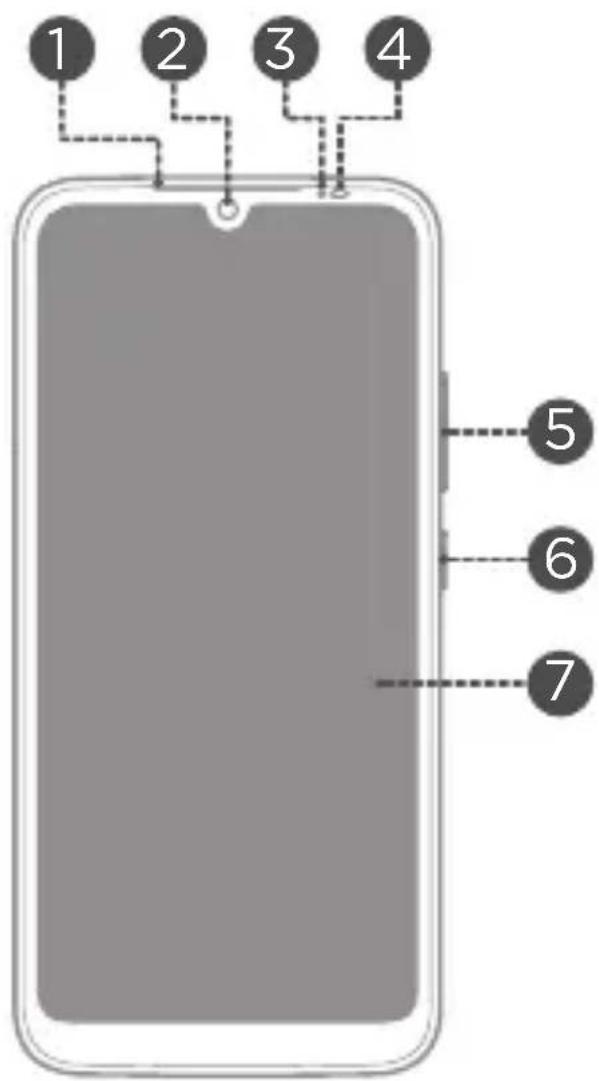
1 Receiver
Front-facing camera
3 Light sensor
4 Infrared/ Proximity sensor
5 Volume button
6 Power button
7 Touch screen
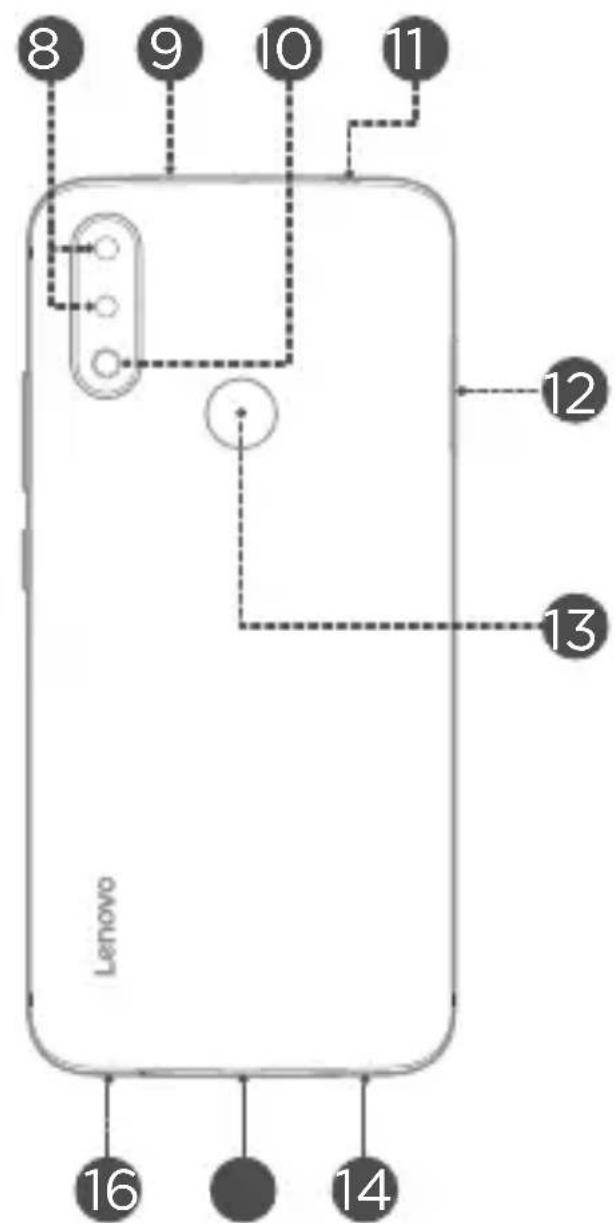
Rear-facing cameras
9 Secondary microphone
Flash
Headset connector
Card tray
Fingerprint sensor
14 Microphone
Mirco-USB connector
16 Speaker
All pictures and illustrations in this document are for your reference only and may differ from the final product.
Installing the Nano-SIM & microSD cards
A Nano-SIM card provided by your carrier is required in order to use cellular services①. A microSD card is required to store data. Install the Nano-SIM cards and the microSD card as shown②.
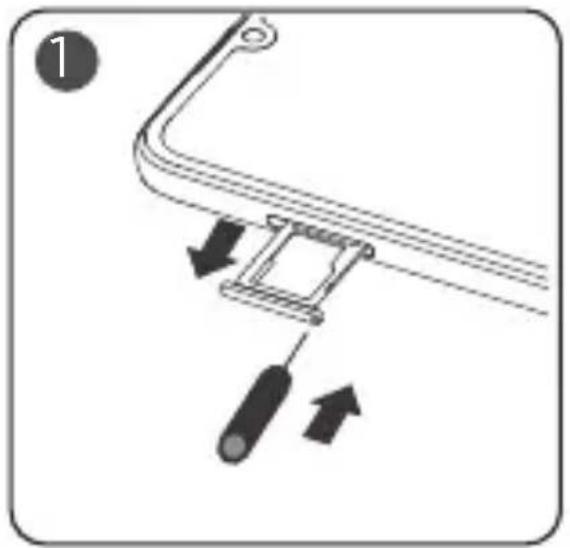

Step 1. Insert the eject tool that comes with your smartphone into the hole in the card tray. Pull out the card tray and install the cards as follows
- Position a Nano-SIM card in Slot 1 and/or another Nano-SIM card in Slot 2^(3) ;
- Position a microSD card in Slot 3.
Step 2. Carefully insert the tray with the installed cards back into the slot.

① Only Nano-SIM cards work with your smartphone.
② Always turn off your smartphone first before you insert or remove a Nano-SIM card. Insert or remove a Nano-SIM card with your smartphone on may damage your Nano-SIM card or smartphone permanently.
③ When two SIM cards are inserted, both SIM card slots support 4G/3G service. But you can enable only one Nano-SIM card for data connection at a time. If you want to change the Nano-SIM card used for data connection, go to Settings > Network & Internet > Mobile networks & SIM.
Charging the battery
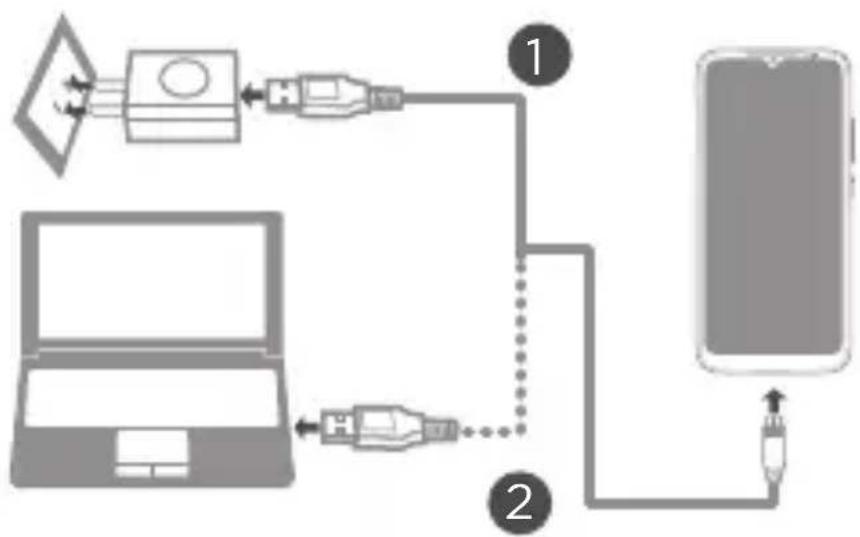
Charge the battery as shown.
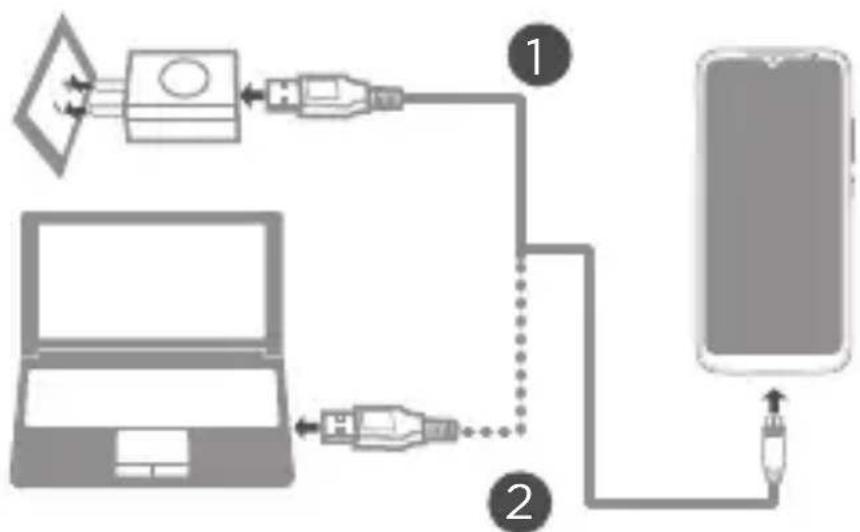
Method 1. Connect your smartphone to a power outlet using the cable and USB power adapter that come with your smartphone.
Method 2. Connect your smartphone to a computer using the cable that comes with your smartphone.

Low battery power Fully charged Charging
Turning on or turning off your smartphone
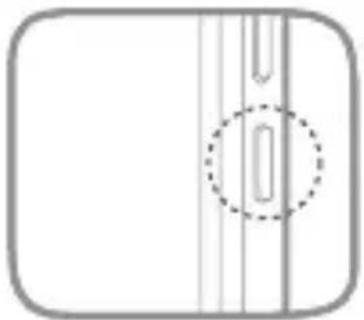
Turn on: Press and hold the Power button until the Lenovo logo appears.
Turn off: Press and hold the Power button for a few seconds, then tap
Power off.
Restart: Press and hold the Power button for a few seconds, then tap
Restart.

Your smartphone has a built-in rechargeable battery. For more information about battery safety, see the "Battery safety" section. The battery in this product cannot be easily replaced by yourself.
Important safety and handling information
This section contains important safety and handling information for Lenovo smartphones. Additional safety and handling information is provided in the User Guide. See the "Accessing your User Guide" section for details.
Operating temperature
Ideal operating temperatures are 0^ to 35^ . Ideal storage temperatures are -20^ to +45^ . Extreme heat or cold may damage your device or accessories.
Plastic bag notice
Danger: Plastic bags can be dangerous. Keep plastic bags away from babies and children to avoid danger of suffocation.
Battery safety
Before assembling, charging or using your mobile device for the first time, please read the important safety and handling information provided with your product.
If your mobile device becomes unresponsive, try a reboot—press and hold the Power button, Volume up button and Volume down button until the screen goes dark and your device restarts.
For your safety, the battery in your mobile device should only be removed by a Lenovo approved service center or independent qualified professional. Don't try to remove or replace the battery yourself—doing so may damage the battery and could cause burning and injury. Don't crush, bend, or expose your mobile device to heat or liquid. This may damage the battery and could cause burning and injury. Don't try to dry your mobile device using a microwave oven, conventional oven, or dryer.
Battery charging
Charge your mobile device using a compatible Lenovo charger, another brand class 2 Limited Power Source USB charger that complies with USB 1.1, 2.0, 3.0, or greater, and complies with EN301489-34, EN60950-1 or equivalent, or a high-power USB port on a PC. Chargers that do not comply with these standards may be unsafe and may cause slow charging, product damage, or reduced device performance.
- Your mobile device will not charge if the temperature is too high or low.
- Only use Lenovo approved batteries, which contain safety circuitry and are designed to give the best performance in your mobile device.
- Don't use a damaged charger or charger cable to charge your device.
- Don't use tools, sharp objects, or excessive force to clean the USB port, as this may damage your mobile device.
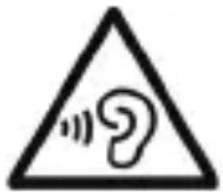
Warning about high volume usage
To prevent possible hearing damage, do not listen
at high volume levels for long periods.
Ensure your player at low volume levels or power off before you leaving.
Fully understand user manual before use.
Disposing according to local laws and regulations
When the Lenovo Phone reaches the end of its useful life, do not crush, incinerate, immerse in water, or dispose of the Lenovo Phone in any manner contrary to local laws and regulations. Some internal parts contain substances that can explode, leak, or have an adverse environmental effect if disposed of incorrectly. See "Recycling and environmental information" for additional information.
Service, support, and warranty information
The following information describes the service support that is available for your product, during the warranty period or throughout the life of your product.
Contact your Lenovo approved Service Providers for a full explanation of warranty terms.
Lenovo Limited Warranty (LLW) notice
Important: Lenovo Smartphone Products do not have International Warranty Services.
Warranty period for your product
| Country or region | Warranty period (months)Handset/Charger/Earphone/USB Cable/Non-RemovableBattery/Removable Battery |
| India, United Arab Emirates,Oman, Qatar, Kuwait, Bahrain,Kenya, Egypt, Lebanon, Ghana,Jordan, Morocco, Angola,Mauritius, Uganda, Tanzania,Botswana, Zimbabwe, Namibia,Nigeria, Ethiopia, Zambia,Tunisia, Mozambique, Algeria,Pakistan, Bangladesh | 12/6/6/6/12/6 |
| Indonesia, Philippines,Vietnam, Hong Kong, Malaysia,Thailand, Singapore, Chile,Colombia, Mexico, Brazil, Peru,Argentina, Paraguay,Honduras, El Salvador,Ecuador, Uruguay, Costa Rica,Guatemala, Nicaragua,Canada, Puerto Rico, United States | 12/12/12/12/12/12 |
| Russia, Kazakhstan, Ukraine,Azerbaijan, Uzbekistan,Armenia, Belarus, Georgia | 12/12/3/12/12/6 |
| Sri Lanka, Cambodia, Macau, Japan, Taiwan, Australia, New Zealand | 12/12/12/12/12/6 |
| Saudi Arabia | 24/6/6/6/24/6 |
| South Africa, Turkey, Portugal, France | 24/24/24/24/24/24 |
| United Kingdom, Ireland | 24/12/12/12/12/12 |
| Romania, Hungary, Bulgaria, Greece, Slovakia, Slovenia, Serbia, Croatia, Cyprus, Czech Republic | 24/24/24/24/24/12 |
| Poland, Netherlands, Belgium, Spain, Norway, Denmark, Sweden, Finland, Italy, German, Lithuania, Estonia, Latvia | 24/12/12/12/24/12 |
| Montenegro, Albania, Macedonia, Bosnia and Herzegovina | 24/12/6/12/12/6 |
| Myanmar | 12/6/3/6/12/6 |
| Moldova | 24/12/3/12/12/6 |
- For the warranty details, contact your Lenovo approved Service Providers.
Recycling and environmental information
General recycling statement
Lenovo encourages owners of information technology (IT) equipment to responsibly recycle their equipment when it is no longer needed. Lenovo offers a variety of programs and services to assist equipment owners in recycling their IT products. For information on recycling Lenovo products, go to http://www.lenovo.com/recycling.
Important battery and WEEE information
Batteries and electrical and electronic equipment marked with the symbol of a crossed-out wheeled bin may not be disposed as unsorted municipal waste. Batteries and waste of electrical and electronic equipment (WEEE) shall be treated separately using the collection framework available to customers for the return, recycling, and treatment of batteries and WEEE. When possible, remove and isolate batteries from WEEE prior to placing WEEE in the waste collection stream. Batteries are to be collected separately using the framework available for the return, recycling, and treatment of batteries and accumulators.
Country-specific information is available at: http://www.lenovo.com/recycling
Recycling information for India
Recycling and disposal information for India is available at: https://www3.lenovo.com/us/en/social_responsibility/sustainability/ptb_india
Battery recycling information for the European Union
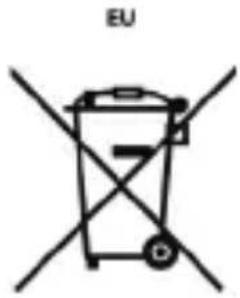
Batteries or packaging for batteries are labeled in accordance with European Directive 2006/66/EU concerning batteries and accumulators and waste batteries and accumulators. The Directive determines the framework for the return and recycling of used batteries and accumulators as applicable throughout the European Union. This label is applied to various batteries to indicate that the battery is not to be thrown away, but rather reclaimed upon end of life per this Directive.
In accordance with the European Directive 2006/66/EU, batteries and accumulators are labeled to indicate that they are to be collected separately and recycled at end of life. The label on the battery may also include a chemical symbol for the metal concerned in the battery (Pb for lead, Hg for mercury, and Cd for cadmium). Users of batteries and accumulators must not dispose of batteries and accumulators as unsorted municipal waste, but use the collection framework available to customers for the return, recycling, and treatment of batteries and accumulators. Customer participation is important to minimize any potential effects of batteries and accumulators on the environment and human health due to the potential presence of hazardous substances. For proper collection and treatment, go to: http://www.lenovo.com/recycling
Restriction of Hazardous Substances Directive (RoHS)
European Union
Lenovo products sold in the European Union, on or after 3 January 2013 meet the requirements of Directive 2011/65/EU on the restriction of the use of certain hazardous substances in electrical and electronic equipment ("RoHS recast" or "RoHS 2").
For more information about Lenovo progress on RoHS, go to: https://www3.lenovo.com/us/en/pdf/41A7733_RoHS-REACH_Eng_Spec.pdf
India
RoHS compliant as per E-Waste (Management & Handling) Rules, 2011.
Vietnam
Lenovo products sold in Vietnam, on or after September 23, 2011, meet the requirements of the Vietnam Circular 30/2011/TT-BCT ("Vietnam RoHS").
Ukraine
LIMiTBePjxEmo, 0 npOdyKzIaJeHOBO BiINOBiJaE BmOram HopMaTHBnX aKTIB YkpaIHn, kI o6MeJyOTb BMICT He6e3neHnx peuOBn
Turkey
The Lenovo product meets the requirements of the Republic of Turkey Directive on the Restriction of the Use of Certain Hazardous Substances in Waste Electrical and Electronic Equipment (WEEE).
European Union compliance statement
European Union conformity
The following information is applicable to mobile devices that carry a CE mark. Contact Point: Lenovo, Einsteinova 21, 851 01 Bratislava, Slovakia.
Compliance with the Radio Equipment Directive
Hereby, LENOVO PC HK LIMITED declares that the radio equipment with this declaration and bearing the CE mark is in compliance with the Directive 2014/53/EU. The full text of the EU Declaration of Conformity can be found in the Regulatory Notices, which you can download from the Lenovo Support Web site at http://support.lenovo.com.
Supported Frequencies and Power
This device is capable of operation on the following frequencies, subject to location and network availability.
| Operating Mode | Frequency Range MHz / Band | Maximum nominal Transmit Power (Conducted) dBm |
| Bluetooth 2402 | - 2480 9.93 | |
| 17.19WLAN 2412 - 24 | ||
| GPS/Glonass N/A575.42 - 1601.71 | ||
| 87.5 - 105FM | N/A | |
| GSM 2/3/5/8 | 31.00 33.50 | |
| WCDMA | 1/2/5/8 24.00 | |
| LTE | 1/2/3/5/7/8/20/ 38/40/41 (2535-2655MHz) | 23.00 24.00 |
Specific Absorption Rate information
This product meets the applicable national or international RF exposure guidance (SAR guideline) when used normally against your head or, when worn or carried, at a distance of 5mm from the body. The SAR guideline includes a considerable safety margin designed to assure the safety of all persons, regardless of age and health.
Specific absorption rate (ICNIRP)
YOUR MOBILE DEVICE MEETS INTERNATIONAL GUIDELINES FOR EXPOSURE TO RADIO WAVES. The highest SAR values under the ICNIRP guidelines for your device model are listed below:
| Head SAR | GSM / WCDMA / LTE, Wi-Fi, Bluetooth | 0.185 W/kg |
| Body-worn SAR | GSM / WCDMA / LTE, Wi-Fi, Bluetooth | 1.225 W/kg |
Français

luminosite/proximate

Écran tactile

Flash

Directive européen RoHS (Restriction of Hazardous Substances)
Union europeenne
RoHS compliant as per E-Waste (Management & Handling) Rules, 2011.
Viet Nam
https://www3.lenovo.com/us/en/socialresponsibility/sustainability/ptb_india
RoHS compliant as per E-Waste (Management & Handling) Rules, 2011.
Vietname
Os produits da Lenovo - vendidos no Vietnamese em ou depuis de 23 de setembro de 2011 - cumprem os requisitos da Circular do Vietnam 30/2011/TT-BCT ("RoHS do Vietnam").
Ucrânia
LIMPiTBePjKyEmo, 0 npOdyKciJ HeHOBo BiINOBiJaE BmOram HopMaTINBnX aKTIB YkpaHn, kI o6MeKyOtB BMICT He6e3neuHnx peUOBn
Turquia
aegdall 1ssjglg aalbll
i 1
.("RoHS 2" "4e RoHS")
:gall o jy jy Jellal gall Laleo Nello 1e 3.https://www3.lenovo.com/us/en/pdf/41A7733_RoHS-REACH_Eng_Spec.pdf
i
RoHS compliant as per E-Waste (Management & Handling) Rules, 2011.
p
2011 23 22 22 22 22 22 22 22 22 22 22 22 22 22 22 22 22 22 22 22 22 22
("p"30/2011/TT-BCT p
1
LIMPiTBePjKyEmo,IO npOdyKciJLeHOBo BiINOBiJaE BmOram HOpMaTnBnX aKTiB YkpaIH,N,aki O6MeKjYb BMicT He6e3neuHnx peUobn
Jn Jnnnnnnnnnnnnnnnnnnnnnnnnnnnnnnnnnnnnnnnnnnnnnnnnnnnnnnnnnnnnnnnnnnnnnnnnnnnnnnnnnnnnnnnnnnnnnnnnnnnnnnnnnnnnnnnnnnnnnnnnnnnnnn
.(WEEE)
:egall sie gll lalill mssuulll llll llll llll https://www3.lenovo.com/us/en/social_responsibility/sustainability/ptb_india
3.0 2.0 USB 1.1 EN60950-1 EN301489-34 m n s l I
aI aI
L
L
L
L
L
L
L
L
L
L
L
L
L
L
L
L
L
L
L
L
L
L
L
L
L
L
L
L
L
L
L
L
L
L
L
L
L
L
L
L
L
L
L
L
L
L
L
L
L
L
L
L
L
L
L
L
L
L
L
L
L
L
L
L
L
L
L
L
L
L
L
L
L
L
i
aaii iiaii iil gllglll jglll
J 100000000000000000000000000000000000000000000000000000000000000000000000000
piai 1 g jai jai iagao
. Lenovo n nn 1111111111111111111111111111111
Jie 1
J 1
35 0 0 20 20
.
a
Jgliae 1y
J 1
i
agall lglal oclg j yj gol jy j 1
aaiiie 1
1 1
oale! pgyalbaaaih jgagall gssgssgss
sio
J 1 J 1 J 1 J 1 J 1 J 1 J 1 J 1 J 1 J 1 J 1 J 1 J 1 J 1 J 1 J 1 J 1 J 1 J 1 J 1 J 1 J 1 J 1 J 1 J 1 J 1 J 1 J 1 J 1 J 1 J 1 J 1 J 1 J 1 J
y. 1 y
J 1
a
山
.
Jg 1
slll 111111111111111111
2 1
Ssll
图
i
slll lal
m = 311
10
USB 15
1
14
a
13
16
1
aBwIg 111111111111111111
Lenovo Motorola Mobility LLC
gai 1
aiaaii i 111 111 111 111 111 111 111 111 111
P 1
< 1111 < 1111
sill siala aalal
4
gall lalai iiall aiae gao g g sll slalaae aeae
http://support.lenovo.com
p 1
Jaiil piaiill Jll Jggl. 5ii jla Jg aiae eo Iogaoe eip
.1111111111111111111111111111111111111111111
gila 1
LenoVo 5e Ks Jn Jn Jn Jn Jn Jn Jn Jn Jn
Lagg g jj j j j j
aiai iie 1
.
Lenovo A6 Note
#
Lenovo L19041

motorola
Designed and manufactured by Motorola
Mobility LLC for Lenovo
Lenovo Motorola Mobility LLC
Copyright Lenovo 2019.
.Lenovo 2019 品
V1.0_20190806
Reduce|Reuse|Recycle

J274-0161-SR0FLD
Printed in China

- Reading first - regulatory information
- Getting support
- Accessing your User Guide
- Legal notices
- First glance
- Installing the Nano-SIM & microSD cards
- Charging the battery
- Turning on or turning off your smartphone
- Important safety and handling information
- Operating temperature
- Plastic bag notice
- Battery safety
- Battery charging
- Warning about high volume usage
- Disposing according to local laws and regulations
- Service, support, and warranty information
- Lenovo Limited Warranty (LLW) notice
- Warranty period for your product
- Recycling and environmental information
- General recycling statement
- Important battery and WEEE information
- Recycling information for India
- Battery recycling information for the European Union
- Restriction of Hazardous Substances Directive (RoHS)
- European Union
- India
- Vietnam
- Ukraine
- Turkey
- European Union compliance statement
- European Union conformity
- Compliance with the Radio Equipment Directive
- Supported Frequencies and Power
- Specific Absorption Rate information
- Specific absorption rate (ICNIRP)
- Français
- Directive européen RoHS (Restriction of Hazardous Substances)
- Union europeenne
- Viet Nam
- Vietname
- Ucrânia
- Turquia
- aegdall 1ssjglg aalbll
- piai 1 g jai jai iagao
- J 1
- a
- i
- Lenovo A6 Note
- #
- Lenovo L19041
- motorola
Brand : LENOVO
Model : A6 Note
Category : Smartphone