
B30IR905SP - Freezer BOSCH - Free user manual and instructions
Find the device manual for free B30IR905SP BOSCH in PDF.
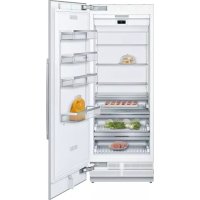


| Product Type | Built-in refrigerator with fresh food compartment |
| Brand | Bosch |
| Model | B30IR905SP |
| Refrigerator net volume | Approximately 600 L (estimate) |
| Dimensions (H x W x D) | Approximately 213 x 90 x 61 cm (estimate) |
| Weight (max) | Up to 460 kg |
| Power supply | 110-120 V, 60 Hz, 10-16 A |
| Power consumption (max.) | 6 A |
| Climate class | Not specified |
| Refrigerant type | R600a (isobutane) |
| Noise level | Not specified |
| Main functions | Super cooling, Eco mode, Sabbath mode, Home Connect, door alarm |
| Temperature setting | Digital display, adjustable from 2 °C to 8 °C (refrigerator), 1 °C (fresh food compartment) |
| Interior equipment | Glass shelves, vegetable drawer with humidity control, fresh food drawer, large bottle rack |
| Lighting | LED, maintenance-free |
| Connectivity | Integrated Wi-Fi, Home Connect compatible |
| Odour filter | Yes, replaceable |
| Cleaning | Stainless steel surface: specific products; interior: warm water and mild dish soap |
| Safety | Automatic door alarm, cleaning lock, self-diagnosis |
| Installation | Built-in, requires 2 people, niche depth min. 610 mm (flush: 635 mm) |
| Warranty | Not specified |
Frequently Asked Questions - B30IR905SP BOSCH
User questions about B30IR905SP BOSCH
0 question about this device. Answer the ones you know or ask your own.
Ask a new question about this device
Download the instructions for your Freezer in PDF format for free! Find your manual B30IR905SP - BOSCH and take your electronic device back in hand. On this page are published all the documents necessary for the use of your device. B30IR905SP by BOSCH.
USER MANUAL B30IR905SP BOSCH
Register your new Bosch now: www.bosch-home.com/welcome
Important safety instructions 3
Definitions 3
About these instructions 3
Introduction 3
Restriction of user group. 3
Risk of explosion. 3
Risk of electric shock 3
Risk of injury. 4
Fire hazard/Danger due to refrigerants 4
Risk of fire 4
Risk of suffocation. 4
Damage 4
Weight 4
State of California Proposition 65 Warnings . . . . . . 4

Intended use 5

Environmental protection 5
Packaging 5
Old appliances 5

Installation and connection 5
Contents of package. 5
Technical data. 5
Installing the appliance 5
Check built-in cut-out. 5
Side-by-side installation 5
Saving energy 6
Before using for the first time 7
Electrical connection 7

Getting to know your appliance 8
Appliance 8
Operating controls. 9
Equipment 10

Operating the appliance 11
Switching the appliance on 11
Switching off and disconnecting the
appliance. 11
Setting the temperature. 11
Super cooling 11
Eco mode 11
Sabbath mode. 11

Home Connect. 12
Setting up Home Connect 12
Connecting the refrigerator to the
Home Connect app 12
Installing updates for the Home
Connect software 13
Customer Service access. 13
Reset settings. 13
Switch on or off the connection to the home
WLAN network (Wi-Fi). 13
Information on data protection 13

Alarm. 13
Door alarm 13

Refrigerator compartment. 14
Note when storing food 14
Note the chill zones in the refrigerator
compartment 14
Vegetable bin 14
Vegetable container with humidity controller 14
Cool-fresh bin 14

Cleaning 15
Cleaning the display 15
Cleaning the appliance interior 15
Cleaning the equipment 15
Care instructions for stainless steel surfaces 15

Odors 16
Changing the odor filter 16

Noises 17
Normal noises 17
Preventing noises 17

Lighting 17

Faults - what to do? 18
Appliance 18

Customer service 19
Appliance self-test 19
Repair order and advice on faults 19

Important safety instructions
READ INSTRUCTIONS - DO NOT DISCARD!
Definitions

WARNING
Non-observance of this warning could result in death or serious injuries.

CAUTION
Non-observation of this warning could result in slight or moderately serious injuries.
NOTICE: Non-observation of this information could damage the appliance.
Note: This indicates important information and/or tips.
About these instructions
- Read and follow the operating and installation instructions. They contain important information on how to install, use and maintain the appliance.
- Retain all documents for subsequent use or for the next owner.
Introduction
This appliance complies with the relevant safety regulations for electrical appliances. The refrigeration circuit has been checked for leaks.
Restriction of user group
- Avoid placing children and vulnerable persons at risk. This appliance may be used by children and persons who have reduced physical, sensory or mental abilities or inadequate experience and/or knowledge, provided they are supervised or have been instructed on how to use the appliance safely and have understood the resulting dangers.
Children should be supervised to ensure that they do not play with the appliance.
Risk of explosion
If the appliance's ventilation openings are sealed, a leak in the refrigeration circuit may result in a flammable mixture of gas and air. Keep ventilation openings in the appliance enclosure or in the built-in structure clear of obstruction. - Never use electric devices inside the appliance (e.g. heaters or electric ice makers). - Do not store products which contain flammable propellants (e.g. spray cans) or explosive substances in the appliance. Only store high-proof alcohol tightly closed and upright. - Do not use additional means to accelerate the defrosting process other than those recommended by the manufacturer.
Risk of electric shock
Improper installations or repairs may put the user at considerable risk.
- When installing the appliance, make sure that the power cord does not get jammed or damaged. In order to avoid danger, if the power cord is damaged, disconnect the appliance from the power source immediately. Have the power cord replaced by the manufacturer, customer service or a similarly qualified person.
- Do not use multiple outlets, extension cords, or adapters. Before servicing the appliance or carrying out installation work, disconnect the appliance from the power source or switch off the fuse.
Before cleaning the appliance, press the main On/Off switch to switch the appliance off.
Glass shelves and other fittings can be moved without any risk while the appliance is switched on.

Important safety instructions
READ INSTRUCTIONS - DO NOT DISCARD!
- Never cut through or remove the power cord's third conductor (grounding conductor).
- Never defrost or clean the appliance using a steam cleaner. The steam may penetrate electrical parts and cause a short circuit. The appliance, cord and accessories should only be repaired or replaced by the manufacturer or an authorized service provider.
- Only use original parts supplied by the manufacturer. These parts come with a warranty from the manufacturer that they satisfy the safety requirements.
Risk of injury
Containers which contain carbonated drinks may burst.

Fire hazard/Danger due to refrigerants
The tubes of the refrigeration circuit contain a small quantity of an environmentally friendly but flammable refrigerant (R600a). If the refrigerant escapes, it may injure your eyes or ignite.
- Do not damage the tubes.
If the tubes are damaged: - Keep open flames and ignition sources away from the appliance. - Ventilate the room. - Switch off the appliance and unplug the power cord. Please contact customer service.

Risk of fire
Portable multi-outlet power strips and portable power supplies may overheat, causing a fire.
- Never leave portable multi-outlet power strips or portable power supplies behind the appliance.
Risk of suffocation
If the appliance features a door lock: keep the key out of the reach of children. - Keep children away from the packaging and its parts.
Damage
To avoid damage:
- Do not stand or lean on the base, runners or doors.
- Keep plastic parts and door seals free of oil and grease. Pull the power plug - not the power cord.
Weight
The appliance is very heavy. The appliance should always be transported and set up by at least 2 people.
"Installing the appliance" on page 5
State of California Proposition 65 Warnings
This product may contain a chemical known to the State of California, which can cause cancer or reproductive harm. Therefore, the packaging of your product may bear the following label as required by California:
STATE OF CALIFORNIA PROPOSITION 65 WARNING: / WARNING ISSUED FROM PROPOSITION 65 OF THE STATE OF CALIFORNIA:

WARNING / WARNING
Cancer and Reproductive Harm / Cancer and reproductive harm - www.P65Warnings.ca.gov.

Intended use
Use this appliance
Only for refrigerating food. only in the home and in the home environment. only according to these operating instructions.
This appliance is intended for use at an elevation of no more than 2000 meters above sea level.

Environmental protection
Packaging
All materials are environmentally safe and recyclable:
- Dispose of packaging in an environmentally responsible manner. Please ask your dealer or inquire at your local authority about current means of disposal.
Old appliances
Valuable raw materials can be reclaimed by recycling old appliances.

WARNING
CHILDREN MAY BECOME LOCKED IN THE APPLIANCE AND SUFFOCATE!
Before disposing of your old appliance:
Remove the door. - Leave shelves and bins in the appliance to prevent children from climbing in. - Keep children away from the discarded appliance.

CAUTION
REFRIGERANT AND HARMFUL GASES MAY ESCAPE.
Do not damage the tubes of the refrigeration circuit and insulation.
- Pull out the power plug.
- Cut through the power cord.
- Have the appliance disposed of properly.

Installation and connection
Contents of package
After unpacking all parts, check for any damage during transport.
If you have any complaints, please contact the dealer from whom you purchased the appliance or our customer service.
"Customer service" on page 19
The delivery consists of the following parts:
Built-in appliance Equipment (depending on model) Installation material Instruction manual Installation instructions Customer service booklet Warranty enclosure Information on the energy consumption and noises
Technical data
Refrigerant, cubic capacity and further technical specifications can be found on the rating plate. See "Getting to know your appliance" on page 8.
Installing the appliance
Installation location
The weight of the appliance may be up to 460 kg depending on the model. The base must be sufficiently stable and should not give. If necessary, reinforce the floor.
Check built-in cut-out
The cut-out must fulfill these criteria:
Anti-tilt bracket must be fitted. Cut-out depth min. 24" (610 mm), for flush installation 25" (635 mm). Rectangular, stable - the side panels and the top must be min. 5/8" (16 mm) thick and securely attached to the floor or wall. Depth of shortest side panels min. 4" (100 mm).
Side-by-side installation
Observe the specifications in the installation instructions for a side-by-side installation.
If a partition wall is required between the appliances it must be at least 5/8" (16 mm) wide.
Saving energy
If you follow the instructions below, your appliance will use less power.
Note: The arrangement of the equipment does not affect the energy consumption of the appliance.
| Installing the appliance | |
| Keep the appliance out of direct sunlight. The appliance needs to cool less frequently at low ambient tempera-tures and therefore consumes less power. | |
| Install the appliance as far away as possible from heating elements, cooker and other heat sources:At least 1¼" (3 cm) from electric or gas cookers.At least 11¾" (30 cm) from oil or solid-fuel cookers. | |
| Select an installation location at a room temperature of approx. 68 °F(20 °C). | |
| Do not cover or block the ventilation openings. The appliance needs to cool less frequently if the warm air can escape and therefore consumes less power. | |
| Using the appliance | |
| Open the appliance door only briefly. | The air in the appliance does not warm up so intensely. The appliance needs to cool less frequently and therefore consumes less power. |
| Transport purchased food in a cool bag and place in the appliance quickly. | |
| Allow warm food and drink to cool down before placing in the appli-ance. | |
| Thaw frozen food in the refrigerator compartment to utilize the low temperature of the frozen food. | |
| Always leave a space between the food and the back panel. | The air can circulate and the humidity will remain constant. The appli-ance needs to cool less frequently and therefore consumes less power. |
| Pack food airtight. | |
| Do not cover or block the ventilation openings. The appliance consumes less power if the warm air can escape. | |
| Vacuum the ventilation openings once a year. | |
Before using for the first time
- Remove information material, adhesive tape and protective foil.
- Clean the appliance.
"Cleaning" on page 15

WARNING
RISK OF ELECTRIC SHOCK! If the power cord is too short, never use multiple outlets or extension cords. Instead, please contact customer service.
Electrical connection

CAUTION
Do not connect the appliance to electronic energy saver plugs.
Note: You can connect the appliance to mains-controlled and sine-controlled inverters.
Mains-controlled inverters are used for photovoltaic systems which are connected directly to the national grid. Sine-controlled inverters must be used for isolated applications. Isolated applications, e.g. on ships or in mountain lodges, are not directly connected to the national grid.
- After installing the appliance, wait at least 1 hour before connecting it to prevent damaging the compressor.
- Check that the outlet was installed according to the regulations and complies with the requirements.
Requirements for outlets
Outlet with 110 V ... 120 V
Protective conductor 60 Hz
Fuse 10 A ... 16 A
Maximum simultaneous load
Appliance 6 A
- Connect the appliance to an outlet near the appliance.
The outlet must also be freely accessible following installation of the appliance.
If free access is impossible, an all-pole isolating switch must be integrated into the permanent electrical installation according to the installation regulations.

WARNING
RISK OF ELECTRIC SHOCK!
Never use multiple outlets, extension cords or adapters.
The appliance must be grounded correctly.
Never cut through or remove the power cord's third conductor (grounding conductor).

Getting to know your appliance
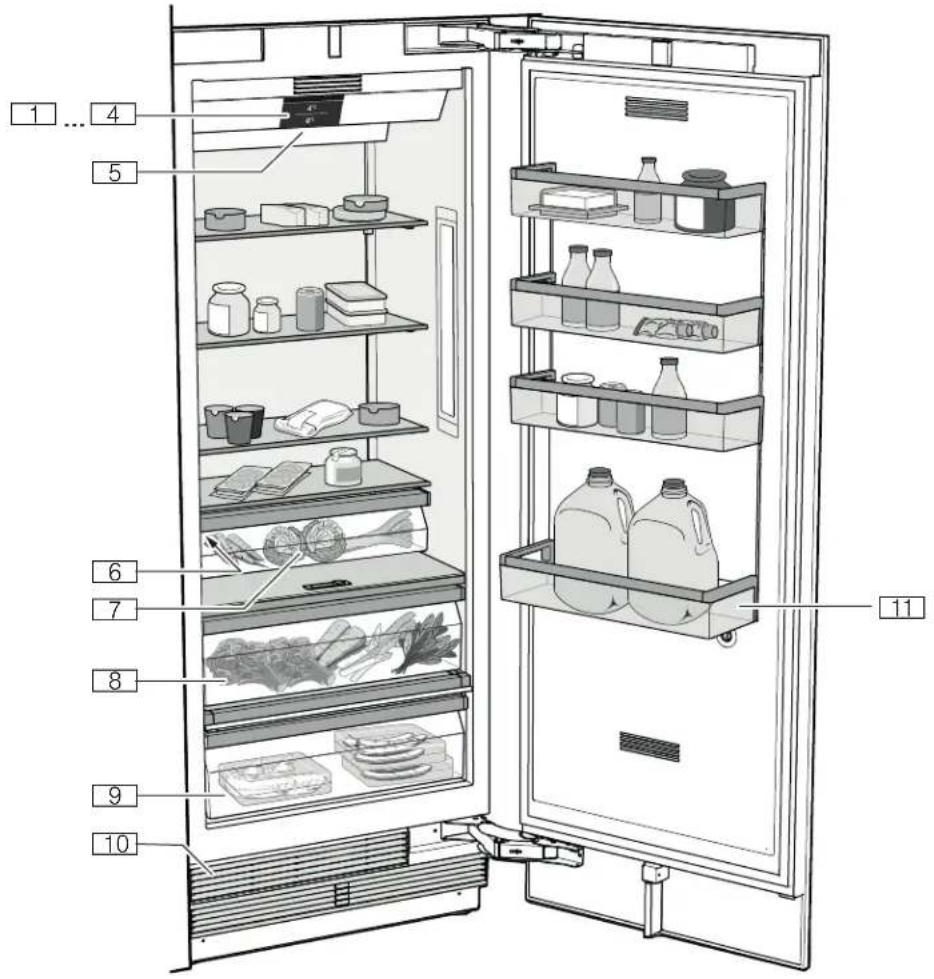
Appliance
...@ Operating controls H Main On/Off switch P Rating plate X Vegetable bin Vegetable container with humidity controller h Cool-fresh bin )Ventilation opening *) Storage compartment for large bottles
Operating controls
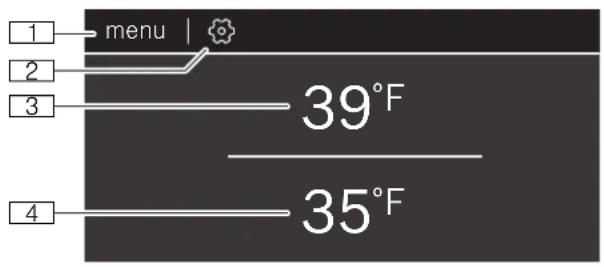
(menu button
Opens mode selection.
0 button
Opens the Settings menu.
"Settings" on page 9
8 Refrigerator compartment temperature display
Indicates the set temperature in °C / °F
@ Cool-fresh compartment temperature display Indicates the set temperature in °C / °F
Mode selection

Eco Mode

Sabbath Mode
Eco mode
Switch the appliance to energy-saving mode.
Eco mode" on page 11
Sabbath mode
All non-essential functions are switched off so you can also use the appliance on the Sabbath.
"Bath mode" on page 11
Settings
Tap to open the settings.
Language
Change the display language.
Home Connect
Connect your refrigerator to your mobile device.
"Home Connect" on page 12
Tones
Set the volume of the button tone and the signal tone.
Display brightness
Adjust the brightness of the display.
Temperature unit
Select the temperature unit °C / °F
Factory settings
Set the settings of the appliance back to its factory settings on delivery.
Self-test
Start fault analysis on your appliance.
Demo mode
Note: Do not store any food items while in demo mode, as the appliance then remains at room temperature.
The cooling function of the appliance is switched off. You can use all other functions. After switching on the appliance, this menu item is displayed for 3 minutes. To switch demo mode on or off later, switch the appliance off and back on. The mode is displayed again for 3 minutes.
Equipment
(not all models)
Storage compartment
You can remove and adjust the height of the storage compartments:
- Lift up the storage compartment and remove.
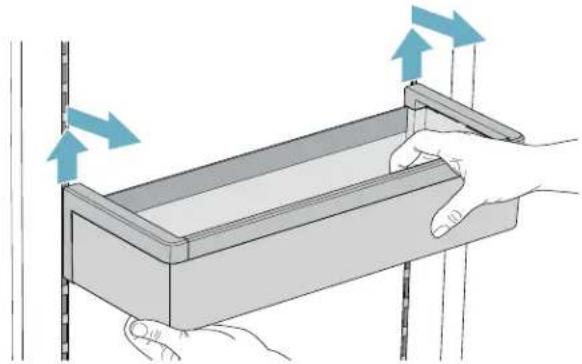
- When re-inserting, insert hooks on back of storage compartment at same height to make it level.
Note: Insert the storage compartment carefully to avoid scratching the appliance.
Shelf
You can remove and adjust the shelf:
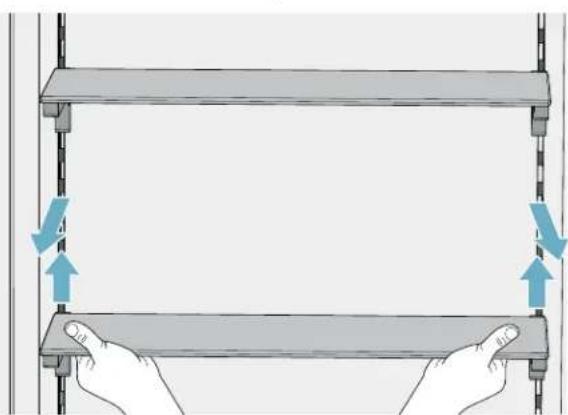
- Lift shelf and remove.
- When re-inserting, insert hooks on back of shelf at same height to make it level.
Note: Insert shelf carefully to avoid scratching the appliance.
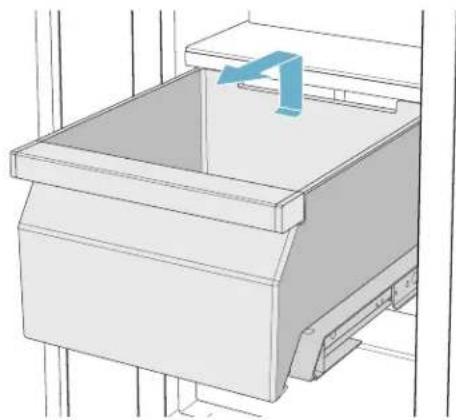
Container
You can remove the container:
Press container to the rear, - lift the container at the rear and remove.
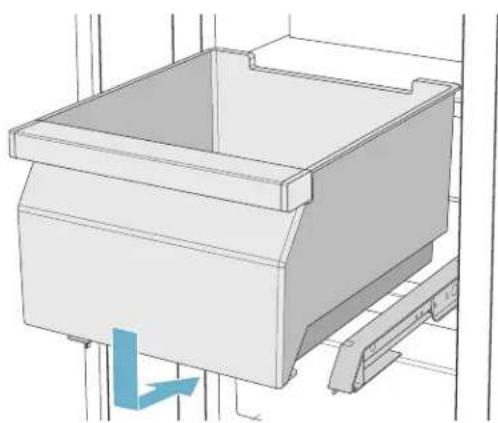
You can insert the bin:
Pull out the telescopic rails all the way. - Place the bin on the telescopic rails and push into the appliance until it engages.

Operating the appliance
Switching the appliance on
- Press the main On/Off switch.
The appliance starts cooling and the light is switched on when the door is open.
- Set the required temperature.
See "Setting the temperature" on page 11.
Operating tips
After the appliance has been switched on, it may take several hours until the set temperature has been reached. Do not put in any food until the selected temperature has been reached. The front sides of the housing are partly heated slightly. This prevents condensation in the area of the door seal.
Switching off and disconnecting the appliance
Switching off the appliance
Press the main On/Off switch.
The appliance is no longer cooling.
Disconnecting the appliance
If you do not use the appliance for a prolonged period:
- Remove groceries.
- Press main On/Off switch.
The appliance is no longer cooling.
- Pull out mains plug or switch off fuse.
- Leave appliance open.
Setting the temperature
Recommended temperature
Cooling compartment: +4 °C/+39 °F
Chill compartment: +1 °C / +34 °F
Setting the refrigerator compartment temperature
- Select the compartment by tapping the temperature display.
- Move the displayed temperature to the required value.
- Return to the main screen with the < button. If the button is not pressed, the appliance saves the setting and automatically returns to the main screen after a few seconds.
Super cooling
Super cooling cools the refrigerator compartment as cold as possible.
Switch on super cooling, e.g.:
Before placing large quantities of food into the compartment for cooling drinks quickly
Note: When super cooling is switched on, increased operating noises may occur.
After approx. 6 hours, the appliance switches to normal operation.
Switching super cooling on or off
- Select the refrigerator compartment by tapping the temperature display.
- Tap button.
When the function is switched on, a pop-up window appears, explaining the function.
- Tap Continue.
The pop-up window is closed, and you return to the main screen.
Note: If you have made a setting to stop the pop-up window from appearing, you can return to the main screen with the button. If the button is not pressed, the appliance saves the setting and automatically returns to the main screen after a few seconds.
Eco mode
Eco mode switches the appliance to energy-saving operation.
The appliance automatically sets the following temperatures:
Refrigerator compartment: +43° F (6°C) Cool-fresh container: +34° F (1°C)
Sabbath mode
All non-essential functions are switched off so you can also use the appliance on the Sabbath.
Once Sabbath mode is switched on, you can also use the appliance on the Sabbath.
You can select a time between 1-96 hours. After the selected time elapses, the appliance switches to normal operation. To end Sabbath mode before the selected time elapses, touch the display and tap Switch off.
The appliance switches off the following:
Audible signals, interior light, messages on the control panel. Background illumination of control panel is reduced.

Home Connect
This appliance is Wi-Fi-capable and can be controlled remotely using a mobile device.
Note: Wi-Fi is a registered trade mark of the Wi-Fi Alliance.
In the following cases, the appliance functions like a refrigerator without a network connection and can still be operated manually via the controls:
The appliance is not connected to a home network. The availability of the Home Connect function depends on the availability of Home Connect services in your country. Home Connect services are not available in every country. You can find more information on www.home-connect.com.
Note: Please observe the safety information in this instruction manual. Ensure that this is also observed if you operate the appliance via the Home Connect app and are not at home when doing so. See "Important safety instructions" on page 3.
Follow the instructions in the Home Connect app as well.
Setting up Home Connect
Notes
Wait at least 2 minutes after switching on the appliance before setting up Home Connect. Only then is internal appliance initialization complete. Take note of the Home Connect supplementary sheet, which is supplied with the appliance or is available for download at www.bosch-home.com together with the instructions. Enter the E-number of your appliance in the search field.
You can connect your appliance to the home WLAN network (Wi-Fi) in 3 basic steps.
- Install the app.
- Connect your refrigerator to the home WLAN network (Wi-Fi).
- Connect the refrigerator to the Home Connect app.
The first time you open the menu, you will be automatically guided through initial setup. Follow the instructions on the control panel. For further information, please also see the following chapters.
The following submenus can be found in the Home Connect menu:
Switching Wi-Fi on and off, Connect to app, Software update, Deleting network settings
Setting up the connection to the home network (WLAN)
The first time you open the menu, you will be automatically guided through initial setup. Follow the instructions on the control panel.
- Install the Home Connect app on your mobile device.
- Open the Home Connect menu on your refrigerator.
- Open the app on your mobile device.
- Log in or register with the app if access is not yet available.
- Check the router of your home network to see if a WPS function is available for automatic connection.
- If this function is available, start automatic network connection and follow the instructions on the control panel.
- Start manual network connection if this function is not available, if you're not sure whether the function is available, or if automatic network connection failed. The refrigerator temporarily generates its own network for connecting the mobile device.
- Start manual network connection in the app of your mobile device.
As soon as the refrigerator is connected to the mobile device, a connection between the refrigerator and your home network (WLAN) is established.
Note: If the connection cannot be established, check whether there is sufficient reception.
Verifying signal strength
The signal strength is displayed on the control panel. The signal strength should be at least 1 bar in addition to the dot. If the signal strength is too weak, the connection may be interrupted temporarily.
Improving signal strength
Place the router closer to the refrigerator. - Check that screening walls do not interfere with the connection. Install a repeater to make the signal stronger.
Connecting the refrigerator to the Home Connect app
Use this menu to connect your refrigerator to mobile devices.
- Install the Home Connect app on your mobile device and log in or register.
- Open the Home Connect menu on your refrigerator.
- Tap menu item Connect to app.
- Confirm the prompt to display the refrigerator in the app.
- Open the app and wait until the refrigerator is displayed. Press Add to confirm the connection between the app and the refrigerator. If the refrigerator is not automatically displayed, click on Add appliance in the app and follow the instructions. As soon as your refrigerator is displayed, add it with
- Follow the instructions in the app until the process is complete.
Installing updates for the Home Connect software
The refrigerator checks at regular intervals whether updates are available for the Home Connect software.
The note window appears on the control panel when an update is available.
To install the update, tap Install now.
Install the update later:
- Open the Home Connect menu.
- Tap Software update.
Note: This menu is only visible if an update is available.
A note window appears.
- To install the update, tap Install now.
Customer Service access
If you contact Customer Service, they can access your appliance and view its status after you have given your consent. You need to have your appliance connected to your home network for this.
Further information about Customer Service access and its availability in your country is available under www.home-connect.com in the Help & Support area.
- Contact Customer Service.
"Customer service" on page 19
- Confirm the start of Customer Service access in the app.
During Customer Service access, the symbol appears on the control panel.
- As soon as Customer Service has obtained the necessary data, they end access.
Note: You can interrupt remote diagnosis early by switching off Customer Service access in the Home Connect app.
Reset settings
If there is a problem when trying to establish a connection, or if you would like to register the appliance in a different home WLAN network (Wi-Fi), the Home Connect settings can be reset:
- Open the Home Connect menu on your refrigerator.
- Tap the menu item "Reset settings".
- Confirm the prompt to delete the network settings.
To then reconnect the appliance to the home WLAN network (Wi-Fi), perform initial setup again.
"Setting up the connection to the home network (WLAN)" on page 12
Switch on or off the connection to the home WLAN network (Wi-Fi)
- Open the Home Connect menu on your refrigerator.
Note: The first time you open the menu, you will be automatically guided through initial setup. Follow the instructions on the control panel.
- Select Switch off Wi-Fi.
- To start the switching off process, press Continue.
- As soon as the connection to the home network has been switched off, the message Wi-Fi switched off will appear. Press OK to confirm the message.
Note: While the home network connection is switched off, you will no longer be able to operate the appliance with your mobile device.
Information on data protection
The first time your Home Connect appliance is registered on a WLAN home network connected to the Internet (Wi-Fi), your appliance will transmit the following types of data to the Home Connect server (initial registration):
- Unique appliance identification (consisting of appliance codes as well as the MAC address of the installed Wi-Fi communication module). Security certificate of the Wi-Fi communication module (to ensure a secure data connection). The current software and hardware version of your domestic appliance. Status of any previous resetting to factory settings.
This initial registration prepares the Home Connect functions for use and is only required when you want to use these Home Connect functions for the first time.
Note: Please note that the Home Connect functions can be utilized only in conjunction with the Home Connect app. Information on data protection can be called up in the Home Connect app.
Alarm
Door alarm
If the appliance door is open for a long time, the door alarm (continuous audible signal) switches on.
Close door.
The audible warning signal is switched off.

Refrigerator compartment
The refrigerator compartment is suitable for storing meat, sausages, fish, dairy products, eggs, ready meals and pastries.
The temperature can be set from +36°F (+2°C) to +46°F (+8°C).
The refrigerator compartment can also be used to store highly perishable groceries in the short to medium term. The lower the selected temperature, the slower the enzymatic and chemical processes and deterioration by microorganisms. A temperature of +39°F (+4°C) or lower ensures optimum freshness and safety of the stored groceries.
Note when storing food
Note: Avoid contact between food and the back panel.
Otherwise, the air circulation will be impaired and food or packaging may freeze to the back panel.
Store fresh, undamaged food. The quality and freshness will then be retained for longer. In the case of ready products and bottled goods, do not exceed the minimum sell-by date or use-by date indicated by the manufacturer. To retain aroma, color and freshness, pack or cover food well before placing it into the appliance. This will prevent flavors being transferred between foods and the plastic parts from becoming discolored. Leave warm food and drinks to cool down before placing them into the refrigerator compartment.
Note the chill zones in the refrigerator compartment
The air circulation in the refrigerator compartment creates different chill zones.
Coldest zone
The coldest zone is in the interior at the back panel and in the chill compartment.
Note: Store delicate food (e.g. fish, sausages and meat) in the coldest zone.
Warmest zone
The warmest zone is at the very top of the door.
Note: Store e.g. hard cheese and butter in the warmest zone. Cheese can continue to release its aroma and the butter will still be easy to spread.
Vegetable bin
The vegetable container is the optimum storage location for fresh fruit and vegetables. A high air humidity keeps leafy vegetables fresh for longer. Fruit and vegetables should be stored at a slightly lower air humidity.
Notes
Fruit sensitive to cold (e.g. pineapple, banana, papaya and citrus fruit) and vegetables sensitive to cold (e.g. eggplant, cucumbers, zucchini, peppers, tomatoes and potatoes) should be stored outside of the appliance at temperatures of approx. +8°C / +36°F ... +12°C / +46°F for optimum preservation of quality and aroma. - Condensation may form in the vegetable container depending on the type and quantity of products stored. Remove condensation with a dry cloth.
Vegetable container with humidity controller
The vegetable container is the optimum storage location for fresh fruit and vegetables. You can adjust the humidity in the vegetable container via the humidity controller and a special seal. This allows fresh fruit and vegetables to be stored up to twice as long as with conventional storage.
The humidity in the vegetable container can be set according to the type and quantity of products to be stored:
Mainly fruit as well as for a large load - set lower humidity with controller position. Mainly vegetables as well as for a mixed or small load - set higher humidity with controller position.
Notes
For optimum preservation of quality and flavor store fruit sensitive to cold (e.g. pineapple, banana, papaya and citrus fruit) and vegetables sensitive to cold (e.g. eggplant, cucumbers, zucchini, peppers, tomatoes and potatoes) outside of the appliance at temperatures of approx. +46°F (+8°C) ... +54°F (+12°C). - Condensation may form in the vegetable container depending on the type and quantity of products stored. Remove condensation with a dry cloth and adjust the humidity in the vegetable container with the humidity controller.
Cool-fresh bin
The storage climate in the cool-fresh container offers ideal conditions for the storage of fish, meat and sausage.

Cleaning

CAUTION
AVOID DAMAGING THE APPLIANCE AND THE EQUIPMENT.
- Do not use abrasive, chloride-based or acidic cleaning agents or solvents.
- Do not use scouring or abrasive sponges. The metallic surfaces may corrode.
- Never clean the shelves or bins in the dishwasher. The parts may become deformed.
Cleaning the display
The change in temperature and humidity can cause the controls to steam up.
Switch the clean lock on before cleaning.
Use a clean micro-fiber cloth for cleaning.
Cleaning the appliance interior
Proceed as follows:
- Press the main On/Off switch.
- Take out food and store in a cool location. Place ice pack (if available) on the food.
- Clean the appliance with a soft cloth, lukewarm water and a little pH-neutral washing-up liquid.

CAUTION
The rinsing water must not run into the light or through the drainage hole into the evaporation area.
- Wipe door seal with clear water and dry thoroughly with a cloth.
- Switch appliance back on and put in food.
Cleaning the equipment
To clean, take the removable parts out of the appliance.
See "Equipment" on page 10.
Care instructions for stainless steel surfaces
When caring for and cleaning stainless steel surfaces, use only cleaning agents suitable for stainless steel and a stainless steel cleaning cloth.
You can purchase a suitable stainless steel cleaning cloth from customer service.
To prevent visible scratches, clean the stainless steel surface in the direction of the structure.

Odors
If you experience unpleasant odors:
- Switch off the appliance with the main On/Off switch.
- Take all food out of the appliance.
- Clean the inside.
See "Cleaning" on page 15.
- Clean all packaging.
- Seal strong-smelling food in order to prevent odors from forming.
- Switch the appliance on again.
- Store food in the appliance.
- Check whether the formation of odors is still occurring after 24 hours.
- Change the odor filter. → "Changing the odor filter" on page 16
Changing the odor filter
Replacement filters are available from your customer service.
- Open the filter holder with a slotted screwdriver.
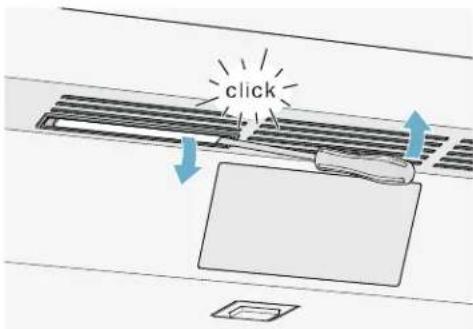
- Remove the used odor filter and replace with a new odor filter.
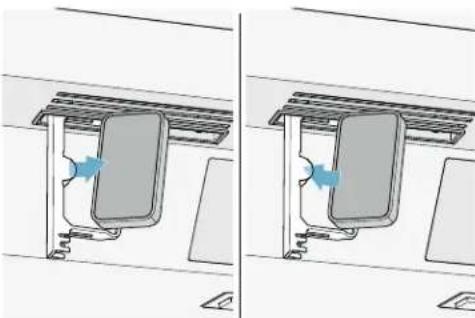
- Close the filter holder.
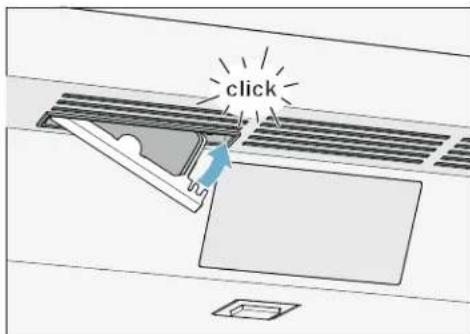

Noises
Normal noises
Droning: A motor is running, e.g. refrigerating unit, ventilator.
Bubbling, buzzing or gurgling: Refrigerant is flowing through the tubes.
Clicking: Motor, switches or solenoid valves are switching on or off.
Cracking: Automatic defrosting is running.
Preventing noises
Appliance is not level: Align appliance using a water level. If required, place a little packing underneath.
Bins, shelves or storage compartments wobble or stick: Check the removable equipment and re-insert if required.

Lighting
Your appliance features a maintenance-free LED light.
Only customer service or authorized technicians may repair the light.

Faults - what to do?
Before you call customer service, use this table to check whether you can rectify the fault yourself.
Appliance
| Temperature differs greatly from the set value. |
| Switch off appliance for 5 minutes. → "Switching off and disconnecting the appliance" on page 11 If the temperature is too warm, check temperature again after a couple of hours. If the temperature is too cold, check temperature again on the following day. |
| Displays do not light up. |
| The power plug has not been inserted properly. Connect the power plug. |
| The fuse has tripped. Check the fuses. |
| The power has failed. Check whether the power is on. |
| The refrigeration unit is switching on more frequently and for longer. |
| The appliance was opened frequently. Do not open the appliance unnecessarily. |
| The ventilation openings are covered up. Remove obstacles. |
| Large quantities of fresh food have been put in. Switch on super cooling promptly in advance. |
| Appliance is not cooling, display and lighting are lit. |
| Demo mode is switched on. Switch demo mode off. → "Settings" on page 9 |

Customer service
If you are unable to rectify the fault, please contact our customer service. We will always find an appropriate solution in order to avoid unnecessary visits by engineers.
The contact information for your nearest customer service can be found here or on the enclosed customer service list.
When calling, please state the product number (ENr.) and the production number (FD), which can be found on the rating plate.
"Getting to know your appliance" on page 8
Trust the expertise of the manufacturer. You can therefore be sure that the repair is carried out by trained service engineers who carry original spare parts for your home appliances.
Appliance self-test
Your appliance features a self-test program which displays the fault your customer service can rectify.
- Press button to open the settings.
- Tap the menu item Self-test.
- Tap Start. The self-test program starts.
- If faults are present, they will be displayed. In this case, follow the instructions on the display.
- The appliance restarts.
- A message that the self-test has finished is displayed for 10 seconds.
When the self-test has ended, the appliance switches to normal operation.
Repair order and advice on faults
Contact information for all countries can be found on the enclosed customer service list.
GB 0344 892 8979 Calls charged at local or mobile rate
IE 01450 2655 0.03 € per minute at peak. Off peak 0.0088 € per minute.
US 800 944 2904 toll-free
fr-ca
fr Table of contents

Side-by-side installation 25
Saving energy 26
Side-by-side installation
Freshness compartment
Select operating mode

Eco mode
Eco mode
Configure Home Connect
Notes
Side-by-side installation 45
Saving energy 46
Refrigerator compartment 54
Side-by-side installation
Refrigerator compartment
1901 Main Street, Suite 600
Irvine CA 92614, USA
www.bosch-home.com
- IMPORTANT SAFETY INSTRUCTIONS
- INTENDED USE
- ENVIRONMENTAL PROTECTION
- INSTALLATION AND CONNECTION
- GETTING TO KNOW YOUR APPLIANCE
- OPERATING THE APPLIANCE
- HOME CONNECT
- ALARM
- REFRIGERATOR COMPARTMENT
- CLEANING
- ODORS
- NOISES
- LIGHTING
- FAULTS - WHAT TO DO
- CUSTOMER SERVICE
- DEFINITIONS
- WARNING
- CAUTION
- ABOUT THESE INSTRUCTIONS
- INTRODUCTION
- RESTRICTION OF USER GROUP
- RISK OF EXPLOSION
- RISK OF ELECTRIC SHOCK
- RISK OF INJURY
- FIRE HAZARD/DANGER DUE TO REFRIGERANTS
- RISK OF FIRE
- RISK OF SUFFOCATION
- DAMAGE
- WEIGHT
- STATE OF CALIFORNIA PROPOSITION 65 WARNINGS
- WARNING / WARNING
- PACKAGING
- OLD APPLIANCES
- CONTENTS OF PACKAGE
- TECHNICAL DATA
- INSTALLING THE APPLIANCE
- INSTALLATION LOCATION
- CHECK BUILT-IN CUT-OUT
- SIDE-BY-SIDE INSTALLATION
- SAVING ENERGY
- BEFORE USING FOR THE FIRST TIME
- ELECTRICAL CONNECTION
- REQUIREMENTS FOR OUTLETS
- MAXIMUM SIMULTANEOUS LOAD
- APPLIANCE
- OPERATING CONTROLS
- (MENU BUTTON
- MODE SELECTION
- ECO MODE
- SABBATH MODE
- SETTINGS
- LANGUAGE
- TONES
- DISPLAY BRIGHTNESS
- TEMPERATURE UNIT
- FACTORY SETTINGS
- SELF-TEST
- DEMO MODE
- EQUIPMENT
- STORAGE COMPARTMENT
- SHELF
- CONTAINER
- SWITCHING THE APPLIANCE ON
- OPERATING TIPS
- SWITCHING OFF AND DISCONNECTING THE APPLIANCE
- SWITCHING OFF THE APPLIANCE
- DISCONNECTING THE APPLIANCE
- SETTING THE TEMPERATURE
- RECOMMENDED TEMPERATURE
- SETTING THE REFRIGERATOR COMPARTMENT TEMPERATURE
- SUPER COOLING
- SWITCHING SUPER COOLING ON OR OFF
- THE APPLIANCE AUTOMATICALLY SETS THE FOLLOWING TEMPERATURES
- SETTING UP HOME CONNECT
- NOTES
- SETTING UP THE CONNECTION TO THE HOME NETWORK (WLAN)
- VERIFYING SIGNAL STRENGTH
- IMPROVING SIGNAL STRENGTH
- CONNECTING THE REFRIGERATOR TO THE HOME CONNECT APP
- INSTALLING UPDATES FOR THE HOME CONNECT SOFTWARE
- CUSTOMER SERVICE ACCESS
- RESET SETTINGS
- SWITCH ON OR OFF THE CONNECTION TO THE HOME WLAN NETWORK (WI-FI)
- INFORMATION ON DATA PROTECTION
- DOOR ALARM
- NOTE WHEN STORING FOOD
- NOTE THE CHILL ZONES IN THE REFRIGERATOR COMPARTMENT
- COLDEST ZONE
- WARMEST ZONE
- VEGETABLE BIN
- VEGETABLE CONTAINER WITH HUMIDITY CONTROLLER
- COOL-FRESH BIN
- CLEANING THE DISPLAY
- CLEANING THE APPLIANCE INTERIOR
- CLEANING THE EQUIPMENT
- CARE INSTRUCTIONS FOR STAINLESS STEEL SURFACES
- CHANGING THE ODOR FILTER
- NORMAL NOISES
- PREVENTING NOISES
- APPLIANCE SELF-TEST
- REPAIR ORDER AND ADVICE ON FAULTS
- FR-CA
- FR TABLE OF CONTENTS
- SELECT OPERATING MODE
- CONFIGURE HOME CONNECT
Brand : BOSCH
Model : B30IR905SP
Category : Freezer