Cypher LX1 - Wristwatch ADIDAS - Free user manual and instructions
Find the device manual for free Cypher LX1 ADIDAS in PDF.



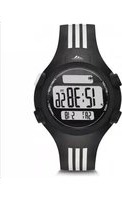
| Product Type | Wristwatch |
| Brand | Adidas |
| Model | Cypher LX1 |
| Case dimensions | Approximately 45 mm diameter, 12 mm thickness |
| Weight | Approximately 100 g |
| Power source | Button cell battery (type CR2032 or similar) |
| Display | Analog and/or digital depending on variant |
| Main functions | Time display, stopwatch, alarm, timer, dual time zone, backlight |
| Water resistance | 5 ATM (50 meters) – suitable for showering and swimming |
| Case material | Stainless steel or resin (depending on variant) |
| Strap | Silicone or leather strap (depending on variant) |
| Care and cleaning | Clean with a soft, dry cloth. Avoid chemical products. |
| Safety | Do not expose to extreme temperatures. Avoid severe shocks. |
| Spare parts and repairability | Replaceable battery and straps. Repair by an authorized watchmaker. |
| General information | 2-year warranty. Made in China. |
Frequently Asked Questions - Cypher LX1 ADIDAS
User questions about Cypher LX1 ADIDAS
0 question about this device. Answer the ones you know or ask your own.
Ask a new question about this device
Download the instructions for your Wristwatch in PDF format for free! Find your manual Cypher LX1 - ADIDAS and take your electronic device back in hand. On this page are published all the documents necessary for the use of your device. Cypher LX1 by ADIDAS.
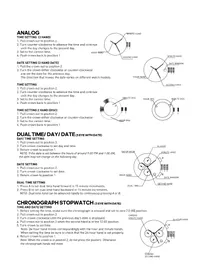
USER MANUAL Cypher LX1 ADIDAS
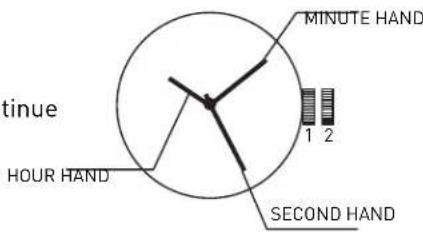
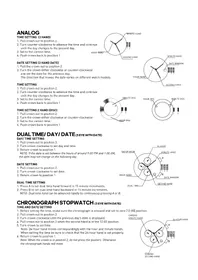
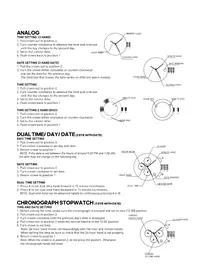
- Pull crown out to position 2.
- Turn counter-clockwise to advance the time and continue until the day changes to the present day.
- Set to the correct time.
- Push crown back to position 1
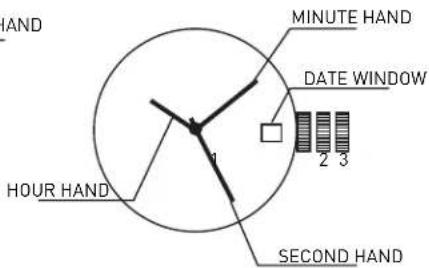
DATE SETTING (3 HAND DATE)
- Pull the crown out to position 2.
- Turn the crown either clockwise or counter-clockwise and set the date for the previous day.
The direction that moves the date varies on different watch models.
TIME SETTING
- Pull crown out to position 2.
- Turn counter-clockwise to advance the time and continue until the day changes to the present day.
- Set to the correct time.
- Push crown back to position 1
TIME SETTING 2 HAND (DISC)
- Pull crown out to position 2.
- Turn the crown either clockwise or counter-clockwise
- Set to the correct time.
- Push crown back to position 1
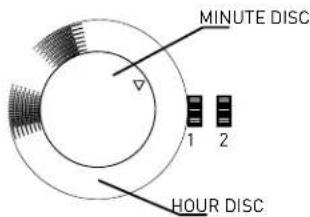
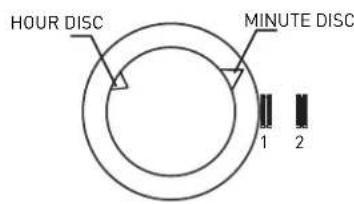
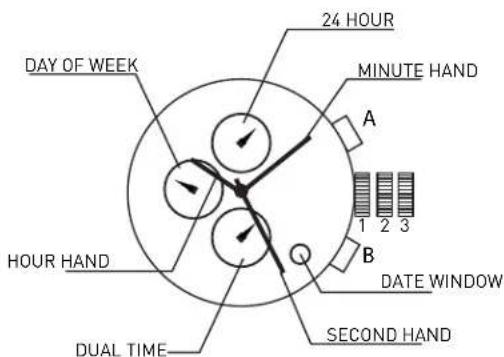
DUAL TIME/ DAY/ DATE (3 EYE WITH DATE)
DAY/TIME SETTING
- Pull crown out to position 3.
- Turn crown clockwise to set day and time.
- Return crown to position 1.
NOTE: If the date is set between the hours of around 9:00 PM and 1:00 AM, the date may not change on the following day.
DATE SETTING
- Pull crown out to position 2.
- Turn crown clockwise to set date.
- Return crown to position 1.
DUAL TIME SETTING
- Press A to set dual time hand forward in 15 minute increments.
- Press B to set dual time hand backward in 15 minute increments.
NOTE: Dual time hand can be advanced rapidly by continuously pressing A or B.
CHRONOGRAPH STOPWATCH (3 EYE WITH DATE)
TIME AND DATE SETTING
- Before setting the time, make sure the chronograph is stopped and set to zero [12:00] position.
- Pull crown out to position 2.
- Turn crown clockwise until the previous day's date is displayed.
- Pull crown out to position 3 when the second hand is at the 12:00 position.
- Turn crown to set time.
Note: 24-hour hand moves correspondingly with the hour and minute hands. When setting the time be sure to check that the 24-hour hand is set properly. - Return crown to position 1.
Note: When the crown is in position 2, do not press the pushers. Otherwise the chronograph hands will move.
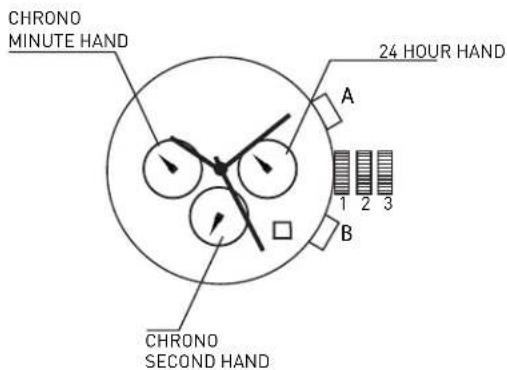
CHRONOGRAPH
-
Press A to start/stop the chronograph.
-
Press B to reset to zero.
CHRONOGRAPH ZERO RESET
-
If either of the chronograph hands is not at the zero (12:00) position, pull crown out to position 3.
-
Press A to move hands clockwise; press B to move hands counter-clockwise.
-
Return crown to position 1.
CHRONOGRAPH 2 EYE WITH DATE (WITH OR WITHOUT DATE)
TIME AND DATE SETTING
- Before setting the time, make sure the chronograph is stooped
and set to zero [12:00] position.
-
Pull crown out to position 2.
-
Turn crown clockwise until the previous day's date is displayed
-
Pull crown out to position 3 when the second hand is at the 12:00 position.
-
Turn crown to set time.
Note: 24-hour hand moves correspondingly with the hour and minute hands.
When setting the time be sure to check that the 24-hour hand is set properly.
- Return crown to position 1.
Note: When the crown is in position 2, do not press the pushers. Otherwise the chronograph hands will move.
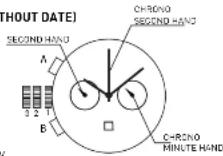
CHRONOGRAPH
-
Press B to start/slop the chronograph.
-
Press A for Split time, Press A again to restart
-
Press A to reset to zero.
CHRONOGRAPH ZERO RESET
-
If either of the chronograph hands is not at the zero (12:00) position, pull crown out to position 3.
-
Press A to move hands clockwise; press B to move hands counter-clockwise.
-
Return crown to position 1.
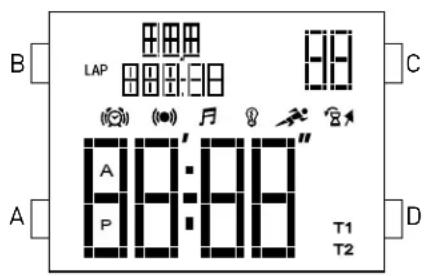
CALAGARY (QFL769BB/QFL873AC)
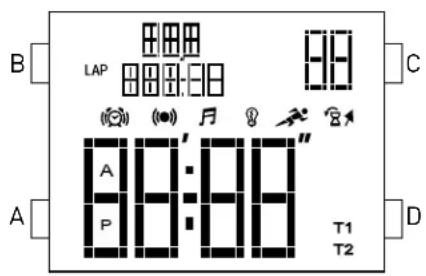
NORMAL TIME DISPLAY
1. Press A for EL
-
Press C to select T1 or T2 format.
-
Press D to toggle chime on/off.
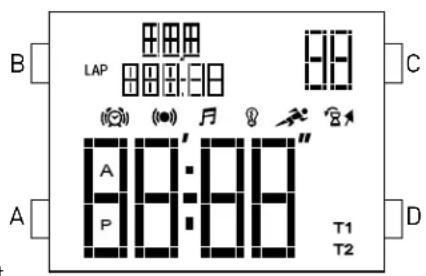
TIME/CALENDAR SETTING
-
In time mode, press and hold D for 2 seconds to enter time setting; hour will begin flashing.
-
Press C to increase selling value. Press D to decrease selling value.
-
Press B to enter next setting field
-
Setting sequence is hour, minute, second, year month, date 12/24 Hr
-
Press A to exit setting mode
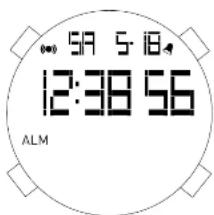
CHRONOGRAPH MODE
-
Press B to enter chrono mode.
-
Press D to select split or lap mode. Split mode will display the full time of all records after
each split. Lap mode will display only the new lap time after each record has been recorded.
-
Press C to start chronp.
-
Press C again to split time.
-
Repeat step 4 until desired number of laps have been reached (maximum 10).
-
Press D to stop chrono.
-
To review, press B to enter recall mode before resetting.
-
Press D again to reset chrono.
RECALL MODE
-
Press C to recall each lap (10 maximum).
-
Press D to return to chrono.
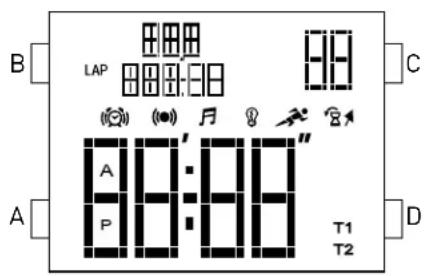
ALARM MODE
-
Press B to enter alarm mode.
-
Press C to toggle alarm on/off.
-
Press D to select T1 Alarm 1 or T2 Alarm 2.
ALARM SETTING
-
Press and hold D for 2 seconds to enter alarm setting; hour will begin flashing.
-
Press C to increase setting value. Press D to decrease setting value.
-
Press B to set minutes.
-
Press A to exit setting mode.
NOTE: Alarm turns on automatically when exiting setting mode.
TIMER MODE
-
Press C to start countdown timer.
-
Press D to stop countdown timer. Press D again to reset timer.
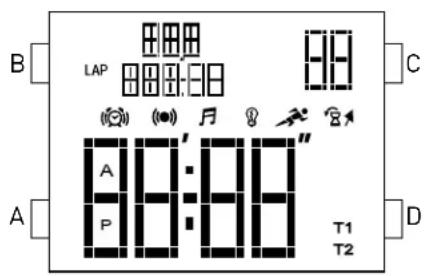
TIMER SETTING
-
Press B to enter timer mode.
-
Press and hold D to enter setting mode; hour will begin flashing.
-
Press C to increase setting value. Press D to decrease setting value.
-
Press B to enter next setting field.
-
Setting sequence is hour, minute, second.
-
Press A to exit setting mode.
PEACHTREE (FL145GB)
NORMAL TIME DISPLAY
-
Press A for EL in any mode
-
Press C to toggle between Time 1 and Time 2
-
Press and hold C to set Time 1 or Time 2 as the default timer.
-
Press D to toggle chime on/off.
TIME/CALENDAR SETTING
-
In normal time display, press and hold A to enter setting mode; chime will begin flashing.
-
Press C to increase setting value. Press D to decrease setting value.
-
Press B to set and advance to next setting value
-
Setting sequence is chime, 12/24-hour time, hour, minute, second, year, month, date, Auto EL
-
Press A to save data and exit setting mode.
CHRONOGRAPH MODE
-
Press B to change to chronograph mode.
-
Press C to start chronograph; press D for lap when the chronograph is running.
-
Press D to change views while chronograph is running
-
Press C to stop chronograph.
NOTE: When running, there is a maximum of 10 laps, afterward last lap will be overwritten each time
additional lap is recorded.
RECALL MODE
-
Press A to recall the memory when the chronograph is stopped.
-
Press A to view the next lap.
-
Press C or D to exit Recall Mode and go back to chronograph mode.
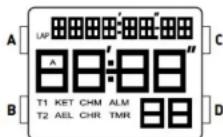
TIMER MODE
-
Press B to change to timer mode.
-
Press C to start timer
-
Press C to stop timer. Press D to reset the timer when it is stopped.
TIMER SETTING
-
In timer mode, press and hold A to enter setting mode; timer type will begin flashing.
-
Press C and D to select count down stop, count down repeat, or count up timer.
-
Press B to advance to next setting field.
-
Press C to decrease and D to increase.
-
Press B In set and advance is next selling value
-
Setting sequence is timer type, hour, minute, second.
-
Press A to save data and exit setting mode
NOTE: Alarm will sound at 2 beeps per second, and will beep for 30 seconds after timer reaches zero.
ALARM MODE
-
Press B to change to alarm mode.
-
Press C to toggle between alarms 1, 2, 3, 4.
-
Press D to enable the alarm: press D again to disable the alarm
-
Press B to exit alarm mode.
ALARM SETTING
-
In alarm mode, press and hold A to enter setting mode, hour will begin flashing.
-
Press C to increase; press D to decrease
-
Press B to set and advance to next setting value
-
Setting sequence is hour, minute.
-
Press A to exit setting mode.
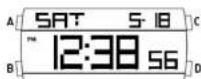
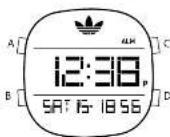
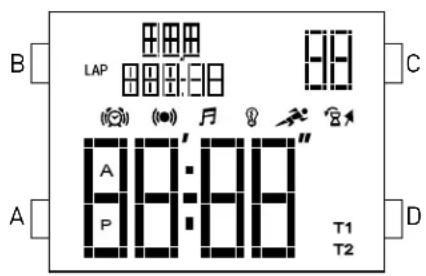
DENVER/ CANDY / SYDNEY (UPCR-780A-P07 / QUPCR-823A-P03 / QUPCR-780A-3-P16)
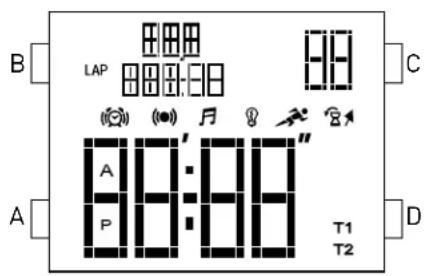
NORMAL TIME DISPLAY
-
Press A for EL
-
Press C to select T1 or T2 format
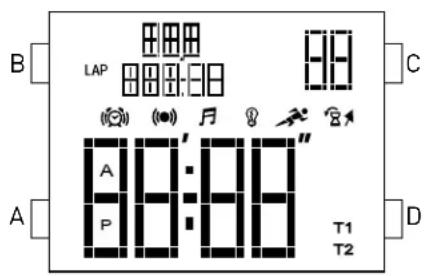
TIME/CALENDAR SETTING
- In time mode, press and hold D for 2 seconds to enter time
setting: hour will begin flashing
-
Press C to increase setting value
-
Press R to enter next setting field
-
Setting sequence is hour, minute, day, year, month, date
-
Press D to exit setting mode
ALARM MODE
-
Press B to enter alarm mode.
-
Press C to toggle alarm/chime on/off
-
Press D to select Home Alarm or T2 Alarm.
ALARM SETTING
-
Press and hold D for 2 seconds to enter alarm setting; hour will begin flashing.
-
Press C to increase setting value
-
Press B to set minutes.
-
Press D to exit setting mode
NOTE: Alarm turns on automatically when exiting setting mode.
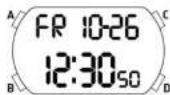
CHRONOGRAPH MODE
-
Press B to enter chrono mode.
-
Press D to select split or lap mode. Split mode will display the full time of all records after each split.
Lap mode will display only the new lap time after each record has been recorded.
-
Press C to start chron
-
Press Canain to split lime
-
Repeat step 4 until desired number of laps have been reached (maximum 10).
-
Press D to stop chrono
-
In review, press B in enter recall mode before reselling.
-
Press Π again to reset chrono
RECALL MODE
-
Press C to recall each lap [10 maximum]
-
Press D to return to chrono.
TIMER MODE
-
Press C to start countdown timer
-
Press D to stop countdown timer. Press D again to reset timer.
TIMER SETTING
-
Press B to enter timer mode.
-
Press and hold 0 to enter setting mode; hour will begin flashing
-
Press C to increase setting value.
-
Press B to enter next setting field.
-
Setting sequence is hour, minute, second
-
Press D to exit setting mode
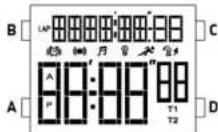
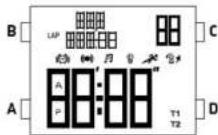
Seoul / Curitiba (QFL657)
NORMAL TIME DISPLAY
- Press A to change mode. Mode sequence is normal time,
chronograph, timer, alarm.
-
Press B for E
-
Press C to flash time zone 2. Press and hold C 2 seconds
to toggle normal time display/time zone 2.
- Press D to toggle key tone on/off.
NOTE: At any point in any setting mode, press B to exit setting mode.
NOTE: In any setting mode, if no number is operated for 30 seconds
all changes will be saved and the setting will automatically return
to normal time display.
TIME/CALENDAR SETTING
- In normal time display, press and hold B 2 seconds; auto EL
on/off will begin flashing.
-
Press C toggle auto EL on/off.
-
Press A to set and advance to next setting value
-
Press to increase dinit, press in decrease dinit. Press and held or for fact increment/decrement
-
Repeat steps 3 and 4 through setting sequence. Setting sequence is: auto E1, chime on/off
12/31-hour format: hour, minutes, second, year, month/daily or daily/month/month, month and date
- Press B to exit setting mode
NOTE: Weekday is automatically updated upon exiting setting mode
TIME ZONE 2 SETTING
-
To sel Time Zone 2, press and hold C 2 seconds to change to Time Zone 2
-
Press and hold B 2 seconds; time difference between time zone 1 and time zone 2 will begin flashing.
-
Press C to increase value: press D to decrease value. Press and hold C or D for
fast increment/decrement
- Press B to exit selling mode
CHRONOGRAPH MODE
-
Press A to change to chronograph mode.
-
Press B to recall lap data. Press B to scroll through laps.
-
Press C to start/stop the chronograph.
-
Press and hold D 2 seconds to reset to zero.
NOTE: Insert chronograph indicator here will flash in all modes if the chronograph is running.
LAP COUNTING
- Press D while the chronograph is running for lap counting (up to 10 laps).
NOTE: After 8 seconds, display will show total chronograph time in the lower portion of the display; next lap running time will show in upper portion of the display.
-
Press C to stop chronograph
-
Press B when the chronograph is stopped to recall chronograph lap data.
-
Press C or D to exit recall mode and return to chronograph
TIMER MODE
-
Press A to change to timer mode.
-
Press C to start/stop timer.
-
Press D to reset the timer.
NOTE: Alarm will sound for 30 seconds when countdown reaches zero. Press any pusher to silence alarm.
TIMER SETTING
-
In timer mode, press and hold B 2 seconds to enter setting mode; timer type will begin flashing.
-
Press C to select countdown-stop ("CD-STP"), countdown-repeat ("CD-REP"), or countdown-then up timer ("CD-UP").
-
Press A to set and advance to next setting value.
-
Press C to increase digit, press D to decrease digit. Press and hold C or D for fast increment/decrement.
-
Repeat steps 3 and 4 through setting sequence. Setting sequence is: timer type, hour, minute, seconds.
-
Press B to exit setting mode.
ALARM MODE
-
Press A to change to alarm mode.
-
Press C to select alarm 1-4.
-
Press D to toggle alarm on/off.
ALARM SETTING
-
In alarm mode, press and hold B 2 seconds; hour will begin flashing.
-
Press C to increase digit; press D to decrease digit. Press and hold C or D for fast increment/decrement.
-
Press A to set and advance minute.
-
Repeat step 2
-
Press B to exit setting mode
NOTE: Alarm will sound for 30 seconds. Press any pusher to silence alarm.
ANALOG
(QFL769BB / QFL873AC)
(UPCR-780A-P07 / QUPCR-823A-P03 / QUPCR-780A-3-P16)
(QFL769BB / QFL873AC)
AFFICHAGE NORMAL DE L'HEURE
RÉGLAGE DE L'HEURE ET DU CALENDRIER
(UPCR-780A-P07 / QUPCR-823A-P03 / QUPCR-780A-3-P16)
AFFICHAGE NORMAL DE L'HEURE
RÉGLAGE DE L'HEURE ET DU CALENDRIER
(QFL769BB / QFL873AC)
PANTALLA DE HORA NORMAL
(UPCR-780A-P07 / QUPCR-823A-P03 / QUPCR-780A-3-P16)
(QFL769BB / QFL873AC)
(UPCR-780A-P07 / QUPCR-823A-P03 / QUPCR-780A-3-P16)
VISUALIZZAZIONE ORARIO NORMALE
SCHERMO CON L'ORA STANDARD
(QFL769BB / QFL873AC)
ACERTO DA HORA/CALENDÁRIO
(UPCR-780A-P07 / QUPCR-823A-P03 / QUPCR-780A-3-P16)
(QFL769BB / QFL873AC)
(UPCR-780A-P07 / QUPCR-823A-P03 / QUPCR-780A-3-P16)
(QFL769BB / QFL873AC)
正常时间显示
时间/日历设置
(UPCR-780A-P07 / QUPCR-823A-P03 / QUPCR-780A-3-P16)
正常时间显示
闹钟模式
(QFL769BB / QFL873AC)
通常時刻表示
時刻/カレンダーの設定
(UPCR-780A-P07 / QUPCR-823A-P03 / QUPCR-780A-3-P16)
通常時刻モード
(QFL769BB / QFL873AC)
정상 시간 표시
시간/달력 설정
(UPCR-780A-P07 / QUPCR-823A-P03 / QUPCR-780A-3-P16)
표준 시간 표시
타이머 설정


- DATE SETTING (3 HAND DATE)
- TIME SETTING
- TIME SETTING 2 HAND (DISC)
- DUAL TIME/ DAY/ DATE (3 EYE WITH DATE)
- DAY/TIME SETTING
- DATE SETTING
- DUAL TIME SETTING
- CHRONOGRAPH STOPWATCH (3 EYE WITH DATE)
- TIME AND DATE SETTING
- CHRONOGRAPH
- CHRONOGRAPH ZERO RESET
- CHRONOGRAPH 2 EYE WITH DATE (WITH OR WITHOUT DATE)
- CALAGARY (QFL769BB/QFL873AC)
- NORMAL TIME DISPLAY
- Press A for EL
- TIME/CALENDAR SETTING
- CHRONOGRAPH MODE
- RECALL MODE
- ALARM MODE
- ALARM SETTING
- TIMER MODE
- TIMER SETTING
- PEACHTREE (FL145GB)
- DENVER/ CANDY / SYDNEY (UPCR-780A-P07 / QUPCR-823A-P03 / QUPCR-780A-3-P16)
- Seoul / Curitiba (QFL657)
- TIME ZONE 2 SETTING
- LAP COUNTING
- ANALOG
- AFFICHAGE NORMAL DE L'HEURE
- RÉGLAGE DE L'HEURE ET DU CALENDRIER
- PANTALLA DE HORA NORMAL
- VISUALIZZAZIONE ORARIO NORMALE
- SCHERMO CON L'ORA STANDARD
- ACERTO DA HORA/CALENDÁRIO
- 正常时间显示
- 时间/日历设置
- 闹钟模式
- 通常時刻表示
- 時刻/カレンダーの設定
- 通常時刻モード
- 정상 시간 표시
- 시간/달력 설정
- 표준 시간 표시
- 타이머 설정
Brand : ADIDAS
Model : Cypher LX1
Category : Wristwatch