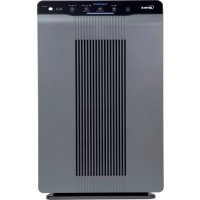
53002 - Air purifier Winix - Free user manual and instructions
Find the device manual for free 53002 Winix in PDF.



| Product type | Air purifier |
| Brand | Winix |
| Model | 53002 |
| Filtration technologies | Washable pre-filter, odor-absorbing carbon filter, True HEPA filter |
| PlasmaWave® Technology | Yes (button activation/deactivation) |
| Fan speeds | Low, Medium, High, Turbo |
| Operating modes | Auto, Manual, Sleep |
| Timer | 1 h, 4 h, 8 h |
| Smart sensor | Yes (continuously monitors air quality) |
| Light sensor | Yes (detects ambient brightness for Sleep mode) |
| Air quality indicator | LED: Red (poor), Amber (average), Blue (good) |
| Power supply | 220-240 V ~ 50/60 Hz |
| Power consumption | 60 W (estimated) |
| Dimensions (approx.) | 38 x 21 x 59 cm |
| Weight (approx.) | 7.5 kg |
| Pre-filter maintenance | Clean every 14 days |
| Carbon filter replacement | Every 3 months |
| True HEPA filter replacement | Every 12 months (replacement indicator lit) |
| Safety instructions | Do not block openings, do not use without filter, keep away from water and heat sources |
| Recommended use | Solid and level surface, 30-45 cm clearance around the unit |
Frequently Asked Questions - 53002 Winix
User questions about 53002 Winix
0 question about this device. Answer the ones you know or ask your own.
Ask a new question about this device
Download the instructions for your Air purifier in PDF format for free! Find your manual 53002 - Winix and take your electronic device back in hand. On this page are published all the documents necessary for the use of your device. 53002 by Winix.
USER MANUAL 53002 Winix
natural_image
Front view of a WINSK air purifier with vertical panel and control buttons (no text or symbols on main body)Model: 5300-2
EN AIR PURIFIER Quick-set-up-manual
Before operating this equipment, carefully read and follow these safety cautions.
Ensure filters are inserted before running unit.
Running the unit without filters may shorten the lifespan of the unit and cause electric shock or injury.
Be sure foreign objects are NOT inserted into the vents on the unit.
Objects can include pins, rods, and coins.
Do not touch any part of the interior of the unit with wet hands.
The high voltage may cause electric shock.
Ensure unit intake and outlet vents do not become blocked.
Blockage may lead to increased internal temperatures causing product failure and deformation.
Do not use the unit as a step stool or place heavy objects on it.
Personal injury may occur or product failure and deformation.

WARNING
Follow these instructions to reduce the risk of serious injury or death and to reduce risk of damaging the unit.

If the supply cord is damaged, it must be replaced by a special cord or assembly available from the manufacturer or its service agent.

This appliance can be used by children aged from 8 years and above and persons with reduced physical, sensory or mental capabilities or lack of experience and knowledge if they have been given supervision or instruction concerning use of the appliance in a safe way and understand the hazards involved.

Children should be supervised to ensure that they do not play with the appliance.

Cleaning and user maintenance shall not be made by children without supervision.

Before cleaning or maintaining, ensure unit is unplugged.

Do not pull on the power cord when unplugging the unit.

Do not tie or knot the power cord when unit is in operation.

If the unit becomes submerged in water, unplug it and contact customer service.

Do not unplug or move the unit while in operation.

Do not plug additional appliances into the same outlet or power supply.

Do not touch the plug with wet hands.

Unplug the unit when not in operation for extended periods of time.

Do not place around heating elements.

Do not use around mist or fumes from industrial oil or around large quantities of metallic dust.

The cord can become damaged by forcefully bending, pulling, twisting, bundling, pinching or placing heavy objects on it.

Do not install in any sort of motor or transport vehicle. (trucks, boats, ships, etc)

Do not place in an area with excessive amounts of noxious gases.

Do not place near any flammable materials. (aerosols, fuel, gases etc)

Do not have the unit facing into wind or drafts.

Do not place below any electrical outlet.

Do not place in excessively humid areas where the unit may become wet.

To reduce the risk of fire or electric shock, do not use this fan with any solid-state speed control device.

Do not place unit closer than 30 cm from the wall during operation. It may cause condensation to the wall and the surrounding area.
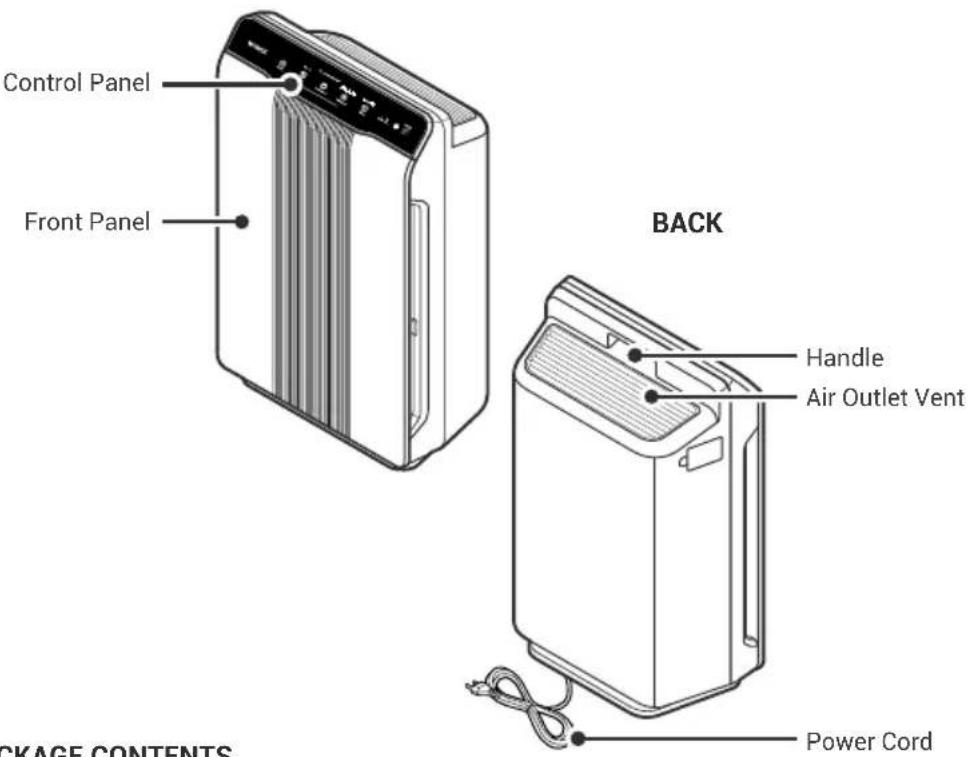
MODEL PART DIAGRAM
English
FRONT
PACKAGE CONTENTS
Unit
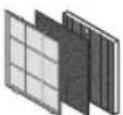
(1) Pre-Filter
(4) Odor Absorbing Carbon Filter
(1) True HEPA Filter

Quick-set-up-manual

NOTICE
You can read and download the full manual on our website. It contains all the details regarding the product, maintenance and filters. The full manual can be viewed and downloaded at https://winixeurope.eu/manuals/

[QR Code link]
https://winixeurope.eu/manuals/
INITIAL OPERATION
English
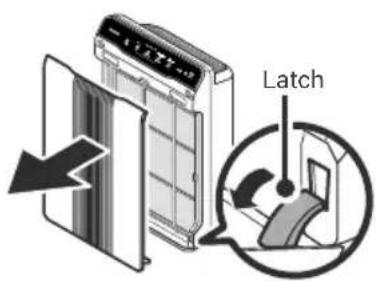
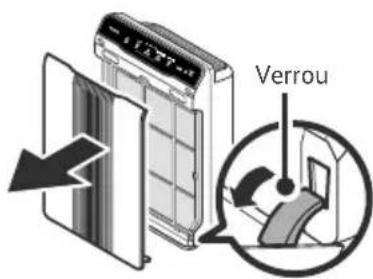
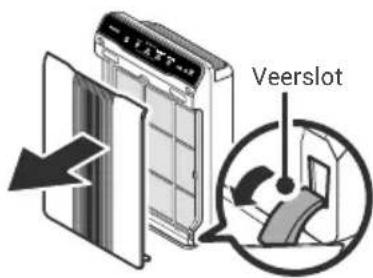
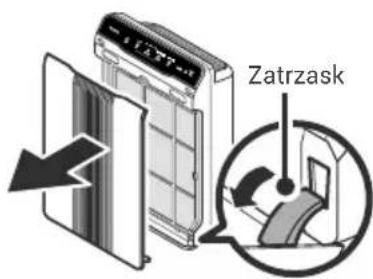
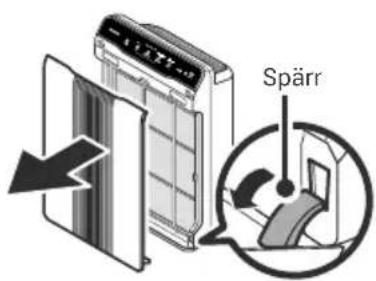
- Remove the front panel by grasping its upper edge and gently pulling forward.
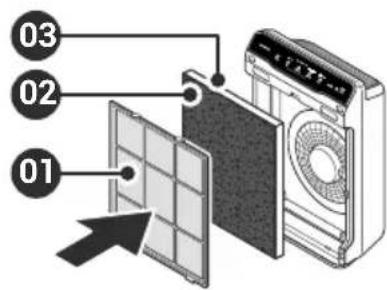
-
Install the filters until they fit securely in place.
-
True HEPA Filter (back)
-
Odor Absorbing Carbon Filter (middle)
-
Pre-Filter (front)
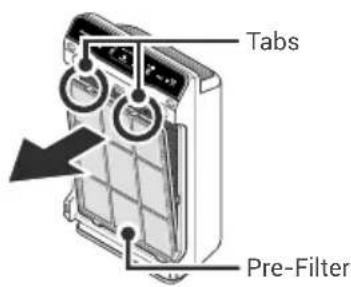
- Press on the Pre-Filter tabs, near the top of the filter, release and remove. Pull out the Odor Absorbing Carbon Filter and True HEPA Filter.
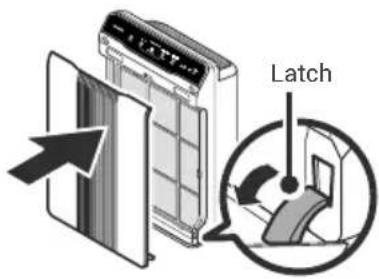
- After filters are installed, close the front panel.
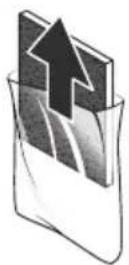
- Remove filters from protective plastic wrap.
natural_image
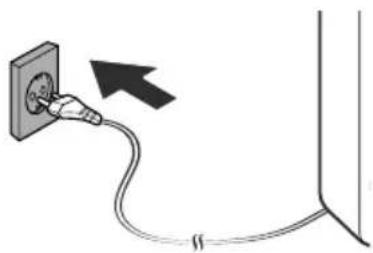
Simple line drawing of a plug inserted into a wall with a cable, no text or symbols present- Insert the power cord into an electrical outlet.
WHERE TO USE
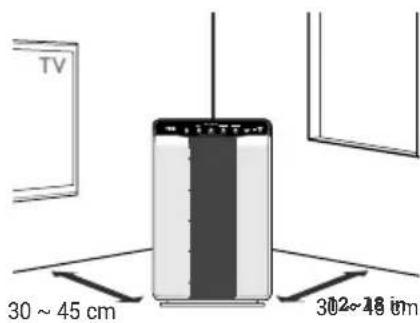
Allow 30 \~ 45 cm of space between TVs, radios, and other electronics
Electromagnetic interference from certain electronics may cause product malfunction.
Place indoors away from direct sunlight
Direct exposure may cause product malfunction or failure.
Only place on hard, flat surfaces
Flimsy or slanted surfaces may result in abnormal noise and vibrations.
Allow at least 30 \~ 45 cm from walls for maximum air flow
CONTROL PANEL
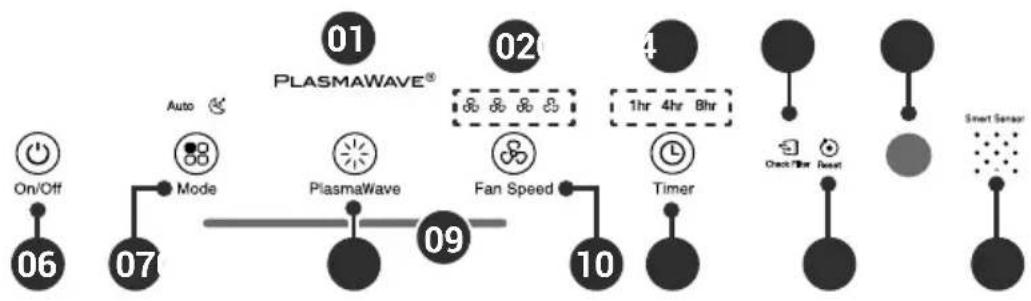
flowchart
graph TD
    A["On/Off 06"] --> B["Mode"]
    B --> C["PlasmaWave 07"]
    C --> D["PlasmaWave 09"]
    D --> E["Fan Speed 10"]
    E --> F["Timer"]
    F --> G["Check Timer"]
    G --> H["Smart Sensor"]
    style A fill:#f9f,stroke:#333
    style H fill:#bbf,stroke:#333
English
01. PlasmaWave® Indicator
Indicates whether the Plasmawave®
Technology is enabled or disabled.
02. Fan Speed Indicator
Indicates the current fan speed.
03. Timer Indicator
If the timer has been set, the LED light indicates the set time of operation.
04. Change Filter Indicator
The LED light indicates when it is time to change your replacement filter.
05. Light Sensor
Detects the amount of ambient light in the environment. When in Auto Mode, the Light Sensor detects when to put the unit into Sleep Mode.
06. Power Button
Turns the unit on or off.
07. Mode Button
Press to cycle through and set the desired mode of operation (Auto Mode, manual settings, and the Sleep Mode).
08. PlasmaWave® Button
Press the Plasmawave ^® button when the unit is on to enable or disable this feature.
09. Air Quality Indicator
Color coded LED light indicates one of three levels of Air Quality: Red (poor), Amber (fair), and Blue (good).
10. Fan Speed Button
Enables manual operation of the unit.
- Press to cycle through and set the desired fan speed: Low → Medium → High Turbo
11. Timer Button
- Press to cycle through and set desired length of operation: 1hr → 4hr -8hr → [NO TIMER]
12. Filter Reset Button
After replacing the filter, turn on the unit and then use a thin object, such as a paper clip, to press the Filter Reset button for 5 seconds.
13. Smart Sensor
Checks the air quality in the environment and helps to improve it automatically.
MAINTENANCE
When to Replace Filters
| Filter Indicator Light | When to Service | When to Replace | |
| Pre-Filter | none | Clean once every 14 days | Permanent |
| Odor Absorbing Carbon Filter | none | Can NOT be WASHED | Replace every 3 months |
| True HEPA Filter |  Check Filter Check Filter | Lasts Approx. 12 months |
- Intervals between filter replacement may vary depending on environment.
- For optimal use, Pre-Filter can be cleaned once every 14 days which can extend the life of other filters.
To purchase replacement Winix filters:
contact your local dealer.
Use WINIX Genuine
Replacement Filter
www.winixeurope.eu
ITEM:115115
FILTER

SÉCURITÉ ET MISES EN GARDE
[Lien QR Code]
https://winixeurope.eu/manuals/
PREMIÈRE UTILISATION
Français
natural_image
Simple line drawing of a plug inserted into a wall with a cable, no text or symbols presentnatural_image
Simple line drawing of a plug inserted into a wall with a cable, no text or symbols presentDe 30 a 45 cm De 30 a 45 cm
[QR-Code-Link]
https://winixeurope.eu/manuals/
natural_image
Simple line drawing of a plug inserted into a wall with a cable, no text or symbols presentnatural_image
Simple line drawing of a plug inserted into a wall with a cable, no text or symbols present[QR Code link]
https://winixeurope.eu/manuals/
EERSTE BEDIENING
natural_image
Simple line drawing of a plug inserted into a wall with a cable, no text or symbols present[Kod QR z linkiem]
https://winixeurope.eu/manuals/
OBSŁUGA WSTĘPNA
natural_image
Simple line drawing of a plug inserted into a socket connected to a cable, with an arrow indicating the direction (no text or symbols)[QR-kodlänk]
https://winixeurope.eu/manuals/
FÖRSTA ANVÄNDNING
natural_image
Simple line drawing of a plug inserted into a wall with a cable, no text or symbols presentnatural_image
Simple line drawing of a plug inserted into a wall with a cable, no text or symbols presentWINIX
Contact Winix for
product related inquiries and customer service
• Website: www.winixeurope.eu
To expedite service, please specify the model name and number, the nature of the problem, your contact information, and your address.
2610-0334-00 Rev.00

- WARNING
- MODEL PART DIAGRAM
- INITIAL OPERATION
- WHERE TO USE
- CONTROL PANEL
- PlasmaWave® Indicator
- Fan Speed Indicator
- Timer Indicator
- Change Filter Indicator
- Light Sensor
- Power Button
- Mode Button
- PlasmaWave® Button
- Air Quality Indicator
- Fan Speed Button
- Timer Button
- Filter Reset Button
- Smart Sensor
- MAINTENANCE
- To purchase replacement Winix filters:
- SÉCURITÉ ET MISES EN GARDE
- PREMIÈRE UTILISATION
- EERSTE BEDIENING
- OBSŁUGA WSTĘPNA
- FÖRSTA ANVÄNDNING
Brand : Winix
Model : 53002
Category : Air purifier