
9800 - Air purifier Winix - Free user manual and instructions
Find the device manual for free 9800 Winix in PDF.


| Product Type | Air Purifier |
| Model | 9800 |
| Voltage | AC 120 V / 60 Hz |
| Power Consumption | 95 W |
| Coverage Area | 500 sq. ft. |
| Dimensions (W × D × H) | 16.5 × 11.8 × 23.2 inches |
| Weight | 18.7 lbs |
| Filtration Stages | 4-Stage: Pre-Filter, Activated Carbon Filter, True HEPA Filter, PlasmaWave |
| Pre-Filter | Washable (every 14 days), permanent |
| Activated Carbon Filter | Replace every 3 months, non-washable |
| True HEPA Filter | Replace approx. every 12 months |
| PlasmaWave Technology | On/Off control, optional ionization |
| Fan Speeds | Auto, Low, Medium, High, Turbo, Sleep |
| Auto Mode | Adjusts fan speed based on air quality (Odor Sensor + Light Sensor) |
| Sleep Mode | Silent operation, disables Air Quality Indicator and PlasmaWave (optional) |
| Air Quality Indicator | Color-coded LED: Red (poor), Amber (fair), Blue (good) |
| Light Sensor | Automatic Sleep Mode in dark conditions (Auto Mode) |
| Wi-Fi Connectivity | 2.4 GHz, compatible with Winix Smart app (Android 5.0+/iOS 10.0+) |
| Filter Replacement Indicator | Flickering LED indicates True HEPA filter replacement needed |
| Replacement Filter Model | Filter A / SKU: 115115 |
| Control Panel | Power, Fan Speed/Auto/Sleep, PlasmaWave, Wi-Fi, Filter Reset |
| Safety Certifications | ETL listed, ENERGY STAR certified, FCC Class B |
| Warranty | 2 years (USA and Canada) |
Frequently Asked Questions - 9800 Winix
User questions about 9800 Winix
0 question about this device. Answer the ones you know or ask your own.
Ask a new question about this device
Download the instructions for your Air purifier in PDF format for free! Find your manual 9800 - Winix and take your electronic device back in hand. On this page are published all the documents necessary for the use of your device. 9800 by Winix.
USER MANUAL 9800 Winix
(4) Activated Carbon Filters
(1) True HEPA Filters
User
Manual
Alexa Setup Guide /
Wi-Fi Setup Guide
WHERE TO USE
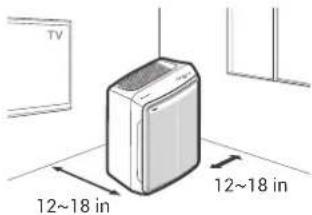
Allow 12 \~ 18 in. of space between TVs, radios, and other electronics
Electromagnetic interference from certain
electronics may cause product malfunction.
Place indoors away from direct sunlight
Direct exposure may cause product malfunction or failure.
Only place on hard, flat surfaces
Flimsy or slanted surfaces may result in abnormal noise and vibrations.
Allow at least 12 \~ 18 in. from walls for maximum air flow
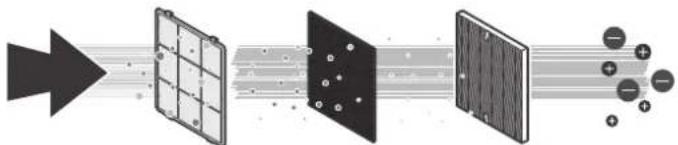
4-STAGE AIR PURIFICATION
Air Purification means it
removes inanimate particles
flowchart
graph LR
    A["Input"] --> B["Stage 1: Solar Panel"]
    B --> C["Stage 2: Fiber"]
    C --> D["Stage 3: Fiber"]
    D --> E["Output: + - + - +"]
    style A fill:#f9f,stroke:#333
    style E fill:#bbf,stroke:#333
1 Pre-Filter
2 Activated Carbon Filter
3 True HEPA Filter
4 PlasmaWave ^8
Winix Smart Wi-Fi Setup
Before you begin, make sure you have a wireless router that is 2.4Ghz or newer and have a Smartphone that is Android 5.0 and later or iOS 10.0 and later. Reference the Winix Smart Wi-Fi Set Up Guide for more details.
- Latest Phone Operating System requirements are subject to change based on future phone technology and app version updates.
- Make sure to disable any VPN networks before connecting your unit.
- Download the Winix Smart app on your device. • available via Google Play store or iTunes App store.
- Run the app and follow the setup guide to connect your device to the unit.
INITIAL OPERATION
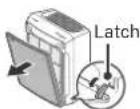
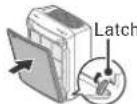
- Remove the front panel by grasping its upper edge and gently pulling forward.
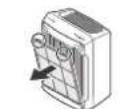
- Remove the Pre-Filter, then the bag of filters behind it.
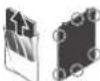
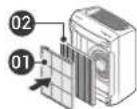
- After removing the packing vinyl of the filter, insert the Activated Carbon Filter into the Pre-Filter.
- Install the filters until they fit securely in place.
- True HEPA Filter (back)
- Pre-Filter (With Carbon Filter) (front)
- After filters are installed, close the front panel.
- Insert the power cord into an electrical outlet.
MAINTENANCE
When to Replace Filters

| Filter | Indicator Light | When to Service | When to Replace |
| Pre-Filter | none | Clean once every 14 days | Permanent |
| Activated Carbon Filter | none | Can NOT be WASHED | Replace every 3 months |
| True HEPA Filter | Check Filter | Lasts Approx. 12 months |
- When the Check Filter Indicator LED is flickering, it is time to replace the Filter.
• Intervals between filter replacement may vary depending on environment.
① Select "New Unit" and choose 9800 to connect to this model.
② Read the notice and select "OK".
③ Enter the password to your Wi-Fi network.
④ Press and hold the Wi-Fi button on the unit's control panel until it beeps.
• The Wi-Fi strength indicator will begin to blink.
⑤ Connect to the Winix Smart network via your device's network menu.
⑥ Selecting "Next" will connect your unit to your device.
③ Define the unit settings (Name and Location).
⑨ When set up is complete, the Winix Smart Indicator will light up.

CONTROL PANEL
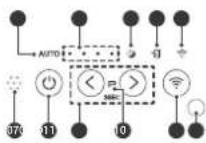
01. Air Quality Indicator
Color coded LED light indicates one of three levels of Air Quality: Red (poor), Amber (fair), and Blue (good).
02. Auto Mode Indicator
The LED "Auto" light will indicate when Auto Mode is activated.
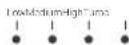
03. Fan Speed Indicator
Indicates the current fan speed.
AUTO
04. Sleep Mode Indicator
The LED "Sleep" light will indicate when Sleep Mode is activated.
05. Filter Replacement Indicator/
Filter Reset Button
- Indicator: LED light indicates when it is time to change the filter.
- Button: After replacing the True HEPA Filter, press the Filter Reset button for at least 5 seconds until the Filter Replacement Indicator turns off.
06. Wi-Fi Indicator
- Enables or disables the Wi-Fi feature.
- When in the pairing state, the Wi-Fi LED
flashes. - When paired successfully, the Wi-Fi LED will be a solid white light.
07. Smart Sensor
Detects the amount of odorous gas in the environment. When in Auto mode, the fan speed adjusts according to the detected amount of gas.
08. Power Button
Turns the unit on or off. During the first 30 seconds
of powering up, the Air Quality Indicator will cycle through Blue, Amber and Red colors.
Odor Sensor takes approximately 4 minutes to detect the air quality in the environment before normal operation begins.
09-1. Fan Speed/Auto/Sleep Buttons
Use the Fan Speed arrow buttons to set the desired fan speed. Fan Speeds cycle over in this sequence: Auto, Low, Medium, High, Turbo, Sleep, Auto.
• Auto Mode:
Auto Mode automatically adjusts fan speeds according to your indoor air quality. The fan speed will adjust to low when air quality is good, medium when fair, and to high when poor.
- Sleep Mode:
When Sleep Mode is activated, the Air Quality Indicator LED light is disabled.
- Fan speed will automatically set to minimum speed (lower than 'Low') which will be nearly silent.
- When Sleep Mode is active, PlasmaWave will be disabled, but it can be turned back on.
09-2. PlasmaWave® Button Press and hold the two arrow buttons <+> for 3 seconds
Press the Plasmawave ^2 button when the unit is on to enable or disable this feature. By default, PlasmaWave ^3 is enabled whenever the unit is powered on. "When the unit is running, you may hear a chirping or buzzing sound. The sound is from large particles passing through PlasmaWave ^3 , it is normal and does not signify product failure."
10. PlasmaWave ^® Indicator
Indicates whether PlasmaWave ^® is enabled or disabled.
11. Wi-Fi Button
- Press for 3 seconds to activate pairing mode. - When Wi-Fi is paired, press the button to turn Wi-Fi off or back on.
12. Light Sensor
Detects the amount of ambient light in the environment. When in Auto Mode, the light sensor detects when to put the unit into Sleep Mode.
REPLACING FILTERS

Resetting Filter Life:
After replacing your True HEPA Filter, place the Pre-Filter back in and close the Front Panel. While the unit is on, hold the Filter Reset Button for at least 5 seconds until you hear the beep. After the beep, the Filter Replacement Indicator will disappear. Your Winix True HEPA is now reset.
CLEANING CARE
Cleaning the Filters:
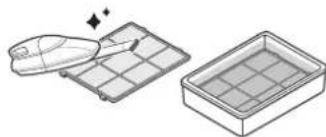
natural_image
Illustration of a tray with a lid and a rectangular container filled with liquid, no text or symbols present.Use a vacuum cleaner or soft brush to clean the Pre-Filter
• If it is excessively soiled, rinse in room temperature water.
- Do not use detergent or soap.
- Allow the filter to dry for 24 hours or more before using.
- Intervals between filter cleaning may vary depending on the air quality.
- Do not use hot water over 104°F or volatile fluids such as paint thinner.

NOTICE
- When cleaning the unit, always unplug the power cord first and then wait until the unit has cooled down.
- Never disassemble, repair, or modify the unit yourself.
• Do not use flammable sprays or liquid detergents. - Do not allow children to clean or maintain the unit.
- Before cleaning or maintaining, ensure unit is unplugged.
- Do not use benzene, alcohol, or other volatile fluids, which may cause damage or discoloration.
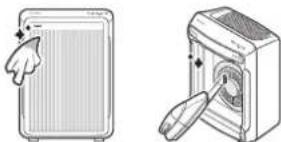
Cleaning the Exterior & Interior:
natural_image
Illustration of two devices: a front panel with a hand cursor and a back panel with a button, both without any text or symbols.Wipe with a soft damp cloth using room temperature water.
• Afterwards, wipe it down with a clean, dry cloth. Open the front panel and clean the interior with a vacuum cleaner.
• For optimal performance, clean every 1 - 2 months.
SPECIFICATIONS
| Model | 9800 |
| Voltage | AC 120 V / 60 Hz |
| Power Rate | 95 W |
| Verified Room Size | 500 sq.ft. |
| Dimensions | 16.5 in(W) × 11.8 in(D) × 23.2 in(H) |
| Weight | 18.7 lbs |
| Replacement Filter | Filter A / SKU: 115115 |
The exterior, design, and product specifications may be changed without prior notice to improve product performance.
To expedite service, please specify the model name and number, the nature of the problem, your contact information, and your address.
SAFETY AND CAUTIONS
Before operating this equipment, carefully read and follow these safety cautions.
Ensure filters are inserted before running unit. Running the unit without filters can shorten the lifespan of the unit and cause electric shock or injury. Be sure foreign objects are NOT inserted into the vents on the unit.
Objects can include pins, rods, and coins.
Do not touch any part of the interior of the unit with wet hands.
The high voltage may cause electric shock.
Ensure unit intake and outlet vents do not become blocked.
Blockage may lead to increased internal
temperatures, causing product failure and deformation.
Do not use the unit as a step stool or place heavy objects on the unit.
Personal injury may occur or product failure and deformation.

Do not pull on the power cord when unplugging the unit.

Do not tie or knot the power cord when unit is in operation.

If the unit becomes submerged in water, unplug it and contact customer service.

Do not unplug or move the unit while in operation.

Do not plug additional appliances into the same outlet or power supply.

Do not touch the plug with wet hands.

Unplug the unit when not in operation for extended periods of time.

WARNING
Follow these instructions to reduce the risk of serious injury or death and to reduce risk of damaging the unit.
- If the power cord is damaged, it must be replaced by a special cord. Reassembly is available from the manufacturer or its service agent.
- This appliance is not intended for use by a person (including children) with reduced physical sensory or mental capabilities, or lack of experience and knowledge of the unit, unless they have been given supervision or instruction concerning use of the appliance by a person responsible for their safety.
• Children should be supervised to ensure that they do not play with the appliance. - This unit is not intended to be used to preserve documents or art conservation.

Do not place around heating elements.

Do not use around mist or fumes from industrial oil or around large quantities of metallic dust.

The cord can become damaged by forcefully bending, pulling, twisting, bundling, pinching or placing heavy objects on it.

Do not install in any sort of motor or transport vehicle (trucks, boats, ships, etc.).

Do not place in an area with excessive amounts of noxious gases.

Do not place near any flammable materials (aerosols, fuel, gases, etc.).
TWO YEARS WARRANTY
The terms of the warranty are as follows:
- This product is manufactured under stringent quality control and inspections.
- The warranty will be voided if product failure is a result of negligence or misuse by the consumer.
- A proof of purchase must be presented upon claiming a Product Warranty.
- Store the proof of purchase in a safe place or register your product on winixamerica.com to upload your proof of purchase.
- This warranty is valid only in the USA and Canada.
* For more information visit https://winixamerica.com/terms-and-conditions/
| Product Name Air Purifier | ||
| Model Name 9800 | ||
| Purchase Date | ||
| Warranty Period | Two (2) Years | |
| Place of Purchase | ||
| Place of Purchase tel. | ||
| Customer | Address | |
| Name | ||
| Tel. | ||
After purchase, be sure to complete all of the above information.
Warning: Changes or modifications to this unit not expressly approved by the party responsible for compliance could void the user's authority to operate the equipment. Note: This equipment has been tested and found to comply with the limits for a Class B digital device, pursuant to Part 15 of the FCC Rules. These limits are designed to provide reasonable protection against harmful interference in a residential installation. This equipment generates, uses and can radiate radio frequency energy and, if not installed and used in accordance with the instructions, may cause harmful interference to radio communications. However, there is no guarantee that interference will not occur in a particular installation. If this equipment does cause harmful interference to radio or television reception, which can be determined by turning the equipment off and on, the user is encouraged to try to correct the interference by one or more of the following measures:
- Reorient or relocate the receiving antenna.
- Increase the separation between the equipment and receiver.
- Connect the equipment into an outlet on a circuit different from that to which the receiver is connected.
- Consult the dealer or an experienced radio/TV technician for help.
This device contains license-exempt transmitter(s)/receiver(s) that comply with Innovation, Science and Economic Development Canada's license-exempt RSS(s). Operation is subject to the following two conditions:
• This device may not cause interference.
- This device must accept any interference, including interference that may cause undesired operation of the device.
Do not have the unit facing into wind or drafts.

Do not place below any electrical outlet.

Do not place in excessively humid areas where the unit may become wet.

Do not place unit closer than 12 inches from the wall during operation. It may cause condensation on the wall and the surrounding area.
SAFETY INSTRUCTIONS
Thank you for purchasing a Winix air purifier. This product is for household use only.
IMPORTANT CAUTIONS FOR USING YOUR AIR PURIFIER:
WARNING: Follow the instructions in this manual to reduce the risk of electric shock, short circuit, and/or fire.
- Do not repair or modify the unit. All repairs should be completed by a qualified technic
- The plug for this unit is polarized with one blade wider than the other. Do not force the plug into an electrical outlet. Do not alter the plug in any way. If the plug does not fit into the outlet, reverse the plug. If it still does not fit, contact a qualified technician to install a proper outlet.
- Do not use if the power cord or plug is damaged or the connection to the wall outlet is loose.
• Use AC 120V only. - Do not damage, break, forcefully bend, pull, twist, bundle, coat, pinch, or place heavy objects on the power cord.
- Periodically remove dust from the power plug. This will reduce the risk of shock due to humidity build up.
-
Remove the power plug from the outlet before cleaning the unit. When removing the power plug, grasp by holding the plug itself, never hold by the cord.
-
If the power plug is damaged, it must be replaced by the manufacturer or a qualified technician.
- Remove the power plug from the outlet when not in use.
- Do not handle the power plug with wet hands.
- Do not operate the unit when using indoor smoke-generating insecticides.
- Do not clean unit with benzene or paint thinner. Do not spray insecticides on the unit.
- Do not use the unit where it is humid or where the unit may become wet, such as the bathroom.
- Do not insert fingers or foreign objects into air intake or outlet.
- Do not use the unit near flammable gases. Do not use near cigarettes, incense, or other spark-creating items.
- Unit will not remove carbon monoxide emitted from heating appliances or other sources.
IMPORTANT PRECAUTIONS FOR USING YOUR AIR PURIFIER:
- Do not block the intake or outlet vents.
- Do not use near hot objects, such as a stove.
- Do not use where the unit may come into contact with steam.
- Do not use the unit on its side.
- Keep away from products that generate oily residue, such as a deep fryer.
-
Do not use detergent to clean the unit.
-
Do not operate without a filter.
- Do not wash and reuse the True HEPA Filter.
- Hold the handle on the back of the unit to transport.
- Do not hold by the front panel.
- Do not stick any small objects into the air outlet vents or fan.
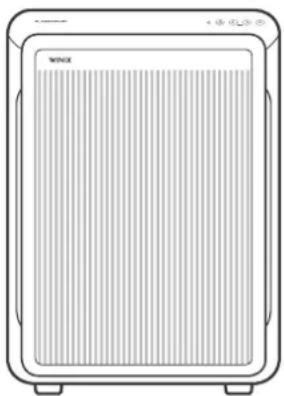
WINIX AIR PURIFIER
natural_image
Line drawing of a rectangular electronic device with ventilation grille and base (no text or symbols)9800 USER MANUAL

US LISTED


• The product warranty is printed on the back of this guide. This product is manufactured for use only in USA / CA. This product is suitable for 120 V only.
The energy efficiency of this ENERGY STAR certified model is measured based on a ratio between the model's CADR for smoke and the electrical energy it consumes, or CADR/Watt.
- WHERE TO USE
- 4-STAGE AIR PURIFICATION
- Winix Smart Wi-Fi Setup
- INITIAL OPERATION
- MAINTENANCE
- CONTROL PANEL
- Air Quality Indicator
- Auto Mode Indicator
- Fan Speed Indicator
- Sleep Mode Indicator
- Filter Replacement Indicator/
- Filter Reset Button
- Wi-Fi Indicator
- Smart Sensor
- Power Button
- 09-1. Fan Speed/Auto/Sleep Buttons
- • Auto Mode:
- - Sleep Mode:
- 09-2. PlasmaWave® Button Press and hold the two arrow buttons <+> for 3 seconds
- PlasmaWave ® Indicator
- Wi-Fi Button
- Light Sensor
- REPLACING FILTERS
- CLEANING CARE
- NOTICE
- SPECIFICATIONS
- SAFETY AND CAUTIONS
- WARNING
- TWO YEARS WARRANTY
- SAFETY INSTRUCTIONS
- IMPORTANT PRECAUTIONS FOR USING YOUR AIR PURIFIER:
- WINIX AIR PURIFIER
Brand : Winix
Model : 9800
Category : Air purifier