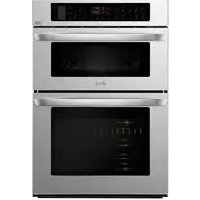
LG LWC3063ST - Microwaves

LWC3063ST - Microwaves LG - Free user manual and instructions

Find the device manual for free LWC3063ST LG in PDF.

English EN Download 💬 AI Question 10 questions ⚙️ Specs
📄

Document temporarily unavailable

The manual is currently being transferred to our new server. It will be accessible again in a few hours. Thank you for your patience.

View the manual : Français FR English EN
Pick your language and provide your email: we'll send you a specifically translated version.
Product Type Combi microwave oven (upper microwave + lower conventional oven)
Brand LG
Model LWC3063ST
Dimensions (W x H x D) 76.2 x 71.1 x 68.6 cm (30 x 28 x 27 inches)
Weight 68 kg (150 lb)
Upper oven capacity (microwave) 1.2 cu ft (34 L)
Lower oven capacity 4.7 cu ft (133 L)
Power supply 240 V, 60 Hz, 30 A (requires dedicated circuit)
Microwave power 1000 W (max)
Grill power (upper oven) 1500 W
Convection power (lower oven) 3000 W
Main functions Microwave, convection, grill, quick cook, defrost, sensor cook, steam cook, timers, delayed start
Microwave power levels 10 levels (100 W to 1000 W)
Lower oven temperature range 100 °F to 550 °F (38 °C to 288 °C)
Display type Digital display with clock and indicators
Interior lights Yes (upper and lower)
Turntable Yes (upper oven)
Temperature probe Yes (lower oven)
Cleaning functions EasyClean® and Self Clean (lower oven)
Connectivity Built-in Wi-Fi, LG ThinQ compatible
Safety Child lock, auto shut-off, open door detection
Included accessories Racks (3), glass tray, metal tray, broiler pan, temperature probe

Frequently Asked Questions - LWC3063ST LG

How to set the clock on the LG LWC3063ST?
Press the Clock button. The display shows CLO. Use the number keys to enter the time (12h or 24h format based on setting). Press Start to confirm. If the clock flashes, reset it after a power outage.
How to use the sensor cook function?
Place food in a microwave-safe dish and cover it. Press Sensor Cook, then select the number corresponding to the food (e.g., 7 for rice). Press Start. The oven automatically detects moisture and adjusts cooking time. Do not open the door during detection.
Can I use aluminum foil in the microwave oven?
Yes, but with caution: use only small pieces to shield thin parts (wings, thighs). Ensure the foil is at least 2.5 cm away from the walls and door. Never completely cover a dish. Arcing may occur if misused.
How to defrost food with this oven?
Press Defrost. Choose category: 1 for meat, 2 for poultry, 3 for fish, 4 for bread. Enter weight in pounds and tenths (e.g., 1.2 for 1.2 lb). Press Start. Mid-cycle, a signal prompts you to turn or separate food. Let stand after defrosting.
How to clean the oven interior?
For the upper oven (microwave), wipe with a damp cloth and mild soap. For the lower oven, use the EasyClean function for light soil: pour water on the oven bottom, run the cycle, then wipe. For stubborn soil, use the Self Clean cycle (remove racks and probe first). Never clean the door gasket.
What to do if the oven does not heat?
First check the power supply: is the circuit breaker on? Is the power cord plugged in? If the clock flashes, a power outage occurred. Ensure the door is fully closed. If the problem persists, use the Smart Diagnosis function via the LG ThinQ app or contact customer service.
How to disable the child lock?
Press the Lower Clear/Off button on the lower oven for 3 seconds. A beep sounds and the lock icon turns off. This function locks the lower oven door and disables most controls. Note that the lock does not affect the clock or timer.
How to use the steam cooking function?
The lower oven offers Steam Bake and Steam Roast modes. Fill the water reservoir (see manual). Select the mode, set the temperature, then press Start. Steam is generated during cooking. Use steam-safe dishes.
Can I use metal utensils in the microwave oven?
No, metal utensils (cutlery, metal pans) are prohibited in the microwave oven because they cause arcing and can damage the appliance. Use only glass, ceramic, microwave-safe plastic, or paper dishes. Check symbols on containers.
How to connect the oven to Wi-Fi?
Download the LG ThinQ app on your smartphone. On the oven, press the Remote Start button for 3 seconds to enable Wi-Fi. Follow the instructions in the app to pair the appliance to your network. Once connected, you can control the oven remotely and receive notifications.

User questions about LWC3063ST LG

0 question about this device. Answer the ones you know or ask your own.

Ask a new question about this device

The email remains private: it is only used to notify you if someone responds to your question.

No questions yet. Be the first to ask one.

Download the instructions for your Microwaves in PDF format for free! Find your manual LWC3063ST - LG and take your electronic device back in hand. On this page are published all the documents necessary for the use of your device. LWC3063ST by LG.

USER MANUAL LWC3063ST LG

Manual assistant
Powered by Anthropic
Waiting for your message
Product information

Brand : LG

Model : LWC3063ST

Category : Microwaves