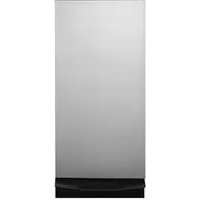
UCG1680LSS - Waste compactor GE - Free user manual and instructions
Find the device manual for free UCG1680LSS GE in PDF.


| Brand | GE |
| Model | UCG1680LSS |
| Product Type | Trash Compactor |
| Power Supply | 120 V, 60 Hz |
| Electrical Protection | Dedicated 15 or 20 amp circuit |
| Compaction Cycle | Less than 30 seconds |
| Volume Reduction | Up to 1/4 of original volume |
| Drawer Capacity | Minimum half full for visible compaction |
| Compactable Waste Types | Paper, cans, bottles, jars, plastic, envelopes, sweepings, some food waste |
| Prohibited Waste | Cartridges, explosives, flammable, toxic, explosive aerosols, lit cigarettes |
| Child Safety | Removable ON/OFF button, control lock |
| Safety Switches | Two drawer safety switches |
| Drawer Opening | By foot pedal |
| Exterior Cleaning | Damp cloth, polish for painted panels, Cerama Bryte cleaner for stainless steel |
| Drawer Interior Cleaning | Remove bag, gloves, wipe with damp cloth |
| Cabinet Interior Cleaning | Remove drawer, vacuum, wet cleaning |
| Compatible Disposable Bags | Special reinforced compactor bags, part WC60X5017 |
| Bag Ordering | US: 877.959.8688, Canada: 800.661.1616 |
| Warranty | 1 year parts and labor |
| Maintenance | Remove button and lock when away |
Frequently Asked Questions - UCG1680LSS GE
User questions about UCG1680LSS GE
0 question about this device. Answer the ones you know or ask your own.
Ask a new question about this device
Download the instructions for your Waste compactor in PDF format for free! Find your manual UCG1680LSS - GE and take your electronic device back in hand. On this page are published all the documents necessary for the use of your device. UCG1680LSS by GE.
USER MANUAL UCG1680LSS GE
SAFETY INFORMATION 3
USING THE TRASH COMPACTOR
Getting Started 5
CARE AND CLEANING 8
TROUBLESHOOTING TIPS 10
WARRANTY 11
CONSUMER SUPPORT 12
OWNER'S MANUAL
UCG1680
UCG1650
UCG1600
ENGLISH/FRANÇAIS
Write the model and serial numbers here:
Model #
Serial #
You can find them on the label on the front of the frame.
THANK YOU FOR MAKING GE APPLIANCES A PART OF YOUR HOME.
Whether you grew up with GE Appliances, or this is your first, we're happy to have you in the family.
We take pride in the craftsmanship, innovation and design that goes into every GE Appliances product, and we think you will too. Among other things, registration of your appliance ensures that we can deliver important product information and warranty details when you need them.
Register your GE appliance now online. Helpful websites and phone numbers are available in the Consumer Support section of this Owner's Manual. You may also mail in the pre-printed registration card included in the packing material.

GE APPLIANCES
IMPORTANT SAFETY INFORMATION READ ALL INSTRUCTIONS BEFORE USING THE APPLIANCE
WARNING For your safety, the information in this manual must be followed to minimize the risk of fire, explosion, electric shock, and to prevent property damage, personal injury, or death.
WARNING
WHEN USING ELECTRICAL APPLIANCES, BASIC SAFETY PRECAUTIONS SHOULD BE FOLLOWED, INCLUDING THE FOLLOWING:
This compactor is for household use only. Use this appliance only for its intended purpose as described in this Owner's Manual.
- Close supervision is necessary when any appliance is operated near children. Do not allow the compactor to be used as a toy, or to run unattended at any time.
- CHILD LOCK-OUT INSTRUCTIONS: Turn the knob to OFF and remove it when not compacting trash. This will help prevent anyone from tampering with the compactor or children from operating it.
- Do not push trash into the drawer with hands or feet.
Trash might contain broken glass, sharp pieces of metal, or other sharp objects that might cause injury.
- When removing or carrying the trash bag, keep the bag away from your body. Sharp objects may have pierced it.
- Be careful when cleaning the inside of the cabinet or trash drawer. Glass fragments may be stuck to the ram, imbedded in the drawer surface or lying in the bottom of the cabinet.
- Do not install or store compactor where it will be exposed to outside conditions.
Make sure the compactor is properly installed and leveled on a floor that can support its weight.
Do not touch moving parts.
- Do not compact food waste such as raw meat and fish, rinds, personal hygiene items and disposable diapers. These items create very strong odors and should not go into the compactor.
- Do not use as a freestanding unit. Use only as a built-in unit.
PRECAUTIONS AGAINST UNREASONABLE USE OF YOUR COMPACTOR:
- Never compact shotgun shells, cartridges for firearms, fireworks, etc., which are highly explosive.
- Never compact flammable materials such as paint, oil- or gasoline-saturated rags, engine starting fluid cans, paint thinner cans, etc.—spontaneous combustion or explosive vapor concentrations could occur.
- Never compact containers of toxic chemicals such as strong insecticides or other poisonous materials—compaction could release hazardous fumes.
- Never compact aerosol cans containing explosive or highly toxic chemicals. (If you are sure the aerosol cans contain non-hazardous materials such as shaving cream, cheese spread and whipped cream, they may be compacted.)
- Do not compact lit cigarettes, cigars, or other hot or burning items.
- Do not store or use gasoline or other flammable vapors and liquids in the vicinity of this or any other appliance.
Do not overload your appliance. - Handle a loaded trash bag with care. Sharp objects can pierce the bag and cause injury. Do not overload trash bag with heavy material such as glass.
READ AND SAVE THESE INSTRUCTIONS
IMPORTANT SAFETY INFORMATION READ ALL INSTRUCTIONS BEFORE USING THE APPLIANCE
WARNING
WHEN USING ELECTRICAL APPLIANCES, BASIC SAFETY PRECAUTIONS SHOULD BE FOLLOWED, INCLUDING THE FOLLOWING:
To prevent hazard of electrical shock, this compactor must be properly installed and grounded in accordance with the Installation Instructions before it is used.
- Do not operate with a damaged cord set, plug, motor, or after damage in any manner. Have the appliance examined, repaired, or adjusted by an authorized service technician.
- Do not take apart this appliance. Incorrect reassembly can cause electric shock when subsequently used.
Unplug the compactor before making any repairs. NOTE: We strongly recommend that any servicing be performed by a qualified person.
- Do not use an adapter plug or an extension cord with this appliance.
- Follow National Electric Codes or prevailing local codes and ordinances. This appliance must be supplied with 120V, 60Hz and connected to an individual, properly grounded branch circuit protected by a 15 or 20 amp circuit breaker or time delay fuse.
If the electric supply provided does not meet the above requirements, call a licensed electrician.
We recommend that a separate circuit serving only this appliance be provided.
- Do not, under any circumstances, cut or remove the third grounding prong from the power cord.
This appliance must be grounded. In the event of a malfunction or breakdown, grounding will reduce the risk of electric shock by providing a path of least resistance for electric current.
This appliance is equipped with a cord having an equipment grounding conductor and a grounding plug. The plug must be plugged into an appropriate outlet that is properly installed and grounded in accordance with local codes and ordinances.
- Improper connection of the equipment grounding conductor can result in a risk of electric shock. Check with a qualified electrician if you are in doubt as to whether the appliance is properly grounded.
- Do not modify the plug with this appliance. If it will not fit the outlet installed, have a proper outlet installed by a qualified electrician.
WARNING
PROPER INSTALLATION AND MAINTENANCE
This compactor must be properly installed and located in accordance with the Installation Instructions before it is used. If you did not receive an Installation Instructions with your compactor, you can receive one by visiting our Website at GEAppliances.com. In Canada, visit www.GEApliances.ca.
READ AND SAVE THESE INSTRUCTIONS
Features and appearance will vary throughout this manual
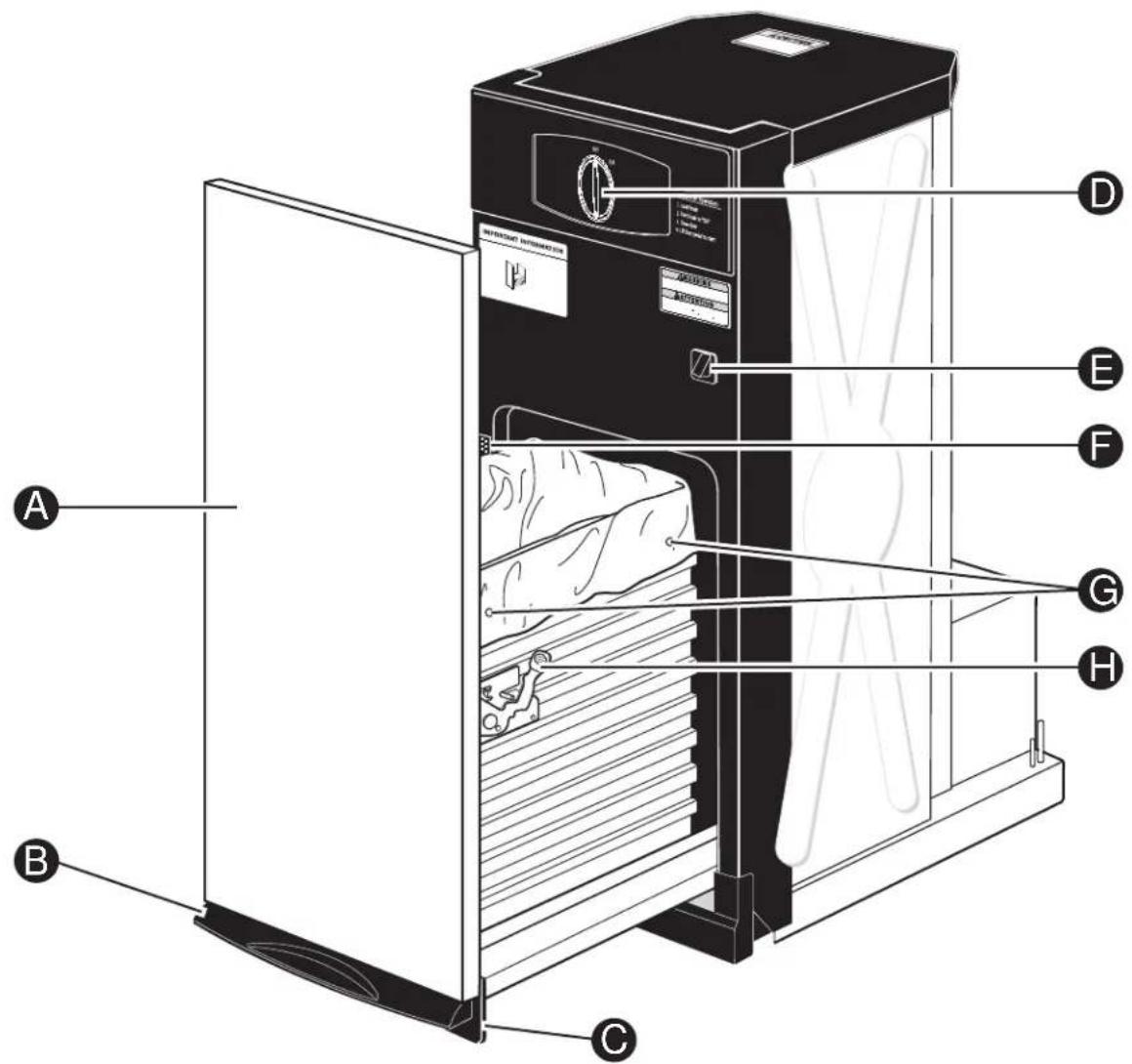
Features

DOOR PANEL

FOOT PEDAL DRAWER OPENER AND COMPACTOR ACTIVATION

TOE KICK

ON/OFF KNOB

DRAWER SAFETY SWITCH

MODEL AND SERIAL NUMBER LABEL

BAG RETAINER BUTTONS

What It Does and How It Works
Your compactor reduces household trash to as little as one-fourth of its original volume.
It compacts most refuse, including paper, cans, bottles, jars, plastic containers, wrappings, sweepings and some food wastes.
Drop trash into the disposable bag (designed for compactor use) that lines the compactor trash drawer and close the drawer. When you start the compactor, an electrically-operated ram moves down into the drawer, compacts trash, moves back up again—and the compactor shuts off automatically.
NOTE: The trash drawer must be at least 1/2 full before you will notice compaction because the ram does not travel all the way down into the drawer. By adding trash, compaction is transferred to the items below until all trash is compacted. Damage may occur if door is opened during cycle.
ON/OFF Knob
The removable knob is provided for your protection as a safety measure. When the knob switch is in the OFF position, the compactor will not operate.
Child Lockout Instructions:
Lock the compactor when it is not in use, by removing the knob. This will keep children from operating the compactor and prevent anyone from tampering with it.
Drawer Safety Switch
The compactor has two safety switches to ensure that the drawer is in its fully closed position for operation. The compactor will not cycle without the drawer being fully closed.
Trash Bag Installation
Before installing a new bag, be sure that:
The side door latch is securely locked. If the side door is open, push to close it.
The container is clean and free of sharp debris that may puncture the bag.
Reinforced plastic bags came with your compactor and are ready to be installed.
You must use the specially designed heavy-duty trash bags included with your compactor. These bags are available from your dealer or Factory Service Center. Ask for catalog number WC60X5017.
To order bags, call toll-free:
US: 877.959.3688 or GEApplianceparts.com
Canada: 800.661.1616 or www.GEApliances.ca
To install a new bag:
1 Place the bag into the drawer. Open the bag and pull the top edges over the drawer top.
Lock the bag in place by pulling the four prepunched holes over the bag retainer buttons. Holes will expand over the buttons without harming the bag.
Loading
Press the foot pedal and pull the drawer out. Remember:
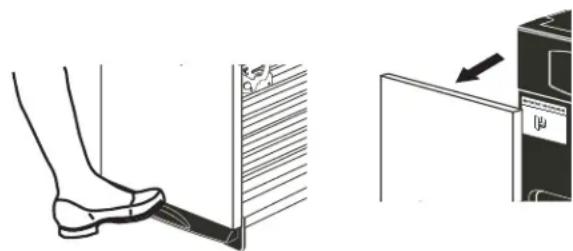
To help keep the ram clean when compacting messy food waste, place a couple of folded sheets of newspaper on top of the load to be compacted.
- Items too bulky to go into the drawer can be folded to fit. If it cannot be folded to fit into the drawer, do not attempt to force it.
- Folded newspaper is also helpful when compacting a large glass bottle, or several bottles or jars, or any other items that might shatter.
- Although it is not necessary to compact until the drawer is full or nearly full, we suggest that, for maximum compaction, you start the compactor each time a significant amount of trash is added.
Compacting
To start the compactor:
1 Turn the knob to ON.
2 Make sure the drawer is fully closed.
3 Lift the foot pedal up to start cycle.
The ram travels downward into the drawer, compacting the trash. At the bottom of the stroke, the ram automatically reverses direction, retracts out of the drawer, returns to its starting position, and the compactor shuts off automatically.
The cycle takes less than 30 seconds. As the trash drawer fills with trash, cycle time gets progressively shorter.
NOTES:
- You will not see compacting of trash the first few times you load. The compactor drawer should be about 1/2 full before the compactor can begin to compress the load.
Glass bottles can make a loud noise when they break during compaction. This is normal. Also, bottles in the trash drawer will not always break during the first cycle. Breaking glass and associated noise may occur several cycles later, depending on the type and volume of the trash. - When bottles and cans are compacted, small tears in the bag may occur. This is normal and in no way affects the performance of the compactor. Keep the bag away from your body to prevent injury from sharp objects that may have pierced the bag.
Removing a Full Trash Bag
1 Open the drawer by depressing the foot pedal.
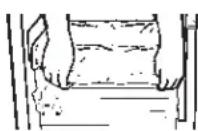
2 Remove the top of the bag from the bag retainer buttons. Pull up all four bag cuffs.
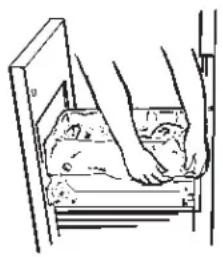
IMPORTANT:
- Do not apply too much force when turning the knob. The knob should always rotate easily. Forcing may break the knob and damage the switch.
- When emptying waste baskets into the trash drawer, some items may spill into the compactor behind the drawer. Items behind the drawer could prevent it from closing completely and prevent the compactor from operating. To remove such items from behind the drawer, open the drawer and remove it to clean them out. See the Care and Cleaning section.
To stop the compactor:
The compactor may be stopped at any time.
1 Attempting to open the drawer while the ram is moving will stop the ram. The safety switch will activate.
2 Close the drawer completely and the ram will travel back to the UP position.
3 Open the drawer fully and turn the knob to OFF.
Push the side door latch down and tilt the drawer side open.
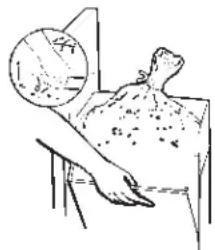
4 Lift the bag out.
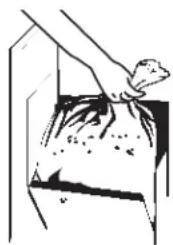
Care and cleaning
Cleaning the Unit
As is true of most appliances, proper care is needed to give you continued satisfaction. Before cleaning the compactor, turn the knob to the OFF position and remove it. If you will be away for more than a couple of days, remove the compactor bag. Lock the compactor by removing the knob and store it in a safe place.
To clean the outside:
Wipe with a clean damp cloth.
Painted panels:
Apply a coat of kitchen/appliance wax when the compactor is new, and then several times a year.
Stainless steel panels:
Stainless steel panels can be cleaned with Cerama Bryte® or a similar product using a clean, soft cloth.
Cerama Bryte is available from GE Appliances by calling 877.959.8688 (US) or 800.661.1616 (Canada).
To clean the drawer interior:
1 Remove the bag. See the Removing a Full Trash Bag section.
2 Wear protective gloves. There may be bits of glass in the drawer. Press the side door latch down.
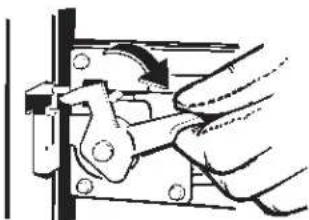
Hold the side door latch down and tilt the side of the drawer until the latch clears the drawer front.
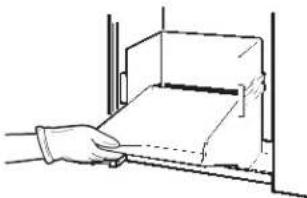
4 Wipe with a damp cloth.
5 Press the side door latch down while pressing the side to the upright position. Lock the side door latch.
To clean the cabinet interior:
Pull the drawer out until it stops. Note the tracks in which the drawer rollers move.
2 Wear protective gloves. Lift the front to clear the drawer stops. Grab the drawer on both sides. Pull it out the rest of the way and set it aside.
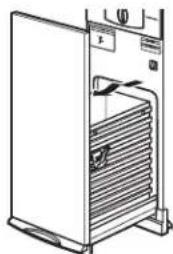
Vacuum inside of the cabinet. Liquid spills or wet trash should be cleaned up by hand, or use a vacuum designed to pick up liquid.
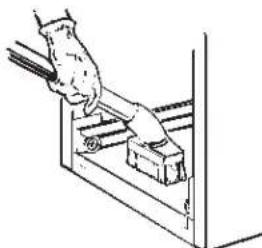
4 Wash, rinse and dry the inside.
Troubleshooting Tips... Before you call for service
| Problem Possible Causes What To Do | ||
| Compactor won't operate | Compactor is unplugged Make sure the cord is plugged securely into a working outlet. | |
| Circuit breaker/fuse is tripped/blown | Check house circuit breakers /fuses. Replace fuses or reset breaker. | |
| Knob switch may not be in the ON position | Make sure the switch is in the ON position. | |
| Foot pedal may not be lifted up long enough to start cycle | Lift foot pedal up momentarily until compaction cycle starts. | |
| Drawer may not be closed Check to make sure the drawer is firmly closed. | ||
| Compactor has an automatic thermal motor reset | If you have just compacted repeatedly, this protector may have opened the motor circuit. Wait a few minutes and the motor reset will reclose automatically. | |
| Drawer is hard to close | Trash may have fallen behind the drawer | Remove any trash. |
| Drawer will not open | The ram is not all the way up | Lift up on the foot pedal and release to allow ram to complete a cycle. |
| Little or no apparent compaction | Drawer is not full enough The drawer must be at least 1/2 full of trash before you will see any amount of compacting. The ram does not travel all the way to the bottom. Trash in the bottom of the drawer will be crushed during later cycles. | |
| Trash is stuck between ram and basket | Remove any trash. | |
GE Appliances Compactor Warranty
GEAppliances.com
All warranty service is provided by our Factory Service Centers, or an authorized Customer Care® technician. To schedule service online, visit us at www.geapliances.com/service_and_support/, or call GE Appliances at 800.GE.CARES (800.432.2737). Please have your serial number and your model number available when calling for service.
Servicing your appliance may require the use of the onboard data port for diagnostics. This gives a GE Appliances factory service technician the ability to quickly diagnose any issues with your appliance and helps GE Appliances improve its products by providing GE Appliances with information on your appliance. If you do not want your appliance data to be sent to GE Appliances, please advise your technician not to submit the data to GE Appliances at the time of service.
| For the period of GE Appliances will replace | |
| One year From the date of the original purchase | Any part of the compactor which fails due to a defect in materials or workmanship. During this limited one-year warranty, GE Appliances will provide, free of charge, all labor and in-home service to replace the defective part. |
What GE Appliances will not cover (for customers in the United States):
Service trips to your home to teach you how to use the product.
Product not accessible to provide required service.
- Improper installation, delivery, or maintenance.
- Damage to the product caused by accident, fire, floods, or acts of God.
Failure of the product if it is abused, misused or used for other than the intended purpose or used commercially.
- Incidental or consequential damage caused by possible defects with this appliance.
- Replacement of house fuses or resetting of circuit breakers.
Damage caused after delivery.
This warranty is extended to the original purchaser and any succeeding owner for products purchased for home use within the USA. If the product is located in an area where service by a GE Appliances Authorized Servicer is not available, you may be responsible for a trip charge or you may be required to bring the product to an Authorized GE Appliances Service location for service. In Alaska, the warranty excludes the cost of shipping or service calls to your home.
Some states do not allow the exclusion or limitation of incidental or consequential damages. This warranty gives you specific legal rights, and you may also have other rights which vary from state to state. To know what your legal rights are, consult your local or state consumer affairs office or your state's Attorney General.
Warrantor: GE Appliances, a Haier company
What GE Appliances will not cover (for customers in Canada):
Service trips to your home to teach you how to use the product.
Failure of the product if it is abused, misused or used for other than the intended purpose or used commercially.
Improper installation.
- Replacement of house fuses or resetting of circuit breakers.
If you have an installation problem, contact your dealer or installer. You are responsible for providing adequate electrical, exhausting and other connecting facilities.
- Damage to the product caused by accident, fire, floods, or acts of God.
Damage caused after delivery.
This warranty is extended to the original purchaser and any succeeding owner for products purchased in Canada for home use within Canada. In home warranty service will be provided in areas where it is available and deemed reasonable by Mabe to provide.
WARRANTOR IS NOT RESPONSIBLE FOR CONSE QUENT TIAL DAMAGES.
Warrantor: MC Commercial, Burlington, ON, L7R 5B6
EXCLUSION OF IMPLIED WARRANTYES
Your sole and exclusive remedy is product repair as provided in this Limited Warranty. Any implied warranties, including the implied warranties of merchantability or fitness for a particular purpose, are limited to one year or the shortest period allowed by law.
Extended Warranties: Purchase a GE Appliances extended warranty and learn about special discounts that are available while your warranty is still in effect. You can purchase it online anytime at
www.geappliances.com/service_and_support/shop-for-extended-service-plans.htm
or call 800.626.2224 during normal business hours. GE Appliances Service will still be there after your warranty expires.
Consumer Support
GE Appliances Website
Have a question or need assistance with your appliance? Try the GE Appliances Website 24 hours a day, any day of the year! You can also shop for more great GE Appliances products and take advantage of all our on-line support services designed for your convenience. In the US: GEAppliances.com
Register Your Appliance
Register your new appliance on-line at your convenience! Timely product registration will allow for enhanced communication and prompt service under the terms of your warranty, should the need arise. You may also mail in the pre-printed registration card included in the packing material. In the US: GEAppliances.com/register
Schedule Service
Expert GE Appliances repair service is only one step away from your door. Get on-line and schedule your service at your convenience any day of the year. In the US: GE Appliances.com/ge/service-and-support/service.htm or call 800.432.2737 during normal business hours.
Extended Warranties
Purchase a GE Appliances extended warranty and learn about special discounts that are available while your warranty is still in effect. You can purchase it on-line anytime. GE Appliances Services will still be there after your warranty expires. In the US: GEAppliances.com/ge/service-and-support/shop-for-extended-service-plans.htm or call 800.626.2224 during normal business hours.
Parts and Accessories
Individuals qualifed to service their own appliances can have parts or accessories sent directly to their homes (VISA, MasterCard and Discover cards are accepted). Order on-line today 24 hours every day. In the US: GEApplianceparts.com or by phone at 877.959.8688 during normal business hours.
Instructions contained in this manual cover procedures to be performed by any user. Other servicing generally should be referred to qualified service personnel. Caution must be exercised, since improper servicing may cause unsafe operation.
Contact Us
If you are not satisfied with the service you receive from GE Appliances, contact us on our Website with all the details including your phone number, or write to:
In the US: General Manager, Customer Relations | GE Appliances, Appliance Park | Louisville, KY 40225
GEAppliances.com/ge/service-and-support/contact.htm
COMPACTEURS
de déchets
CONSIGNES DE SECURITE 3
UTILISATION DU COMPACTEUR
Comment démarrer 5
ENTRETIEN ET NETTOYAGE....8
CONSEILS DE DÉPANNAGE......10
GARANTIE 11
SERVICEÀ LA CLIENTÉLE 12
MANUEL
D'UTILISATION
UCG1680
UCG1650
UCG1600
Garant:MCCommercial,Burlington,ON,L7R5B6
Au Canada: Prodsupport.mabe.ca/crm/Products/ProductRegistration.aspx
Au Canada: GEAppliances.ca/en/support/service-request ou composez le 800.561.3344
Prolongation de garantie
Au Canada: GEAppliances.ca/en/support/purchase-extended-warranty ou composez le 800.290.9029
Aux Etats-Unis: General Manager, Customer Relations | GE Appliances, Appliance Park | Louisville, KY 40225
GEAppliances.com/ge/service-and-support/contact.htm
Au Canada : Director, Consumer Relations, Mabe Canada Inc. | Suite 310, 1 Factory Lane | Moncton, N.B. E1C 9M3 GEAppliances.ca/en/contact-us


- OWNER'S MANUAL
- ENGLISH/FRANÇAIS
- THANK YOU FOR MAKING GE APPLIANCES A PART OF YOUR HOME.
- IMPORTANT SAFETY INFORMATION READ ALL INSTRUCTIONS BEFORE USING THE APPLIANCE
- WARNING
- WHEN USING ELECTRICAL APPLIANCES, BASIC SAFETY PRECAUTIONS SHOULD BE FOLLOWED, INCLUDING THE FOLLOWING:
- PRECAUTIONS AGAINST UNREASONABLE USE OF YOUR COMPACTOR:
- READ AND SAVE THESE INSTRUCTIONS
- PROPER INSTALLATION AND MAINTENANCE
- Features
- What It Does and How It Works
- ON/OFF Knob
- Child Lockout Instructions:
- Drawer Safety Switch
- Trash Bag Installation
- Before installing a new bag, be sure that:
- To install a new bag:
- Loading
- Compacting
- NOTES:
- Removing a Full Trash Bag
- IMPORTANT:
- To stop the compactor:
- Care and cleaning
- Cleaning the Unit
- To clean the outside:
- Painted panels:
- Stainless steel panels:
- To clean the drawer interior:
- To clean the cabinet interior:
- GE Appliances Compactor Warranty
- GEAppliances.com
- What GE Appliances will not cover (for customers in the United States):
- What GE Appliances will not cover (for customers in Canada):
- EXCLUSION OF IMPLIED WARRANTYES
- Consumer Support
- GE Appliances Website
- Register Your Appliance
- Schedule Service
- Extended Warranties
- Parts and Accessories
- Contact Us
- COMPACTEURS
- de déchets
- UTILISATION DU COMPACTEUR
- ENTRETIEN ET NETTOYAGE....8
- Prolongation de garantie
Brand : GE
Model : UCG1680LSS
Category : Waste compactor