ManualGo.com
KD80178AFN - Fridge Atag - Free user manual and instructions
Find the device manual for free KD80178AFN Atag in PDF.



Download the instructions for your Fridge in PDF format for free! Find your manual KD80178AFN - Atag and take your electronic device back in hand. On this page are published all the documents necessary for the use of your device. KD80178AFN by Atag.
USER MANUAL KD80178AFN Atag
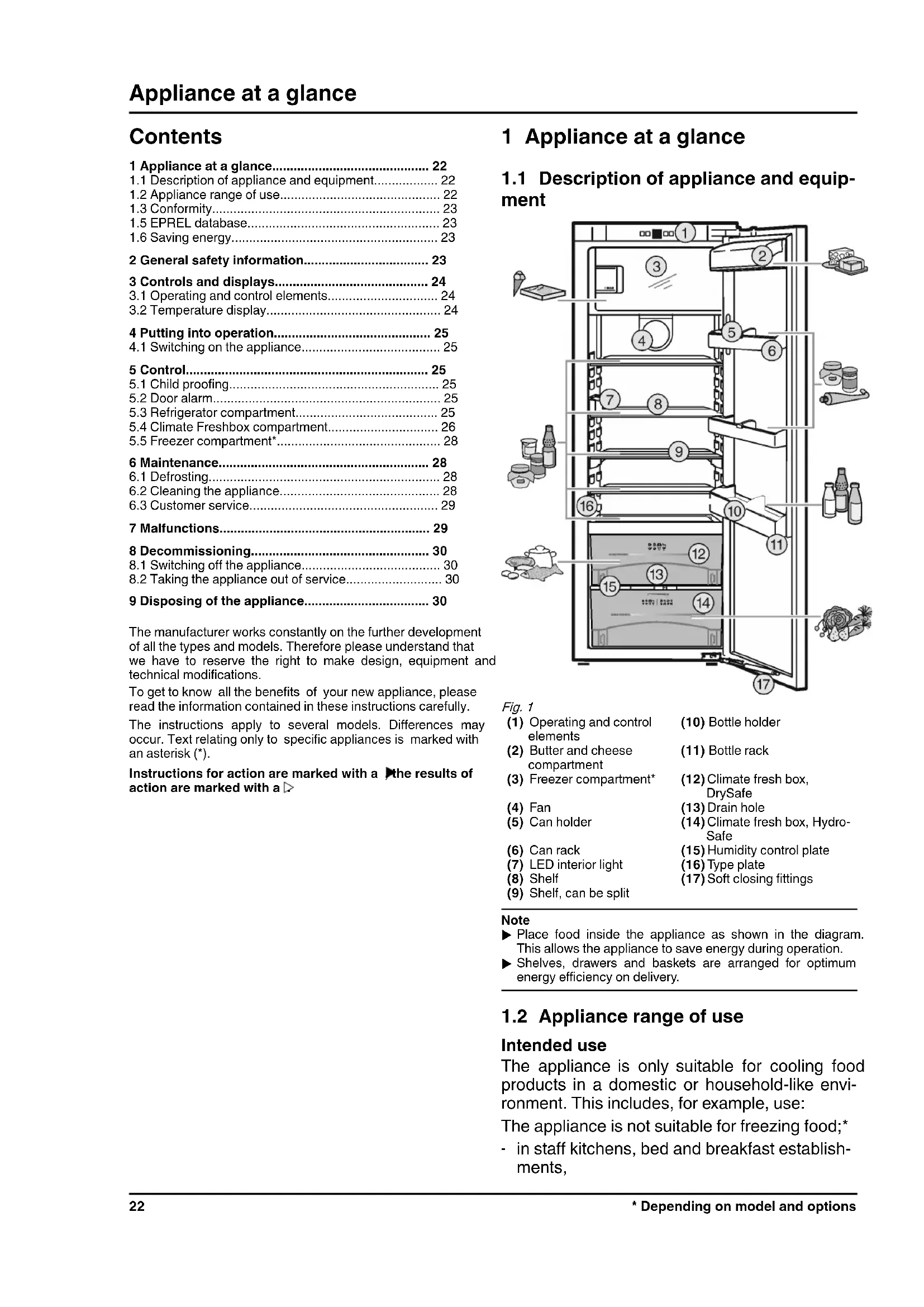
1.1 Description of appliance and equip-
ment Fig. 1 (1) Operating and controlelements(10) Bottle holder(2) Butter and cheesecompartment(11) Bottle rack (3) Freezer compartment* (12) Climate fresh box, DrySafe (4) Fan (13) Drain hole (5) Can holder (14) Climate fresh box, Hydro- Safe (6) Can rack (15) Humidity control plate (7) LED interior light (16) Type plate (8) Shelf (17) Soft closing fittings (9) Shelf, can be split Note
Place food inside the appliance as shown in the diagram.This allows the appliance to save energy during operation.
Shelves, drawers and baskets are arranged for optimum energy efficiency on delivery.
1.2 Appliance range of use
Intended use The appliance is only suitable for cooling food products in a domestic or household-like envi- ronment. This includes, for example, use: The appliance is not suitable for freezing food;*
in staff kitchens, bed and breakfast establish- ments, Appliance at a glance 22 * Depending on model and options- by guests in country houses, hotels, motels and other accommodation,
for catering and similar services in the whole- sale trade. All other types of use are not permitted. Foreseeable misuse The following applications are expressly forbidden:
Storing and refrigerating medicines, blood plasma, laboratory preparations or similar substances and products based on the Medical Device Directive 2007/47/EC
Use in areas at risk of explosions Misusing the appliance may lead to damage to the goods stored or they may spoil. Climate classifications Depending on the climate classification the appliance is designed to operate in restricted ambient temperatures. The climate classifica- tion applying to your appliance is printed on the rating plate. Note
Keep to the specified ambient temperatures in order to guarantee that the appliance works properly. Climate classi-ficationfor ambient temperatures ofSN 10 °C to 32 °CN 16 °C to 32 °CST 16 °C to 38 °CT 16 °C to 43 °C
The refrigerant circuit has been tested for leaks. In installed condition, this appliance complies with the applicable safety stipulations and with directives 2014/35/EU, 2014/30/EU, 2009/125/EG, 2011/65/EU and 2010/30/EU. The Climate Freshbox meets the requirements of a cold storage compartment as set out in DIN EN 62552:2020.
Details about energy labelling and ecodesign requirements willbe available on the European product database (EPREL) from1st March 2021. You can access the product database at thefollowing link: https://eprel.ec.europa. eu/ You will be asked to enter the model ID. You can find the model ID on the name- plate.
Pay attention to good ventilation. Do not cover ventilation holes or grids. Always keep the fan air slits clear.
Do not install the appliance in direct sunlight, next to an oven, radiator or similar. Energy consumption depends on the installation conditions, e.g. the ambient temperature (see 1.2 Appliance range of use) . A warmer ambient temperature can increase the energy consumption. Open the appliance for as short a time as possible.
The lower the temperature is set the higher the energy consumption. Arrange the food in an organised way (see 1 Appliance at aglance) .
Keep all food properly packed and covered. This prevents frost from forming. Only take food out for as long as necessary so that it doesn’twarm up too much. Inserting warm food: allow to cool down to room temperaturefirst. Thaw frozen food in the refrigerator.* If there is a thick layer of frost in the appliance: defrost theappliance.* 2 General safety information Danger for the user:
This device can be used by children and people with impaired physical, sensory or mental abilities or with a lack of experi- ence and knowledge provided that they are supervised or have received instruction in the safe use of this device, and about the resulting hazards. Children must not play with this appliance. Cleaning and user main- tenance work must not be carried out by chil- dren without adult supervision. Children aged between 3 and 8 are allowed to load and unload the appliance. Children below the age of 3 must be kept away from the appliance unless they are under continuous adult super- vision.
When disconnecting the appliance from the supply, always take hold of the plug. Do not pull the cable.
In the event of a fault pull out the mains plug or deactivate the fuse.
Do not damage the mains power cable. Do not operate the appliance with a defective mains power cable.
Repairs, interventions on the appliance and the replacement of mains connection line may only be carried out by After-Sales Service or other suitably trained specialist personnel.
Only install, connect and dispose of the appli- ance according to the instructions.
Only use the appliance when it is installed.
Please keep these instructions in a safe place and pass them on to any subsequent owners. Fire hazard:
The coolant used (information on the model plate) is eco-friendly but also flammable. Any leaking coolant may ignite.
Do not damage the refrigerant circuit pipes. General safety information
- Depending on model and options 23• Do not handle ignition sources inside the appliance.
Do not use electrical appliances inside the appliance (e.g. steam cleaners, heaters, ice cream makers, etc.).
If the refrigerant leaks: remove any naked flames or ignition sources from the vicinity of the leakage point. Properly air the room. Inform customer services.
Do not store explosives or sprays using combustible propellants such as butane, propane, pentane, etc. in the appliance. To identify these spray cans, look for the list of contents printed on the can, or a flame symbol. Gases possibly escaping may ignite due to electrical components.
Please be sure to store alcoholic drinks or other packaging containing alcohol in tightly closed containers. Any alcohol that leaks out may be ignited by electrical components. Danger of tipping and falling:
Do not misuse the plinth, drawers, doors etc. as a step or for support. This applies particu- larly to children.
Danger of tipping if the door is open if the appliance has not yet been installed properly. Danger of food poisoning:
Do not consume food which has been stored too long. Danger of frostbite, numbness and pain:
Avoid prolonged skin contact with cold surfaces or refrigerated/frozen goods or take protective measures, e.g wear use gloves. Danger of injury and damage:
Hot steam can lead to injury. Do not use elec- trical heating or steam cleaning equipment, open flames or defrosting sprays to defrost.
Do not use sharp implements to remove the ice. Danger of crushing:
Do not hold the hinge when opening and closing the door. Fingers may get caught. Symbols on the appliance: The symbol can be located on the compressor. It refers to the oil in the compressor and indicates the following danger: Swallowing or inhaling can be fatal.This is only relevant for recycling. There is nodanger in normal operation.This symbol is found on the compressor andindicates the danger of flammable materials.Do not remove the sticker. A sticker to this effect may be applied to the rear of the appliance. It refers to the foam-padded panels in the door and/or the housing. This is only relevant for recycling. Donot remove the sticker. Please observe the specific information in the other sections: DANGER identifies a situation involving direct danger which, if not obviated, may result in death or severe bodily injury.WARNING identifies a dangerous situationwhich, if not obviated, may result indeath or severe bodily injury.CAUTION identifies a dangerous situationwhich, if not obviated, may result inminor or medium bodily injury.NOTICE identifies a dangerous situationwhich, if not obviated, may result indamage to property.Note It contains useful instructions andtips. 3 Controls and displays
3.1 Operating and control elements
During normal operation, the display shows: the average cooling temperature The following displays indicate a fault. Possible causes and solutions: (see 7 Malfunctions) .
F0 to F9 Controls and displays 24 * Depending on model and options4 Putting into operation
4.1 Switching on the appliance
Open the door. Press the On/Off button Fig. 2 (1)
The temperature display lights up. The interior light goes on when the door is opened. The appli-ance is switched on. If “DEMO” is displayed, demo mode is activated.Please contact the after sales service. 5 Control
The child-proofing function enables you to makesure that the appliance is not inadvertently switchedoff by playing children.
For the fridge and BioFresh compartmentsAn audible warning sounds if the door is open forlonger than 60 seconds.The audible warning stops automatically when thedoor is closed.
5.2.1 Muting the door alarm
The audible alarm can be muted when the door is open. Thesound switch-off function is active as long as the door is leftopen. Press alarm button Fig. 2 (6)
The door alarm is silenced.
5.3 Refrigerator compartment
The natural circulation of air in the refrigerator compartment results in zones differing in temperature. It is coldest directlyabove the plate separating off the ClimatFreshbox zone and atthe rear wall. It is warmest at the top front of the compartmentand in the door.
5.3.1 Refrigerating food
Note The energy consumption increases and the cooling perform-ance decreases if the ventilation is inadequate. Always keep the air slits of the fan free. Place butter and preserves in the top area and in the door.(see 1 Appliance at a glance)
Use reuseable plastic, metal, aluminium, glass containers and foil wrap to store food. Always store raw meat and fish in clean, sealed containerson the bottom shelf of the refrigerator, to prevent themcoming into contact with or dripping onto other foods. Foods that easily absorb or give off smell or taste, as well asliquids, should be stored in sealed containers or covered. Use the front area of the base shelf only to temporarily setdown refrigerated foods, for example while rearranging or sorting the contents. Remember not to leave refrigerated foods here as they could shift to the back or tip over whenyou close the door. Do not pack foods too closely together, as the air needs tocirculate.
5.3.2 Setting the temperature
The temperature depends on the following factors: the frequency of opening the door how long the door is open for the room temperature of the installation location the type, temperature and quantity of the foodRecommended temperature setting: 5 °CAn average temperature of approx. -18 °C is then establishedin the freezer compartment.*The temperature can be adjusted continually. Once the setting3 °C is reached, the cycle is begun again at 9 °C.
The previously-set value will flash in the tempera-ture display. Change the temperature in 1 °C steps: Pressthe "+/-" setting button Fig. 2 (3) until therequired temperature is indicated in the tempera-ture display. Change temperature continually: hold downsetting button. During adjustment the value flashes on the display. The new setting is adopted approx. 5 seconds after thelast time the button was pressed and the set temperatureis again displayed. The temperature in the interior graduallyadjusts to the new value.
FastCool is for maximum cooling. This option is for very lowtemperatures:* In the fridge compartment In the freezer compartment*Use FastCool if you want to quickly cool a large amount of food.To freeze food, activate FastCool when you place the goods inthe appliance.*The fan is in operation when Fast Cool is switched on*. Theappliance operates with the maximum cooling capacity; conse-quently, noises emitted by the cooling unit may be temporarilylouder.Fast Cool has a slightly higher energy consumptionTo cool using Fast Cool Briefly press the Fast Cool button Fig. 2 (4)
The Fast Cool symbol Fig. 2 (5) illuminates in the display. The cooling temperature drops to the coldest value.Fast Cool is switched on. The freezing temperature drops to the lowest setting.* Fast Cool automatically switches itself off after approx. 12 h. The appliance continues to function in the energy-saving normal mode.To switch off Fast Cool ahead of time Briefly press the Fast Cool button Fig. 2 (4)
The Fast Cool symbol Fig. 2 (5) goes out in the display. Fast Cool is switched off.
Moving or removing shelvesThe shelves are prevented from being pulled out accidentallyby pull out stops. Putting into operation
- Depending on model and options 25Fig. 3
Lift the shelf and pull forward a little. Adjust the height of the shelf. To do this move the slots alongthe supports. In order to remove the shelf fully, place it at a slant and pullout towards the front.
Insert shelf with the raised edge pointing upwards at the back. The food does not freeze onto the rear wall.Dismantling shelves The shelves can be disman-tled for cleaning.
5.3.5 Using the sectioned shelf
Slide the sectioned shelfunder, as shown in theillustration. Fig. 4
The glass shelf with stop face (2) has to be at the back. The glass plate (1) with pull-out stops must be at the front sothat the stops (3) face downwards. When dealing with appliances with a freezer compartment,do not attach trayslides and sectioned shelves in front of thefan.*
Moving the storage rack Remove storage rack according toillustration.Always remove the butter and cheesecompartment together with the lid. To remove lid: Press one side part ofthe butter and cheese compartmentoutwards until the lid pin is clear andthen remove the lid sideways.
5.3.7 Removing the bottle holder
Remove the bottle holder according tothe illustration.
5.4 Climate Freshbox compartment
The Climate Freshbox compartment allows various types of fresh food to be kept as much as three times longer than in aconventional refrigerator, while maintaining the quality.For food with an indicated best before date, the date specifiedon the packaging always applies.
The DrySafe is suitable for storing dry or wrapped food (e.g.dairy products, meat, fish, sausages). A relatively dry storageclimate is established here.
The humidity in the compartment depends on the moisturecontent of the items being stored and the number of times thedoor is opened. You can set the humidity yourself.On the high moisture setting, the HydroSafe is suitable forstoring loose salad, vegetables and fruit with a high moisturecontent. A well-stocked drawer is stored in absolute freshness.
5.4.3 Setting the humidity in the HydroSafe
low humidity: move the regulator tothe left. high humidity: move the regulatorto the right.
Do not put the following in the Climate-FreshBox section:cold-sensitive vegetables including cucumbers, aubergines,tomatoes, courgettes and any cold-sensitive tropical fruits.
To prevent food spoilage due to transfer of germs: Store unwrapped animal and vegetable products separate from one another in the drawers. This also applies to different sorts of meat.If food has to be stored together due to lack of space: wrap the food.
Guidelines for storage periods at low humidity 0 °CButter up to 90 daysHard cheese up to 110 daysMilk up to 12 days Control 26 * Depending on model and optionsGuidelines for storage periods at low humidity 0 °C Cold meats up to 9 days Poultry up to 6 days Pork up to 7 days Beef up to 7 days Game up to 7 days Note
Please note that protein-rich food deteriorates faster, i.e. shellfish and crustaceans deteriorate faster than fish, fish faster than meat. Guidelines for storage periods at high humidity 0 °C Vegetables, salads Artichokes up to 14 days Celery up to 28 days Cauliflower up to 21 days Broccoli up to 13 days Chicory up to 27 days Leaf lettuce up to 19 days Peas up to 14 days Kale up to 14 days Carrots up to 80 days Garlic up to 160 days Cabbage up to 55 days Round lettuce up to 13 days Herbs up to 13 days Leeks up to 29 days Mushrooms up to 7 days Radishes up to 10 days Sprouts up to 20 days Asparagus up to 18 days Spinach up to 13 days Savoy cabbage up to 20 days Fruit Apricots up to 13 days Apples up to 80 days Pears up to 55 days Blackberries up to 3 days Dates up to 180 days Strawberries up to 7 days Figs up to 7 days Blueberries up to 9 days Raspberries up to 3 days Red currants up to 7 days Cherries, sweet up to 14 days Kiwis up to 80 days Peaches up to 13 days Guidelines for storage periods at high humidity 0 °C Plums up to 20 days Cranberries up to 60 days Rhubarb up to 13 days Gooseberries up to 13 days Grapes up to 29 days
5.4.6 Setting the temperature in the climate
fresh box unit Recommended refrigerator setting: 5 °C. The climate fresh box temperature is controlled automatically and is between 0 °C and 3 °C. You can set a slightly higher or lower temperature. The temper- ature can be set from b1 (lowest temperature) to b9 (highest temperature). The default is b5. With levels b1 to b4 the temperature may drop below 0 °C so that the food can freeze. The value can be continuously altered. Once the b9 setting has been reached, the process starts again with the b1 setting.
Press the "+/-" setting button Fig. 2 (3) until b flashes in the display.
Press the "+/-" setting button Fig. 2 (3) until the required value is indicated in the display.
b flashes on the display.
The refrigerator compartment temperature is again indicated on the temperature display.
The temperature in the climate fresh box unit gradually reaches the new value.
Pull out the drawer, lift it at the back and draw it forwards for removal.
Replace the racks. Fig. 6
Attach the drawer to the rails and push it in until it engages audibly at the back. Control
- Depending on model and options 275.4.8 Humidity control plate Fig. 7 To remove the humidity control plate: Having removed thedrawers, carefully draw the plate forwards and lower it forremoval. To insert the humidity control plate: Insert the cover mould-ings of the plate into the rear holder Fig. 7 (1) from under-neath and engage them in the holder Fig. 7 (2) at the front.
5.5 Freezer compartment*
You can store frozen food for several months, make ice cubesand freeze fresh food in the freezer compartment at a tempera-ture of -18 °C and lower. The air temperature in the compartment, measured by ther- mometer or other instruments, may fluctuate.
The rating plate indicates the maximum quantity of fresh foodyou can freeze within 24 hours (see 1 Appliance at a glance)under “Freezing capacity ... kg/24h”. CAUTION Risk of injury due to broken glass!Bottles and cans containing drinks may burst when beingfrozen. This applies particularly to sparkling drinks. Do not freeze bottles and cans containing drinks! Switch on Fast-Cool when you load the product.(see 5.3.3 Fast Cool)So that the food is rapidly frozen through to the core, do notexceed the following quantities per pack- Fruit, vegetables up to 1 kg- Meat up to 2.5 kg Pack the food in portions in freezer bags, reusable plastic,metal or aluminium containers
Guide times for storing various types of food in the freezercompartment:Ice cream 2 to 6 monthsSausage, ham 2 to 6 monthsBread, bakery products 2 to 6 monthsGame, pork 6 to 10 monthsFish, fatty 2 to 6 monthsFish, lean 6 to 12 monthsCheese 2 to 6 monthsPoultry, beef 6 to 12 monthsVegetables, fruit 6 to 12 monthsStorage times given are guide times.
- in the refrigerator compartment- in a microwave oven- in a conventional or fan oven- at room temperature Remove only as much food as is required. Use thawed foodas quickly as possible. Food once thawed should be re-frozen only in exceptionalcases. 6 Maintenance
6.1.1 Defrosting refrigerator compartment
The refrigerator compartment is defrosted automatically. Thewater evaporates. Drops of water on the rear wall are function-ally conditioned and perfectly normal. Clean the drain hole at regular intervals to allow the defrostwater to drain (see 6.2 Cleaning the appliance) .
6.1.2 Defrosting freezer compartment*
A layer of frost and ice forms in the freezer compartment afterthe appliance has been in use for a lengthy period of time. Thisis quite normal. The layer of frost and ice forms more quicklyif the door is opened frequently or if the food is warm whenplaced inside. However, a thick layer of ice will increase theappliance‘s energy consumption. You should therefore defrostthe appliance regularly. WARNING Danger of injury and damage Do not use any mechanical aids or other means not recom-mended by the manufacturer in order to accelerate thedefrosting process. Do not use electrical heating or steam cleaning equipment,open flames or defrosting sprays to defrost. Do not use sharp implements to remove the ice. Do not damage the pipework in the refrigerant circuit. Switch off the appliance. The temperature display goes out. If the temperature display does not go out, the child-proofingfunction (see 5.1 Child proofing) is active. Pull out the plug. Wrap the frozen food in newspaper or blankets and store ina cool place.
Leave the compartment and appliance door open during defrosting. Remove detached pieces of ice.
Pay attention that the defrost water does not run into the kitchen unit. If necessary, pick up defrost water several times, using asponge or cloth. Clean the compartment (see 6.2 Cleaning the appliance) .
6.2 Cleaning the appliance
Clean the appliance regularly. WARNING Risk of injury and damage as a result of hot steam!Hot steam can lead to burns and can damage the surfaces. Do not use any steam cleaners! Maintenance 28 * Depending on model and optionsNOTICE Incorrect cleaning damages the appliance! Do not use cleaning agents in concentrated form. Do not use any scouring or abrasive sponges or steel wool. Do not use any sharp or abrasive cleaning agents, nor anythat contain sand, chloride or acid. Do not use chemical solvents. Do not damage or remove the type plate on the inside of theappliance. It is important for the customer service.
Do not pull off, bend or damage cables or other compo- nents. Do not allow any cleaning water to enter the drain channel,ventilation grille or electrical parts. Please use soft cleaning cloths and a universal pH-neutralcleaning agent. Please use cleaning and care products suitable for contactwith foodstuffs in the appliance interior. Empty appliance. Pull out the power plug.
Clean plastic outer and inner surfaces with lukewarm water and a little washing-up liquid.
Most of the parts can be dismantled for cleaning: see therelevant chapter.
Clean drawers by hand with lukewarm water and a little washing up liquid. Clean other items of equipment by hand with lukewarmwater and a little washing-up liquid. Only use a damp cloth to clean the telescopic rails. Thegrease in the runners is for lubrication purposes and mustnot be removed.After cleaning: Wipe dry the appliance and items of equipment. Connect the appliance and switch it on again.When the temperature is sufficiently cold: Put the food back inside.
6.3 Customer service
First check whether you can correct the fault yourself by refer-ence to the list (see 7 Malfunctions) . If this is not the case,please contact the customer service whose address is given inthe enclosed customer service list. WARNING Risk of injury if repair work is not carried out professionally! Have any repairs and action - not expressly specified - on the appliance and mains cable carried out by service personnel only. (see 6 Maintenance) Read the appliancedesignation Fig. 8 (1) service No. Fig. 8 (2)and serial No.Fig. 8 (3) off the typeplate located insidethe appliance on theleft-hand side.Fig. 8 Notify the customer service, specifying the fault, appliancedesignation Fig. 8 (1), service No. Fig. 8 (2) and serial No.Fig. 8 (3)
This will help us to provide you with a faster and more accu-rate service. Keep the appliance closed until the customer servicearrives. The food will stay cool longer. Pull out the mains plug (not by pulling the connecting cable)or switch off the fuse. 7 Malfunctions Your appliance is designed and manufactured for a long lifespan and reliable operation. If a malfunction nonethelessoccurs during operation, check whether it is due to a handlingerror. In this case you will have to be charged for the costsincurred, even during the warranty period. You may be able torectify the following faults yourself:Appliance does not work. The appliance is not switched on. Switch on the appliance. The power plug is not properly inserted in the wall socket. Check power plug. The fuse of the wall socket is not in order. Check fuse.The compressor runs for a long time. The compressor switches to a low speed when little cold isneeded. Although the running time is increased as a result,energy is saved. This is normal in energy-saving models. Fast-Cool is activated. The compressor runs for longer in order to rapidly cool thefood. This is normal.A LED on the bottom rear of the appliance (at thecompressor) flashes repeatedly every 5 seconds*. There is a fault. Please contact the after-sales service (see 6 Mainte-nance) .Excessive noise. Due to the various speed steps, speed-regulated* compres-sors can generate different running noises. The sound is normal.A bubbling and gurgling noise. This noise comes from the refrigerant flowing in the refriger-ation circuit. The sound is normal.A quiet clicking noise. The noise is produced whenever the refrigeration unit(motor) automatically switches on or off. The sound is normal.A hum. It is briefly a little louder when the refrigerationunit (the motor) switches on.
The refrigeration increases automatically when the Fast-Cool function is activated, fresh food has just been Malfunctions
- Depending on model and options 29placed in the appliance or the door has been left open for awhile. The sound is normal. The ambient temperature is too high. Solution: (see 1.2 Appliance range of use)A low hum. The sound is produced by air flow noise of the fan. The sound is normal.Vibration noises The appliance is not standing firmly on the floor. As a resultobjects and adjacent units start to vibrate when the refriger-ator is running. Check the installation and realign the appliance. Keep bottles and jars apart.Flow sound at the soft stop mechanism. The noise is produced when the door is opened andclosed. The sound is normal.The temperature display indicates: F0 to F9 There is a fault. Please contact the after-sales service (see 6 Mainte-nance) .DEMO shines in the temperature display. The demo mode is activated. Please contact the after-sales service (see 6 Mainte-nance) .The outer surfaces of the appliance are warm*. The heat of the refrigeration circuit is used to preventcondensate from forming. This is normal.The temperature is not cold enough. The door of the appliance is not properly closed. Close the door of the appliance. Insufficient ventilation. Keep ventilation grille clear, and clean it. The ambient temperature is too high. Solution: (see 1.2 Appliance range of use) . The appliance was opened too frequently or for too long.
Wait to see whether the appliance reaches the required temperature by itself. If not, please contact the after salesservice (see 6 Maintenance) . The temperature is incorrectly set. Set the temperature to a colder setting and check after 24hours. The appliance is too close to a source of heat (stove, heateretc). Change the position of the appliance or the source of heat. The appliance was not inserted properly into the recess.
Check whether the appliance was inserted correctly and the door closes properly.The internal light does not come on. The appliance is not switched on. Switch the appliance on. The door was open for longer than 15 minutes. The internal light switches itself off automatically after about15 minutes if the door is open. The LED illumination is faulty or the cover is damaged: WARNING Risk of injury due to electric shock!There are live electrical parts under the cover. Only ever have the inside LED light replaced or repaired bycustomer service or trained personnel. WARNING Risk of injury from LED bulb!The light intensity of the LED light corresponds to hazard groupRG 2.If the cover is defective: Do not look directly into the light from close range. It causeinjury to the eyes.With an ambient temperature below 18 °C the device isslightly warmed in places on the inner surface of thefridge compartment's right side wall.* This is a necessary part of the function. This is normal. 8 Decommissioning
8.1 Switching off the appliance
Press On/Off button Fig. 2 (1) forapprox. 2 seconds. A long beep is emitted. The temperature displayis dark. The appliance is switched off. If the appliance cannot be switched off, the childlock function is active (see 5.1 Child proofing) .