PKS3178F - Fridge Pelgrim - Free user manual and instructions
Find the device manual for free PKS3178F Pelgrim in PDF.


| Product type | Fridge-freezer combi (upright) |
| Dimensions (H x W x D) | Approx. 185 x 60 x 65 cm |
| Net weight | Approx. 70 kg |
| Power supply | 220-240 V ~ 50 Hz |
| Climate class | SN, N, ST, T (according to rating plate) |
| Refrigerator volume | Approx. 200 L |
| Freezer volume | Approx. 100 L |
| Temperature control | Electronic with digital display (depending on model) |
| Special functions | Fast cooling, fast freezing, open door alarm, child lock |
| Cooling system | Ventilated (NO FROST) on some models |
| Defrosting | Automatic for refrigerator; manual or automatic for freezer (depending on model) |
| Interior lighting | E14 bulb, max 25 W |
| Shelf material | Tempered glass |
| Included accessories | Crisper drawer, fresh drawer, door shelves, egg tray, meal tray |
| Cleaning and maintenance | Mild detergent, avoid abrasive products; dust condenser regularly |
| Safety | Automatic door closing, child lock, audible alarm stop |
| Spare parts and repairability | Pelgrim after-sales service; bulb consumable not covered by warranty |
| General information | Manual downloadable in PDF; multiple languages available |
Frequently Asked Questions - PKS3178F Pelgrim
User questions about PKS3178F Pelgrim
0 question about this device. Answer the ones you know or ask your own.
Ask a new question about this device
Download the instructions for your Fridge in PDF format for free! Find your manual PKS3178F - Pelgrim and take your electronic device back in hand. On this page are published all the documents necessary for the use of your device. PKS3178F by Pelgrim.
USER MANUAL PKS3178F Pelgrim
Instructions for use Upright refrigerator-freezer
natural_image
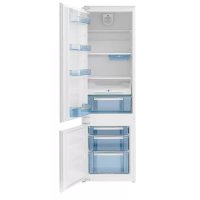
Interior view of a white refrigerator with open doors and shelves (no visible text or symbols)Gebruiksaanwijzing....3
Instructions for use 23
Notice d'utilisation ....42
Gebrauchsanweisung 62
Pelgrim
text_image
- °C 24 A B C D E F G H I J K L M Ntext_image
GH I J K L M Ntext_image
A B C D E F G H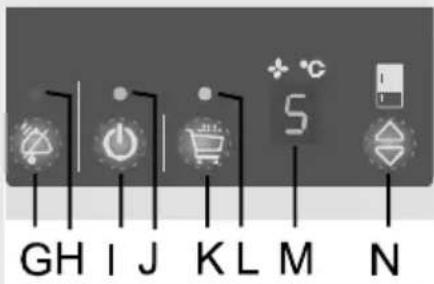
text_image
GH I J K L M Ntext_image
A B C D E F G Htext_image
GH I J K L M NSnelkoelen
natural_image
Illustration of a hand pressing down on a shelf with an upward arrow (no text or symbols)natural_image
Diagram of a 3D object with numbered arrows indicating rotational motion, no text or symbols presentnatural_image
3D diagram of a mechanical component with two bidirectional arrows indicating movement or force (no text or symbols)natural_image
Hand holding a transparent container with a pen inserted, no visible text or symbolsnatural_image
Close-up of a mechanical component with a black arrow indicating direction (no text or symbols visible)Thank you for your confidence in buying our appliance and congratulations on the excellent choice. We hope it will successfully serve its purpose for many years.
Upright refrigerator - freezer (hereinafter: the appliance) consists of two parts: top part is refrigerator and bottom part is upright freezer.
Refrigerator is used in households for storage of fresh food at temperatures above 0^ C. Freezer is used in households for freezing fresh food and storage of frozen food for up to one year (depending on the type of food).
Upright refrigerator-freezer 43
Before first operation....44
Description of the appliance ....45
Installation and connections ....46
Control panel - appliance with electronical regulation 48
Control panel - Appliance with mechanical regulation ....53
Refrigerator accessories ....53
Storage of food in the refrigerator ....55
Storage of food in the FRESH ZONE ....55
Freezing and storage of frozen food ....56
Defrosting the appliance 58
Cleaning the appliance ....59
Troubleshooting guide ....60
Noise level 61
Before fi rst operation
- The appliance is manufactured in compliance with all relevant safety standards; however, it is recommended that persons with impaired physical, motional, or mental abilities, or persons with inadequate experience and knowledge, do not use the appliance without due supervision. The same recommendation applies to minors using the appliance.
- Before connecting the appliance read these instructions carefully. They describe the appliance and provide instructions for its safe and correct use. The instructions are prepared for different types and models of the appliance so they may contain descriptions of functions and components your appliance may not have.
- These instructions also contain the NO FROST version of the freezer, fitted with the fan and featuring automatic defrosting.
- Remove the wrapping protecting the appliance during transport.
- Wrappings contain environmentally friendly materials which can be recycled, recovered or disposed off without threat to the environment.
- Door corners are fitted with protective spacers. Remove the spacers and replace them with the attached pegs.
- Before connecting the appliance to the mains supply, leave it in upright position for about 2 hours. This will reduce possibility of malfunctions in the cooling system resulting from prior transport and handling.
- The appliance must be connected to the mains supply in accordance with the standing regulations and local requirements.
- The appliance must not be used in open air or exposed to weather precipitation.
- Always disconnect the appliance from power supply (pull the power cord from wall socket) before cleaning and before replacing the light bulb.
- If the power supply cord is damaged, in order to avoid hazard it must be replaced by the service or by qualified personnel.
- In case of longer disuse first turn the appliance off with the ON/OFF button and disconnect it from mains supply. Empty the appliance, clean the interior and leave the door ajar.
- For the protection of environment deliver the obsolete appliance to the authorized scrap appliance dealers.
- Never let the children play with the appliance.
- Self closing shear door hinge pulls the door to the cabinet just before closing, thereby preventing the door to remain ajar. Equally it limits the door opening angle and prevents damage to adjacent elements.
- Rating plate with basic information is located in the interior of the appliance. If the sticker plate is not suitable for your language, replace it with the attached one.
- Warning: Ventilation slots on the appliance or built-in element should always be kept clean and unobstructed.
- Warning: Do not use any mechanical accessories when thawing the refrigerator, except for those explicitly recommended by the manufacturer.
- Warning: To prevent any pollution be careful not to damage the insulation or refrigeration tubes at the rear wall during the installation, cleaning and disposal of the appliance.
- Warning: Do not use any electrical devices inside the appliance, except for those explicitly recommended by the manufacturer.
The symbol on the product or on its packaging indicates that this product may not be treated as household waste. Instead it shall be handed over to the applicable collection point for the recycling of electrical and electronic equipment. By ensuring this product is disposed of correctly, you will help prevent potential negative consequences for the environment and human health, which could otherwise be caused by inappropriate waste handling of thisproduct. For more detailed information about recycling of this product, please contact your local city office, your household waste disposal service or the shop where you purchased the product.
Description of the appliance
Interior equipment of the appliance will typically vary according to the specific model.
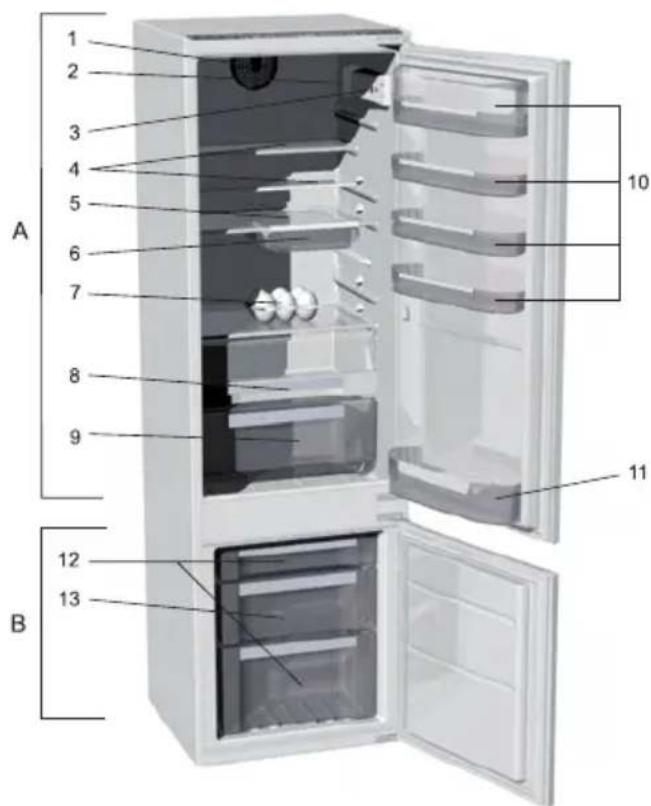
text_image
A 1 2 3 4 5 6 7 8 9 10 11 B 12 13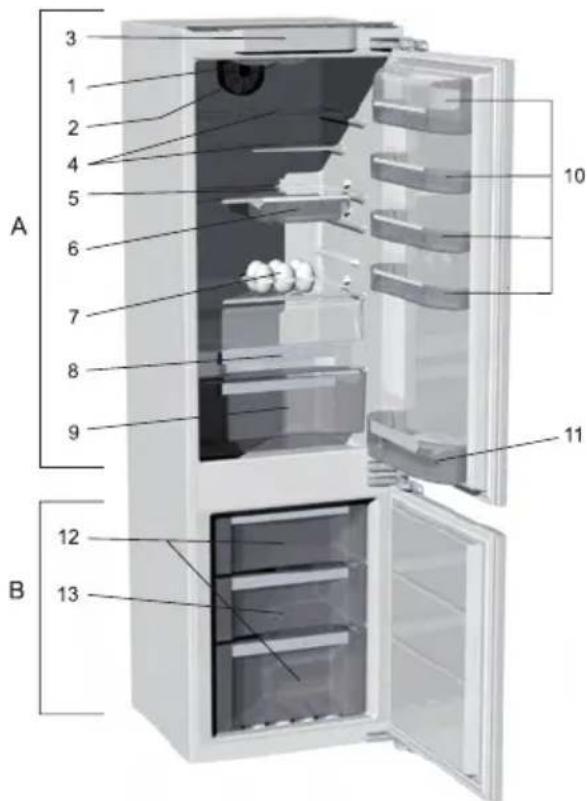
text_image
A B 1 2 3 4 5 6 7 8 9 10 11 12 13A Refrigerator
1 Fan
2 Interior light
3 Control panel
4 Adjustable glass shelves
5 Pull-out glass shelf (adjustable height)
6 Removable snack tray
7 Foldable egg rack
(closed - 6 eggs, open - 12 eggs)
8 FRESH ZONE pan
9 Vegetable crisp pan
10 Refrigerator door pans
(options: deep, shallow; covered or no cover)
11 Door bottle rack with safety holder
B Freezer
12 Storage compartment
13 Freezing compartment
Installation and connections
Selecting the location Selecting the locationpliance in dry and well aired room. The appliance operates best at temperature ranges indicated in the chart below. Relevant class of the appliance is indicated on the rating plate.
| Class Ambient temperature | |
| SN (subnormal) from | + 10°C to + 32°C |
| N (normal) from + 16°C | to + 32°C |
| ST (subtropical) from | + 16°C to + 38°C |
| T (tropical) from + 16°C | to + 43°C |
Positioning the appliance
Positioning the appliance requires two persons in order to avoid injuries or damage to the appliance.
- Place the appliance flatly and firmly on a solid base.
- Avoid exposing the appliance to direct sunlight or heat sources. If this is not feasible, install insulation plate between the appliance and adjacent heat source.
- The appliance may stand independently or you may incorporate it into the kitchen cabinet. Be sure to leave enough space for cooling of condenser (distance from the wall or the opening should be 200 cm ^2 ). Distance to the cabinet above the appliance should be at least 5 cm. After the installation, the appliance mains plug should be accessible!
Connecting to power supply
- Use the power cord to connect the appliance to the mains power. Wall outlet must be fitted with ground terminal (safety socket). Required nominal voltage and frequency are indicated on the relevant label or rating plate of the appliance.
- Mains power connection and grounding must be made in line with standing regulations and local requirements.
The appliance is able to accommodate minor temporary voltage tolerances, but they may not exceed -10% to +6%.
Control panel - appliance with electronical regulation
CONTROL UNIT I
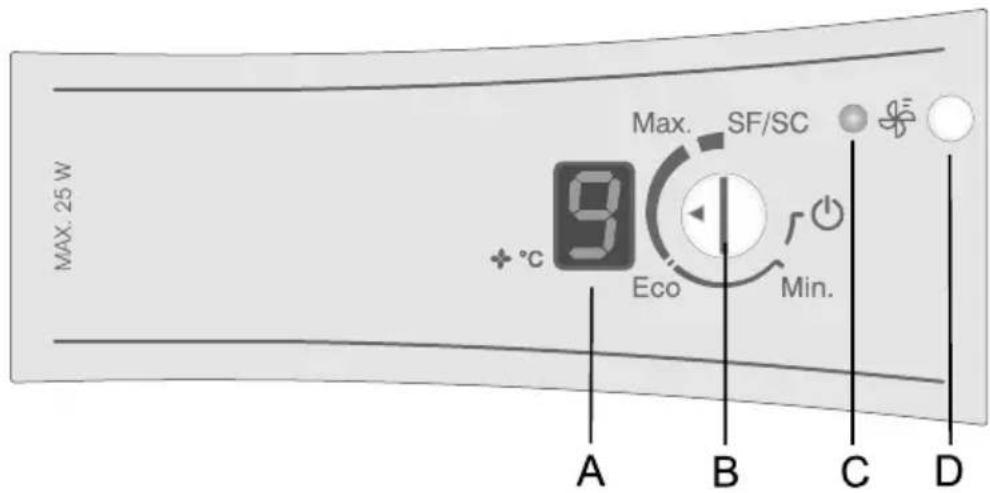
text_image
MAX. 25 W Max. SF/SC +°C Eco Min. A B C DCONTROL UNIT II
No frost system appliance
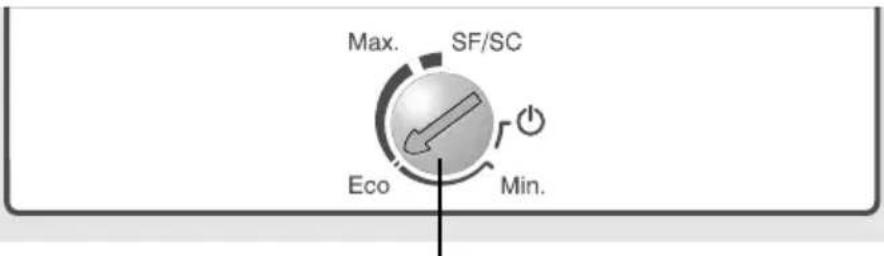
text_image
Max. SF/SC Eco Min.B
A Digital temperature display (certain models only) of the refrigerator indicates actual temperatures during the operation from +1°C to +9°C.
B ON/OFF and temperature setting button
C Orange LED: illuminated during fan operation (knob D).
D Fast cooling fan activation knob
ON/OFF button ON/OFF butt
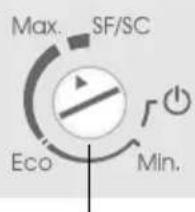
text_image
Max. SF/SC Eco Min.B
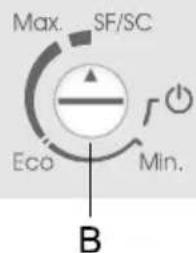
to me appliance is switched on by turning the button (B) towards Max, and accordingly switched off when the arrow (small triangle) on the button points to the ON/OFF mark ⏻ (the appliance, however, is still under mains power).
Refrigerator temperature setting
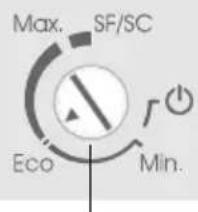
text_image
Max. SF/SC Eco Min.B
- Temperature of the appliance is set by turning the button (B) to the position between the Min and Max span.
- Recommended setting of the thermostat knob is to ECO position.
- If the room temperature, in which the appliance is installed, is lower than 16°C, the recommended setting of the thermostat knob is to the Max.
- In case of exceptionally higher ambient temperatures it is recommended to switch the fan operation at high speed by pressing button (D) – only for models featuring control panel I.
- SF/SC position
- SF position stands for "Super frost" and indicates fast freezing (certain models only).
- SC position stands for "Super cool" and indicates fast cooling (certain models only).
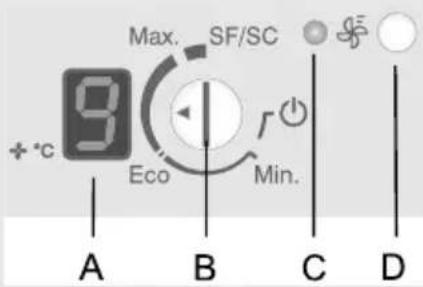
text_image
Max. SF/SC +°C Eco Min. A B C D- In apliances with digital display the indicator flashes during the setting procedure, and the beep signals each change of preset temperature. When flashing stops the final setting is stored in memory.
- When the appliance is switched on, the display (A) will flash for a few seconds – the set value will be indicated. After a while, the actual or maximum value is indicated. This value will remain
panel) the display until the actual temperature in the refrigerator compartment falls below the displayed level.
Start of fan assisted cooling
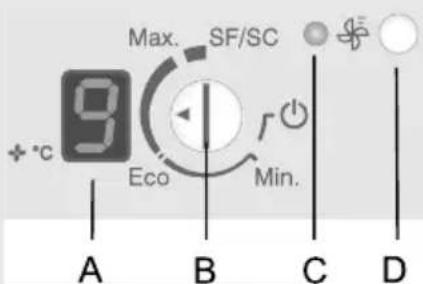
text_image
Max. SF/SC + °C Eco Min. A B C D(control panel I)
Fan assisted fast cooling is started by pressing the button (D).
Orange LED is on. Fan eliminates minor temperature differences between different cabinet spaces, and reduces dew formation on the interior surface of the appliance.
Fast freezing function
text_image
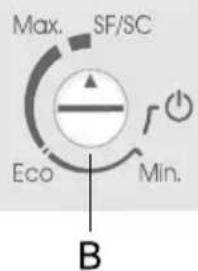
Max. SF/SC Eco Min. BFast freezing function is activated by turning the button (B) arrow (triangle) to the position SF/SC.
If the function is not switched off manually it stops automatically (after approximately two days of operation).
- After the automatic stop of the fast freeze function the appliance switches to regular operation mode at Max. setting, so you need to turn the button (B) back to your preferred setting.
- The fast freeze function is used after the first start of the appliance, before major cleaning, or when large quantity of fresh food is stored in the freezer.
Open refrigerator door alarm (control panel I)
- To repeat the fast freeze function you need to first turn the knob (B) from the SF/SC position to the position Eco, and then back to the position SF/SC!
The alarm sounds if the refrigerator door is left open for more than 1 minute. When the door is closed again the alarm stops.
CONTROL UNIT III
Valve and no frost system appliance
text_image
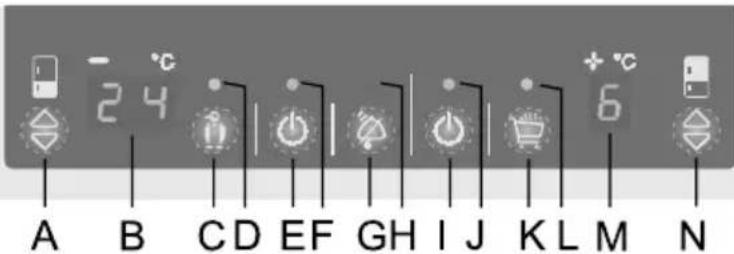
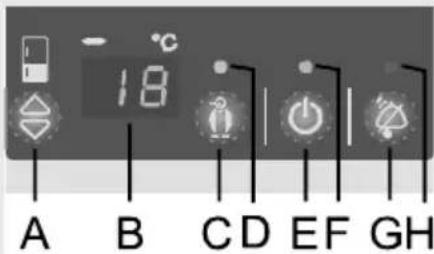
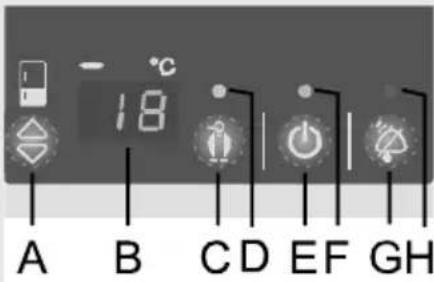
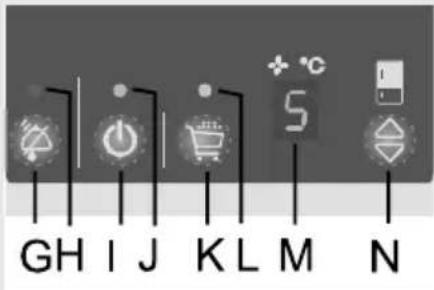
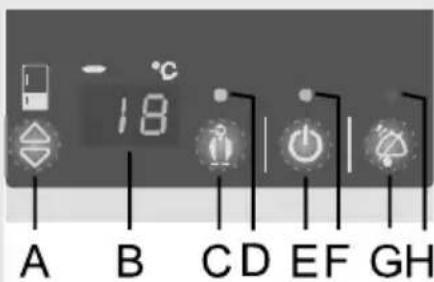
A B C D E F G H I J K L M N 24 + °CA Freezer temperature setting button
B Freezer temperature digital display:
indicates temperature span between -16^ and -24^ .
C Fast freeze button ON/OFF
D Orange LED: indicates fast freeze setting in operation
E Mains ON/OFF button (both refrigerator and freezer)
F Green LED: indicates freezer operation
G Alarm off button and child lock ON/OFF button
H Red LED: indicates alarm state
I Refrigerator ON/OFF button
J Green LED: indicates refrigerator operation
K Fast refrigerator cooling ON/OFF button
L Orange LED: indicates fast refrigerator cooling setting in operation
M Digital refrigerator temperature display: indicates temperature span between +1°C and +9°C.
N Refrigerator temperature setting button
Mains ON/OFF buttonMains
ON/OFF buttoner cord into the wall outlet. The LCD display is on and indicates dashes. This means that both the refrigerator and the freezer are off.
text_image
18 A B C D E F G H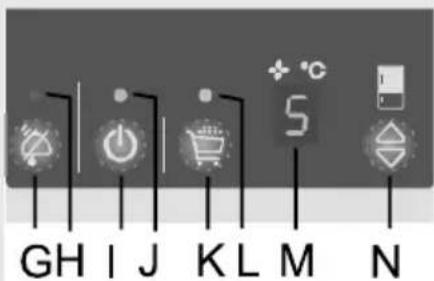
text_image
GH I J K L M N- Switch the appliance on/off by pressing button (E) for 3 seconds. Both the refrigerator and the freezer are on, green LED's (F) and (J) are on. In this mode you can switch only the refrigerator off by pressing the button (I) for 3 seconds (green LED (J) is off).
- Display indicates refrigerator temperature +9°C and freezer temperature 0°C. These values remain on the display until the actual temperature within the cabinet units falls below the above values.
- The appliance is factory preset to the recommendable refrigerator temperature of +5°C and freezer temperature of 18 °C.
Temperature setting Temperature setting
| Refining temperature setting span | +1°C do +9°C |
| Freezer temperature setting span | -16°C to -24°C+ fast freeze |
text_image
A B C D E F G H - °C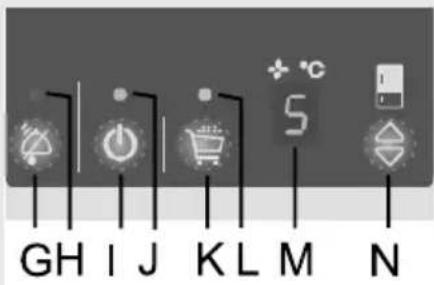
text_image
GH I J K L M N- Freezer temperature is set by the button (A), and refrigerator temperature by the button (N).
- When you press one of temperature setting buttons, the digital display starts fl ashing and indicates the last selected temperature.
- Temperature setting is changed by short sequence pressing of the button in steps of 1°C. During the setting procedure all other buttons are void.
- Around 5 seconds after the release of the button, the display automatically indicates the actual temperature in the refrigerator and in the freezer.
Other settings Other settings Continuous sound - opened refrigerator door - alarm
text_image
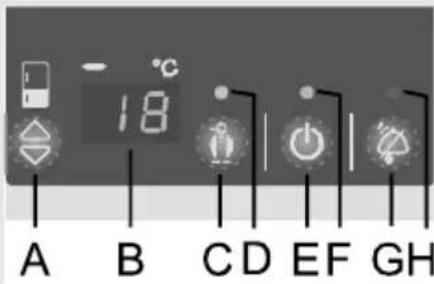
A B C D E F G HIf the refrigerator door is open for more than one minute, the sound signal (continuous tone) starts and red LED (H) appears. Alarm goes off by closing the door, or by pressing the alarm off button (G).
text_image
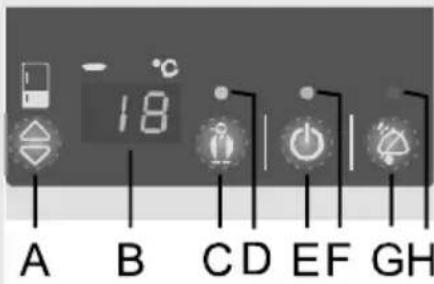
A B C D E F G HIntermittent sound - refrigerator/freezer temperature too high - alarm
Elevated temperature within the appliance is signaled by the sound alarm (intermittent tone), and the temperature fl ashing on the display.
- Alarm is switched off by pressing the alarm off button (G). The red LED and f1 ashing temperature are switched off automatically when the interior of the refrigerator/freezer is cool enough, and there is no danger for perishable goods
- If the temperature in the freezer compartment fails to reach the required level even 24 hours after the alarm had been shut down, the sound alarm is switched on again and shuts off automatically when the freezer compartment cools down to the required level and there is no danger for perishable food. After first start the appliance has a 24-hour alarm delay to avoid unnecessary panic.
text_image
GH I J K L M N + °C 5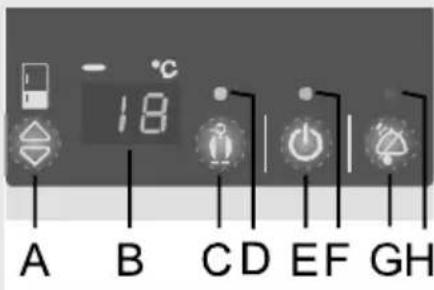
text_image
A B C D E F G H
text_image
18°C A B C D E F G HIntermittent sound signal – power failure alarm
If the refrigerator or freezer temperature increases excessively due to power failure, this is signaled by the sound alarm (intermittent beep), red light is on, and the display indicates flashing maximum temperature digit (max. 9°C for the refrigerator).
Fast cooling of the refrigerator
The function of fast cooling of the refrigerator interior is activated by pressing the button (K) – orange LED is on (L). It is switched off automatically after 6 hours, and the setting returns to the preceding value. The function is used for fast cooling of large quantities of fresh food inserted at once.
Fast freeze function
The fast freeze function is activated by pressing the button (C) – orange LED is on (D), and intensive freezing starts.
If you fail to switch this function off manually it turns off automatically after approximately two days. The function is intended for fast freezing of large quantities of inserted food. In case of power failure the fast freeze procedure is repeated. The function is used with the first start of the appliance, before cleaning, and when larger quantities of fresh food are inserted in the appliance.
Child lock
Built-in child lock prevents the appliance from unwanted temperature alterations and/or even switching off. Turn it on/off by pressing the alarm button (G) for 3 seconds (letters 'LL' and 'L' fl ash on the displays). When the protection is activated, the only active button is the alarm button. If you press any button the wording 'LL' and 'L' appear on the display.
Control panel - Appliance with mechanical regulation
ON/OFF button
text_image
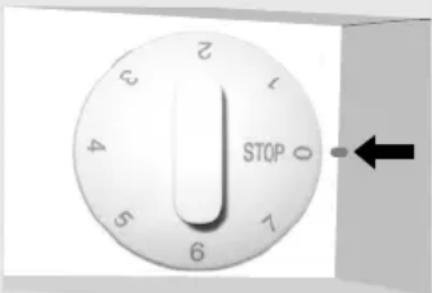
STOP 0 1 2 3 4 5 6 7 8 9The appliance is switched on/off by turning the temperature selector (see Fig.) to any position from 0 to 7.
The appliance operation is controlled by turning the thermostat (temperature selecting button) located within the refrigerator cabinet from the position STOP (0) to the position 7 and back.
Temperature setting
- The higher the position of the temperature selector (towards position 7) the lower is the temperature (cooler) within the cabinet of the appliance. Interior temperature in the refrigerator may even fall below 0°C. Higher position settings are to be used on in case of recommended low cooling temperature, or if the ambient temperature is below 16°C. In case of standard ambient temperature we recommend the medium setting.
- Change in the ambient temperature affects the temperature of the appliance, so the position of the temperature selector should be adjusted accordingly.
- In the STOP (0) position the appliance is switched off (cooling system is off). However, the appliance is still powered (light bulb is turned on if you open the refrigerator door).
Refrigerator accessories
Shelf Shelf
natural_image
Hand pressing down on a shelf with an upward arrow, no text or symbols visible(Equipment depends on the model)
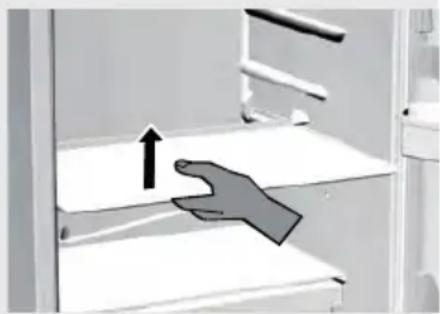
- Shelves can be optionally placed on the guides inside the appliance. To remove the shelf, first slide it out as far as the guide allows it, then slightly lift it up and pull it out. Quickly perishable food should be stored on the back i.e. the coldest part of the shelves.
Adjustable glass shelf Adjustable glass shelf store higher objects (bottles, jars, jugs) in the refrigerator you can remove the front part of the shelf, relocate it to a lower level, and obtain the required space.
Vegetable crisp pan Vegetable
text_image
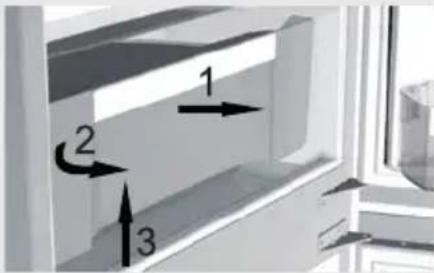
Diagram showing three labeled directional arrows (1, 2, 3) pointing to a rectangular object on a window-like surface.Crisptan below the glass shelf at the bottom of the refrigerator is used for storage of fruit and vegetables. It retains the right level of moisture and prevents drying out.
- Pulling out the drawer:
Pull the drawer towards yourself (in the direction of arrow 1) – as far as the door stopper. On the opposite side, continue to pull the drawer out of the refrigerator (in the direction of arrow 2 – rotation) while lifting the drawer at the same time (in the direction of arrow 3).
Refrigerator door liningRefriger
FanFan
Removable snack tray
natural_image
Pure mechanical component diagram without any text, numbers, or symbolsRecommended distribution of food
erator/door/liningr lining consists of various shelves or holders used for storing cheese, butter, eggs, yogurt, and a stock of other smaller packages, tubes, cans etc. The bottom shelf is used for storing bottles.
- Fan fixed under the ceiling or hidden behind the rear refrigerator panel or within the freezer compartment improves even distribution of temperature and decreases dew upon storage racks.
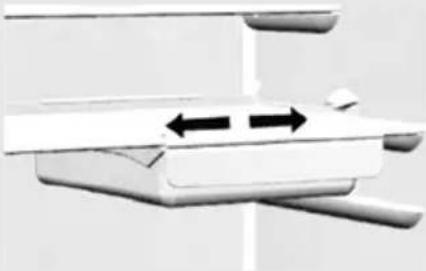
The tray is especially handy for cold cuts, cheese, etc ... The drawer is pulled out by lifting the front part slightly and then pulling out. The handle may be moved sideways along with the drawer.
Refrigerator compartments:
- top section: canned food, bread, wine, cake, ...
- middle section: dairy products, readymade food, desserts, juices, beer, TV-dinners, ...
- bottom section: meat, meat products, delicatessen, ...
- crisp pan: fresh fruit, vegetables, salads, root vegetables, potatoes, onions, garlic, tomato, tropical fruit, sauerkraut, turnips ...
Refrigerator door lining compartments:
- top/middle section: eggs, butter, cheese, ...
- bottom section: beverages, cans, bottles, ...
Freezer compartments:
- freezing, storage of frozen food (see section Freezing and storage of frozen food).
Storage of food in the refrigerator
Important precautions and hints
- Proper use of the appliance, adequately packed food, correct temperature and hygienic precautions produce substantial impact on the quality of stored food.
• Always respect the best before date, printed on the packaging. - Food to be stored in the refrigerator should be properly packed as to prevent emission and/or reception of moisture and odors.
- Never store infl ammable, volatile or explosive substances.
- Beverages with high alcohol percentage shall be stored in tightly sealed bottles in vertical position.
- Some organic solutions like volatile oils in lemon or orange peel, acids in butter etc. can cause damage in prolonged contact with plastic surfaces or gaskets for longer period of time they can cause accelerated aging of the plastic material.
- Unpleasant odor inside the refrigerator is a sign that something is wrong with food or that your refrigerator needs cleaning (see chapter Cleaning).
- If you plan a longer absence, make sure you removed quickly perishable articles of food from the appliance before you leave.
Storage periods Storage periods Recommended periods of storing fresh food in the refrigerator
| Food Storage period | |
| eggs, marinades, smoked meat, up to 10 | days |
| cheese up to 10 days | |
| carrots, etc... up to 8 days | |
| butter up to 7 days | |
| cake, fruit, TV-dinner dishes, raw chunks of meat | up to 2 days |
| fi sh, raw minced meat, seafood up to 1 day |
Storage of food in the FRESH ZONE
The FRESH ZONE drawer provides storage of wide selection of fresh food longer than in the traditional refrigerator. Food remains fresh for long time and it preserves its taste and nutritive ingredients. It reduces decay and loss of mass, so fruit and vegetables are more fresh and natural. The drawer must be tightly closed to provide optimum operation.
natural_image
Hand holding a transparent plastic tray with an arrow pointing to it, placed on a surface (no visible text or symbols)- Moisture level in the drawer depends upon the moisture of stored food, and on the frequency of opening the drawer. - When you buy food check its freshness: quality and durability of food depends on it. - Store non-wrapped animal or vegetable food separately, or wrap it in suitable packages. Be careful to prevent touching of different types of meat. They should be packed and stored separately to avoid bacterial decomposition in case meat turns foul.
- Approximately 30-60 minutes prior use remove food from the drawer to let its aroma and taste develop at ambient temperature.
- Food sensitive to low temperatures is not suitable for storage in the FRESH ZONE drawer: pineapple, avocado, bananas, olives, potato, eggplant, cucumber, beans, bell pepper, melons, water melons, pumpkins,...
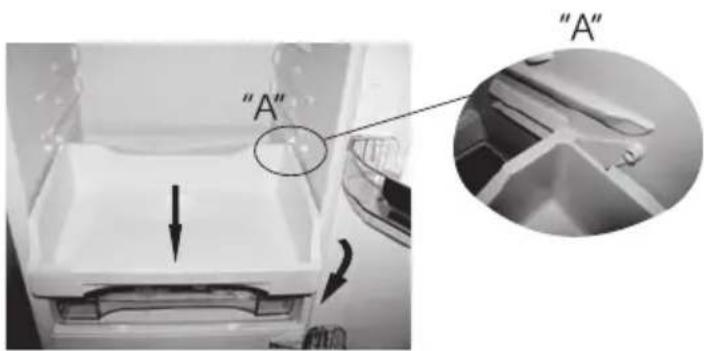
- Pulling out the drawer:
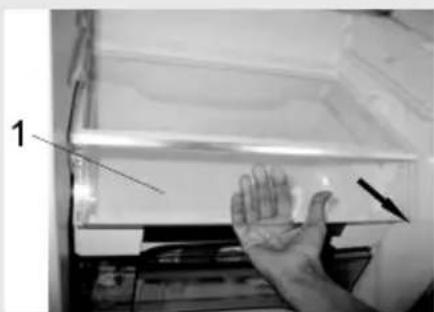
- open the drawer door (1), hold them in the middle (as indicated in the photo above) and simultaneously pull it upwards and towards yourself.
- Pull out the drawer as far as the position indicated in the figure (detail A); then, rotate it downwards and pull out completely.
text_image
"A" "A"Freezing and storage of frozen food
Storage procedure Storage
procedure the fast freeze function by pressing the button (C) for continuous operation 24 hours prior intended freezing.
text_image
Max. SF/SC Eco Min. B- control unit 1 and 2: with knob B, position SF/SC;
- control unit 3: with key C;
- mechanical regulation: knob position approximately between 4 and 6.
Upon expiry of this period insert fresh food in the freezing compartment. Do not let the already frozen packages touch the fresh ones.
text_image
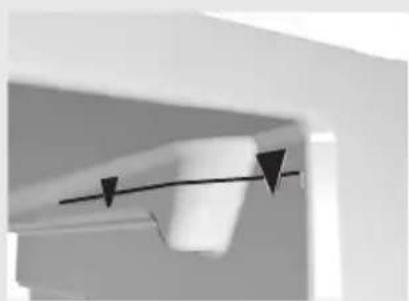
18 A B C D E F G HBe sure to provide the NO FROST freezer models with enough room below the ceiling for cool air circulation, so avoid storing food over the marked maximum storage level (see Fig.).
- After 24 hours you may relocate the food to the storage compartment, and repeat the freezing procedure if required. You may also remove the drawers and store frozen food directly on cooling shelves.
- For freezing smaller quantities of fresh food (1-2 kg), the engagement of the fast freeze function is not required.
natural_image
Close-up of a ceiling fixture with a curved black line and two downward-pointing triangles (no text or symbols visible)Important precautions and hints for freezing fresh food
- Freeze only such food which is suitable for freezing and sustain low temperatures. Food should be of adequate quality and fresh.
- Select adequate packaging for each kind of food and pack it correctly.
- The packaging should be air tight and well sealed without leaking since this could cause substantial vitamin loss and dehydration.
- Mark packages with following data: kind and amount of foods and the date of loading.
- It is imperative that food is frozen as quickly as possible. We therefore recommend the size of the package not to be too large and to be cooled before loading into the freezer.
- The amount of the fresh foods that can be loaded in the freezer as a single load is declared on the rating plate. If the loaded amount is too large, the quality of freezing is reduced which in turn affects the quality of frozen foods.
Storage of industrially frozen food
The storage time and recommended temperature for storing commercially frozen foods is indicated on the packaging. Always follow manufacturer's instructions for storage and use of frozen food. When shopping be careful to choose only food which is adequately packed and provided with complete data and stored in freezers where the temperature never rises above -18^ .
Do not buy packages of food wrapped with frost. This indicates that the package was thawed before at least once.
Take care that packages don't start to thaw during transport to your home. Temperature rise shortens the storage time and affects the quality of commercially frozen foods.
Storage periods of frozen food
Recommended periods of storing frozen food in the freezer
| Food Period | |
| Fruit, beef from 10 to 12 months | |
| Vegetables, veal, poultry from 8 to 10 months | |
| Venison from 6 to 8 months | |
| Pork from 4 to 6 months | |
| Chopped (minced) meat 4 months | |
| Bread, pastry, TV-dinners, fat free fi sh | 3 months |
| Intestines 2 months | |
| Smoked sausages, fat fi sh 1 month |
Defrosting frozen food Defrosting frozen food defrosted foods should be used as soon as possible. Cold air preserves the food but it does not destroy microorganisms which rapidly activate themselves after defrosting and make foods perishable.
Partial defrosting reduces the nutritional value of food, especially fruits, vegetables and readymade meals.
Defrosting the appliance
Automatic defrosting of the refrigerator
Defrosting classical freezer
Defrosting NO FROST freezer
Refrigerator needs no special defrosting procedure, because ice deposited at the inner back wall is defrosted automatically. Ice deposited on the inner back wall during the compressor operation is defrosted when the compressor stops operating, and condensed water drops are drained through the outlet in the inner back wall into the drain pan situated above the compressor where it evaporates. In case you should notice excessive ice formation at the rear refrigerator panel (3-5 mm thick), switch the appliance off and thaw it manually.
- Clean the freezer when the frost layer in the freezer reaches thickness of around 3-5 mm.
- 24 hours before defrosting activate the fast freeze function (see relevant control chapter depending upon the model of the appliance – fast freezing) for continuous operation in order to additionally freeze the food inside. After that period take the food out of the freezer and protect them from excessive thawing.
- Switch the appliance off (see the relevant control chapter for ON/OFF function) and pull the power cord from the wall socket.
- Place a convenient absorbent cloth underneath to collect the defrost water and change it periodically.
- Never use powered appliances to defrost the freezer (hair dryer, etc.) - LIFE THREATENING!
- Avoid using defrosting sprays, as they may cause damage to the plastic parts and may be hazardous to health.
- Clean the interior of the appliance and wipe it dry (see chapter Cleaning).
- Before reloading food into the freezer switch the appliance on.
- Defrosting the NO FROST freezer model is completely automatic. Periodical appearance of frost deposits disappear after certain period of time.
Cleaning the appliance
Prior any cleaning attempt disconnect the appliance from the mains (see the control chapter for ON/OFF function), and pull the power cord from the mains wall outlet.
Special antibacterial protection in top layer of inner walls prevents multiplication of bacteria and maintains the interior clean and germ free.
Make sure to remove traces of any cleansing agents you had been using.
- Clean the exterior of the appliance with water and liquid detergent.
- Do not use abrasive or aggressive agents (such as stainless steel cleansers) for cleaning of plastic and coated surfaces as you can damage them.
- Clean coated and/or aluminum surfaces with soft cloth and alcohol based cleansing agent (for example glass cleaners).
- Wash the interior of the appliance with liquid detergent and lukewarm water, mixed with a little vinegar.
- Containers, shelves, and drawers with a decorative profile (metallic appearance) are not dishwasher safe! They can only be cleaned with a dissolved liquid detergent and a soft cloth. Do not rub them!
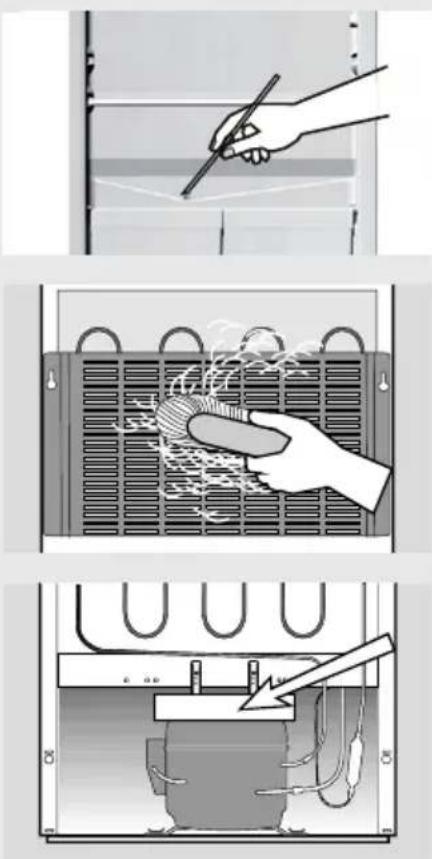
- Groove and drain outlet located underneath the cooling panel at the rear wall collect the drained water, so they must not be clogged (with food particles, for example). Make sure you inspect them periodically and clean if necessary (use plastic straw to free the outlet hole).
- The condenser on the rear wall must always be clean and free of dust or kitchen fumes deposits, therefore clean the dust periodically with non-metallic brush or vacuum cleaner..
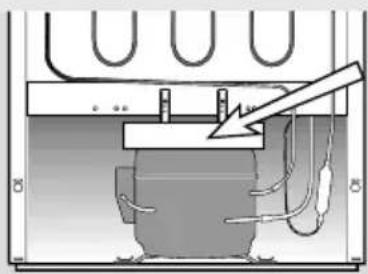
- Clean also the drip pan above the compressor. If you removed the pan, please make sure you replace it to the same position, and check that it is in completely horizontal position!
- Ice and/or frost deposits exceeding 3-5 mm increase energy consumption, so you need to remove them regularly (with the exception of the NO FROST model). Do not use sharp pointed objects, solvents or sprays.
• After cleaning switch the appliance on and reload the food.
Troubleshooting guide
| Fault: Cause/Remedy | |
| The appliance does not operate after connection to the mains: | ·Check if there is power in the socket and if the appliance is switched on. |
Cooling system operates continuously without intermittent stoppages: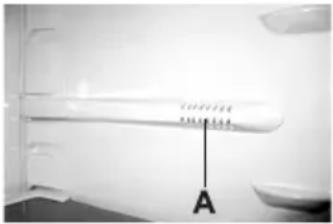 | ·Ambient temperature too high.·Frequent opening of the door, door open too long.·Door not closed properly (particle between door gasket, sagged door, check gasket sealing, etc...).·Excessive quantity of fresh food inserted at once.·Refrigerator probe (A) is clogged with fresh food. Relocate the food to provide air circulation around the probe (certain models only).·Check air circulation for sufficient cooling of the compressor, and clean the condenser. |
| Excessive ice formation at the rear interior wall of the freezer: | ·Frequent opening of the door, door open too long.·Inserting hot food in the freezer.·Food or dish is touching the rear interior panel of the refrigerator.·Bad door sealing; clean or replace the gasket if dirty or damaged. |
| Water dripping from the appliance: | ·Drain outlet is clogged, drain water drips past the collection groove.·Clean the clogged outlet using plastic straw.·Thaw thick ice deposits manually (see chapter Defrosting). |
| Red signal light flashing (only freezer): | ·Frequent opening of the door, door open too long.·Door not closed properly (particle between door gasket, sagged door, damaged gasket, etc...).·Excessively long power failure.·Excessive quantity of fresh food inserted at once. |
| Difficult door opening: | ·If you attempt to open the immediately closed door of the freezer you may experience resistance. This happens because certain quantity of cold air escapes from the appliance through the open door and is replaced by warm ambient air. Cooling of such air creates negative pressure (vacuum) and suction, which prevents easy opening of the door. Situation is normalized after a few minutes (5-10), and you can open the door with ease. |
| Fault: | Cause/Remedy |
Bulb replacement: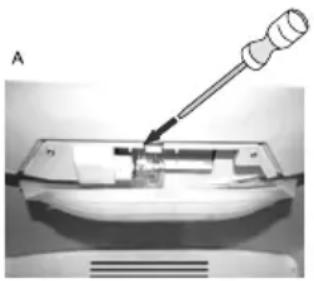 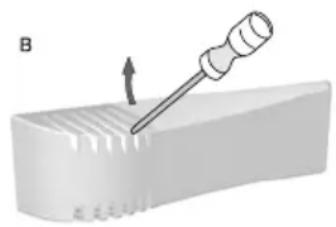 | Before replacing the light bulb, disconnect the appliance form the power supply (pull the power cord from the wall socket).A – Use the screwdriver to press the locking hook (in arrow direction), and remove the cover.B – Insert the screwdriver into the cover slot, lift it and remove the cover.Replace the bulb with the equivalent new bulb (E 14, same voltage as the original one) and replace the cover back to its position.Don’t forget: the old bulb does not belong to organic waste.Light bulb is consumption material and is not covered by the warranty! |
| Helpful hints • If none of the above proves effective and you can not remove the fault yourself, disconnect the appliance from the mains (see chapter regarding the ON/OFF function), pull the power cord from the wall socket, wait for approximately 10 minutes and reconnect the appliance.If the fault persists call the nearest service center and tell them the information from the rating plate: type of appliance, model and serial number, located inside the appliance. | |
Noise level
The refrigerator – freezer appliances are cooled by the refrigeration system with a compressor (assisted by fan in certain models) whose operation may produce certain noise. The level of such noise depends upon the location, correct use and age of the appliance.
- After starting the appliance, the operation of the compressor (the refrigerant flow) may be somewhat louder. This does not mean that something is wrong with the appliance, neither has it any influence on the lifetime of the appliance. Gradually the noise is reduced and eventually subsides.
- Sometimes the appliance produces unusual and stronger noise which is rather unusual for the appliance. This noise is often the consequence of inadequate positioning of the appliance:
- The appliance should be placed and leveled firmly on solid base.
- It should not touch the wall or adjacent kitchen units standing next to it.
- Check whether the accessories in the interior of the appliance are placed correctly in their positions; also check the bottles, tins and other vessels that might touch each other and rattle.
THE MANUFACTURER RESERVES THE RIGHT TO ALTER THE SPECIFICATIONS WITH NO IMPACT TO THE FUNCTIONAL OPERATION OF THE APPLIANCE.
text_image
A B C D E F G H I J K L M N 24 + °C 6text_image
GH I J K L M Ntext_image
A B C D E F G H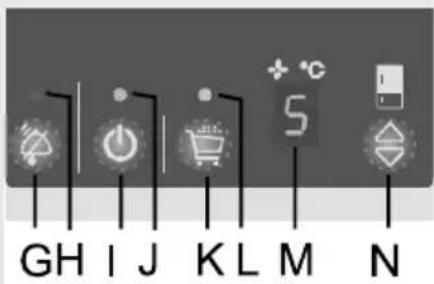
text_image
GH I J K L M Ntext_image
A B C D E F G Htext_image
A B C D E F G Htext_image
GH I J K L M Ntext_image
18°C A B C D E F G HCongélation rapide
natural_image
Illustration of a hand pressing down on a shelf with an upward arrow (no text or symbols)Clayette modulable en verre
natural_image
Close-up of a hand holding a transparent container with an arrow pointing to it, no visible text or symbols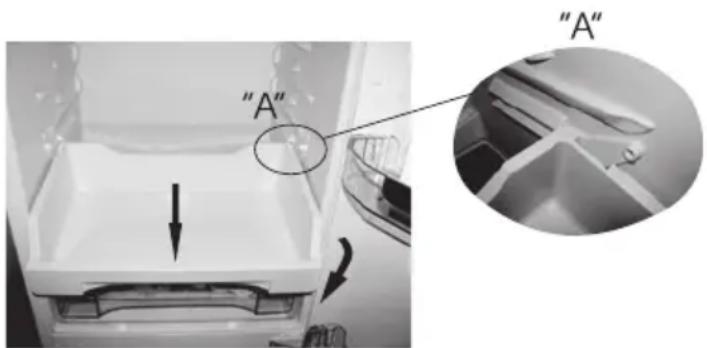
text_image
"A" "A"natural_image
Close-up of a mechanical component with a black curved line and two downward-pointing arrows (no text or symbols visible)text_image
Diagram illustrating three steps of a heating or cooling process: hand holding a tool, inside a heat exchanger, and after cooling.text_image
A B C D E F G H I J K L M Ntext_image
GH I J K L M Ntext_image
A B C D E F G H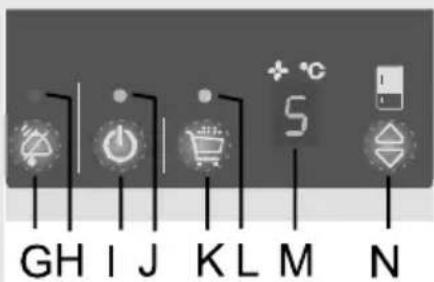
text_image
GH I J K L M Ntext_image
A B C D E F G Htext_image
GH I J K L M Ntext_image
A B C D E F G HKindersicherung
natural_image
Illustration of a hand pressing down on a shelf with an upward arrow (no text or symbols)natural_image
3D diagram of a mechanical component with two bidirectional arrows indicating movement or force (no text or symbols)natural_image
Close-up of a hand holding a transparent plastic tray with a pen inserted, no visible text or symbols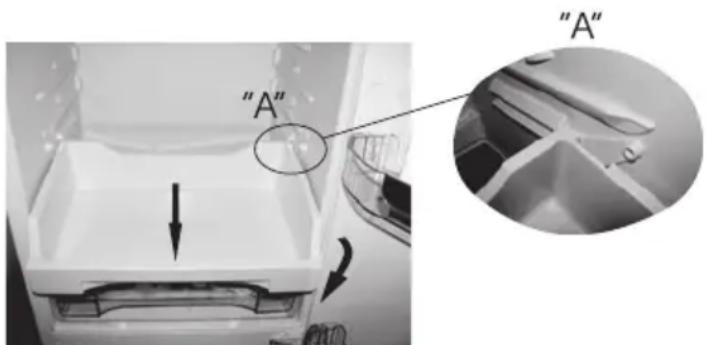
text_image
"A" "A"natural_image
Close-up of a mechanical component with a black arrow indicating direction (no text or symbols visible)natural_image
Hand holding a pen writing on a surface with grid lines (no text or symbols visible)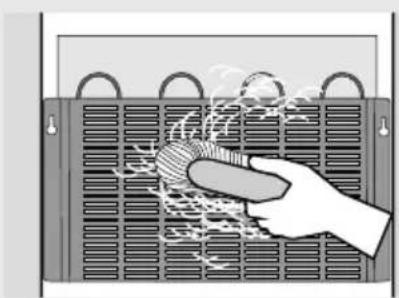
natural_image
Illustration of a hand cleaning a large heat exchanger with visible steam and cooling effect (no text or symbols)