
Archer TX3000E - Router TP-LINK - Free user manual and instructions
Find the device manual for free Archer TX3000E TP-LINK in PDF.
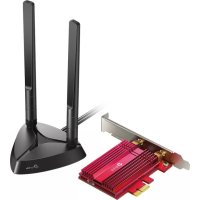


| Product Type | PCIe Wi-Fi 6 + Bluetooth 5.0 Network Card |
| Model | Archer TX3000E |
| Brand | TP-Link |
| Wi-Fi Standards | IEEE 802.11ax/ac/n/a 5 GHz, IEEE 802.11ax/n/g/b 2.4 GHz |
| Max Speed | Up to 2402 Mbps (5 GHz) and 574 Mbps (2.4 GHz) |
| Bluetooth | 5.0/4.2/4.0 |
| Technologies | MU-MIMO, 1024-QAM |
| Wireless Security | WEP, WPA/WPA2/WPA3, WPA-PSK/WPA2-PSK, 802.1X |
| Interface | PCI Express X1 |
| Antennas | 2 external antennas with magnetic base |
| Supported Operating Systems | Windows 10 (64-bit) only |
| Operating Temperature | 0 °C to 40 °C |
| Storage Temperature | -40 °C to 70 °C |
| Operating Humidity | 10% to 90% non-condensing |
| Storage Humidity | 5% to 90% non-condensing |
| Power Supply | Via PCIe slot |
| Dimensions (approx.) | 12.1 x 2.2 x 12.1 cm (card with antennas) |
| Weight (approx.) | About 150 g (with antennas and cable) |
| Care and Cleaning | Clean with a soft, dry cloth. Do not use solvents. |
| Safety | Compliant with FCC and IC. Minimum distance of 20 cm between antenna and body. |
| Spare Parts and Repairability | Not applicable (sealed product). 2-year manufacturer warranty. |
| Package Contents | Archer TX3000E card, USB Bluetooth cable, antennas, low-profile bracket, driver CD, quick installation guide |
Frequently Asked Questions - Archer TX3000E TP-LINK
User questions about Archer TX3000E TP-LINK
0 question about this device. Answer the ones you know or ask your own.
Ask a new question about this device
Download the instructions for your Router in PDF format for free! Find your manual Archer TX3000E - TP-LINK and take your electronic device back in hand. On this page are published all the documents necessary for the use of your device. Archer TX3000E by TP-LINK.
USER MANUAL Archer TX3000E TP-LINK
https://www.tp-link.com/support/download/
TP-Link USA Corporation, d/b/a TP-Link North America, Inc.
Address: 145 South State College Blvd. Suite 400, Brea, CA 92821
Website: http://www.tp-link.com/us/
Tel: +1 626 333 0234
This equipment has been tested and found to comply with the limits for a Class B digital device, pursuant to part 15 of the FCC Rules. These limits are designed to provide reasonable protection against harmful interference in a residential installation. This equipment generates, uses and can radiate radio frequency energy and, if not installed and used in accordance with the instructions, may cause harmful interference to radio communications. However, there is no guarantee that interference will not occur in a particular installation. If this equipment does cause harmful interference to radio or television reception, which can be determined by turning the equipment off and on, the user is encouraged to try to correct the interference by one or more of the following measures:
- Reorient or relocate the receiving antenna.
- Increase the separation between the equipment and receiver.
- Connect the equipment into an outlet on a circuit different from that to which the receiver is connected.
- Consult the dealer or an experienced radio/ TV technician for help.
This device complies with part 15 of the FCC Rules. Operation is subject to the following two conditions:
1) This device may not cause harmful interference. 2) This device must accept any interference received, including interference that may cause undesired operation.
Any changes or modifications not expressly approved by the party responsible for compliance could void the user's authority to operate the equipment.
Note: The manufacturer is not responsible for any radio or TV interference caused by unauthorized modifications to this equipment. Such modifications could void the user's authority to operate the equipment.
FCC RF Radiation Exposure Statement:
This equipment complies with FCC RF radiation exposure limits set forth for an uncontrolled environment. This device and its antenna must not be co-located or operating in conjunction with any other antenna or transmitter.
To comply with FCC RF exposure compliance requirements, this grant is applicable to only Mobile Configurations. The antennas used for this transmitter must be installed to provide a separation distance of at least 20 cm from all persons and must not be co-located or operating in conjunction with any other antenna or transmitter.
We, TP-Link USA Corporation, have determined that the equipment shown above complies with the applicable technical standards, FCC part 15. No unauthorized change is made in the equipment and the equipment is properly maintained and operated.
Issue Date: 2019-09-24
CE Mark Warning

This is a class B product. In a domestic environment, this product may cause radio interference, in which case the user may be required to take adequate measures.
OPERATING FREQUENCY (the maximum transmitted power)
EU declaration of conformity
TP-Link hereby declares that the device is in compliance with the essential requirements and other relevant provisions of directives 2014/53/EU, 2011/65/EU and (EU)2015/863.
The original EU declaration of conformity may be found at
https://www.tp-link.com/en/ce
RF Exposure Information
This device meets the EU requirements (2014/53/EU Article 3.1a) on the limitation of exposure of the general public to electromagnetic fields by way of health protection.
The device complies with RF specifications when the device is used at 20 cm from your body.
Attention: This device may only be used indoors in all EU member states and EFTA countries.

Canadian Compliance Statement
This device contains licence-exempt transmitter(s)/receiver(s) that comply with Innovation, Science and Economic Development Canada's licence-exempt RSS(s). Operation is subject to the following two conditions:
(1) This device may not cause interference.
(2) This device must accept any interference, including interference that may cause undesired operation of the device.
This radio transmitter (IC: 1000M-AX200NG/ Model: Archer TX3000E) has been approved by Industry Canada to operate with the antenna types listed below with the maximum permissible gain indicated. Antenna types not included in this list below, having a gain greater than the maximum gain indicated for that type, are strictly prohibited for use with this device.
Antenna: Two High-Gain Dual Band Antennas
Caution:
1) The device for operation in the band 5150-5250 MHz is only for indoor use to reduce the potential for harmful interference to co-channel mobile satellite systems; 2) For devices with detachable antenna(s), the maximum antenna gain permitted for devices in the bands 5250-5350 MHz and 5470-5725 MHz shall be such that the equipment still complies with the e.i.r.p. limit. 3) For devices with detachable antenna(s), the maximum antenna gain permitted for devices in the band 5725-5850 MHz shall be such that the equipment still complies with the e.i.r.p. limits specified for point-to-point and non-point-to-point operation as appropriate; and
DFS (Dynamic Frequency Selection) products that operate in the bands 5250-
5350 MHz, 5470-5600MHz, and 5650-5725MHz.
Warning:
Radiation Exposure Statement:
This equipment complies with IC radiation exposure limits set forth for an uncontrolled environment. This equipment should be installed and operated with minimum distance 20cm between the radiator & your body.
Industry Canada Statement
CAN ICES-3 (B)/NMB-3(B)
Korea Warning Statements
NCC Notice
Warning!
According to the Regulations for Low-power Radio-frequency Devices
Article 12
- Keep the device away from water, fire, humidity or hot environments.
- Do not attempt to disassemble, repair, or modify the device.
- Do not use the device where wireless devices are not allowed.
Please read and follow the above safety information when operating the device. We cannot guarantee that no accidents or damage will occur due to improper use of the device. Please use this product with care and operate at your own risk.
Explanation of the symbols on the product label
| Symbol | Explanation |
| RECYCLING | This product bears the selective sorting symbol for Waste electrical and electronic equipment (WEEE). This means that this product must be handled pursuant to European directive 2012/19/EU in order to be recycled or dismantled to minimize its impact on the environment. User has the choice to give his product to a competent recycling organization or to the retailer when he buys a new electrical or electronic equipment. |
Brand : TP-LINK
Model : Archer TX3000E
Category : Router