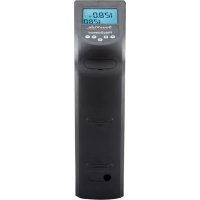
the Sous Vide Professional Creative Series SVCRC5 - Cooking appliance PolyScience - Free user manual and instructions
Find the device manual for free the Sous Vide Professional Creative Series SVCRC5 PolyScience in PDF.


User questions about the Sous Vide Professional Creative Series SVCRC5 PolyScience
0 question about this device. Answer the ones you know or ask your own.
Ask a new question about this device
Download the instructions for your Cooking appliance in PDF format for free! Find your manual the Sous Vide Professional Creative Series SVCRC5 - PolyScience and take your electronic device back in hand. On this page are published all the documents necessary for the use of your device. the Sous Vide Professional Creative Series SVCRC5 by PolyScience.
USER MANUAL the Sous Vide Professional Creative Series SVCRC5 PolyScience
natural_image
Exterior view of a modern office building (no signage)Download user's guide in Spanish, German, English, French on www.cuisinetechnology.com/manual
Contents.
| Important Safeguards | 2 |
| Introduction | 5 |
| Advantages of Sous Vide Cooking | 5 |
| Features & Benefits | 6 |
| Controls & Components | 7 |
| Quick-Start | 9 |
| Set-up | 11 |
| Day-to-Day Operation | 13 |
| Loss of Power | 16 |
| Cleaning & Storage | 16 |
| Troubleshooting | 18 |
| Disposal | 20 |
| Warranty | 21 |
IMPORTANT SAFEGUARDS.
When using electrical appliances, basic safety precautions should always be followed, including the following:
- Do not touch hot surfaces. Use handles or knobs.
- Do not operate this Circulator with a damaged power cord or plug, or if it has been dropped, damaged, or malfunctions. Return the Circulator to PolyScience for examination and/or repair.
- Do not let power cord touch hot surfaces or hang over the edge of table or counter.
- Unplug from electrical outlet when not in use.
- To avoid the possibility of personal injury, always unplug the Circulator from the electrical outlet before cleaning the unit.
-
To protect against the risk of electrical shock, submerse only the heater/pump portion of this Circulator in liquid. The maximum submersion depth is indicated on the housing of the unit. If the Circulator or power cord fails into liquid, unplug the power cord from the electrical outlet immediately. DO NOT REACH INTO THE LIQUID.
-
Do not use an extension cord with this Circulator.
- This Circulator is intended for indoor use only; do not use outdoors.
- Do not let this Circulator come in direct contact with food. All foods to be prepared with this Circulator should be placed in FDA approved boilable bags.
- Carefully review the safety section in included literature.
- This appliance should not be used by children. To avoid accidental injury, close supervision is necessary when this appliance is used where children may be present.
- Do not operate in the presence of explosive and/or flammable fumes.
- Never operate the Circulator without the pump/heater housing cover securely in place.
- Do not use this Circulator for other than the intended use of preparing foods.
- The use of accessory attachments not recommended by the appliance manufacturer may cause injuries.
- Do not place on or near a hot gas or electric burner, or in a heated oven.
- Extreme caution must be used when moving an appliance containing hot oil or other hot liquids.
- To disconnect, turn any control to "off," then remove plug from wall outlet.
- Household use only.
- Read all instructions carefully.
SAVE THESE INSTRUCTIONS.
Notice.
This Circulator is equipped with a grounded power cord. Connect the appliance only to earthed (grounded) power sockets with residual current devices (PCD). Do not use the appliance if the grounding prong on the plug is missing or damaged or with a grounding adapter. Contact a qualified electrician if the plug does not fit into the electrical outlet you intend on using.

IMPORTANT: You Sos/Mode Professional is equipped with an automatic over-temperature safety that will disable the heater in the event of a heater fault. If this safety cannot be reset, the unit must be sent back to PolyScience.

IMPORTANT: You SSoss/Video Professionalists is also equipped with a float switch that disables the heater and pump in the event that the liquid level in the cooking vessel drops too low. If the Circulator will not restart once a proper liquid level is restored, the unit must be sent back to PolyScience.

IMPORTANT: COUNTERTOP PROTECTION
Some countertop materials may not be able to withstand the prolonged exposure to heat required for sous vide cooking. To safeguard against damage to your countertop, PolyScience recommends that you always place your cooking vessel on a trivet or other insulating material before you begin heating the cooking liquid.
Introduction.
Thank you for choosing the PolyScience Sous Vide Professional Thermal Circulator. Properly cared for, it will provide you with the precise and reliable temperature control you need for low temperature sous vide cooking.
We recommend that you begin using your Circulator immediately to confirm that it is operating properly. In the unlikely event that the unit was damaged during shipping or does not operate properly, contact:
PolyScience
6600 W. Touhy Avenue
Niles, IL 60714 USA
Phone: 1.800.229.7569
1.847.647.0611
Email: culinary@polyscience.com
Be sure to activate your new Sous Vide Professional warranty at www.cuisinetechnology.com/activate
Advantages of Sous Vide Cooking.
- Significantly reduces shrinkage when cooking meats, fish, or poultry.
- Because food is vacuum sealed in a pouch, nutrients, flavors, and fat cannot escape as it does with other cooking methods. Sous vide cooking requires less fat and oil, making healthier meals. It also generally reduces the amount of seasoning (except salt) required.
- Once you place the food in the cooking bath, you can leave it to cook and tend to other kitchen tasks.
- Once you've established the desired cooking temperature and time for a sous vide dish, you can repeat it exactly every time.
- Sous vide cooking produces textural qualities that cannot be achieved with other cooking techniques.
Features & Benefits.
Your PolyScience Sous Vide Professional Thermal Circulator combines design innovation with highly intuitive operation to deliver convenient and accurate temperature control for sous vide cooking. Here are some of the features that make the Sous Vide Professional so kitchen friendly:
• Extremely easy to use.
- Exceptionally precise – maintains sous vide cooking temperatures up to 210°F / 99°C with ±0.1°F / ±0.07°C stability.
- Easy to monitor – extra-large LCD lets you view cooking temperature at a glance.
- Consistent – circulating pump keeps liquid temperature throughout the cooking bath uniform, helping ensure that individual portions cook evenly and at the same rate.
- Flexible – clamps securely to stock pots, hotel pans, and other cooking vessels; turns vessels up to 20 liters / 21 quarts into a sous vide bath.
- Integrated – fully enclosed housing prevents cooking pouches from direct contact with pump and heater, yet removes easily for inspection and cleaning.
- Sturdy – impact resistant construction stands up to day in, day out use.
- Compact – stores easily in a drawer or cabinet when not in use.
Controls & Components.
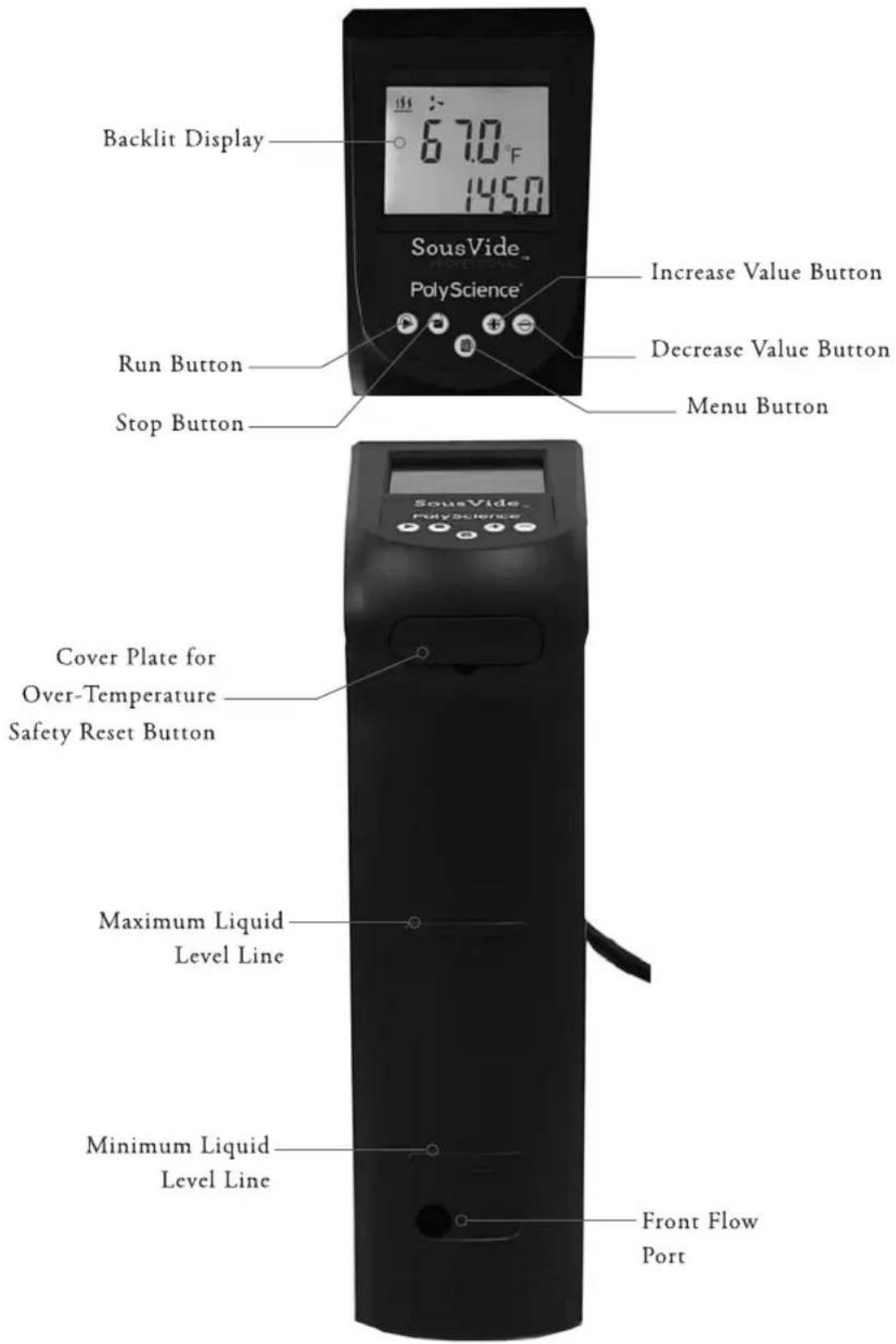
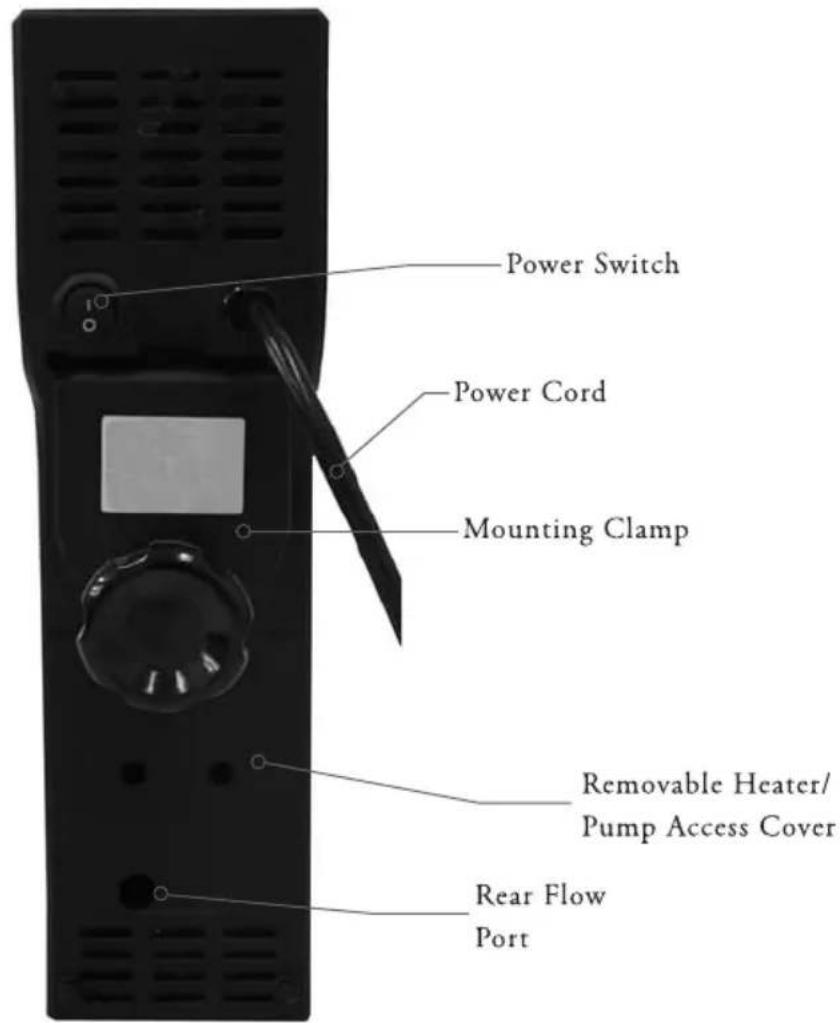
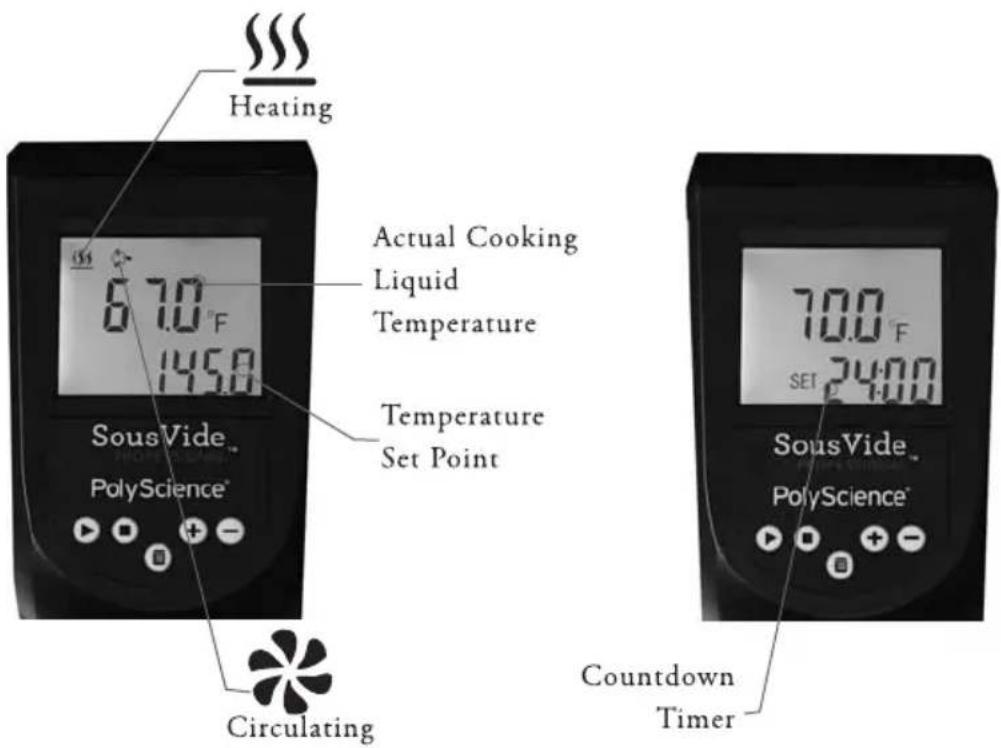
Quick-Start.
See Set-up for additional information.
| 1 | Attach your Sous Vide Professional to the cooking vessel | 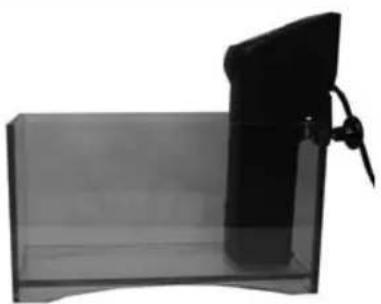 |
| 2 | Fill the vessel with tap water and cover with plastic wrap or lid | 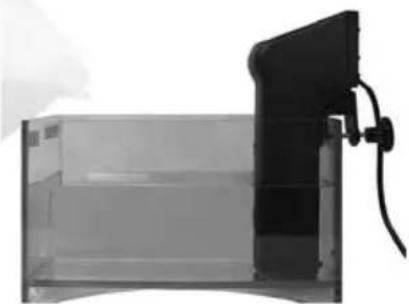 |
| 3 | Connect the power cord to an electrical outlet | 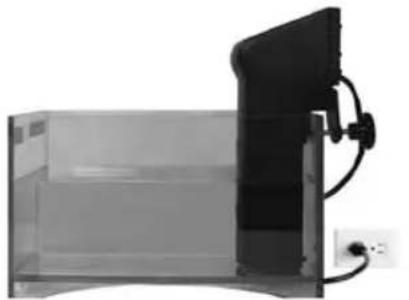 |
| 4 | Turn the Sous Wide Professional "ON" | 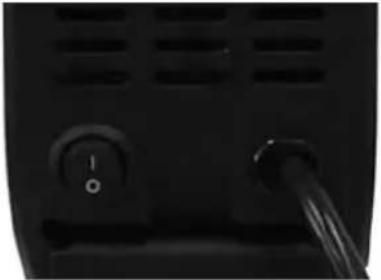 |
| 5 | Press the Menu button to access the set point menu | 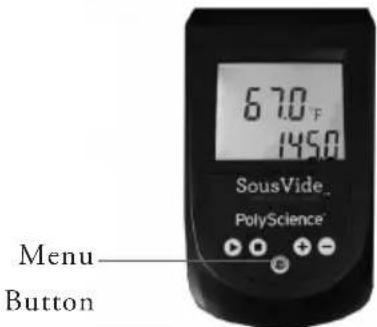 |
| 6 | Enter desired cooking temperature | Increase and decrease value buttons | 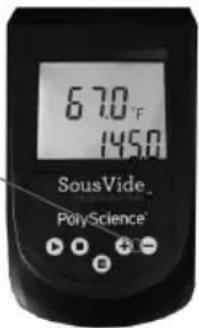 |
| 7 | Press the RUN button | Run Button | 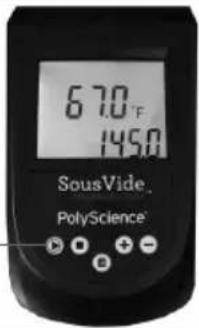 |
Set-Up.
Your Sous Vide Professional Thermal Circulator is easy to set up.
- Attach the Circulator to the cooking vessel (not included). The mounting clamp on the back of the unit will mount it securely to both flat and rounded vessel walls. Allow a minimum of 0.5 inch / 1.3 cm clearance between the bottom of the Circulator housing and the bottom of the cooking vessel.
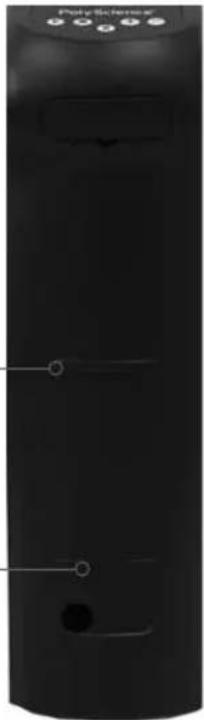
- Add water to the cooking vessel. The depth of the liquid in the cooking vessel should be kept somewhere between the "Maximum" and "Minimum" liquid level lines embossed on the heater/pump housing.

IMPORTANT: The water level in the cooking vessel will rise as food is added. Be sure to allow for this displacement when placing liquid in the vessel.
natural_image
Close-up of a black cylindrical device with control buttons and a circular opening (no visible text or symbols)MAXIMUM Always keep the cooking liquid at proper level
MAXIMUM
MINIMUM
- Plug the power cord into a properly grounded electrical outlet.

WARNING: Make certain that the electrical outlet is the same voltage and frequency as your Circulator. The correct voltage and frequency are indicated on a label on the back of the unit. The use of extension cards is most recommended.
4. Place the power switch on the rear of the unit in the "ON"
position. The LCD will light and the actual set point temperature (in °F) will appear on the display.
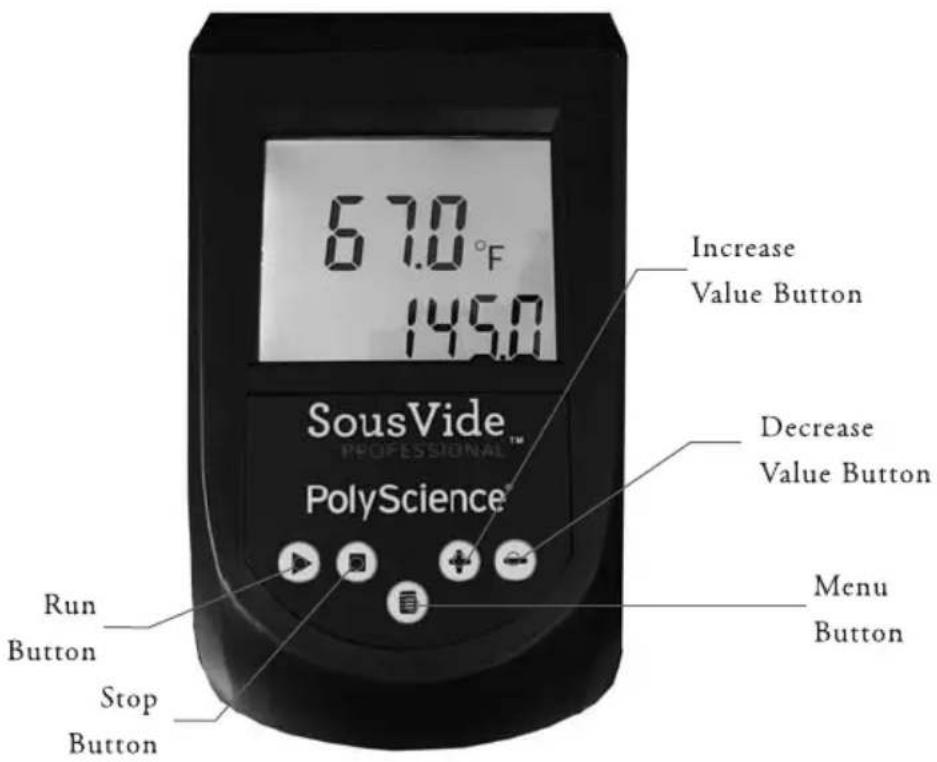
You are now ready to begin cooking with your Sous Vide Professional Thermal Circulator!
Day-to-Day Operation.
Turning the Unit ON
Place the power switch on the rear of the unit in the "ON" position.
All characters/symbols on the LCD will momentarily light, after which the actual and set point temperature (in °F) will be displayed. The Circulator is now in the Standby mode.
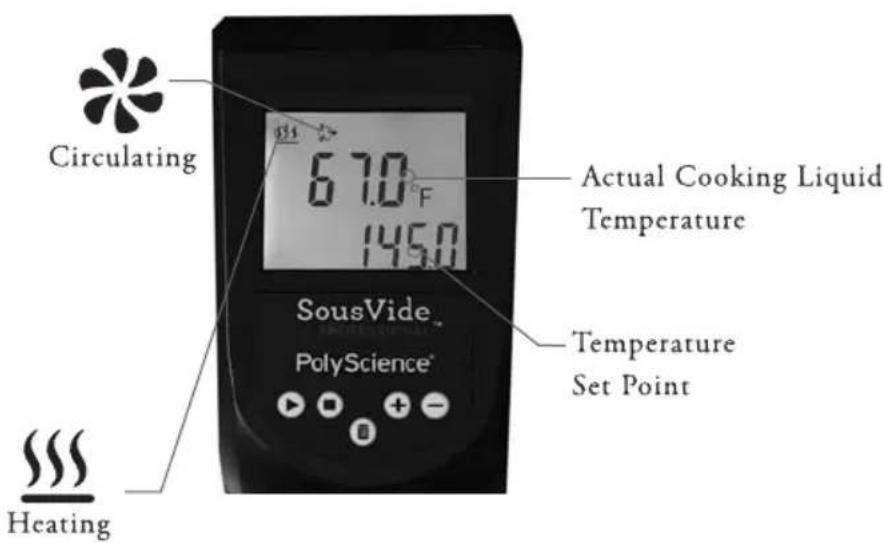
To begin cooking, press ▶. To set the cooking temperature or timer, press 📄.
Setting Cooking Temperature

natural_image
Black triangular warning symbol with white exclamation mark (no text or numbers)IMPORTANT: The cooking temperature cannot be set while the Circulator is heating or circulating the cooking liquid. You must first place it in Standby by pressing ▪.
Cooking temperature may be set and displayed in either °F or °C.
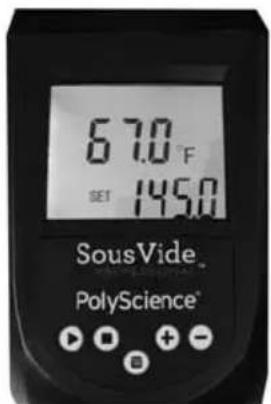
To select °F, press ☐ once; the word "SET" will be lit to the left of the current cooking temperature. Press or hold + or - until the desired cooking temperature is displayed. Press ▶ to begin cooking at that temperature.
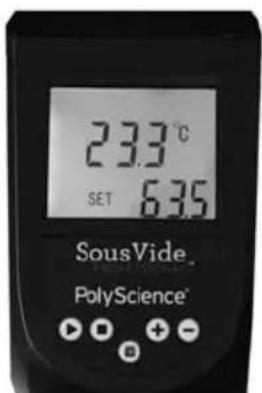
To select °C, press ☐ three times; the word "SET" will be lit to the left of the current cooking temperature. Press or hold + or - until the desired cooking temperature is displayed. Press ▶ to begin cooking at that temperature.

natural_image
Black triangular warning symbol with white exclamation mark (no text or numbers)IMPORTANT: Always allow the cooking liquid to reach the set point temperature before adding the sous vide cooking pouches to the cooking vessel. For optimal heating and performance, cover the cooking vessel with plastic wrap or a lid (DO NOT COVER THE CIRCULATOR).
Using the Timer

natural_image
Black triangular warning symbol with exclamation mark (no text or numbers)IMPORTANT: The timer cannot be set while the Circulator is heating or circulating the cooking liquid. You must first place it in Standby by pressing ■.
Your Sous Vide Professional Thermal Circulator has a built-in timer that can be set for cooking times from 5 minutes to 99 hours. The factory default is 2:00 hours.
To set the timer, press ☐ twice; the word "SET" will be lit next to the current cooking time. Press or hold + or - until the desired cooking time is displayed. Press ▶ to begin cooking.
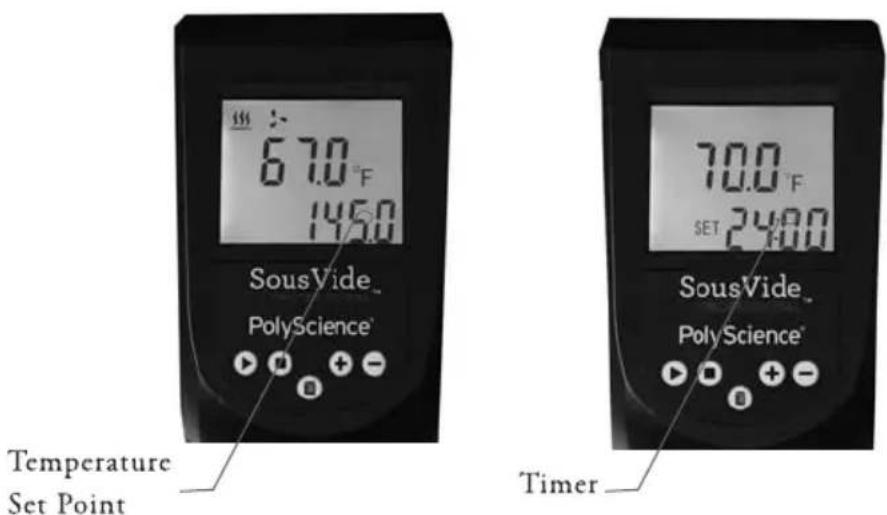
The remaining cooking time and the set point will appear alternately on the display. When the set cooking time has elapsed, the Circulator will beep three times, go silent for 15-20 seconds, and then repeat. The Circulator will continue circulating the cooking liquid and maintaining it at the set point temperature until ■ is pressed; this also resets the timer.
TIP: Always allow the cooking liquid to reach the set point temperature before setting the timer. This will help ensure that the food is cooked at the desired temperature for the desired length of time.
Loss of Power.
In the event that electrical power is disrupted during use, your Circulator will return to the Standby mode when power is restored, with temperature displayed in °F and the timer set for 2:00 hours.
Cleaning & Storage.
Always clean and dry your Sous Vide Professional Thermal Circulator completely before storing. Be sure to protect it from contact with equipment or other objects that could damage the digital display.
Routine Cleaning
Turn the Circulator OFF by pressing ■ and placing the power switch on the rear of the unit in the OFF position. Unplug the power cord from the electrical outlet.

WARNING: To avoid the potential for burns, allow the Circulator to cool to room temperature before removing it from the cooking vessel.
Keeping the unit upright, wipe the housing with a clean damp cloth or sponge. Do not use abrasive cleansers as these could scratch the housing or LCD readout.
Should the Circulator's immersed components become coated with grease or other residue due to a cooking pouch leak or break, run the unit in clean water containing a small amount of non-sudging dishwasher detergent for about 10 minutes at 140^ / 60^ . Rinse carefully and dry thoroughly when done.

WARNING: Never immerse the Circulator's controls or display in water or other liquids or place under running water. Do not clean the unit in a dishwasher.
ANY OTHER SERVICING SHOULD BE PERFORMED BY AN AUTHORIZED SERVICE REPRESENTATIVE.
Removing Mineral or Scale Deposits
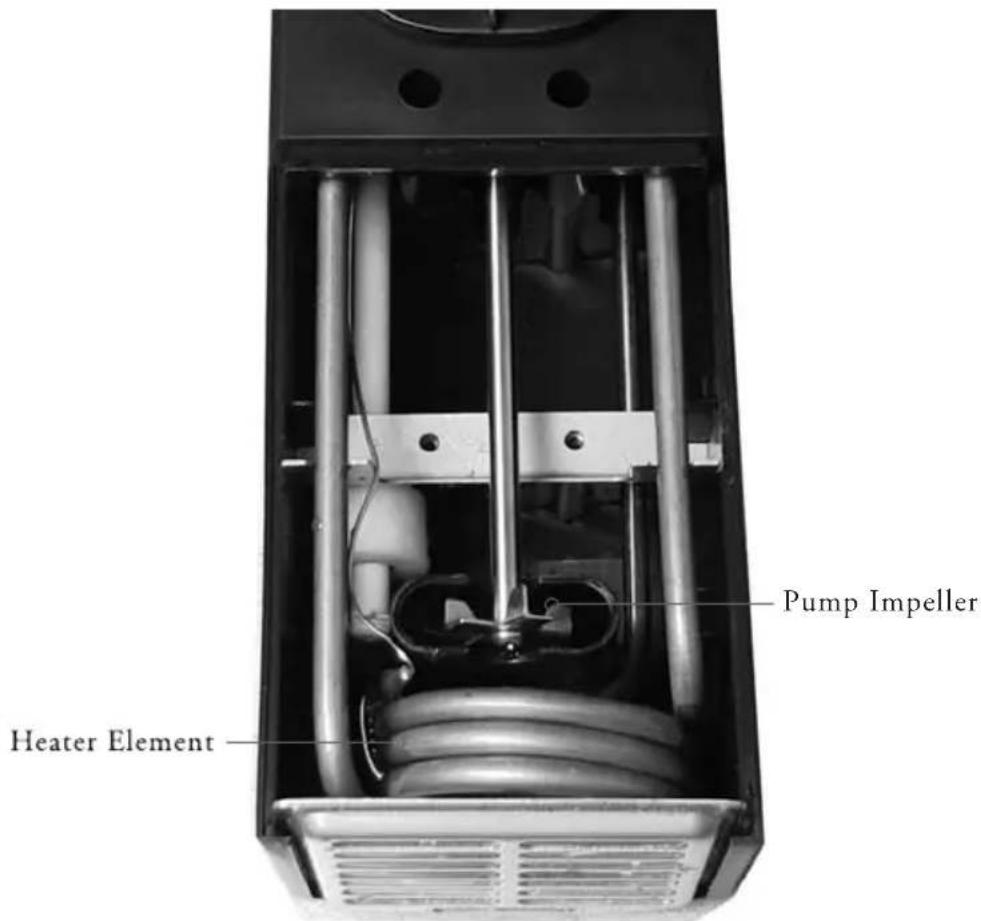
Depending on the frequency of use and the hardness of your water, scale and minerals may build up on your Circulator's heater element and pump impeller. These components should be inspected periodically for such deposits by removing the protective cover on the bottom rear of the unit. The cover is held in place with two Phillips head fasteners.
Should cleaning become necessary, run the Circulator in either a 15% white vinegar in water solution or a 10% food-safe calcium/lime/rust remover in water solution at 140^ F / 60^ C until the scale is removed. Dry thoroughly when done.
Removing Food Debris.
Turn the Circulator OFF by pressing ■ and placing the power switch on the rear of the unit in the OFF position. Unplug the power cord from the electrical outlet.

WARNING: To avoid the potential for burns, allow the Circulator to cool to room temperature before removing it from the cooking vessel.
In the unlikely event that food or other debris becomes lodged in the heater element or pump impeller, these components can be fully accessed by removing the protective cover on the bottom rear of the unit. This cover is held in place with two Phillips head fasteners.
Use a soft brush to remove any lodged particles. If necessary, soak in clean water to soften before brushing. DO NOT use hard utensils or abrasive pads to remove trapped food debris.

WARNING: Never operate your Circulator without the protective cover in place.
Troubleshooting.
Food does not cook uniformly. The food portions are not equal in size and/or the liquid-to-food ratio is too low.
Circulator won't heat. Check to see if the heat symbol ( ) is flashing.
If symbol is flashing and you are cooking at higher temperatures or using larger cooking vessels, cover the vessel with plastic wrap or a lid (DO NOT COVER CIRCULATOR).
If symbol is not flashing, (1) verify that the Circulator is in the Run mode ( * lit) and (2) that the set point temperature is higher than the cooking liquid temperature.
Displayed liquid temperature greatly exceeds set point temperature.
Check bottom of the Circulator and/or front and rear outlet ports for blockages and clear as required. If that does not correct the problem, turn power to the Circulator OFF and then back ON. If problem persists, the temperature sensor may be defective and require service.
Cooking liquid is circulating, but the circulating icon (\*) is not
lit. This is generally an indication that the Circulator's automatic over-temperature safety has been activated due to over-heating, but could be due to a momentary problem with the electronics. Turn power to the Circulator OFF and then back ON. If problem persists, allow the cooking liquid to cool and then reset the safety (see Resetting the over-temperature safety, see below).
E01 appears on the display. This indicates that the water level is too low. Fill the cooking vessel until the water level is above the MIN liquid level mark on the Circulator's housing and then turn power to the unit OFF and then back ON.
Digital display is blank. Verify that the power cord is plugged into an operating electrical outlet and that the power switch on the rear of the Circulator is in the ON position. Check for problems with the main electrical power supply (tripped circuit breaker, etc.).
Resetting the over-temperature safety. The Circulator's automatic over-temperature safety removes power from the heater and pump whenever the liquid temperature exceeds a factory set temperature. This safety reset as follows:
- Press ■ to place the Circulator in the Standby mode.
- Place the power switch on the rear of the unit in the OFF position.
- Unplug the power cord from the electrical outlet.
- Allow the liquid in the cooking vessel to cool.
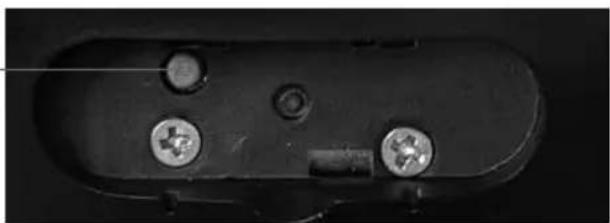
- Remove the plate covering the red reset button.
- Press the red reset button.
- Replace the cover plate.
- Restore power to the unit.
- Press ▶.
If the problem persists, contact PolyScience.
Reset Button
natural_image
Close-up of a black electronic component with three screws and a connector (no visible text or symbols)Disposal.
natural_image
Simple line drawing of a trash bin with two crossed lines indicating no waste or discharge (no text or symbols)This equipment is marked with the crossed out wheeled bin symbol to indicate that it must not be disposed of with unsorted waste.
It is your responsibility to correctly dispose of this equipment at lifecycle-end by handing it over to an authorized facility for separate collection and recycling. By doing so, you will help conserve natural and environmental resources and you will ensure that your equipment is recycled in a manner that protects human health.
Please contact PolyScience.
For recipe ideas, instructional videos, and free downloads visit www.sousvideprofessional.com.
Warranty.
POLYSCIENCE LIMITED PRODUCT WARRANTY
This limited warranty supersedes all previous warranties on this product. This limited warranty is available for consumers only. You are a consumer if you were the original purchaser of the product at retail for personal, family or household use. PolyScience agrees to correct for the consumer, either by repair, or at PolyScience's election, by replacement, any defects in material or workmanship which develop within twelve (12) months after delivery of this product to the consumer for parts and labor. In the event of replacement, the replacement product will be warranted for (A) ninety (90) days from the date of delivery of the replacement, or (B) the remainder of the original warranty period, whichever is longer.
If this product should require service, contact PolyScience for instructions. When return of the product is necessary, a return authorization number is assigned and the product should be shipped, transportation charges pre-paid, to the indicated service center. To insure prompt handling, the return authorization number should be placed on the outside of the package. A detailed explanation of the defect must be enclosed with the product.
Notwithstanding the above, this warranty shall not apply if the defect or malfunction was caused by accident, neglect, unreasonable use, improper service, or other causes not arising out of defects in material or workmanship
THERE ARE NO WARRANTIES, EXPRESS OR IMPLIED, INCLUDING, BUT NOT LIMITED TO, THOSE OF MERCHANTABILITY OR FITNESS FOR A PARTICULAR PURPOSE, WHICH EXTEND BEYOND THE DESCRIPTION AND PERIODS SET FORTH HEREIN.
POLYSCIENCE'S SOLE OBLIGATION UNDER THIS WARRANTY IS LIMITED TO THE REPAIR OR REPLACEMENT OF A DEFECTIVE PRODUCT AND POLYSCIENCE SHALL NOT, IN ANY EVENT BE LIABLE FOR ANY INCIDENTAL OR CONSEQUENTIAL DAMAGES OF ANY KIND RESULTING FROM USE OR POSSESSION OF THE PRODUCT.
Some states do not allow (A) limitations on how long an implied warranty lasts, or (B) the exclusion or limitation of incidental or consequential damages, so the above limitations or exclusions may not apply to you. This warranty gives you specific rights, and you may have other rights which vary from state to state.
To activate your warranty, please visit http://www.cuisinetechnology.com/activate
PolyScience Toll-free USA and Canada: (800) 229-7569
6600 W. Touhy Avenue Worldwide: +1 (847) 647-0611
Niles, IL 60714 USA Email: culinary@polyscience.com
www.sousvideprofessional.com
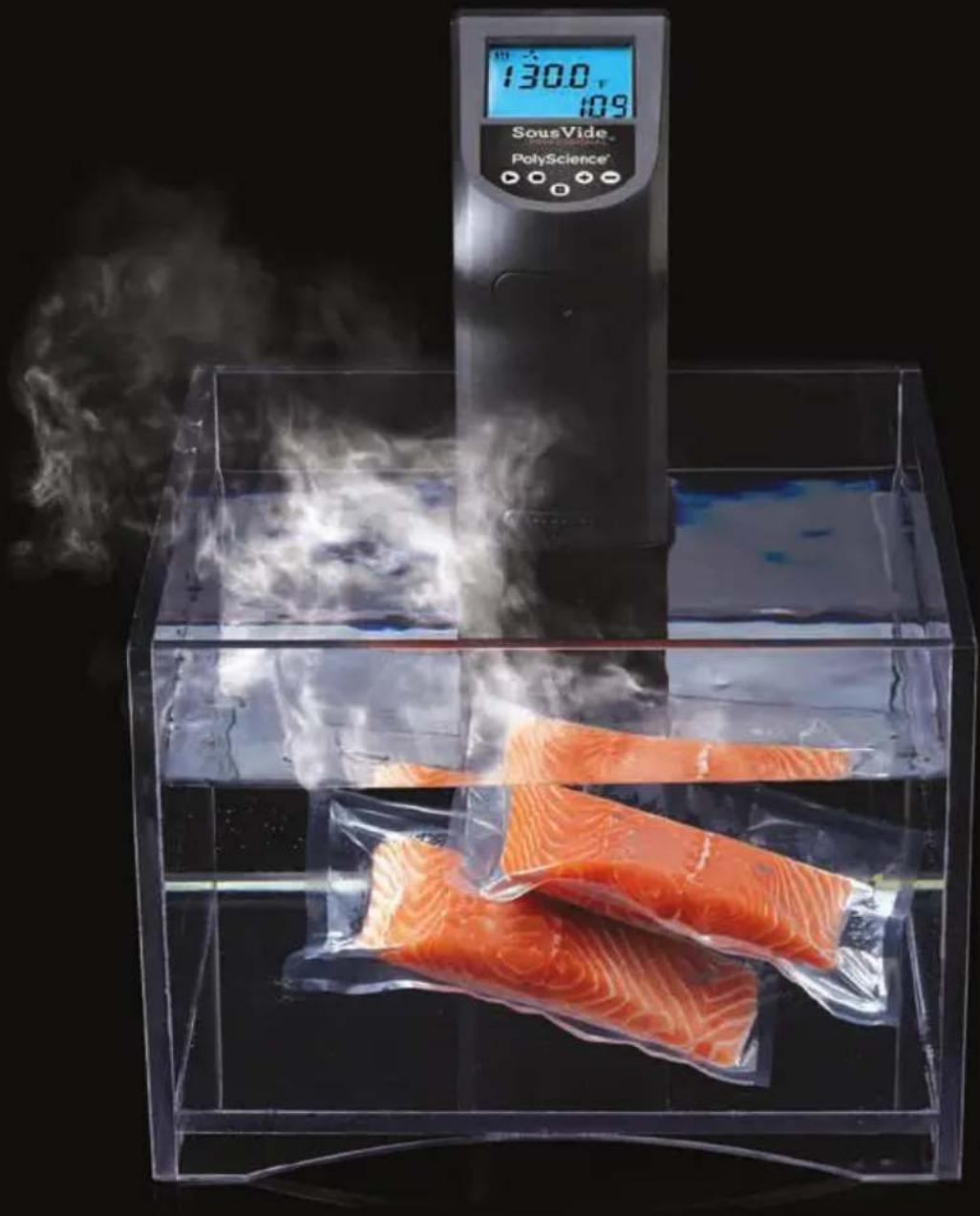
SousVide™
PROFESSIONAL
SÉRIE CREATIVE
PRECISE TEMPERATURE COOKING SYSTEM™
natural_image
Exterior view of a modern office building (no signage)natural_image
Black circular warning symbol with white exclamation mark (no text or numbers)natural_image
Black circular warning symbol with an exclamation mark (no text or numbers)natural_image
Black circular warning symbol with a white exclamation mark (no text or numbers)IMPORTANT : PROTECTION DU PLAN DETRAVAILL
natural_image
Black cylindrical device with control buttons and mounting holes, no visible text or symbolsnatural_image
Black triangular warning sign with a lightning bolt symbol (no text)natural_image
Black triangular warning symbol with exclamation mark (no text or numbers)natural_image
Black triangular warning symbol with white exclamation mark (no text or numbers)natural_image
Black triangular warning symbol with exclamation mark (no text or numbers)natural_image
Simple line drawing of a trash bin with crossed lines indicating no waste or prohibition (no text or symbols)
Contacter PolyScience.
GARANTIE LIMITÉE DE PRODUIT POLYSCIENCE
International: +1 (847) 647-0611
Niles, IL 60714 USA
Courriel: culinary@polyscience.com
www.sousvideprofessional.com