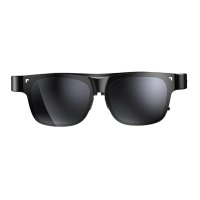
NXTWEAR Air - Multimedia glasses TCL - Free user manual and instructions
Find the device manual for free NXTWEAR Air TCL in PDF.



| Product Type | Multimedia Glasses |
| Brand | TCL |
| Model | NXTWEAR Air |
| Connectivity | USB Type-C with DisplayPort Alt Mode |
| Compatibility | Devices equipped with USB-C with DisplayPort Alt Mode |
| Power | Via connected device (USB-C) |
| Main functions | Virtual display, personal screen, media viewing |
| Minimum recommended age | 14 years (with adult supervision) |
| Operating temperature | 0°C to 50°C |
| Cleaning | Clean, dry, and soft cloth; no chemicals |
| Materials | Not specified in the manual |
| Weight | Approximately 80 g (estimate) |
| Dimensions | Not specified in the manual |
| Box contents | Not specified in the manual |
| Manufacturer | Falcon innovation technology (Shenzhen) Co., Ltd |
| Manufacturer website | www.tcl.com |
| Certification | Compliant with directive 2014/30/EU |
| Recycling | Sorting instructions (Triman) – see www.consignesdetri.fr |
| Usage precautions | Do not use when tired, ill, or under influence; stop if excessive heat or discomfort |
| Intended use | Personal entertainment, portable display |
| Warranty | Not specified in the manual |
Frequently Asked Questions - NXTWEAR Air TCL
User questions about NXTWEAR Air TCL
0 question about this device. Answer the ones you know or ask your own.
Ask a new question about this device
Download the instructions for your Multimedia glasses in PDF format for free! Find your manual NXTWEAR Air - TCL and take your electronic device back in hand. On this page are published all the documents necessary for the use of your device. NXTWEAR Air by TCL.
USER MANUAL NXTWEAR Air TCL
To optimise the user experience, scan the QR code to download and install the APP.
Scan the QR Code to read the complete user manual.
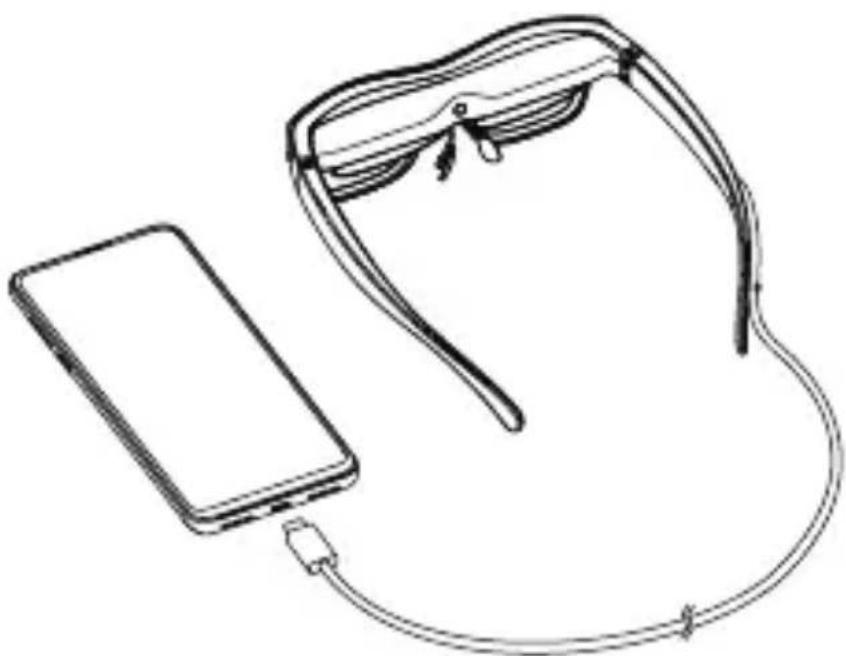
Connecting to the device
- If your device is equipped with USB Type-C with DisplayPort Alternate Mode, connect the cable of the Glasses to the USB Type-C connector of your device.
Warning
- To use TCL NXTWEAR Air Glasses, users must read the entire user manual to become familiar with the features of this product before using it. Failure to use this product in a safe and responsible manner within its intended purpose could result in personal injury or damage to the product or other property.
- This product is not intended for use by children under the age of 14 without direct adult supervision.
Disclaimer
- Congratulations on purchasing our TCL NXTWEAR Air Glasses.
- There may be certain differences between the user manual description and the phone's operation, depending on the software release of your phone and the Glasses or specific carrier services.
- Falcon innovation technology (Shenzhen) Co., Ltd. shall not be legally responsible for such differences.
Safety information
TO REDUCE THE RISK OF PERSONAL INJURY, DISCOMFORT OR PROPERTY DAMAGE, PLEASE ENSURE THAT YOU HAVE READ THE BELOW SAFETY INFORMATION CAREFULLY BEFORE USING OUR TCL NXTWEAR Air GLASSES.
- Use only in a safe environment.
- To prevent possible hearing damage, do not listen at high volume levels for long periods.
- Do not use these Glasses during sudden or intensive activity.
- If your Glasses feel hot to the touch or are uncomfortably warm, stop using and allow them to cool down.
- Immediately discontinue using these Glasses if you are experiencing eye strain or dizziness.
- Please immediately stop using these Glasses if they are damaged.
- Do not expose to liquid.
- Consult your doctor before using these Glasses. Do not use these Glasses if you are sick, fatigued, under the influence of intoxicants/drugs, or are not feeling generally well.
-
Do not squeeze these Glasses during use to avoid damage to the Glasses or cause the lenses to become extruded which could risk damaging the wearer's face.
-
Stop using these Glasses if you notice swelling, itchiness, skin irritation or other discomforts of your skin that is in contact with them. If symptoms persist, please contact a doctor. Do not use strong chemicals, cleaning agents or strong detergents to clean the Glasses, otherwise it may lead to material changes, thus affecting eye health. Please use a clean, dry, soft cloth to wipe the Glasses.
- Please stop using the Glasses and disconnect all connections or cables with other equipment before cleaning and maintenance.
- Do not let children or pets bite the Glasses to avoid injury or failure of the Glasses.
- Do not place these Glasses in direct sunlight, such as car wash dashboard or window sill.
- Do not treat these Glasses as ordinary domestic waste.
- Please comply with the local ordinance for these Glasses and support recycling initiatives.
- These Glasses are not equipped with prescription spectacle lenses by default, users who need corrective lenses should purchase them by themselves.
- These Glasses are not a waterproof product, please do not use them in water or rain.
- The manufacturer's recommended operating temperature range is 0^ (32^) to 50^ (122^) .
General information
- Internet address: https://www.tcl.com/global/en/ mobilesupport.html. On our website, you will find our FAQ (Frequently Asked Questions) and Smart Glasses app etc.
- Manufacturer: Falcon innovation technology (Shenzhen) Co., Ltd
- Address: 5th Floor, Building D4, TCL International E City, no.1001 zhongshan Yuan Road, Nanshan District, Shenzhen.
This product is not intended for use by children under the age of 14 without direct adult supervision.
Regulatory information
- Hereby, Falcon innovation technology (Shenzhen) Co., Ltd. declares that the product type TCL NXTWEAR Air is in compliance with Directive 2014/30/EU.
- The full text of the EU declaration of conformity is available at the following internet address: www.tcl.com/global/en/-service-support-mobile/eu-doc.html
Additional information
- Software, which allow the product to operate as intended, can be obtained in the full text of the EU declaration of conformity at the following internet address: www.tcl.com/global/en/service-support-mobile/eu-doc.html
- Internetová adresa: https://www.tcl.com/global/en/ mobilesupport.html. Na našem webu najdete Časté dotazy, aplikaci Smart Glasses atd.
- Vyrobce: Falcon innovation technology (Shenzhen) Co., Ltd
- Adresa: 5th Floor, Building D4, TCL International E City, no.1001 zhongshan Yuan Road, Nanshan District, Shenzhen.
- Internet adresi: https://www.tcl.com/global/en/ obilesupport.html. Web sitemizde SSS (Sik Sorulan Sorular) ve Akilli Gozluklerimizi uygulamasini vb.bulacaksiniz.
- Üretici: Falcon innovation technology (Shenzhen) Co., Ltd
- Adres: 5th Floor, Building D4, TCL International E City, no.1001 zhongshan Yuan Road, Nanshan District, Shenzhen.