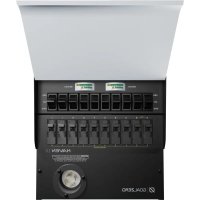
Haven 10 - Portable generator GOAL ZERO - Free user manual and instructions
Find the device manual for free Haven 10 GOAL ZERO in PDF.


| Product Type | Home Integration Kit for Portable Generator (Manual Transfer Switch) |
| Brand | Goal Zero |
| Model | Haven 10 |
| Compatibility | Yeti PRO 4000 Power Station and Tank PRO 4000 Expansion Battery |
| Number of Circuits | 10 circuits (4 x 20A, 6 x 15A) |
| Maximum Power | 7500 W |
| Circuit Breakers | 2 x 30A and 8 x 20A |
| Circuit Protection | Integrated, one per circuit |
| Transfer Type | Manual (LINE/YETI switch) |
| Voltage | 120 V AC, 60 Hz |
| Required Power Source | Yeti PRO 4000 (sold separately) |
| Installation | By a qualified and licensed electrician |
| Yeti Extension Cable | Length 1.5 m (5 ft), gauge 1.0 AWG |
| 3600 W Pass-Through Cable | Length 2.3 m (8 ft), automatic switching < 10 ms |
| Usage | Backup power for 10 circuits 120 V |
| Maintenance | Keep dry, clean with a dry cloth |
| Safety | Do not use on GFCI circuit for Yeti power |
| Dimensions (estimated) | 20 x 15 x 8 cm |
| Weight (estimated) | 1.5 kg |
| Included Accessories | Yeti Extension Cable, 3600 W Pass-Through Cable |
Frequently Asked Questions - Haven 10 GOAL ZERO
User questions about Haven 10 GOAL ZERO
0 question about this device. Answer the ones you know or ask your own.
Ask a new question about this device
Download the instructions for your Portable generator in PDF format for free! Find your manual Haven 10 - GOAL ZERO and take your electronic device back in hand. On this page are published all the documents necessary for the use of your device. Haven 10 by GOAL ZERO.
USER MANUAL Haven 10 GOAL ZERO
PRODUCT INFORMATION INFORMATIONS SUR LE PRODUIT
GENERAL GENÉRALITES
10 Circuits: 4-20A, 6-15A
Built-in Protection: one per circuit
Max Wattage: 7500W
Max circuit breaker: 2x 30A and 8x 20A
- Requires Goal Zero Yeti PRO 4000 power station and optional Tank PRO 4000 Expansion Battery.
WHAT'S INCLUDED INCLUDE
- Yeti Extension Cable: 5 ft, 10AWG Note: This cable can only be used to connect one Yeti PRO 4000
- Haven 10 Manual Transfer Switch (Reliance PRO/TRAN 2%)
3600 W Passthrough Cable (More info in the back of this booklet)
(CF)p.10
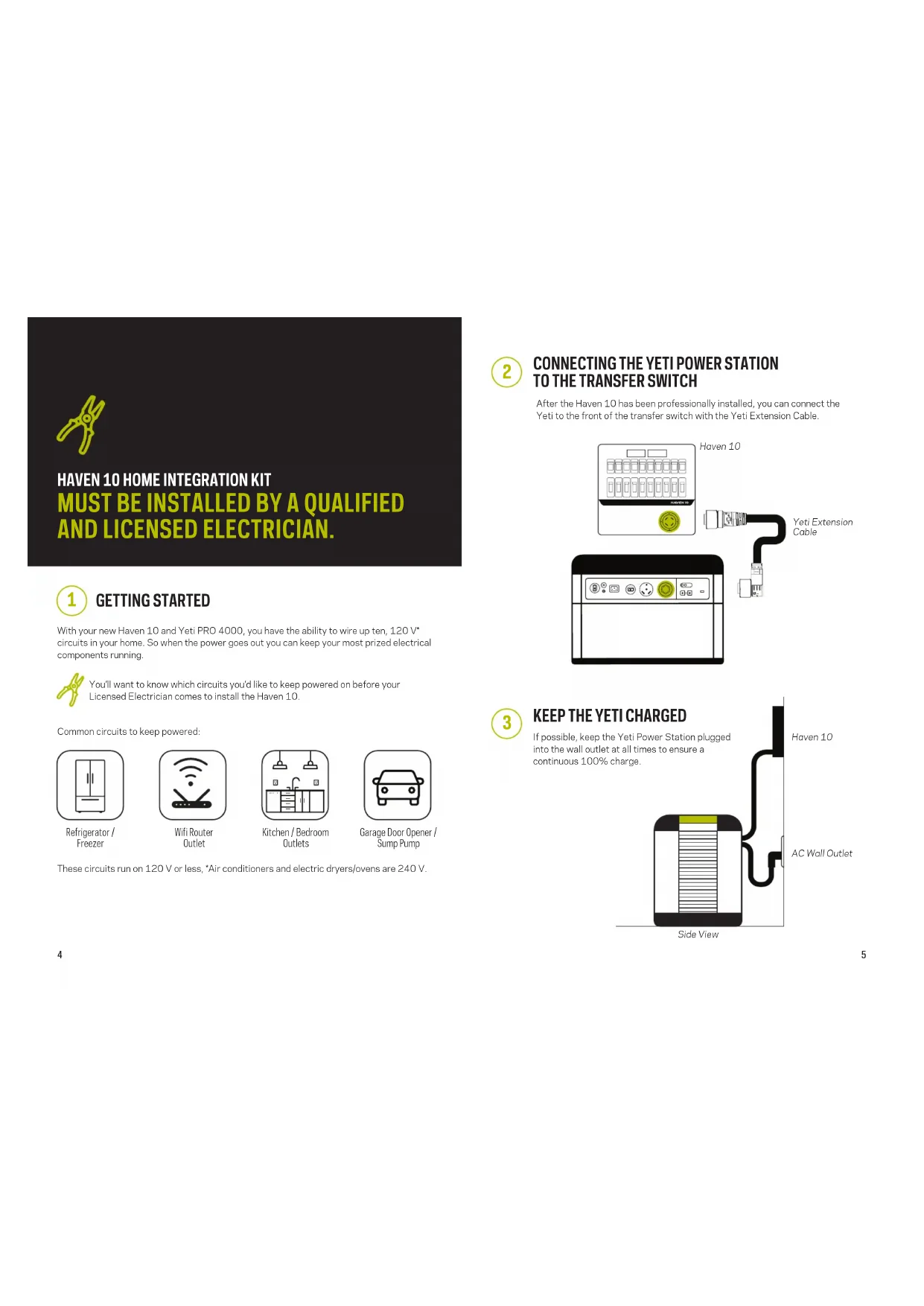
With your new Haven 10 and Yeti PRO 4000, you have the ability to wire up ten, 120V^* circuits in your home. So when the power goes out you can keep your most prized electrical components running.

You'll want to know which circuits you'd like to keep powered on before your Licensed Electrician comes to install the Haven 10.
Common circuits to keep powered:
Refrigerator / Freezer

Wifi Router Outlet
Kitchen/Bedroom Outlets

Garage Door Opener / Sump Pump
These circuits run on 120 V or less, Air conditioners and electric dryers/ovens are 240 V.

CONNECTING THE YETI POWER STATION TO THE TRANSFER SWITCH
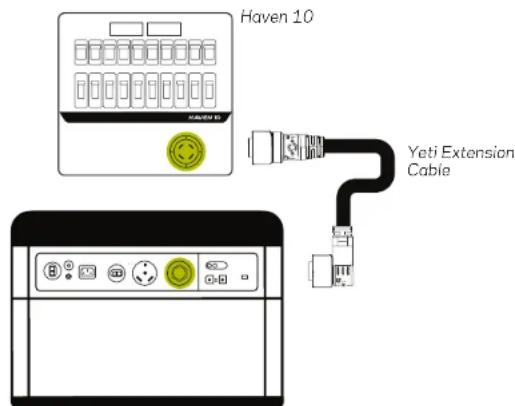
After the Haven 10 has been professionally installed, you can connect the Yeti to the front of the transfer switch with the Yeti Extension Cable.

HAVEN 10 HOME INTEGRATION KIT USING YOUR BACK UP POWER DURING AN OUTAGE.
Just when you think "Oh Not" when the power goes out, you're quickly calmed knowing that you've already installed your back-up power system and you're good to go.

Press the Power Button on the Yeti Power Station.

The button will glow white when the power is on.

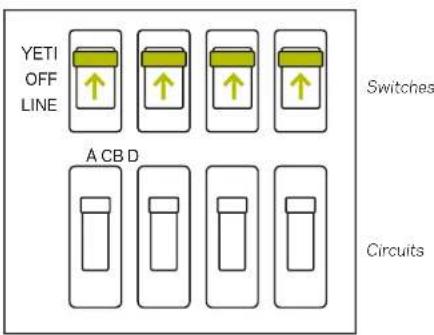
Lift the cover of the Haven 10 and flip your switches from LINE to YETI. All Done!
Transfer Switch Box
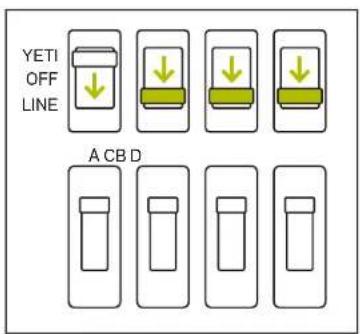
Once your grid or LINE power has been restored, simply return the Switches back to LINE on the transfer switch.
Switches
Circuits
Transfer Switch Box

Then turn off the Yeti power stations by pushing the AC button. The light will turn off. All Done!

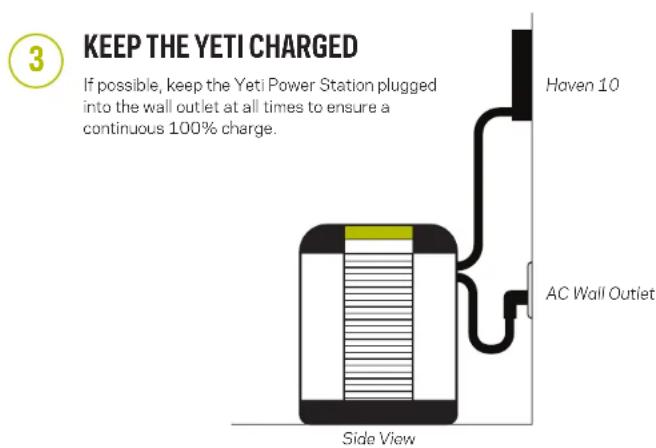
There is no need to disconnect the Yeti from the Haven 10 when not in use.
Q: What Yeti Portable Power Station do you recommend to use with the Haven 10?
A: The Haven 10 is only compatible with the Yeti PRO 4000 power station and Tank PRO 4000 Expansion Battery.
Q: How long will the Haven 10 system run my fridge?
A: Just like estimating runtimes from the Yetis themselves, runtimes with the Haven 10 system are dependent on what you're powering (lights vs. fridge) and what Yeti Portable Power Station you're using. The amount of power a fridge pulls is completely dependent on the make and model, as well as other factors, like how often you are opening and closing it, and how full it is. For example, a fridge pulling an average of 55 watts would run for approximately 72 hours from a Yeti PRO 4000 (4000Wh/55=72.72. For more information on runtimes and other examples, check out the user manual for the Goal Zero Yeti Portable Power Station.
Q: What if I want to take the Yeti PRO 4000 outside?
A: Easy, simply unplug the Yeti and take it wherever you need it.
3600 W Passthrough Cable
8 ft Flying Leads to Power + Male Cable
This cable replaces the power cord that is included with the Yeti PRO.
Please keep the power cord in case you need it in the future.
- The cable allows for automatic power switching in less than 10 milliseconds (up to 3600 W). When grid power goes down, the circuits connected to the Haven 10 will switch to using power from the Yeti PRO. To take advantage of this feature, make sure the Yeti PRO 4000 is connected to the Haven 10 Manual Transfer Switch and that the circuits are set to "YETI".
It allows you to charge the Yeti PRO 4000 while simultaneously passing through power to your circuits. - Passthrough capability up to 3600 W when the Yeti PRO is completely charged. (120 V only)
If charging at 1800 W, it can continue to pass through another 1800 W
When using the Yeti PRO 4000 with the Haven:
Automatic Power Switching and Passthrough functionalities are not available if a GFCI protected circuit is supplying power to the Yeti PRO 4000. Before installing, have your electrician confirm the power supplied to the Yeti PRO 4000 is not from a GFCI protected circuit. This applies whether the Yeti PRO 4000 is directly plugged into the GFCI receptacle or to another receptacle on the same circuit. GFCI rules differ by area. Check with your local electrician or city for the latest information.
If you need additional assistance setting up or using your Haven 10 and Yeti PRO 4000, visit our contact page at www.galzero.com/contact or call 1-888-794-6250.
NOTES
Circuit Breaker Labels from left to right:
A
B
C
D
E
F
G
H
1
J

MISE EN ROUTE
POWER. ANYTHING. ANYWHERE.

Brand : GOAL ZERO
Model : Haven 10
Category : Portable generator