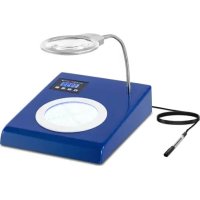
SBSCC1000 - Colony counter STEINBERG - Free user manual and instructions
Find the device manual for free SBSCC1000 STEINBERG in PDF.


| Product type | Colony counter |
| Brand | Steinberg |
| Model | SBSCC1000 |
| Dimensions (W × D × H) | 300 × 240 × 420 mm |
| Weight | 0.96 kg |
| Power supply | 230 V ~ 50 Hz |
| Rated power | 12 W |
| Compatible Petri dish size | 90 mm |
| Magnification | 2x to 5x |
| Display screen | Digital LCD, range 0–9999 |
| Lighting | LED ring with contrast adjustment (16 levels) |
| LCD lighting power supply | 3 AAA batteries 1.5 V |
| Counting stylus | Stylus included |
| Control panel functions | Contrast increase/decrease, reset (CLR), subtraction |
| Reset function | Yes |
| Subtraction function | Yes (reduces the counter by 1) |
| Holding arm | Adjustable |
| Cleaning | Soft non-abrasive cloth; do not immerse |
| Maintenance | Unplug before cleaning; store in dry place |
| Safety | Do not use with wet hands; do not expose to water |
| Spare parts | AAA batteries, counting stylus |
| General information | Manual available in multiple languages (DE, EN, PL, CZ, FR, IT, ES, HU, DA) |
Frequently Asked Questions - SBSCC1000 STEINBERG
User questions about SBSCC1000 STEINBERG
0 question about this device. Answer the ones you know or ask your own.
Ask a new question about this device
Download the instructions for your Colony counter in PDF format for free! Find your manual SBSCC1000 - STEINBERG and take your electronic device back in hand. On this page are published all the documents necessary for the use of your device. SBSCC1000 by STEINBERG.
USER MANUAL SBSCC1000 STEINBERG
| Parameter description | Parameter value | |
| Product name | COLONY COUNTER | |
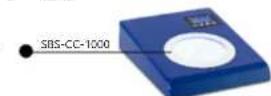
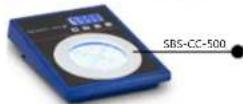
| Model | SBS-CC-1000 | SBS-CC-500 |
| Supply voltage [V~] / Frequency [Hz] | 230/50 | |
| Rated power [W] | 12 | |
| Dimensions (Width x Depth x Height) [mm] | 300x240x420 | 400x300x350 |
| Unit weight [kg] | 0,96 | 2,30 |
| Peltin dish size [mm] | 90 | 150 |
| Magnifying glass magnification | 2-5 times | |
| Power supply for LCD illumination | 3 x AAA 1.5V batteries | |
| LCD display reading range | 0-9999 | |
| Value reset | yes | |
| Marker | yes | |
- GENERAL DESCRIPTION The user manual is designed to assist in the safe and trouble-free use of the device. The product is designed and manufactured in accordance with strict technical guidelines, using state-of-the-art technologies and components. Additionally, it is produced in compliance with the most stringent quality standards.

To increase the product life of the device and to ensure trouble free operation, use it in accordance with this user manual and regularly perform maintenance tasks. The technical data and specifications in this user manual are up to date. The manufacturer reserves the right to make changes associated with quality improvement. The device is designed to reduce noise emission risks to a minimum, taking into account technological progress and noise reduction opportunities.
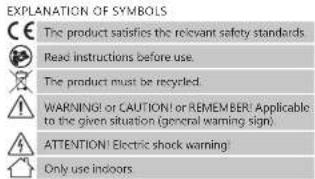
25.10.2021
Please note! The illustrations in this instruction manual are for reference only and may differ from the actual product in some details.
2.SAFETY OF USE
ATTENTION! Read all safety warnings and all instructions. Failure to follow the warnings and instructions may result in electric shock, fire and/or severe personal injury or death.
The terms 'device' or 'product' are used in the warnings and instructions to refer to: COLONY COINITER.
2.1.ELECTRICAL SAFETY
a) The plug must fit the socket. Do not modify the plug in any way. Using original plugs and matching sockets reduces the risk of electric shock.
b) Avoid touching earthed elements such as pipes, heaters, boilers and refrigerators. There is an increased risk of electric shock if the earthed device is exposed to rain, comes into direct contact with a wet surface or is operating in a damp environment. Water getting into the device increases the risk of damage to the device and of electric shock.
c) Do not touch the device with wet or damp hands.
d) Use the cable only for its designated use. Never use it to carry the device or to pull the plug out of a socket. Keep the cable away from heat sources, oil, sharp edges or moving parts. Damaged or tangled cables increase the risk of electric shock.
e) If using the device in a damp environment cannot be avoided, a residual current device (RCD) should be applied. The use of an RCD reduces the risk of electric shock.
D. Do not use the device if the power cord is damaged or shows obvious signs of wear. A damaged power cord should be replaced by a qualified electrician or the manufacturer's service centre.
g) ATTENTION: DANGER TO LIFE! While cleaning, never immerse the device in water or other liquids.
h) Prevent the device from getting wet. Risk of electric shock
2.2.SAFETY IN THE WORKPLACE
a) If you discover damage or irregular operation immediately switch the device off and report it to a supervisor without delay.
b) If there are any doubts as to the correct operation of the device, contact the manufacturer's support service.
c) Only the manufacturer's service point may repair the device. Do not attempt any repairs independently!
a) In case of fire, use a powder or carbon dioxide (CO2) fireproofing agent and use it as intended for use on live electrical devices to put it out.
e) Please keep this manual available for future reference. If this device is passed on to a third party, the manual may be used by the manufacturer.
f) Keep packaging elements and small assembly parts in a place not available to children.
2.3.PERSONAL SAFETY
a) Do not use the device when tired, ill or under the influence of alcohol, narcotics or medication which can significantly impair the ability to operate the device.
b) The device is not designed to be handed by persons (including children) with limited mental and sensory functions or persons lacking relevant experience and/or knowledge unless they are supervised by a person responsible for their safety or they have received instruction in how to operate the device.
c) To prevent the device from accidentally switching on, make sure the switch is on the OFF position before connecting to a power source.
d) The device is not a toy. Children must be supervised to ensure that they do not play with the device.
2.4.SAFF DEVICE USE
a) Do not use the device if the DNO/Off switch does not function properly (does not switch the device on and off). Devices which cannot be switched on and off using the device should be replaced, or otherwise, should not be operated and must be repaired.
b) Disconnect the device from the power supply before commencement of adjustment, cleaning and maintenance. Such a preventive measure reduces the risk of accidental activation.
c) When not in use, store in a safe place, away from children and people not familiar with the device who have not read the user manual. The device may pose a hazard in the hands of inexperienced users.
d) Keep the device in perfect technical condition. Before each use check for general damage and especially check for cracked parts or elements and for any other conditions which may impact the safe operation of the device. If damage is discovered, hand over the device for repair before use.
e) Device repair or maintenance should be carried out by qualified persons, only using original spare parts. This includes:
f) To ensure the operational integrity of the device, do not remove factory-fitted guards and do not loosen any screws.
g) Clean the device regularly to prevent stubborn gime from accumulating.
h) It is forbidden to interfere with the structure of the system in order to change its parameters or construction.
i) Keep the device away from sources of fire and heat.
ATTENTION! Despite the safe design of the device and its protective features, and despite the use of additional elements protecting the operator, there is still a slight risk of accident or injury when using the device. Stay alert and use common sense when using the device.
- USE GUIDELINES
The product is used for rapid, digital examination of bacteriological colonies.
The user is liable for any damage resulting from unintended use of the device.
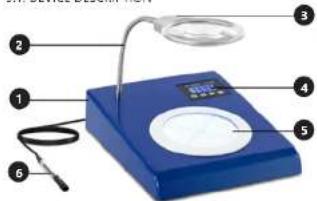
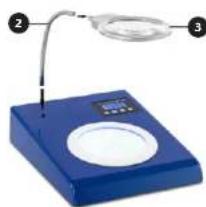
3.1.DEVICE DESCRIPTION
- Casing
- Adjustable arm
- LED ring light with magnifying glass
- Digital display
-
Counting chamber plate
-
Market
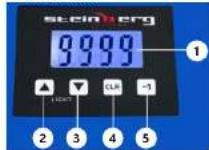
CONTROL PANEL
- Digital display
- Button for increasing the illumination contrast
- Button for decrease of contrast of the backlight
- Button for zcrping
- Countdown button
Keep the unit away from any hot surfaces. Always operate the unit on a level, stable, clean, fireproof and dry surface and out of the reach of children and persons of impaired mental, sensory and intellectual functions. Place the unit in such a way that the mains plug can be reached at any time. Ensure that the power supply to the unit corresponds to that specified on the identification plate!
ASSEMBLY OF THE UNIT
Before working on the device, make sure that all components are complete and as expected.
Then connect the device's adjustable arm (2) to the LED ring light with magnifying glass (3).
Connect the structure thus prepared to the bore axis of the bacterial colony counter station.
Connect the instrument marker (B) to the power supply output located on the rear panel, between the power cord connection output () and the on/off button. I1 C (8).
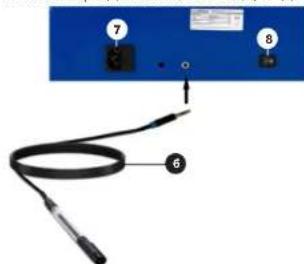
Connect the power cord to the power output of the unit (7). After completing these installation steps, you can start working with the device.
3.3.WORKING WITH THE UNIT
a) Plug the machine into a power outlet
b) Turn on the instrument by turning the power switch to the ip position:
c) Set the microbial slide on the counting chamber dish(5).
d) Adjust the contrast of the illumination of the counting chamber dish. Use the Up or Down keys to increase or decrease the light intensity. The device has 1000 counts per second for each setting. A voice message will appear with each selection.
e) To record the number of bacterial colonies on the petri dish, press the marker at the desired location. f) The number of bacterial colonies will be displayed on
The digital display and a voice message will appear. 91 The digital display and a voice message can be reduced by selecting the countdown button on the control panel. The measurement will be reduced by the value of 1.
h) Once the counter has been reset to zero with the 'CLR' button, the measurement can be restarted by clicking the "start" button.
3.4.CLEANING AND MAINTENANCE
a) Pull out the mains plug before each cleaning and when the device is not in use.
b) Use only non-corrosive cleaning agents for cleaning the surfaces.
c) After each cleaning, all the parts should be dried well before the unit is used again.
d) Store the unit in a dry and cool place protected from moisture and direct sunlight.
e) Do not spray the unit with a stream of water or immerse it in water.
f) Make sure that no water enters through the ventilation openings in the carotid.
g) Clean the ventilation openings with a brush and compressed air.
h) Perform regular inspections of the unit checking technical fitness and any damages.
i) Use a soft cloth for cleaning
j) Do not leave the batteries in the device when it will not be used for a long time.
k) Do not use sharp and/or metal objects (e.g., a wire brush or metal spatula) for cleaning, as these may damage the surface of the material from which the unit is made.
1) Do not clean the unit with acidic substances, medical wastes, or other chemicals. Use other chemicals as this may cause damage to the unit.
INSTRUCTIONS FOR THE SAFE DISPOSAL OF BATTERIES. The designer uses a 3- AA 3- H2 battery.
Remove used batteries from the device in the same way you put them in.
Return the batteries to a unit responsible for their disposal.
DISPOSAL OF USED UNITS.
At the end of its useful life, this product should not be disposed of with normal household waste but should be taken to a collection point for the recycling of electrical and electronic equipment. This is indicated by the symbol on the product, operating instructions or packaging. The materials used in this unit are recyclable according to their marking. You will be making an important contribution to protecting our environment by reusing, recycling or otherwise disposing of used units.
Your local administration will provide you with information about the appropriate disposal point for used units.
Brand : STEINBERG
Model : SBSCC1000
Category : Colony counter