
CCD-TR506E - Camcorder SONY - Free user manual and instructions
Find the device manual for free CCD-TR506E SONY in PDF.



| Product type | Hi8 analog camcorder |
| Brand | Sony |
| Model | CCD-TR506E |
| Recording format | Hi8 |
| Sensor | 1/3 inch CCD |
| Pixel count | Approximately 250,000 |
| Optical zoom | ×10 |
| Digital zoom | ×120 |
| Viewfinder | 0.5 inch electronic |
| LCD screen | 2.5 inches (not included) |
| Dimensions (W × H × D) | Approximately 117 × 97 × 205 mm |
| Weight | Approximately 870 g (without battery) |
| Power supply | Battery NP-C65/66/67/77H/78/98, 6 V |
| Battery life | Up to 2 h with NP-98 |
| Operating temperature | 0 °C to 40 °C |
| Storage media | Hi8 tape |
| Connectors | AV output, S-Video, DC power input |
| Main functions | Recording, playback, zoom, stabilizer, fade effect |
| Maintenance and cleaning | Clean with a dry soft cloth, avoid moisture |
| Safety | Do not expose to extreme temperatures, use indoors |
| Spare parts and repairability | Batteries, charger, cables available |
| General information | User manual available for download |
Frequently Asked Questions - CCD-TR506E SONY
User questions about CCD-TR506E SONY
0 question about this device. Answer the ones you know or ask your own.
Ask a new question about this device
Download the instructions for your Camcorder in PDF format for free! Find your manual CCD-TR506E - SONY and take your electronic device back in hand. On this page are published all the documents necessary for the use of your device. CCD-TR506E by SONY.
USER MANUAL CCD-TR506E SONY
Video Camera Recorder
Operating Instructions
Before operating the unit, please read this manual thoroughly, and retain it for future reference.
natural_image
Line drawing of a Handycam video camera with no text or symbols on the device itselfCCD-TR740E
Video 8
CCD-TR501E/TR502E/TR503E/
TR506E/TR720E/TR740E
8
English
Welcome!
Congratulations on your purchase of this Sony Handycam® camcorder. With your Handycam, you can capture life's precious moments with superior picture and sound quality. Your Handycam is loaded with advanced features, but at the same time it is very easy to use. You will soon be producing home video that you can enjoy for years to come.
WARNING
To prevent fire or shock hazard, do not expose the unit to rain or moisture.
To avoid electrical shock, do not open the cabinet. Refer servicing to qualified personnel only.
Certain countries may regulate disposal of the battery used to power the product. Please consult with your local authority.
Русский
Добро!
Checking supplied accessories 6
Getting started
Charging and installing the battery pack...... 7
Inserting a cassette.... 11
Basic operations
Camera recording 12
Using the zoom feature 15
Hints for better shooting 16
Checking the recorded picture 18
Connections for playback 19
Playing back a tape 22
Advanced operations
Using alternative power sources 24
Changing the mode settings 27
Recording with the date or time 30
Selecting the START/STOP mode 31
Fade-in and fade-out 32
Enjoying picture effect 34
Using the wide mode function (CCD-TR502E/TR506E/TR720E/TR740E only) 36
Focusing manually 38
Using the PROGRAM AE function 40
Shooting with backlighting 42
Releasing the STEADY SHOT function (CCD-TR720E/TR740E only) 43
Superimposing a title 44
Making your own titles 46
Editing onto another tape 48
Additional information
Changing the lithium battery in the camcorder 49
Resetting the date and time.... 51
Playback modes 52
Tips for using the battery pack 53
Maintenance information and precautions..... 57
Using your camcorder abroad 63
Trouble check 64
Specifications 72
Identifying the parts 76
Warning indicators 86
Index 87
The instructions in this manual are for the six models listed below. Before you start reading this manual and operating the unit, check your model number by looking at the bottom of your camcorder. The CCD-TR740E is the model used for illustration purposes. Otherwise, the model name is indicated in the illustrations. Any differences in operation are clearly indicated in the text, for example, “CCD-TR740E only”. As you read through this manual, buttons and settings on the camcorder are shown in capital letters.
e.g. Set the POWER switch to CAMERA.
As indicated with ♪ in the illustrations, you can hear the beep sound to confirm your operation.
Types of differences
Note on TV colour systems
TV colour systems differ from country to country.
To view your recordings on a TV, you need a PAL system-based TV. When you want to use a SECAM system-based TV, you will need a PAL/SECAM transcorder (as this is a PAL system-based camcorder).
Precaution on copyright
Television programmes, films, video tapes, and other materials may be copyrighted. Unauthorized recording of such materials may be contrary to the provision of the copyright laws.
Precautions on camcorder care
- The LCD screen and/or the colour viewfinder are manufactured using high-precision technology. However, there may be some tiny black points and/or bright points (red, blue or green in colour) that constantly appear on the LCD screen and/or in the viewfinder. These points are normal in the manufacturing process and do not affect the recorded picture in any way. Over 99.99% are operational for effective use.
- Do not let the camcorder get wet. Keep the camcorder away from rain and sea water. It may cause a malfunction and sometimes the malfunction cannot be repaired. [a]
- Never leave the camcorder under temperatures above 60^ (140° F), such as in a car parked in the sun or under direct sunlight. [b]
![[a]](/content/2024/11/48949/images/9de9e34d584c4f3e3dda5fe0a12376c724332ba4f6eb4575741fcb3cebdd352c.jpg)
Contents of the recording cannot be compensated if recording or playback is not made due to a malfunction of the camcorder, video tape, etc.
Check that the following accessories are supplied with your camcorder.
1 Wireless Remote Commander (1) (p. 23, 81)
2 NP-33 Battery Pack (1) (p. 7)
3 CR2025 Lithium Battery (1) (p. 49) Already installed in the camcorder.
4 A/V connecting cable (1) (p. 19)
* for stereo model
5 R6 (size AA) battery for Remote Commander (2) (p. 82)
6 Shoulder strap (1) (p. 79)
7 AC-V16/V16A/V17/V17A AC power adaptor (1) (p. 7, 25)
8 AV cordless IR receiver (1) and AC power adaptor (1) (p. 20)
CCD-TR740E only
Charging and installing the battery pack
Before using your camcorder, you first need to charge and install the battery pack. To charge the battery pack, use the supplied AC power adaptor.
Charging the battery pack
Charge the battery pack on a flat place without vibration.
(1) Connect the AC power adaptor to the mains.
(2) Align the right side of the battery pack with the line on the AC power adaptor, then slide the battery pack in the direction of the arrow.
(3) Set the selector to CHARGE. The CHARGE lamp (orange) lights up. Charging begins. When charging is completed, the CHARGE lamp goes out. Unplug the unit from the mains, and then remove the battery pack and install it on the camcorder.
natural_image
Illustration of a handheld electronic device with a curved cable and labeled component '1' (no text or symbols on the device itself)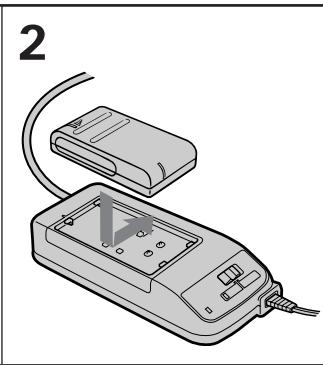
natural_image
Illustration of a handheld electronic device with a cable and connector, no text or symbols present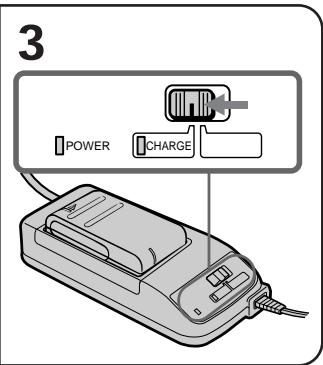
Charging Time
| Battery pack | Charging time* |
| NP-33 (supplied) | 60 |
| NP-55H | 85 |
| NP-C65/67 | 105 |
| NP-66 | 95 |
| NP-77H/78 | 170 |
| NP-98 | 215 |
* Approximate minutes to charge an empty battery pack using the supplied AC power adaptor (Lower temperatures require a longer charging time.)
Время зарядки
| Battery pack | Typical recording time** | Continuous recording time*** |
| NP-33 (supplied) | 55 | 100 |
| NP-55H | 65 | 120 |
| NP-C65/67 | 90 | 175 |
| NP-66 | 90 | 165 |
| NP-77H/78 | 135 | 255 |
| NP-98 | 175 | 330 |
CCD-TR506E
| Battery pack | Typical recording time** | Continuous recording time*** |
| NP-33 (supplied) | 50 | 95 |
| NP-55H | 65 | 115 |
| NP-C65/67 | 90 | 165 |
| NP-66 | 90 | 160 |
| NP-77H/78 | 135 | 250 |
| NP-98 | 175 | 320 |
CCD-TR720E/TR740E
| Battery pack | Typical recording time** | Continuous recording time*** |
| NP-33 (supplied) | 50 | 85 |
| NP-55H | 60 | 110 |
| NP-C65/67 | 90 | 155 |
| NP-66 | 80 | 145 |
| NP-77H/78 | 130 | 230 |
| NP-98 | 170 | 300 |
** Approximate minutes when recording while you repeat recording start/stop, zooming and turning the power on/off.
The actual battery life may be shorter.
*** Approximate continuous recording time indoors.
Срок службы батарейки CCD-TR501E/TR502E/TR503E
To remove the battery pack
Slide the battery pack in the direction of the arrow.
natural_image
Illustration of a device with an open lid and cable, showing internal components (no text or symbols)Notes on charging the battery pack
- The POWER lamp will remain lit for a while even if the battery pack is removed and the mains lead is unplugged after charging the battery pack. This is normal.
- If the POWER lamp does not light, set the selector to VTR (DC OUT) and disconnect the mains lead. After about one minute, reconnect the mains lead and set the selector to CHARGE again.
- You cannot operate the camcorder using the AC power adaptor while charging the battery pack.
Installing the battery pack
(1) Insert the top of the battery pack into the top of the battery mounting surface.
(2) Push the battery pack so that it attaches firmly. Make sure that you hear clicks twice. Attach the battery pack to the camcorder securely.
natural_image
Illustration of a handheld video camera with labeled parts (1 and 2), showing cable routing (no text or symbols beyond labels)Note on installing the NP-98 battery pack
Use the camcorder while lifting up the viewfinder slightly.
Note on the battery pack
Do not carry the camcorder by grasping the battery pack.
To remove the battery pack
Slide BATT, and then pull the lower part of the battery pack.
natural_image
Illustration of hands holding a digital camera with labeled parts (no text or symbols on the device itself)You can look at the demonstration of the functions available with this camcorder. (p. 29)
Make sure that a power source is installed.
(1) While pressing the small blue button, slide EJECT in the direction of the arrow. The cassette compartment automatically opens.
(2) Insert a cassette (not supplied) with the window facing out.
(3) Press the PUSH mark on the cassette compartment to close it. The cassette compartment automatically closes.
natural_image
Line drawing of a vintage video camera with a downward arrow indicating motion (no text or symbols)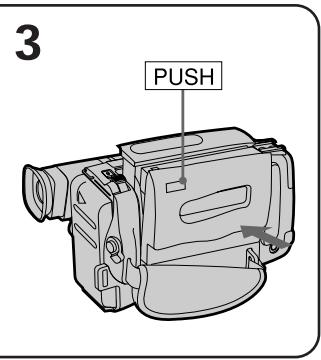
To eject the cassette
While pressing the small blue button, slide EJECT in the direction of the arrow.
To prevent accidental erasure
Slide the tab on the cassette to expose the red mark.
If you insert the cassette with the red mark exposed and close the cassette compartment, the beeps sound for a while. If you try to record with the red mark exposed, the △ and ▲ indicators flash, and you cannot record.
To re-record on this tape, slide the tab back out covering the red mark.
natural_image
Diagram of a CD-ROM drive showing two wheels and a close-up view of the right side of the drive (no text or symbols present)Make sure that a power source and a cassette is inserted and that the START/STOP MODE switch is set to ☐.
When you use the camcorder for the first time, power on it and reset the date and time to your time (p. 51) before you start recording. The date is automatically recorded for 10 seconds after you start recording (AUTO DATE feature). This feature works only once a day.
Before you record one-time events, you may want to make a trial recording to make sure that you are using the camcorder correctly.
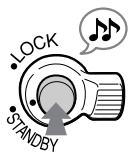
(1) While pressing the small green button on the POWER switch, set it to CAMERA.
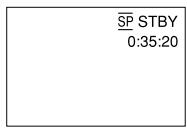
(2) Turn STANDBY up. The “STBY” indicator appears in the viewfinder.
(3) Press START/STOP. The camcorder starts recording and the “STBY” indicator changes to the “REC” indicator.
You can also select Recording mode, SP (standard play) mode or LP (long play) mode. Set REC MODE in the menu system according to the length of your planned recording before you start.
To stop recording momentarily [a]
Press START/STOP again. The “REC” indicator in the viewfinder changes to the “STBY” indicator (Standby mode).
To finish recording [b]
Press START/STOP. Turn STANDBY down, and set the POWER switch to OFF.
Then, eject the cassette and remove the battery pack.
[a]
Note on standby mode
If you leave the camcorder for 5 minutes or more with a cassette inserted in Standby mode, the camcorder goes off automatically. This prevents wearing down the battery and wearing out the tape. To resume Standby mode, turn STANDBY down once and turn it up again. To start recording, press START/STOP.
Notes on the recording mode
- This camcorder records and plays back in SP (standard play) mode and in LP (long play) mode.
The playback quality in LP mode, however, will not be as good as that in SP mode. - When a tape recorded on this camcorder in LP mode is played back on other types of 8mm camcorders or VCRs, the playback quality may not be as good as that on this camcorder.
Note on recording
When you record from the beginning of the tape, run the tape for about 15 seconds before starting the actual recording. This prevents the camcorder from missing any start-up scenes when you play back the tape.
To focus the viewfinder lens
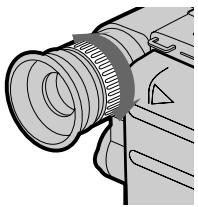
If the viewfinder is not in focus at all or when you use the camcorder after someone else has used it, focus the viewfinder lens. Turn the viewfinder lens adjustment ring [a] (CCD-TR501E/TR502E) or move the viewfinder lens adjustment lever [b] (CCD-TR503E/TR506E/TR720E/TR740E) so that the indicators in the viewfinder come into sharp focus.
[a] CCD-TR501E/TR502E
natural_image
Illustration of a camera lens assembly with no text or symbolsNote on the lighting aperture -CCD-TR503E/TR506E/TR720E/TR740E
If direct sunlight enters the lighting aperture, the picture in the viewfinder appears brighter. When this happens, colours in the viewfinder may change.
Notes on the tape counter
- The tape counter indicates the recording or playback time. Use it as a guide. There will be a time lag of several seconds from the actual time. To set the counter to zero, press COUNTER RESET.
- If the tape is recorded in SP and LP modes mixed, the tape counter shows incorrect recording time. When you intend to edit the tape using the tape counter as a guide, record in same (SP or LP) mode.
Note on beep sound
As indicated with ♪ in the illustrations, a beep sounds when you turn the power on or when you start recording and two beeps sound when you stop recording, confirming the operation. Several beeps also sound as a warning of any unusual condition of the camcorder. Note that the beep sound is not recorded on the tape. If you do not want to hear the beep sound, set BEEP to OFF in the menu system.
natural_image
Line drawing of a mechanical device with a cylindrical component and control panel (no text or symbols)The clock is set at the factory to Sydney time for Australia and New Zealand models, to Tokyo time for the models sold in Japan and to Hong Kong time for other models. You can reset the clock.
The AUTO DATE feature shows the date automatically once a day. However, the date may automatically appear more than once a day when:
- you reset the date and time.
- you eject and insert the tape again.
- you stop recording within 10 seconds.
Using the zoom feature
Zooming is a recording technique that lets you change the size of the subject in the scene. For more professional-looking recordings, use the zoom sparingly.
“T” Side: for telephoto (subject appears closer) “W” Side: for wide-angle (subject appears farther away)
Zooming speed (Variable speed zooming)
Turn the power zoom lever fully for a high-speed zoom. Turn it lightly for a relatively slow zoom.
When you shoot a subject using a telephoto zoom
If you cannot get a sharp focus while in extreme telephoto zoom, move the power zoom lever to the "W" side until the focus is sharp.
You can shoot a subject that is at least 80 cm (about 2 5/8 feet) away from the lens surface in the telephoto position, or 1 cm (about 1/2 inch) in the wide-angle position.
Notes on digital zoom
- CCD-TR502E/TR506E/TR720E/TR740E only
- More than 15x zoom is performed digitally, and the picture quality deteriorates as you go toward the “T” side. If you do not want to use the digital zoom, set D ZOOM to OFF in the menu system.
- The right side [a] of the power zoom indicator shows the digital zooming zone, and the left side [b] shows the optical zooming zone. If you set D ZOOM to OFF, the right [a] zone disappears.
Hints for better shooting
For hand-held shots, you'll get better results by holding the camcorder according to the following suggestions:
[b]
natural_image
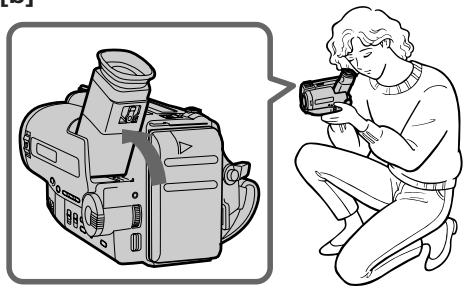
Illustration of a digital camera and a person holding a recording device (no text or symbols present)- Hold the camcorder firmly and secure it with the grip strap so that you can easily manipulate the controls with your thumb [a].
- Place your right elbow against your side.
- Place your left hand under the camcorder to support it.
- Place your eye firmly against the viewfinder eyecup.
- Use the viewfinder frame as a guide to determine the horizontal plane.
- You can record in a low position to get an interesting recording angle. Lift the viewfinder up for recording from a low position [b].
Place the camcorder on a flat surface or use a tripod
Try placing the camcorder on a table top or any other flat surface of suitable height. If you have a tripod for a still camera, you can also use it with the camcorder. When attaching a non-Sony tripod, make sure that the length of the tripod screw is less than 6.5 mm (9/32 inch). Otherwise, the screw may damage the inner parts of the camcorder.
Cautions on the viewfinder
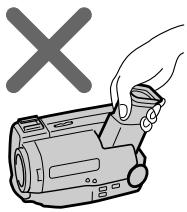
- Do not pick up the camcorder by the viewfinder [c].
- Do not place the camcorder so as to point the viewfinder toward the sun. The inside of the viewfinder may be damaged. Be careful when placing the camcorder under sunlight or by a window [d].
[c]
natural_image
Illustration of a hand holding a video camera with a 'X' symbol above (no text or symbols on device)Using EDITSEARCH, you can review the last recorded scene or check the recorded picture in the viewfinder.
(1) While pressing the small green button on the POWER switch, set it to CAMERA.
(2) Turn STANDBY up.
(3) Press the – (☐) side of EDITSEARCH momentarily; the last few seconds of the recorded portion plays back (Rec Review). Hold down the – side of EDITSEARCH until the camcorder goes back to the scene you want. The last recorded portion is played back. To go forward, hold down the + side (Edit Search).
flowchart
graph TD
    A["Start"] --> B["Add EditSearch"]
    B --> C["Step 1: Game is on the path, then moves rightward"]
    C --> D["Step 2: Game is on the path, then moves leftward"]
    D --> E["Step 3: Game is on the path, then moves rightward"]
    E --> F["Step 4: Game is on the path, then moves leftward"]
    F --> G["End"]
To stop playback
Release EDITSEARCH.
To begin re-recording
Press START/STOP. Re-recording begins from the last recorded point or the point you released EDITSEARCH. Provided you do not eject the tape, the transition between the last scene you recorded and the next scene you record will be smooth.
Connections for playback
Connect the camcorder to your VCR or TV to watch the playback picture on the TV screen. When monitoring the playback picture by connecting the camcorder to your TV, we recommend you to use mains for the power source.
Connecting directly to a VCR/TV with Video/Audio input jack
Open the jack cover. With using the supplied A/V connecting cable, connect the camcorder to the LINE IN inputs on the TV or VCR connected to the TV. Set the TV/VCR selector on the TV to VCR. When connecting to the VCR, set the input selector on the VCR to LINE.
If your TV or VCR is a monaural type
- CCD-TR506E/TR720E/TR740E only
Connect only the white plug for audio on both the camcorder and the TV or the VCR. With this connection, the sound is monaural.
To connect to a VCR or TV without Video/Audio input jacks
Use an RFU adaptor (not supplied).
Using the AV cordless IR receiver
- LASER LINK
- CCD-TR740E only
Once you connect the supplied AV cordless IR receiver to your TV or VCR, you can easily view the picture on your TV.
LASER LINK is a system which transmits and receivers a picture and sound between video equipment having the ↗ mark by using infrared rays. LASER LINK is a trademark of Sony Corporation
To connect the AV cordless IR receiver to your TV
Connect the receiver to a TV with the supplied A/V connecting cable, and connect the supplied AC power adaptor to DC IN 6V.
If your TV or VCR is a monaural type
Connect the yellow plug for video and connect only the white plug for audio on both the AV cordless IR receiver and the TV or VCR. With this connection, the sound is monaural.
To play back on a TV
(1) Set the POWER switch on the camcorder to PLAYER.
(2) After connecting your TV and AV cordless IR receiver, set the POWER switch on the AV cordless IR receiver to ON.
(3) Turn the TV on and set the TV/VCR selector on the TV to VCR.
(4) Press LASER LINK. The lamp of LASER LINK lights.
(5) Adjust the angle and direction of both the camcorder and AV cordless IR receiver.
(6) Press ▶ on the camcorder to start playback.
To release LASER LINK
Press LASER LINK again.
Notes on connecting AV cordless IR receiver
- To connect AV cordless IR receiver to mains, use only supplied AC power adaptor, because the polarity of the supplied adaptor is opposite of conventional adaptors. Do not use the supplied AC power adaptor for other electric appliance with a DC IN 6V jack.
- You cannot use an RFU adaptor for this connection.
natural_image
Pure electrical circuit lines without any symbolsPlaying back a tape
You can monitor the playback picture in the viewfinder. You can also monitor a picture on a TV screen, after connecting the camcorder to a TV or VCR.
(1) While pressing the small green button on the POWER switch, set it to PLAYER.
(2) Insert the recorded tape with the window facing out.
(3) Press ▶ to start playback.
Using the Remote Commander
You can control playback using the supplied Remote Commander.
Before using the Remote Commander, insert the R6 (size AA) batteries.
To erase the indicators
Press DISPLAY to erase the viewfinder screen indicators on the TV. To display the indicators, press again.
Various playback modes
To view a still picture (Playback pause)
Press || during playback. To resume playback, press || or ▶.
To locate a scene (Picture Search)
Keep pressing ◀◀ or ▶▶ during playback. To resume normal playback, release the button.
To monitor the high-speed picture while advancing the tape or rewind (Skip Scan)
Keep pressing ◀◀ while rewinding or ▶▶ while advancing the tape.
To resume normal playback, press ▶.
Notes on playback
- Streaks appear and the sound is muted in the various playback modes.
- When playback pause mode lasts for 5 minutes or more, the camcorder automatically enters stop mode.
Note on the lens cover
The lens cover does not open when the POWER switch is set to PLAYER. Do not open the lens cover manually. It may cause malfunction.
You can choose any of the following power sources for your camcorder: battery pack, the mains and 12/24 V car battery. Choose the appropriate power source depending on where you want to use your camcorder.
| Place | Power source | Accessory to be used |
| Indoors | Mains | Supplied AC power adaptor |
| Outdoor | Battery pack | Battery pack (Ni-Cd type) |
| In the car | 12 V or 24 V car battery | Sony DC pack DCP-77 |
Note on power sources
Disconnecting the power source or removing the battery pack during recording or playback may damage the inserted tape. If this happens, restore the power supply again immediately.

This mark indicates that this product is a genuine accessory for Sony video product. When
purchasing Sony video products, Sony recommends that you purchase accessories with this “GENUINE VIDEO ACCESSORIES” mark.
To use the supplied AC power adaptor:
(1) Connect the mains lead to the mains. Insert the top of the connecting plate of the AC power adaptor into the top of the battery mounting surface. Push the connecting plate so that it attaches firmly. Make sure that you hear clicks twice.
(2) Set the selector to VTR (DC OUT).

WARNING
The mains lead must only be changed at qualified service shop.
PRECAUTION
The set is not disconnected from the AC power source (mains) as long as it is connected to the mains, even if the set itself has been turned off.
ПРЕДУПРЕЖДЕНИЕ
- The POWER lamp will remain lit for a while even if the unit is unplugged after use. This is normal.
- If the POWER lamp does not light, set the selector to VTR (DC OUT) and disconnect the mains lead. After about one minute, reconnect the mains lead.
To remove the adaptor
The adaptor is removed in the same way as the battery pack.
Using a car battery
Use Sony DCP-77 DC pack (not supplied).
Connect the cord of the DC pack to the cigarette lighter socket of the car (12 V or 24 V). Connect the DC pack to the battery mounting surface of the camcorder.
To remove the DC pack
The DC pack is removed in the same way as the battery pack.
Changing the mode settings
You can change the mode settings to further enjoy the features and functions of the camcorder.
(1) Press MENU to display the menu.
(2) Turn the control dial to select the desired item, and press the dial.
(3) Turn the control dial to select the desired mode, and press the dial.
(4) Press MENU to erase the menu display.
Selecting the mode setting of each item
Items for both CAMERA and PLAYER modes
COMMANDER
- Select ON when using the supplied Remote Commander for the camcorder.
- Select OFF when not using the Remote Commander.
BEEP\*
- Select ON so that beeps sound when you start/stop recording, etc.
- Select OFF when you do not want to hear the beep sound.
Items for CAMERA mode only REC MODE\*
- Select SP to record a tape in SP (standard play) mode.
- Select LP to record a tape in LP (long play) mode.
TITLE POS\*
- Select CENTER to centre the title in the picture.
- Select BOTTOM to position the title at the bottom of the picture.
TITLE1 SET\*/TITLE2 SET\*
Store your own titles.
D ZOOM\* (CCD-TR502E/TR506E/TR720E/TR740E only)
- Select ON to activate digital zooming.
- Select OFF to not use the digital zoom. The camcorder goes back to 15x zoom.
REC LAMP\*
- Select OFF when you do not want the camera recording/battery lamp at the front of the unit to light up.
- Normally select ON.
AUTO DATE\*
- Select ON to record the date for 10 seconds after recording has started.
- Select OFF to not record the date.
Reset the date or time.
DEMO MODE\*
- Select ON to make the demonstration appear.
- Select OFF to make the demonstration not appear.
Items for PLAYER mode only HiFi SOUND (CCD-TR506E/TR720E/TR740E only)
• Normally select STEREO.
- Select 1 or 2 to play back a dual sound track tape.
* These settings are retained even when the battery is removed, as long as the lithium battery is in place.
Notes on DEMO MODE
- DEMO MODE is set to STBY at the factory and the demonstration starts about 10 minutes after you set the POWER switch to CAMERA without inserting a cassette.
Note that you cannot select STBY of DEMO MODE in the menu system. - You cannot select DEMO MODE when a cassette is inserted in the camcorder.
- If you insert a cassette during the demonstration, the demonstration stops. You can start recording as usual. DEMO MODE automatically returns to STBY.
To look at the demonstration at once
Eject the cassette, if inserted. Select ON of DEMO MODE. Erase the menu display. The demonstration will begin. If you turn off the camcorder once, DEMO MODE automatically returns to STBY.
CLOCK SET\*
Дату или время.
DEMO MODE\*
Recording with the date or time
Before you start recording or during recording, press DATE or TIME. You can record the date or time displayed in the viewfinder with the picture. You cannot record the date and time at the same time. Except for the date or time indicator, no indicator is recorded.
The clock is set at the factory to Sydney time for Australia and New Zealand models, to Tokyo time for the models sold in Japan and to Hong Kong time for other models.
natural_image
Line drawing of a video camera with no visible text or symbols
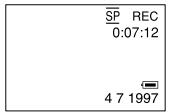

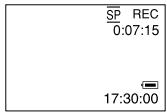
To stop recording with the date or time
Press DATE or TIME again. The date or time indicator disappears. The recording continues.
Note
You cannot superimpose a title during recording the date or time.
Your camcorder has two modes besides normal start/stop mode. These modes enable you to take a series of quick shots resulting in a lively video.
(1) Set START/STOP MODE to the desired mode.
: Recording starts when you press START/STOP, and stops when you press it again (normal mode).
ANTI GROUND SHOOTING: The camcorder records only while you press down START/STOP so that you can avoid recording unnecessary scenes.
5 SEC : When you press START/STOP, the camcorder records for 5 seconds and then stops automatically.
(2) Turn STANDBY up and press START/STOP. Recording starts.
If you selected 5 SEC, five dots appear in the viewfinder. The dots disappear at a rate of one per second as illustrated below.
To extend the recording time in 5 SEC mode
Press START/STOP again before all the dots disappear. Recording continues for about 5 seconds from the moment you press START/STOP.
You can fade in or out to give your recording a professional appearance.
When fading in, the picture gradually fades in from black while the sound increases.
When fading out, the picture gradually fades to black while the sound decreases.
When fading in [a]
(1) While the camcorder is in Standby mode, press FADER. The FADER indicator starts flashing.
(2) Press START/STOP to start recording. The FADER indicator stops flashing.
When fading out [b]
(1) During recording, press FADER. The FADER indicator starts flashing.
(2) Press START/STOP to stop recording. The FADER indicator stops flashing, and then recording stops.
When the date or time indicator is displayed
The date or time and a title indicator does not fade in or fade out.
When the START/STOP MODE switch is set to ↓ or 5 SEC
You cannot use the fade-in/fade-out function.
Selecting picture effect
You can make pictures like those of television with the Picture Effect function.
the picture is mosaic.
SOLARIZE [b]
The light intensity is more clear, and the picture looks like a painting.
B&W
The picture is monochrome (black and white).
SEPIA
The picture is sepia.
NEG. ART [c]
The colour of the picture is reversed.
MOSAIC [a]
Using picture effect function
While the camcorder is in Standby mode, press PICTURE EFFECT to select the desired Picture Effect mode.
natural_image
Line drawing of a video camera with no visible text or symbols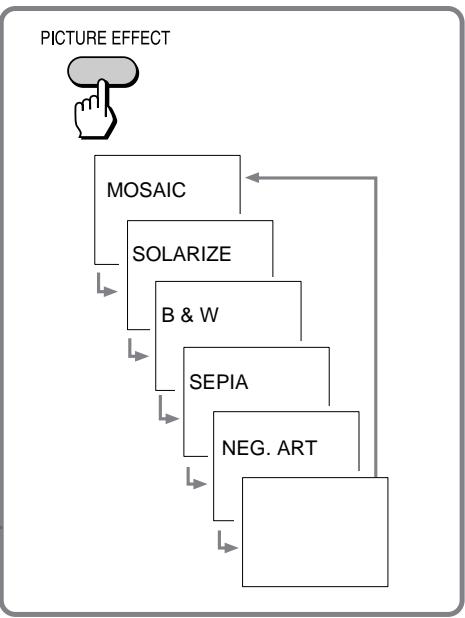
flowchart
graph TD
    A["PICTURE EFFECT"] --> B["MOSAIC"]
    B --> C["SOLARIZE"]
    C --> D["B & W"]
    D --> E["SEPIA"]
    E --> F["NEG. ART"]
    F --> G["..."]
Returning to normal mode
Press PICTURE EFFECT until the Picture Effect indicator disappears.
Note on the picture effect
When you turn the power off, the camcorder returns automatically to normal mode.
Selecting the desired mode
You can record a cinemalike picture (CINEMA) or a 16:9 wide picture to watch on the 16:9 wide-screen TV (16:9FULL).
Black bands appear at the top and the bottom of the screen. The viewfinder [a] and a normal TV screen [b] look wide. You can also watch the picture without black bands on a wide-screen TV [c].
16:9FULL
The picture in the viewfinder [d] or on a normal TV [e] is horizontally compressed. You can watch the picture of normal images on a wide-screen TV [f].
CINEMA
While the camcorder is in Standby mode, press 16:9 WIDE repeatedly so that the desired mode indicator appears.
natural_image
Line drawing of a video camera with no visible text or symbols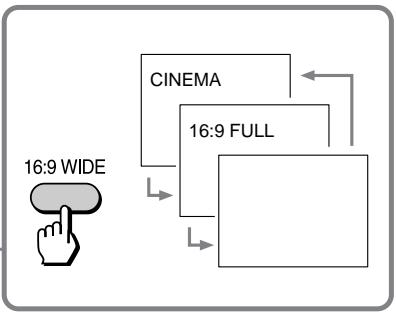
flowchart
graph TD
    A["16:9 WIDE"] --> B["CINEMA"]
    B --> C["16:9 FULL"]
    C --> D["Output Box"]
To cancel wide mode
Press 16:9 WIDE repeatedly until the wide mode indicator disappears.
To watch the tape recorded in wide mode
To watch the tape recorded in CINEMA mode, set the screen mode of the wide-screen TV to zoom mode. To watch the tape recorded in 16:9FULL mode, set it to full mode. For details, refer to the instruction manual of your TV. Note that the picture recorded in 16:9FULL mode looks compressed on a normal TV.
Notes on wide mode
- You cannot cancel the wide mode during recording.
- If wide mode is set to 16:9FULL, the SteadyShot function does not work and the «¶» indicator flashes.
- When you record in 16:9FULL mode, the date or time indicator will be widened on the wide-screen TV.
- If you dub a tape, the tape is copied in the same mode as the original recording.
- The wide mode is cancelled automatically 5 minutes after you remove the power source.
When to use manual focus
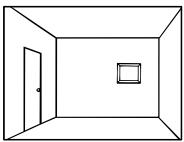
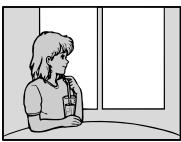
In the following cases you should obtain better results by adjusting the focus manually.
natural_image
Illustration of an adult and a child standing together under a crescent moon at night (no text or symbols)[b]
natural_image
Simple line drawing of a room with a door and framed picture on the wall (no text or symbols)[c]
natural_image
Illustration of a person sitting at a desk near a window (no text or symbols)[d]
| 1.00 1.00 1.00 1.00 1.00 1.00 1.00 1.00 1.00 1.00 1.00 1.00 1.00 1.00 1.00 1.00 1.00 1.00 1.00 1.00 | 1.00 1.00 1.00 1.00 1.00 1.00 1.00 1.00 1.00 1.00 1.00 1.00 1.00 1.00 1.00 1.00 1.00 1.0 | 1.0 | 1.0 | 1.0 | 1.0 | 1.0 | 1.0 | 1.0 | 1.0 | 1.0 | 1.0 | 1.0 | 1.0 | 1.5 | 1.5 | 2.5 | 3.5 | 4.5 | 5.5 | 6.5 | 7.5 | 8.5 | 9.5 | 12 | 12 | 12 | 12 | 12 | 12 | 12 | 12 | 12 | 12 | 12 | 12 | 12 | 12 | 12 | 12 | 12 | 12 | 12 | 12 | 12 | 12 | 12 | 12 | 12 | 12 | 12 | 12 | 12 | 12 | 12 | 12 | 12 | 12 |
When focusing manually, first focus in telephoto before recording, and then reset the shot length.
(1) Set FOCUS to MANUAL. The Ⓕ indicator appears.
(2) Turn the focus dial to focus on the subject. Turn to the NEAR side to focus on a nearer object.
Turn to the FAR side to focus on a farther object.
Ручная фокусировка
To return to the autofocus mode
Set FOCUS to AUTO. The Ⓧ indicator goes out.
Shooting in relatively dark places
Shoot at wide-angle after focusing in the telephoto position.
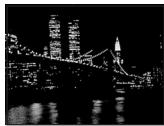
You can select from three PROGRAM AE (Auto Exposure) modes to suit your shooting situation. When you use PROGRAM AE, you can capture high-speed action or night views.
Selecting the best mode
Select the best mode by using the following examples.
natural_image
Skier in action on snowy terrain, wearing a vest and holding poles (no visible text or symbols)

natural_image
Person playing golf on a grassy field with trees in the background (no visible text or symbols)
natural_image
Nighttime cityscape with illuminated skyscrapers and a bridge over water (no visible text or symbols)
Sports mode
- Outdoor sports scenes such as football, tennis, golf or skiing
• A landscape in a moving car

High-speed shutter mode
- A golf swing or a tennis match in fine weather with the ball captured clearly
- Playing back certain scenes with high-speed movements in clear, sharp picture

Twilight mode
- Recording night views, neon signs or fireworks

Режим спорта
While the camcorder is in Standby mode, set the mark of the desired mode to ● mark above the PROGRAM AE dial.
natural_image
Line drawing of a video camera with no visible text or symbols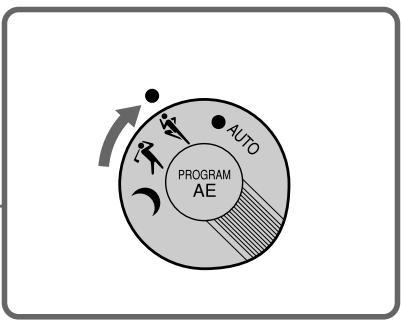
flowchart
graph TD
    A["Auto"] --> B["PROGRAM AE"]
    B --> C["Action Indicator"]
    style A fill:#f9f,stroke:#333
    style B fill:#ccf,stroke:#333
    style C fill:#cfc,stroke:#333
Returning to automatic mode
Turn PROGRAM AE until the PROGRAM AE indicator disappears.
Note on shutter speed
The shutter speed in each PROGRAM AE mode is as follows:
Sports mode - between 1/50 to 1/500
High-speed shutter mode - 1/4000
Twilight mode - 1/50
AUTO mode - 1/50 (or 1/100 when the Steady
Shot is on - CCD-TR720E/TR740E only)
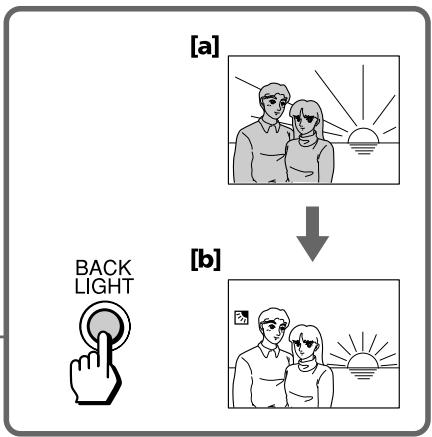
When you shoot a subject with the light source behind the subject or a subject with a light background, use the BACK LIGHT function.
Press BACK LIGHT. The indicator appears in the viewfinder.
natural_image
Line drawing of a video camera with lens and control buttons (no text or symbols)[a] Subject is too dark because of backlight.
[b] Subject becomes bright with backlight compensation.
After shooting
Be sure to release this adjustment condition by pressing BACK LIGHT again. The ☑ indicator disappears. Otherwise, the picture will be too bright under normal lighting condition.
This function is also effective under following conditions:
- On snow e.g. at the ski resort
- At the beach under strong sunshine
- A subject with a light source nearby or a mirror reflecting light
- A white subject against a white background. Especially when you shoot a person wearing shiny clothes made of silk or synthetic fiber, his or her face tends to become dark if you do not use this function.
flowchart
graph TD
    A["Back Light"] --> B["[a"] Photo frames with sun and couple photo]
    B --> C["[b"] Family photo frames with sun and couple photo]
When you shoot, the indicator appears. This indicates that the SteadyShot function is working and the camcorder compensates for camera-shake.
You can release the SteadyShot function when you do not need to use the SteadyShot function. Do not use the SteadyShot function when shooting a stationary object with a tripod.
Set STEADY SHOT to OFF. The (☐) indicator goes off.
Notes on the steady shot
- The SteadyShot will not correct excessive camera-shake.
- When you switch the SteadyShot function on or off, the exposure may fluctuate.
- When you record in 16:9FULL mode, the SteadyShot function does not work and the «¶» indicator flashes.
You can select from eight preset titles and two titles you made to superimpose it on the picture during recording. Each time you press TITLE, the preset titles appear one by one.
To superimpose from the beginning
(1) Set the POWER switch to CAMERA.
(2) Turn STANDBY up.
(3) Press TITLE repeatedly until the desired title appears. The title flashes.
(4) Press START/STOP to start recording.
(5) Press TITLE when you want to turn off the title.
To superimpose on the way of recording
(1) Press TITLE repeatedly until the desired title appears. The title flashes.
(2) When the title stops flashing, press TITLE. The title disappears.
(3) Press START/STOP to start recording.
(4) Press TITLE when you want superimpose the title.
(5) Press TITLE when you want to turn off the title.
natural_image
Line drawing of a video camera with no visible text or symbolsTITLE

Titles cycle as follows
Original title 1 → Original title 2 → HELLO! → HAPPY BIRTHDAY → HAPPY HOLIDAYS → CONGRATULATIONS! → OUR SWEET BABY → WEDDING → VACATION → THE END When you press TITLE with “THE END” displayed, the titles disappear. When you press TITLE once again, the titles begin from “HELLO!” or your original title.
If you have not stored any original titles
The titles begin from "HELLO!".
Notes on titles
- You cannot select a title during recording.
- While the picture is fading in or fading out, a title does not fade in or out.
- You cannot record a title and the date/time at the same time.
- While the menu is displayed, the titles are not recorded.
To select the title position
(1) Press MENU to display the menu.
(2) Turn the control dial to select TITLE POS, then press the dial.
(3) Turn the control dial to select CENTER [a] or BOTTOM [b], then press the dial.
(4) Press MENU to erase the menu display.
[a]
Making your own titles
You can make two titles of up to 22 characters each, and store them in memory.
We recommend to eject the cassette before you begin so that the power is not turned off on the way.
(1) While the camcorder is in Standby mode, press MENU to display the menu.
(2) Turn the control dial to select TITLE1 SET or TITLE2 SET, then press the dial.
(3) Turn the control dial to select the desired character, then press the dial.
(4) Repeat step 3 until you finish the title.
(5) Turn the dial to select ↓, then press the dial. The title is stored in memory.
(6) Press MENU to erase the menu display.
To erase the title you have made
Press MENU, select the title you want to erase, and press the dial. Select ← at the leftmost character, then press the dial.
Do not select the blank to erase a character.
Otherwise, the blank is stored as a title in memory.
To change the title you have made
In step 2, select TITLE1 SET or TITLE2 SET, depending on which title you want to change, then press the dial. Select the desired characters again.
If you enter 22 characters in step 4
The title is stored immediately (and you can skip step 5).
If it takes more than 5 minutes to make a title with a cassette inserted
If the Standby mode lasts for more than 5 minutes with a cassette inserted, the power is turned off automatically.
If the power is turned off while you are making a title, set the POWER switch to OFF once, then to CAMERA. The title you have made remains stored in memory.
Advancing the characters rapidly
Keep pressing the dial.
Making a blank
Select a blank. It is counted as a character.
Editing onto another tape
You can create your own video programme by editing with any other 8 mm, Hi8 Hi8, VHS VHS, SVHS S-VHS, VHSC VHSC, SVHSC S-VHSC or 8 Betamax VCR that has video/audio inputs.
After connecting the camcorder to the VCR,
(1) Set the POWER switch to PLAYER.
(2) Insert a blank tape (or a tape you want to record over) into the VCR and insert your recorded tape into the camcorder.
(3) Play back the recorded tape on the camcorder until you locate the point where you want to start editing, then press Ⅲ to put the camcorder in playback pause mode.
(4) On the VCR, locate the recording start point and put the VCR in recording pause mode.
(5) Press ■ on the camcorder and VCR simultaneously to start editing.
Repeat steps 3 to 5.
To stop editing
Press ■ STOP on both the camcorder and VCR.
Changing the lithium battery in the camcorder
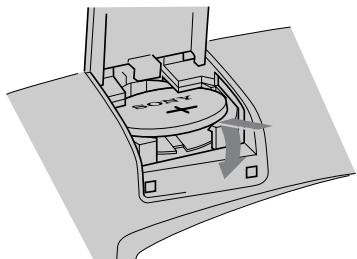
Your camcorder is supplied with a lithium battery installed. When the lithium battery becomes weak or dead, the indicator flashes in the viewfinder for about 5 seconds when you set the POWER switch to CAMERA. In this case, replace the battery with a Sony CR2025 or Duracell DL-2025 lithium battery. Use of any other battery may present a risk of fire or explosion. Discard used batteries according to the manufacturers instructions.
The lithium battery for the camcorder lasts for about one year under normal operation. (The lithium battery that comes installed at the factory may not last one year.)
Notes on lithium battery
- Keep the lithium battery out of the reach of children. Should the battery be swallowed, immediately consult a doctor.
- Wipe the battery with a dry cloth to assure a good contact.
- Do not hold the battery with metallic tweezers, otherwise a short-circuit may occur.
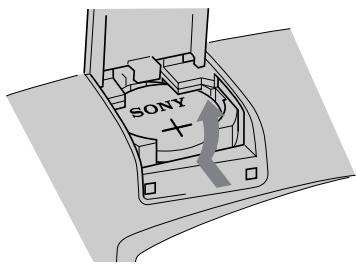
- The lithium battery has positive (+) side and negative (−) side as illustrated. Be sure to insert the lithium battery with the positive side facing out.
The battery may explode if mistreated. Do not recharge, disassemble, or dispose of in fire.
Changing the lithium battery
When replacing the lithium battery, keep the battery pack or other power source attached.
Otherwise, you will need to reset the date and time.
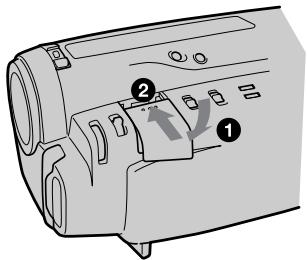
(1) Slide the cover, and then pull it up.
(2) Push the battery in once and pull it out from the holder.
(3) Install the new lithium battery with the positive (+) side facing out.
(4) Close the cover. Then slide the cover until it clicks.
ПРЕДУПРЕЖДЕНИЕ
2
3
natural_image
Diagram of a car interior showing a circular component with 'SOTY' label and directional arrow (no text or symbols beyond label)4
Resetting the date and time
You can reset the date and time in the menu system.
(1) Set the POWER switch to CAMERA.
(2) Press MENU to display the menu.
(3) Turn the control dial to select CLOCK SET, then press the dial.
(4) Turn the control dial to select the desired year, then press the dial.
(5) Set the month, day, hour, and minutes by turning the control dial and pressing the dial.
(6) Press MENU to erase the menu display.
To correct the date and time setting
Repeat steps 4 and 5.
To check the date and time
Press DATE to display the date indicator. Press TIME to display the time indicator. When you press the same button again, the indicator goes out.
The year indicator changes as follows:

Note on the time indicator
The internal clock of this camcorder operates on a 24-hour cycle.
The playback mode (SP/LP) is selected automatically according to the format in which the tape has been recorded. The quality of the recorded picture in LP mode, however, will not be as good as that in SP mode.
Notes on AFM HiFi stereo
- CCD-TR506E/TR720E/TR740E only
When you play back a tape, the sound will be in monaural if :
- You record the tape using this camcorder, then play it back on an AFM HiFi monaural video recorder/player.
- You record the tape on an AFM HiFi monaural video recorder, then play it back on this camcorder.
Foreign 8 mm video
You may not play back tapes recorded on a different TV colour system. Because the TV colour systems differ from country to country, you may not be able to play back foreign pre-recorded tapes. Refer to the list of “Using your camcorder abroad” to check the TV colour system of foreign countries.
Tips for using the battery pack
This section shows you how you can get the most out of your battery pack.
Preparing the battery pack
Always carry additional batteries
Have sufficient battery pack power to do 2 to 3 times as much recording as you have planned.
Battery life is shorter in cold environment
Battery efficiency is decreased, and the battery will be used up more quickly, if you are recording in cold environment.
To save battery power
Turn STANDBY down when not recording to save battery power.
A smooth transition between scenes can be made even if recording is stopped and started again. While positioning the subject, selecting an angle, or looking through the viewfinder lens, the lens moves automatically and the battery is used. The battery is also used when a cassette is inserted or removed.
When to replace the battery
While you are using your camcorder, the remaining battery indicator decreases gradually as battery power is used up.
flowchart
graph LR
    A["Black Battery"] --> B["White Triangle"]
    B --> C["Black Triangle"]
    C --> D["White Triangle"]
    D --> E["White Circle"]
When the remaining battery indicator reaches the lowest point, the ↻ indicator appears and starts flashing.
When the ⏻ indicator changes from slow flashing to rapid flashing while you are recording, set the POWER switch to OFF on the camcorder and replace the battery pack. Leave the tape in the camcorder to obtain smooth transition between scenes before and after the battery pack has been replaced.
Note on the remaining battery indicator
The remaining battery indicator of the camcorder may indicate a different remaining capacity from that of the battery pack with its own indicator (not supplied). The indicator on the battery pack is more accurate.
Notes on the rechargeable battery pack
CAUTION
Never leave the battery pack in temperatures above 60^ C ( 140^ F), such as in a car parked in the sun or under direct sunlight.
The battery heats up
During charging or recording, the battery pack heats up. This is caused by energy that has been generated and a chemical change that has occurred inside the battery pack. This is not cause for concern and is normal.
Battery pack care
- Remove the battery pack from the camcorder after using it, and keep it in a cool place. When the battery pack is installed to the camcorder, a small amount of current flows to the camcorder even if the POWER switch is set to OFF. This shortens battery life.
- The battery pack is always discharging even when it is not in use after charging. Therefore, you should charge the battery right before using the camcorder.
How to use the switch on the battery pack
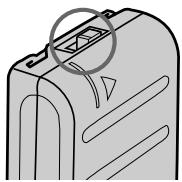
When the switch is supplied with the battery pack ([a] on page 56), you can use it to find whether the battery pack is charged or not. Set the switch to the “no mark” position when charging is completed. Set the switch to the “red mark” position when the battery is used up (or in whichever direction you want to remind yourself).
The life of the battery pack
If the battery indicator flashes rapidly just after turning on the camcorder with a fully charged battery pack, the battery pack should be replaced with a new fully charged one.
Charging temperature
You should charge batteries at temperatures from 10^ C to 30^ C (from 50^ F to 86^ F). Lower temperatures require a longer charging time.
A brand-new battery pack is not charged. Before using the battery pack, charge it completely.
After long storage
Recharge the battery pack after a long period of storage. If the battery pack is charged fully but not used for a long time (about one year), it becomes discharged. Charge it again, but in this case the battery life will be shorter than normal. After several charging and discharging cycles, the battery life will recover its original capacity.
Notes on the terminals
If the terminals (metal parts on the back) are not clean, the battery charge duration will be shortened.
When the terminals are not clean or when the battery pack has not been used for a long time, repeatedly install and remove the battery pack a few times. This improves the contact condition. Also, wipe the + and - terminals with a soft cloth or paper.
Be sure to observe the following
- To prevent an accident caused by a short circuit, do not allow metal objects such as a necklace to touch the battery terminals. When carrying the battery pack, attach to the terminal cover. [b]
- Keep the battery pack away from fire.
- Keep the battery pack dry.
- Do not open or try to disassemble the battery pack.
- Do not expose the battery pack to any mechanical shock.
[a]
natural_image
Diagram of a device casing with internal compartments and a circular annotation highlighting a section (no text or symbols present)natural_image
3D diagram of a mechanical device with a handle and base plate, no text or symbols presentMaintenance information and precautions
Moisture condensation
If the camcorder is brought directly from a cold place to a warm place, moisture may condense inside the camcorder, on the surface of the tape, or on the lens. In this condition, the tape may stick to the head drum and be damaged or the camcorder may not operate correctly. To prevent possible damage under these circumstances, the camcorder is furnished with moisture sensors. Please take the following precautions.
Inside the camcorder
When the ▶ and ▲ indicators flash, moisture has condensed inside the camcorder. If this happens, no other functions except for tape ejection will work.
Eject the tape, turn off the camcorder and leave it with the cassette compartment open for at least one hour. The camcorder can be used again if the □ indicator does not appear when the power is turned on again.
On the lens
If moisture condenses on the lens, no indicator appears, but the picture becomes dim. Turn off the power and do not use the camcorder for about one hour.
How to prevent moisture condensation
When bringing the camcorder from a cold place to a warm place, put the camcorder in a plastic bag and allow it to adapt to room conditions over a period of time.
(1) Be sure to tightly seal the plastic bag containing the camcorder.
(2) Remove the bag when the air temperature inside it has reached the temperature surrounding it (after about one hour).
Конденсация влаги
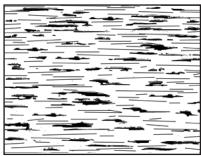
To ensure normal recording and clear pictures, clean the video heads. When the ✗ indicator and “♣ CLEANING CASSETTE” message appear one after another in CAMERA mode or playback pictures are “noisy” or hardly visible, the video heads may be dirty.
Очистка головок
natural_image
Black-and-white photo of two smiling children (no text or symbols visible)[a]
natural_image
Abstract black-and-white pattern with horizontal lines and irregular shapes (no text or symbols)[b]
[a] Slightly dirty
[b] Dirty
If this happens, clean the video heads with the Sony V8-25CLH cleaning cassette (not supplied). After checking the picture, if it is still “noisy”, repeat the cleaning. (Do not repeat cleaning more than 5 times in one session.)
Caution
Do not use a commercially available wet-type cleaning cassette. It may damage the video heads.
Note
If the V8-25CLH cleaning cassette is not available in your area, consult your nearest Sony dealer.
[a] Слегка загрязнены
[b] Загрязнены
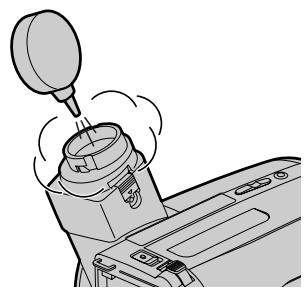
Removing dust from inside the viewfinder
- CCD-TR501E/TR502E only
(1) Remove the screw with a screwdriver (not supplied). Then, while sliding the RELEASE knob, turn the eyecup in the direction of the arrow and pull it out.
(2) Clean the surface with a commercially available blower.
2
natural_image
Mechanical assembly diagram showing a lever shift mechanism with no text or symbolsTo reattach the eyecup
(1) Align the groove on the eyecup with the • mark on the barrel.
(2) Turn the eyecup in the direction of the arrow.
(3) Replace the screw.
natural_image
Diagram of a camera lens assembly with an arrow indicating motion (no text or symbols present)2

natural_image
Illustration of a classical column capital with a base and decorative elements (no text or symbols)Caution
Do not remove any other screws. You may remove only the screw to remove the eyecup.
Предостережение
- Operate the camcorder using 6.0V (battery pack), or 7.5V (AC power adaptor).
- For DC or AC operation, use only the recommended accessories.
- Should any solid object or liquid fall into the casing, unplug the camcorder and have it checked by your nearest Sony dealer before operating it any further.
- Avoid rough handling or mechanical shock. Be particularly careful of the lens.
- Keep the POWER switch set to OFF when not using the camcorder.
- Do not wrap up the camcorder and operate it since heat may build up internally.
- Keep the camcorder away from strong magnetic fields or mechanical vibration.
On handling tapes
Do not insert anything in the small holes on the rear of the cassette. These holes are used to sense the type of tape, thickness of tape, and if the recording tab is out or in.
Camcorder care
- When the camcorder is not to be used for a long time, disconnect the power source and remove the cassette. Periodically turn on the power, operate the camera and player sections and play back a tape for about 3 minutes.
- Clean the lens with a soft brush to remove dust. If there are fingerprints on the lens, remove them with a soft cloth.
Предосторожности
Maintenance information and precautions
- Clean the camcorder body with a soft dry cloth, or a soft cloth lightly moistened with a mild detergent solution. Do not use any type of solvent which may damage the finish.
- Do not let sand get into the camcorder. When you use the camcorder on a sandy beach or in a dusty place, protect it from the sand or dust. Sand or dust may cause the unit to malfunction, and sometimes this malfunction cannot be repaired.
AC power adaptor Charging
- Attach the battery pack firmly.
- Place the battery pack on a flat surface without vibration during charging.
- The battery pack will get hot during charging. This is normal.
Others
Maintenance information and precautions
- Do not apply mechanical shock or drop the unit.
- While the unit is in use, particularly during charging, keep it away from AM receivers and video equipment because it will disturb AM reception and video operation.
- The unit becomes warm while in use. This is normal.
- Do not place the unit in locations that are:
- Extremely hot or cold
- Dusty or dirty
- Very humid
- Vibrating
Notes on dry batteries
To avoid possible damage from battery leakage or corrosion, observe the following.
- Be sure to insert the batteries in the correct direction.
- Dry batteries are not rechargeable.
- Do not use a combination of new and old batteries.
- Do not use different types of batteries.
- The batteries slowly discharge while not in use.
- Do not use a battery that is leaking.
If battery leakage occurred
- Wipe off the liquid in the battery case carefully before replacing the batteries.
- If you touch the liquid, wash it off with water.
- If the liquid get into your eyes, wash your eyes with a lot of water and then consult a doctor.
If any difficulty should arise, unplug the unit and contact your nearest Sony dealer.
Using your camcorder abroad
Each country or area has its own electricity and TV colour systems. Before using your camcorder abroad, check the following points.
Power sources
You can use your camcorder in any country or area with the supplied AC power adaptor within 110 V to 240 V AC, 50/60 Hz.
Difference in colour systems
This camcorder is a PAL system-based camcorder. If you want to view the playback picture on a TV, it must be a PAL system- based TV or a SECAM system-based TV with a PAL-SECAM transcoder. Check the following list.
PAL system
Australia, Austria, Belgium, China, Denmark, Finland, Germany, Great Britain, Holland, Hong Kong, Italy, Kuwait, Malaysia, New Zealand, Norway, Portugal, Singapore, Spain, Sweden, Switzerland, Thailand, etc.
PAL M system
Brazil
PAL N system
Argentina, Paraguay, Uruguay
NTSC system
Bahama Islands, Bolivia, Canada, Central America, Chile, Colombia, Ecuador, Jamaica, Japan, Korea, Mexico, Peru, Surinam, Taiwan, the Philippines, the U.S.A., Venezuela, etc.
SECAM system
Bulgaria, Czech Republic, France, Guyana, Hungary, Iran, Iraq, Monaco, Poland, Russia, Slovak Republic, Ukraine, etc.
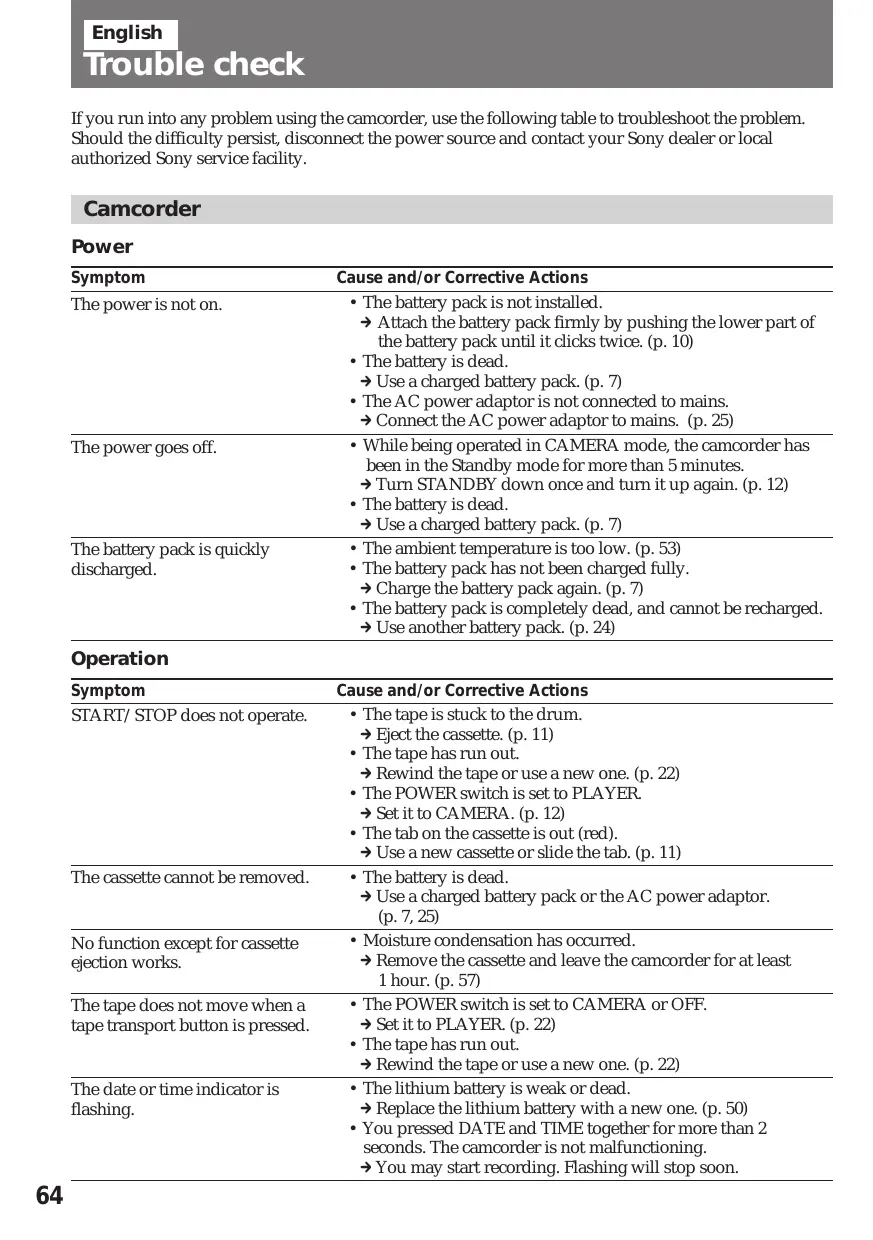
If you run into any problem using the camcorder, use the following table to troubleshoot the problem. Should the difficulty persist, disconnect the power source and contact your Sony dealer or local authorized Sony service facility.
Camcorder
Power
| Symptom | Cause and/or Corrective Actions |
| The power is not on. | The battery pack is not installed. Attach the battery pack firmly by pushing the lower part of the battery pack until it clicks twice. (p. 10)The battery is dead. Use a charged battery pack. (p. 7)The AC power adaptor is not connected to mains. Connect the AC power adaptor to mains. (p. 25) |
| The power goes off. | While being operated in CAMERA mode, the camcorder has been in the Standby mode for more than 5 minutes. Turn STANDBY down once and turn it up again. (p. 12)The battery is dead. Use a charged battery pack. (p. 7) |
| The battery pack is quickly discharged. | The ambient temperature is too low. (p. 53)The battery pack has not been charged fully. Charge the battery pack again. (p. 7)The battery pack is completely dead, and cannot be recharged. Use another battery pack. (p. 24) |
Operation
| Symptom | Cause and/or Corrective Actions |
| START/STOP does not operate. | The tape is stuck to the drum.→ Eject the cassette. (p. 11)The tape has run out.→ Rewind the tape or use a new one. (p. 22)The POWER switch is set to PLAYER.→ Set it to CAMERA. (p. 12)The tab on the cassette is out (red).→ Use a new cassette or slide the tab. (p. 11) |
| The cassette cannot be removed. | The battery is dead.→ Use a charged battery pack or the AC power adaptor. (p. 7, 25) |
| No function except for cassette ejection works. | Moisture condensation has occurred.→ Remove the cassette and leave the camcorder for at least 1 hour. (p. 57) |
| The tape does not move when a tape transport button is pressed. | The POWER switch is set to CAMERA or OFF.→ Set it to PLAYER. (p. 22)The tape has run out.→ Rewind the tape or use a new one. (p. 22) |
| The date or time indicator is flashing. | The lithium battery is weak or dead.→ Replace the lithium battery with a new one. (p. 50)You pressed DATE and TIME together for more than 2 seconds. The camcorder is not malfunctioning.→ You may start recording. Flashing will stop soon. |
| The date or time indicator disappears. | Reset the date and time. (p. 51) |
| The SteadyShot function does not activate. (CCD-TR720E/TR740E only) | STEADY SHOT is set to OFF.Set STEADY SHOT to ON. (p. 43)The SteadyShot function does not work when the wide mode is set to 16:9FULL. |
| The autofocusing function does not work. | FOCUS is set to MANUAL.Set it to AUTO (p. 39)Shooting conditions are not suitable for autofocus.Set FOCUS to MANUAL to focus manually. (p. 39) |
| Recording stops in a few seconds. | START/STOP MODE switch is set toor 5 SEC.Set it to . (p. 31) |
| The title display position shifts. | There are unwanted blanks before or after the title.Delete them then select . |
| The fader function does not work. | The START/STOP MODE switch is set to 5 SEC or .Set it to . (p. 31) |
| No sound or only a low sound is heard when playing back a tape (CCD-TR506E/TR720E/TR740E only). | The stereo tapes is played back with HiFi SOUND set to 1 or 2 in the menu system.Set to STEREO in the menu system. (p. 29) |
Picture
| Symptom | Cause and/or Corrective Actions |
| The image on the viewfinder screen is not clear. | The viewfinder lens is not adjusted.→Adjust the viewfinder lens. (p. 14) |
| A vertical band appears when a subject such as lights or a candle flame is shot against a dark background. | The contrast between the subject and background is too high. The camcorder is not malfunctioning.→Change locations. |
| The picture is “noisy”. | The video heads may be dirty.→Clean the heads using the Sony V8-25CLH cleaning cassette. (p. 58) |
| A vertical band appears when shooting a very bright subject. | The camcorder is not malfunctioning. |
| An unknown picture is displayed in the viewfinder. | If 10 minutes elapsed after you set the POWER switch to CAMERA without inserting a cassette, the camcorder automatically starts the demonstration.→Insert the cassette, and the demonstration stops. You can make the demonstration not appear. (p. 29) |
| The picture on a TV screen is unclear and background noise occurs. (CCD-TR740E only) | The camcorder and the receiver are not facing each other.→Adjust the position and angle of both units.Another infrared emitting appliance is operating.→Stop operating it. |
Continued to the next page
Others
| Symptom | Cause and/or Corrective Actions |
| The supplied Remote Commander does not work. | COMMANDER is set to OFF.→ Set it to ON. (p. 28)Something is blocking the infrared rays.→ Remove the obstacle.The battery is not inserted with the correct polarity.→ Insert the battery with the correct polarity. (p. 82)The batteries are dead.→ Insert new ones. (p. 82) |
| There is dust in the viewfinder. (CCD-TR501E/TR502E only) | Detach the eyecup and clean the viewfinder lens. (p. 59) |
| The infrared transmission system does not operate. (CCD-TR740E only) | The POWER of the receiver is turned off.→ Set the POWER switch on the receiver to ON. (p. 21)The camcorder and the receiver are not facing each other.→ Adjust the position and angle of both units. (p. 80)The receiver is positioned too far from the camcorder.→ Use the camcorder near the infrared receiver.Direct sunlight is shining on the infrared sensor of the receiver.→ Avoid direct sunlight. |
AC power adaptor
| Symptom | Cause and/or Corrective Actions |
| The POWER lamp does not light. | Set the selector to VTR (DC OUT) and disconnect the mains lead. After about one minute, try again. (p. 9) |
| The CHARGE lamp flashes. | See the following chart. |
When the CHARGE lamp flashes
Check through the following chart.

flowchart
graph TD
    A["Remove the battery pack from the AC power adaptor. Then install the same battery pack again."] --> B["When the CHARGE lamp flashes again\nInstall another battery pack."]
    A --> C["When the CHARGE lamp does not flash again\nIf the CHARGE lamp lights up and goes out after a while, there is no problem.*"]
    B --> D["When the CHARGE lamp flashes again\nThe problem is with the AC power adaptor."]
    B --> E["When the CHARGE lamp does not flash again\nIf the CHARGE lamp lights up and goes out after a while, the problem is with the battery pack installed first."]
    D --> F["Please contact our nearest Sony dealer in connection with the product with the problem."]
* If you use a battery pack which you have just bought or which has been left unused for a long time, the CHARGE lamp may flash at the first charging. This does not indicate a problem. Repeat again to charge with the same battery pack.
Video camera recorder
System
Video recording system
Two rotary heads, Helical scanning, FM system
Audio recording system
Rotary heads, FM system Video signal
PAL colour, CCIR standards
Usable cassette
8 mm video format cassette (standard 8 mm)
Recording/Playback time
SP mode: 1 hour and 30 minutes (P5-90)
LP mode: 3 hours (P5-90)
Fastforward/rewind time Approx. 5 min. (P5-90)
Image device
CCD (Charge Coupled Device)
Viewfinder
Electronic viewfinder
CCD-TR501E/TR502E: Black and white
CCD-TR503E/TR506E/
TR720E/TR740E: Colour Lens
Combined power zoom lens,
CCD-TR501E/TR503E: 15x (Optical)
CCD-TR502E/TR506E/
TR720E/TR740E: 15x (Optical), 180x (Digital)
F1.4 - 2.4
Filter diameter 37 mm (1 12 inches)
Focal distance
f = 4.1 - 61.5 ~mm(^3 / 16 - 2 ^1 / 2. inches)
When converted to a 35 mm still camera
CCD-TR501E/TR502E/
TR503E/TR506E: 39 - 585 mm (1 ^9 /16 - 23 ^1 /8 inches)
CCD-TR720E/TR740E: 47 - 705
mm (1^7 / 8 - 27^7 / 8 inches)
Colour temperature Auto
Minimum illumination
CCD-TR501E/TR502E/
TR503E/TR506E: 0.4 lux at F 1.4
CCD-TR720E/TR740E: 0.7 lux at F 1.4
Illumination range
CCD-TR501E/TR502E/
TR503E/TR506E: 0.4 to 100,000 lux
CCD-TR720E/TR740E: 0.7 to
100,000 lux
Recommended illumination
More than 100 lux
Input and Output connectors
Video output
Phono jack, 1 Vp-p, 75 ohm, unbalanced
Audio output
CCD-TR501E/TR502E/
TR503E: Monaural, Phono jack
CCD-TR506E/TR720E/
TR740E: Phone jack (2: stereo L and R)
327 mV, (at load impedance 47 kilohm), impedance less than 2.2 kilohm
RFU DC OUT
Special minijack, DC 5 V
LANC control jack
Stereo mini-minijack ( 2.5 mm)
MIC jack
Minijack, 0.388 mV, low
impedance with 2.5 to 3 V DC
output, impedance 6.8 kilohm ( 3.5 mm)
General
Power requirements
7.5 V (AC power adaptor)
Average power consumption
CCD-TR501E/TR502E/
TR503E: 3.3W
CCD-TR506E: 3.4W
CCD-TR720E/TR740E: 3.7W
Operating temperature
0^ to 40^ (32°F to 104°F)
Storage temperature
-20^ to +60^ (-4^ to +140^)
Dimensions (Approx.)
111 x 105 x 200 mm
(4 3/8 x 4 1/8 x 7 7/8 inches)
(w/h/d)
Mass (Approx.)
CCD-TR501E/TR502E/
TR503E/TR506E: 770g (1 lb 11 oz)
CCD-TR720E/TR740E: 780g
(1 lb 11 oz)
Excluding the battery pack, lithium battery, cassette and shoulder strap
CCD-TR501E/TR502E/
TR503E/TR506E: 990g
(2 lb 2 oz)
CCD-TR720E/TR740E: 1kg
(2 lb 3 oz)
Including the battery pack NP-33, lithium battery CR2025, cassette P5-90 and shoulder strap
Microphone
Electret condenser microphone, monaural type
Supplied accessories
See page 6.
AC power adaptor
Power requirements
110 - 240 V AC, 50/60Hz
Power consumption
AC-V16/V17: 20 W
AC-V16A/V17A: 22 W
Output voltage
DC OUT in operation mode
7.5 V, 1.8 A
Battery charge terminal
10 V, 1.1 A in charge mode
Application
Sony battery packs NP-33
(supplied), NP-55H, NP-C65,
NP-66, NP-67, NP-77H, NP-78, NP-98
Operating temperature
0^ to 40^ (32°F to 104°F)
Storage temperature
-20^ to +60^ (-4^ to +140^)
Dimensions (Approx.)
166 x 43 x 75 mm (6 ^5/8 x 1 ^11/16 x
3 inches) (w/h/d)
including projecting parts and controls
Mass (Approx.)
AC-V16: 420 g (15 oz)
AC-V16A: 450 g (16 oz)
AC-V17: 460 g (16 oz)
AC-V17A: 490 g (17 oz)
Design and specifications are subject to change without notice.
Видеокамера
Система
Система видеозаписи
① Tape transport buttons (p. 22, 23)
■ STOP
◀ REW (rewind)
▶ PLAY ( playback)
▶▶ FF (fast forward)
II PAUSE
These buttons will function in PLAYER mode.
2 EDITSEARCH button (p. 18)
③ LASER LINK button (CCD-TR740E only) (p. 21)
4 Lens cover
5 Built-in microphone
6 IR transmitter (CCD-TR740E only) (p. 80)
7 Remote sensor (p. 82)
Aim the Remote Commander here for remote control.
8 Power zoom lever (p. 15)
⑨ Lighting aperture (CCD-TR503E/TR506E/TR720E/TR740E only)
10 Viewfinder (p. 14)
11 16:9 WIDE button (CCD-TR502E/TR506E/TR720E/TR740E only) (p. 37)
12 STEADY SHOT button (CCD-TR720E/TR740E only) (p. 43)
13 TIME button (p. 30)
14 DATE button (p. 30)
15 Accessory shoe
16 START/STOP MODE switch (p. 12, 31)
17 Recording lamp
18 Focus dial (p. 39)
19 FOCUS switch (p. 39)
20 Viewfinder adjustment ring (CCD-TR501E/TR502E only) (p. 14)
21 COUNTER RESET button (p. 14)
22 TITLE button (p. 44)
23 MENU button (p. 27)
24 DISPLAY button (p. 23)
25 PICTURE EFFECT button (p. 35)
26 Lithium battery compartment (p. 50)
27 POWER switch (p. 12, 22)
28 Display window (p. 85)
29 FADER button (p. 32)
30 BACK LIGHT button (p. 42)
31 PROGRAM AE dial (p. 41)
32 Eyecup
33 Viewfinder adjustment lever (CCD-TR503E/TR506E/TR720E/TR740E only) (p. 14)
34 STANDBY switch (p. 12)
35 START/STOP button (p. 12)
36 LANC control jack
stands for Local Application Control Bus system. The control jack is used for controlling the tape transport of video equipment and peripherals connected to it. This jack has the same function as the connectors indicated as CONTROL L or REMOTE.
37 Menu control dial (p. 27)
38 BATT (battery release) knob (p. 10)
39 EJECT knob (p. 11)
40 Eyecup release knob (CCD-TR501E/TR502E only) (p. 59)
41 Hooks for shoulder strap
42 Battery mounting surface (p. 10)
43 Grip strap (p. 17)
44 Cassette compartment (p. 11)
45 RFU DC OUT (RFU adaptor DC out) jack
46 VIDEO/AUDIO OUT jack (p. 19)
47 MIC (PLUG IN POWER) jack
Connect an external microphone (not supplied). This jack also accepts a “plug-in-power” microphone.
48 Tripod receptacle (p. 17)
Attaching the shoulder strap
Attach the supplied shoulder strap to the hooks for the shoulder strap 41.
AV cordless IR receiver
- CCD-TR740E only
Using the Remote Commander
Make sure that COMMANDER is set to ON in the menu system.
The buttons that have the same name on the Remote Commander as on the camcorder function identically.
1 Transmitter
Point toward the remote sensor to control the camcorder after turning on the camcorder.
② Tape transport buttons (p. 22)
3 R6 (size AA) battery holder (p. 82)
4 START/STOP button
5 Power zoom button
The zooming speed is unchangeable on the Remote Commander.
To prepare the Remote Commander
Insert two R6 (size AA) batteries by matching the + and - on the batteries to the diagram inside the battery compartment.
natural_image
Diagram of a device with battery and switch components, showing a downward arrow indicating rotation (no text or symbols present)Note on battery life
The batteries for the Remote Commander last about 6 months under normal operation. When the batteries become weak or dead, the Remote Commander does not work.
To avoid damage from possible battery leakage
Remove the batteries when you will not use the Remote Commander for a long time.
Remote control direction
Aim the Remote Commander to the remote sensor within the range as shown below.
Notes on the Remote Commander
- Keep the remote sensor away from strong light sources such as direct sunlight or illumination. Otherwise, the remote control may not be effective.
- Be sure that there is no obstacle between the remote sensor on the camcorder and the Remote Commander.
- This camcorder works at commander mode VTR 2. The commander modes (1, 2, and 3) are used to distinguish this camcorder from other Sony VCRs to avoid remote control misoperation. If you use another Sony VCR at commander mode VTR 2, we recommend you change the commander mode or cover the remote sensor of the VCR with black paper.
To watch the demonstration
You can start the demonstration by setting in the menu system.
You can also start the demonstration by the following operation.
To enter Demo mode
(1) Eject the cassette and set the POWER switch to PLAYER.
(2) Turn STANDBY up.
(3) While holding down ▶ set the POWER switch to CAMERA.
To exit Demo mode
(1) Set the POWER switch to PLAYER.
(2) Turn STANDBY up.
(3) While holding down ■ set the POWER switch to CAMERA.
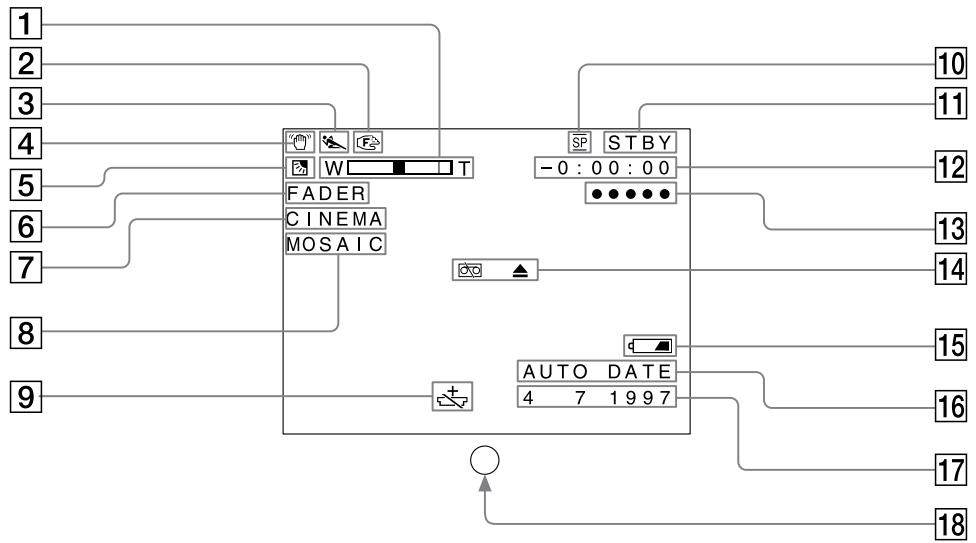
Operation indicators
In the viewfinder
Индикаторы работы
В видоискателе
flowchart
graph TD
    A["1"] --> B["FADER"]
    C["2"] --> B
    D["3"] --> B
    E["4"] --> B
    F["5"] --> B
    G["6"] --> B
    H["7"] --> B
    I["8"] --> J["AUTO DATE"]
    K["9"] --> J
    L["10"] --> M["STBY"]
    N["11"] --> M
    O["12"] --> P["-0:00:00"]
    Q["13"] --> R["●●●●●"]
    S["14"] --> T["+"]
    U["15"] --> V["4 7 1997"]
    W["16"] --> X["17"]
    Y["17"] --> Z["18"]
1 Power zoom indicator (p. 15)
② Manual focus indicaror (p. 39)
3 PROGRAM AE indicator (p. 41)
4 SteadyShot indicator (CCD-TR720E/TR740E only) (p. 43)
5 Back light indicator (p. 42)
6 FADER indicator (p. 32)
7 Wide mode indicator (CCD-TR502E/TR506E/TR720E/TR740E only) (p. 37)
8 Picture Effect indicator (p. 35)
9 Lithium battery indicator (p. 49)
10 SP/LP recording mode indicator (p. 12)
11 Tape transport mode (p. 12)
12 Tape counter (p. 14)
13 5 SEC recording indicator (p. 31)
14 Warning indicator (p. 86)
15 Remaining battery indicator (p. 54)
16 AUTO DATE indicator (p. 12)
17 Date or Time (p. 30)
18 Recording lamp/battery lamp (p. 12)

1 Warning indicators (p. 86)
2 Recording mode indicator (SP/LP) (p. 12)
3 Remaining battery indicator (p. 54)
4 Date or time (p. 30)
Tape counter (p. 14)

В окошке дисплея
The warning indicators and the recording lamp flash to inform you of the following situation. The illustrations below are the warning indicators of the viewfinder. The same indicators flash also in the display window.
♪: You can hear the beep sound when BEEP is set to ON.
1 The battery is weak or dead.
Slow flashing: The battery is weak.
Fast flashing: The battery is dead.
② The tape is near the end.
③ The tape has run out.
4 No tape has been inserted.
5 The tab on the tape is out (red). (p. 11)
6 Moisture condensation has occurred.
(p. 57)
▲ indicator appears only when the cassette is inserted.
7 The video heads may be contaminated. (p. 58)
⑧ Some other trouble has occurred.
Disconnect the power source and contact your Sony dealer or local authorized facility.
9 The lithium battery is weak or is not installed. (p. 49)
This indicator flashes just only after powering on.
Adjusting viewfinder ...... 14
AUTO DATE 15
B
BACK LIGHT 42
BEEP 14,28
C
Camera recording 12
Car battery 26
Charging battery 7
Cleaning video heads ...... 58
COUNTER RESET ...... 14
D
DATE/TIME 30
Demonstration 29
Digital zoom 16, 28
E
Editing 48
EDITSEARCH ...... 18
EJECT.... 11
F, G, H
Fade-in/Fade-out 32
FADER 32
Fast-forward 22
5 sec. recording 31
High-speed shutter mode ..... 40
I, J, K, L
LANC 78
LASER LINK 21
Lithium battery 49
M, N, O, P
Mains 25
Manual focus 38
PICTURE EFFECT ...... 35
Playback on TV 22
Playback pause 23
Power sources 24
Power zoom 15
PROGRAM AE 40
Q, R
REC MODE 28
Rec. Review 18
Remote Commander ...... 81
Remote control jack (LANC) .. 78
Rewind 22
S
Shoulder strap 79
Sports mode 40
STANDBY 12
Standby mode 13
STEADY SHOT 43
Supplied accessories...... 6
T, U, V
Tape counter 14
Title 44
Tripod mounting 17
Trouble check 64
Twilight mode 40
W, X, Y, Z
Wide mode 36
Zoom 15