MediaPad M5 10.8 - Tablet HUAWEI - Free user manual and instructions
Find the device manual for free MediaPad M5 10.8 HUAWEI in PDF.



| Product type | Tablet |
| Brand | Huawei |
| Model | MediaPad M5 10.8 (CMR-W09) |
| Dimensions | 258.7 x 171.8 x 7.3 mm |
| Weight | Approximately 498 g |
| Display | 10.8-inch IPS LCD, 2560 x 1600 pixels resolution |
| Processor | Kirin 960 octa-core |
| RAM | 4 GB |
| Internal storage | 64 GB or 128 GB (expandable via microSD) |
| Battery | 7500 mAh, battery life up to 12 hours of web browsing |
| Operating system | Android 8.0 (Oreo) with EMUI 8.0 |
| Rear camera | 13 megapixels, autofocus, LED flash |
| Front camera | 8 megapixels |
| Speakers | Four speakers, Harman Kardon sound |
| Connectivity | Wi-Fi 802.11 a/b/g/n/ac, Bluetooth 4.2, USB Type-C |
| Sensors | Fingerprint, accelerometer, gyroscope, proximity sensor, compass, ambient light sensor |
| Power supply | Power adapter 5V/2A or 9V/2A (fast charging) |
| Care and cleaning | Turn off the device, unplug the charger, wipe with a soft dry cloth. Do not use abrasive products. |
| Safety | Avoid extreme temperatures, do not expose to water, maintain safe distances for electronic implants (15 cm). |
| Spare parts and repairability | Built-in battery (ref. HB2994I8ECW), adapter (ref. HW-059200XHQ). For repairs, contact an authorized Huawei service center. |
| General information | Manufactured by Huawei Technologies Co., Ltd. Software version: CMR-W09 8.0.1.1(SP1C432). Support website: consumer.huawei.com. |
Frequently Asked Questions - MediaPad M5 10.8 HUAWEI
User questions about MediaPad M5 10.8 HUAWEI
0 question about this device. Answer the ones you know or ask your own.
Ask a new question about this device
Download the instructions for your Tablet in PDF format for free! Find your manual MediaPad M5 10.8 - HUAWEI and take your electronic device back in hand. On this page are published all the documents necessary for the use of your device. MediaPad M5 10.8 by HUAWEI.
USER MANUAL MediaPad M5 10.8 HUAWEI
English (United Kingdom)....1
Français....10
Deutsch....22
Italiano....32
Español.... 42
Português....52
Nederlands....62
Українська....72
Русский 83
Your device at a glance
Before you start, let's take a look at your new device.
- To power on your device, press and hold the power button until the screen turns on.
- To power off your device, press and hold the power button, and then touch ⏻
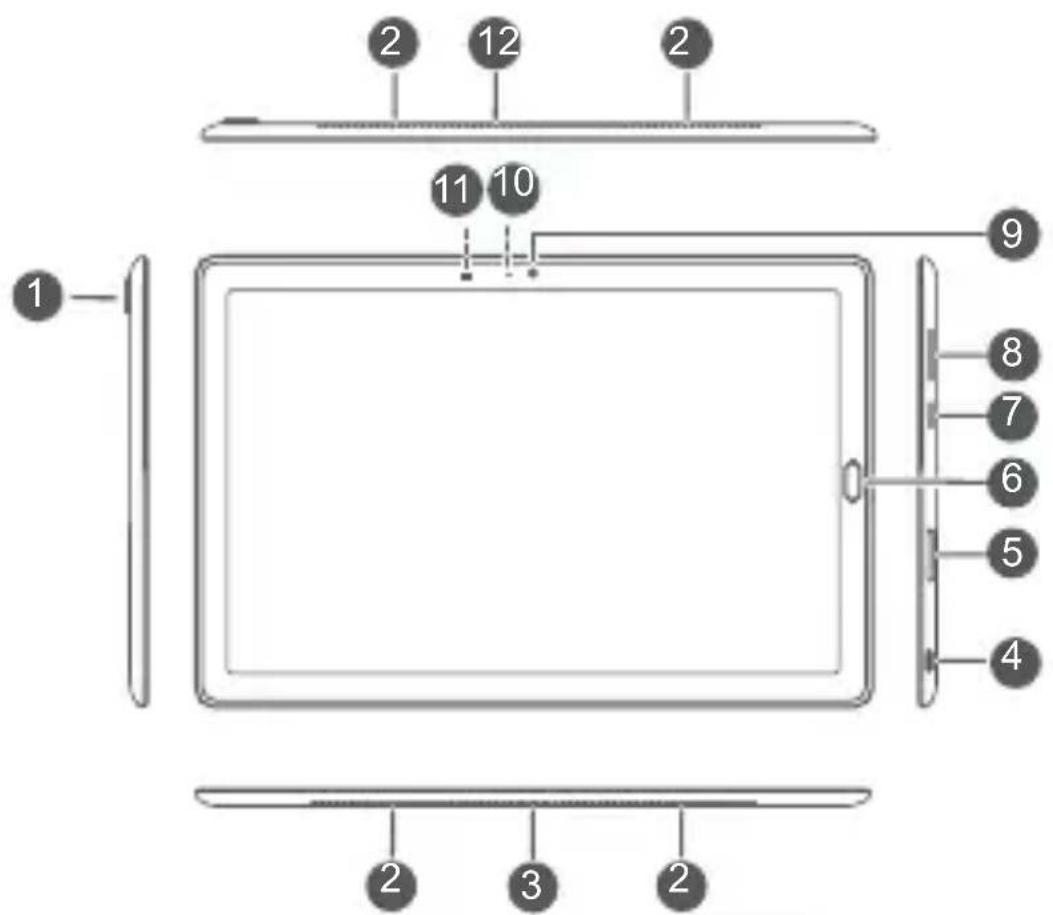
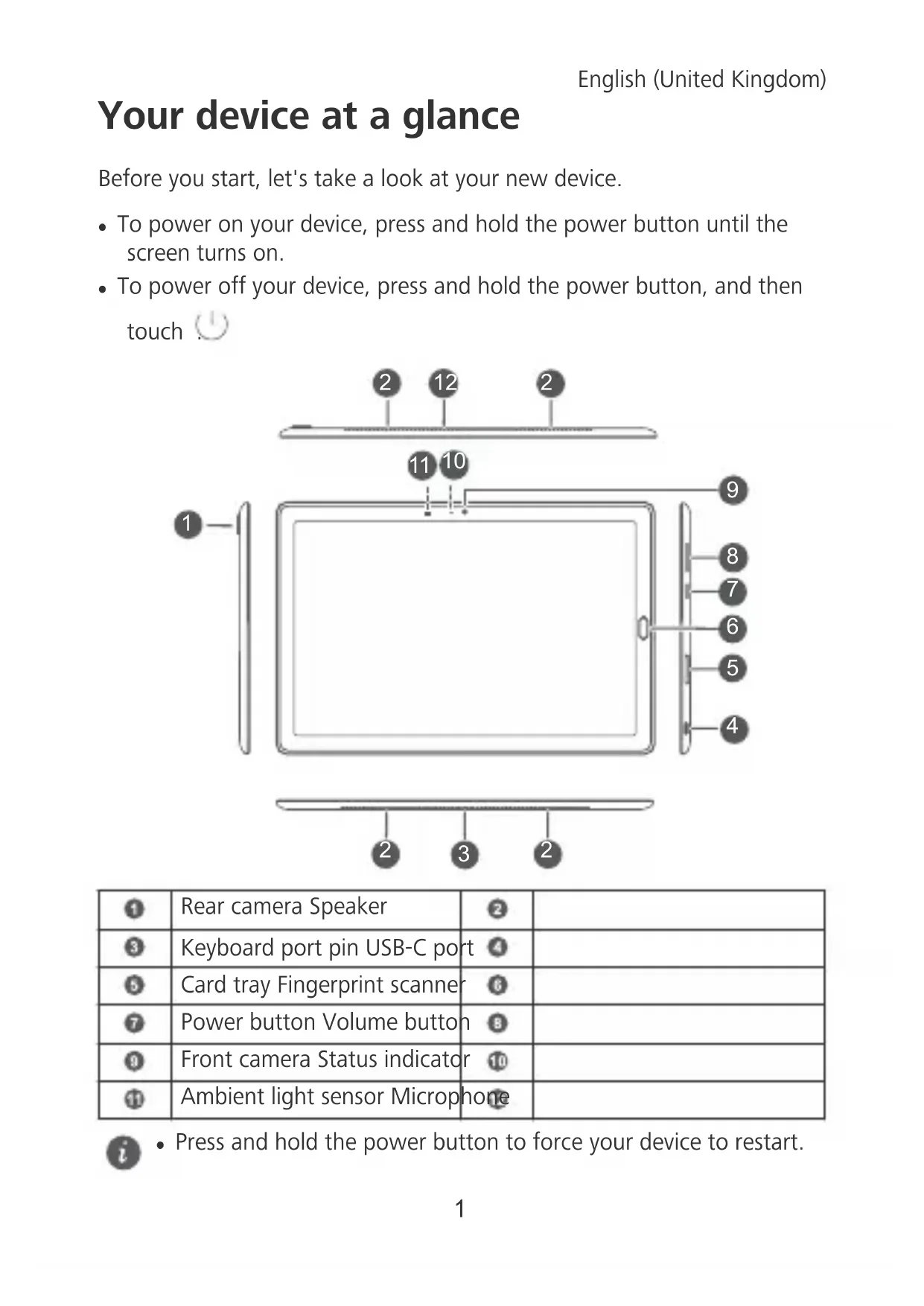
| 1 | Rear camera Speaker | 2 | |
| 3 | Keyboard port pin USB-C port | 4 | |
| 5 | Card tray Fingerprint scanner | 6 | |
| 7 | Power button Volume button | 8 | |
| 9 | Front camera Status indicator | 10 | |
| 11 | Ambient light sensor Microphone |

- Press and hold the power button to force your device to restart.
Getting Started
Follow the instructions in the following figures to set up your device.
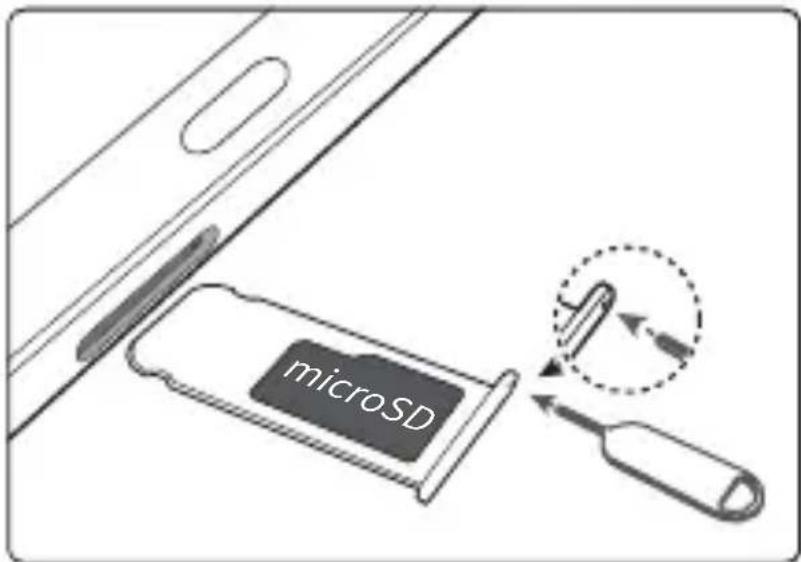

Be careful not to scratch your device or hurt yourself when using the eject pin. Store the eject pin out of the reach of children to prevent accidental swallowing or injury.
For more information
If you encounter any problems whilst using your device, you can get help from the following resources:
- Visit http://consumer.huawei.com/en to view device information, frequently asked questions and other information.
- Visit http://consumer.huawei.com/en/support for the most up-to-date contact information for your country or region.
- You can find service hotlines, retailer addresses, service policies and more information for your local region in HiCare.
Go to Settings and touch System > About tablet > Legal to view legal information for your product.
Go to Settings and touch System > About tablet > Legal > Safety information to view safety information for your product.
Go to Settings and touch System > About tablet > Authentication info to view regulatory information for your product.
Go to Settings and touch System > Certification logos to view more information on certification logos for your product.

All pictures and illustrations in this guide, including but not limited to the product color, size, and display content, are for your reference only. The actual product may vary. Nothing in this guide constitutes a warranty of any kind, express or implied.
Safety Information
Please read all of the safety information carefully before using your device to ensure its safe and proper operation and to learn how to dispose of your device properly.
Operation and Safety

- To prevent possible hearing damage, do not listen at high volume levels for long periods.
- Using an unapproved or incompatible power adapter, charger or battery may damage your device, shorten its lifespan or cause a fire, explosion or other hazards.
- Ideal operating temperatures are 0 °C to 35 °C. Ideal storage temperatures are -20 °C to +45 °C.
- Pacemaker manufacturers recommend maintaining a minimum distance of 15 cm between a pacemaker and a wireless device to prevent potential interference with the pacemaker. If using a pacemaker, hold the device on the side opposite the pacemaker and do not carry the device in your front pocket.
- Keep the device and the battery away from excessive heat and direct sunlight. Do not place them on or in heating devices, such as microwave ovens, stoves or radiators.
- Adhere to local laws and regulations while using the device. To reduce the risk of accidents, do not use your device while driving.
- While flying in an aircraft or immediately before boarding, ensure that you use your device according to the instructions provided. Using a wireless device in an aircraft may disrupt wireless networks, present a hazard to aircraft operations or be illegal under law.
- To prevent damage to your device's parts or internal circuits, do not use it in dusty, smoky, damp or dirty environments or near magnetic fields.
-
When charging the device, make sure the power adapter is plugged into a socket near the devices and is easily accessible.
-
Unplug the charger from the electric socket and from the device when not in use.
- Do not use, store or transport the device where flammables or explosives are stored (e.g. in a petrol station, oil depot or chemical plant). Using your device in these environments increases the risk of explosion or fire.
- Dispose of this device, the battery and accessories according to local regulations. They should not be disposed of in normal household waste. Improper battery use may lead to fire, explosion or other hazards.
- Please consult your doctor and the device manufacturer to determine if operation of your device may interfere with the operation of your medical device.
- Adhere to any rules or regulations set forth by hospitals and health care facilities.
- If you must make or answer a call, stop your vehicle at a safe location first.
- Keep the device away from sources of heat and fire, such as a heater, microwave oven, stove, water heater, radiator, or candle.
Potentially Explosive Atmosphere
Power off your device in any area with a potentially explosive atmosphere, and comply with all signs and instructions. Areas that may have potentially explosive atmospheres include the areas where you would normally be advised to turn off your vehicle engine. Triggering of sparks in such areas could cause an explosion or a fire, resulting in bodily injuries or even deaths. Do not power on your device at refueling points such as service stations. Comply with restrictions on the use of radio equipment in fuel depots, storage, and distribution areas, and chemical plants. In addition, adhere to restrictions in areas where blasting operations are in progress. Before using the device, watch out for areas that have potentially explosive atmospheres that are often, but not always, clearly marked. Such locations include areas below the deck on boats, chemical transfer or storage facilities, and areas where the air contains chemicals or particles such as grain, dust, or metal powders. Ask the manufacturers of vehicles using liquefied petroleum gas (such as
propane or butane) whether this device can be safely used in their vicinity.
Disposal and recycling information
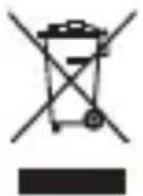
The crossed-out wheelie bin symbol on your product, battery, literature or packaging reminds you that all electronic products and batteries must be taken to separate waste collection points at the end of their working lives; they must not be disposed of in normal household waste. It is the responsibility of the user to dispose of the equipment using a designated collection point or service for separate recycling of waste electrical and electronic equipment (WEEE) and batteries according to local laws.
Proper collection and recycling of your equipment helps ensure EEE waste is recycled in a manner that conserves valuable materials and protects human health and the environment. Improper handling, accidental breakage, damage, and/or improper recycling at the end of its life may be harmful for your health and the environment. For more information about where and how to drop off your EEE waste, please contact your local authorities, retailer or household waste disposal service or visit the website http://consumer.huawei.com/en/.
Reduction of hazardous substances
This device and any electrical accessories are compliant with local applicable rules on the restriction of the use of certain hazardous substances in electrical and electronic equipment, such as EU REACH, RoHS and Batteries (where included) regulations, etc. For declarations of conformity about REACH and RoHS, please visit our web site http://consumer.huawei.com/certification.
EU Regulatory Conformance
Body worn operation
The device complies with RF specifications when used at a distance of 0.50 cm from your body. Ensure that the device accessories, such as a device case and device holster, are not composed of metal components. Keep the device away from your body to meet the distance requirement.
The highest SAR value reported for this device type when tested in portable exposure conditions is
CMR-W09 0.86 W/kg
Statement
Hereby, Huawei Technologies Co., Ltd. declares that this device is in compliance with the essential requirements and other relevant provisions of Directive 2014/53/EU.
The most recent and valid version of the DoC (Declaration of Conformity) can be viewed at http://consumer.huawei.com/certification.
This device may be operated in all member states of the EU.
Observe national and local regulations where the device is used.
This device may be restricted for use, depending on the local network.
Restrictions in the 2.4 GHz band:
Norway: This subsection does not apply for the geographical area within a radius of 20 km from the centre of Ny-Ålesund.
Restrictions in the 5 GHz band:
According to Article 10 (10) of Directive 2014/53/EU, the packaging shows that this radio equipment will be subject to some restrictions when placed on the market in Belgium (BE), Bulgaria (BG), the Czech Republic (CZ), Denmark (DK), Germany (DE), Estonia (EE), Ireland (IE), Greece (EL), Spain (ES), France (FR), Croatia (HR), Italy (IT), Cyprus (CY), Latvia (LV), Lithuania (LT), Luxembourg (LU), Hungary (HU), Malta (MT), Netherlands (NL), Austria (AT), Poland (PL), Portugal (PT), Romania (RO), Slovenia (SI), Slovakia (SK), Finland (FI), Sweden (SE), the United Kingdom (UK), Turkey (TR), Norway (NO), Switzerland (CH), Iceland (IS), and Liechtenstein (LI). The WLAN function for this device is restricted to indoor use only when operating in the 5150 to 5350 MHz frequency range.
Frequency Bands and Power
(a) Frequency bands in which the radio equipment operates: Some bands may not be available in all countries or all areas. Please contact the local network provider for more details.
(b) Maximum radio-frequency power transmitted in the frequency bands in which the radio equipment operates: The maximum power for all bands is less than the highest limit value specified in the related Harmonised Standard.
The frequency bands and transmitting power (radiated and/or conducted) nominal limits applicable to this radio equipment are as follows:
| CMR-W09 B | leuetooth: 20 dBm, Wi-Fi 2.4G: 20 dBm, Wi-Fi 5G: 5150-5350 MHz: 23 dBm, 5470-5725 MHz: 30 dBm |
Accessories and Software Information
Some accessories are optional in certain countries or regions. Optional accessories can be purchased from a licenced vendor as required. The following accessories are recommended:
Adapters: HW-059200XHQ (X represents the different plug types used, which can be either C, U, J, E, B, A, I, R, Z or K, depending on your region)
Batteries: HB2994I8ECW
The product software version is CMR-W09: CMR-W09 8.0.1.1(SP1C432).
Software updates will be released by the manufacturer to fix bugs or enhance functions after the product has been released. All software versions released by the manufacturer have been verified and are still compliant with the related rules.
All RF parameters (for example, frequency range and output power) are not accessible to the user, and cannot be changed by the user.
For the most recent information about accessories and software, please see the DoC (Declaration of Conformity) at http://consumer.huawei.com/certification.
ErP Product Information
Huawei Technologies Co., Ltd. hereby declares that its products conform to the Energy-related Products Directive (ErP) 2009/125/EC. For detailed ErP information and the user manuals required by Commission Regulation (EU) No 801/2013, please visit: http://consumer.huawei.com/en/certification.
Legal Notice
Trademarks and Permissions

HUAWEI
HUAWEI, and the trademarks or registered
trademarks of Huawei Technologies Co., Ltd.
Android™ is a trademark of Google Inc.
The Bluetooth® word mark and logos are registered trademarks owned by Bluetooth SIG, Inc. and any use of such marks by Huawei Technologies Co., Ltd. is under license.
Wi-Fi®, the Wi-Fi CERTIFIED logo and the Wi-Fi logo are trademarks of Wi-Fi Alliance.
ENERGY STAR® MARK
For information related to ENERGY STAR ^® , please visit the website www.energystar.gov.
Privacy Policy
To better understand how we protect your personal information, please see the privacy policy at http://consumer.huawei.com/privacy-policy.
Copyright © Huawei Technologies Co., Ltd. 2018. All rights reserved.
THIS DOCUMENT IS FOR INFORMATION PURPOSE ONLY, AND DOES NOT CONSTITUTE ANY KIND OF WARRANTIES.
Français
Copyright © Huawei Technologies Co., Ltd. 2018.
natural_image
White plastic electrical plug with two metal pins (no text or symbols visible)Huawei Technologies Company Limited,
Copyright © Huawei Technologies Co., Ltd.
- Все права защищены.
Note: Remember the Google account your device last logged in to.
During an untrusted factory settings restoration or microSD card-based update, Google's anti-theft mechanism requires you to enter the Google account your device last logged in to on the startup navigation screen for identity authentication. Your device can properly power on only after the identity authentication passes.
Model: CMR-W09

- Your device at a glance
- Getting Started
- For more information
- Safety Information
- Operation and Safety
- Potentially Explosive Atmosphere
- Disposal and recycling information
- Reduction of hazardous substances
- EU Regulatory Conformance
- Body worn operation
- Statement
- Restrictions in the 2.4 GHz band:
- Restrictions in the 5 GHz band:
- Frequency Bands and Power
- Accessories and Software Information
- ErP Product Information
- Legal Notice
- Trademarks and Permissions
- Privacy Policy
- Copyright © Huawei Technologies Co., Ltd. 2018. All rights reserved.
- Français
- Copyright © Huawei Technologies Co., Ltd. 2018.
Brand : HUAWEI
Model : MediaPad M5 10.8
Category : Tablet