Vibe K6 - Smartphone LENOVO - Free user manual and instructions
Find the device manual for free Vibe K6 LENOVO in PDF.


| Product type | Smartphone |
| Brand | Lenovo |
| Model | Vibe K6 |
| Dimensions (approximate) | 142 x 71 x 8.5 mm |
| Weight (approximate) | 145 g |
| Power | Built-in rechargeable lithium-ion battery (3000 mAh typical) |
| Charging | Via USB power adapter or computer (micro-USB cable included) |
| Display | Touchscreen, 5.0 inches, Full HD resolution (1080 x 1920) |
| Cameras | Rear (with LED flash) and front |
| Sensors | Ambient light, proximity, fingerprint |
| Connectivity | Wi-Fi, Bluetooth, 4G/3G/2G, GPS |
| SIM cards | Nano-SIM (dual SIM or single SIM model depending on version) |
| Expandable storage | microSD card (up to 128 GB) |
| Connectors | Micro-USB (charging/data), 3.5 mm headphone jack |
| Physical buttons | Power, Volume, Home, Back, Recent apps |
| Operating system | Android (version unspecified) |
| Security | Fingerprint reader |
| Operating temperature | -10°C to 35°C |
| SAR (head) | 0.618 W/kg (max) |
| SAR (body) | 1.167 W/kg (max) |
| Maintenance and cleaning | Avoid moisture, clean with a soft dry cloth |
| Spare parts and repairability | Built-in battery not user-replaceable; contact Lenovo support for repairs |
Frequently Asked Questions - Vibe K6 LENOVO
User questions about Vibe K6 LENOVO
0 question about this device. Answer the ones you know or ask your own.
Ask a new question about this device
Download the instructions for your Smartphone in PDF format for free! Find your manual Vibe K6 - LENOVO and take your electronic device back in hand. On this page are published all the documents necessary for the use of your device. Vibe K6 by LENOVO.
USER MANUAL Vibe K6 LENOVO
Read this guide carefully before using your smartphone.
Reading first - regulatory information
Be sure to read the Regulatory Notice for your country or region before using the wireless devices contained in your Lenovo Mobile Phone. To obtain a PDF version of the Regulatory Notice, see the "Downloading publications" section.
Getting support
To get support on network service and billing, contact your wireless network operator. To learn how to use your smartphone and view its technical specifications, go to http://support.lenovo.com.
Downloading publications
To obtain the latest smartphone manuals, go to: http://support.lenovo.com
Accessing your User Guide
Your User Guide contains detailed information about your smartphone. To access your User Guide, go to http://support.lenovo.com and follow the instructions on the screen.
Legal notices
Lenovo and the Lenovo logo are trademarks of Lenovo in the United States, other countries, or both.
Other company, product, or service names may be trademarks or service marks of others.
Manufactured under license from Dolby Laboratories. Dolby, Dolby Atmos, and the double-D symbol are trademarks of Dolby Laboratories.
Contents
First glance. 1
Installing the Nano-SIM & microSD cards 2
Charging the battery. 4
Important safety and handling information 5
Service, support, and warranty information. 7
Recycling and environmental information. 8
European Union compliance statement 11
Specific Absorption Rate information. 12
First glance
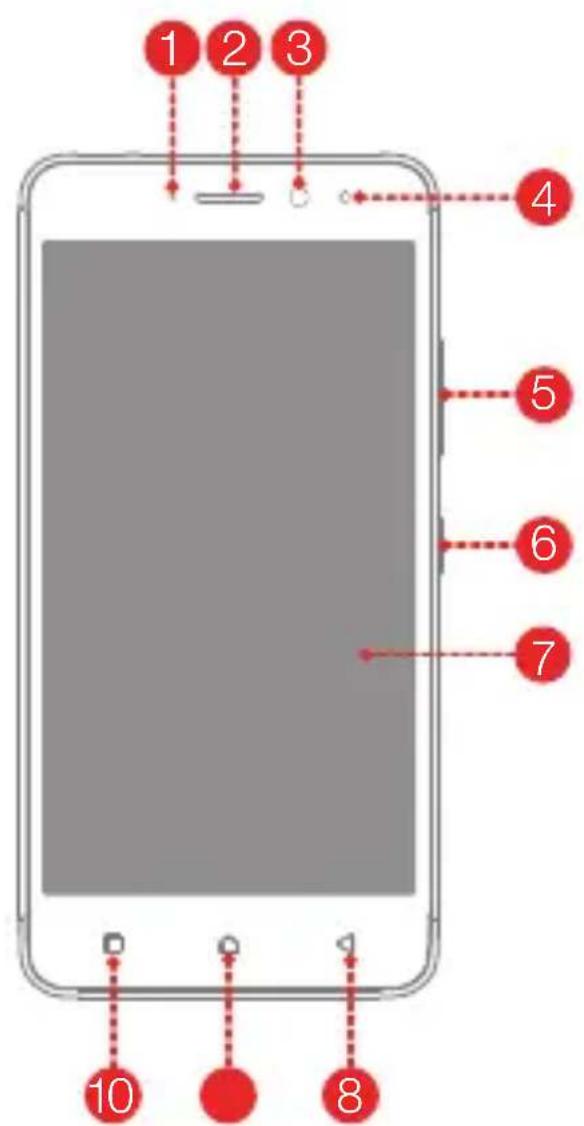
Indicator Receiver
2
3 Front-facing camera
4 Light/Proximity sensor
5 Volume buttons
6 On/Off button
7 Touch screen
8 Back button
9 Home button
10
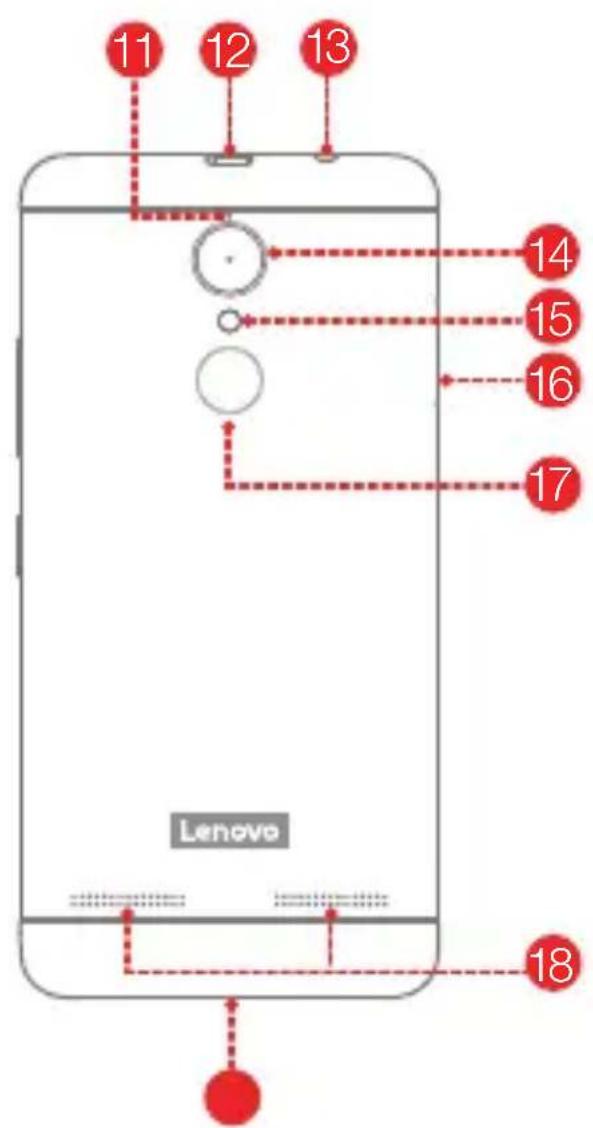
Anti-noise microphone
12 Micro USB connectorMultita
13 Headset connector
14 Rear-facing camera
15 Flash
16 Card tray Fingerprint Solder
18 Speakers
19 Microphone
Installing the Nano-SIM & microSD cards
Dual-SIM model
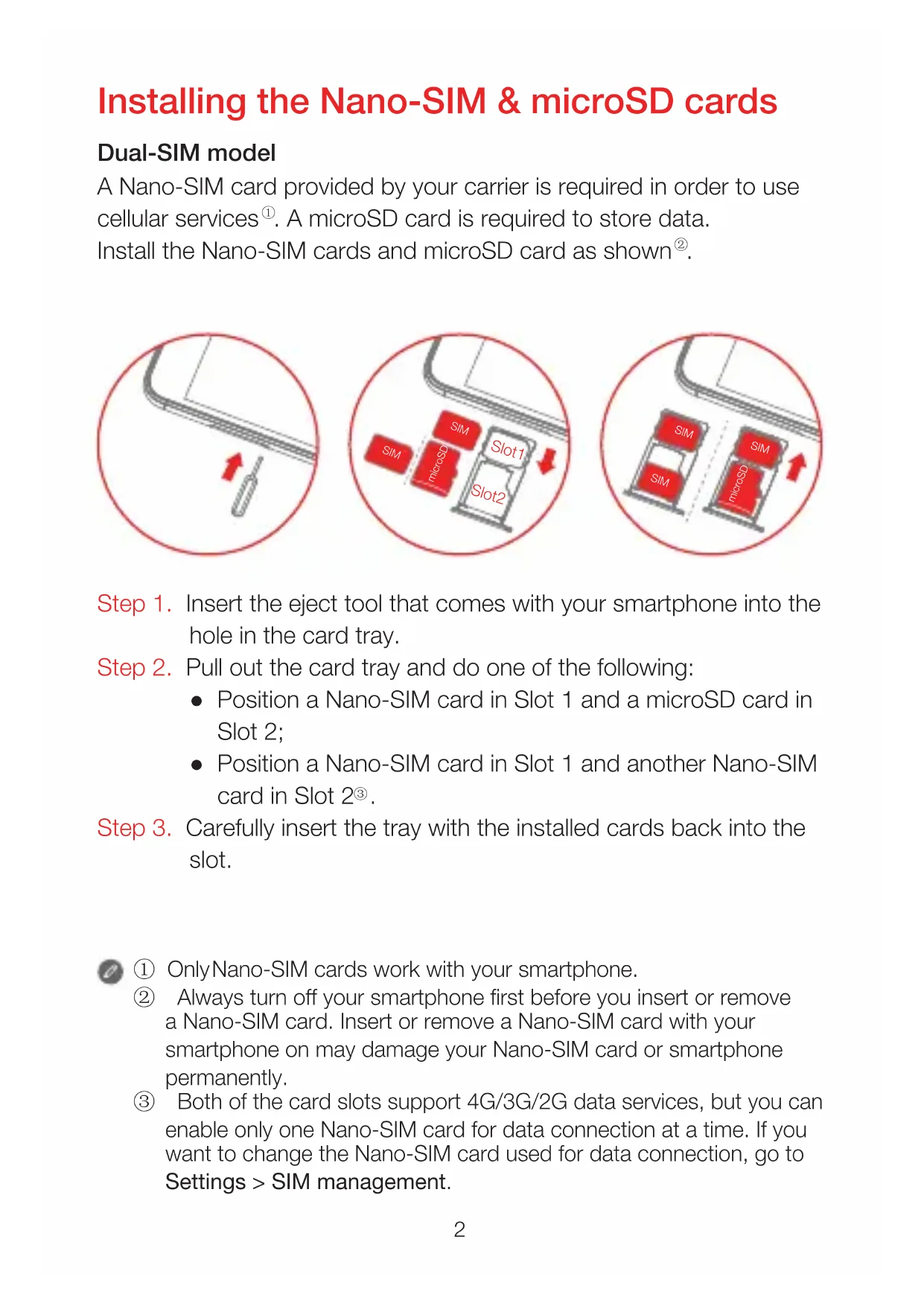
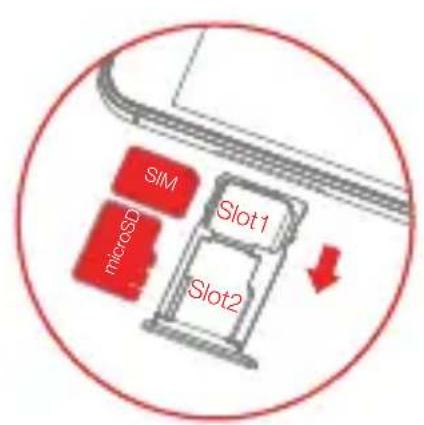
A Nano-SIM card provided by your carrier is required in order to use cellular services①. A microSD card is required to store data. Install the Nano-SIM cards and microSD card as shown②.
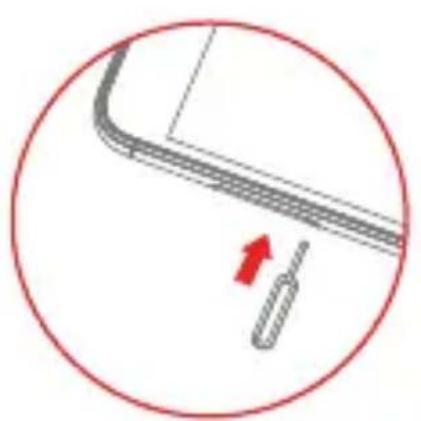
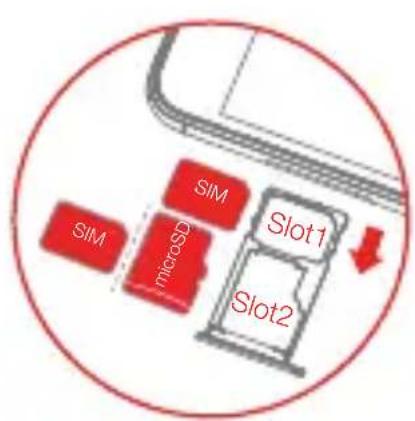
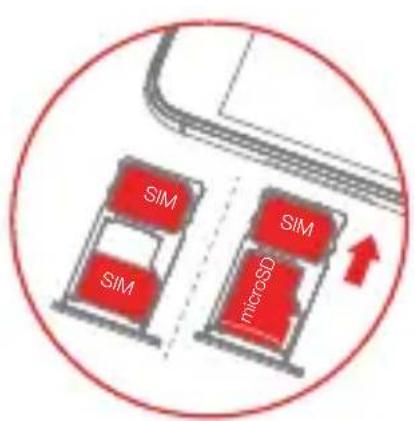
Step 1. Insert the eject tool that comes with your smartphone into the hole in the card tray.
Step 2. Pull out the card tray and do one of the following:
- Position a Nano-SIM card in Slot 1 and a microSD card in Slot 2;
- Position a Nano-SIM card in Slot 1 and another Nano-SIM card in Slot 2^③ .
Step 3. Carefully insert the tray with the installed cards back into the slot.

① Only Nano-SIM cards work with your smartphone.
Always turn off your smartphone first before you insert or remove a Nano-SIM card. Insert or remove a Nano-SIM card with your smartphone on may damage your Nano-SIM card or smartphone permanently.
③ Both of the card slots support 4G/3G/2G data services, but you can enable only one Nano-SIM card for data connection at a time. If you want to change the Nano-SIM card used for data connection, go to Settings > SIM management.
Single-SIM model
A Nano-SIM card provided by your carrier is required in order to use cellular services①. A microSD card is required to store data. Install the Nano-SIM card and microSD card as shown②.
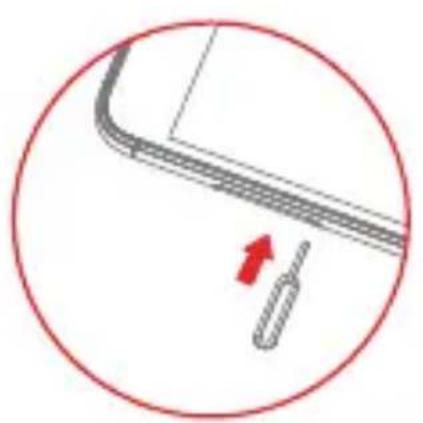
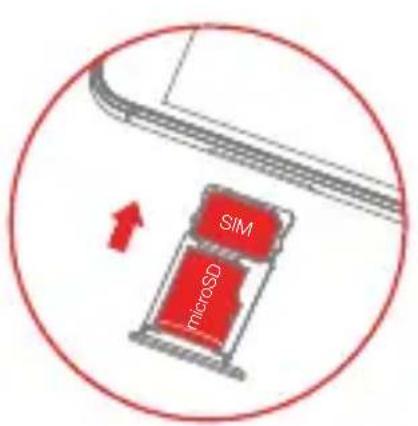
Step 1. Insert the eject tool that comes with your smartphone into the hole in the card tray.
Step 2. Pull out the card tray and position a Nano-SIM card in Slot 1 and a microSD card in Slot 2;
Step 3. Carefully insert the tray with the installed cards back into the slot.

① Only Nano-SIM cards work with your smartphone.
② Always turn off your smartphone first before you insert or remove a Nano-SIM card. Insert or remove a Nano-SIM card with your smartphone on may damage your Nano-SIM card or smartphone permanently.
Charging the battery
Charge the battery as shown.
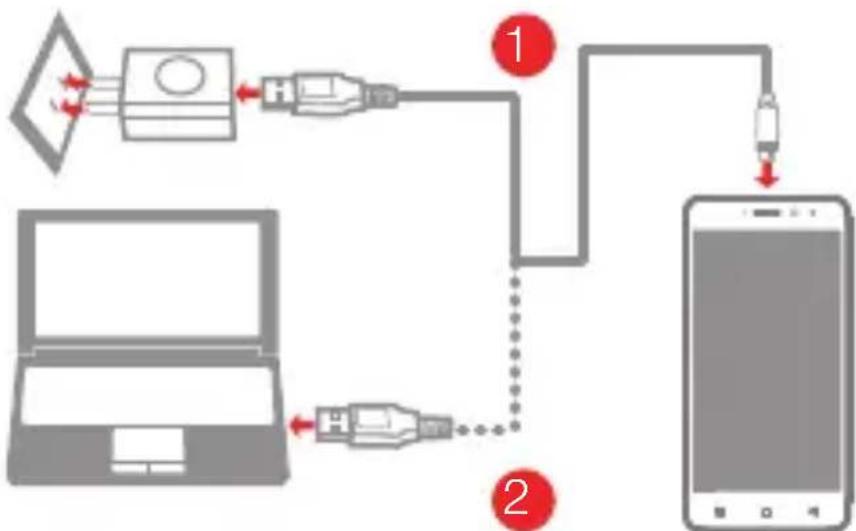
Method 1. Connect your smartphone to a power outlet using the cable and USB power adapter that come with your smartphone.
Method 2. Connect your smartphone to a computer using the cable that comes with your smartphone.

Low battery power ChargingFully charged


As a protective measure, your smartphone will stop charging automatically in unstable voltage conditions. Reconnect the micro USB cable to your smartphone to resume charging.
Turning on or turning off your smartphone
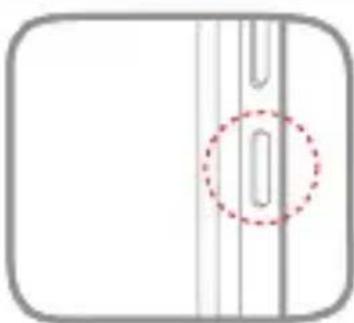
Turn on: Press and hold the On/Off button until the Lenovo logo appears.
Turn off: Press and hold the On/Off button for a few seconds, then tap Power off and tap ok to confirm it.
Restart: Press and hold the On/Off button for a few seconds, then tap Restart and tap ok to confirm it.

Your smartphone has a built-in rechargeable battery. For more information about battery safety, see the "Built-in rechargeable battery notice" section. The battery in this product cannot be easily replaced by yourself.
Important safety and handling information
This section contains important safety and handling information for Lenovo smartphones. Additional safety and handling information is provided in the User Guide. See the "Accessing your User Guide" section for details.
Operating temperature
Use the Lenovo Phone only in the temperature range of -10^ (14 F) - 35^ (95 F) to avoid damage.
Plastic bag notice
DANGER: Plastic bags can be dangerous. Keep plastic bags away from babies and children to avoid danger of suffocation.
General battery notice
The original batteries supplied with your product have been tested for compatibility and should only be replaced with approved parts. Risk of explosion if the battery is replaced with an incorrect type. Dispose of used batteries according to the instructions.
Rechargeable battery notice
CAUTION: Risk of explosion if the battery is replaced with an incorrect type.
When replacing the lithium battery, use only the same or an equivalent type that is recommended by the manufacturer. The battery contains lithium and can explode if not properly used, handled, or disposed of. Dispose of used batteries according to the instructions.
Do not:
- Throw or immerse into water
- Heat to more than 100^ (212°F)
Repair or disassemble
Built-in rechargeable battery notice
CAUTION: Do not attempt to replace the internal rechargeable lithium ion battery. Contact Lenovo Support for factory replacement.
Charging
Lenovo, and its affiliates are not responsible for the performance or safety of products not manufactured or approved by Lenovo, or its affiliates. Use only approved Lenovo ac adapters and batteries. Adapter shall be installed near the equipment and shall be easily accessible.
Preventing hearing damage
To prevent possible hearing damage when using headsets, earphones, or earbuds with this device, do not listen at high volume levels for long periods.
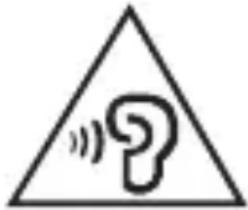
Disposing according to local laws and regulations
When the Lenovo Phone reaches the end of its useful life, do not crush, incinerate, immerse in water, or dispose of the Lenovo Phone in any manner contrary to local laws and regulations. Some internal parts contain substances that can explode, leak, or have an adverse environmental effect if disposed of incorrectly. See "Recycling and environmental information" for additional information.
Service, support, and warranty information
The following information describes the technical support that is available for your product, during the warranty period or throughout the life of your product. Refer to the Lenovo Limited Warranty for a full explanation of Lenovo warranty terms.
Online technical support
Online technical support is available during the lifetime of a product at: http://www.lenovo.com/support
Telephone technical support
Where applicable, you can get help and information from the Customer Support Center by telephone. Before contacting a Lenovo technical support representative, please have the following information available: model and serial number, the exact wording of any error message, and a description of the problem.
Your technical support representative might want to walk you through the problem while you are at your phone during the call.
Worldwide Lenovo Support telephone list
IMPORTANT: Telephone numbers are subject to change without notice. The most up-to-date telephone list for the Customer Support Center is always available at:
http://support.lenovo.com/supportphonelist
The Customer Support Center phone number is subject to change. For the latest phone number, go to the e-support website. If the telephone number for your country or region is not listed, contact your Lenovo reseller or Lenovo marketing representative.
Lenovo Limited Warranty (LLW) notice
Read the full LLW at http://support.lenovo.com/smSMART-llw. You can view the LLW in a number of languages from this Web site. If you cannot view the LLW either from the Web site or from your phone, contact your local Lenovo office or reseller to obtain a printed version of the full LLW.
IMPORTANT: Lenovo Smartphone Products do not have International Warranty Services.
Recycling and environmental information
General recycling statement
Lenovo encourages owners of information technology (IT) equipment to responsibly recycle their equipment when it is no longer needed. Lenovo offers a variety of programs and services to assist equipment owners in recycling their IT products. For information on recycling Lenovo products, go to http://www.lenovo.com/recycling.
Important battery and WEEE information
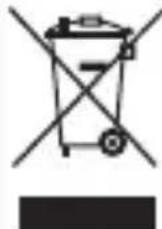
Batteries and electrical and electronic equipment marked with the symbol of a crossed-out wheeled bin may not be disposed as unsorted municipal waste. Batteries and waste of electrical and electronic equipment (WEEE) shall be treated separately using the collection framework available to customers for the return, recycling, and treatment of batteries and WEEE. When possible, remove and isolate batteries from WEEE prior to placing WEEE in the waste collection stream. Batteries are to be collected separately using the framework available for the return, recycling, and treatment of batteries and accumulators. Country-specific information is available at: http://www.lenovo.com/recycling
Recycling information for India
Recycling and disposal information for India is available at: http://www.lenovo.com/social_responsibility/us/en/sustainability/ptb_india.html
Battery recycling information for the European Union
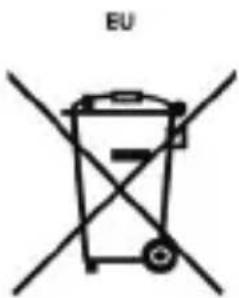
Batteries or packaging for batteries are labeled in accordance with European Directive 2006/66/EC concerning batteries and accumulators and waste batteries and accumulators. The Directive determines the framework for the return and recycling of used batteries and accumulators as applicable throughout the European Union. This label is applied to various batteries to indicate that the battery is not to be thrown away, but rather reclaimed upon end of life per this Directive.
In accordance with the European Directive 2006/66/EC, batteries and accumulators are labeled to indicate that they are to be collected separately and recycled at end of life. The label on the battery may also include a chemical symbol for the metal concerned in the battery (Pb for lead, Hg for mercury, and Cd for cadmium). Users of batteries and accumulators must not dispose of batteries and accumulators as unsorted municipal waste, but use the collection framework available to customers for the return, recycling, and treatment of batteries and accumulators. Customer participation is important to minimize any potential effects of batteries and accumulators on the environment and human health due to the potential presence of hazardous substances. For proper collection and treatment, go to: http://www.lenovo.com/recycling
Restriction of Hazardous Substances Directive (RoHS)
European Union
Lenovo products sold in the European Union, on or after 3 January 2013 meet the requirements of Directive 2011/65/EU on the restriction of the use of certain hazardous substances in electrical and electronic equipment ("RoHS recast" or "RoHS 2"). For more information about Lenovo progress on RoHS, go to: http://www.lenovo.com/social_responsibility/us/en/RoHS_Communication.pdf
India
RoHS compliant as per E-Waste (Management & Handling) Rules, 2011.
Vietnam
Lenovo products sold in Vietnam, on or after September 23, 2011, meet the requirements of the Vietnam Circular 30/2011/TT-BCT ("Vietnam RoHS").
Ukraine
LIMiTBePjKyEmo, 0 npOdyKciJ IeHOBO BiIOBidaE BmOram HopMaTHBnX aKTIB YkpaIHn, kI o6MeKyIb BMICT He6e3neuHnx peYOBnH
Turkey
The Lenovo product meets the requirements of the Republic of Turkey Directive on the Restriction of the Use of Certain Hazardous Substances in Waste Electrical and Electronic Equipment (WEEE).
European Union compliance statement
European Union conformity
EU contact: Lenovo, Einsteinova 21, 851 01 Bratislava, Slovakia
C€0560
Compliance with the R&TTE Directive
This product is in compliance with the essential requirements and other relevant provisions of the EU Council Radio and Telecommunications Terminal Equipment (R&TTE) Directive, 1999/5/EC. The Declaration of Conformity information is located in the Regulatory Notices, which you can download from the Lenovo Support Web site. See "Downloading publications" in this document for additional information.
NOTE: R&TTE 1999/5/EC remains in force during the transition period of Radio Equipment Directive (RED) 2014/53/EU until 12 June, 2017. After then, RED 2014/53/EU will take the place of R&TTE 1999/5/EC.
Specific Absorption Rate information
This mobile device meets the government's requirements for exposure to radio waves. Your mobile device is a radio transmitter and receiver.
The exposure standard for mobile devices employs a unit of measurement known as the Specific Absorption Rate, or SAR.
The SAR limit adopted by Europe is 2.0W / kg averaged over 10 grams of tissue. Tests for SAR are conducted using standard operating
positions with the device transmitting at its highest certified power level in all tested frequency bands.
The highest SAR value for your Lenovo device when tested for use at the head and body is outlined as follows:
| Position The highest SAR value Regulation | ||
| Head | 0.618 | Europe 10g SAR Limit (2.0 W/kg) |
| Body-worn | 1.167 | Europe 10g SAR Limit (2.0 W/kg) |
During use, the actual SAR values for this device are usually well below the values stated above. This is because, for purposes of system efficiency and to minimize interference on the network, the operating power of your mobile devices is automatically decreased when full power is not needed for the call. The lower the power output of the device, the lower its SAR value.
To meet RF exposure guidelines during body-worn operation, the device must be positioned at least 0.5cm away from your body.
Français

Directive Européenne RoHS (Restriction of Hazardous Substances)
Union française
RoHS compliant as per E-Waste (Management & Handling) Rules, 2011.
Viêt Nam
Reducie | Ruaa | Recycle

V1.0_20160811© Copyright Lenovo 2
711608009591
Printed in China