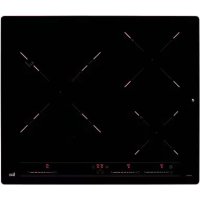
USER MANUAL IB 6315 TEKA
A technology is a tool to improve the performance of a system. It is used to improve the performance of a system by improving its performance and reducing its cost. It is also used to improve the performance of a system by improving its performance and reducing its cost.
Warning. If the ceramic glass breaks or cracks, immediately unplug the stovetop to avoid electric shocks. This appliance is not designed to work with an external timer (not built into the appliance) or a separate remote control system. Do not steam clean this device. Warning. The device and its accessible parts may heat up during operation. Avoid touching the heating elements. Children younger than 8 years old must stay away from the hob unless they are permanently supervised. This device may solely be used by children 8 years old or older, people with impaired physical, sensory or mental abilities, or those who lack experience and knowledge. ONLY when supervised or if they have been given adequate instruction on the use of the device and understand the dangers its use involves. User cleaning and maintenance may not be done
by unsupervised children. Children must not play with the device. Warning. It is dangerous to cook with fat or oil without being present, as these may catch fire. NEVER try to extinguish a fire with water! In this event disconnect the device and cover the flames with a lid, a plate or a blanket. Do not store any object on the cooking areas of the induction hob. Prevent possible fire hazards. The induction generator complies with current EU legislation. We however recommend that anyone fitted with a device such as a pacemaker should refer to their physician, or if in doubt abstain from using the induction areas. Metal objects such as knives, forks, spoons and lids may not be placed on the surface of the hob as they may overheat. After use always disconnect the hot plate, do not simply remove the pot or pan. Otherwise a malfunction may
occur if inadvertently another pot or pan is placed on it within the detection period. Prevent possible accidents! If the supply cord is damaged, it must be replaced by the manufacturer, its service agent or similarly qualified persons in order to avoid hazard. WARNING: Use only stovetop protectors designed by the appliance manufacturer or indicated by the manufacturer in the instructions for use as adequate or stovetop protectors incorporated into the device. The use of inadequate protectors can cause accidents. It is necessary to allow the appliance disconnection after installation. Disconnection devices must be incorporated to the fixed electrical installation, according to the installation regulations.
Installation
Installation with cutlery drawer
If you wish to install furniture or a cutlery drawer under the hob, a separation board must be fitted between the two. Accidental contact with the hot surface of the device's housing is thus prevented.
The board must be fitted 20 mm beneath the under part of the stovetop.
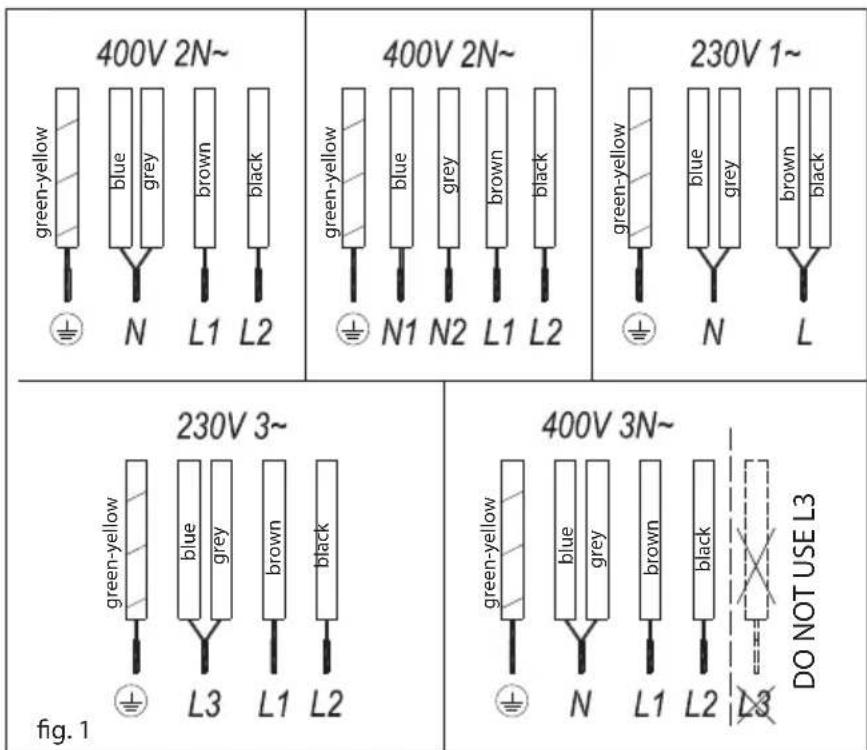
Electrical connection
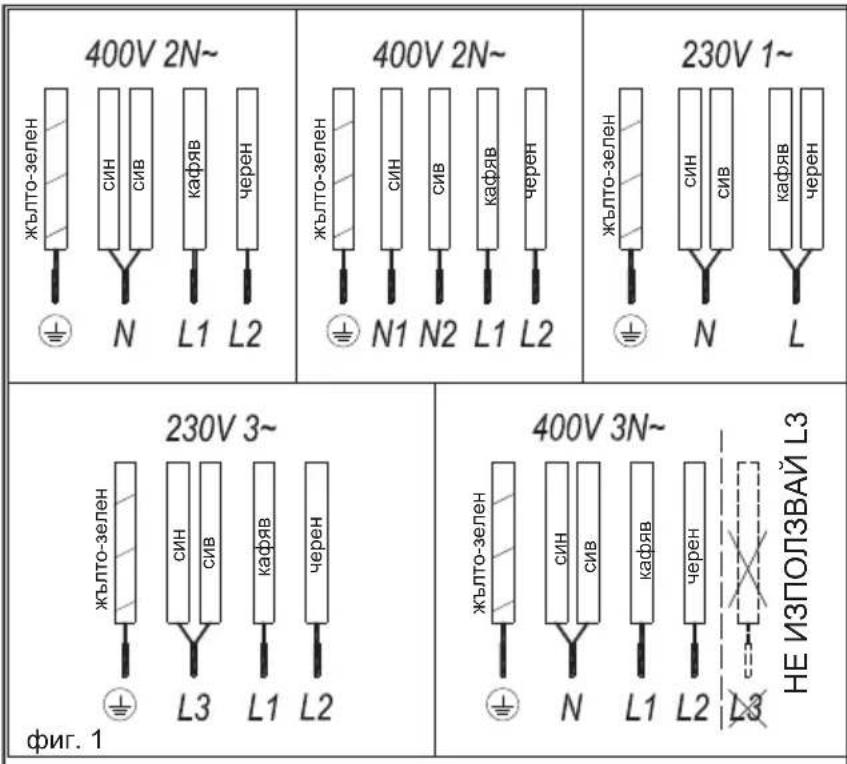
Before you connect the stovetop to the mains, check that the voltage and frequency match those specified on the stovetop nameplate, which is underneath it, and on the Guarantee Sheet, or if applicable on the technical data sheet, which you must keep together with this manual throughout the product's service life.
Ensure that the inlet cable does not come into contact with the induction top housing or the oven housing, if it is installed in the same unit.
Warning:
The electrical connection must be properly grounded, following current legislation, otherwise the induction hob may malfunction.
Unusually high power surges can damage the control system (like with any electrical appliance).
It is advised to refrain from using the induction hob during the pyrolytic cleaning function in the
case of pyrolytic ovens, due to the high temperature that this type of device attains.
! Only the TEKA official technical service can handle or repair the appliance, including replacement of the power cable.
Before disconnecting the hob from the mains, we recommend switching off the cutoff switch and waiting for approximately 25 seconds before disconnecting from the mains. This time is required to allow for the complete discharge of the electronic circuitry and thus preclude the possibility of electric shock from the cable terminals.
i Keep the Guarantee Certificate or the technical data sheet together with the instructions manual throughout the product's service life. These contain important technical information.
Use and Maintenance
User instructions of the Touch Control
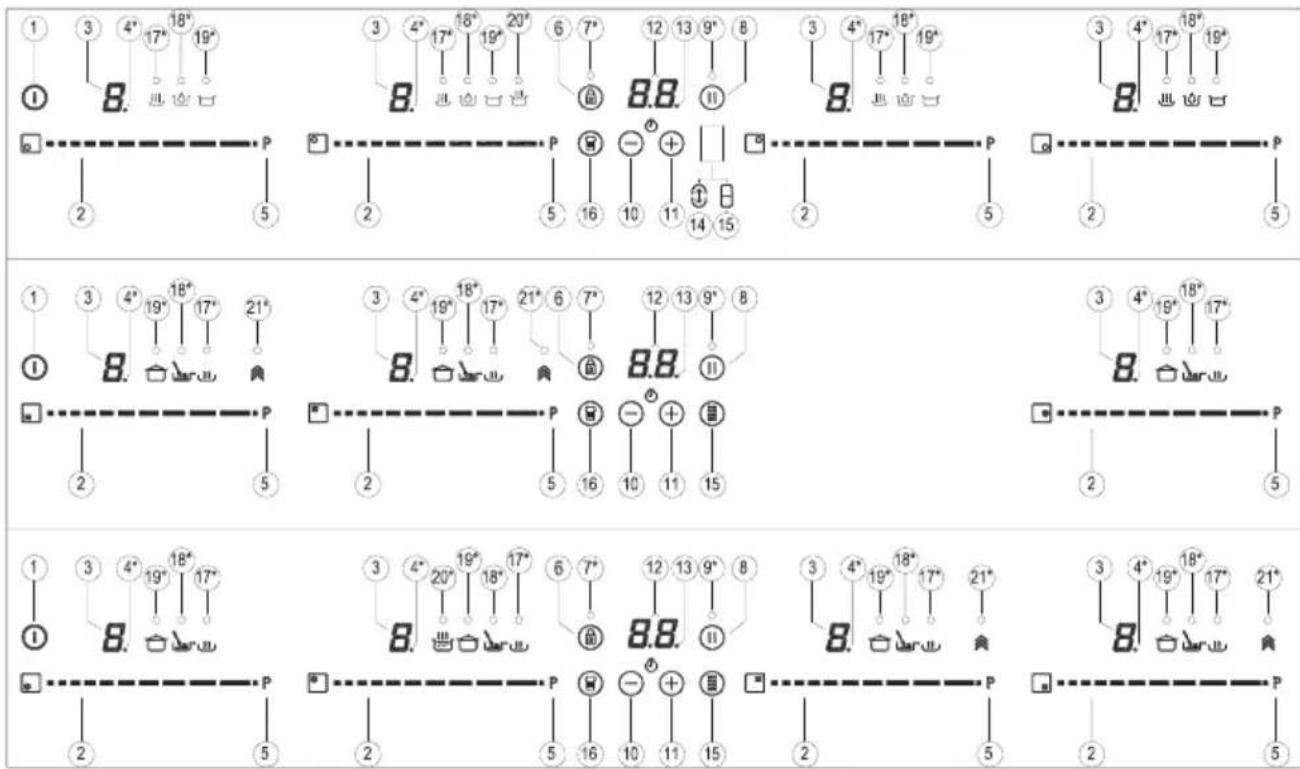
HANDLING ELEMENTS (fig. 2)
1 General on/off sensor.
Cursor slider for controlling power.
Power and/or residual heat indicator*.
Decimal dot of power and/or residual heat indicator.
Direct access to "Power" function.
Activation sensor for "Block" or "Stop&Go" functions.
Pilot indicator light "Block" function activated*.
Activation sensor for "Stop&Go" function.
Pilot indicator light "Stop&Go" function activated*.
"Minus" sensor for timer.
"Plus" sensor for timer.
Timer indicator.
Decimal dot of the timer.*
Activation sensor for "Synchro" function ; (depending on model).
Activation sensor for "Flex Zone" function ; (depending on model).
Activation sensor for "Chef" functions; (depending on model).
Pilot indicator light "Keep Warm" function activated*; (depending on model).
18 Pilot indicator light "Melting" function activated* (depending on model).
Pilot indicator light "Simmering" function activated* (depending on model).
20 Pilot indicator light "Quick Boiling" function activated* (depending on model).
21 Pilot indicator light "Slide Cooking" function activated* (depending on model).
- Only visible while running.
The controls are operated using the touch keys. You do not need to press hard on the desired touch key; simply touch it with your fingertip to activate the required function.
Fig.2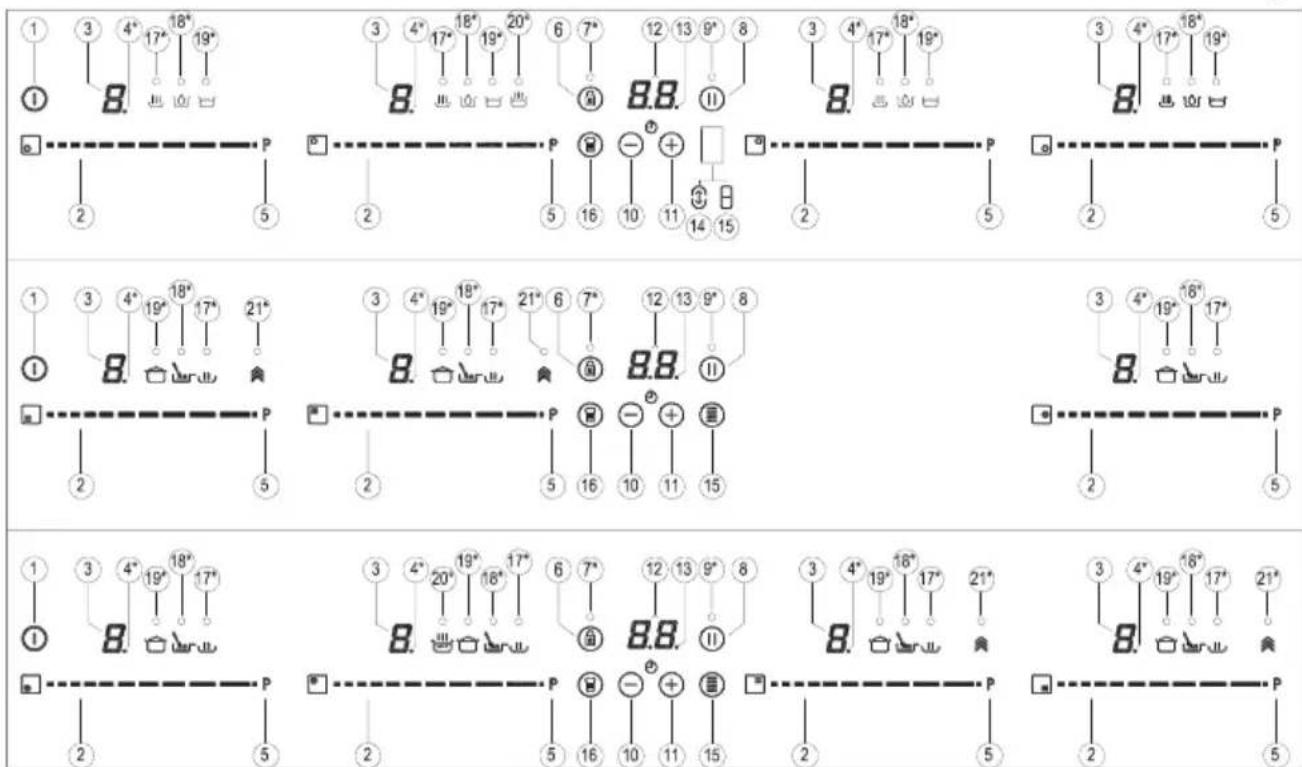
Each action is confirmed by a beep. Use the cursor slider (2) to adjust power levels (0-9) by sliding your finger over it. Sliding to the right increases the value, while sliding to the left decreases it.
It is also possible to directly select a power level by placing your finger directly on the desired point of the cursor slider (2).
To select a cooking zone on these models, directly touch the cursor slider (2).
SWITCHING ON THE DEVICE
1. Touch the On touch key (1) for at least one second. The touch control will become active, a beep will sound, and the indicators (3) will light up displaying a "-". If any cooking zone is hot, the corresponding indicator will flash an H.
If you do not take any action within the next 10 seconds, the touch control will switch off automatically.
When the touch control is activated, you can disconnect it at any time by touching the touch button (1), even if it has been locked (lock function activated). The touch button (1)
always has priority to disconnect the touch control.
ACTIVATING PLATES
Once the Touch Control is activated with sensor 1 (1), any plate can be turned on by following these steps:
1. Slide the finger or touch in any position of one of the cursors "slider" (2). The zone has been selected and simultaneously the power level will be set between 0 and 9. That power value will be shown on the corresponding power indicator and its decimal dot (4) will keep light up during 10 seconds.
2. Use the cursor slider (2) to choose a new cooking level between 0 and 9.
As long as the plate is selected, in other words, with the decimal (4) dot light up, its power level can be modified.
TURNING OFF A PLATE
Using the touch slider key (2) lower the power to level 0. The hotplate will switch off.
When a hot plate is switched off an
H will appear in its power indicator (3), if the glass surface of the related cooking area is hot and there is a risk of burns. When the temperature drops, the indicator (3) switches off (if the hob is disconnected), or otherwise a "-" will light up if the hob is still connected.
TURNING ALL PLATES OFF
All plates can be simultaneously disconnected by using the general on/off sensor (1). All plate indicators (3) will turn off. If the heating zone turned off is hot, its indicator shows an H.
Pan detector
Induction cooking zones have a built-in pan detector. This way, the plate will stop working if there is no pan present or if the pan is not suitable.
The power indicator (3) will show a symbol to designate "there is no pan" if, while the zone is on, no pan is detected or the pan is not suitable.
If a pan is taken off the zone while it is running, the plate will automatically stop supplying energy and it will show the symbol for "there is no pan". When a pan is once again placed on the cooking zone, energy supply
will resume at the same power level previously selected.
If a pan is taken off the zone while it is running, the plate will automatically stop supplying energy and it will show the symbol for "there is no pan". When a pan is once again placed on the cooking zone, energy supply will resume at the same power level previously selected.
When finished, turn off the cooking zone by using the touch controls. Otherwise an undesired operation could occur if a pan is accidentally placed on the cooking zone during the three minutes. Avoid possible accidents!
Block Function
With the Block Function, you can block the other sensors, except for the on/off sensor (1), in order to avoid undesired operations. This function is useful as a childproof safety.
To activate this function, touch sensor (6) for at least one second. Once you have done so, the pilot (7) turns on indicating that the control panel is blocked. To deactivate the function, simply touch sensor (6) again.
If the on/off sensor (1) is used to turn off the appliance while the block function is activated, it won't be possible to turn the cooktop on again until it unblocks.
Silencer of the beep
When the hob is on, if one presses the touch key (+) (11) and the locking touch key (号) (6) simultaneously for three seconds, the beep that accompanies each action will be deactivated. The time indicator (12) will display "OF".
This deactivation will not be applied to all the functions, as for example the beep for on/off, the ending of the timer or the locking/unlocking of the touch keys always remain activated.
To once again activate all the beeps
that accompany each action, again simultaneously press the touch key (11) and the locking touch key (6) for three seconds. The time indicator (12) will display "On"
Stop&Go Function
This function puts the cooking process on pause. The timer will also be paused if it is activated.
Activating the Stop function.
Touch the Stop sensor (8) for one second. The pilot (9) lights up and the power indicators will show the symbol to indicate cooking has been paused.
Deactivating the Stop function
Touch Stop&Go sensor (8) again. The pilot (9) turns off and cooking resumes under the same power and timer settings that were established before the pause.
Power Function
This function supplies "extra" power to the plate, above the nominal value. Said power depends on the size of the plate, with the possibility of reaching the maximum value permitted by the generator.
1 Slide the finger above the corresponding cursor slider (2) until the power indicator (3) shows "9" and keep the finger pressed for one second, or touch directly on "P" and keep pressed the finger for one second.
2 The power level indicator (3) will show the symbol , and the plate will start to supply extra power. The Power function has a maximum duration specified in Table 1. After this time, the power level will automatically adjust to 9. A beep sounds.
On activating the Power function in one hotplate, it is possible that the performance of some of the others may be affected, reducing its power to
a lower level, in which case this will be displayed on its indicator (3).
Deactivation of Power Function, before its working time passes, can be done either by means of touching cursor "slider" modifying its power level or repeating step 3.
Timer Function (countdown clock)
This function facilitates cooking given that you don't have to be present: You can set a timer for a plate, and it will turn off once the desired time is up.
For these models, you can simultaneously program each plate for durations ranging from 1 to 90 minutes.
Setting a timer on a plate.
Once the power level is set on the desired zone, and while the decimal dot of the zone keeps on, the zone will be able to be timed.
To that end:
1 Touch sensor (10) or (11). Timer Indicator (12) will show "00" and corresponding zone indicator (3) will show the symbol blinking alternately with its current power level. 2 Immediately afterwards set a cooking time between 1 and 99 minutes, using the sensors (10) or (11). With the first one the value will start at 60, whereas with the second it will start at 01. By keeping sensors (10) or (11) pressed, the value will be restored to 00. When there is less than one minute left, the clock will begin to count down in seconds. 3. When the timer indicator (12) stops flashing, it will start to count down the time automatically. The indicator (3) relating to the timed hotplate will alternately display the selected power level and the symbol.
Once the selected cooking time has elapsed, the heating zone being timed is turned off and the clock emits a
series of beeps for several seconds. To turn off the audible signal, touch any sensor. The timer indicator (12) will display a flashing 00 beside the decimal dot (4) of the selected zone. If the heating zone turned off is hot, its power indicator (3) will display alternately the H symbol and a " -".
If you wish to time another hotplate at the same time, repeat steps 1 to 3.
If one or more zones are already timed, the timer indicator (12) will show by default the shortest remaining time to finish, showing a "t" on the related zone. Rest of timed zones will show on their corresponding indicator zones the decimal dot blinking. When cursor "slider" of another timed zone is pressed, the timer will show the remaining time of that zone for a few seconds and its indicator will show its power level and the "t" alternately.
Changing the programmed time.
For modifying programmed time, cursor "slider" (2) of timed zone has to be pressed. Then it will be possible to read and modify the time.
Through sensors (10) and (11), you can modify the programmed time.
Disconnecting the clock
If you wish to stop the clock before the programmed time is up, this can be done at any time by simply adjusting its value to 0.
1 Select the desired plate. 2 Adjust the value of the clock to "00" by using the sensor (10). The clock is cancelled. This can also be done more quickly by pushing the sensors (10) and (11) at the same time.
Power Management function (depending on model)
Some models are equipped with a power limiting function (Power Management). This function allows the total power generated by the hob to be set to different values selected by the user. To do this, for the first minute after having connected the hob to the
power supply, it is possible to access the power limiting menu.
1 Press the () (11) touch key for three seconds. The letter PL will appear on the timer indicator (12). 2 Press the locking touch key (6). The different power values to which the hob can be limited will appear, and these can be changed using the ()(11) and ( 0) sensors. 3 Once the value has been selected, press the locking touch key (6) again. The hob will be limited to the chosen power value.
If you want to change the value again, you must unplug the hob and plug it in again after a few seconds. This will allow you to enter the power limiting menu again.
Every time the power level of a hotplate is changed, the power limiter will calculate the total power the hob is generating. If you have reached the total power limit, the touch control will not allow you to increase the power level of that hotplate. The hob will beep, and the power indicator (3) will blink at the level that cannot be exceeded. If you wish to exceed that value, you must lower the power of the other hotplates. Sometimes it will not be enough to lower another by a single level, as this depends on the power of each hotplate and the level it is set at. It is possible that to raise the level of a large hotplate, the levels of several smaller ones must be turned down.
If you use the quick switch-on at maximum power function and the said value is above the value set by the limit, the hotplate will be set to the maximum possible level. The hob will beep, and the said power value will blink twice on the indicator (3).
Special functions: CHEF (depending on the model)
The Touch Control has special features that help the user to cook through the CHEF sensor (16). These functions are available depending on the model.
To activate a special feature on a zone:
1 First, it should be selected; then, the decimal point (4) will be active on the power indicator (3). 2 Now click on the CHEF sensor (16). The sequentially successive presses will go over all the CHEF functions available in each zone one by one. These functions will show the activation with the corresponding LEDs (17), (18), (19), (20), and (21).
If you want to cancel a special active function at any time, you should touch the "slider" cursor sensor (2) of the related zone to select it. The decimal point (4) of the power indicator (3) will light up. Then, touch the "slider" (2) cursor again to set a new power level or to power off the zone, or you can choose a different special function by touching the CHEF sensor (16) again.
KEEP WARM FUNCTION (depending on the model)
This function automatically sets an appropriate power level to keep the cooked food hot.
To activate it, select the plate, and press the CHEF sensor (16)
until the LED (17) located on the icon lights up. Once the function is activated, the symbol will appear on the power indicator (3).
You can override the function at any time by turning off the plate, by changing the power level or by choosing a different special function.
MELTING FUNCTION (depending on the model)
This function maintains a low temperature in the cooking zone. Ideal for defrosting food or for slowly melting other food types such as chocolate, butter, etc.
To activate it, select the plate, and press the CHEF sensor (16) until the LED (18) located on the icon lights up. Once the function is activated, the symbol will appear on the power indicator (3).
You can override the function at
any time by turning off the plate, by changing the power level or by choosing a different special function.
Filled to over half its capacity with room temperature water (never use warmed or hot water).
SIMMERING FUNCTION (depending on the model)
Failure to comply with these conditions will distort the proper control of boiling.
This feature allows you to keep simmered.
WARNING: do not use this feature for a different cooking purpose other than boiling water. Never use oil, it may lead to overheating and generate a flame.
After the food is boiled, enable the plate by selecting it, and press the CHEF sensor (16) until the LED (19) located on the icon / lights up. Once the function is activated, the symbol R will appear on the power indicator (3).
Activation of the function
You can override the function at any time by turning off the plate, by changing the power level or by choosing a different special function.
To activate the function, select the plate, and press the CHEF sensor (16) until the LED (20) located on the icon / lights up.
QUICK BOILING FUNCTION (depending on the model)
Once the feature is activated, the sign R will appear on both the power indicator (3) and the timer indicator (12); a moving segment will appear, indicating that the cooking is under the system's control.
This function enables the automatic boiling control, which is a great help for cooking pasta, rice, eggs, boiling some food, etc. It is available only in zones where the /symbol appears.
When the system detects that it is about to start boiling, a first beep will be heard. Take this opportunity to prepare your food for boiling or baking as desired.
Conditions of the container
After 30 seconds, a second beep will be heard; if you have not already done so, it's time to pour the food into the pan.
For proper operation of the Quick Boiling function, you need to use a container that meets the following preconditions:
After the second beep, the system will activate the timer and stopwatch for you so that you can control how long the food is to be boiled.
- Bottom size as close as possible to the diameter of the plate.
30 seconds after activating the stopwatch, a third beep will sound
to warn that from that moment on, the system will decrease the power supplied in order to maintain a gentle and continuous boil. The timer will remain active until the end of cooking.
If desired, you can disable the timer and set a time for the countdown and automatic shutdown of the plate (see section Timer Function).
Deactivation of the function
You can override the function at any time by turning off the plate, by changing the power level, or by choosing a different special function.
SLIDE COOKING FUNCTION (depending on the model)
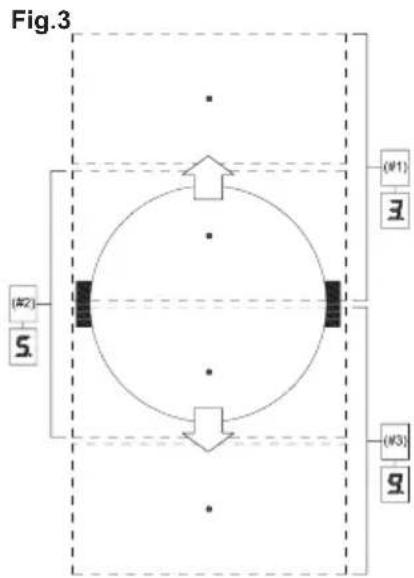
This function allows to divide the flexible zone into three areas (see fig.3) and activates a predefined power configuration. It will allow slide the vessel from one area to another, to cook with the power assigned to each zone.
To activate it, you must first activate the "Flex Zone" function (see section "Flex Zone function").
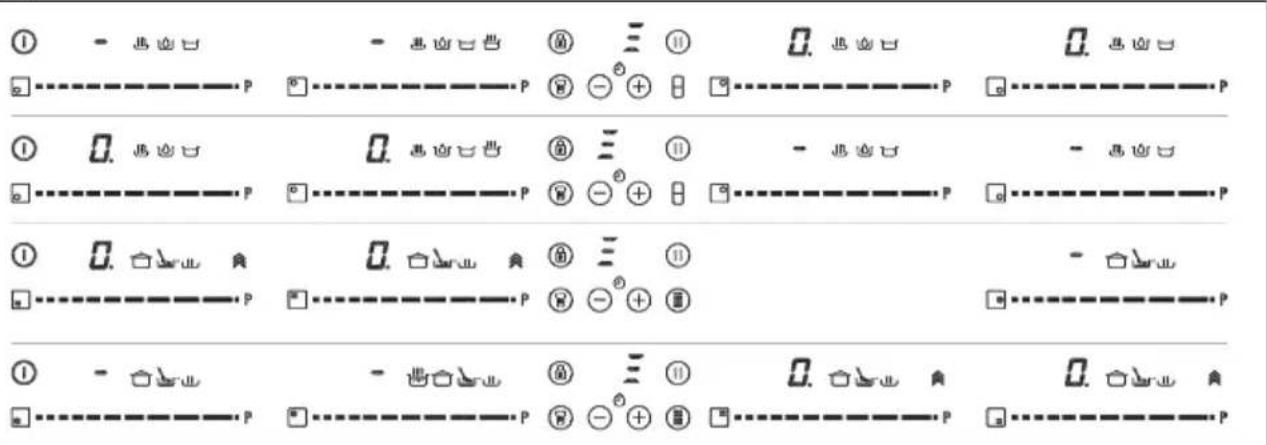
After, press on the CHEF sensor (16), until the leds (21) located on the icon lights up. When doing so, the power indicators (3) will show three segments (see fig. 4) indicating that you can now place the vessel.
Once the vessel is placed, the power level will appear automatically in the power indicators (3): for zone #1, the power level is 3, for zone #2 the power level is 5 and for zone #3 the power level is 9 (see fig.3 and 5).
Fig. 6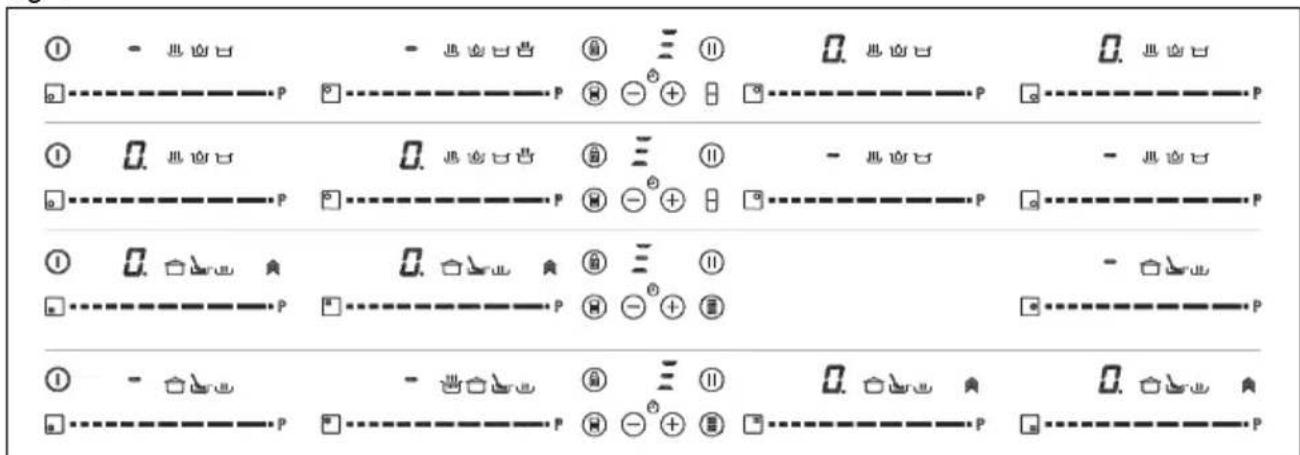
Fig. 4 Fig. 5
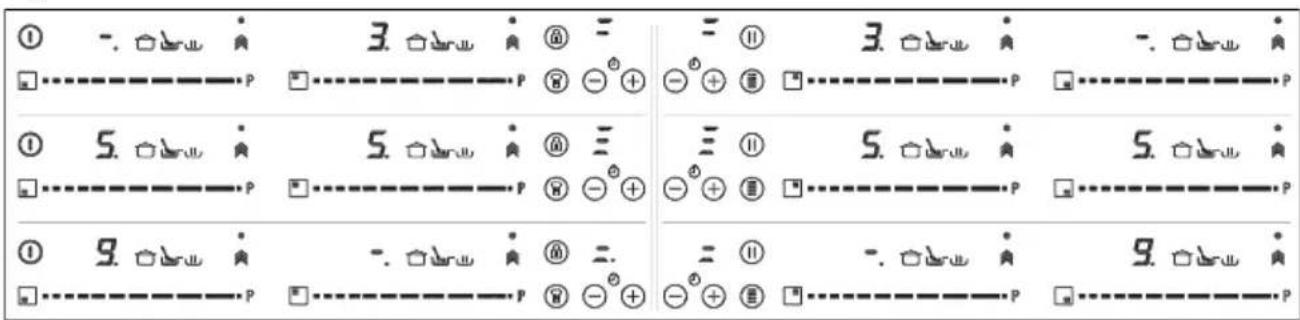
To deactivate this function, you must activated zones. In case your model touch the "slider" cursor (2) in the has several zones with "Flex Zone", position "0". you can select the desired option
Flex Zone function (depending on the model)
Through this function, it is possible to enable two cooking zones work together, and to select a power level and to activate the timer function for both zones.
To activate this function, press the sensor 15).By doing so, the decimal points (4) of the linked plates will light up and the value "0" will be shown on their power indicators (3).
The clock timer indicator (12) will show three segments indicating the
After the "Flex Zone" is selected, you can assign the power by touching any of the "滑行器" cursors (2) of one of the linked zone. The power level and its variations are displayed simultaneously on the power indicators (3) of both zones.
To disable this feature, you should touch the sensor 日 / 日 again. Also, when the function is disabled, the levels of powers and functions assigned to the related zones are cleared.
Synchro Function (depending on the model)
Through this function, it is possible to achieve that two cooking zones indicated in the printing screen as "Synchro" work together and to select a power level and to activate the timer function for both zones
Press the sensor (14) to activate this function. By doing so, the decimal points (4) of the linked plates will
light up and the value "0" will blink on their power indicators (3). The detection of the container will take place throughout the linked zone. You will have a few seconds to perform the next operation; otherwise, the function will be disabled automatically.
To disable this feature, touch the sensor (14) again. Also, when the function is disabled, the levels of powers and functions assigned to the related zones will be cleared.
Safety switch off function
If due to an error one or several heating zones do not switch off, the appliance will be automatically disconnected after a set amount of time (see table 1).
Table 1
| Selected power level | MAXIMUN OPERATING TIME (in hours) |
| 0 | 0 |
| 1 | 8 |
| 2 | 8 |
| 3 | 5 |
| 4 | 4 |
| 5 | 4 |
| 6 | 3 |
| 7 | 2 |
| 8 | 2 |
| 9 1 | |
| P | 10 or 5 minutes, readjusts to level 9 (depending on model) |
When the "safety switch off" function has been triggered, a 0 is displayed if the glass surface temperature is not dangerous for the user or an H if there is a burn risk.

- Keep the control panel of the living areas clean and dry at all times.

In the event of operating procedures or incidents not mentioned in this manual, disconnect the balance and contact the TEKA technical service.
Suggestions and recommendations
- Use pots or pans with thick, completely flat bottoms.
- Do not slide pots and pans over the glass because they could scratch it.
- Although the glass can take knocks from large pots and pans without sharp edges, try not to knock it.
- To avoid damaging the ceramic glass surface, do not drag pots and pans over the glass and keep the undersides of them clean and in good condition.
- Recommended diameters of the pot bottom, (see "Technical Data Sheet" supplied with the product).

Try not to spill sugar or pro
ducts containing sugar on the glass as while the surface is hot these could damage it.
Cleaning and maintenance
To keep the appliance in good condition, clean it using suitable products and implements once it has cooled down. This will make the job easier and avoid the build-up of dirt. Never use harsh cleaning products or tools that could scratch the surface, or steam-operated equipment.
Light dirt not stuck to the surface can be cleaned using a damp cloth and a gentle detergent or warm soapy water. However, for deeper stains or grease use a special cleaner for ceramic hot plates and follow the instructions on the bottle. Dirt that is firmly stuck due to being burned repeatedly can be removed using a scraper with a blade.
Slight tinges of colour are caused by pots and pans with dry grease residue underneath or due to grease between the glass and the pot during cooking. These can be removed using a nickel scourer with water or a special cleaner for ceramic hot plates. Plastic objects, sugar or food containing a lot of sugar that have melted onto the surface must be removed immediately using a scraper.
Metallic sheens are caused by dragging metal pots and pans over the glass. These can be removed by cleaning thoroughly using a special cleaner for ceramic glass hot plates, although you may need to repeat the cleaning process several times.
Warning:
A pot or pan may become stuck to the glass due to a product having melted between them. Do not try to lift the pot while the heating zone is cold! This could break the glass.
Do not step on the glass or lean on it as it could break and cause injury. Do not use the glass as a surface for placing objects.
TEKA INDUSTRIAL S.A. reserves the
right to make changes to its manuals that it deems necessary or useful, without affecting the product's essential features.
Environmental considerations
product
or its packaging means that this product cannot be treated like ordinary household waste. This product must be taken to a recycling collection point for electrical and electronic appliances. By ensuring that this product is disposed of correctly, you will avoid harming the environment and public health, which could happen if this product is not handled properly. For more detailed information about recycling this product, please contact your local authority, household waste service or the store where you purchased the product.
The packaging materials used are environmentally friendly and can be recycled completely. Plastic components are marked >PE<, >LD<, EPS<, etc. Dispose of packaging materials, like household waste, in your local container.
Fulfillment with Energy Efficiency of the appliance: -Appliance has been tested according to standard EN 60350-2 and the obtained value, in Wh/Kg, is available in the appliance's rating plate.
Following advices will help you to save energy anytime you cook:
- Use the correct lid for each pot whenever is possible. Cooking without lid uses more energy.
- Use pans with flat bases and appropriate base diameters in order to match size of the cooking zone. Pan manufacturers usually provide top diameter of the pot that is always larger than base diameter.
- When water is used for cooking, use little quantities in order to preserve vitamins and minerals of vegetables and set the minimum power level that allows maintaining the cooking. High power level
is unnecessary and a waste of energy.
- Use small pots with small quantities of food.
If something does not work
Before calling the technical service, perform the verifications described below.
The appliance does not work: Ensure that the power cable is plugged in.
The induction zones do not produce heat:
The container is not appropriate (it does not have a ferromagnetic bottom or is too small). Check that the bottom of the container attracts a magnet, or use a larger container.
A humming is heard when starting to cook in the induction zones:
With containers which are not very thick or not of one piece, the humming results from the transmission of energy directly to the bottom of the container. The humming is not a defect, but if you wish to avoid it anyway, reduce the power level slightly or use a container with a thicker bottom, and/or of one piece.
The touch control does not light up despite lighting, does not respond:
No heating zone has been selected. Be sure to select a heating zone before operating it.
There is humidity on the sensors, and/or your fingers are wet. Keep the touch control surface and/or your fingers clean and dry. The locking function is activated. Unlock the controls.
The sound of a fan is heard while cooking, which continues even after cooking has ended:
The induction zones have a fan to keep the electronics cool. This only operates when the electronic circuits get hot. It stops again when the circuits cool whether the hob is turned on or not.
The symbol will appear on the power indicator of a hotplate:
The induction system does not find a
pot or pan on a hotplate or it is of an unsuited type.
The hotplate will switch off and the message C81 or C82 will appear on the indicators:
Excessive temperature in the electronics or on the glass. Wait for a while for the electronics to cool down or remove the pot or pan so that the glass can cool.
C85 appears on the indicator of one of the hotplates:
The pot or pan used is of an unsuited type. Switch off the hob, switch it on again and try with another pot or pan.
The appliance switches off and the message C90 appears on the power indicators (3):
The touch control detects on/off (1) sensor is covered and doesn't allow switching on the cooktop. Remove the possible objects or liquids keeping the touch control surface, clean and dry until the message disappears.
The appliance switches off and the message C91 appears on the power indicators (3):
The touch control detects Stop&Go sensor (6) is covered and doesn't allow to handle the cooktop. Remove the possible objects or liquids keeping the touch control surface, clean and dry, then press twice Stop&Go (6) sensor for removing the message and return to normal operation.
The touch control detects overheating of the central area. Wait for the appliance to cool down, then press the on/off sensor to switch it back on. If the problem persists, contact the after-sales service.
Keep the proof of purchase and the technical documentation together with the instruction manual for the entire life of the product. These contain important technical information.
Overheating of the electronic circuits. Wait for the circuits to cool down.
Remove the cookware to allow the circuits to cool down.
Electrical connection
Before connecting the appliance to the electrical mains, make sure that the voltage and frequency correspond to the rating plate on the appliance, as well as to the household electrical system, and if applicable, to the technical documentation that must be kept together with this manual for the entire period of use of the product.
The electrical connection must be made through a device for all-pole disconnection, with a contact opening of at least 3 mm, suitable for the load and current. This will ensure disconnection from the mains in case of emergency and allow for maintenance of the appliance.
Make sure that the power cord does not touch the body of the induction hob or the body of the oven, if it is installed in the same unit.
Warning:
The electrical connection must be properly grounded, according to current laws and regulations, otherwise it may cause malfunction of the induction hob.
High voltage currents can damage the control system (as with all other electrical devices).
We recommend not using the induction hob when the cookware is empty during heating.
Furniture, advice High. Temperature, which can reach these types of devices.
Only the official TEKA technical service can service or repair the device, including replacing the cable.
Before disconnecting from the mains, we recommend disconnecting the main switch (circuit breaker) and waiting approximately 25 seconds before removing from the mains. This interval is necessary to allow the electronic board to discharge and thus avoid the risk of electric shock upon contact.
Keep the warranty and documents with technical data together with the instructions for the entire period of use of this product. They contain important technical information.
Use and maintenance
Instructions for
users for
sensor panels for
control
OPERATING ELEMENTS (Fig. 2)
1 Main sensor for on/off. 2 Slider cursor for power control. 3 Indicator for heating and/or residual heat. 4 Decimal point of the heating indicator and/or residual heat. 5 Lock function access. 6 Sensor for activating the function "Lock" or "Stop & Go". 7 Indicator light for activated function "Lock". 8 Sensor for activating the function "Stop & Go". 9 Indicator light for activated function "Stop & Go". 10 Sensor "Minus" for timer. 11 Sensor "Plus" for timer. 12 Timer indicator. 13 Decimal point of the timer*.
14 Sensor for activating the function "Synchronization" (depending on model). 15 Sensor for activating the function "Dual Zone" (depending on model). 16 Sensor for activating the function "Ready"; (depending on model). 17 Indicator light for activated function "Keep Warm" (depending on model). 18 Indicator light for activated function "Defrost" (depending on model). 19 Indicator light for activated function "Booster" (depending on model). 20 Indicator light for activated function "Quick Boil" (depending on model). 21 Indicator light for activated function "Slow Cooking" (depending on model).
*Attention only during operation.
The controls are operated using the sensor keys. It is not necessary
to press hard on the sensor keys, just touch them with the tip of your finger to activate the desired function.
Each action is confirmed with a beep.
Press the cursor button (2) to set the power level (0-9). Pressing it repeatedly increases the value, while pressing it to the left decreases it.
It is possible to directly select the desired power level by placing the cursor button (2) directly on the desired point of the cursor scale.
To select a mode from these models, directly press the cursor button (2).
TURNING ON THE DEVICE
Press the sensor button (1) briefly to turn it on. The sensor panel will activate, and the indicator lights (3) will light up, showing that the heating level is correct. The corresponding indicator will
light up, etc.
If no action is taken within the next 10 seconds, the sensor panel will automatically deactivate.
When the sensor control is active, you can turn it off at any time by pressing the sensor button (1) to switch it off (the shutdown function is activated). The sensor button (1) takes priority over the sensor panel control.
ACTIVATING THE PLATE
Once the sensor panel is activated with the sensor (1), each plate can be turned on by following these steps:
1 Press and hold the cursor button (2) until it is positioned on one of the cursor scales. The zone was selected and simultaneously the power level is between 0 and 9. The power level will be shown on the corresponding power indicator and the decimal point (4) will flash for
10
seconds.
2 Use the cursor button (2) to select a new heating level between 0 and 9.
Heating will resume automatically, and the energy supply will be restored to the previously selected power level.
This function remains active until the sensor for on/off is pressed or until the timer or blocking/unblocking of the sensor is activated.
While the hob is on, with the rotary knob for the cooking zone (4), the power level can be changed.
The time for turning on the hob is 3 minutes. If during this period no hob is set or the hob is not suitable, the cooking zone will turn off.
To activate the child lock, which prevents accidental operation, press the child lock button (11) and the lock button (6) simultaneously for three seconds. The timer indicator (12) will show "On".
TURNING OFF THE HOB
Use the sensor for the hob (2), press the power level to 0. The hob will turn off.
When you finish, turn off the cooking zone using the sensor buttons for control. Otherwise, it could lead to unintended operation if the hob is accidentally placed on the cooking zone during those three minutes. Avoid possible incidents!
Function
"Stop&Go"
When the hob is turned off, the symbol H will not appear on the power indicator (3), if the corresponding cooking zone surface is hot, there is a risk of burns. When the temperature drops, the indicator (3) turns off (if the hob is switched off), or with the rotary knob "it does not light up" if the hob is still connected.
Function "Lock"
With the "Lock" function you can lock other sensors, with the exception of the sensor for on/off (1), to avoid unintended operation. This function is useful for the safety of children.
This function sets the hob to pause. The timer will be set to pause if it is active.
TURNING OFF ALL ZONES
All zones can be turned off simultaneously with the sensor for on/off (1). All indicators of the hob (3) will turn off. If the turned-off heating zone is hot, the indicator shows the symbol H.
Press and hold the sensor (6) for one second. When you release it, the additional sensor (7) will turn on, indicating a setting for control in blocking mode. To deactivate the function, simply press the sensor (6) again.
Activating the "Stop" function.
Press the sensor " (8) for one second. The additional indicator (9) lights up and the power indicators will show the symbol I, to indicate that the device is set to pause.
Deactivating the "Stop" function.
Press the Stop&Go sensor (8) again. The additional indicator (9) goes out, the device resumes operation at the power and timer settings that were set before the pause.
Pull sensor
Pull the sensor for the cooking zone. The device will stop working if there is a pull or if the pull is not suitable.
If the on/off sensor (1) was used to turn off the device while the "Block" function is active, it will be possible to turn on the device again only after unlocking.
Power function
The power indicator (3) will show a symbol to indicate that there is a pull, if, while the zone is on, no pull is detected or it is not of a suitable size.
Child safety lock
When the device is on, if you press the lock sensor (11) and the additional sensor (6) simultaneously for three seconds, a signal sounds, all actions are deactivated. The time indicator (12) will show "OF".
This function provides "additional" power for a short time. The additional power depends on the size of the cooking zone and the possibility of reaching the maximum power allowed by the generator.
Press the cursor for the cooking zone (2) until the power indicator (3) shows "9" and hold.
If the pull is removed from the zone while the device is working, it will automatically stop supplying energy and the symbol "Pull" will be shown. If on the zone
Press and hold the button for one second.
2 The power level indicator (3) will show the corresponding symbol and the appliance will supply power.
The "Power" function has the maximum power level, as shown in Table 1. During this time, the power level will automatically decrease to 9. After that.
When activating the function for keeping a single zone, it is possible to increase the working zone - decreasing the power level to a lower level, and in this case this will be shown on the indicator (3).
Deactivating the "Power" function before the end of the working time can be done with the help of the sensor knob "Raise", changing the power level or by pressing key 3 again.
If you use the rapid heating function to activate the maximum power and the set duration is not the desired duration, the zone will be set to the highest possible level. The zone will emit a sound when the set duration has elapsed.
If you want to cancel a special active function at any time, you must press the "Raise" knob sensor (2) on the corresponding zone to select it. The decimal point (4) of the power indicator (3) will light up. After this, press the "Raise" (2) knob again to set a new power level or to switch off the zone, or you can select a different special function by pressing the corresponding sensor (16).
To activate, select the zone and press the sensor (16) until the light (18), located on the indicator, lights up. Once the function is activated, the symbol R will appear on the power indicator (3).
You can cancel the function at any time by switching off the zone, changing the power level, or selecting a different special
function.
SIMMERING FUNCTION (depending on the model)
This function allows you to cook at a low heat.
Once the cooking is finished, switch on the zone, select Y, press the sensor (16) until the light (19), located on the indicator, lights up. Once the function is activated, the symbol R will appear on the power indicator (3).
You can cancel the function at any time by switching off the zone, changing the power level, or selecting a different special function.
QUICK BOILING FUNCTION (depending on the model)
The automatic control on the hob is a great help when cooking pasta, rice, etc. It is available only in the zones where the symbol appears.
Status bar
For the correct functioning of the QuickBoiling function, you must use cookware that meets the following preliminary conditions:
- The size of the cookware should be as close as possible to the diameter of the cooking zone.
- Lid.
Compliance with the energy efficiency class:
- The appliance has been tested for operation in accordance with the EN 60350-2 standard and the obtained value is indicated on the energy label of the appliance with the unit Wh/kg.
If you follow the advice below, you will save energy when cooking:
* Use a lid for every pot whenever possible. Cooking without a lid leads to higher energy consumption. * Use flat-bottomed cookware with a diameter that matches the size of the cooking zone. Cookware manufacturers often recommend a larger diameter for the lid than the diameter of the base. * If you use water during cooking, the amount should
BG
be small, to preserve the vitamins and minerals in the food and to ensure a minimal level of power to maintain the cooking process. A high level of power is not necessary and leads to energy consumption.
* Use small cookware for small amounts of food.
If it does not work
Before contacting the technical service, perform the checks described below.
The appliance does not work:
Make sure the cable is plugged in.
The cooking zones do not produce heat:
The cookware is not suitable (the
bottom is not flat or is too
small). Make sure the bottom of the cookware is flat and clean.
When you finish cooking, the cooking zones turn off automatically after a short time.
For foods that are not very thick or are made up of several components, the cooking time is reduced by transferring energy directly to the food. The cooking time is not a defect, but if you want to reduce it, increase the power level or use a suitable pan, and/or one made of a single component.
The sensor control does not respond to light or touch:
No heating zone is selected. Make sure you have selected a heating zone before trying to work with it.
There is dirt on the sensor, or your fingers are wet. Clean the surface of the sensor control and/or dry your fingers.
The child lock is activated. Disconnect the sensor control.
While cooking, you hear a sound from the fan, which is normal.
For specific types of cooking, follow the instructions:
The cooking zones have a fan that cools the electronics. It turns on only when the electronic components are hot. It continues to work when they cool down, regardless of whether the zones are on or off.
U
The boiler does not turn on. Check the power supply to the boiler:
The heating system does not open the boiler or the burner, or the burner/boiler is not working.
The boilers are turned off, and the indicators will show C81 or C82:
The electronic board or the sensor is overheating. Remove the electronic board to cool it down, and check the sensor or the burner to cool the sensor.
C85 appears on the indicator of one of the boilers:
The sensor/burner used is not working. Turn off the power, turn it on again, and try with another sensor or burner.
The device is turned off, and the indicators of the shutdown show message C90 (3):
The sensor control detects that the on/off sensor (1) is covered and does not allow the device to turn on. Remove any objects or liquids that are in contact with the surface. Clean and wait for the message to disappear.
The device is turned off, and the indicators of the shutdown show message C91 (3):
The sensor control detects that the stop/start sensor (6) is covered and does not allow the device to work. Remove any objects or liquids that are in contact with the surface of the sensor control and dry it, then press the stop/start sensor (6) twice to clear the message and return to normal operation.
Teka Subsidiaries
Country Subsidiary Address City Phone
| AustriaKüppersbusch Austria | Eitnergasse, 13 | 1231 Wien | +43 18 668 022 |
| BelgiumKüppersbusch Belgium S.P.R.L. | Doomveld Industrie, Asse 3, No. 11 - Boite 7 | 1731 Zellik | +32 24 668 740 |
| BulgariaTeka Bulgaria EOOD | Blvd. "Tsarigradsko Shosse" 135 | 1784 Sofia | +359 29 768 330 |
| ChileTeka Chile S.A. | Avd El Retiro Parque los Maitenes, 1237. Parque Enea | Pudahuel, Santiago de Chile | + 56 24 386 000 |
| ChinaTeka International Trading (Shanghai) Co. Ltd. | No.1506, Shengyuan Henghua Bldg. No.200 Wending Rd. | Xuhui, Dist. 200030 Shanghai | +86 2 153 076 996 |
| Czech RepublicTeka CZ S.R.O. | V Holesovickách, 593 | 182 00 Praha 8 - Liben | +420 284 691 940 |
| EcuadorTeka Ecuador S.A. | Parque Ind. California 2, Via a Daule Km 12 | Guayaquil | +593 42 100 311 |
| GreeceTeka Hellas A.E. | Thesi Roupaki - Aspropyrgos | 193 00 Athens | +30 2 109 760 283 |
| HungaryTeka Magyarország Zrt. | Terv u. 92 | 9200 Mosonmagyaróvár | +36 96 574 500 |
| IndonesiaPT Teka Buana | Jalan Menteng Raya, Kantor Taman A9 Unit A3 | 12950 Jakarta | +62 215 762 272 |
| MalaysiaTeka Küchentechnik (Malaysia) Sdn Bhd | 10 Jalan Kartunis U1/47, Temasya Park, Off Glenmarie | 40150 Shah Alam, Selangor Darul Ehsan | +60 376 201 600 |
| MexlcoTeka Mexicana S.A. de C.V. | Blvd Manuel A. Camacho 126, Piso 3 Col. Chapultepec | 11000 Mexico D.F. | +52 5 551 330 493 |
| MoroccoTeka Maroc S.A. | 73, Bd. Slimane, Depôt 33, Route de Ain Sebaa | Casablanca | +212 22 674 462 |
| PeruTeka Kuchentechnik Perú S.A. | Av. El Polo 670 local A 201, CC El polo, Surco | Lima | +51 14 363 078 |
| PolandTeka Polska Sp. ZO.O. | ul. 3-go Maja 8 / A2 | 05-800 Pruszkow | +48 227 383 270 |
| PortugalTeka Portugal S.A. | Estrada da Mota - Apdo 533 | 3834-909 Ilhavo, Aveiro | +35 1 234 329 500 |
| RomaniaS.C. Teka Kuchentechnik Romania S.R.L. | Sevastopol str., no 24, 5th floor, of. 15 | 010992 Bucharest Sector 1 | +40 212 334 450 |
| Russia/PossyaTeka Rus LLC/OOO "Teka Pyc" | Neverovskogo 9, Office 417, 121170, Moscow, Russia | 121087 Рожец, москва | +74 956 450 064 |
| SingaporeTeka Singapore PTE Ltd | Clemenceau Avenue, 83, 01-33/34 UE Square | 239920 Singapore | +65 67 342 415 |
| SpainTeka Industrial, S.A. | C/ Cajo,17 | 39011 Santander | +34 942 355 050 |
| ThailandTeka (Thailand) Co. Ltd. | 364/8 Sri-Ayuttaya Road, Phayathai, Ratchatavee | 10400 Bangkok | +66 -26 424 888 |
| TurkeyTeka Teknik Mutfak Aletleri Sanayi VeUkraineTeka Ukraine LLC | Büyük dere Cad. 24/1386-e, Bozhenko Str .2nd floor,4th entrance | 80290 Mecidiyeköy, Istanbul03150 Kyiv | +90 2 122 883 134+380 444 960 680 |
| United Arab EmiratesTeka Middle East Fze | Building LOB 16, Office 417 | P.O. Box 18251 Dubai | +971 48 872 912 |
| United Arab EmiratesTeka Kuchentechnik U.A.E LLC | Bin Khedia Centre | P.O. Box 35142 Dubai | +971 42 833 047 |
| VenezuelaTeka Andina S.A. | Ctra. Petare-Santa Lucia, km 3 (El Limoncito) | 1070 Caracas | +58 2 122 912 821 |
| VietnamTEKA Vietnam Co., Ltd. | 803, FI 8th, Daiminh Convention Center, 77, Hoang Van | Thai, Tan Phu Ward, District 7, Ho Chi Minh | +84 854 160 646 |
TEKA