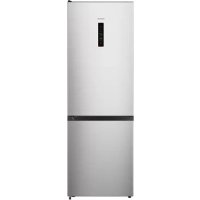
JVL2600 - Fridge INVENTUM - Free user manual and instructions
Find the device manual for free JVL2600 INVENTUM in PDF.


| Product type | Combined refrigerator-freezer |
| Brand | Inventum |
| Model | JVL2600 |
| Dimensions (W x D x H) | 59.5 x 59.0 x 178.5 cm |
| Net weight | 57 kg |
| Gross weight | 62 kg |
| Power supply | 220-240 V ~ 50 Hz, 80 W |
| Energy class | A++ |
| Annual consumption | 216 kWh |
| Total net capacity | 287 L |
| Refrigerator capacity | 207 L |
| Freezer capacity | 80 L (****) |
| Freezing capacity | 8 kg/24h |
| Autonomy in case of power failure | 16 h |
| Climate class | SN/N/ST (10 °C to 38 °C) |
| Noise level | 39 dB(A) |
| Defrost type | No-frost (automatic) |
| Color | Stainless steel |
| Number of doors | 2 |
| Reversible door | Yes |
| Interior lighting | LED |
| Fresh box (0 °C zone) | 1 drawer with temperature adjustment |
| Vegetable drawer | 1 (with humidity control) |
| Egg tray | 2 |
| Ice cube tray | 1 |
| Glass shelves | 3 |
| Freezer drawers | 3 |
| Door compartments | 3 (including 1 bottle rack) |
| Refrigerant | R600a (isobutane) |
| Compressor | 1 |
| Cord length | 2.0 m |
| Special features | Super freeze, Eco mode, touch screen |
| Maintenance | Interior cleaning with soapy water, manual defrosting of the freezer if necessary |
| Safety | Child lock (not specified), CFC/HFC-free insulation |
Frequently Asked Questions - JVL2600 INVENTUM
User questions about JVL2600 INVENTUM
0 question about this device. Answer the ones you know or ask your own.
Ask a new question about this device
Download the instructions for your Fridge in PDF format for free! Find your manual JVL2600 - INVENTUM and take your electronic device back in hand. On this page are published all the documents necessary for the use of your device. JVL2600 by INVENTUM.
USER MANUAL JVL2600 INVENTUM
Reversing the door openings page 4-8
- Safety instructions page 21
2.Appliance description page 24
3.Before the first use page 24 - Usage page 25
- Tips page 26
- Cleaning & maintenance page 28
- Troubleshooting page 29
8.Product fiche page 30
General terms and conditions of service and warranty page 56
Deutsch
EN reversing the door openings
EN reversing the door openings
The doors of the appliance can be opened on the right or left side. In order to reverse the door openings, please observe the instructions below. It would be best to do this with two people.
Attention: switch off the thermostat and remove the plug from the socket. Remove all items from the refrigerator, including the shelves and drawers, before reversing the door opening.
- Use a putty knife or thin-blade screwdriver to remove the screw hole cap (left) a, then remove the upper hinge cover (right) b.
- Unscrew the special self-tapping screws a and remove the upper hinge. Remark: During this step, hold the upper door with your hand to prevent it from falling.
- Remove the upper hinge axis, transfer it to the reversed side and tighten securely. Put it down for late use.
- Remove the upper door from the middle hinge by carefully lifting the door straight up. Remark: when removing the door, watch for the washer(s) between the center hinge and the bottom of the upper door that may stick to the door. Do not loose.
- Place the upper door on a smooth surface with its panel upwards. Loosen screw a and remove the stop block b.
- Install these 2 parts a and b to the left side and tighten securely.
- Unscrew the two special self-tapping screws which are used for fixing the middle hinge part, then remove the middle hinge part that hold the lower door in place. Remark: when removing the door, watch for the washer(s) between the center hinge and the bottom of the upper door that may stick to the door. Do not loose.
- Place the lower door on a smooth surface with its panel upwards. Loosen the screw a and remove the stop block b.
- Install these 2 parts a and b to the left side and tighten securely.
- Change the screw hole caps on the middle cover plate from the left to the right (as shown in the figure).
- Lay the refrigerator backwards on soft foam packaging or similar material to prevent damages. Remove both adjustable bottom feet b, and remove the lower hinge c by unscrewing the special self-tapping screws a.
- Change the screw hole caps on the bottom cover plate from the left to the right (as shown in the figure).
- Replace the lower hinge to the left side and fixate it with the special self-tapping screws. Replace the adjustable bottom feet to the other side and fixate them.
Carefully place the refrigerator upright.
- Place the lower door on the bottom hinge and support it. Make sure the door is aligned.
- Flip over the middle hinge a 180 degrees and fix it on the other side of the appliance. Place the middle hinge axis into the upper hole of the lower door and tighten the screws b of the hinge.
- Place the upper door on the middle hinge. Make sure the door is aligned.
- Place the upper hinge a. Make sure the upper hinge axis fits in the upper hole of the upper door. Remark: please support the upper door with your hand when doing this. Fixate the upper hinge with the self-tapping screws.
- Place the screw hole cap a and place the other hinge cover b (which is in the plastic bag).
Place the shelves and drawers back in the refrigerator. Allow the appliance to rest for 2 to 3 hours before inserting the plug in the socket.
1 safety instructions
-
Please read these instructions before operating the appliance and retain for future use.
-
Only use this appliance for the purposes described in the instruction. The appliance is suitable for storing food. It is possible to freeze fresh food in the freezer section.
- Only connect the appliance to alternate current, to an earthed wall socket, with a mains voltage that corresponds with the information provided on the information plate of the appliance.
- Do not use single/multiple adapters or extension cords.
- Do not use the appliance if the plug, cord or appliance are damaged, or if the appliance no longer functions properly or if it is damaged in any other way. If this is the case, consult the shop or our technical service. Never replace the plug or cord yourself.
- The appliance must be moved and installed by two or more persons.
- Be careful when moving the appliance to prevent the floor from getting damaged.
- During installation, do make sure the power cable is not damaged.
- Check that the appliance is not placed too close to a heat source.
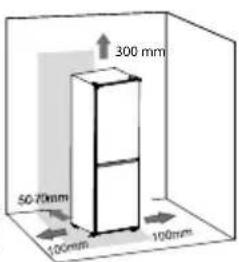
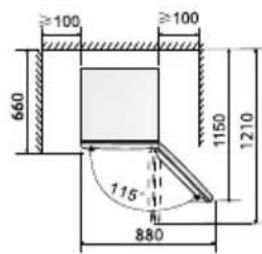
- In order to ensure proper ventilation, a free space of 10cm should be maintained around the appliance and 30cm from the top.
- Do not place anything on top of the appliance, such as an oven or microwave.
- Never cover the ventilation openings.
- Make sure the cooling pipes do not get damaged.
- Install the appliance on a sturdy, flat and stable surface.
- Install the appliance in a dry and well ventilated room. The
appliance is intended for use in a room where the ambient temperature falls within the applicable class, depending on the climate class found on the information plate on the back of the appliance.
| Climatic class Ambient temperature |
| SN From 10°C to 32°C |
| N From 16°C to 32°C |
| ST From 16°C to 38°C |
| T From 16°C to 43°C |
- Do not store explosive or highly flammable substances in the appliance. The vapours could cause a fire hazard or an explosion.
- Do not store glass bottles or jars with liquids in the freezer, as they could break when frozen.
- Do not use mechanical, electrical or chemical agents to speed up the defrosting process.
- Make sure that children are unable to play with the appliance, such as hide in it. This is dangerous.
- Keep the appliance out of reach of children. Children do not see the dangers when handling electrical appliances. Therefore, never allow children to work with electrical appliances without supervision. Keep the appliance and cord out of reach of children younger than 8 years of age.
Note: Children aged from 3 to 8 years are allowed to load and unload refrigerating appliances.
- The appliance can be used by children of 8 years and older and persons with a limited physical, sensory or mental capacity or lack of experience or knowledge, provided they use the appliance under supervision or have been instructed about its safe use and understand the hazards involved.
- The appliance may not be cleaned or maintained by children, unless this is done under supervision.
- Repairs to electrical appliances should only be performed by skilled persons. It is dangerous to perform a repair whereby the base unit of the appliance must be opened.
- Only use and store the appliance indoors.
- Never bend the power cord sharply or allow it to run across hot parts.
- Always remove the plug from the socket when the appliance must be cleaned or repaired.
- Never use the appliance with parts that are not recommended or supplied by the manufacturer.
- Do not pull the cord and/or appliance to remove the plug from the wall socket. Never touch the plug with wet or moist hands.
- Be careful with ice cubes and ice pops. If these are consumed directly out of the freezer, there is a risk of frostbite.
- Never submerge the appliance, cord or plug in water.
-
The appliance cannot be used with a timer or separate remote control.
-
This appliance is only suitable for household use. If the appliance is not used as intended, no compensation can be claimed in case of defects or accidents and the warranty will be invalidated.
- If you decide not to use the appliance any more due to a defect, we recommend cutting off the cord after removing the plug from the wall socket. Household appliances are not normal waste. Take the appliance to the waste processing department concerned of your municipality.
Refrigerant
The refrigerant isobutene (R600a) is contained within the refrigerant circuit of the appliance, a natural gas with a high level of environmental compatibility, which is nevertheless flammable. During transportation and installation of the appliance, ensure that none of the components of the refrigerant circuit becomes damaged. The refrigerant (R600a) is flammable.
WARNING: Refrigerators contain refrigerant and gases in the insulation. Refrigerant and gases must be disposed of professionally as they may cause eye injuries or ignition. Ensure that tubing of the refrigerant circuit is not damage prior to proper disposal.

WARNING: Risk of fire/ flammable materials
If the refrigerant circuit should be damaged:
-
Avoid open flames and sources of ignition.
-
Thoroughly ventilate the room in which the appliance is situated. It is dangerous to alter the specifications or modify this product in any way. Any damage to the cord may cause a shortcircuit, fire, and/or electric shock.
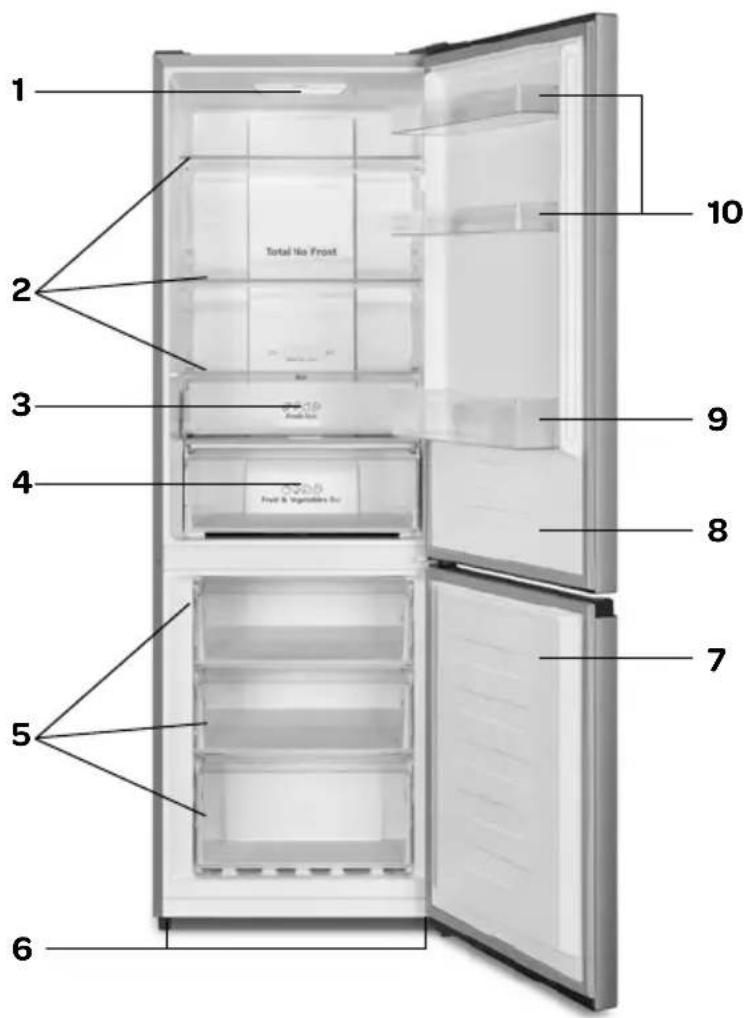
2 appliance description
- Internal lighting
- Glass shelves
- Fresh box drawer
- Crisp drawer
- Freezer drawers
- Adjustable feet
- Door - freezer section
- Door - cooler section
- Bottle compartment
- Door compartments
- Egg tray - 2 pcs. - not shown
- Ice cube tray - not shown
3 before the first use
Before using the appliance for the first time, you should proceed as follows: carefully unpack the appliance and remove all packaging material and any promotional stickers. Keep the packaging (plastic bags, polystyrene and cardboard) out of the reach of children. After unpacking the appliance, check it for external damage that may have occurred during transport.
Place the appliance on a sturdy, flat surface and make sure there is enough space all around for sufficient ventilation. A minimum space of 10cm is required between the appliance and the surrounding walls and keep 30~cm clear above the appliance. In this way the appliance is able to release heat properly, cool well and function in an energy efficient way. You can use the adjustable feet to level the appliance. Do not place the appliance near heat sources such as central heating or a stove. Do take note of the climate class of the appliance. When placed in a room that is too cold, the refrigerator will not function properly.
After placing the appliance, leave it for at least 3 hours before inserting the plug in the socket.
First clean the interior of the appliance. Use warm soapy water with, for instance, washing-up liquid, all-purpose cleaner or soda. Wipe the inside of the appliance after cleaning with clean water and properly wipe everything dry. Leave the appliance to dry for 1 to 2 hours.
4
usage
The control unit of the appliance is located on the outside. Check that the voltage corresponds with what is stated on the information plate and insert the plug in the socket.
Instruction: the recommended temperature setting is 4^ . For the freezer section this is -18^
Instruction: The amount of food, the ambient temperature, the frequency of opening the door and the position of the appliance have an effect on the temperature in the appliance. The temperatures in the refrigerator can differ from the temperature on the display. Take this into account when setting the thermostat.
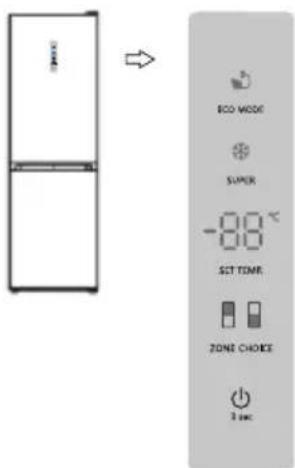
Control panel on the outside of the door
SETTING THE TEMPERATURE OF THE COOLER SECTION
Press on the control panel on the key ZONE CHOICE to change the temperature of the appliance. The symbol of the cooler section lights up. Press the key SET TEMP until the desired temperature is shown in the display. The temperature of the cooler section can be set between 2^ and 8^ .
The temperature is set in the following sequence:

SETTING THE TEMPERATURE OF THE FREEZER SECTION
On the control panel, press ZONE CHOICE to change the temperature of the freezer section. The symbol of the freezer section lights up. Press the key SET TEMP until the desired temperature is shown in the display. The temperature of the freezer section can be set between -14^ and -24^ .
The temperature is set in the following sequence:

After setting the temperatures, the appliance continues to cool until the set temperatures have been reached. Allow the appliance to reach the required temperature with no food. Usually this will take 2 to 3 hours. After this, you are able to fill the appliance with food.
If the ambient temperature rises, set the appliance to a lower temperature position in order to be able to guarantee the interior temperature.
SUPER FREEZING
Use this mode to quickly freeze food that is not yet frozen. In order to be able to freeze fresh food quickly, the temperature of the freezer section should be lowered timely in advance. It may be necessary to activate the super freezing mode 24 hours in advance.
When this mode is selected, the temperature of the freezer section automatically drops to -24^ for a maximum period of 52 hours. After 52 hours the temperature of the freezer section returns to the preset temperature.
To activate the super freezing mode, press the key SUPER until the light lights up on the display. To switch off the mode, press the key SUPER until the light no longer lights up.
ECO MODE

This mode helps prevent energy waste when the refrigerator is not used as normally, such as during your holidays. When this mode is selected, the temperature of the freezer section is automatically set to -17^ and the cooler section is set to 6^ .
To activate the ECO MODE, press the key ECO MODE until the symbol lights up on the display. To switch off the mode, press the key ECO MODE until the symbol no longer lights up.
SWITCHING ON AND OFF
You can switch the appliance on and off with the on/off key
To switch the appliance off, press the on/off key for 3 seconds. You will here a sound and in the display OF appears.
To switch the appliance on, press the on/ off key for 3 seconds. You will here a sound and the appliance switches on.
DOOR OPEN ALARM
If the door is opened for longer than 2 minutes, the alarm is activated and a sound can be heard 3 times per minute until the door is closed or a random key is pressed.
In case of a power failure, the setting of the door open alarm will function as set prior to the power failure, as soon as the refrigerator receives power again.
FRESH BOX DRAWER - 0^ DEGREE ZONE
Depending on the type of food you want to store in the fresh box, the temperature can be changed with the slider. Slide the slider left for fruits and vegetables.
Slide the slider to the right for meat and fish. This cools the fresh box drawer more.
VEGETABLE & FRUIT DRAWER
The crisper drawer has a slider for moisture control. Slide the slider to the right to increase the moisture. Slide the slider to the left to open the vents to reduce the moisture inside the drawer.
Attention:
The ambient temperature, the frequency of opening the door and the position of the appliance have an effect on the temperature in the appliance. Take this into account when setting the thermostat.
- Do not place hot food in the appliance.
- You should never place hazardous, highly flammable or explosive substances such as alcohol, acetone or petrol in the appliance, because there will be a hazard of explosion.
- Carefully package meat and fish to prevent unpleasant smells.
- Leave sufficient space between the different foods, to allow the air to circulate properly.
- Do not place food against the rear wall of the appliance. The shelves have a stopper to prevent this.
- Do not leave the door open for longer than necessary.
5 tips
- High ambient temperatures have a negative effect on energy use. Keep the appliance in a position away from direct sunlight or other sources of heat.
- Keep ventilation openings free. Clogged openings lead to higher use of energy.
Try not to open the door too often, especially when the weather is wet and hot. Once you open the door, mind to close it as soon as possible. - The space between the shelves and the rear wall of the refrigerator compartment must be unobstructed to allow the cool air to circulate. Therefore don't place any food items against the back.
- Turn the thermostat to a lower setting when the circumstances allow it.
- Before storing fresh cooked food, make sure the food has cooled at least to room temperature.
- Ice and frost layer increase energy consumption, so clean the appliance as soon as the layer is 3 to 5mm thick.
If the gasket is damaged or if it turns out that the sealing is poor, the energy consumption is substantially higher. To restore efficiency, replace the gasket. - Always consider the instructions, otherwise the energyconsumption is substantially higher.
To avoid contamination of food, please respect the following instructions
- Opening the door for long periods can cause a significatn increase of the temperature in the compartments of the appliance.
- Clean regularly surfaces that can come in contact with food and accessible drainage systems.
- Store raw meat and fish in suitable containers in the refrigerator, so that it is not in contact with or drip onto other food.
- Two-star frozen-food compartments are suitable for storing pre-frozen food, storing or making icecream and making ice cubes.
- One-, two- and three-start compartments are not suitable for the freezing of fresh food.
| Order Compartments TYPE Target storage temp. [℃] | Appropriate food | |
| 1 Fridge +2 ~ +8 Eggs, cooked food, packaged food, fruits and vegetables, dairy products, cakes, drinks and other foods are not suitable for freezing. | ||
| 2 (***)-Freezer ≤-18 Seafood (fish, shrimp, shellfish), fresh water aquatic products and meat products (recommended for 3 months, the longer the storage time, the worse the taste and nutrition), suitable for frozen fresh food. | ||
| 3 ***-Freezer ≤-18 Seafood (fish, shrimp, shellfish), freshwater aquatic products and meat products (recommended for 3 months, the longer the storage time, the worse the taste and nutrition), suitable for frozen fresh food. | ||
| 4 **-Freezer ≤-12 Seafood (fish, shrimp, shellfish), freshwater aquatic products and meat products (recommended for 3 months, the longer the storage time, the worse the taste and nutrition), suitable for frozen fresh food. | ||
| 5 *-Freezer ≤-6 Seafood (fish, shrimp, shellfish), freshwater aquatic products and meat products (recommended for 3 months, the longer the storage time, the worse the taste and nutrition), suitable for frozen fresh food. | ||
| 6 0-star -6 ~ 0 Fresh pork, beef, fish, chicken, some packaged processed foods, etc. (Recommended to eat within the same day, preferably no more than 3 days). Partially encapsulated processed foods (non-freezable foods). | ||
| 7 Chill | -2 ~ +3 | Fresh/ frozen pork, beef, chicken, freshwater aquatic products, etc. (7 days below 0°C and above 0°C is recommended for consumption within that day, preferably no more than 2 days). Seafood (less than 0 for 15 days, it is not recommended to store above 0°C. |
| 8 Fresh food | 0 ~ +4 | Fresh pork, beef, fish, chicken, cooked food, etc. (Recommended to eat within the same day, preferably no more than 3 days) |
| 9 Wine | +5 ~ +20 Red wine, white wine, sparkling wine, etc. | |
Note: please store different foods according to the compartments or target storage temperature of your purchased products.
If the refrigerating appliance is left empty for long periods, switch off, defrost, clean, dry, and leave the door open to prevent mould developing within the appliance.
Water dispenser cleaning (special for water dispenser products):
- Clean water tanks if they have not been used for 48h ; flush the water system connected to a water supply if water has not been drawn for 5 days.
WARNING - Food needs to be packed in bags before putting into the refrigerator, and liquids need to be packed in bottles or capped containers to avoid the problem that the product design structure is not easy to clean.
6
cleaning & maintenance
Before cleaning the appliance, switch it off by removing the plug from the socket.
Clean the interior of the appliance. Use warm soapy water with, for instance, washing-up liquid, all-purpose cleaner or soda in order to prevent nasty smells. Wipe the inside of the appliance after cleaning with clean water and properly wipe everything dry. Leave the appliance to dry for 1 to 2 hours.
The shelves, drawers and door compartments can be removed from the appliance easily and washed by hand.
These components may not be cleaned in the dishwasher.
For areas in the refrigerator that are difficult to clean, such as small openings or corners, it is recommended wiping them clean regularly with a soft cloth or brush. If necessary, a tool can be used, such as thin sticks (cocktail sticks, for example), to make sure no contamination can occur in these areas.
Clean the outside of the refrigerator and the door rubbers with a soft damp cloth.
Clean the rear of the refrigerator at least one per year with a vacuum cleaner so that the condenser and ventilation holes remain clean and the refrigerator is able to function as optimal as possible.
Do not use hard brushes, steel wool, abrasives (such as toothpaste), organic solvents (such as alcohol, acetone, oil, etc.), boiling water, acid or alkaline product to clean the refrigerator, as this could damage the surface and interior of the refrigerator. Boiling water and benzene could deform or damage plastic components.
DEFROSTING
The freezer section of this appliance is free from frost - no-frost. If used correctly, no ice will be formed.
If an ice layer is created after all, defrost the freezer section when the ice layer has reached a thickness of 3mm
Remove all products from the freezer section. Store the frozen products on a cool location, packaged in newspapers and blankets. Remove the plug from the socket and keep the door of the cooler section closed while defrosting the freezer section.
Defrost the freezer section Defrosting can be accelerated by placing a tray with hot water in the freezer section.
Do not use sharp metal objects to scrape the freezer section clean, use a plastic ice scraper.
Clean and dry the freezer section. Insert the plug in the socket and set the thermostat to the required setting.
Place the frozen products back in the freezer section once it has reached the required temperature.
Warning: Never remove ice with sharp objects, defrosting sprays, a hair dryer, a heater or something similar.
This could lead to unsafe situations and cause irreparable damage to the appliance
REPLACING LED LIGHTING
This appliance has been provided with LED lighting. This lighting lasts for a longer period of time. When a LED lamp in the appliance is broken, you are not able to replace it yourself. Contact the Inventum service department.
7 troubleshooting
| Breakdown Cause Solution | ||
| The appliance no longer works | There is an interruption in the power supply. | - check that the plug is properly inserted in the socket - check that the power cable is not damaged - check that there is voltage on the socket by connecting a different appliance, such as a night lamp - check that the appliance is on by setting the thermostat higher than 0 |
| The interior lighting does not work. | The lamp is defective or the plug is not in the socket. | Check the solutions above or have the lamp replaced. |
| Temperature in the refrigerator is too high or too low | Wrong setting of the thermostat. - turn the thermostat to a different position | |
| The ambient temperature is higher or lower than the temperature indicated in the table with technical data. | The appliance is intended for operation in an ambient temperature indicated in the table with technical data supplied with the appliance. | |
| The appliance is located in direct sunlight or near a heat source. | Change the location of the appliance according to the information in the instruction manual. | |
| A too large amount of hot food has been placed in the appliance at once. | Wait 72 hours until the products are frozen. The temperature in the appliance will return to the required level. | |
| The ventilation at the rear of the appliance is hindered. | Keep the appliance 10 cm away from the walls, for sufficient ventilation. | |
| The door of the refrigerator is opened too frequently or remains open for too long. | Open the door less often and/or reduce the time that the door remains open. | |
| The door is not closed properly. Make sure the foods are placed in such a way that they do not hinder the door when it is being closed. | ||
| The compressor does not work often enough. | Check that the ambient temperature is not lower than the range of the climate class. | |
| The door rubber is loose. Fasten the door rubber or have it replaced. | ||
| The appliance is working continuously. | Wrong setting of the thermostat. - turn the thermostat to a higher position | |
| There is water in the lower section of the refrigerator. | The opening of the defrost water drain is clogged. | Clean the opening of the defrost water drain by means of the skewer. |
| The ventilation within the cooler section is hindered. | Check that the food does not make contact with the rear wall of the refrigerator. | |
| Unusual or loud noises | The appliance is not level and stable. | Level the appliance with the adjustable feet. |
| The appliance is standing against something. | Place the appliance in such a way that it is not standing against anything. | |
During normal use of the cooling appliance, different types of noises can occur that do not have any effect on the correct operation of the freezer.
Noises that can be easily remedied:
- Noise due to the fact that the appliance is not level - position the appliance using the front adjustable feet. If necessary, place soft material under the rear wheels, particular in case of a tiled floor.
- Friction against other furniture - move the appliance.
- Grinding of drawers or shelves - remove the shelf or drawer and then place it back.
- Noise of colliding bottles - place the bottles apart.
Noises that can be heard during normal use of the appliance are caused by the operation of the thermostat, compressor (activation), cooling system (shrinkage and expansion of the material under the influence of temperature differences and flow of cooling liquid).
8 product fiche
| INVENTUM | |
| Model number | JVL2600 |
| Type of appliance | refrigerator/freezer |
| Category | 7 |
| Energy-efficiency class | A++ |
| Annual energy consumption [Aec] | 216 kWh |
| Nett capacity - total | 287 litres |
| Nett capacity - cooling compartment | 207 litres |
| Nett capacity - freezer compartment **** | 80 litres |
| Max. storage time in case of power failure | 16 hours |
| Freezing capacity (kg/24 hour) | 8 |
| Climate class | SN/N/ST |
| Noise level dB(A) | 39 dB |
| Type of appliance | vrijstaand |
| Defrosting system | no-frost |
| Execution | |
| Color | inx |
| Number of doors | 2 |
| Door opening reversible | ● |
| Eggholder included | 2 |
| Ice cube holder included | 1 |
| Number of glass shelves | 3 |
| Number of freezer drawers | 3 |
| Total amount of door compartments/bottle racks | 3 |
| Number of fresh box drawers (0° degree zone) | 1 |
| Number of risper drawers | 1 |
| CFK/HFK free | free |
| Type of cooling agent | R600a |
| Number of compressors | 1 |
| Technical specifications | |
| Dimensions (wxdxh) in cm | 59,5 x 59,0 x 178,5 |
| Nett weight in kg 57 kg | |
| Gross weight in kg | 62 kg |
| Power consumption [W] | 80 w |
| Rated voltage [V] / frequency [Hz] | 220-240V ~ 50Hz |
| Lenght of power cord [m] | 2,0 |
| Type of plug | VDE plug 90° |
Note: On the rating label - which you can find on the left inside the appliance - you can also find the technical specifications.
general terms and conditions of service and warranty
We do not need to remind you of the importance of service. After all, we develop our products to a standard so that you can enjoy them for many years, without any concerns. If, nevertheless, there is a problem, we believe you are entitled to a solution straight away. Hence our products come with an exchange service, on top of the rights and claims you are entitled to by law. By exchanging a product or part, we save you time, effort and costs.
2-year full manufacturer's warranty
- Customers enjoy a 2-year full manufacturer's warranty on all Inventum products. Within this period, a faulty product or part will always be exchanged for a new model, free of charge. In order to claim under the 2-year full manufacturer's warranty, you can either return the product to the shop you bought it from or contact the Inventum costumer service department via the form at www.inventum.eu/service-aanyraag.
- The 2-year warranty period starts from the date the product is bought.
- In order to claim under the warranty, you must produce a copy of the original receipt.
- The warranty applies only to normal domestic use of Inventum products within the Netherlands.
5-year Inventum warranty
- Inventum offers a 5-year warranty on most large domestic appliances and a selection of small domestic appliances. This 5-year Inventum warranty consists of a 2-year full manufacturer's warranty, extended by a further 3-year warranty. The only thing you need to do to qualify for the 3-year extended warranty is to register the product within 45 days of purchase. You can read more about registering the product in the following paragraph.
- In accordance with the 5-year Inventum warranty provisions, a faulty product or part will always be exchanged for a new model during the first 2 years under the warranty. During the 3rd to 5th year under the warranty, you will only pay the costs of exchange. The current costs of exchange are listed at www.inventum.eu/omruilkosten.
- In order to claim under the 5-year Inventum warranty, you can either return the product to the shop you bought it from or contact the Inventum costumer service department via the form at www.inventum.eu/service-aanvraag.
- The 5-year warranty period starts from the date the product is bought.
- In order to claim under the warranty, you must produce a copy of the original receipt.
- The warranty applies only to normal domestic use of Inventum products within the Netherlands.
Product registration
- The 3-year extended warranty is easy to obtain, free of charge, by registering the product within 45 days of purchase, via the website www.inventum.eu/garantie- registrarie. If you did not register the product within 45 days of purchase, you can still do so up to 2 years after the purchase date. However, there will be a charge. The one-off registration charge is € 89 for each separate product. Registration is possible only for products that are subject to the 5-year Inventum warranty. Whether the product qualifies for the 5-year Inventum warranty is stated in the product user manual and in the product information sheet, on Inventum's website.
- The warranty period always starts from the date the product is bought. If the product is registered for the extended warranty at a later date, the warranty period still starts from the original date of purchase.
- The 3-year extended warranty can only be applied for if you are in the possession of a copy of the original receipt and the Inventum 5-year warranty certificate.
Large domestic appliances
- Breakdowns or faults in large domestic appliances (separate and built-in white goods) can be registered via the form at www.inventum.eu/service-aanvraag, by calling the Inventum costumer service department or in the store where you bought the device. The telephone number of the costumer service department can be found at www.inventum.eu.
- In the event of breakdowns or faults in large domestic appliances, Inventum will have the option to have a service engineer inspect the faulty device onsite at the customer in the Netherlands and to carry out repairs, there and then. The Inventum customer service department can also decide to have the device exchanged.
- If you suffer a breakdown or fault in a large domestic appliance during the first 2 years from the date of purchase, Inventum will not charge any costs for the exchange, call-out or for parts and labour.
- If you registered the product as described before at www.inventum.eu/garantie-registry and you subsequently report a breakdown of a large domestic appliance in the 3rd to 5th year of the date of purchase, the 5-year Inventum warranty applies and the device will be repaired or exchanged, free of charge. In the event of a repair or exchange of the device, you only pay the costs of exchange. The current costs of exchange are listed at www.inventum.eu/omruilkosten. If you did not register the product, the 3-year extended warranty does not apply.
- When reporting a breakdown or fault, a service engineer will contact the customer within 1 working day in order to make an appointment. When the report is made in a weekend or during a public holiday, this will be the next working day.
- If you report a breakdown or fault via the form at www.inventum.eu/service-aanvraag, you will be kept informed of the progress via mobile messages and e-mail.
- The warranty period starts from the date the product is bought.
56·English
- In order to claim under the warranty, you must produce a copy of the original receipt and the Inventum 5-year warranty certificate.
- The warranty applies only to normal domestic use of Inventum products within the Netherlands.
Breakdowns or faults outside the warranty period
- Breakdowns or faults in small or large domestic appliances outside the warranty period, can be reported to the costumer services department via the form at www.inventum.eu/service-aanvraag or by calling the costumer services department.
- The costumer services department may ask you to send the product for inspection or repair. The costs of dispatch will be at your expense.
- The inspection to establish whether repair is possible involves a charge. You need to grant your permission for this, in advance.
- In the event of a large domestic appliance, Inventum, at your request, can send out a service engineer. In that case, you will be charged the call-out costs, as well as parts and labour.
- In the event of an instruction to repair, the repair costs must be paid in advance. In the event of a repair by a service engineer, the costs of the repair must be settled with the engineer onsite, preferably by means of PIN payment.
Warranty exclusions
- The following is excluded from the aforesaid warranties:
normal wear and tear;
- improper use or misuse;
insufficient maintenance;
- failure to comply with the operating and maintenance instructions;
- unprofessional installation or repairs by third parties or the customer himself;
non-originaiparts used by the customer
- use for commercial or business purposes;
- removal of the serial number and/or rating label.
-
In addition, the warranty does not apply to normal consumer goods, such as:
-
dough hooks, baking tins, (carbon) filters, etc.;
- batteries, bulbs, carbon filters, fat filters etc.;
external connection cables; - glass accessories and glass parts such as oven doors;
-
and similar items.
-
Transport damage not caused by Inventum is also excluded. Therefore, inspect your new device before starting to use it. If you detect any damage, you must report this to the store where you purchased the product within 5 working days, or to the Inventum customer service department via the form at www.inventum.eu/service-aanvraag. If transport damage is not reported within this period, Inventum does not accept any liability in this respect.
- The following are excluded from warranty and/or replacement: faults, loss of and damage to the device as a result of an event that is normally insured under the home contents insurance.
Important to know
- The replacement or repair of a faulty product, or a part thereof, does not lead to an extension of the original warranty period.
- Parts that have been replaced, packaging material and exchanged devices are taken back by the service engineer and become the property of Inventum.
- If a complaint is unfounded, all costs arising from it will be at the customer's expense.
- Following expiry of the warranty period, all costs of repair or replacement, including administration costs, dispatch and call-out charges, will be charged to the customer.
- Inventum cannot be held liable for damage as a result of devices built in incorrectly.
- Inventum cannot be held liable for damage caused by external events, unless this liability arises from mandatory statutory provisions.
- These warranty and service provisions are governed by Dutch law. Disputes will be settled exclusively by the competent Dutch court.
facebook.com/inventum1908
youtube.com/inventum1908


- Deutsch
- EN reversing the door openings
- safety instructions
- Refrigerant
- WARNING: Risk of fire/ flammable materials
- appliance description
- before the first use
- usage
- Control panel on the outside of the door
- SETTING THE TEMPERATURE OF THE COOLER SECTION
- SETTING THE TEMPERATURE OF THE FREEZER SECTION
- SUPER FREEZING
- ECO MODE
- SWITCHING ON AND OFF
- DOOR OPEN ALARM
- FRESH BOX DRAWER - 0° DEGREE ZONE
- VEGETABLE & FRUIT DRAWER
- Attention:
- tips
- cleaning & maintenance
- DEFROSTING
- REPLACING LED LIGHTING
- troubleshooting
- Noises that can be easily remedied:
- product fiche
- general terms and conditions of service and warranty
- 2-year full manufacturer's warranty
- 5-year Inventum warranty
- Product registration
- Large domestic appliances
- 56·English
- Breakdowns or faults outside the warranty period
- Warranty exclusions
- Important to know
Brand : INVENTUM
Model : JVL2600
Category : Fridge