ManualGo.com
 8587 Elite - Garage door LiftMaster - Free user manual and instructions
Find the device manual for free 8587 Elite LiftMaster in PDF.


Download the instructions for your Garage door in PDF format for free! Find your manual 8587 Elite - LiftMaster and take your electronic device back in hand. On this page are published all the documents necessary for the use of your device. 8587 Elite by LiftMaster.
USER MANUAL 8587 Elite LiftMaster
Write down the following information for future reference:
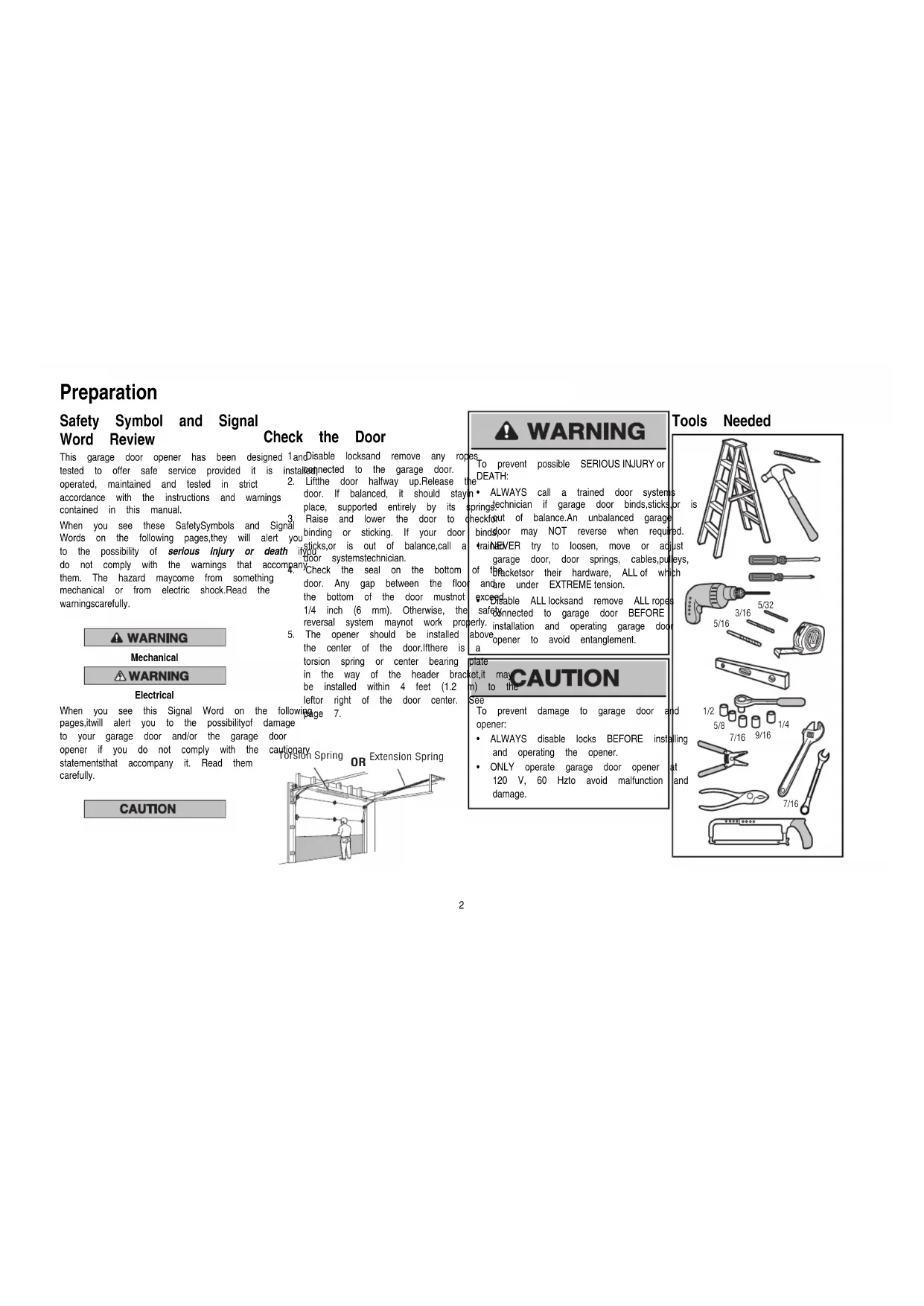
Safety Symbol and Signal Word Review This garage door opener has been designed and tested to offer safe service provided it is installed, operated, maintained and tested in strict accordance with the instructions and warnings contained in this manual. When you see these SafetySymbols and Signal Words on the following pages,they will alert you to the possibility of serious injury or death ifyou do not comply with the warnings that accompany them. The hazard maycome from something mechanical or from electric shock.Read the warningscarefully. Mechanical Electrical When you see this Signal Word on the following pages,itwill alert you to the possibilityof damage to your garage door and/or the garage door opener if you do not comply with the cautionary statementsthat accompany it. Read them carefully. Check the Door
1. Disable locksand remove any ropes
connected to the garage door.
2. Liftthe door halfway up.Release the
door. If balanced, it should stayin place, supported entirely by its springs.
3. Raise and lower the door to checkfor
binding or sticking. If your door binds, sticks,or is out of balance,call a trained door systemstechnician.
4. Check the seal on the bottom of the
door. Any gap between the floor and the bottom of the door mustnot exceed 1/4 inch (6 mm). Otherwise, the safety reversal system maynot work properly.
5. The opener should be installed above
the center of the door.Ifthere is a torsion spring or center bearing plate in the way of the header bracket,it may be installed within 4 feet (1.2 m) to the leftor right of the door center. See page 7. Torsion Spring Extension Spring
- ALWAYS call a trained door systems technician if garage door binds,sticks,or is out of balance.An unbalanced garage door may NOT reverse when required.
- NEVER try to loosen, move or adjust garage door, door springs, cables,pulleys, bracketsor their hardware, ALLof which are under EXTREMEtension.
- Disable ALLlocksand remove ALLropes connected to garage door BEFORE installation and operating garage door opener to avoid entanglement. To prevent damage to garage door and opener:
- ALWAYS disable locks BEFORE installing and operating the opener.
- ONLY operate garage door opener at 120 V, 60 Hzto avoid malfunction and damage. Tools Needed
A. tekcarb redaeH B. Pulley and bracket C. tekcarb rooD D. mra rood devruC E. mra rood thgiartS F. yellorT G. Emergency release rope and handle H. Rail
I. renepo rood egaraG
NOTE: Accessories will vary depending on the garage door opener model purchased. Depending on your specific model, other accessories may be included with your garage door opener. The instructions for these accessories will be attached to the accessory and are not included in this manual. The images throughout this manual are for reference and your product may look different. J. Chain spreader K. Chasis support bracket L. Chain M. lortnoc rooD N. eriw etihw/der dna etihW The Protector System
O. srosnes gnisrever ytefaS with white and white/black wire attached: Sending Sensor (1), Receiving Sensor (1) Safety Sensor Brackets (2), and ExtensionBrackets (2) P. erutaretil dna slebal ytefaS Q. Rail grease Hardware AssemblyWashered Bolts and Lock Washer[mounted in the top of the garage door opener]Screw #8-32 x 3/8" (2)Hex Bolts 1/4"-20 x 5/8" (2)Lock Washers (2)Washered Bolt 5/16"-18 x 1/2" (2)Chassis Support Bracket HardwareScrew #8-32 x 3/8" (2)Chain Spreader HardwareRail HardwareInstallationHex Bolt 5/16"-18 x 7/8" (4)Lag Screw 5/16"-9 x 1-5/8" (2)Lag Screw 5/16"-18 x 1-5/8" (2)Clevis Pin 5/16" x 2-3/4" (1)Clevis Pin 5/16" x 1-1/4" (1)Clevis Pin 5/16" x 1" (1)Nut 5/16"-18 (4)Lock Washer 5/16"-16 (4)Self-Threading Screw 1/4"-14 x 5/8" (2)Ring Fastener (3)Carriage Bolt 1/4"-20 x 1/2" (2)Wing Nut 1/4"-20 (2)Hex Bolt 1/4"-20 x 5/8" (2)Lock Nut 1/4"-20 (2)Lag Screw 1/4" x 1-1/2" (4)Door Control HardwareScrew 6AB x 1-1/4" (2)Screw 6-32 x 1" (2)Drywall Anchors (2)Insulated Staples 895MAXRemote Control880LM Smart ControlPanel
Preparation4 To avoid SERIOUS damage to garage dooropener, use ONLY those bolts/fastenersmounted in the top of the opener. Washered Bolt5/16"-18x1/2"(Mounted in the garage door opener) HARDWARE Lock Nut(Mounted in the garage door opener) NOTE: ONLY use the bolts removed from thegarage door opener. Place the garage dooropener on the packing material to preventscratching.
1.1 Remove bolt and locknut from the top
of the garage door opener.
1.2 Align the rail and the styrofoam over the
sprocket.Cut the tape from the rail,chain, and styrofoam.
1.3 Fasten the rail with the previously
removed washered bolt and lock nut.
1.4 Position the chain around the garage
door opener sprocket.
1.5 Attach the chain spreader to the garage
door opener with screws.
1.6 Guide the chain around the selected
groove in the chain spreader, toengage either the 8-tooth or 6-toothsprocket.NOTE:The 6-tooth sprocket is for usewith Carriage House Doors and the 8-tooth sprocket is for use with regulardoors. Lock Nut Washered Bolt5/16"-18x1/2"Hex Screws 8-32x1"Washers Chain Spreader6-ToothSprocket8-ToothSprocketChain SpreaderMotor Unit Mounting Plate Motor Unit Mounting Plate Assembly 1 Attach the rail to the garage door opener5 To avoid possible SERIOUS INJURY to finger from moving garage door opener:
- ALWAYS keep hand clear of sprocket while operating opener.
- Securely attach sprocket cover BEFORE operating.
2.1 Position the chassis support bracketon the unit.
2.2 Attach the bracket to the rail with 1/4"-20x5/8" hex bolts and lockwashers.Donot overtighten.
2.3 Attach the bracket to the opener by inserting a 5/16"-18x1/2" washered screw through a hole in each side flange and a matching hole in the bracket.Complete the connection by inserting the #8-32x3/8" screw through the back flange and the hole in rail support . Washerd Bolt5/16"-18x1/2"Screw#8-32x3/8"Hex Bolt1/4"-20x5/8" Lock Washer 3 Tighten the Chain
3.1 Loosen the inner nutand lockwasher on the trolley threaded shaft.
3.2 Tighten the outer nut until the chain is a 1/2 inch above the base of the rail atthe midpoint of
Slack in the chain is normal when the door is closed. No readjustment is necessary. NOTE: Sprocket noise can result if the chain is too loose. During future maintenance, ALWAYS pull the emergency release handle to disconnect the trolley before adjusting the chain. 1/2" Assembly 2 Attach the Chassis Support Bracket6
IMPORTANT INSTALLATION INSTRUCTIONS
WARNING To reduce the risk of SEVERE INJURY or DEATH:
1. READ ANDFOLLOW ALL INSTALLATION WARNINGS AND INSTRUCTIONS.
2. Install garage door opener ONLY on properly balanced and lubricated garage door.An
improperly balanced door may NOT reverse when required and could result in SEVERE INJURY or DEATH.
3. ALL repairs to cables, spring assemblies and other hardware MUST be made by a trained
door systems technician BEFORE installing opener.
5. Install garage door opener 7 feet (2.13 m) or more above floor.
6. Mount the emergencyrelease within reach,but at least6 feet (1.83 m) above the floor and
avoiding contactwith vehicles to avoid accidental release.
7. NEVER connect garage door opener to power source until instructed to do so.
8. NEVERwear watches,rings or loose clothing while installing or servicing opener. They could
be caught in garage door or opener mechanisms.
9. Install wall-mounted garage door control:
- within sightofthe garage door.
- out of reach of children at minimum height of 5 feet(1.5 m).
- away from ALL moving partsofthe door.
10. Place entrapmentwarning label on wall next to garage door control.
11. Place manual release/safetyreverse test label in plain view on inside of garage door.
12. Upon completion of installation, testsafety reversal system.Door MUST reverse on contactwith
a 1-1/2" (3.8 cm) high object (or a 2x4 laid flat) on the floor.
13. To avoid SERIOUS PERSONAL INJURY or DEATH from electrocution, disconnectALL
electric power BEFORE performing ANY service or maintenance.
14. DO NOT enable the Timer-to-Close functionality if operating either one-piece or swinging
garage doors.To be enabled ONLY when operating a sectional door. NOTE:If you are installing the garage door opener on a one-piece door, visit www.liftmaster.com for installation instructions. Installation7 To prevent possible SERIOUS INJURY or DEATH:
- Header bracketMUST be RIGIDLY fastened to structural support on header wall or ceiling, otherwise garage door might NOTreverse when required. DO NOT install header bracket over drywall.
- Concrete anchors MUST be used if mounting header bracket or 2x4 into masonry.
- NEVER try to loosen, move or adjust garage door, springs,cables,pulleys, brackets,or their hardware, ALL of which are under EXTREME tension.
- ALWAYS call a trained door systems technician ifgarage door binds,sticks, or is out ofbalance.An unbalanced garage door might NOT reverse when required. 1 Determine the header bracket location NOTE: If you are installing the garage door opener on a one-piece door, visit www.liftmaster.com for installation instructions.
1.1 Close the door and mark the inside vertical centerline of the garage door.
1.2 Extend the line onto the header wall above the door.
Youcan fasten the header bracket within4 feet (1.22 m) of the left orright of the door center only if a torsion spring or center bearingplate is in the way; oryoucan attach it to the ceiling when clearance is minimal.(It may be mounted onthe wallupside down if necessary,to gain approximately 1/2" (1 cm). If you need to install the header bracket on a 2x4 (on wall or ceiling), use lag screws(not provided) to securely fasten the 2x4 to structural supports.
1.3 Open your door to the highestpoint of travel as shown.Draw an intersecting horizontal line on
the header wall 2" (5 cm) above the high point.This height will provide travel clearance for the top edge of the door. NOTE: If the total number of inches exceeds the height available in your garage, use the maximum height possible, or refer to page 8 for ceiling installation. Sectional door with curved track Header Wall Track 2" (5 cm) Highest Point of Travel Door Header WallUnfinished CeilingVertical Centerline of Garage Door 2x4 2x4 Structural SupportsLevel (Optional)OPTIONAL CEILING MOUNT FOR HEADER BRACKET8 You can attach the header bracket either to thewall above the garage door, or to the ceiling.Follow the instructions which will work bestforyour particular requirements. Do not installtheheader bracket over drywall. If installing intomasonry,use concrete anchors (not provided). HARDWARE Lag Screw5/16" - 9 x 1-5/8"
OPTION A WALL INSTALLATION
2.1A Center the bracket on the vertical centerline with the bottom edge ofthebracket on the horizontal line as shown(with the arrow pointing toward theceiling). 2.2A Mark the vertical set ofbracketholes (do not use the holes designated for ceilingmount).Drill 3/16" pilot holes and fastenthe bracket securely to a structuralsupport with lag screws.
OPTION B CEILING INSTALLATION
2.1B Extend the vertical centerline onto the ceiling asshown. 2.2B Center the bracket on the vertical mark, no more than 6" (15 cm) from the wall.Make sure the arrow is pointing towardthe wall. The bracket can be mountedflush againstthe ceiling when clearanceis minimal. 2.3B Mark the side holes.Drill 3/16" pilot holes and fasten bracketsecurely to a structuralsupport with lag screws. Wall MountOptional Mounting HolesVertical Centerline of Garage Door(Header Wall)Header Bracket 2x4 Structural SupportDoor Spring(Garage Door)Highest Point of Garage Door TravelHorizontal Line Lag Screw5/16" - 9 x 1-5/8" (Header Wall)Ceiling Mounting Holes(Finished Ceiling)Vertical Centerline of Garage DoorHeader Bracket6" (15 cm) MaximumDoor Spring(Garage Door)Lag Screw5/16" - 9 x 1-5/8"
3.1 Align the rail with the header bracket.
Insert the clevis pin through the holes in the header bracket and rail. Secure with the ring fastener. NOTE: Use the packing material as a protective base for the garage door opener. Ring FastenerClevis Pin5/16" X 2-3/4" HARDWARE Clevis Pin5/16" x 2-3/4" Ring Fastener 4 Position the garage door opener To preventdamage to garage door, rest garage door opener rail on 2x4 placed on top section of door.
4.1 Remove the packing material and liftthe
garage door opener onto a ladder. NOTE: A 2x4 is ideal for setting the distance between the rail and the door. If the ladder is not tall enough you will need help at this point.
4.2 Fullyopen the door and place a 2x4 (laid flat) under the rail.
NOTE: If the door hits the trolley when it is raised, pull the trolley release arm down to disconnect the inner and outer trolley. Slide the outer trolley toward the garage door opener. The trolley can remain disconnected until instructed. Connected Disconnected 3 Attach the rail to the header bracket10 To avoid possible SERIOUS INJURY from afalling garage door opener, fasten it SECURELYto structural supports ofthe garage. Concreteanchors MUSTbe used if installing ANY bracketsinto masonry. HARDWARE Hex Bolt 5/16"- 18x7/8"Nut 5/16"-18 Lock Washer 5/16" Hanging your garage door opener will varydepending on your garage. Two representativeinstallations are shown. Yours may be different.Hanging brackets should be angled (Figure 1) toprovide rigid support.On finished ceilings (Figure2), attach a sturdy metal bracket to structuralsupportsbefore installing the opener.Thisbracket and fastening hardware are not provided.Instructions below are for attaching the garagedoor opener directly to structural supports.
5.1 Measure the distance from each side of the
motor unit to the structural support.
5.2 Cutboth pieces of the hanging bracket to
5.3 Drill 3/16" pilot holes in the structural
5.4 Attach one end of each bracketto a
support with 5/16"-18x1-7/8" lag screws(notprovided).
5.5 Fasten the opener to the hanging brackets
with 5/16"-18x7/8" hex bolts, lockwashersand nuts.
5.6 Check to make sure the rail is centered
over the door (or in line with the headerbracket if the bracketis not centered abovethe door).
5.7 Remove the 2x4.Operate the door
manually. Ifthe door hits the rail, raise theheader bracket.NOTE: DO NOT connect power to opener at thistime. FIGURE 1FIGURE 2(Not Provided)Lag Screws5/16"- 18x1-7/8"MeasureDistanceHex Bolt 5/16"- 18x7/8", Lock Washer 5/16", Nut 5/16"-18 FIGURE 3Not ProvidedFinished CeilingUnfinished Ceiling Installation 5 Hang the garage door opener11 To prevent possible OVERHEATING ofthe end panel or light socket:
- Use ONLY A19 incandescent(100Wmaximum) or compactfluorescent (26Wmaximum) light bulbs.
- DO NOT use incandescent bulbs larger than 100W.
- DO NOT use compactfluorescent light bulbs larger than 26W (100W equivalent). To prevent damage to the opener:
- DO NOT use halogen bulbs.
- DO NOT use short neck or specialty light bulbs.
6.1 Pull on the top center ofthe light lens and rotate the
compactfluorescent (26W,100Wequivalent)light bulb into the light socket. NOTE: Do not use halogen, short neck, or specialty light bulbs as these may overheat the end panel or light socket. Do not use LED bulbs as they may reduce the range or performance of your remote control(s).
6.3 Rotate the lens up to close.
or or 7 Attach the emergency release rope and handle To prevent possible SERIOUS INJURY or DEATH from a falling garage door:
- If possible, use emergencyrelease handle to disengage trolley ONLY when garage door is CLOSED.Weak or broken springs or unbalanced door could resultin an open door falling rapidly and/or unexpectedly.
- NEVER use emergency release handle unless garage doorway is clear of persons and obstructions.
- NEVER use handle to pull door open or closed. If rope knot becomes untied, you could fall.
7.1 Insertone end of the emergency release rope
through the handle.Make sure that “NOTICE” is right side up. Tie a knot at least1 inch (2.5 cm) from the end of the emergencyrelease rope.
7.2 Insertthe other end of the emergencyrelease rope
through the hole in the trolley release arm.Mount the emergencyrelease within reach,but at least6 feet (1.83 m) above the floor, avoiding contactwith vehicles to prevent accidental release and secure with a knot. NOTE: If it is necessary to cut the emergency release rope, seal the cut end with a match or lighter to prevent unraveling. Ensure the emergency release rope and handle are above the top of all vehicles to avoid entanglement. Trolley lease Arm 6 Install the light bulbs12 Fiberglass,aluminum or lightweight steel garage doors WILLREQUIRE reinforcement BEFORE installation of door bracket.Contact your door manufacturer for reinforcement kit.Figure 1 showsone piece of angle iron as the horizontal brace.For the vertical brace,2 piecesof angle iron are used to create aU-shaped support.The bestsolution is to checkwith your garagedoor manufacturer for an opener installation door reinforcement kit. NOTE: Many door reinforcement kits provide for direct attachmentof the clevis pin and door arm. In this case you will not need thedoor bracket; proceed to the next step. Self-Threading Screw1/4"-14x5/8" HARDWARE SECTIONALDOORS
8.1 Center the door bracket on the previouslymarked vertical centerline used for the header bracket
installation. Note correctUP placement, as stamped inside the bracket.
8.2 Position the top edge of the bracket 2"-4" (5-10 cm) below the top edge of the door, OR directly below
any structural support acrossthe top of the door.
8.3 Mark, drill holes and install as follows, depending on your door’s construction:
Metal or light weight doors using a vertical angle ironbrace between the door panelsupportandthe door bracket:• Drill 3/16" fastening holes.Secure the door bracket using the two self threading screws.(Figure 2)• Alternately,use two 5/16" bolts, lockwashers and nuts(not provided). (Figure 3)Metal,insulated orlight weight factory reinforced doors:• Drill 3/16" fastening holes.Secure the door bracket using the self-threading screws. (Figure 4)WoodDoors:• Use top and bottom or side to side door bracket holes.Drill 5/16” holes through the door andsecure bracket with 5/16"-18x2" carriage bolts,lockwashers and nuts(not provided). (Figure 5)NOTE: The 1/4"-14x5/8" self-threading screws are not intended for use on wood doors. 8 Install the door bracket A horizontal and vertical reinforcementis needed for lightweight garage doors(fi berglass, aluminum, steel, doorswith glass panel, etc.) (not provided). A horizontal reinforcement braceshould be long enough to be securedto two or three vertical supports.A vertical reinforcement brace shouldcover the height of the top panel. FIGURE 1FIGURE 2FIGURE 4FIGURE 5FIGURE 3Vertical ReinforcementVertical Centerlineof Garage Door Door BracketSelf-Threading Screw1/4" - 14x 5/8"Self-Threading Screw1/4" - 14x 5/8"Vertical ReinforcementBolt 5/16"-18x2"(Not provided) Lock Washer 5/16"Nut 5/16"-18Door Bracket Vertical Centerlineof Garage Door Vertical Centerline ofGarage Door Bolt 5/16"-18x2"(Not provided) Inside Edge of Door orReinforcement Board Vertical Centerlineof Garage Door Installation13 IMPORTANT: The groove on the straight door arm MUST face away from the curved door arm. Straight Door ArmCurved Door Arm (Groove facing out)CORRECTINCORRECTStraight Door Arm Curved Door Arm
9.1 Close the door. Disconnectthe trolley by
pulling the emergencyrelease handle. Slide the outer trolley back(away from the door) about 2" (5 cm).
9.2 Attach the straight door arm to the outer
trolley using the clevispin. Attach with the ring fastener. Ring Fastener Clevis Pin 5/16" x 1"
9.3 Attach the curved door arm to the door
bracketusing the clevispin. Attach with the ring fastener. Ring Fastener Clevis Pin 5/16 " x 1-1/4" HARDWARE Hex Bolt 5/16"-18x7/8" Nut 5/16"-18 Lock Washer 5/16" Clevis Pin 5/16"x1" Clevis Pin 5/16"x1-1/4" Ring Fastener
9.4 Align the straight door arm with the
curved door arm.Selecttwo aligned holes (as far apart as possible) and attach using the bolts,nutsand lock washers. Nut 5/16"
Lock Washer 5/16" Hex Bolt 5/16" - 18 x 7/8" NOTE: If the holes do not line up, reverse the straight door arm. Select two aligned holes (as far apart as possible) and attach using the bolts, nuts and lock washers. If the straight door arm is hanging down too far, you may cut 6 inches (15 cm) from the solid end.Nut 5/16" - 18Lock Washer5/16" Hex Bolt 5/16 " - 18 x 7/8"
9.5 Pull the emergency release handle
toward the garage door opener until the trolley release arm is horizontal. The trolley will re-engage automatically when the garage door opener is activated. Trolley
lease arm 9 Connect the door arm to the trolley14 1 Install the door control Install the Door Control To prevent possible SERIOUS INJURY or DEATHfrom electrocution:• Be sure power is NOTconnected BEFORE installing door control.• ConnectONLY to 12 VOLT low voltage wires.To prevent possible SERIOUS INJURY or DEATHfrom a closing garage door:• Install door control within sight of garage door, out of reach of children at a minimum height of 5 feet(1.5 m),and away from ALL moving parts of door.• NEVER permitchildren to operate or play with door control push buttons or remote controltransmitters.• Activate door ONLY when it can be seen clearly, is properly adjusted, and there are noobstructions to door travel.• ALWAYS keep garage door in sight until completelyclosed. NEVER permitanyone to cross path ofclosing garage door. INTRODUCTION Compatible with MyQ and Security+ 2.0™accessories,see page 35. Your garage dooropener is compatible with up to 2 Smart ControlPanels or 4 of any other Security+ 2.0™ doorcontrols.NOTE:Older LiftMaster door controlsand third party products are not compatible.Install the door control within sight of the door ata minimumheight of 5 feet (1.5 m) where smallchildren cannot reach, and away from themoving parts of the door.NOTE: Your product may look different thanmoving parts of the door the illustrations. Screw6ABx1" HARDWAREDrywall Anchors Screw6-32x1" NOTE: For gang box installations it is not necessary to drill holes or install the drywall anchors. Use the existing holes in the gang box.
1.1 Strip 7/16 inch (11 mm) of insulation from
one end of the wire and separate the wires. 7/16" (11 mm)
1.2 Connectone wire to each of the two screws
on the backof the door control. The wirescan be connected to either screw.PRE-WIREDINSTALLATIONS:Chooseany two wires to connect, note which wiresare used so the correctwires are connectedat the garage door opener in a later step.
1.3 Mark the location of the bottom mounting
hole and drill a 5/32 inch (4 mm) hole. Wall
1.4 Install the bottom screw,allowing 1/8 inch
1.5 Position the bottom hole ofthe door
control over the screw and slidedown into place.
1.6 Liftthe push bar up and mark the top hole. 1.7 Remove the door control from the wall
and drill a 5/32 inch (4 mm) hole forthe top screw.
1.8 Position the bottom hole ofthe
door control over the screw andslide down into place. Attach thetop screw. DRYWALLDrywall AnchorScrew 6-32 x 1"Screw 6AB x 1"GANG BOX 2 Wire the door control to the garage door opener HARDWARE Insulated Staple(Not shown) PRE-WIRED INSTALLATIONS: When wiringthe door control to the garage door openermake sure you use the same wires thatareconnected to the door control. Run the white and red/white wire from the door control tothe garage door opener. Attach the wire to the wall andceiling with the staples (not applicable for gang box orpre-wired installations). Do not pierce the wire with thestaple asthis maycause a short or an open circuit. Staple
Strip 7/16 inch (11 mm) of insulationfrom the end of the wire near thegarage door opener. 7/16" (11 mm)
Connectthe wire to the red andwhite terminals on the garagedoor opener. To insertorrelease wires from the terminal,push in the tab with screwdriver tip. RED WHITE WHITE GREY WHI WHITE E16 Install the Door Control 3 Attach the warning labels
3.1 Attach the entrapmentwarning label on the wall near the door control with tacks or
3.2 Attach the manual release/safetyreverse testlabel in a visible location on the inside of
the garage door.17 Introduction Be sure power is NOT connected to the garage door opener BEFORE installing the safety reversing sensor. To prevent SERIOUS INJURY or DEATH from closing garage door:
- Correctlyconnectand align the safety reversing sensor. This required safety device MUST NOT be disabled.
- Install the safetyreversing sensor so beam is NO HIGHER than 6" (15 cm) above garage floor. Install the Protector System
IMPORTANTINFORMATIONABOUTTHESAFETYREVERSINGSENSORS The safety reversingsensors must be connected and alignedcorrectly before the garage door openerwillmove inthe down direction. The sending sensor (with an amber LED) transmits an invisible light beam to the receiving sensor (with a green LED).If an obstruction breaks the light beam while the door is closing, the door will stop and reverse to the full open position, and the garage door opener lightswill flash 10 times. NOTE: For energy efficiency the garage door opener will enter sleep mode when the door is fully closed. The sleep mode shuts the garage door opener down until activated. The sleep mode is sequenced with the garage door opener light bulb; as the light bulb turns off the sensor LEDs will turn off and whenever the garage door opener lights turn on the sensor LEDs will light. The garage door opener will not go into the sleep mode until the garage door opener has completed 5 cycles upon power up. When installing the safety reversingsensors check the following:
- Sensors are installed inside the garage, one on either side of the door.
- Sensors are facing each other with the lenses aligned and the receiving sensor lens does not receive directsunlight.
- Sensors are no more than 6 inches (15 cm) above the floor and the light beam is unobstructed. Invisible Light Beam Protection Area Safety Reversing Sensor 6" (15 cm) max. above floor Safety Reversing Sensor 6" (15 cm) max. above floorInstall the Protector System
1 Install the Safety Reversing Sensors The safetyreversing sensors can be attached to the door track, the wall,or the floor. Ifthe door trackwill not support the sensor bracket a wall installation is recommended. Choose one of the following installations. HARDWARECarriage Bolt 1/4"-20x1/2" Wing Nut 1/4"-20 Lag Screw 1/4"x1-1/2"Hex Bolt 1/4"-20x5/8" Lock Nut 1/4"-20 OPTION A
DOOR TRACK INSTALLATION
1.1A Slide the curved arms of the sensor bracket around the edge of the doortrack.Snap into place so that thesensor bracket is flush against thetrack. 1.2A Slide the carriage bolt into the slot on each sensor. Carriage Bolt1/4" - 20 x 1/2" 1.3A Insertthe bolt through the hole in the sensor bracket and attach with the wing nut.The lenseson both sensors should point toward each other.Make sure the lens is not obstructed by thesensor bracket. Wing Nut 1/4" - 20
OPTION B WALLINSTALLATION
If additional clearance is needed an extension bracket(notprovided) or wood blockscan be used. Make sure each bracket has the same amountof clearance so they will align correctly. 1.1B Position the sensor bracketagainstthe wall with the curved armsfacing thedoor. Make sure there is enoughclearance for the beam to beunobstructed. Mark holes. (not provided) 1.2B Drill 3/16 inch pilot holes for each sensor bracket and attach the sensor bracketsto the wall using lag screws (notprovided).
(not provided) 1.3B Slide the carriage bolt into the slot on each sensor. Lens Carriage Bolt 1/4" - 20 x 1/2" 1.4B Insertthe bolt through the hole in the sensorbracket and attach with the wing nut.The lenseson both sensors should point toward eachother. Make sure the lens isnot obstructed bythe sensor bracket. Wing Nut 1/4" - 20 18Install the Protector System
1 Install the Safety Reversing Sensors OPTION C FLOOR INSTALLATION Use an extension bracketor wood blockto raise the sensor bracketif needed. 1.1C Carefully measure the position of both sensor brackets so they will be the samedistance from the wall and unobstructed. 1.2C Attach the sensor bracketsto the floorusing concrete anchors. Lag Screws1-4"x1-1/2"Extension Brack Lock Nut 1/4"-20Hex Bolt 1/4"-20x5/8" 1.3C Slide the carriage bolt into the slot oneach sensor. Carriage Bolt1/4" - 20 x 1/2" 1.4C Insertthe bolt through the hole in the sensorbracket and attach with the wing nut.The lenson both sensors should point toward eachother. Make sure the lens is not obstructed bythe sensor bracket. Wing Nut1/4" - 20 2 Wire the Safety Reversing Sensors OPTION A
INSTALLATION WITHOUT PRE-WIRING
PRE-WIRED INSTALLATIONS: If your garagealready has wires installed for the safety reversingsensors,see page 20. HARDWAREInsulated Staple(Not shown) 2.1A Run the wire from both sensors to the garage door opener. Attach the wire tothe wall and ceiling with the staples. Staple 2.2A Strip 7/16 inch (11 mm) of insulation from each set of wires. Separate thewires. Twist the white wires together.Twistthe white/black wires together. 7/16" (11 mm) 2.3A Insertthe white wires into the white terminal on the garage door opener. Insert the white/blackwires into the grey terminal on the garage dooropener. To insert or remove the wires from theterminal, push in the tab with a screwdriver tip. RED WHITE WHITE GREY
2.1B Cutthe end ofthe safety reversing sensor wire, makingsure there is enough wire toreach the pre-installed wiresfrom the wall. 2.2B Separate the safetyreversing sensor wires and strip 7/16 inch (11 mm) of insulation from each end. Choose two of the pre-installed wires and strip 7/16inch (11 mm) of insulation from each end. Make sure that you choose thesame color pre-installed wires for each sensor. 7/16" (11 mm)7/16" (11 mm) Safety reversing sensor wiresPre-installed wires 2.3B Connectthe pre-installed wires to the sensor wires with wire nuts making sure the colors correspond for each sensor. For example,the white wire would connectto the yellow wire and the white/blackwire would connectto the purple wire. WhiteWhite/BlackYellow (for example)Purple (for example)Not ProvidedPre-installed wiresSafety reversing sensor wires 2.4B At the garage door opener,strip 7/16 inch (11 mm) of insulation from each end ofthe wires previouslychosen for the safety reversing sensors.Twist the like-colored wires together. 7/16" (11 mm)YellowPurple 2.5B Insert the wires connected to the white safety sensor wires to the white terminal on the garage door opener.Insertthe wires that areconnected to the white/black safety sensor wires to the greyterminal on the garage door opener. RED WHITEWHITE GREY
Purple (for example) Yellow (for example) To insert or remove the wires from the terminal, push in the tab with a screwdriver tip. WHITE WHITE GREY GREY
- Be sure power isNOT connected to the opener, and disconnectpower to circuit BEFORE removing cover to establish permanent wiring connection.
- Garage door installation and wiring MUST be in compliance with ALL local electrical and building codes.
- NEVER use an extension cord, 2-wire adapter,or change plug in any way to make it fit outlet.Be sure the opener isgrounded. To avoidinstallation difficulties, donot activate the garage dooropener at this time. To reduce the risk of electric shock,your garage door opener has a grounding type plug with a third grounding pin. This plug will only fitinto a grounding type outlet. If the plug doesn’t fitinto your outlet, contacta qualified electrician to install the proper outlet. THERE ARE TWO OPTIONS FOR CONNECTINGPOWER: OPTION A TYPICAL WIRING 1.1A Plug in the garage door opener into a grounded outlet. 1.2A DO NOT run garage door opener at this time. TYPICAL WIRING Ground TabGreen Ground ScrewGround Wire White WirePERMANENT WIRING Black Wire Black Wire OPTION B PERMANENT WIRING If permanent wiringis required by your local code, refer to the following procedure. To make a permanent connection throughthe 7/8 inch hole in the topof the motorunit (according to localcode): 1.1B Remove the motor unit cover screwsand set the cover aside. 1.2B Remove the attached 3-prong cord. 1.3B Connectthe black(line) wire to the screw on the brassterminal; the white (neutral) wire to the screw on the silver terminal; and the ground wire to the green ground screw.The opener must be grounded. 1.4B Reinstall the cover. Power22 2 Ensure the Safety Reversing Sensors are aligned The doorwillnot close if the sensors have not been installedand aligned correctly. When the light beam is obstructed or misaligned while the door is closing, the door will reverse and the garage door opener lights will flash ten times.If the door is already open, itwill not close.The sensors can be aligned by loosening the wing nuts,aligning the sensors,and tightening the wing nuts.
2.1 Check to make sure the LEDs in both sensors are glowing steadily.The LEDs in both sensorswill glow steadily ifthey
are aligned and wired correctly. Green LEDROSNES GNIVIECERROSNES GNIDNESAmber LED the receiving sensor is in direct sunlight, switch it with sending sensor so it is on the opposite side of the door.(invisible light beam) IF THE AMBER LED ON THE SENDING SENSOR IS NOT GLOWING: IF THE GREEN LED ON THE RECEIVING SENSOR IS NOT GLOWING: Make sure there is power to the garage door opener.Make sure the sensor wire is not shorted/broken. RED WHITEWHITE GREY Make sure the sensor has been wired correctly: white wires to white terminal and white/black wires to grey terminal. Make sure the sensors are aligned.Make sure the sensor wire is not shorted/broken. 3 Ensure the Door Control is wired correctly If the door control hasbeen installed and wired correctly a message will display on the screen. Power23 Without a properly installed safetyreversal system, persons (particularly small children) could be SERIOUSLY INJURED or KILLED by a closing garage door.
- Incorrect adjustment of garage door travel limits will interfere with proper operation of safetyreversal system.
- After ANY adjustments are made, the safety reversal system MUSTbe tested. Door MUST reverse on contact with 1-1/2" (3.8 cm) high object(or 2x4 laid flat) on floor. To prevent damage to vehicles, be sure fully open door provides adequate clearance. INTRODUCTION Your garage door opener is designed with electronic controls to make setup and adjustments easy. The adjustmentsallow you to program where the door will stop in the open (UP) and close (DOWN) position. The electronic controls sense the amount of force required to open and close the door. The force is adjusted automatically when you program the travel. NOTE: If anything interferes with the door’s upward travel it will stop. If anything interferes with the door’s downward travel, it will reverse. To watch a short instructional video on programming your new garage door opener use your smartphone to read the QR Code below: PROGRAMMING BUTTONS The programming buttons are located on the leftside panel of the garage door opener and are used to program the travel. UP (Open) DOWN (Close) UP Button Adjustment Button DOWN Button PROGRAMMING BUTTONS Adjustments24 1 Program the Travel Without a properly installed safetyreversal system,persons (particularly small children) could be SERIOUSLY INJURED or KILLED by a closing garage door.
- Incorrectadjustment of garage door travel limitswill interfere with proper operation of safetyreversal system.
- After ANY adjustments are made, the safety reversal system MUST be tested. Door MUST reverse on contactwith 1-1/2" (3.8 cm) high object(or 2x4 laid flat) on floor.
1.1 Pressand hold the
Adjustment Button until the UP Button begins to flash and/or a beep is heard.
1.2 Pressand hold the UP Button until the door is in
the desired UP position. NOTE: The UPand DOWNButtons can be used to move the door up and down as needed.
1.3 Once the door is in the desired UP position
press and release the Adjustment Button. The garage door opener lightswill flash twice and the DOWNButton will begin to flash.
1.4 Pressand hold the DOWN Button until the door
is in the desired DOWN position. NOTE: The UPand DOWNButtons can be used to move the door up and down as needed.
1.5 Once the door is in the
desired DOWNposition press and release the Adjustment Button. The garage door opener lights will flash twice and the UP Button will begin to flash.
1.6 Pressand release the UP Button. When the
door travels to the programmed UP position, the DOWN Button will begin to flash.
1.7 Pressand release the DOWNButton. The door
will travel to the programmed DOWNposition. Programming is complete. If the garage door opener lightsare flashing 5 times during the steps for Program the Travel, the programming has timed out.Ifthe garage door opener lights are flashing 10 times during the steps for Program the Travel, the safetyreversing sensors are misaligned or obstructed (refer to page 22). When the sensors are aligned and unobstructed, cycle the door through a complete up and down cycle using the remote control or the UP and DOWNbuttons. Programming is complete.Ifyou are unable to operate the door up and down,repeat the steps for Programming the Travel. Adjustments25 2 Test the Safety Reversal System Withouta properly installed safetyreversal system, persons(particularly small children) could be SERIOUSLY INJURED or KILLED bya closing garage door.
- Safety reversal system MUSTbe tested every month.
- After ANY adjustmentsare made,the safety reversal system MUST be tested. Door MUST reverse on contactwith 1-1/2" (3.8 cm) high object (or 2x4 laid flat) on the floor.
2.1 With the door fully open,place a 1-1/2
inch (3.8 cm) board (or a 2x4 laid flat) on the floor, centered under the garage door.
2.2 Press the remote control push button to
close the door. The door MUSTreverse when itmakes contact with the board. If the door stops and does not reverse on the obstruction, increase the down travel (refer to Adjustment Step 1). Repeat the test.When the door reverses upon contact with the 1-1/2 inch board, remove the board and open/close the door 3 or 4 timesto test the adjustment. If the garage door opener continues to fail the safetyreversal test,call a trained door systems technician. 3 Test the Protector System
Withouta properly installed safety reversing sensor,persons(particularly small children) could be SERIOUSLY INJURED or KILLED bya closing garage door.
3.1 Open the door. Place the garage door
opener carton in the path of the door.
3.2 Press the remote control push button to
close the door. The door will not move more than an inch (2.5 cm), and the garage door opener lights will flash 10 times. The garage door opener will not close from a remote control if the LED in either safetyreversing sensor is off(alerting you to the fact thatthe sensor is misaligned or obstructed). If the garage door opener closesthe door when the safetyreversing sensor is obstructed (and the sensorsare no more than 6 inches[15 cm] above the floor), call for a trained door systems technician. Adjustments26 IMPORTANT SAFETYINSTRUCTIONS WARNING To reduce the risk of SEVERE INJURY or DEATH: 1. READ ANDFOLLOW ALL WARNINGS AND INSTRUCTIONS.2. ALWAYS keep remote controls out of reach of children. NEVER permitchildren to operate orplaywith garage door control push buttons or remote controls.3. ONLY activate garage door when itcan be seen clearly, it is properly adjusted, and there areno obstructions to door travel.4. ALWAYS keep garage door in sight and away from people and objectsuntil completelyclosed. NO ONE SHOULD CROSS THE PATHOF THE MOVING DOOR.5. NO ONE SHOULD GO UNDER A STOPPED,PARTIALLY OPENEDDOOR.6. If possible,use emergency release handle to disengage trolley ONLY when garage door isCLOSED. Use caution when using this release with the door open. Weak or broken springsor unbalanced door could resultin an open door falling rapidly and/or unexpectedly andincreasing the riskofSEVERE INJURY or DEATH.7. NEVER use emergency release handle unlessgarage doorway is clear of personsandobstructions.8. NEVER use handle to pull garage door open or closed. Ifrope knot becomes untied, youcould fall.9. After ANY adjustments are made, the safety reversal system MUSTbe tested.10. Safetyreversal system MUSTbe tested every month. Garage door MUSTreverse oncontactwith 1-1/2" (3.8 cm) high object(or a 2x4 laid flat) on the floor. Failure to adjustthegarage door opener properly increases the risk of SEVERE INJURY or DEATH.11. ALWAYS KEEP GARAGE DOOR PROPERLY BALANCED (see page 2). An improperlybalanced door may NOT reverse when required and could resultin SEVERE INJURY orDEATH.12. ALL repairs to cables,spring assemblies and other hardware, ALL ofwhich are underEXTREME tension,MUST be made by a trained door systems technician.13. To avoid SERIOUS PERSONAL INJURY or DEATH from electrocution, disconnectALLelectric power BEFORE performing ANY service or maintenance.14. This operator system is equipped with an unattended operation feature. The door couldmove unexpectedly.NO ONE SHOULD CROSS THE PATHOF THE MOVING DOOR.15. DO NOT enable the Timer-to-Close functionality if operating either one-piece or swinginggarage doors.To be enabled ONLY when operating a sectional door.
16. SAVE THESE INSTRUCTIONS.
Operation27 Your garage door opener is equipped with features to provide you with greater control over your garage door operation. Alert2Close The Alert2Close feature provides a visual and an audible alert that an unattended door is closing. Timer-to-Close (TTC) The TTC feature automatically closes the door after a specified time period that can be adjusted using a TTC enabled door control (Models 881LM or 880LM).Prior to and during the door closing the garage door opener lightswill flash and the garage door opener will beep. MyQ
technology uses a 900MHzsignal to provide two-way communication between the garage door opener and MyQ
enabled accessories. Your garage door opener is compatible with up to 16 MyQ
accessories. SECURITY+ 2.0
Your garage door opener has already been programmed atthe factoryto operate with your remote control,which changes with each use, randomlyaccessing over 100 billion new codes.Compatible with MyQ
and Security+ 2.0™ accessories,see page 35. NOTE: Older LiftMaster remote controls, door controls, and third party products are not compatible. SECURITY+2.0
Accessories MEMORY CAPACITY Remote Controls Up to 40 Door Controls Up to 2 Smart Control Panels or 4 of any other Security+ 2.0™ door controls Keyless Entries Up to 4
(SAFETY REVERSING SENSORS) When properly connected and aligned,the safety reversing sensors will detect an obstruction in the path of the infrared beam.Ifan obstruction breaksthe infrared beam while the door is closing, the door will stop and reverse to full open position, and the opener lightswill flash 10 times.If the door is fully open, and the safetyreversing sensors are notinstalled, or are misaligned, the door will not close from a remote control. However, you can close the door ifyou hold the button on the door control or keyless entry until the door is fully closed. The safetyreversing sensors do notaffectthe opening cycle. ENERGY CONSERVATION For energy efficiencythe garage door opener will enter sleep mode when the door is fully closed. The sleep mode shutsthe garage door opener down until activated. The sleep mode is sequenced with the garage door opener lightbulb; as the light bulb turns offthe sensor LEDswill turn offand whenever the garage door opener lights turn on the sensor LEDs will light. The garage door opener will notgo into the sleep mode until the garage door opener has completed 5 cycles upon power up. LIGHTS The garage door opener light bulbs will turn on when the opener is initially plugged in; power is restored after interruption, or when the garage door opener is activated. The lights will turn off automatically after 4-1/2 minutes. An incandescent A19 light bulb (100 watt maximum) or for maximum energy efficiencya 26W (100W equivalent) compactfluorescent light (CFL) bulb may be used. Light Feature The garage door opener is equipped with an added feature; the lights will turn on when someone enters through the open garage door and the safetyreversing sensor infrared beam is broken. For added control over the light bulbs on your garage door opener, see page 29.
USING YOUR GARAGE DOOR OPENER
The garage door opener can be activated through a wall-mounted door control, remote control, wirelesskeyless entry or MyQ
accessory.When the door is closed and the garage door opener is activated the door will open.Ifthe door sensesan obstruction or is interrupted while opening the door will stop. When the door is in any position other than closed and the garage door opener is activated the door will close.Ifthe garage door opener sensesan obstruction while closing, the door will reverse. If the obstruction interrupts the sensor beam the garage door opener lights will blink 10 times.However, you can close the door if you hold the button on the door control or keyless entry until the door is fully closed. The safetyreversing sensors do notaffectthe opening cycle.The safetyreversing sensor must be connected and aligned correctly before the garage door opener will move in the down direction. Features28
USING THE DOOR CONTROL
SYNCHRONIZETHEDOORCONTROL To synchronize the door control to the garage door opener, pressthe push bar until the garage door opener activates (it may take up to 3 presses). Test the door control by pressing the push bar,each pressof the push bar will activate the garage door opener. Push Bar LIGHT button Screen Motion Sensor Navigation Buttons PUSH BAR Pressthe push bar to open or close the door. NAVIGATION BUTTONS Use the navigation buttonsto make selectionsand program features. LIGHT BUTTON Pressthe LIGHTbutton to turn the garage door opener lightson or off.When the lights are turned on they will stay on until the LIGHTbutton is pressed again, or until the garage door opener is activated. Once the garage door opener is activated the lightswill turn offafter the specified period oftime (the factory setting is 4-1/2 minutes). The LIGHTbutton will notcontrol the lights when the door is in motion. The duration of the lighttiming can be adjusted by accessing the menu using the navigation buttons. SCREEN The screen will display the time and temperature until the menu button ispressed, and then itwill display the menu options.If there is a problemwith the garage door opener the screen will display the Diagnostic Code. Refer to the Troubleshooting section. The following features are accessible throughthe screen usingthe navigation buttons:
Any compatible remote controls,wireless keylessentry, or MyQ
accessories can be programmed to the garage door opener by accessing the menu and using the navigation buttons. LOCK The LOCK feature isdesigned to prevent activation ofthe garage door opener from remote controls while still allowing activation from the door control and keylessentry. This feature is useful for added peace ofmind when the home is empty (i.e. vacation). TIMER-TO-CLOSE (TTC) DO NOT enable TTCif operating a one-piece door. TTC is to be used ONLY with sectional doors. Factory defaultis setto off.TTCcan be setto automatically close your garage door from the fully open position after a specified period of time (1, 5,10 minute intervals). The garage door opener will Beep and the lights will Flash before closing the door. The screen on the door control can display the status of the TTC. TTC WILL NOT workif the garage door opener is operating by battery power or ifthe safety reversing sensors are misaligned. This feature is NOT intended to be the primary method ofclosing the door.A keyless entry shouldbe installed in the event of anaccidentallock out when usingthis feature. NOTE: Before enabling the TTC for the first time, or if you experience a power outage, cycle the garage door opener open and closed to allow the TTC to set. AUTOMATIC LIGHT Motion Sensor Factory defaultis setto on.Thisfeature automatically turnson the garage door opener lightswhen motion is sensed.The lights will come on for the setperiod of time,then shutoff.Ifusing the garage door opener light as a work light disable the motion sensor, otherwise the light will turn offautomatically if you are beyond the range ofthe sensor. Light Feature The lights will turn on when someone enters through the open garage door and the safetyreversing sensor infrared beam is broken. MAINTENANCE ALERT (MAS) Thisfeature assiststhe homeowner in ensuring the garage door opener system staysin good working condition.A maintenance alert message will display on the screen indicating the garage door opener maybe in need of maintenance. The factory setting for the MASfeature is offand can be activated at time of installation. Contact your installing dealer for service. Door Control29 Smart Control Panel Setup The features on the door control can be programmed through a series of menus on the screen and the navigation buttons.Refer to the descriptions below. SCREEN The main screen displaysthe time, temperature, and current battery charge (if applicable). Navigation Buttons FEATURES Press the navigation button below "MENU" to view the Features menu. CLOCK SETUP: Set the time, choose 12 or 24 hour clockand show/hide clock. TTCSETTINGS (for sectional doors ONLY): Set the Timer-to-Close feature off/on and set the time interval before door closes.NOTE: DO NOT enable TTC if operating a one-piece door. TTC is to be used ONLY with sectional doors. LOCK: Enable/disable lock. PROGRAM: Add remote controls,MyQ
devices, an extra remote button to control your garage door opener lights,or a keylessentry. SETTINGS Press the navigation button below the down arrow till you see TEMPERATURE to view the Settings menu. TEMPERATURE: Display the temperature in Fahrenheit or Celsius and show/hide the temperature. LANGUAGE: Select a language. LIGHT SETTINGS: Set duration for garage door opener lightto stay on after operation, selectable range of 1-1/2 to 4-1/2 minutes. Turn the Motion sensor off/on, and turn the entry light feature off/on. CONTRAST: Adjustthe contrast of the screen. SERVICE Press and hold the second navigation button, then press the LIGHTbutton to view the Service menu. SOFTWARE REVISION: Displayssoftware version information. CYCLE COUNT ON/OFF: Turn the Maintenance Alert (MAS) on/off. TRANSMITTERS: Displaysthe number of remote controls,MyQ
devices,door controls and keyless entries currently programmed to operate the garage door opener. DISPLAYERROR: Displaysany errors that have occurred. To program a remote control or keyless entry to the garage door opener using the door control, see page 30. Door Control30 Your remote controlhas been programmed at the factory to operate with yourgarage door opener. Older LiftMaster remote controls are NOTcompatible,see page 35 for compatible accessories.Programming can be done through the door control or the learn button the garage door opener. To program additional accessories refer to the instructions provided with the accessory or visitwww.liftmaster.com. If your vehicle isequipped with a Homelink
, you mayrequire an external adapter depending on the make, model, and year ofyour vehicle.Visitwww.homelink.com for additional information. TO ADD,REPROGRAM, OR CHANGE A REMOTE CONTROL/KEYLESS ENTRY PIN USING THE DOOR CONTROL 1 Press the navigation button below "MENU" to view the Features menu. 2 Use the navigation buttons to scroll to "PROGRAM". press to continue. 3 Select"REMOTE"or "KEYPAD" to program from the program menu. TO REMOTE press to continue. 4 Remote Control: Press the button on the remote control thatyou wish to operate your garage door. Keyless Entry: Enter a 4-digit personal identification number (PIN) ofyour choice on the keylessentry keypad.Then press the ENTERbutton.
The garage door opener lights will flash (or two clicks will be heard) when the code hasbeen programmed. Repeat the steps for programming additional remote controls or keyless entry devices.If programming is unsuccessful,program the remote using the learn button. PIN
Locate the Program Button on the side ofthe remote control. Program Button Remote Control31 3 Using a safety pin or paper clip, pressthe program button until the LEDson the front of the remote control turn on. 4 Press and release the Learn button on the garage door opener. The Learn LEDwill light. Within 30 seconds... 5 Press and release the remote control button you want to use... Check to see if the garage door opener light bulb blinks. Ifnot,wait for the remote control LEDto lightsolid then slowly pressand release the remote control button again. Repeat until the light bulb blinks. DONOTpress the button after the light bulb blinks. 6 To exitprogramming mode, pressany remote control button except the button that wasjust programmed. 7 To test, press the programmed button on the remote control... The garage door opener will activate. To Erase the Memory ERASE ALL REMOTE CONTROLS AND KEYLESS ENTRIES 1 Press and hold the learn button on garage door opener until the learn LED goes out (approximately 6 seconds).All remote control and keylessentrycodes are now erased. Reprogram any accessory you wish to use. ERASE ALL DEVICES (Including MyQ
enabled accessories) 1 Press and hold the learn button on garage door opener until the learn LED goes out (approximately 6 seconds). 2 Immediately press and hold the learn button again until the learn LED goes out. All codes are now erased. Reprogram any accessory you wish to use. Remote Control32 To prevent possible SERIOUS INJURY or DEATHfrom a falling garage door:
- If possible, use emergencyrelease handle to disengage trolley ONLY when garage door is CLOSED.Weak or broken springs or unbalanced door could resultin an open door falling rapidly and/or unexpectedly.
- NEVER use emergency release handle unless garage doorway is clear of persons and obstructions.
- NEVER use handle to pull door open or closed. Ifrope knot becomes untied, you could fall.
DISCONNECT THE TROLLEY
1 The door should be fully closed if possible. 2 Pull down on the emergencyrelease handle.
RECONNECT THE TROLLEY
The lockout feature preventsthe trolley from reconnecting automatically. 1 Pull the emergencyrelease handle down and back(toward the opener). The door can then be raised and lowered manually as often as necessary. 2 To disengage the lockout feature, pull the handle straight down. The trolley will reconnecton the nextUP or DOWNoperation, either manually or by using the door control or remote control. NOTICE NOTICE Maintenance EVERY MONTH
- Manually operate door. If it is unbalanced or binding, call a trained door systemstechnician.
- Check to be sure door opens and closes fully.Adjustifnecessary,see page 24.
- Testthe safety reversal system.Adjustif necessary,see page 25. EVERY YEAR
- Oil door rollers, bearings and hinges.The garage door opener does not require additional lubrication. Do not grease the door tracks.
EVERY TWO TO THREE YEARS
- NEVER allow small children near batteries.
- Ifbattery is swallowed, immediately notify doctor. To reduce riskof fire, explosion or chemical burn:
- Replace ONLY with 3V2016 coin batteries.
- DO NOT recharge, disassemble, heat above 212°F (100°C) or incinerate. To replace the batteries,remove the two screwsand open the remote control housing. Push the battery out of the holder for removal. Insert replacementbatteries positive side up (+). Replace the batteries with only 3V2016 coin cell batteries.Dispose of old batteries properly. Batteries Screws (2) To Open the Door Manually33 Diagnostic Chart Your garage door opener is programmed with self-diagnosticcapabilities. The UP and DOWNarrowson the garage door opener flash the diagnostic codes.
DIAGNOSTICCODE SYMPTOM SOLUTION
Up Arrow Flash(es) Down Arrow Flash(es) 1 1 The garage door opener will not close and the light bulbs flash. Safety sensors are not installed, connected or wires may be cut.Inspectsensor wires for a disconnected or cutwire. 1 2 The garage door opener will not close and the light bulbs flash. There is a short or reversed wire for the safetysensors.Inspectsafety sensor wire at all staple points and connection points and replace wire or correct as needed. 1 3 The door control will not function. The wires for the door control are shorted or the door control is faulty.Inspectsafety sensor wire at all staple points and connection points and replace wire or correctas needed. 1 4 The garage door opener will not close and the light bulbs flash. Safety sensors are misaligned or were momentarily obstructed. Realign both sensorsto ensure both LEDs are steady and not flickering. Make sure nothing is hanging or mounted on the door thatwould interrupt the sensors path while closing. 1 5 Door moves6-8" stops or reverses. Manually open and close the door. Checkfor binding or obstructions,such as a broken spring or door lock,correctas needed. Check wiring connections at travel module and at the logic board. Replace travel module if necessary. No movement,only a single click. Manually open and close the door. Check for binding or obstructions,such as a broken spring or door lock,correctas needed. Replace logic board if necessary. Opener hums for 1-2 seconds no movement. Manually open and close the door. Checkfor binding or obstructions,such as a broken spring or door lock,correctas needed. Replace motor if necessary. 1 6 Door coastafter it has come to a complete stop. Program travel to coasting position or have door balanced by a trained technician. 2 1-5 No movement or sound. Replace logic board. 3 2 Unable to set the travel or retain position. Check travel module for proper assembly,replace if necessary. Troubleshooting34
DIAGNOSTIC CODE SYMPTOM SOLUTION
Up Arrow Flash(es) Down Arrow Flash(es) 4 1-4 Door is moving stops and or reverses. Manuallyopen and close the door. Check for binding or obstructions,such as a broken spring or door lock, correct as needed.Ifthe door is binding or sticking contact a trained door systemstechnician. If door is not binding or sticking attemptto reprogram travel (refer to page 24 ). 4 5 Opener runs approximately 6-8",stops and reverses. Communication error to travel module. Check travel module connections, replace module ifnecessary. 4 6 The garage door opener will notclose and the light bulbs flash. Safety sensors are misaligned or were momentarily obstructed. Realign both sensors to ensure both LEDs are steady and not flickering. Make sure nothing is hanging or mounted on the door that would interrupt the sensor'spath while closing. The garage dooropener can beep for severalreasons:
- Garage door opener hasbeen activated through a device or feature such as Timer-to- Close,garage door monitor or LiftMaster Internet Gateway, see page 27. My remote control willnot activate the garage door:
- Verify the lockfeature isnot activated on the door control.
- Reprogram the remote control.
- If the remote control will still notactivate the door check the diagnostic codes to ensure the garage door opener isworking properly. My doorwill not close and the light bulbs blink on my motor unit: The safety reversing sensor must be connected and aligned correctly before the garage door opener will move in the down direction.
- Verify the safety sensors are properly installed, aligned and free ofany obstructions. My garage door openerlight(s) willnot turn off when the dooris open: The garage door opener isequipped with a feature thatturns the light on when the safety reversing sensors have been obstructed or when the motion sensor on the door control detectsmovement in the garage. These features can be disabled using the door control, see page 31 . My neighbor’s remote control opens my garage door: Erase the memoryfrom your garage door opener and reprogram the remote control(s). The LEDs onthe doorcontrolblink: If you have a SmartControl Panel installed and the TTC is setto a custom time, pressthe ONbutton on the Premium Motion-Detecting Control Panel to set the time properly. My vehicle's Homelink
is not programmingto my garage dooropener: Depending on the make,model,and year ofyour vehicle an external adapter may be required. Visit www.homelink.com for additional information. Troubleshooting35 Accessories
Internet Gateway: Internet enabled accessory which connects to the computer and allows you to monitor and control garage door openers and lighting accessories enabled by MyQ
technology. 3-Button Premium MAX Remote Control: Compatible with LiftMaster
garage door openers manufactured since 1993. Includes visor clip. Smart Control Panel
Displays temperature, time and system diagnostics; includes a push bar to open and close the door and a lock feature for extra security. SECURITY✚ 2.0™ compatible. Garage and Gate Monitor: Monitor open/closed status for up to 4 MyQ
compatible garage door openers or gate operators and close them from anywhere in the home. Remote Light Switch: Automatically control your lights using your garage door opener, a SECURITY✚ 2.0™ remote control or a LiftMaster
Internet Gateway. Simply replaces your current wired wall switch. 3-Button MAX Remote Control: Compatible with LiftMaster
garage door openers manufactured since 1993. Includes visor clip. Motion Detecting Control Panel with Timer-to-Close Control: Multi-function door control with motion sensor that automatically turns opener lights on when it detects a person entering the garage. SECURITY✚ 2.0™ compatible. Surge Protector: The Garage Door Opener Surge Protector is designed to protect LiftMaster
garage door openers against damage from lightning and power surges. Easy to install. Remote Light Control: Automatically control your lights using your garage door opener, a SECURITY✚ 2.0™ remote control or a LiftMaster
Internet Gateway. Plugs into any interior outlet. Mini 3-Button MAX Remote Control: Compatible with LiftMaster
garage door openers manufactured since 1993. Motion Detecting Control Panel: Multi-function door control with motion sensor that automatically turns opener lights on when it detects a person entering the garage. SECURITY✚ 2.0™ compatible. MAX Wireless Keyless Entry: For use outside of the home to enable access to the garage using a 4-digit PIN. Works with ALL LiftMaster
openers from 1993- present. Laser Garage Parking Assist: Laser enables homeowners to precisely park vehicles in the garage. 2 & 4 Button Learning Remote Controls: Compatible with LiftMaster
garage door openers manufactured since 1997. Also compatible with Encrypted DIP for gate applications.Warranty LIFTMASTER
The Chamberlain Group, Inc. (“Seller”) warrants to the fi rst retail purchaser of this product, for the residence in which this product is originally installed, that it is free from defects in materials and/or workmanship for a period of fi ve years from the date of purchase, except that the motor is warranted to be free from defects in materials and/or workmanship for the lifetime of the product while you own your residence,. The proper operation of this product is dependent on your compliance with the instructions regarding installation, operation, and maintenance and testing. Failure to comply strictly with those instructions will void this limited warranty in its entirety. If, during the limited warranty period, this product appears to contain a defect covered by this limited warranty, call 1-800-528-9131, toll free, before dismantling this product. You will be advised of disassembly and shipping instructions when you call. Then send the product or component, pre-paid and insured, as directed to our service center for warranty repair. Please include a brief description of the problem and a dated proof-of-purchase receipt with any product returned for warranty repair. Products returned to Seller for warranty repair, which upon receipt by Seller are confi rmed to be defective and covered by this limited warranty, will be repaired or replaced (at Seller’s sole option) at no cost to you and returned pre-paid. Defective parts will be repaired or replaced with new or factory-rebuilt parts at Seller’s sole option. [You are responsible for any costs incurred in removing and/or reinstalling the product or any component .] ALL IMPLIED WARRANTIES FOR THE PRODUCT, INCLUDING BUT NOT LIMITED TO ANY IMPLIED WARRANTIES OF MERCHANTABILITY AND FITNESS FOR A PARTICULAR PURPOSE, ARE LIMITED IN DURATION TO THE APPLICABLE LIMITED WARRANTY PERIOD SET FORTH ABOVE FOR THE RELATED COMPONENT(S), AND NO IMPLIED WARRANTIES WILL EXIST OR APPLY AFTER SUCH PERIOD. Some States do not allow limitations on how long an implied warranty lasts, so the above limitation may not apply to you. THIS LIMITED WARRANTY DOES NOT COVER NON-DEFECT DAMAGE, DAMAGE CAUSED BY IMPROPER INSTALLATION, OPERATION OR CARE (INCLUDING, BUT NOT LIMITED TO ABUSE, MISUSE, FAILURE TO PROVIDE REASONABLE AND NECESSARY MAINTENANCE, UNAUTHORIZED REPAIRS OR ANY ALTERATIONS TO THIS PRODUCT), LABOR CHARGES FOR REINSTALLING A REPAIRED OR REPLACED UNIT, REPLACEMENT OF CONSUMABLE ITEMS (E.G., BATTERIES IN REMOTE CONTROL TRANSMITTERS AND LIGHT BULBS), OR UNITS INSTALLED FOR NON-RESIDENTIAL USE. THIS LIMITED WARRANTY DOES NOT COVER ANY PROBLEMS WITH, OR RELATING TO, THE GARAGE DOOR OR GARAGE DOOR HARDWARE, INCLUDING BUT NOT LIMITED TO THE DOOR SPRINGS, DOOR ROLLERS, DOOR ALIGNMENT OR HINGES. THIS LIMITED WARRANTY ALSO DOES NOT COVER ANY PROBLEMS CAUSED BY INTERFERENCE. UNDER NO CIRCUMSTANCES SHALL SELLER BE LIABLE FOR CONSEQUENTIAL, INCIDENTAL OR SPECIAL DAMAGES ARISING IN CONNECTION WITH USE, OR INABILITY TO USE, THIS PRODUCT. IN NO EVENT SHALL SELLER’S LIABILITY FOR BREACH OF WARRANTY, BREACH OF CONTRACT, NEGLIGENCE OR STRICT LIABILITY EXCEED THE COST OF THE PRODUCT COVERED HEREBY. NO PERSON IS AUTHORIZED TO ASSUME FOR US ANY OTHER LIABILITY IN CONNECTION WITH THE SALE OF THIS PRODUCT. Some states do not allow the exclusion or limitation of consequential, incidental or special damages, so the above limitation or exclusion may not apply to you. This limited warranty gives you specifi c legal rights, and you may also have other rights, which vary from state to state.
Description Part Number 1 Curved Door Arm 178B35 2 Door Bracket with Clevis Pin and Fastener 41A5047 3 Emergency Release Rope and Handle 41A2828 4 Header Bracket with Clevis Pin and Fastener 41A4353 5 Remote Control Visor Clip 29B137 6 Safety Sensor Brackets 041A5266-3 7 Safety Sensor Kit Receiving and sending sensors with 2-conductor wire 41A5034 8 Straight Door Arm 178B34 9 White and Red/White Wire 41B4494-1 10 3V2016 Lithium Battery 10A19 11 Extension Brackets 041A5281-16
Repair Parts Garage Door Opener Parts © 2013, The Chamberlain Group, Inc.114A4622 All Rights Reserved Description Part Number 1 Chassis Support Bracket Assembly Kit 41C5069