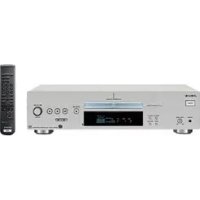
SCDXB770 - Cd player/recorder SONY - Free user manual and instructions
Find the device manual for free SCDXB770 SONY in PDF.

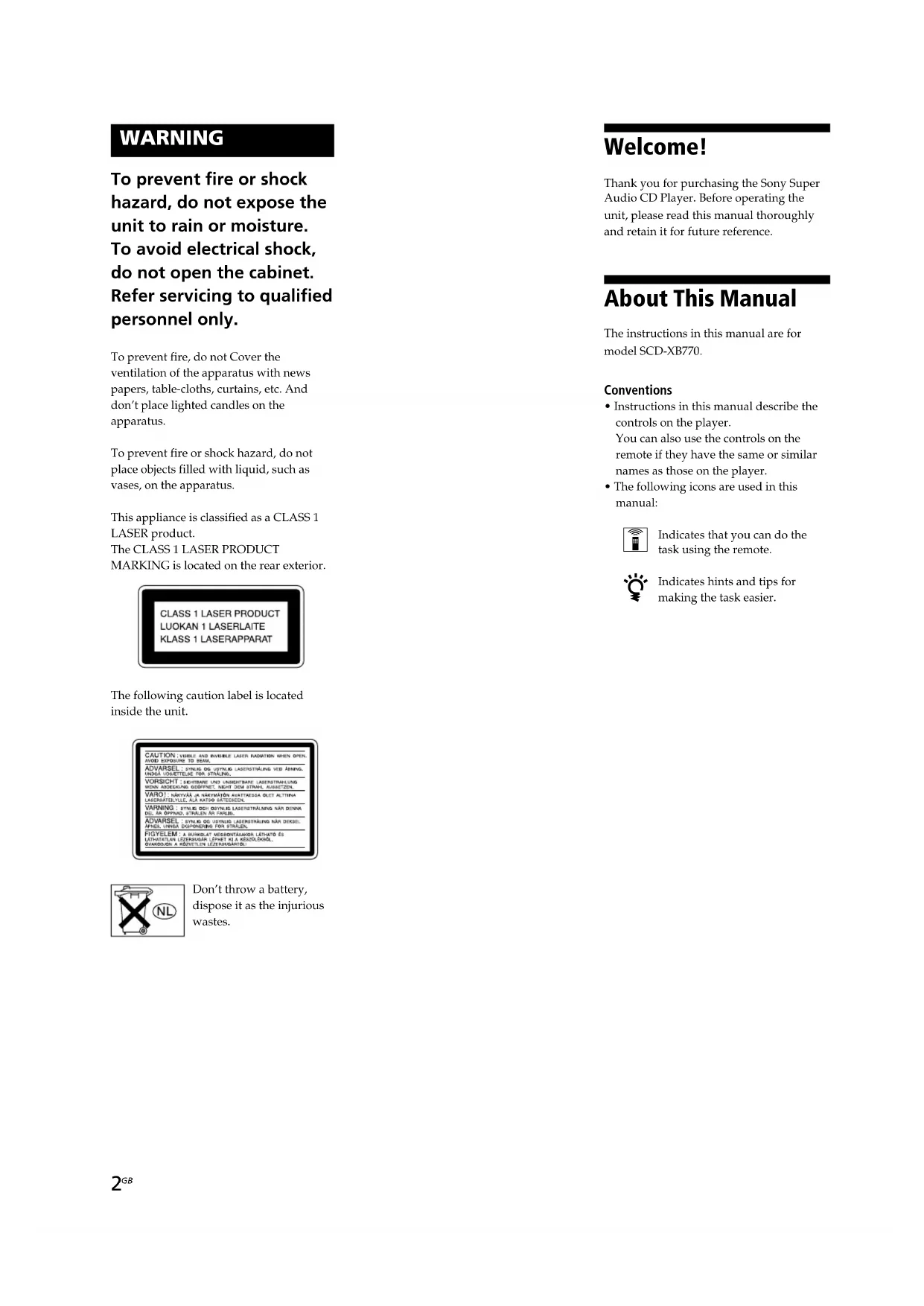


| Brand | SONY |
| Model | SCDXB770 |
| Product Type | Super Audio CD Player |
| Compatible Disc Formats | Super Audio CD (2-channel and multi-channel), standard CD, CD-R/RW (partially) |
| Analog Connectivity | ANALOG 2CH OUT jacks (RCA), ANALOG 5.1CH OUT jacks (RCA) |
| Digital Connectivity | Optical output (DIGITAL CD OUT OPTICAL), coaxial output (DIGITAL CD OUT COAXIAL) |
| Headphone Output | Yes, with level adjustment (PHONES LEVEL) |
| Analog Output Power | 2 Vrms (into 50 kΩ) |
| Dimensions (W × H × D) | 430 × 111 × 283 mm (including protrusions) |
| Power Supply | 230 V AC, 50/60 Hz |
| Power Consumption | 25 W |
| Laser | Semiconductor, Class 1, wavelengths 650 nm (SACD) and 780 nm (CD) |
| Playback Functions | Normal play, random, programmed, repeat (all tracks, single track, A-B), index search, time search |
| Multi-channel Management | Speaker configuration setting (Large/Small) and output level balance per speaker |
| Supplied Accessories | Remote control RM-SX700, audio cables (2 × RCA, 1 × black RCA), R06 (AA) batteries |
| Safety | Class 1 laser, do not open the chassis, avoid exposure to moisture |
| Maintenance | Clean the cabinet with a soft cloth and mild detergent; clean discs from center to edge |
| Repairability | Call qualified personnel for any repair |
| Frequency Response (SACD) | 2 Hz – 100 kHz |
| Signal-to-Noise Ratio (CD) | 99 dB or more |
Frequently Asked Questions - SCDXB770 SONY
User questions about SCDXB770 SONY
0 question about this device. Answer the ones you know or ask your own.
Ask a new question about this device
Download the instructions for your Cd player/recorder in PDF format for free! Find your manual SCDXB770 - SONY and take your electronic device back in hand. On this page are published all the documents necessary for the use of your device. SCDXB770 by SONY.
USER MANUAL SCDXB770 SONY
Super Audio CD Player
Operating Instructions GB
Mode d'emploi FR
Bedienungsanleitung DE
Manual de instrucciones ES

SUPER AUDIO CD

DIGITAL AUDIO TEXT
SCD-XB770
WARNING
To prevent fire or shock hazard, do not expose the unit to rain or moisture. To avoid electrical shock, do not open the cabinet. Refer servicing to qualified personnel only.
To prevent fire, do not Cover the ventilation of the apparatus with news papers, table-cloths, curtains, etc. And don't place lighted candles on the apparatus.
To prevent fire or shock hazard, do not place objects filled with liquid, such as vases, on the apparatus.
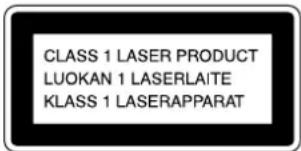
This appliance is classified as a CLASS 1 LASER product. The CLASS 1 LASER PRODUCT MARKING is located on the rear exterior.
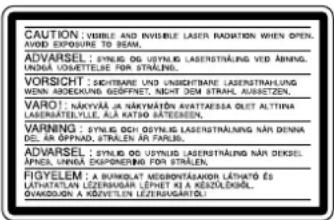
The following caution label is located inside the unit.
Don't throw a battery, dispose it as the injurious wastes.
Welcome!
Thank you for purchasing the Sony Super Audio CD Player. Before operating the unit, please read this manual thoroughly and retain it for future reference.
About This Manual
The instructions in this manual are for model SCD-XB770.
Conventions
- Instructions in this manual describe the controls on the player. You can also use the controls on the remote if they have the same or similar names as those on the player.
The following icons are used in this manual:

Indicates that you can do the task using the remote.

Indicates hints and tips for making the task easier.
Features
About the Super Audio CD
- Super Audio CD is a new high-quality audio disc standard where music is recorded in the DSD (Direct Stream Digital) format (conventional CDs are recorded in the PCM format). The DSD format, using a sampling frequency 64 times higher than that of a conventional CD, and with 1-bit quantization, achieves both a wide frequency range and a wide dynamic range across the audible frequency range, and so provides music reproduction extremely faithful to the original sound.
- The Super Audio CD has two types; a 2 channel stereo disc and a Multi-channel disc which holds up to 6 independent channels. The multi-channel characteristic of the Super Audio CD features a speaker allocation system basically similar to the 5.1 channel output of current AV systems.
Features of the player
This player is designed to play back 2-channel and multi-channel Super Audio CDs, and conventional CDs, and provides the following features:
- Mounted with a Discrete Dual Laser Optical Pickup, capable of reading a Super Audio CD or conventional CD depending on the exclusive wavelength.
- Quicker track access performance enabled by an advanced servo mechanism.
- A Multi-Channel Management function that allows you to adjust the multi-channel playback environment according to the allocation and size of your speakers.
- A Super Audio D/A Converter and Direct Digital Sync System, which allows higher-quality sound reproduction.
Others
- A Super Audio CD can mark up to 255 track/index numbers. This feature applies to SCD-XB770.
- The supplied remote is capable of controlling both the SCD-XB770 and a conventional Sony CD player.
TABLE OF CONTENTS
Getting Started 4
Before You Start the Hookup 4
Hooking Up the Audio Components 5
Location and Functions of Parts 8
Front Panel Parts Descriptions 8
Rear Panel Parts Descriptions 10
Remote Parts Descriptions 11
Playing Discs 12
Compatible Disc Types 12
Playing a Disc 14
Using the Display 15
Locating a Specific Track 18
Locating a Particular Point in a Track 18
Playing Tracks Repeatedly 19
Playing Tracks in Random Order (Shuffle Play) 20
Creating Your Own Programme (Programme Play) 21
Listening to a Multi-channel Super Audio CD (Multi-channel management function) 22
Additional Information 25
Precautions 25
Notes on Discs 26
Troubleshooting 27
Specifications 27
Index 28
Getting Started
This chapter provides information on the supplied accessories and how to connect various audio components to the Super Audio CD player. Be sure to read this chapter thoroughly before you actually connect anything to the player.
Before You Start the Hookup
Checking the supplied accessories
This player comes with the following items:
Audio connecting cord
phono jack · 2 (Red and White) phono jack · 2 (Red and White) (2)
phono jack · 1 (Black) phono jack · 1 (Black) (2)
Remote commander RM-SX700 (1)
R06 (size-AA) batteries (2)
Inserting batteries into the remote
Insert two R06 (size-AA) batteries into the battery compartment with the + and - correctly oriented to the markings. When using the remote, point it at the remote sensor on the player.
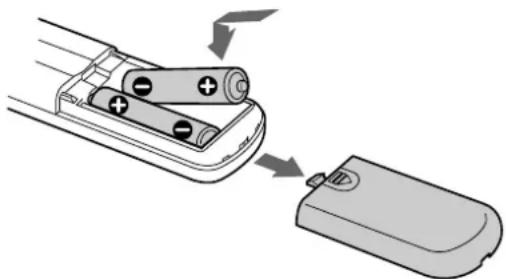

When to replace the batteries
Under normal conditions, the batteries should last for about six months. When the remote no longer operates the player, replace both batteries with new ones.
Notes
- Do not leave the remote in an extremely hot or a humid place.
- Do not drop any foreign object into the remote casing, particularly when replacing the batteries.
- Do not use a new battery with an old one.
- Do not expose the remote sensor to direct sunlight or lighting apparatus. Doing so may cause a malfunction.
- If you do not intend to use the remote for an extended period of time, remove the batteries to avoid possible damage from battery leakage and corrosion.
Hooking Up the Audio Components
Connect the Super Audio CD player to an audio component. Be sure to turn off the power of all components before making connections and connect securely to prevent noise.
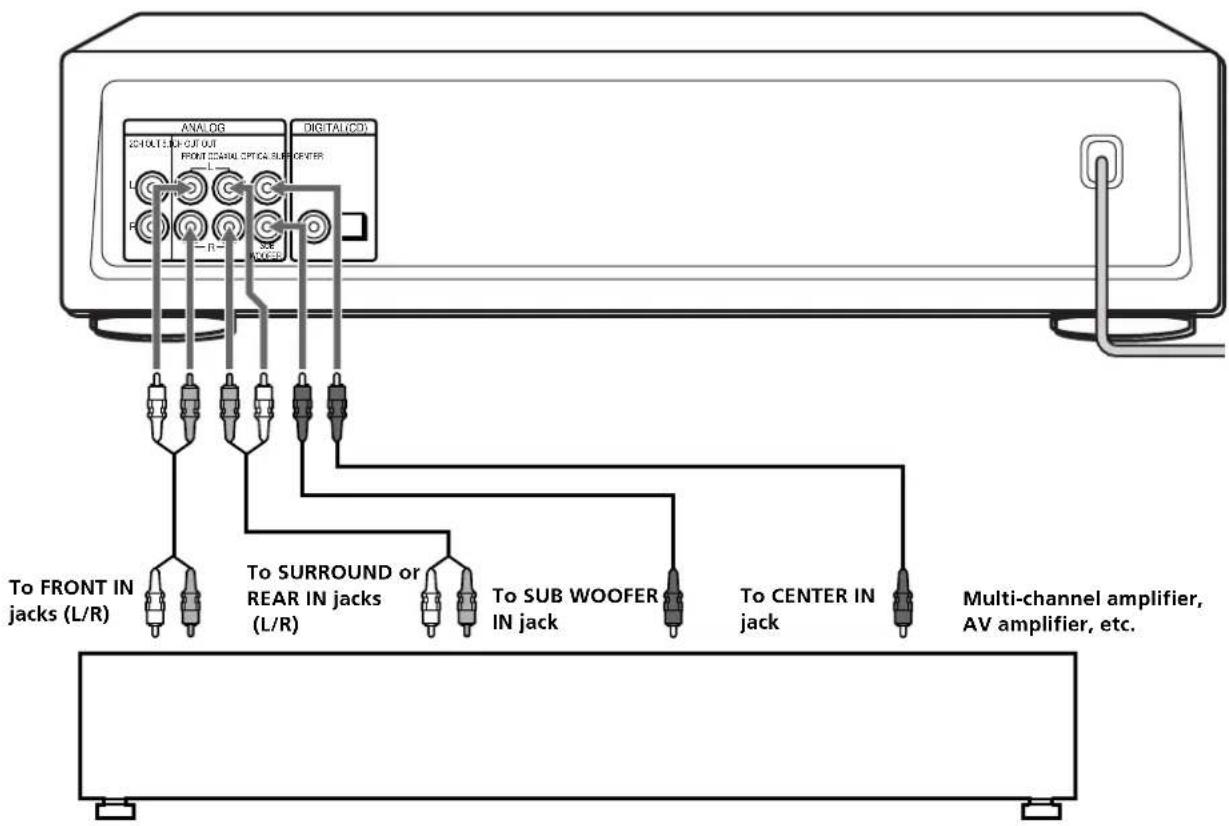
When you have an amplifier equipped with the 5.1CH input jacks (multi-channel amplifier, AV amplifier, etc.) and connect the player and the amplifier via ANALOG 5.1CH OUT jacks, you can play a multi-channel Super Audio CD and enjoy the multi-channel playback. For normal playback, connect the player and an amplifier via ANALOG 2CH OUT jacks.
Connecting via ANALOG 5.1CH OUT jacks
Use audio connecting cords for this connection. Connect the ANALOG 5.1CH OUT jacks (FRONT L/R, SURR L/R, CENTER, SUBWOOFER) to the corresponding jacks of your amplifier. For FRONT or SURR connection, use the connecting cords (Red and White jacks) and be sure to match the colour-coded pin to the appropriate jacks: white (left) to white and red (right) to red. For CENTER and SUB WOOFER connection, use the connecting cords (Black).
FRONT or SURR connection
Audio connecting cords (Red and White) (supplied)

CENTER or SUB WOOFER connection
Audio connecting cords (Black) (supplied)

Notes
- When you make the Multi-channel connection, connect the ANALOG 2CH OUT jacks also using another audio connecting cord so that you can play a CD (or SACD) when you set the input selector of your amplifier to CD (or SACD) input.
- During playback of a conventional CD or a 2CH Super Audio CD, the same signal that is output from the ANALOG 2CH OUT jacks is also output from the ANALOG 5.1CH FRONT L/R jacks.
- During playback of a Multi-channel Super Audio CD, the same signal that is output from the ANALOG 5.1CH FRONT L/R jacks is also output from the ANALOG 2CH OUT jacks. (The down mixed signal of the Multi-channel signal is not played back.)
There are 5CH,4CH,and 3CH Super Audio CD.When you play these disc, the signal does not output from all the jacks of the ANALOG 5.1CH OUT.For details of the playback, see the cover or instructions of the Super Audio CD.
Hooking Up the Audio Components
Connecting via ANALOG 2CH OUT jacks
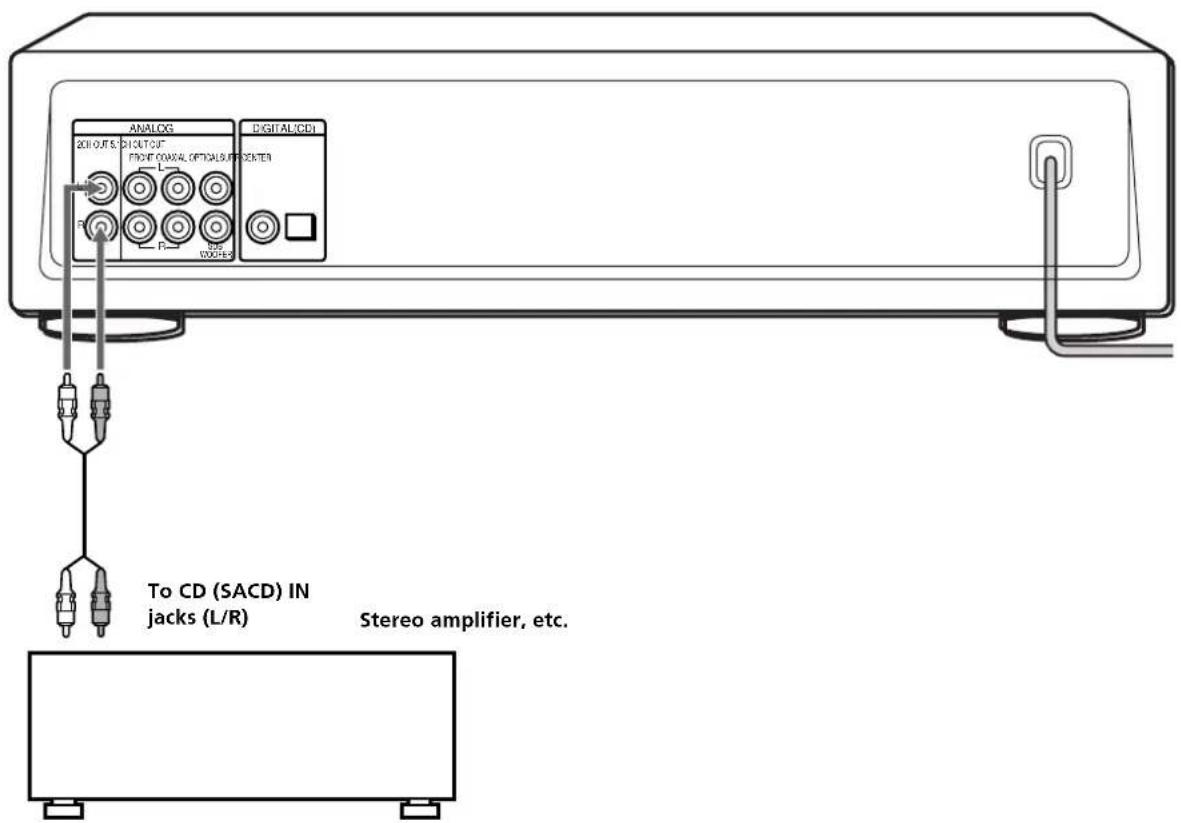
Use an audio connecting cords for this connection. Connect the ANALOG 2CH OUT L/R jacks to the CD (SACD) input jacks of your amplifier. Be sure to match the colour-coded pin to the appropriate jacks: white (left) to white and red (right) to red.
Audio connecting cords (Red and White) (not supplied*)

- If you do not make the ANALOG 5.1 CH connection (page 5), you can use the suppplied audio connecting cable for the ANALOG 2CH connection.
Connecting via DIGITAL (CD) OUT OPTICAL connector
Use an optical digital cable for this connection. When connecting the optical digital cable to the DIGITAL (CD) OUT OPTICAL connector, take the cap off the connectors and push the cable plugs in until they click into place.
Be careful not to bend or twist the optical cable.
Optical digital cable (not supplied)

Note
Only the audio signals of conventional CDs can be output from the DIGITAL (CD) OUT connectors. Those of the Super Audio CD cannot be output through DIGITAL (CD) OUT.
Connecting via DIGITAL (CD) OUT COAXIAL connector
Use a coaxial digital cable to connect the audio components equipped with coaxial digital input connectors.
Coaxial digital cable (not supplied)

Note
Only the audio signals of conventional CDs can be output from the DIGITAL (CD) OUT connectors. Those of the Super Audio CD cannot be output through DIGITAL (CD) OUT.
Connecting the AC power cord
Connect the AC power cord to a wall outlet.
Location and Functions of Parts
This chapter tells you about the location and functions of the various buttons and controls on the front and rear panels and the supplied remote. Further details are provided on the pages indicated in parentheses. It also tells you about the information that appears in the display window.
Front Panel Parts Descriptions
1 POWER switch (14)
Press to turn on the player.
TIME/TEXT button (15)
Each time you press the button, the playing time of the track, the total remaining time on the disc, or TEXT information appears in the display.
3 SACD/CD button (12)
Each time you press the button, "SACD" or "CD" appears in the display. Select the type of CD you want to play.
4 Disc tray (14)
Press OPEN/CLOSE to open/close the disc tray.
5 Multi-channel indicator
Turns on when you turn on the player, or when the Multi-channel Super Audio CD is loaded and select the Multi-channel playback area by pressing MULTI/2CH.
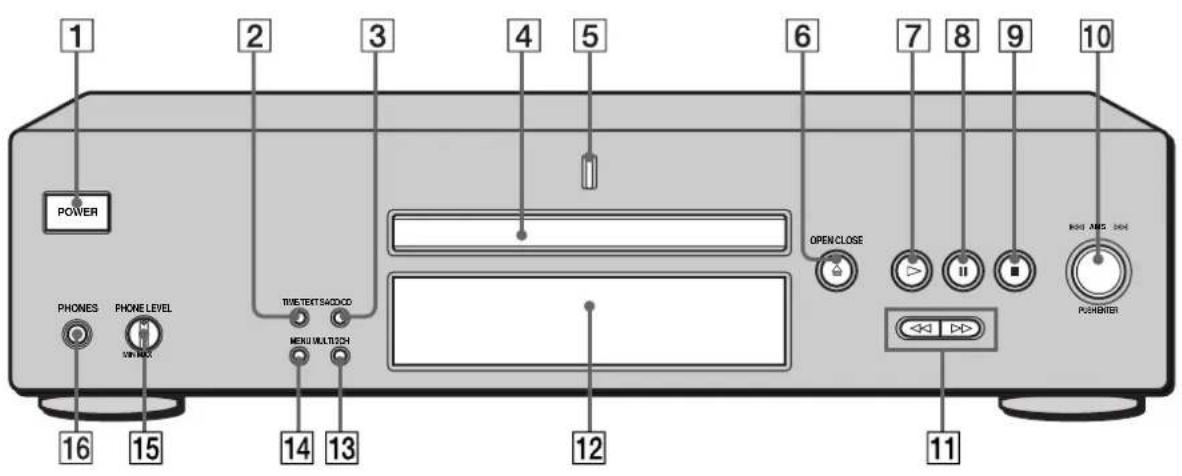
6 OPEN/CLOSE button (14)
Press to open the disc tray.
7 button (14)
Press to start play.
8 II button (14)
Press to pause play.
9 button (14)
Press to stop play.
10 AMS dial (AMS: Automatic Music Sensor) (13)
When you turn the AMS dial counterclockwise by one click, you go back to the preceding track; when you turn the AMS dial clockwise by one click, you go to the succeeding track.
11 / buttons (18)
Press to locate a portion you want to play within a track.
Display window (15)
Shows various information.
13 MULTI/2CH button (12)
Press to select the playback area when the 2 channel + Multi-channel Super Audio CD (page 13) is loaded.
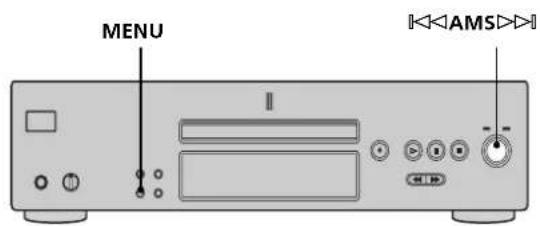
14 MENU (13)
Press to enter the menu.
15 PHONES LEVEL
Adjust the headphones volume.
16 PHONES
Connect the headphones.
During playback of a Multi-channel Super Audio CD, the same signal that is output from the ANALOG 5.1CH FRONT L/R jacks is output from the PHONES jack.
Rear Panel Parts Descriptions
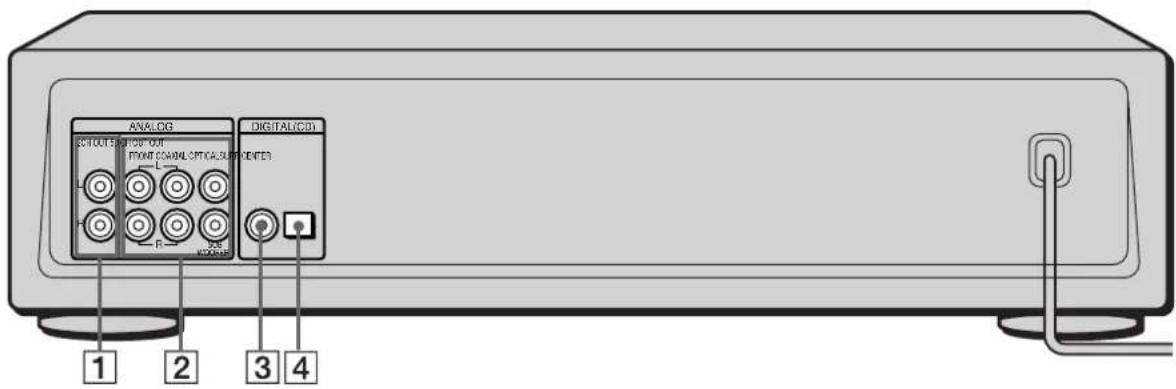
1 ANALOG 2CH OUT L/R jacks (6)
Connect to an audio component (stereo/2 channel) using the audio connecting cord.
2 ANALOG 5.1CH OUT jacks (5)
Connect to an amplifier equipped with the 5.1CH input jacks (Multi-channel amplifier, AV amplifier, etc.) using the audio connecting cords.
3 DIGITAL (CD) OUT COAXIAL connector (7)
Connect to an audio component using the coaxial digital cable.
4 DIGITAL (CD) OUT OPTICAL connector (7)
Connect to an audio component using an optical digital cable.
Note
Only the audio signals of the CD can be output from the DIGITAL (CD) OUT connectors shown in [3] and [4]. Those of the Super Audio CD cannot be output through DIGITAL (CD) OUT.
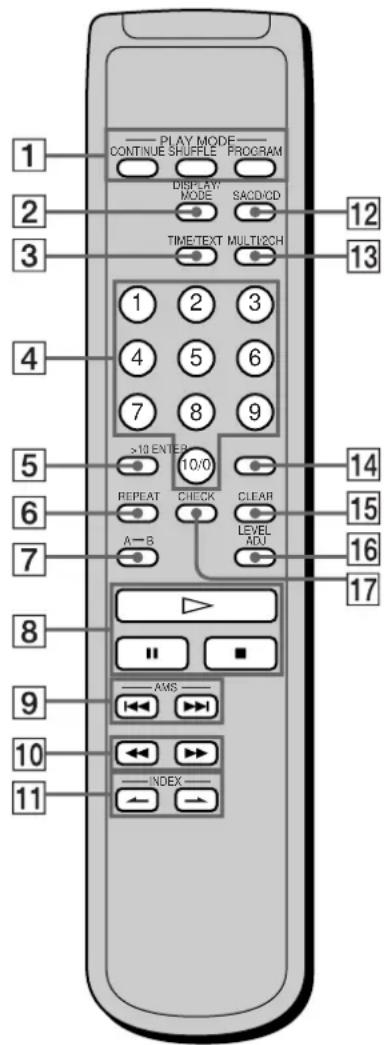
Remote Parts Descriptions
1 CONTINUE button (20)
Press to resume normal play from Shuffle Play or Programme Play.
SHUFFLE button (20)
Press to select Shuffle Play.
PROGRAM button (21)
Press to select Programme Play.
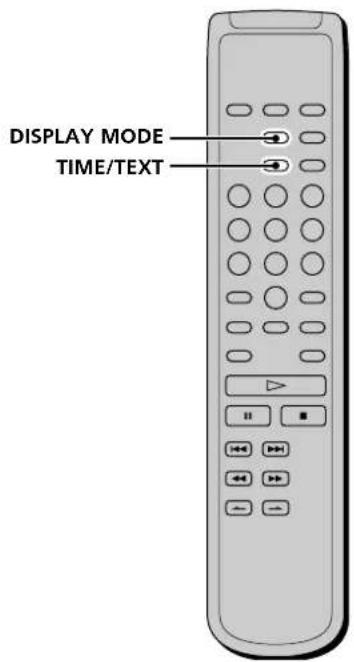
2 DISPLAY MODE button (16)
Press to turn off the information.
TIME/TEXT button (15)
Each time you press the button, the playing time of the track, the total remaining time on the disc, or TEXT information appears in the display.
4 Number buttons (18)
Press to enter the track numbers.
5>10button(18)
Press to locate a track numbered over 10.
6 REPEAT button (19)
Press repeatedly to play all tracks or only one track on the disc.
7 A B button (20)
Press to select Repeat A-B Play.
8 button (14)
Press to start play.
button (14)
Press to pause play.
■ button (14)
Press to stop play.
9 AMS I/AMS: Automatic Music Sensor)
buttons (18)
Press to locate a specific track.
10 / buttons (18)
Press to locate a portion you want to play within a track.
11 INDEX buttons (18)
Press to locate a specific point marked with an index signal when you play a disc that has index signals.
12 SACD/CD button (12)
Each time you press the button, "SACD" or "CD" appears in the display. Select the type of CD you want to play.
13 MULTI/2CH button (12)
Press to select the playback area when the 2 channel + Multi-channel Super Audio CD (page 13) is loaded.
14 ENTER button (24)
Press to decide the selection.
15 CLEAR button (21)
Press to delete a programmed track number.
LEVEL ADJ button (24)
Press to adjust the output level balance for the Multi-channel management function (page 22).
17 CHECK button (21)
Press to check the programmed order.
Playing Discs
This chapter explains the various ways to play discs.
Compatible Disc Types
You can play the following discs with this player. Depending on the type of disc to be played, select the appropriate indicator by pressing SACD/CD or MULTI/2CH (pages 14).
Classification by the layer configuration
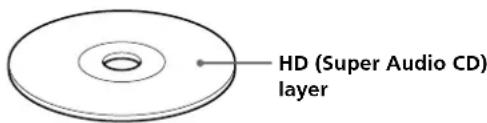
Super Audio CD (single layer disc)
This disc consists of a single HD (high density) layer. When you play this disc, the player is set to the Super Audio CD playback mode automatically.
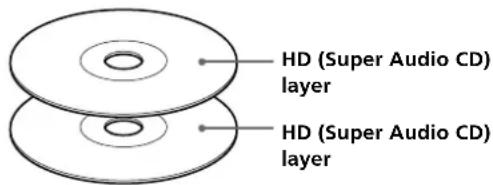
Super Audio CD (dual layer disc)
This disc consists of dual HD layers and is capable of extended play over long periods. When you play this disc, the player is set to the Super Audio CD playback mode automatically. Also, as the dual layer disc consists of dual HD layers on one side only, it is not necessary to turn the disc over.
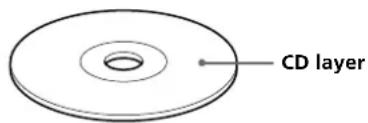
Conventional CD
This disc is the standard format. When you play this disc, the player is set to the Conventional CD playback mode automatically.
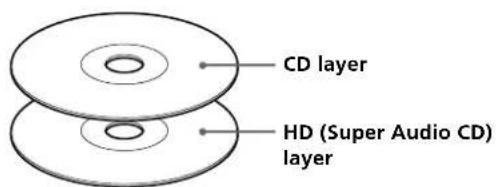
Super Audio CD + CD (Hybrid disc)
This disc consists of an HD layer and a CD layer. Press SACD/CD to select the layer you want to listen to. Also, as the dual layers are on one side, it is not necessary to turn the disc over. You can play the CD layer using a conventional CD player.
Classification by the channel configuration of the Super Audio CD
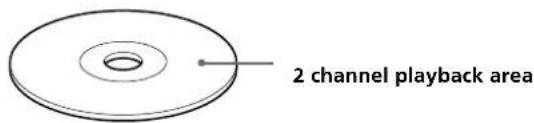
2 channel Super Audio CD
This disc consists of the 2 channel playback area. When you play this disc, the player is set to the 2 channel playback mode automatically.
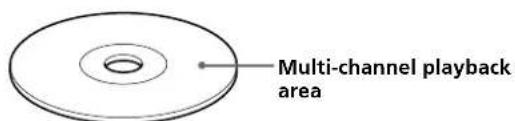
Multi-channel Super Audio CD
This disc consists of the multi-channel playback area. When you play this disc, the player is set to the multichannel playback mode automatically.
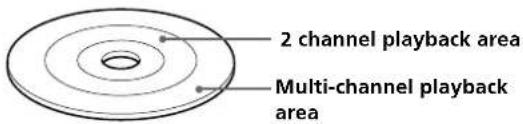
2 channel + Multi-channel Super Audio CD
This disc consists of the 2 channel playback area and the multi-channel playback area.
Press MULTI/2CH to select the playback area you want to listen to.
You can select the default playback area (2 channel playback or multi-channel playback area).
1 During stop mode, press MENU.
2 Turn until "M/2CH SELECT" appears in the display.
3 Press . The current playback area appears.
4 Turn to select desired playback area, then press
Incompatible Discs
This player cannot play the following discs. If you try to play them, the error message "TOC Error" or "NO DISC" will appear or there will be no sound.
CD-ROM
DVD,etc.
Playing a Disc
The operations for normal play and the basic operations during play are explained below.
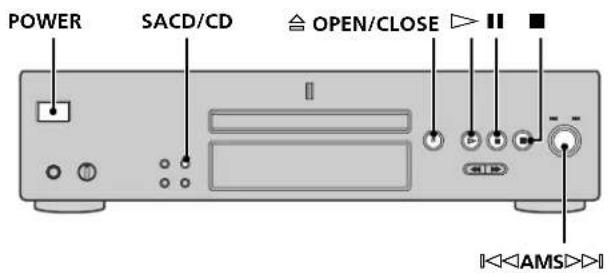
1 Turn on the amplifier. Turn down the volume level to the lowest.
2 Select the player position using the input selector on the amplifier.
3 Press POWER to turn on the player.
4 Press OPEN/CLOSE to open the disc tray, and place a disc on the tray.
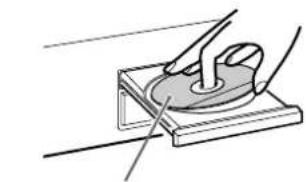
With the label side up
5 Press SACD/CD to select the SACD or CD.
Each time you press the button, the SACD or CD appears alternately in the display. Select the type of disc on the tray. For details, see page 12.
6 Press
Playback starts from the first track. If you want to start playing from a specific track, turn to select the track number before pressing
7 Adjust the volume on the amplifier.
Basic operations during play
| To Press |
| Stop play■ |
| Pause play■ |
| Resume play after pausing■or▷ |
| Locate a succeeding track Turn ▪<AMS▷□clockwise |
| Locate the beginning of the Turn ▪<AMS▷□current track or a preceding counterclockwise track |
| Eject the disc △OPEN/CLOSE |
If you turn on the player when a disc is already loaded
Playback starts automatically. If you connect a commercially available timer, you can set it to start playing the disc at any time you want.
To select a layer you want to listen to when playing a hybrid disc (page 13)
After you stop play using , press SACD/CD repeatedly to light either the "SACD" or "CD."
To select a playback area you want to listen to when playing a 2 channel + Multi-channel Super Audio CD (page 13)
After you stop play using, press MULTI/2CH repeatedly to light either the "MULTI CH" or "2 CH."
Note
During playback, increase the volume level gradually starting from the lowest level. The output from this unit may contain band width that are out of the normal listening range. This may cause damage to the speakers or ears.
Using the Display
The display window shows various information about the disc or track being played. This section describes the current disc information and information that appears for each play status.
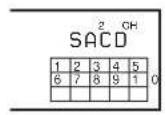
Disc information when a disc is loaded
Depending on the disc that is currently loaded, the display shows as follows:
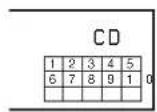
2 channel Super Audio CD
Multi-channel Super Audio CD
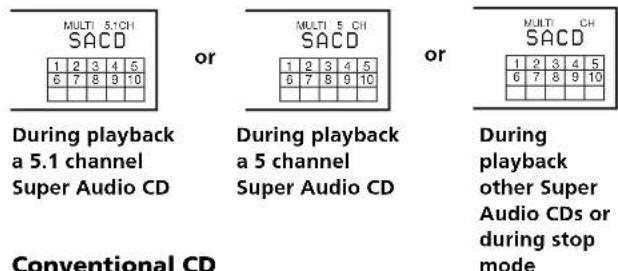
Displaying information while the player is stopped
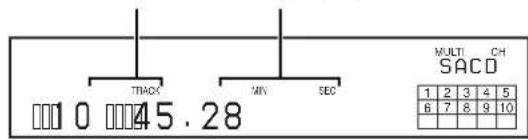
Press TIME/TEXT.
The display shows the total number of tracks and total playing time.
Total number of tracks Total playing time
Using the Display
Displaying information while the player is playing
Press TIME/TEXT.
Each time you press the button, the current track number and its elapsed time or remaining time appears, or the total remaining time for the disc appears in the display. When the player detects a Multi-channel Super Audio CD, the channel information appears before the default display appears.
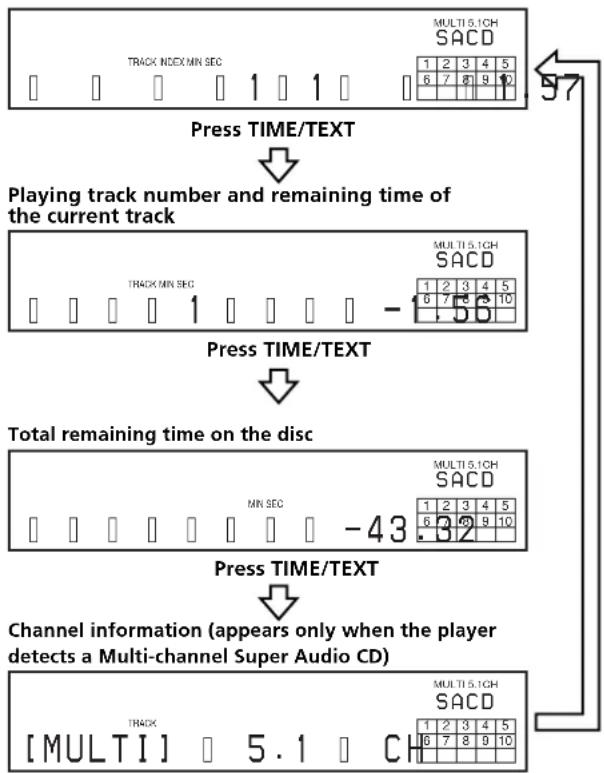
Playing track number and elapsed playing time of the current track (default display)
Turning off the information in the display

Each time you press DISPLAY MODE on the remote while playing a disc, the display turns off and on alternately.
Even when the display is turned off, the display turns on if you pause or stop play. When you resume play, the display turns off again.
Before you start playing, when you press DISPLAY MODE to turn off the display, "DISPLAY OFF" appears, and when you press the button to turn on the display, "DISPLAY ON" appears.
Displaying the information of a TEXT disc

TEXT discs contain information, such as the disc name or artist name, as well as the audio signals. This player can display the disc name, artist name, and current track name as TEXT information.
When the player detects a TEXT disc, "TEXT" appears in the display. If your TEXT disc has several languages, "TEXT" and "MULTI" appear in the display. When you want to check the information in another language, see "Displaying the information of a TEXT disc in other languages" on page 17.
Displaying the information of a TEXT disc in stop mode
Press TIME/TEXT.
Each time you press the button, the disc name or artist name appears in the display. When you select the artist name, "ART." appears in the display.
- Before you start playing
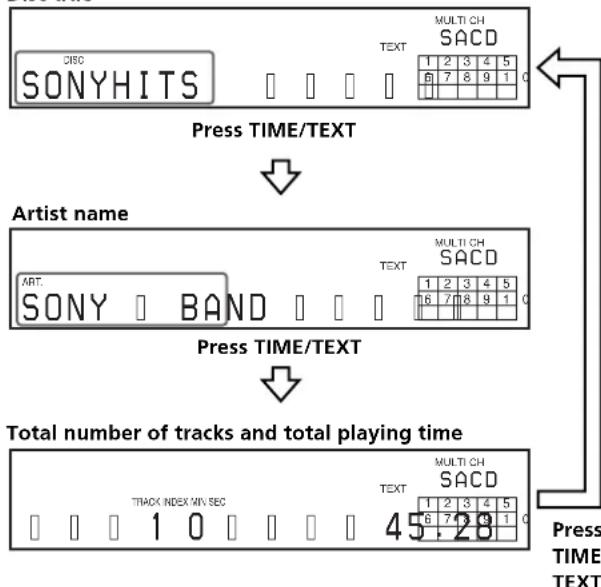
Disc title
Display information of a TEXT disc while playing a disc
The current track name appears. If the disc name has more than 15 characters, the first 14 characters will remain after the name scrolls by in the display.
When the player detects a Multi-channel Super Audio CD, the channel information appears before the playing time of the current track appears.
While playing a disc
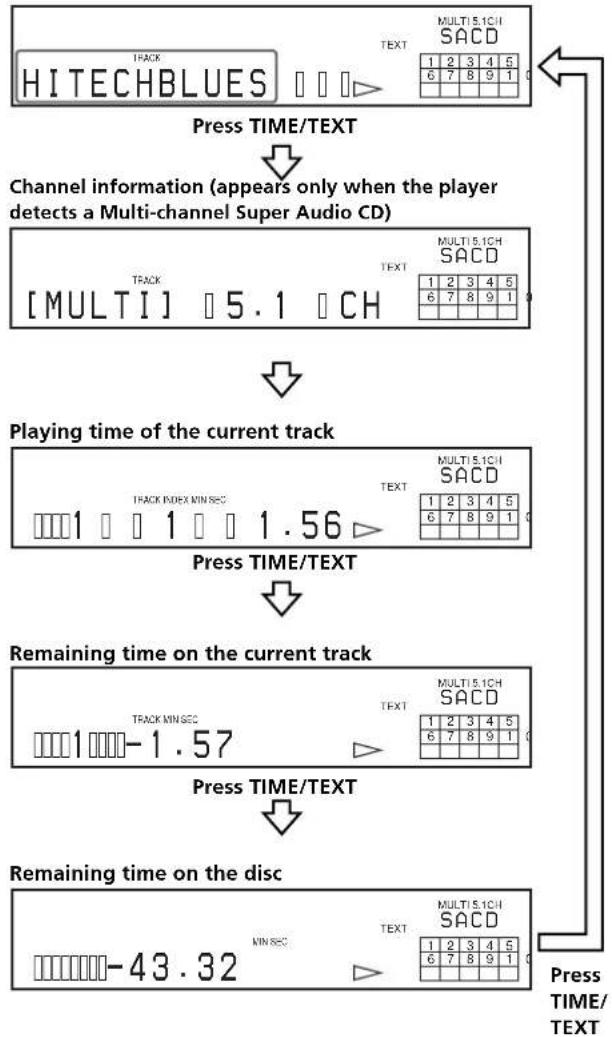
Track title
Notes
- The display may not show all the characters, depending on the disc.
- This player can display only the disc name, artist name, and track names from TEXT discs. Other information cannot be displayed.
Displaying the information of a TEXT disc in other languages
You can change the displayed language if the TEXT disc has multi language capacity. When the player detects such a TEXT disc, "TEXT" and "MULTI" appear in the display. Change the language according to the procedures below.
1 Press MENU in stop mode.
2 Turn AMS until "LANGUAGE" appears in the display.
3 Press 1 AMS
The current selected language (English, French, German, etc.) flashes.
If the player cannot display the language used in a TEXT disc, "Other Lang" appears in the display.
4 Turn until the desired language appears in the display.
5 Press AMS
After a few seconds, the information appears in the selected language.
Locating a Specific Track
During stop or play mode, you can locate any track to be played.
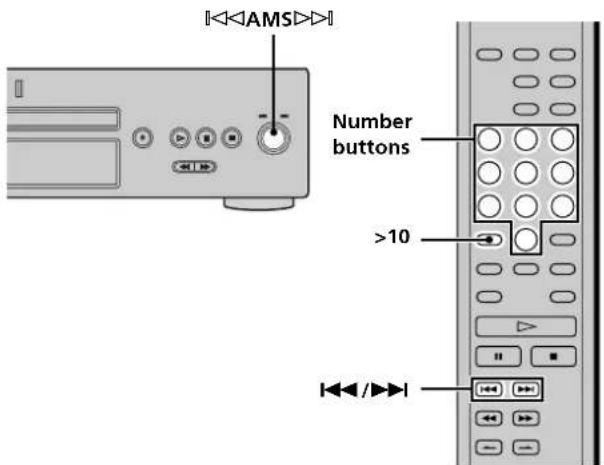
| To locate | You need to |
| The next or succeeding tracks | Turn ↑ AMS ➔ clockwise until you find the track. When using the remote, press ➔ repeatedly until you find the track. |
| The current or preceding tracks | Turn ↑ AMS ➔ counterclockwise until you find the track. When using the remote, press ➔ repeatedly until you find the track. |
| A specific track directly | Turn ↑ AMS ➔ until you find the track number you want. When using the remote, press ➔ or ➔ repeatedly until you find the track. |
Locating a track directly by entering the track number
Press the number button(s) to enter the track number.

To enter a track number over 11
1 Press >10
2 Enter the corresponding digits.
To enter 0, press 10 / 0 instead.
Examples:
To play track number 30, press >10 , then 3 and 10/0 .
To play track number 100, press >10 twice, then 1, and 10/0 twice.
Locating a Particular Point in a Track
You can locate a particular point in a track during play or play pause.
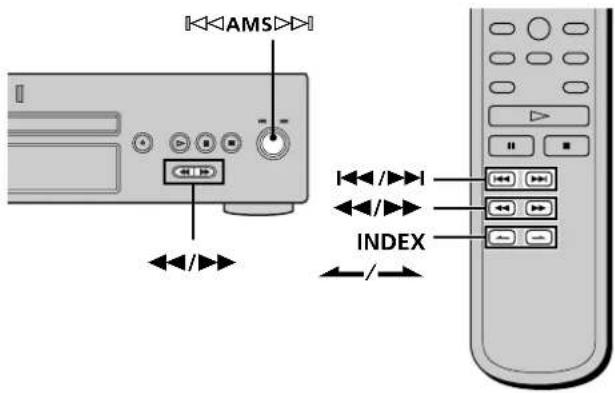
Locating a point while monitoring the sound (Search)
Press and hold / during play.
You will hear intermittent playback as the disc goes forward or reverses.
When you reach the desired point, release the button.
Locating a point by observing the time indication (High-Speed Search)
Press and hold / during play pause.
You will not hear the playback sound.

When "Over!!" appears in the display
The disc has reached its end. Press or to go back.
Note
Tracks that are only a few seconds long may be too short for monitoring. In this case, the player may not search correctly.
Locating a point using the index function (Index Search)
Press INDEX or INDEX repeatedly in play or pause mode.

What is an INDEX?
Some SACD or CD are provided with an index marking system which divides tracks or discs into smaller segments. This is especially useful when you want to locate a certain point within a long track (in classical music for example). The index search function works only when you use a commercially available indexed discs (usually indicated on the label).
Locating a point by setting the start time (Time Search)
1 Press I< / (or turn AMS to select the desired track in stop mode.
2 Press and hold / to set the time to start play while looking at the display.
You can set the time from the beginning of the desired a track when you press at first, and set the time from the end of the desired track backward's when you press at first.
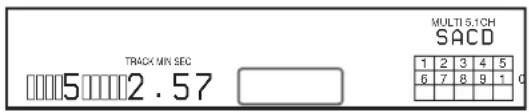
2 Press
Play will start at the time search.
Playing Tracks Repeatedly

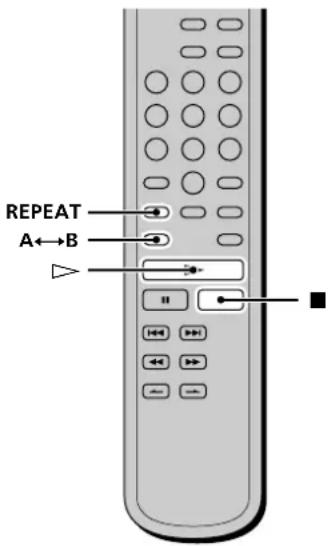
You can play an entire disc or portions thereof repeatedly. This function can be used with Shuffle Play to repeat all the tracks in random order (page 20), or with Programme Play to repeat all the tracks in a programme (page 21). You can also repeat a specific track or portion within a track.
Note
If you turn off the player or disconnect the mains lead, the player will store the last setting of repeat play ("Repeat All" or "Repeat 1") and recall it the next time you turn on the player. However, the setting of the Repeat A-B Play will be cancelled if you turn off the player or disconnect the mains lead.
Repeating all the tracks on the disc (Repeat All Play)
Press REPEAT once, then press
"REPEAT" appears in the display and Repeat All Play starts.
The repeat play changes depending on the play mode you select.
| When the play mode is | The player repeats |
| Normal play (page 14) | All the tracks in sequence |
| Shuffle Play (page 20) | All the tracks in random order |
| Programme Play (page 21) | All the tracks in the programme in sequence |
To stop Repeat All Play
Press
To resume normal play
Press REPEAT repeatedly until "REPEAT" goes off.
Playing Tracks Repeatedly
Repeating the current track (Repeat 1 Play)
While the track you want to repeat is being played, press REPEAT repeatedly until "REPEAT 1" appears in the display.
Repeat 1 Play starts.
To stop Repeat 1 Play
Press x.
To resume normal play
Press REPEAT repeatedly until "REPEAT 1" goes off.
Repeating a specific portion within a track (Repeat A-B Play)
You can specify one portion within a track to be played repeatedly. Note that the portion that you specify must be within the boundaries of a single track.
1 While the player is playing, press A B at the starting point (point A) of the portion to be played repeatedly.
"REPEAT" appears and "A" flashes in the display.
2 Continue playing the track (or press M) to locate the ending point (point B), then press A B.
"REPEAT A-B" appears and Repeat A-B Play starts.
To stop Repeat A-B Play and resume normal play Press REPEAT or x.
You can set a new starting point and ending point during Repeat A-B Play
You can change the current ending point to a new starting point, then specify a new ending point to repeat another portion right after the current portion.
1 During Repeat A-B Play, press A B The current ending point changes to the new starting point (point A). "REPEAT" lights up and "A-" flashes in the display.
2 Locate the new ending point (point B) and press A B "REPEAT A-B" lights up and the player starts to repeat the newly specified portion.
When you want to restart from the starting point A, press H during A B repeat.
Playing Tracks in Random Order (Shuffle Play)
When you select Shuffle Play, the player plays all the tracks on the disc in random order.
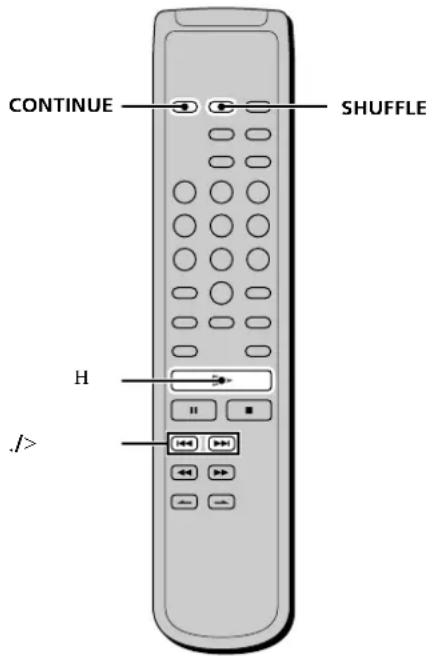
1 Press SHUFFLE in stop mode.
2 Press H.
Shuffle Play starts.
"..." appears while the player is "shuffling" the tracks.
The player will stop after playing all the tracks once.
To resume normal play
Press CONTINUE.

You can locate tracks during Shuffle Play
Press.>
Press > to locate the next track or press. to locate the beginning of the current track. The player does not go back to tracks which have already been played.
Creating Your Own Programme (Programme Play)
You can pick out the tracks that you like and specify the playback order in a programme containing up to 32 tracks (or 999 min. 59 sec. in total programme time)
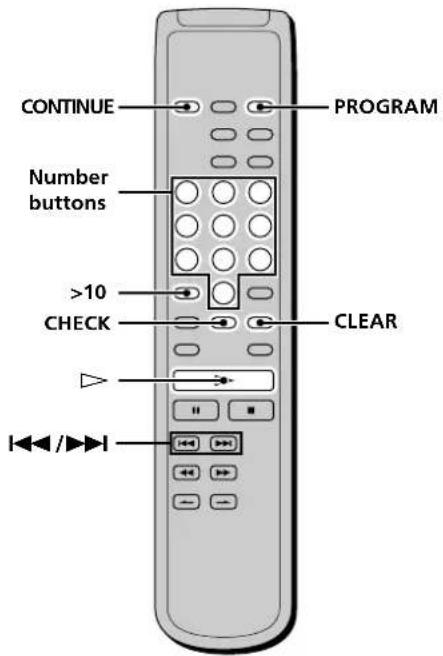
1 Press PROGRAM in stop mode. "PROGRAM" appears in the display.
2 Press the number buttons to enter the track number.
If you entered the wrong track number
Press CLEAR to erase the track number and reenter the correct track number using the number buttons.
To select a track number over 11
Press >10 (page 18).
3 Repeat step 2 to enter other tracks.
Each time you enter a track number, the total programme time appears in the display.
4 Press
Programme Play starts.
To resume normal play
Press CONTINUE.
The programme remains even after Programme Play ends Press to play from the beginning of the programme again. The programme remains even if you stop play.
Note
If you turn off the player, disconnect the mains lead, or press OPEN/CLOSE, the programme will be erased.
Checking the contents of the programme
Before you start playing or while the player is playing, press CHECK.
Each time you press the button, the track numbers will appear in the display in the programmed order. When you press CHECK while the player is playing, the track number appears from the next track numbers of the current playing track number.
Changing the contents of the programme
You can change the contents of the programme in stop mode.
| To | Do the following: |
| Erase a track | 1 Press CHECK repeatedly until the track number you want to erase appears. 2 Press CLEAR. |
| Erase from the last track in the programme | Press CLEAR. Each time you press the button, the last track of the programme is erased. |
| Add a track to the end of the programme | Press ↓/▶ to select the track you want to add, then press PROGRAM. When using the remote, press the number button of the track to be added. |
| Erase all tracks | Hold down CLEAR or ■ (for about 2 seconds) until "Prog CLEAR" appears in the display. |
Listening to a Multi-channel Super Audio CD (Multi-channel management function)
This player is equipped with a Multi-channel management function that sets the playback mode of the Super Audio CD by the DSD-DSP (built into the player) according to the layout or size of your speaker.
Example of the speaker layout
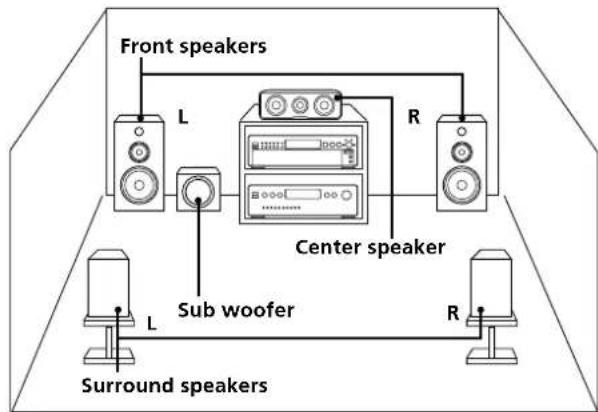
To set the Multi-channel management:
1 Select the appropriate preset playback mode (2 channel playback or Multi-channel playback).
2 Adjust the output level balance of each speaker (only when you select the Multi-channel playback mode).
Notes
- This features only work when you play the Super Audio CD.
- You may not be able to adjust the output level balance depending on the speaker layout mode that you selected.
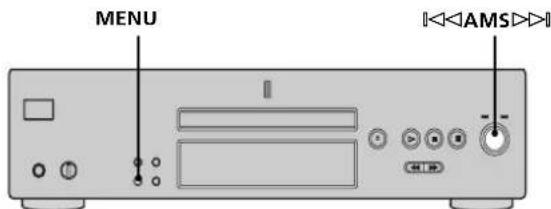
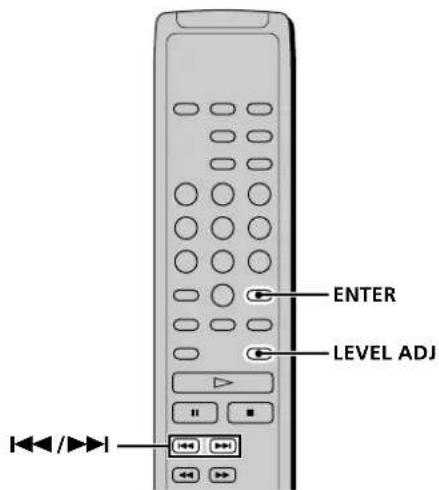
Selecting 2 channel playback mode
1 Press MENU.
2 Turn AMS until "2CH SPK MODE" appears in the display.
3 Press The playback mode appears in the display.
| Playback mode | Front speakers | Sub woofer |
| 2CH Direct | Each signal outputs directly from front speakers. No signal outputs from the Sub woofer. | |
| 2CH + SW | ○ | ○ |
4 Turn AMS until desired mode appears in the display.
5 Press AMS
Note
You cannot operate this function when the player is in the CD or Multi-channel playback mode. Operate this function when the player is in the 2 channel Super Audio CD playback mode, the disc tray is opened, or no discs are in the player.
Selecting Multi-channel playback mode
1 Press MENU.
2 Turn until "MCH SPK MODE" appears in the display.
3 Press The playback mode appears in the display.
| Playback mode | Front speakers | Center speaker | Surround speakers | Subwoofer |
| MCH Direct | Each signal outputs directly from each speaker. | |||
| 5-Large + SW | Large | Large | Large | ○ |
| 5-Large | Large | Large | Large | — |
| 5-Small + SW | Small | Small | Small | ○ |
| FRT - Large +SW | Large | Small | Small | ○ |
| FRT - Large | Large | Small | Small | — |
| No-CNTR + SW | Large | — | Large | ○ |
| No-CNTR | Large | — | Large | — |
About "Large" or "Small" speaker
A "Large" speaker is a speaker that can reproduce bass frequencies plenitfully. If you select "Small" for the surround speakers, the bass frequencies will come from the front speakers and/or sub woofer. For normal use, select "MCH Direct" or set all the speakers to "Large" (ex. "5 - Large + SW," "5 - Large," etc.). If the sound is noisy or the Multi-channel playback is not effective while playing a Multi-channel Super Audio CD, change the settings of the speakers concerned to "Small."
4 Turn until desired mode appears in the display.
5 Press
The output level balance setting display appears. To set the output level balance, go to Step 4 in "Adjusting the output level balance on the front panel of the player" on page 23 or Step 2 in "Adjusting the output level from the remote" on page 24. To return to the normal display, press MENU.
Notes
- The Multi-channel management function does not work when you select "MCH Direct" (you cannot set the output level balance of each speaker).
- The front speaker setting is set to "Large" automatically when you set the Subwoofer to "—"
-
When you play a track that does not contain the LFE* signal, the signal for the Subwoofer does not output. Therefore, when you select "MCH Direct," "5 - Large + SW," or "No - CNTR + SW," no signal outputs from the Subwoofer. However, when you select "5 - Small + SW" or "FRT - Large + SW" (when you set the speaker setting to "Small"), the bass frequencies will come from the subwoofer.
-
Low Frequency Enhancement (described as ".1 CH")
Adjusting the output level balance of each speaker
You can adjust following items with the Multi-channel management function:
CNTR BALANCE
The relative output level balance between the front speakers (FRONT L/R) and the center speaker (CENTER)
SURR BALANCE
The relative output level balance between the front speakers (FRONT L/R) and the surround speakers (SURR L/R)
SW BALANCE
The relative output level balance between the front speakers (FRONT L/R) and the sub woofer (SUB WOOFER)
Note
Some adjustment may not work depending on the Multi-channel playback mode that you selected.
Adjusting the output level balance on the front panel of the player
You can adjust the output level balance of each speaker while listening during playback. You can also adjust while listening to the test tone during stop mode.
1 Press MENU.
2 Turn 1 1 AMS until "LEVEL ADJUST" appears in the display.
3 Press
During playback, go to Step 6.
4 Turn 1 1 AMS until "TONE ON" appears in the display.
5 Press
The test tone issues from the speakers in sequence with the speaker type appearing in the display.
6 Turn 1 1 AMS until the desired item appears in the display.
Select the item from "CNTR BALANCE," "SURR BALANCE," or "SW BALANCE."
Note
When you set the Subwoofer to "—" in the Multi-channel playback mode (page 22), "SW BALANCE" does not appear. Similarly, "CNTR BALANCE" or "SURR BALANCE" does not appear when you set the corresponding speaker to "—."
Listening to the Multi-channel Super Audio CD
7 Press
The balance adjustment display appears.
In stop mode, the test tone is output from the selected speaker.
Example: When you select "SURR BALANCE"
during stop mode, the test tone is output from the front speakers and surround speakers.
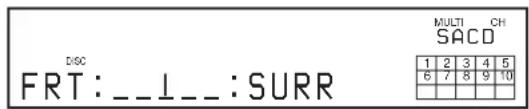
8 Turn to adjust the output level.
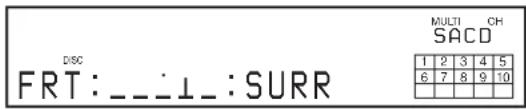
9 Press
The player status returns to Step 6.
Repeat Step 6 through 9 for more adjustments.
10 Press MENU after you finish adjusting.
The display returns to the normal display.
Adjusting the output level from the remote
You can adjust the output level of each speaker from the listening position by using the supplied remote.
1 Press LEVEL ADJ during playback or stop mode.
During playback, go to Step 4.
2 Press 山 / 山 repeatedly until "TONE ON" appears in the display.
3 Press ENTER.
The test tone issues from the speakers in sequence with the speaker type appearing in the display.
4 Press I / repeatedly until the desired item appears in the display.
Select the item from "CNTR BALANCE," "SURR BALANCE," or "SW BALANCE."
Note
When you set the Subwoofer to "—" in the Multi-channel playback mode (page 22), "SW BALANCE" does not appear. Similarly, "CNTR BALANCE" or "SURR BALANCE" does not appear when you set the corresponding speaker to "—"
5 Press ENTER.
The balance adjustment display appears.
In stop mode, the test tone is output from the selected speaker.
Example: When you select "SURR BALANCE" during stop mode, the test tone is output from the front speakers and surround speakers.
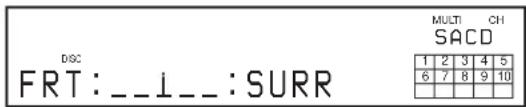
6 Press 山 / 山 山 repeatedly to adjust the output level.
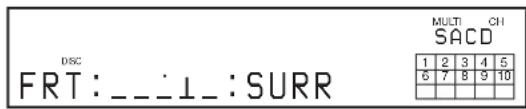
7 Press ENTER.
The player status returns to Step 4.
Repeat Step 4 through 7 for more adjustments.
Press LEVEL ADJ after you finish adjusting.
The display returns to the normal display.
Additional Information
This chapter provides additional information that will help you understand and maintain your Super Audio CD player.
Precautions
On safety
- Caution — The use of optical instruments with this product will increase eye hazard.
- Should any solid object or liquid fall into the cabinet, unplug the player and have it checked by qualified personnel before operating it any further.
- AC power cord must be changed only at the qualified service shop.
- The unit is not disconnected from the AC power source (mains) as long as it is connected to the wall outlet, even if the unit itself has been turned off.
On power sources
- Before operating the player, check that the operating voltage of the player is identical with your local power supply. The operating voltage is indicated on the nameplate at the rear of the player.
- The player is not disconnected from the mains as long as it is attached to the mains, even if the player itself has been turned off.
- If you are not going to use the player for a long time, be sure to disconnect the player from the mains. To disconnect the mains lead, grasp the plug itself; never pull the cord.
On placement
- Place the player in a location with adequate ventilation to prevent heat build-up in the player.
- Do not place the player on a soft surface such as a rug that might block the ventilation holes on the bottom.
- Do not place the player in a location near heat sources, or in a place subject to direct sunlight, excessive dust or mechanical shock.
On operation
- If the player is brought directly from a cold to a warm location, or is placed in a very damp room, moisture may condense on the lenses inside the player. Should this occur, the player may not operate properly. In this case, remove the disc and leave the player turned on for about an hour until the moisture evaporates.
- During power on, some noise may be heard while the disc is being loaded into the Super Audio CD player. This is not a malfunction.
On adjusting the volume
- Do not turn up the volume too much while listening to a portion with very low level inputs or no audio signals. If you do, the speakers may be damaged when a peak level portion is played.
Precautions
On inserting a disc
- You may hear a transmission or a mechanical sound from the player. This indicates that the player is automatically adjusting its internal mechanisms according to the inserted disc. You may also hear the mechanical sound from the player when you insert a warped disc.
On cleaning
- Clean the cabinet, panel, and controls with a soft cloth slightly moistened with a mild detergent solution. Do not use any type of abrasive pad, scouring powder, or solvent such as alcohol or benzine.
On transportation
- Be sure to remove the disc on the tray.
- Be sure to close the disc tray.
If you have any questions or problems concerning your player, please consult your nearest Sony dealer.
Notes on Disks
On handling discs
- To keep the disc clean, handle the disc by its edge. Do not touch the surface.
- Do not stick paper or tape on the disc.
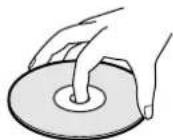
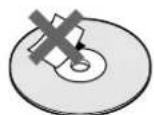
- Use only round-shaped discs. If you use a special shaped disc (e.g., star-shaped, heart-shaped, or square-shaped, etc.), the player may be damaged.
- Do not use a disc with a seal attached on such as on a used disc or rental disc.
On keeping discs
- Do not expose the disc to direct sunlight or heat sources such as hot air ducts.
- After playing, store the disc in its case. If you put it on top of another disc without the case, the disc may be damaged.
On placing discs on the disc tray
- Make sure the disc is positioned securely on the tray. If not, the player or the disc may be damaged.
On cleaning
- If the disc is dirty with fingerprints or dust, it may lessen the quality of the audio out.
- Before playing, clean the disc with a cleaning cloth. Wipe the disc from the centre out.
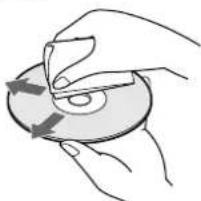
- Clean the disc with a soft cloth slightly moistened with water, and remove moisture with a dry cloth.
- Do not use solvents such as benzine, thinner, record cleaners, or anti-static spray.
Notes on CD-R/CD-RW playback
- Discs recorded on CD-R/CD-RW drives may not be played back because of scratches, dirt, recording condition, or the drive's characteristics. Besides, the discs, which are not yet finalized at the end of recording, cannot be played back.
Troubleshooting Specifications
If you experience any of the following difficulties while using the player, use this troubleshooting guide to help you remedy the problem. Should any problem persist, consult your nearest Sony dealer.
There is no sound.
Check that the player is connected securely.
Make sure you operate the amplifier correctly.
When you use the headphones, adjust the volume with PHONES LEVEL.
There is no sound from the DIGITAL (CD) OUT connectors.
The audio signals of the super audio CD cannot be output from the DIGITAL (CD) OUT connectors.
The disc does not play.
There is no disc inside the player.
The disc is placed upside down on the tray.
Place the disc on the disc tray with the label side up.
The disc is placed at an angle. Reload the disc.
Clean the disc (see page 26).
Moisture has condensed inside the player. Remove the disc and leave the player turned on for about an hour.
There is an incompatible disc on the tray (see page 13).
The remote does not function.
Remove any obstacles in the path of the remote and the player.
Point the remote at the remote sensor on the player.
If the batteries in the remote are weak, replace with new ones.
There is no sound from the SUB WOOFER jack.
Select the playback mode so that the Sub woofer is set to "O" (page 22).
When you play a track that does not contain the LFE signal, the signal outputs from the SUB WOOFER jack only when you select "5-Small ^+ SW" or "FRT-Large ^+ SW" for the Multi-channel playback mode (page 23).
When a super audio CD is played
Playing frequency range 2Hz to 100kHz
Frequency response 2Hz to 50kHz (-3dB)
Dynamic range 104 dB or more
Total harmonic distortion rate
0.0018 % or less
Wow and flutter Value of measurable limit (± 0.001%)
W. PEAK) or less
When a CD is played
Frequency response 2Hz to 20kHz
Dynamic range 99 dB or more
Total harmonic distortion rate
0.002% or less
Wow and flutter Value of measurable limit (± 0.001%)
W. PEAK) or less
Output connector
| Jack type | Output level | Load impedance | |
| ANALOG OUT | Phono jacks | 2 Vrms (at 50 kilohms) | Over 10 kilohms |
| DIGITAL (CD) OUT | Square optical output connector | -18 dBm | Light emitting wave length: 660 nm |
| OPTICAL* | |||
| DIGITAL (CD) OUT | Coaxial output connector | 0.5 Vp-p | 75 ohms |
| COAXIAL* | |||
| PHONES | Stereo phone jack | 10 mW jack | 32 ohms |
*Output only the audio signals of the CD
General
Laser Semiconductor laser
(SACD: = 650nm
(CD: = 780nm )
Emission duration: continuous
Laser radiant power: 5.47 uW at 650 nm
*These output is the value measured at a distance of about 200mm from the objective lens surface on the optical pick-up.
Power requirements 230VAC,50 / 60Hz
Power consumption 25 W
Dimensions (w/h/d) 430·111·283 mm incl. projecting
parts
Mass (approx.) 5.8kg
Supplied accessories
See page 4.
Design and specifications are subject to change without notice.
Index
A
Accessories 4
Amplifier (not supplied) 5
AMS (Automatic Music Sensor) 14
ANALOG OUT
2CH6
5.1CH5
B
Batteries 4
C
Cable
Coaxial digital 7
Optical digital 7
Cord
Audio connecting 5
D, E, F, G
DIGITAL (CD) OUT 7
Displaying information 15
H, I, J, K
Hooking Up
Audio Components 5
Power 7
L
Locating
a specific track 18
a particular point 18
by entering the track number 18
by observing the time indication (High-speed Search) 18
using the index function (Index Search) 18
while monitoring the sound (Search) 18
M, N
Multi-channel management function 22
Multi-channel Super Audio CD 13
0
Output level balance 23
P, Q
Pause play 14
Place a disc 14
Playback mode
2 channel 22
Multi-channel 22
Playing
adisc 14
by entering the track number 18
Multi-channel Super Audio CD 22
repeatedly 19
track in random order 20
Programme Play
Checking the contents of the programme 21
Changing the contents of the programme 21
how to create your own programme 21
R
Remote commander (remote) 11
Repeat
A-B Play 20
All Play 19
1 Play 20
s
Search
High-speed search 18
Index search 18
Time Search 19
Shuffle Play 20
Super Audio CD 12
T, U, V, W, X, Y, Z
TEXT 16
TOC 13
AVERTISSEMENT
1 Prises ANALOG 2CH OUT L/R (6)
15 Touche CLEAR (21)
Masse (approx.) 5,8kg
Accessoires fournis
Voir page 4.
4 Conector DIGITAL (CD) OUT OPTICAL (7)
- Super Audio CD Player
- WARNING
- Welcome!
- About This Manual
- Conventions
- Features
- About the Super Audio CD
- Features of the player
- Others
- TABLE OF CONTENTS
- Getting Started 4
- Location and Functions of Parts 8
- Playing Discs 12
- Additional Information 25
- Getting Started
- Before You Start the Hookup
- Checking the supplied accessories
- Inserting batteries into the remote
- When to replace the batteries
- Notes
- Hooking Up the Audio Components
- Connecting via ANALOG 5.1CH OUT jacks
- FRONT or SURR connection
- CENTER or SUB WOOFER connection
- Connecting via ANALOG 2CH OUT jacks
- Connecting via DIGITAL (CD) OUT OPTICAL connector
- Note
- Connecting via DIGITAL (CD) OUT COAXIAL connector
- Connecting the AC power cord
- Location and Functions of Parts
- Front Panel Parts Descriptions
- Rear Panel Parts Descriptions
- ANALOG 2CH OUT L/R jacks (6)
- ANALOG 5.1CH OUT jacks (5)
- DIGITAL (CD) OUT COAXIAL connector (7)
- DIGITAL (CD) OUT OPTICAL connector (7)
- Remote Parts Descriptions
- CONTINUE button (20)
- SHUFFLE button (20)
- PROGRAM button (21)
- DISPLAY MODE button (16)
- TIME/TEXT button (15)
- Number buttons (18)
- 5>10button(18)
- REPEAT button (19)
- A → B button (20)
- button (14)
- button (14)
- ■ button (14)
- AMS I/AMS: Automatic Music Sensor)
- buttons (18)
- / buttons (18)
- INDEX buttons (18)
- SACD/CD button (12)
- MULTI/2CH button (12)
- ENTER button (24)
- CLEAR button (21)
- LEVEL ADJ button (24)
- CHECK button (21)
- Playing Discs
- Compatible Disc Types
- Classification by the layer configuration
- Super Audio CD (single layer disc)
- Super Audio CD (dual layer disc)
- Conventional CD
- Super Audio CD + CD (Hybrid disc)
- Classification by the channel configuration of the Super Audio CD
- channel Super Audio CD
- Multi-channel Super Audio CD
- channel + Multi-channel Super Audio CD
- Incompatible Discs
- Playing a Disc
- Using the Display
- Disc information when a disc is loaded
- Displaying information while the player is stopped
- Displaying information while the player is playing
- Press TIME/TEXT.
- Turning off the information in the display
- Displaying the information of a TEXT disc
- Displaying the information of a TEXT disc in stop mode
- - Before you start playing
- Display information of a TEXT disc while playing a disc
- Displaying the information of a TEXT disc in other languages
- Locating a Specific Track
- Locating a track directly by entering the track number
- Examples:
- Locating a Particular Point in a Track
- Locating a point while monitoring the sound (Search)
- Locating a point by observing the time indication (High-Speed Search)
- Locating a point using the index function (Index Search)
- What is an INDEX?
- Locating a point by setting the start time (Time Search)
- Playing Tracks Repeatedly
- Repeating all the tracks on the disc (Repeat All Play)
- Repeating the current track (Repeat 1 Play)
- To stop Repeat 1 Play
- To resume normal play
- Repeating a specific portion within a track (Repeat A-B Play)
- To stop Repeat A-B Play and resume normal play Press REPEAT or x.
- Playing Tracks in Random Order (Shuffle Play)
- Press.>
- Creating Your Own Programme (Programme Play)
- Checking the contents of the programme
- Changing the contents of the programme
- Listening to a Multi-channel Super Audio CD (Multi-channel management function)
- Selecting 2 channel playback mode
- Selecting Multi-channel playback mode
- About "Large" or "Small" speaker
- Turn K AMS I until desired mode appears in the display.
- Press K AMS I
- Adjusting the output level balance of each speaker
- CNTR BALANCE
- SURR BALANCE
- SW BALANCE
- Adjusting the output level balance on the front panel of the player
- Press MENU.
- Listening to the Multi-channel Super Audio CD
- Press I AMS I
- Turn K AMS I to adjust the output level.
- Press I AMS I
- Press MENU after you finish adjusting.
- Adjusting the output level from the remote
- Press ENTER.
- Press I / repeatedly until the desired item appears in the display.
- Press ENTER.
- Press 山 / 山 山 repeatedly to adjust the output level.
- Press ENTER.
- Press LEVEL ADJ after you finish adjusting.
- Additional Information
- Precautions
- On safety
- On power sources
- On placement
- On operation
- On adjusting the volume
- On inserting a disc
- On cleaning
- On transportation
- Notes on Disks
- On handling discs
- On keeping discs
- On placing discs on the disc tray
- Notes on CD-R/CD-RW playback
- Troubleshooting Specifications
- There is no sound.
- There is no sound from the DIGITAL (CD) OUT connectors.
- The disc does not play.
- The remote does not function.
- There is no sound from the SUB WOOFER jack.
- When a super audio CD is played
- When a CD is played
- General
- Supplied accessories
- Index
- A
- B
- C
- D, E, F, G
- H, I, J, K
- L
- M, N
- 0
- P, Q
- R
- s
- T, U, V, W, X, Y, Z
- AVERTISSEMENT
- Prises ANALOG 2CH OUT L/R (6)
- Touche CLEAR (21)
- Accessoires fournis
Brand : SONY
Model : SCDXB770
Category : Cd player/recorder