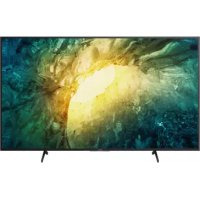
Bravia KD49X7056 - Projector SONY - Free user manual and instructions
Find the device manual for free Bravia KD49X7056 SONY in PDF.



| Product Type | Full HD LED TV |
| Brand | Sony |
| Model | Bravia KD49X7056 |
| Screen Size | 49 inches (diagonal) |
| Power Supply | 220-240 V AC, 50/60 Hz |
| Power Consumption | Check the energy label or Sony website (not specified in the manual) |
| Network Connectivity | Built-in Wi-Fi, Ethernet port |
| Smart Functions | Smart TV with Internet access, home screen, apps |
| Screen Type | LCD with LED backlight |
| Resolution | Full HD (1920 x 1080 pixels) - estimated, not explicitly specified but typical |
| Wall Mount System | Compatible with Sony wall mount (models SU-WL8xx), requires minimum ventilation space |
| Stand | Supplied, installation on a stable surface |
| Remote Control | Operates with 2 AAA batteries (included, type not specified) |
| Operating Temperature | Avoid sudden temperature changes, condensation possible |
| Humidity | Do not expose to humidity, rain, or splashes |
| Cleaning | Soft dry cloth, diluted mild detergent if necessary. Do not spray directly |
| Safety | Stability: secure the furniture and TV to the wall to prevent tipping |
| Batteries | Do not mix types, respect polarities, dispose according to local regulations |
| Environment | Moderate ambient temperature, away from direct sunlight |
| Ventilation Maintenance | Do not block vents, free space around TV (minimum 10 cm) |
Frequently Asked Questions - Bravia KD49X7056 SONY
User questions about Bravia KD49X7056 SONY
0 question about this device. Answer the ones you know or ask your own.
Ask a new question about this device
Download the instructions for your Projector in PDF format for free! Find your manual Bravia KD49X7056 - SONY and take your electronic device back in hand. On this page are published all the documents necessary for the use of your device. Bravia KD49X7056 by SONY.
USER MANUAL Bravia KD49X7056 SONY
Internet security caution
It is strongly recommended for security purposes to connect your TV to the Internet via a router/modem that includes router functionality. Direct connection of your TV to the Internet may expose your TV to a security threat such as extraction or tampering of content or personal information.
Internet Connection and Data Privacy
This product connects to the internet during initial setup as soon as a network is connected in order to confirm internet connection, and later to configure the Home screen. Your IP address is used in these and all other internet connections. If you do not want your IP address be used at all, do not set-up the wireless internet function and do not connect an internet cable. Please refer to the privacy information presented in the set-up screens for further details of internet connections.
WARNING
TO PREVENT THE SPREAD OF FIRE, KEEP CANDLES OR OTHER OPEN FLAMES AWAY FROM THIS PRODUCT AT ALL TIMES.
NOTICE FOR CUSTOMERS IN THE UNITED KINGDOM
A moulded plug complying with BS1363 is fitted to this equipment for your safety and convenience.
Should the fuse in the plug supplied need to be replaced with the same rating of fuse approved by ASTA or BSI to BS 1362 (i.e., marked with or) must be used.
If the plug supplied with this equipment has a detachable fuse cover, be sure to attach the fuse cover after you change the fuse.
Never use the plug without the fuse cover. If you should lose the fuse cover, please contact your nearest Sony service station.
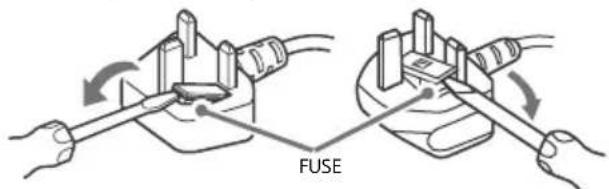
How to replace the fuse
Open the fuse compartment with a blade screwdriver, and replace the fuse.
Please refer to the illustration that actually equipped with the product.
IMPORTANT NOTICE
This product has been manufactured by or on behalf of Sony Corporation.
EU and UK Importer: Sony Europe B.V.
Inquiries to the EU Importer or related to product compliance in Europe should be sent to the manufacturer's authorized representative, Sony Belgium, bijkantoor van Sony Europe B.V., Da Vincilaan 7-D1, 1930 Zaventem, Belgium.
Inquiries to the UK Importer or related to product compliance in the UK should be sent to the manufacturer's authorized representative, Sony Europe B.V., The Heights, Brooklands, Weybridge, Surrey KT13 0XW, United Kingdom.
For applicable AC adapter model only:
Energy consumption and other information for the power supply, as required by Commission Regulation (EU) 2019/1782, is available at the following website: https://compliance.sony.eu
Safety Information
WARNING
Caution
Risk of explosion if the battery is replaced by an incorrect type. Batteries must not be exposed to excessive heat such as sunshine, fire or the like or extremely low air pressure that can result in an explosion or leakage of flammable liquid or gas.
Stability Hazard
The television set may fall, causing serious personal injury or death.
WARNING
A television set may fall, causing serious personal injury or death. Many injuries, particularly to children, can be avoided by taking simple precautions such as:
- ALWAYS use cabinets or stands or mounting methods recommended by the manufacturer of the television set.
- ALWAYS use furniture that can safely support the television set.
- ALWAYS ensure the television set is not overhanging the edge of the supporting furniture.
- ALWAYS educate children about the dangers of climbing on furniture to reach the television set or its controls.
- ALWAYS route cords and cables connected to your television so they cannot be tripped over, pulled or grabbed.
NEVER place a television set in an unstable location.
NEVER place the television set on tall furniture (for example, cupboards or bookcases) without anchoring both the furniture and the television set to a suitable support. - NEVER place the television set on cloth or other materials that may be located between the television set and supporting furniture.
- NEVER place items that might tempt children to climb, such as toys and remote controls, on the top of the television or furniture on which the television is placed.
If your existing television set is being retained and relocated, the same considerations as above should be applied.
Installation/Set-up\*
Apparatus connected to the protective earthing of the building installation through the mains connection or through other apparatus with a connection to protective earthing - and to a television distribution system using coaxial cable, may in some circumstances create a fire hazard. Connection to a television distribution system therefore has to be provided through a device providing electrical isolation below a certain frequency range (galvanic isolator, see EN 60728-11).
Ventilation
- Never cover the ventilation holes or insert anything into the cabinet.
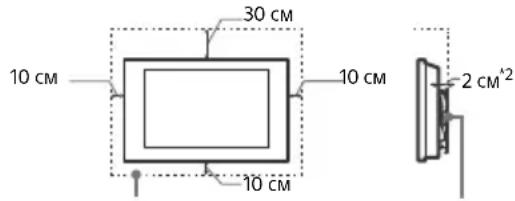
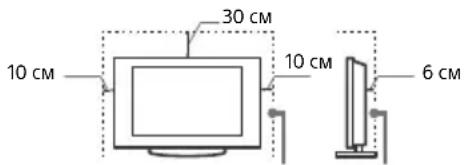
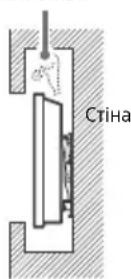
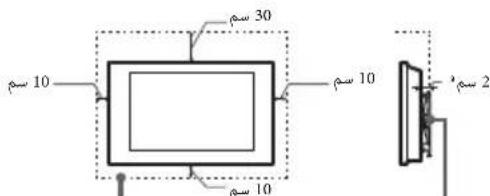
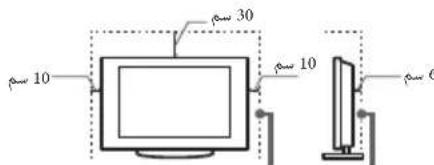
- Leave space around the TV set as shown below.
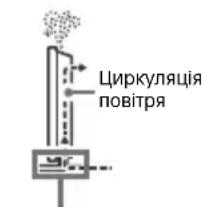
- It is strongly recommended that you use a Sony Wall-Mount Bracket in order to provide adequate air circulation.
Installed on the wall
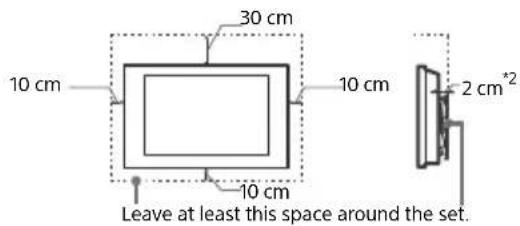
Installed with stand
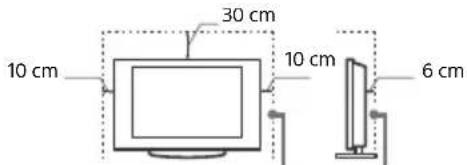
Leave at least this space around the set.
*21 cm for SU-WL8xx only. Refer Reference Guide to know whether your TV is compatible with this Wall-Mount Bracket.
To ensure proper ventilation and prevent the collection of dirt or dust:
- Do not lay the TV set flat, install upside down, backwards, or sideways.
Do not place the TV set on a shelf, rug, bed or in a closet. - Do not cover the TV set with a cloth, such as curtains, or items such as newspapers, etc.
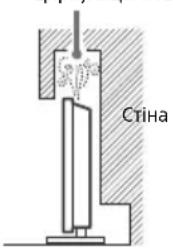
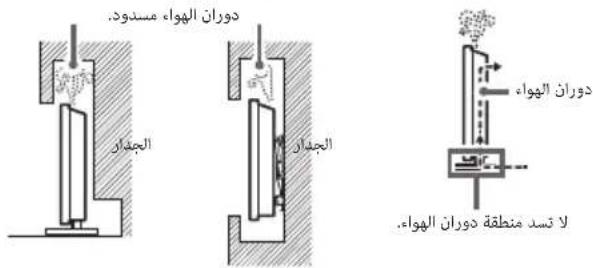
- Do not install the TV set as shown below.
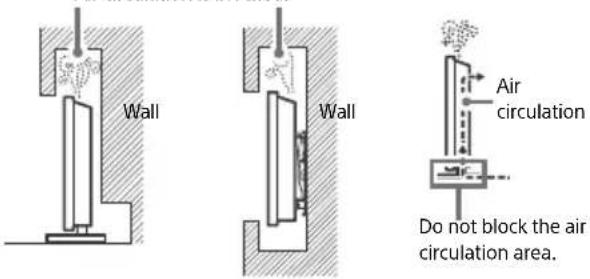
Air circulation is blocked.
- The ventilation condition is depending on your TV model. If this ventilation information is described in both Reference Guide and Safety Information, please refer to the Reference Guide.
Mains lead
Handle the mains lead and socket as follows in order to avoid any risk of fire, electric shock or damage and/or injuries:
- Use only mains leads supplied by Sony, not other suppliers.
- Insert the plug fully into the mains socket.
- Operate the TV set on a 220 V - 240 V AC supply only.
- When wiring cables, be sure to unplug the mains lead for your safety and take care not to catch your feet on the cables.
- Disconnect the mains lead from the mains socket before working on or moving the TV set.
- Keep the mains lead away from heat sources.
- Unplug the mains plug and clean it regularly. If the plug is covered with dust and it picks up moisture, its insulation may deteriorate, which could result in a fire.
Note
- Do not use the supplied mains lead on any other equipment.
- Do not pinch, bend, or twist the mains lead excessively. The core conductors may be exposed or broken.
- Do not modify the mains lead.
- Do not put anything heavy on the mains lead.
- Do not pull on the mains lead itself when disconnecting the mains lead.
- Do not connect too many appliances to the same mains socket.
- Do not use a poor fitting mains socket.
NOTE ON MAINS ADAPTOR (models with supplied mains adaptor only)
Warning
To reduce the risk of fire or electric shock, do not expose this apparatus to rain or moisture.
To prevent fire or shock hazard, do not place objects filled with liquids, such as vases, on the apparatus. Do not install this equipment in a confined space, such as a bookshelf or similar unit.
- Please ensure that the mains socket is installed near the equipment and shall be easily accessible.
- Be sure to use the supplied mains adaptor and mains lead.
- Do not use any other mains adaptor. It may cause a malfunction.
- Connect the mains adaptor to an easily accessible mains socket.
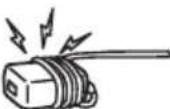
- Do not coil the mains lead around the mains adaptor. The core wire may be cut and/or it may cause a malfunction of the media receiver.
- Do not touch the mains adaptor with wet hands.
If you notice an abnormality in the mains adaptor, disconnect it from the mains socket immediately. - The set is not disconnected from the mains source as long as it is connected to the mains socket, even if the set itself has been turned off.
- As the mains adaptor will become warm when it is used for a long time, you may feel hot when touching it by hand.
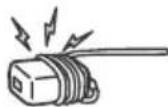
Prohibited Usage
Do not install/use the TV set in locations, environments or situations such as those listed below, or the TV set may malfunction and cause a fire, electric shock, damage and/or injuries.
Locations:
- Outdoors (in direct sunlight), at the seashore, on a ship or other vessel, inside a vehicle, in medical institutions, unstable locations, near water, rain, moisture or smoke.
Environments:
- Places that are hot, humid, or excessively dusty; where insects may enter; where it might be exposed to mechanical vibration, near the source of naked flame, such as lighted candle, which is placed on a TV. The TV set shall not be exposed to dripping or splashing and no objects filled with liquids, such as vases, shall be placed on the TV.
Situations:
- Use when your hands are wet, with the cabinet removed, or with attachments not recommended by the manufacturer. Disconnect the TV set from mains socket and aerial during lightning storms.
-
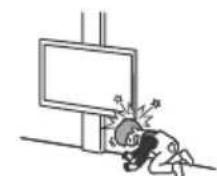
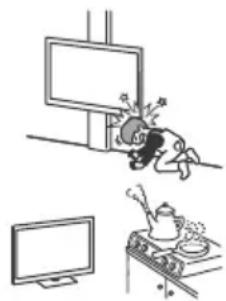
Install the TV so that it sticks out into an open space. Injury or damage from a person or object bumping into the TV may result.
-
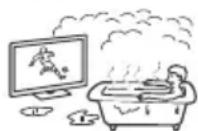
Place the TV in a humid or dusty space, or in a room with oily smoke or steam (near cooking tables or humidifiers). Fire, electric shock, or warping may result.
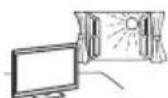
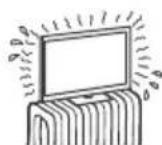
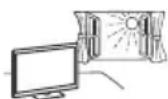
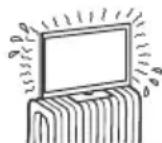
Install the TV in places subject to extreme temperature such as in direct sunlight, near a radiator or a heating vent. The TV may overheat in such condition which can cause deformation of the enclosure and/or TV malfunction.
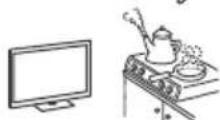
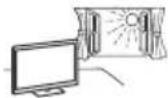
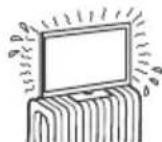
If the TV is placed in the changing room of a public bath or hot spring, the TV may be damaged by airborne sulfur, etc.
- For best picture quality, do not expose the screen to direct illumination or sunlight.
- Avoid moving the TV from a cold area to a warm area. Sudden room temperature changes may cause moisture condensation. This may cause the TV to show poor picture and/or poor colour. Should this occur, allow moisture to evaporate completely before powering the TV on.
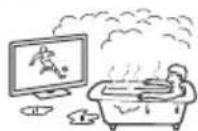
Broken pieces:
- Do not throw anything at the TV set. The screen glass may break by the impact and cause serious injury.
- If the surface of the TV set cracks, do not touch it until you have unplugged the mains lead. Otherwise this may cause an electric shock.

When not in use
- If you will not be using the TV set for several days, the TV set should be disconnected from the mains for environmental and safety reasons.
- As the TV set is not disconnected from the mains when the TV set is just turned off, pull the plug from the mains socket to disconnect the TV set completely.
- Some TV sets may have features that require the TV set to be left in standby/networked standby to work correctly.
For children
- Do not allow children to climb on the TV set.
- Keep small accessories out of the reach of children, so that they are not mistakenly swallowed.
If the following problems occur...
Turn off the TV set and unplug the mains lead immediately if any of the following problems occur. Ask your dealer or Sony service centre to have it checked by qualified service personnel.
When:
- Mains lead is damaged.
- Poor fitting of mains socket.
- TV set is damaged by being dropped, hit or having something thrown at it.
- Any liquid or solid object falls through openings in the cabinet.
About TV Temperature
When the TV is used for an extended period, the panel surrounds become warm. You may feel hot when touching there by the hand.
Do not place this product close to medical devices
This product (including accessories) has magnet(s) which may interfere with pacemakers, programmable shunt valves for hydrocephalus treatment, or other medical devices. Do not place this product close to persons who use such medical devices. Consult your doctor before using this product if you use any such medical device.
Keep out of the reach of children or the supervised individuals
This product (including accessories) has magnet(s). Swallowing magnet(s) could cause serious harm, such as choking hazard or intestinal injuries. If magnets (or a magnet) were swallowed, consult a doctor immediately.
Magnetic influence
This product (including accessories) has magnet(s). Do not leave this product (e.g. terminal cover) near any objects susceptible to magnetism (cash cards, credit cards with magnetic coding, etc.).
Precautions
Viewing the TV
View the TV in moderate light, as viewing the TV in poor light or during long period of time, strains your eyes.
- When using headphones, adjust the volume so as to avoid excessive levels, as hearing damage may result.
Screen (For LCD TV only):
- Although the screen is made with high-precision technology and 99.99% or more of the pixels are effective, black dots may appear or bright points of light (red, blue, or green) may appear constantly on the screen. This is a structural property of the screen and is not a malfunction.
-
Do not push or scratch the front filter, or place objects on top of this TV set. The image may be uneven or the screen may be damaged.
-
If this TV set is used in a cold place, a smear may occur in the picture or the picture may become dark. This does not indicate a failure. These phenomena disappear as the temperature rises.
- Ghosting may occur when still pictures are displayed continuously. It may disappear after a few moments.
The screen and cabinet get warm when this TV set is in use. This is not a malfunction. - The screen contains a small amount of liquid crystal. Follow your local ordinances and regulations for disposal.
OLED Screen (For OLED TV only):
- Although the OLED screen is made with high-precision technology and 99.99% or more of the pixels are effective, black dots may appear or bright points of light (white, red, blue, or green) may appear constantly on the OLED screen. This is a structural property of the OLED screen and is not a malfunction.
- Do not push or scratch the front filter, or place objects on top of this TV set. The image may be uneven or the OLED screen may be damaged.
- The screen and cabinet get warm when this TV set is in use. This is not a malfunction.
- When disposing of your TV, be sure to follow your local laws and regulations.
Handling and cleaning the screen surface/ cabinet of the TV set
Be sure to unplug the mains lead connected to the TV set from mains socket before cleaning.
To avoid material degradation or screen coating degradation, observe the following precautions.
- To remove dust from the screen surface/cabinet, wipe gently with a soft cloth. If dust is persistent, wipe with a soft cloth slightly moistened with a diluted mild detergent solution.
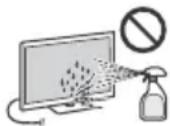
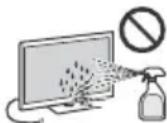
- Never spray water or detergent directly on the TV set. It may drip to the bottom of the screen or exterior parts and enter the TV set, and may cause damage to the TV set.
- Never use any type of abrasive pad, alkaline/acid cleaner, scouring powder, or volatile solvent, such as alcohol, benzene, thinner or insecticide. Using such materials prolonged contact with rubber or vinyl mat damage to the screen surface and cabinet
Periodic vacuuming of the ventilation openings is recommended to ensure proper ventilation. - When adjusting the angle of the TV set, move it slowly so as to prevent the TV set from moving or slipping off from its table stand.
Optional Equipment
- Keep optional components or any equipment emitting electromagnetic radiation away from the TV set. Otherwise picture distortion and/or noisy sound may occur.
- This equipment has been tested and found to comply with the limits set out in the EMC Standards using a connection signal cable shorter than 3 meters.
- This equipment has been tested and found to comply with the limits set out in the EMC Standards using a RF cable shorter than 30 meters for terrestrial/satellite/CATV terminal.
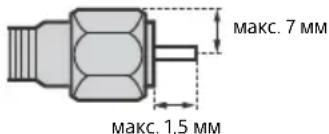
Recommendation of F type plug*
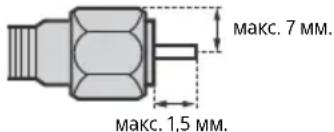
Projection of the inner wire from the connection part must be less than 1.5mm
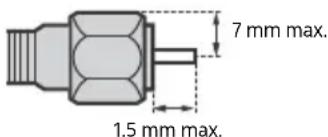
(Reference drawing of the F type plug)
- Only on limited region/country/TV model.
Wireless Function of the unit
- Do not operate this unit near medical equipment (pacemaker, etc.), as this may result in the malfunction of the medical equipment.
- Although this unit transmits/receives scrambled signals, be careful of unauthorised interception. We cannot be responsible for any trouble as a result.
- This equipment should be installed and operated keeping a separation distance of 20cm or more between the antenna of this device and a person's body.
Caution about handling the remote control
- Observe the correct polarity when inserting batteries.
- Do not use different types of batteries together or mix old and new batteries.
- Dispose of batteries in an environmentally friendly way. Certain regions may regulate the disposal of batteries. Please consult your local authority.
- Handle the remote control with care. Do not drop or step on it, or spill liquid of any kind onto it.
- Do not place the remote control in a location near a heat source, a place subject to direct sunlight, or a damp room.
CAM (Conditional Access Module)
- Do not remove the dummy card or cover (availability depends on TV model) from TV CAM (Conditional Access Module) slot other than to insert a smart card fitted in CAM.
Disposal of the TV set
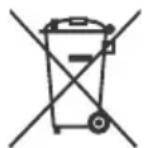
Disposal of old electrical & electronic equipment (applicable in the European Union and other countries with separate collection systems)
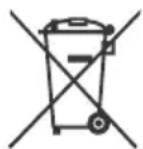
This symbol on the product or on its packaging indicates that this product shall not be treated as household waste. Instead it shall be handed over to the appropriate collection point for the recycling of electrical and electronic equipment.
By ensuring that this product is disposed of correctly, you will help to prevent potential negative consequences for the environment and human health, which could be caused by inappropriate waste handling of this product. The recycling of materials will help to conserve natural resources. For more detailed information about recycling of this product, please contact your local Civic Office, your household waste disposal service or the shop where you purchased the product.
Disposal of waste batteries (applicable in the European Union and other countries with separate collection systems)
This symbol on the battery or on the packaging indicates that the battery provided with this product shall not be treated as household waste.
On certain batteries this symbol might be used in combination with a chemical symbol. The chemical symbol for lead (Pb) is added if the battery contains more than 0.004% lead. By ensuring that these batteries are disposed of correctly, you will help to prevent potentially negative consequences for the environment and human health which could be caused by inappropriate waste handling of the battery. The recycling of the materials will help to conserve natural resources. In case of products that for safety, performance or data integrity reasons require a permanent connection with an incorporated battery, this battery should be replaced by qualified service staff only. To ensure that the battery will be treated properly, hand over the product at end-of-life to the appropriate collection point for the recycling of electrical and electronic equipment. For all other batteries, please view the section on how to remove the battery from the product safely. Hand the battery over to the appropriate collection point for the recycling of waste batteries. For more detailed information about recycling of this battery, please contact your local Civic Office, your household waste disposal service or the shop where you purchased the product or battery.
To3n npOdykTe npOn3BeDen OT nJIn OT mETo Ha Sony Corporation.
Bhocnten B EC: Sony Europe B.V.
3aNTBaHn DO BHOCTeJI NIN 3aNTBaHn CBp3AHn CbC
cBOteCTBnTo HA npOyKTnTe cbLnacHO 3aKOHOaTeIcTBOTo
Ha Ebponeckn CbO3, CneBa Da ce OTnpABT KbM
YbnHOMoUeHN ppeCTaBnTeH Na npOn3BoUHTeN Sony
Belgium, bijkantoor van Sony Europe B.V., Da Vincilaan 7-D1,
1930 Zaventem, BEnn.
Korato He n3no3BaTe yCTpoNCTBOTo
Iopapn npuHnH, CbBp3aHn C 6e3oNaChocTt Na OKJHaTa Cpea, BN pnpOpBcBaMe Da n3KnOuBaTe TeneBu3Opa OT MpeKaTa, KOrTo He PnAHHape Ta rO n3NoJ3BaTe HKoJIko DnH.
TeIeBn3OpbT He n3KJIIOueH oT MpeKaTa, KOraTo e N3KJIIOueH oT KonueTo. 3a Da n3KJIIOUHTe HaNbJHo YcTPOJCTBOTo, N3KJIIOUte Ka6eHa Ha 3axpaHbaHeTo oT eNEKtpueckata MpeKa.
HЯко TeileBnOpi npitexKaBAt yHKUu, KOnTo n3NCKBaT yCTpoIcTBOTo 6bJe octaBeHO bpeKIM FOTOBHOCT/ MpexKOBa rOTOBHOCT, 3a da paBoTIT npabINHO.
OTHOCHOeata
- He no3B0JaBaIe Ha Da eCa Ta Ce KaYBaT Bbpy TeJeBu3Opa.
- Na3eTe MaKnTe akcecoapn daJeu OT deua, 3a da He 6bdaT NOBHaTN OT TReX IIO HEBHMaHHe.
Ako Bb3HnKHaT CneHnTe npo6IeMn...
He3a6abHNO n3KnIOyete TeNeBUN3Opa Nn3BaJeTe 3axpaHbAunna Ka6en B Cnyau, Che Bb3HNKe HAKON OT CneDHNTE npo6NMe. KOncynTpapTe ce C BAUnn DOCTaBUnk nn Sony cepBUn3e ueHTbp daJn e HANOxTeHNo TEeBUN3OpbT da 6bJe npOBepen OT KBaINMUnpAn cepBN3.
Korato:
3axpaHbauT ka6e enoBpeH.
-ΓHe3dToHa KOnTaKaTtHe 3axBaUa CtaBnHcEcnEJa.
TeBn3OpbTe nobpeDen, noHKe e n3nyChaT, ydapeHnn Heo e Xbplno No Hero.
TeuHn nn TBbpN npeMmTa nonaHaBn B OTbOpTe Ha Kopnyca.
Othocho TemnepaTypata Ha TeJeBu3opa
Korato TeBnOptBe nIOnI3Ba npDblxntenHO BpeMe, pAMkata OKoI NaHeIe Ce 3aTOnII. MoKe Da ycETte TOnNHa, KOrato JDOKOChTe Cpbka.
He noctabraye To3n npodykt B 6IIN30CT do MedunHcN yCTpoiCTBa
To3n npOyKT (BKn. AkcecoapnTe) CbIbPka MaHHTN, KOnTO
Morat Da nonpeaHa paBoTaHa NeiCMeKbpn,
nporpampyEm 6aiNaac KAnu 3a XnDpoeFaAInna N Dpyr
MeDuHNcN yCTpoNCTBa. He NoctabTte To3n npOyKT B
6bn3ocT do Iune c TaKnBA yCTpoNCTBa. KoHCytnpaIte ce c
Iekap, npEne d AnIOIN3BATE To3n npOyKT, Ako INON3BATE
TaKnBA MeDuHNcN yCTpoNCTBa.
ДрьхтпpoуктHa МясTo,КbdeTo He Moxe Da 6bde DoctnHAT OT Deua nIn NInca nOД Ha3Op
To3n npOdyKT (BkI. akcecoapnte) cbIbpxKa MaHHTN.
PnllbuaheTO Ha MarHNTM MoKe Da npuynHn Cepno3n BpeDu, HApnpMe 3aDaBaHe N 3aDywaBe, INI HapaHaBaHe Ha
eepbata.Ako ca NorbHaTn MaHHTN (INI MaHHT), BeDHaRa ce KOHCJYtnpaTne C Jekap.
MarHnTHoBJIyHne
To3n npOdyKT (BKn. akcecoapnte) cbIbpxKa MaHHTn. He octaBRIte npOdyKta (HaNPIMep Kanaka Ha KJIEMTe) 6bn3o Do npEmeTn, YyCBTBNTeHN Ha MarHeTNbM (deBHTN KapTn, KpeINTHKAPrC M aARHTHNO KoDnpaHE n dp.).
Ppepa3Hmepkn
TneJaHe Ha TeLeBn3nA
- IeJaIe TeneBn3N B CpeHIO OCBteHa CTaR, TbKATO IeJaeHAnTo Ha TeBEnBn3N B Cna6o OCBteHa CTa R HtOBaBa DOIbIhInTeHNOHTe BN.
Korato n3non3Bate Cnyuankn, HactpoTe cnJaTa Ha 3Byka TaKa, Ye da npedOTbpaTne YbpejdaHe Ha Cnyxa.
Ekpan (camo 3a LCD Telebu3op):
Bbnpekn ye ekpaHbTe n3pa6oTeH no BnCOKo-npeuHa texHOLOrma nOBeue ot 99,99% OT NIKCeIInTe My ca eFeKtINBHN, BbpXy ekpaHa MoKe TpaHDo a Ce NOBRT YepHN nIN CBETIN TOKN (YePBHeN, CUNn ININ ZEENEHN).TOBA eCTpykTypHa OOCeHoHc H ekpaHa N He npedctabJIbBa HEN3PpABHOCT.
He HATnckaTe N He npackaTe npedHnIpNtbpN He nocTABraTe pneDmETn Bbpxy yCTpoiCTBOTo. 3O6paXeHMeTO MOKe Da e HepaBHomePHO NNekpaHbT MoKe da Ce NOBpeNi.
Ako n3nON3BaTe yCTpoIcTBOTo Ha CTyJeHO MRCTO, KAPTuHaTa MoXe Da Ce 3aMbTIN Wn Da cTaHe No-TbMHa. TOba He e Hen3nPaBHOCT. To3n fEHomeH N34e3Ba, KOraTo TemNepaTpata Ce NOBnWn
KoratoHaekpaHa npOdbNkTeHb BpeMe ca Noka3aHN HeNODBNXHn 036paKeHn, Bb3MOxHO e Da CE NOBBAO cTaTbHHn 06pa3n. Te MoRaT da n3ue3HaT CneH HKOJIko CeKYHdN.
EkpaHbT N KopnycbT ce 3aToNnT, KOraTO n3No13BaTe yCTpoIcTBOTo. ToBa He e HEn3npaBHOCT.
EkpaHbT cbIbpXa MaJIko KOIynchCTBO TeUHN KpIcTaII. CneBaTe MeCTHIne npaBnla 3aKOHn 3a N3XBpJIrHe Ha noO6Hn OTNaIbU.
OLED ekpan (camo 3a OLED TeJeBn3Op):
Bbnpeknue OLED ekpaht e n3pa6oTeH no Bucko-npeun3Ha texHOJrnnnoBceeOT 99,99% OT NIKCEJIte My ca eEeKtmbHn, BbpyOLED ekpahMoKe TpaHNo da ce NoB8T cepHNn CBeTIN TockN (6en, YepBeHn, CNHn nn 3eHeH). Toba e ctpyKtpyh oocbeHcT HA OLED ekpahn He npedctabJRA Hne3npaBHocT.
- He HATNCKaITe N He IpaKaNte npedHnA FNITbp N He NOCTABRAIe PpeDMETN Bbpxy yctpoiCTBOTo. IV3o6paXeHNeTO MOKe Da e HepaBHomepHo IIN OLED ekpaHbT MoKe da ce NobpeDn.
- EkpaHbT N KopnycBt Ce 3aToTnI, KOrato N3No13BaTe yCtpoIcTB0To. ToBa He e HEn3PpABHOCT.
Korato n3xBpIaTe TeneBn3opa, cna3BaIte 3aIbIXnTeHIO MeCTHnTE npaBUNa N 3aKOH.
IoppbkKa n nouchBaHe Ha nobbpxHocTTa Ha ekpaHa/KopnyCa Ha TeJeBn3opa
YBepeCe, CTe N3KIOUOWIN CBbP3AHN KBM TeNeBUN3Opa 3axpHaBaI Ka6E,InpEn Da 3anoOHETe NOCTBAHe. 3a Da npEOToBpAInTE NoOBpeHa NaOKPnTneTo Ha ekPaHa, CneDaBte INHCTpykUnITE,N3bPOeHNNo-DOJy.
3a Da NpeMaxHeTe npaxa OT NOBbpxHocTt Ha ekpaHa/Kopnyca, noocCTBaIe T MeKO cyo Nape IaT. AkoNoJIeHNJnT npx He Moke Da ce NoocCTN, NoocCTBaIe EkpaHa C MeKO napye IaT, JeKO HbJaXHeHo Cbc Cna6 NoocCTBaU pa3TbOp.
Hnkora He npbckaIte Boda nIpaTbOp dIpeKTHo Bbpxy TeNeBn3opa. No ekpHa nNn BbHnHTe qACTn, MoKe Da ce o6pa3yBaT KaKN, KOnTo Da NoTeKaT, Da HABne3HaB DoJIHaTa qACT Ha TeBn3opa N da Ro NobpeAaT.
He n3noJ3BaIte rpanabn npaeta nlaT, noNCTBaIIN ppeapatn Ha aKaNHa/KncenHHa oCHOBA, noNCTBaIIN npaxoBE nI IN pa3TbOpn, KATO HApMmep AkoXoI, 6eH3O,Ipa3peDntE IIN NHCEkTNuI. N3noJ3BaHeTo Ha TAKnBa BeUeCTBa IIN IPOdbJnxTeJIHNKT HOtAKT C rYma IIN BUNI MoKeJa IOBpeDNIOBbpxHOCTTa HA ekPaHa IIN NOBbPxHOCTTa HA KopNyCa HA yCTpoiCTBO.To.
- IpenopbYBa ce nepnoDmHNo nooNCTBaHe c npaxocMykaHa Ha TOBpnte 3a npoBeTpyBaHe cJeI ocNpyPbaHe Ha npaBnHa BeHTInaua.
Korato perynipate bIbIa Ha TepeBn3Opa, MeTeTe 6abHO yctpoiCTBOTo, 3a Ia npedOTbPaTIne NTMeCTBaHe Ha TepeBn3Opa INI NpAdHe OT Macata INI CTOnKaTa.
DonblnHTeJHo 06OpyBaHe
He IpbkTe 6n3o Do TeneBn30pa DOnbNHTenHnTc KOMHOHETN NNNKKBTO N Da e 6NIO O6OpyBaHe, N3bYBaAto eNEKTPomAHTHN BbLNH. B npOTuBE Hcnya E Bb3MOxHO KaPTNHaTa N/NIIN 3ByKbT Da bDaT cCb CMUeHn
TOBA O6OpydBaHe e TcTeBaHO n CbOTBeTCTBa Hn3NCKBaHnTa Hs TaHApTne 3a EMC, KaTo n3NoJ3Ba CBbp3BaU cnHnAen Ka6eI No-Kbc OT 3 MeTpA.
ToBAO6OpyBaHe eTeCTBaHO nCBOTBeCTBa HA n3NcKBAHNrA HcTaHApTnTe 3a EMC, Kato n3non3Ba RF kAben no-Kbc OT 30 metpa 3a Ha3emEn/CateInnEr/ CATV n3BOD.
Ppenopbkn 3a KOHeKTop TnF\*
BbtpewHnT npoBOHNK Tp6Ba da e n3daen Cnpma CBbp3Baata Ta cT He nobeoe ot 1,5 MM.
Mny tootheite to npoiov auto kovta oIatpikec ouakeuEc
To npoiov auto (oupiiaaiaaavovwv aEouap) exei
ayvnt(-c) nou mtopei va dnloupyei-ovv) npaeBolac oBnataodotec, npoypaumaticiouvec baaiibdec npoxetueonc yia th epaneia udpokefalou n aaLec latpikec ouokeuc. Mnu tototheite To npoiov auto kovt aTOAPOU xpoiunoiov tvtoiu eIOUC iATpikoc oukeuc. Uouauuteite Tov yiatpo ac, pivxnpoiounoe To npoiov auto, eoov xpoiounie tetoiu eIOUC iATpkn oukeun.
m = 311
TTObI He DoNCTnB BO3RopAHHIN NIN NOPaXeHN
3NEKTPnueCKM TKOM,He CTaBbTe Ha annapaTyPcEMKOCTNC
KNIOKCTbIO, HAnpIMep BA3b. He YcTaHaBnBaHTe 3TO
O6OpYOBaHHe B 3aMKHYTom OBeMe, HApIMep Ha KNHXHO
NONKe INI NOoBHOM MeCe.
Y6eINTecb,yTO 3JNEKTPnuecka po3eTKa HaxoDITcPRAOM C YCTPOINCTBOM BJIERKOIOCTyHOM MecTe.
-063aTeBHo HcNoIb3yIte npUlaeMbI cTeBOI aAnTep I Ka6eJIb NITAHJ.
He nCnoB3yIte npyrne ceTeBbIe aanTepbl.3To MoKcET npBecTn K HeuCnpaBHOCTN.
-Поdkнioчite ceteBoi aadantep K nerkoocTyHoi 3neKtpnuecko po3eTke.
He 6MaTbBAIte KaebI NITAHIN BOKpycTeBOro aAnTepa.B npOTNBOM CnyaeMOxET OblomNTbc npOBOD CcepDeuHkOM,TO npUBeDEt KHeNCnPaBHOCT nPOnrPbBATeyMybTmMeHa.
- He npukacaiTecb K ceteBOMy aanTepy BnaXhblm pyKaMn.
- ECNI BJI 3aMetNTe, YTO cTeBcOJ aJaTep pa6oTaet HEnpaBnJIbHo, HeMeIJIeHHO OTKJIouHrte erO OT 3JIeKtpueceKo PO3eKN.
Ioka yCTPOIcTBO BKNIOHEO B 3NEKTPnueCKyIO po3ETky,Ha HeRo IIO-PIeKHeNIOJaTeC3 NKeTpOnITaHne, DaKe ECnn CAMo YCTPOIcTBO BIKIQHO.
- PnI dIInTeBHom IcNoJIb3OBAHm CeTeBOJ aIaJIteP MoKET HArpeBaTbcr, 3TO MOXHO NocYBCTBOBaTb, PpIKoCHyBUnCb K Hemy pyKoI.
3anpeeHHbI Tnbl yctaHOBKn
Bo n36exaHHe Bo3ropaHn, nopaxeHn 3IKeTpuCeKm TokOM, NOBpExeHNe TeteBnOpa HINn TPAbM He yCTAHBaNBAitE/He 3KcPnyATnpyTe TeleBnOsp B TaKnx MecTx, NOMEeHnX IN CNTyAunx, KOTOpBnepePueNCHeHb HInke.
MeToNoJoxKeHn:
HaOTKpbTOM BO3dyXe (NOI npRmBIMN COJIHeuHbIM Nnyamn) Ha 6epey MOp8, HA KOPa6ne ININ DpyrOM cyDHe, B aTOMOBInE, B MEINCHKIN YUPEKDeHNx, B HEYCTOINBOM NOIOXeHN; B0NJIN3N BOiB, ININ TAM, IDE BO3MOXHO BO3dEINCTBNE Ha Hrero DOJkIA, BNAHIN Dbima.
Cpebl:
B JkapKnx, BnaxKbix Nnn CnWkOM 3aNblneHHbx NOMeueHnx; B MecTax, rge MOrY 6bItb HaceKombie; B TaKnx MecTax, B KOTOpbIx TeneBn3Op MoKeT 6bItb NoDBepKeH MexAHuecko Bn6paun, B6n3n HcTOCHNA kOtKpblTOrO ORH, HApPmep CBeyn, NOCTabNeHH Ha TepeBn3Op. Ha TepeBn3Op He DOJXhbl IonoJaTa KaKe-Imo Bo KaNN Nnn 6pbI3r; HeJIb3r CTaBIVb Ha Hero npeMe, CoedePkaune XnDkoCTn, HApPmep BaBy C LBeTaMn.
CnTuauu:
IcnoB3OBAHnE n3eJnN, KOrJa MOKpbIe pyKu; CHrKopnyCnny YCTaHOBHeHbI DOnONHHTeNBHe AKeCCcyApbl, He peKoMeHDoBaHHBe N3ROTOBtEnM. Bo BpEm rpo3bl OTKnIOUaHTeTeBn3Op OTo p3eTKn 3JeKTPoNTaHnRn aHTeHHbI.
YCTaHABINBaTbTeNEBn3Op TaK, YTO6bI OH BbIaBaJcR B OTKpbItoe npocTpaHCTBO.CToNKHOBeHne YeNoBeka Nm PpeMTeCA TeNEBn3OpOM MoKeT npNBcTn K TpaMe Nm Yuep6y.
YCTaHaBbVaBt TeEeBn3Op BO BnAaXbHbX NIN NbJbHbX NOMEueeHnX C MaCnAHyM DbIMOM NIN napOM (HeNoaJaNcKy OT KYxOHbHX CTOJOB NIN YBaNxAhHTeNe Bo3Dyxa). INhaYe MoKeT npOn3oTuN
BO3RopaHne, yDap 3eKeTpueckm TOKOM NIN DeOpMaun.
YcTaHbMbBaTbTeBn3Op TaM, rDe Bo3MOxHO CnIbHoe NOBblHeHne TEmNepaTyPbI, HApIMpe NOD npMaBMn COHHeHm Iyamn, pAnOM COTOnITBeHbHMn Pnp6opAMn INoObrpeBaTeJMy. B Taknx YcNoBnx TeBn3Op MoKet neperpeTbc, Yo npuBeTe K DeOpMaun Kopnyca mIN NoBpeXdHIO TeBn3Opa.
- PpN yCTaHOBKe B pa3eBaJIke 6acceHa
nIIN ROPaHrO NcTOUHnKa
PnCytCTByIOuNE B BO3dyXe cepa nT. n.
MOrY T Bbl3BaTb NOBpeJxDeHn
TeENBu3Opa.
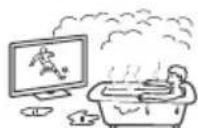
IIOOBecneueHnHaJIyUeeroKaueCTBaN3O6paXeHnHe H NODBepraTe 3KpaH BO3dEiCTBnIO NpMaRTOOCBeuHnNn COJHeuHO CBeTa.
TeBn3Op H peKomeHnyeTcnapeHoNcntb nXoNoHOrO NOMeueHn B TeTNOe. Pe3Kne N3MeHeHn TEMepaTybl N NOMeUeHN MOnyT Bb3BaT bKOHDeHcauIO BnAri. 3TO MoXeT npNBecTN K CHNXeHIO KaueCTBa N3O6paKeHn TEBn3Opa I/nn NCKaKeHIO CBtOB. B CTOM Cnyae DOxJNTecb NnHOrO NCnapeHn BnAr, IpexJe Yem BKIOuTa TbeBn3Op.
Ockolkn:
He 6pocaIte HnKaKne npEmdTeB TeLeEBn3Op. OT yDapa KpaHHOe cTEKIO MOKeT pa3bCn HaHeCTN cepBe3HyTOpaBMy.
- EcnHa NoBepxHocTn TeBeN3opa o6pa3OBaIncb TpeuINHb, nepeD TeM, KaK pNkOcHytbc K HeMy, BbHtE Ka6eJb NITAHn H3 po3etKn. B npotNBOM Cnyae 30 MoKet npnbEcTn Kydapy 3NeKTpUmckIM TKOM.
Ecnn TeJebn3Op He nCnoJb3yETc
- Ecnn Bbl He cobupaetebc nolb3oBatc bTeleBn3Opom B TeueHne HeckonbKln DHeN, No coo6paKeHnM 6eOtnaCHO t N 3heproScbepekeHn er o CneJeY eT OTKIOuHTb OT cTeu 3NeKTponNTAHN.
Tak KaK TeJeBUN3Op He OTKJIOUaE TcR OT CeTN Pn BbIKIOueHIN KHOIKO, IIN erO NIOHORO OTKJIIOUeHIN OT JNEKTPONNTAHN BbIHbTe BuNKy KaBeJI NITAHN IN PO3ETKN. - HeKOTOpBte TeneBn3Opbl OChaSeHbI yHKnIaMNI,ДЯКорpeKTHoP aBoTbI KOTOpblx Tpe6yTeCtOCTAbJIbTb TeLEBn3OpB pexmJe OXnAnA/HcTeBOM pexmJe OXnAnA/Ha
MepblnpedocTopoxHOctnBOTHOWeHNn deten
- He no3BOJIAIte DeTAM B36npaTbcra Ha TeJIeBN3Op.
XpaHnte MeJKe npHaadJeKHOCTn BHe DoCraemocT nTei, TTObI OHn He MoTIN CNyuaHNO pOrnOTnBnX.
Ecnn HmEOT MeTo CJeDyUoune HenCnpaBHOCTn...
HemeJeHHo BbIKIOHTe TeBEN3Op N BbHbTe BNky Ka6JIa NITAHIN3 PO3ETKN B CNEyHOUX CNyuaX.
O6paTnTeCb K CBOeMy DnIepy NnB B cepBnChbI CEHTp Sony dIra TOrO, YTO6bI KBaIIHnΦuNpOBaHHbIe CneuaAInCTbI cepBnCHoI CNyXbblBIOHNHnnpOBepkY TeleBu3opa.
B cnyuae, ecn:
- NOBpeKdEN Ka6eJIb NiTaHnA.
- 3NeKtpopo3eTKa IMeET NIOXHe KOHTaKTbI.
TeBn3Op nOlyuIN NOBpeKdEHN B pe3yNbTaTe NaeHn, yDapa nnI nonaHaHn 6poWeHHbIM B Hero npEdomet.
BHytpb Kopnyca TeNeBn3opaYepe3 OTBepCTna nonana JIKKOCTb NIN KAKOJ-Ni6o npedMeT.
OTempepatetypeTeJeBn3opa
PnDInTeBHomNCNoB3OBaHmTeJeBn3opaero NOBepxHocTHnHarpeBaIOTc. OHnCTaHOBbTcRopyHM HaOuyb.
He pa3MeaTe daHoe n3eJIne B6Jn3m MeunHcknx yCTPOIcTB
JaHHoe n3dJIe (BkIIOaay akceccyapbl) OCHaueHO MarHNTOM(AMN), KOTOpbIM MoXeT BInrTa Ha pa6oTy kAPINOCHTMMyJATopoB, IpORpaMMpyEmBX WUYHTPyrUOuNX KlaNaHOB IJIeHeHnraIgpoeFaHm ININ DpyRnx MeDUNHCKHX YCTpOCTB. He pAmeMaTe DaHHOe N3dJIe B6NI3N INU, PONb3YIOUXc TaKIMMeDUNHCKHM YCTpOCTBaM.NIPOKCHyIbTIpyTEcb C BpaOM nepeI NCIOJIb3OBAHnEM DAHHOFIO3dJIEN, ECIN Bbl NOIb3YEteCB JIObIM MeDUNHCKM YCTpOCTBOM.
XpaHnte B MeCTax, HeoctynbIX dIa deteHnLIu, HaxOJauxxCn oD npncMOTpOM
JaHHoe n3dJIe (BkIOUaA kCeCCyApb) OCHaueHo MarHITOM(AMN).IpOrNaTbIBAHne MaHTa(OB)MOKET npNBECTK cepBe3HbIM NocNECTBnM, HAnPmEep, OAnCHOtY DUYuEHn ININ NOBpeXDeHnM JeNYDOHO-KNIeUHOro TpaKa. B Cnyae IporrAtebHaHN MaHITOB (NNMaHHTa) HeMeDNeHNO IpOKOHcYbTIpyuTEcb CBpaOM.
MarHHTHOe BO3dEICTBHe
DahHoe n3dJIe (BkIIOUa aKceccyapbl) oChauEHO MarHTOM(AMn). He octabIte DaHHb I npOyKT (HaNPIMep, KpbIuKy pa3BeMa) B6bn3n obBeKToB, noDbepKeHHbIX MarHeTIN3My (PiTeXhIbe KapTbI, KpeINTHIbe KapTbC MaHTHThOH JeHTOn n T. n.).
MepblnpedocTopoKHoCTn
PpocmpteBn3opa
- CmOTpnte TeJIeBn3Op npu DOCTaTOHOM OCeIeHnn; npocMToP npu IIOXOM OCEIeHnn INN B TeueHne Ype3MePHo npOJIKTeNbHO BpeMeHN yTOMJrE rJa3a.
-Пи NOIb3OBaHn HayUHnKAMn He yCTaHaBnBaJTe CInuKOM 6OJIb7yIO rPOMKOCTb, YTO6bl He NoBpeDnTb CInyX.
3KpaH (ToIbko dIy XX-K-TeJIeBuN3opa):
XOTKpAHN3ROTOBHeH NO BbCOKOTOH TexHOLOrnn N YcNIO 3ΦΦeKTnBbIX TOueK DOCTnraeT 99,99% N BblIe,Ha 3KpAHE MOYrTOCTOHHNOIPOBJIbTBcR cepHbe IINI RApKne UBtBHe (KpaChBe,CnHne IINI 3eJeHbe) ToCKN.3To CTpykTypHoe CBOICTBO KpAha,KOTOpoe He RAJIaTeCn PnINsHakOM HEnCnpaBHOCTn.
He HaxnmaTe Ha 3aunTHbI Φnltp, He capanaTne ero n He CTaBbTe Ha TeJIeBN3Op KaKHe-JIN60 PpeJMeTb. 3TO MoKeT pInBecTe K HepaBHOMepHOCTn N3O6paXeHn IIN NobPexDeHnO 3KaPaHa.
- Ecnn TeBn3op paobTaet B XoJIoHOM MceTe, N3O6paKeHne MoKET OKa3aTbCpa3MbItbIM ININ CInuHKom TEmHbIM. 3TO He RBAJIeTCpN3HaKOM HcNpabHOCTN. 3TN RaJIeHnRAcE3HTC NOBbIWeHMe TEMnepatpyb.
-Пп рдддддддддддддддддддддддддддддддддддддддддддддддддддддддддддддддддддддддддддддддддддддддддддддддддддд徴
Чебрахеня MOrT NOBЯТSC OTeTOHbI N3O6paXeHn. Yepe3 HeckOblKbO CEkyHd OHN MOrT UcYe3HTy.
BoBpMa pa60bI TeJIeBn3Opa 3KpaH N Kopnyc HarpeBaIOCTC. 3TO He ABJRAETCR npN3HakOM HNCnPabHOCTN.
3KpaH codepxHT He6oJbwoe KOJNUyecTBO KJUKNX KpIcTannOB. PnYtJIN3aUN CoBIOJaTe COOTBeTCTBYUuNE MeCThBiE NOLOKeHnN INHCTpyKUnn.
OLED-3KpaH (ToIbko IJRA OLED-TeJIeBn30pa):
XOTARLED-3KpAHN3rOToBnEN NO BbICOKOTOHnTexHOJINM 甲No3ΦFekTmHBxTOeKdoCTnAe999%N Bblue,Ha OLED-3KpaHneMOrNIOCToRnHO NOBnBtBCaYePbIeNNn RPKHeZcBTHBe(KpachBe,CNHHeNn3eJeHbe)TOkKn.3TO CTpyKTPyHoe CBOITBO OLED-3KpHa, KOTope He RaJIaTeCn PnH3NaKOM HeNCnPabHOCTn.
He HaxnMaIte Ha 3aunTHbIy fHnlbTp, He capanaiTe ero n He CTAbTe Ha TeLEBnOsp KaKne-JIN60 PpeJMeTb. 3TO MoKeT pNIBeCTn K HepaBmepHocTn N3OpbaeHn rnn NobpexdHeIO OLED-ekpHa.
BoBpempa6oTbTeJIeBn3OpaKpaH N KopIyC HarpeBaIOCTc. 3TO He ABJRETC npN3HakOM HncPiPABHOCTN.
-Пиутллзаци.TeJIeBn3opa co6IIOaIte MeCTHbIe NIOJoxHeN u INCHtpKUn.
YxOJ 3a NOBepXHocTbIO 3KpaHa, KOpnycom TelenBn30pa Hnx YnCTka
Ipeep nctkO TeBn3opa Wn BNKn Kaebna TaHn oTcoeHNHTe Kaebb Ot cTeN.
IЯ obecneueHn coxpaHHocn KOHCTpyKUHOHBIX MaTePnaIOB I NOKpbTIN 3KpaHa TeleBnOpa c6NIOaIe CNeDyIOuMe MpeI npedocTopoXHocn.
-ДЯудаленяпьлсnoBepxHocTNkpaHa/Kopnyca TeneBnOpa octopoXHO npOTnpaIte erO MRAKoTKaHb.EcNl PblHe ydaJareTcnoJIHOCbIO, npOTpNTe 3KaPmMRAKoT KtAHbIO, CJIeKCa CMOueHHOB B Cna6om paCTBOpe MRAKoro MOIOUero CpeCTBA.
HnKOrda He pa36pbI3rNBaIte BDOy nINMOOuue CpeIcTBO IpRAmo HA TeLEBUN3Op.CKoJIeHne XIKKOCTN BH3Y 3KpaHa INHapUKKbIX NOBEPXHOCTRX INPOHnKHOBeHne BHTpb TELEBUN3OpMOxET PnVBecTN K BbIXOy TELEBUN3Op N3CTPOJ.
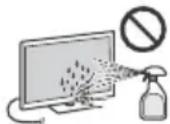
HnB Koem Cnyuae He nCnoJb3yIte HnKaKne a6pa3nBhBe MaTePnAbl, 9eNoUHbE/KNcNOThBHe ONUCTNTEni, NCTAUHne NOPouWKn I TAKNe JETyue pAcTBOpNTEni, KaC cPiPT, 6EH3HN, pa36aBntJIb NN INCeKTNUmDi. PpIMMeHHe N3Tx BeUecTB NN dInTeNbHbIKoHTaK T N3dENnMm N3 pe3HbI/BnHnA MOrYT NOpeDITb NOKpbITNe KOpNyca NN NOBepXHOCTb EkpHa.
ДлгобсесениннадпжашьBEHTNIAUpeKOMeHnyetcnpnoDnueckn npOuNtB BeHTNIAUOnHHbE OTBepCTNcNOMOJIbNo nbIlecoca.
Ipy npovBKe yraHaKIOHa TeeBN3Opa N3MeHnTe ero IIOJoxHe MeDJIeHH O OCTOpOXHO BO n36ExaHne COCKaJIb3bIBaHH TaTeeBN3Opa C NOCTaKN.
DOnonHnTeJIbHoe o6OpydoBaHne
- Depknte donoJHnTbe Hbte KOMnoHeHt bnn OobpyoBaHne, N3nyaOuCe 3NeKTPoMaHnTHbte BONHb, Ha paCCToRHNOT TeBn3opa. B npotNBHom Cnyae moKeT MeTb MeTo NcKaXeHne N3o6paxEHHN n/nn 3Byka.
-Данhoe obopydobAHne npotectnpoBaHO n npn3HaHO OTBeaHouIM Tpe6OBaHNm KnpdeJbHbIM 3HaHeHNm, YcTaHOBLeHHbIM CTaHapTaMn 3MC, npn nCNoJIb3OBAHNcoeINHHTeHbHO rHgHaJIbHOro KaBeJIa DInHOm MeHee 3MetPOB.
-Данhoe obopydobAHne npotechnpObaH no npn3HaHO OTBeyauoIIM Tpe6OBaHnM K ppeJeIbHbIM 3HaYeHnM, YcTaHOBJIeHHbIM cTaNaptAmN 3MC, npn NcNoJIb3OBaHnP aDIOuOAcToTHOrO KaBeJr DInHoM MeHee 30 MTePoB dIra NOdkIIOUeHnK pa3bemy Ha3EmHO/n/CnyTHNKOBoI/ CATV aHTHeHHbl.
Pekomehdauzn no pa3bemy Tuna F\*
BHytpenHra Xnla DOnxHa BbCTynatb n3 pa3beMa Mehee Yem Ha 1,5 MM.
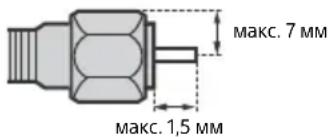
(CnpaBOUHb pucyHOK pa3bema Tnna F)
*ToIbkoB onpeJeHbIX perNoHax/CTpaHax/MoJEnx TeJIeBu3Opa.
BecnpoBOnHa yHKunyCTpoNCTBa
He nCnObl3yIte yCtpoiCtBO B6Hn3M MeDnUHCKoRO OobpyoBAnHra (JIEKPOHHbIX CTmMyJIaTOPOB cepua n T.Д.) NocKoIbKy 30 MoKeT PnVBcTn K HeNCnPpABHOCTN NocJeIeHrO.
HeCMOTpHaTo,TO DaHHOe YcTpoICTBO Nepeaet/NOlyaet 3auNphiPobAAHbIE CnHAnbI, OCTeperaIaTeCb HecAHKUNHOHPOBaHHorO nepExbTa CnHana. Mbl He Hecem OTBeCTBENHOCTNa 3a IIO6yIO npObnemy TAKORo poJa.
JaHHOe OOBpyOBAHmE CneJeT yCTaHABnBaTb N BKNIOuTaH TaKOM pACCToRHH, YTOb6I MeJxdy eRO aHTeHHoN nTeLOM YeIOBeka 6bIo He MeHee 20 cm.
IpeynpeXeHne OTHoCHTeBHo IcnoJIb3OBAHnI PyIbTa DnCTaHcNoHHoro ynpabJeHnI
BCTABJIa 6aTapeKn,co6JIIOdaIte IOnpHOCTb.
He nCnoB3yIte OndHOBpeMeHHO 6aTapeKn pa3nUHbIX TUNOBnn CTapBle HOBBe 6aTapeKn.
- Pn ytni3aun 6atapeek Bcerda co6IoudaJe T npabuHa oxpaHb okpykaOoee cpeB. B heKOTOpbix perIOHax npabuHa ytni3aun 6atapeek MOyT 6bItb perNaMeHTnpoBaHb. Ipoc6b6 obaPaaTbcrno 30my NObOy B MeCThBe opraHb BLactN.
-BepeXHo 06paauTeCb CnyIbTOM nCTaHIOHOHOrO ynpabHeHn. He 6pocAteero, He cTaHOBtEcHa Hero HneJeTe Ha Hero HnKaKx KIOKcTei.
He ocTbIyTe nIyt dNCTaHcNOHOrO ynpaBHeHnB6JIn3N MTOCHYKOB TeIJa IIN B MeCte, NOBepXeHOM npRMOMy 8O3dEiNCTBIO COJIHeuHbIX Lyuei, INI BO BLnAIXHOM NOMeUeHNII.
CAM (moynb orpaHneHHoro doctyna)
KpbIshky nnn 3aRnyuKy (HaInuHne 3aBnCnT OT MoJeNn TeneBnOpa) cNeDyEYdAJaTBc RHe3Da TV CAM (Moynb orpaHueHHoro DoCTyna) ToIbKO B TOM Clyuae, ecIn yCTaHabINBaETcM aPrt-KapTa, noXoJAAaJa IJa pa3beMa CAM.
Ytuln3aunrTeleBn3opa
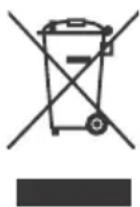
Ytlnn3aun OTCnykBwero 3neKtpnueckoro n 3neKtpoHoro 6opydoBaHna (DnpeKtnBa npmeHmAb CtpaHax Ebpoco103a n Dpynx CtpaHax, rde dienCTBYOT cnCTembl pa3delenbHorO c6opa OTXODOB)
YTNIN3aUHNCIOJIb3OBAHHbIX 3JIeMeHTOB NITAHN(DnpeKTHBa npIMeHMaBCTpaHax Ebpoco3a n dpynx CtpaHax, rIe DeIcTByOT cnCTembl pa3dEJbHorO c6opa OTXODOB)
CbeHnnoIapantna
TapaHTnpaacnpoctpaHReTcHa n3JeNna, KynIeHHbIe Ha TeppuTopuN cTpaH TaMOxKeHHoro CO103a.
Cpok rapaHTnn (NET): 1. Cpok cnjx6bl (NET): 5.
PnOOBAPyXeHm PnOu3BODCTBeHHbIX HeoCTaTKOB n3DeNnB
TeueHne Cpoka rapaHTnn COHn INn ABTOPOBaHHbIe
CepBncbIe CEnTb (ACU) no CBOemy yCMOTpeHIO nIbO
ycTaPAnr IIN CnOJb3OBAHNEM HOBbIX INn BOCCTaHOBJIeHHbIX
3aNnAChE, INIO 3aMeHr N3dJeNne aHaONuYHbIM HOBbIM INn
BOcCTaHOBJIeHHbIM, INIO BO3MeCTAT YNlAHeHHHy CTOMMOCTb.
PeKOMeHdyETcR coXpaHtB DOKyMeHNT, NOITBePxxDAIOUIN DaTy
NOKyKn IN3dEINNA.
Dnra CoXpaHEnHraPaHTnn Heo6xoDMo CoBLOdaTb NHCTpyKUnn
NO mCnONb3OBAHnO, XpaHEHIO IN TPAHCNPOTIPOBKe,
3KCNIIyATnpoBaTB IN3dJeNne TOJbKO B INuHbIX INOMaUNHX UeJAX,
He NOJBePraTb MoINΦKaUINu INn HEKBaINuΦuPobAHHomY
peMOHTy, He yDANr TB 3TNkETKY C cepINHbIM HHomePOM.
FapaHTnn CoHn HE orpHaunBuAet npaba Notpe6nteNe,
yCTaHOBJIeHHbIe pImeHMlbIM 3aKOHOaTeJBCTBOM B
OTHOSeHm TOPROBn NOTpe6nteNBckkMn TOBaPAM.
Cnyx6a noDepkKu:
Poccn88002007667
Bénapycb 8 820 0071 76 67
Ka3axCTaH 8 800 070 70 35
Dpyrme cTpaHb+74952587669
e-mail info@sony.ru
BOHIO,TPIMAATE CBIUKN I INHIJXKEPEJA BIDKPINTOROBHO IODAJIIBIDZbOBOBNPOB
Ha3Ba Bnpo6y: TeIeBi3Op
Infopmaia odo 6e3neuhoi ekcnnyataaii
PONEPEJXEHH
3actepekhi 3axo
Pn3NK Bn6yxy, kIIO 6batapeky 3aMIHeHO Ha HEnpabNbHn TnIbatapeKn He nobHNH NIDabATncr HAdMIPHomr HarPiBaHHo, TaKOMY Kc coHNe CBITNO, BOrOb ToIO, aBO HAD3BnuAHIHO Hn3bKOMY TnCKY NOBtpr, IIO MoKe npu3BcTeN Do Ix Bn6yxy aBO BTOKY 3aIMNCToI pINHn Yn rAry.
He6e3neKa BiDcyTHoCTi CTiKoCTi
Y pa3i naHnHraTeBbI3Op MOKe cnpuHHHTc cepNo3Hi TpaBMn HABITb CmepTb.
NONEPEJXEHN
Y pasi nadihi Tenebi3Omp Moze cnpuuHnTn cepno3Hi TpaBMn uHaBbTcMeptb. YmMaIoo TpaBM, 30KpeMa NITraqnx, MOXHaYNHKNy, BIKOHyoU npOCT npaBnA 6e3neKn:
3ABXDNBVKOpNCToByTe 7aФKn Nn iNCTaBKn a6o cnocobn KpInneHH, peKOMeHNOBaHb INpuOBHKOM TeIeBi3opa.
3ABXDN BUKOPNCTOByTe NmWe Ti Me6nI, 0o 3aTHi BNTpMaTn Bary TeNeBi3Opa.
3 ABXJn nepeBipnTe, n TeNebiOp He BucTynae 3a Kpa enemeta Me6JIb, Ha kOMy BIn CToiTb.
3ABXJINPO3NOBIDaTe DIITrM NPO Te,IO BNNA3NTHa Me6nI, IO6 DoTARITNCdToTEJIb3OpaH NoIoro eJeMeHTIB KepYBaHHA, He6e3neuHO.
3ABXdIcnpmaOByTe npoBOni Ka6JI, nID'cHaHi Do TeleBIsOpa, TaK, 06 He nepeuNTnc Hpe3 Hx, He Tarrn i He 3avinATn IX.
HIKOLIN He BcTaHOBnIOTe TeNeBi3Op Ha HecTIki NOBepxHi.
HIKOIHe CTaBTe TeneBi3Op Ha BnCOKi Me6Nl (HapnKnaI,Ha cepBaHTu KNHnKkoBy 7aФy),O6OB'3KOBo 3a6e3neTte ahKepe H KpInNeHHra K Te nEbi3oPa,Tak i eIenMeHTa Me6NIBdo HAdiHoiOnopn.
HIKOJIHe nIiknaaTe nI TeLeBIOr KaHnHy iHIM MaTepiA, KOJI CTaBtE Ioro Ha OnOpHn eJeMeHT Me6JIb.
HIKOLNe KnaIbT npEIMTe, JAK MOKyTB npuBa6Tu dTei 3McyTNIX BUNI3TN Ha TeNEB3Op CH MeOJI,Ha RAKNxCOTtB TeNEB3Op; CE MOKyTB 6Tu INrpaAkn Nn NylbT DnCTaHuiHoro KepyBAHHa.
Kxho Heo6xHNO nepehctn TeneB3Op B IHe Mie, DToPmMyTeCg ONcAHnx BNue 3aCTepexHnx 3axOJIB.
BcTaHOBnEHHaJaAaTbAHn
Pnncptpi,3'6dHaHH i3 3axnCHHm 3a3eMHeHH m 6ydiBli uepe3 MepekeBe 3'6dHaHH a6o uepe3 IHwH npncptpi 3 ndKluoyehHM Do 3axnCHOrO 3a3eMHeHH, a TaKox do TeNeBi3iHoiCnCTMeu 3 BKNOpNCtAHHH M KoakciaIbHoro Ka6eHIO, B DeAekn BuNpAikx MoKe CnpuHNHTn NoXeKxy. Uepe3 ce ndKluoyehH Do TeNeBi3iHoi po3oNDJIbHoI CnCTMeN NOBVH0 3diHOBaTnca Cheepnctpi, uo 3a6e3neHy eEKeTPnuH y I0JLHIO HIXKye NeBHoro dIana3OHy qactOT (raIbBaHCHH I0JrTop, DVB. EN 60728-11).
Bentnlaia
Hikon He 3akpnaBte BeHTnIaHi OTbOpn i HiYoro He BCTabTne TY KOpNyc.
3aHitbBilbHn npoctip HabkoIIO Tebei3opa, kNoka3aHO HXe.
- PeKoMeHdyetybCBABKnOpuCtOByBaTn KpoHHTeHdIHa HAcTIHHORO KpINHeHH 3 MeTOIO 3a6e3NeueHH HaJIeXHOIBEHTNUII.
BctaHOBJeHHHa CTiHi
3aHmTe npHaMHi TaKNI npocTip BInbHM HABKO TeneBisopa.
BctahOBLeHHaDOnOMoTO np
3aHHTe npHaHmHI taKn npocTip BInbHM HABKOTo TeleB3opa.
*21 cm liuhe dny SU-WL8xx.ДиВ.ДobiДКOBи noci6HnK,цo6 Di3HaTnC4,ч TeNeBizop cyMicn i3 KpoHHTeHOM dЯ HabciHHoro KpinneHHra.
ДяЗбe3пeуннHaJexHoI BeHTnlauT Ta 3anobirHnHaKoNueHHO 6pydny a60 nny:
- He KnaDiTb TeneBtiOp y roPi3OHTaJIbHe noIooXeHHN, He BCTaHOBIOJIte NOro HIXHbIO CTopoHOIO DoIorOp, 3aIDOM Haneped a60 h 6ik.
He cTabe TeIeBizOp Ha noJIuO,KnIM, noCTiB a6o y 1a.
He hakpmbaTe TeIeB3Op TkaHNOIO, TaKIO K 3aHaBicKN, a6o IHsIMPeayAMn, HapnKlaJrTaEtaMToTO.
He BCTAHOBJIIOI Te TeneB3Op TaK, NK NOKa3aHO HnXkYe.
Lupkynia NOBITpHemoxnna.
He 3akpmbaIte o6naCTb dIrauPKyIauiTIOBITpr.
*YMOB BEHTNIAJI 3aIeXaTb BID MoJeI TeEbiOpa. RaIO BIOMoCTI IooIO BEHTNIAJI OINCAHI I B DoIKOBOMY NociHNY,IB IHOpMaJI 363neUHOI EKcNlpyataJI,IMB. DoIKOBNI NOciHNK.
CnIOBNI shHyp
NobbTeec 13 cINOBUM UHypom I pOeTkoIO y 3a3NaueHn Hxue cnci6, uO6 3anO6IITn pn3NKy BuHNKHeHH NoKeXi, ypaJehH eJeKtpuHm CTpyMOM N NOUKoJxHeHH Ta/a60 TpaBM.
BukopncToByTe CnIOBm UHyp, HAdaHm TINbKn KOMNaHicO Sonya, a He IHsMMN NoCTaaybHKaMn.
BCTaBnIe TtEnceIb Do eNekTpnuHoi pO3eTKn Do KINz.
-Плкюат Telebi3op TIlbkn Do MepeXi 3MiHoro CTpyMy 3 HanpyroIO 220 B - 240 B.
-Пи niiKIOHnI Ka6eNIB 3apaIN BnaCHOI 6e3neKn O6OB'RAKOBO BiE'EDHaNeTe CNIOBu IHyHp i CIIkyITe, Uo6 He 3aJIpyTaTcHrHorAMy K6eJx.
Bii'cndaHte CnOBu shybp iD po3eTKn nepepeMOHTOM aO npemieHHm TeIeBi3opa.
- TpMaIte cInOBn IHy np noDani BiD JxpeJen TeNa.
PerynepHO BmMaTe 7tencB 13 p03eTKN OOnuAte NOro. RaIIO TcncBbKpTNI NINOM I HbOro NotpanIE BOIora, Noro i3oJzmu MoKe 3iCByaTnC, Io MoKe np3BeCTn Do nOxexJI.
PnpimItka
He BnKOpNCObyIte HadaHm CnIOBm IHyp i3 KoDnM IHsIM mObnHaHHm.
He 3aueemnIte, He 3ruHaIe I He nepekpyuIte cInobn HHyp HAdTo CnIbHo. CTpyMONpOBIiHi KUNMOxTyb OrJNTcR a6o 3JaMaTncr.
- He moDnΦiKyIte cunobn shHyp.
- He knaidiB baxki peyi Ha cnnoBn shyp.
He TargHtB CnIOBm UHyp npu BiD'EDHaHHI NOro BiEneKtpuHoi pO3eKn.
-He niknouaHTe HaTTo 6arato npnaadBo oHic po3eTK.
He BnKOpncTObyIte eNeKtpnHy po3eKy, 10 He 3a6e3neYc HAnJekHOrO npNJaRaHHa KOnTaKTiB WTeNCeJIa.
IPNIMITKA ⅢOIO AADANTPEPA 3MIHHORO CTPMY (IneMoJei,do KOMnJIeKTu JKNX DoJaTbcra aadantep 3MiHHoro CTpyM)
PonepeJxKeHHa
Ioo3Hn3HTn pN3NK 3aMmHa N ypaXeHH eNEKtpnHm CTpyMOM, He iDdabaiTe ue npuiaBnNbBy douy u BOiOnr. IooB NKJIIOUHTN MoXINBICTB 3aGopRHH ypaXeHH eEKeTpnuHMMCTpyMOM,He CTABTe Ha npuia NapdeMeTu HAnOBHEH BOIOH, HApNKJaAD Ba3N.He BcTAHOBIIOte npuaJy 3aMKHeHOMy npoCTOPI, HApNKJaY KNHKKOBi W aFi ToIO.
- P03eTKa Maé 3haxoDITnCra nO6n3y o6naHaHHaI 6ytN IerKo DOCTYINHOJ.
BukopncToByntaanTep 3minHoro ctpmy i kabel KINBneHH, IOdoiaoTbca.
He BnKOpncOByTe HnHnn aanTep 3mHnHO CTpyMy. Lc MoKe CnpuHHHTn HeCnPabHCTb.
PiKJIouaIte aanTep 3miHoro ctpmy do Ierko DoctynhoI p03eTKI.
He Hamotyte Kaebj KMBlenHn HabkoIoo anaTepa 3miHHoro CTpyM. Ue moKe npN3BcTeN Do noiKoJKeHHn KJIu Ka6eIO Ta cnpuHnHn HecnpaBHicThb MedianpnuMaaya.
He TopkaTecra o anaTepa 3miHHoro CTpyMBy BOIOrMM pykAmn. - POMITUBWINЯKICTb HENONAДKN, HeraHOBiD'EDHaITe aanTep 3MiHHoro CTpyMBy BiD po3ETKn.
HabitbnicBUMKHeHH npnana3aIImaεTbcSriIKNIOeHIM Do eNEKtpnuHoi MepeXi. BID'ENHaTe NoRo BiD po3eKn.
-Пи ТпВалову BИКОПСТАнHIаДАПТЕР 3МИНОНТСТPyMHy HArpIbAeTbCЯ.Лe МоЖи ВДЧУТ,ДOTOPKHYBUNcьdoHbOro pyKIOU.
3a60peHe BnKOpncTaHH
He BCTaHOBNIIOTe Ta He BUNOpNCOTByTE TeNEBi3Op y HNKe3a3HaueHnX Micx, OTOeHHnx i CNTyauix, OCKInbKn ce MoKe Ipn3BecTn Do HecnPpABHoCti TeNEBi3Opa, NoKexi, ypaKeHHN EJekTPnuHm CTpyMOM, NooKOJKeHHraTa/a6o TpaBM.
Micra:
HaBopi (PiN npMm COHnHm IpomHHm), Ha MOpcbKOMy y36peXkKi, HA kopabNI abo IHUOM cyNJI, BCEpeNHI TpaHCnopTHoro 3acoby, Y MeuHnx 3aknaDax, HeCtabINbHX MICxJx, PNOJN3Y BiKpUTNX BOOIM abo DxKepeN BODN, B yMOBAX DOUy aO DMY.
Cepedobnue:
- Rapayi, Bonori 60 abo HauMpHoo 3aunneHi Micra; Micra, KyuMoXytb NotpantnT KOMaxi; Micra, De TeneBisop MoKe 3a3HtN MexaHIOI B6paui, Nobn3y DkepeR BiKpnTorO BorHNO, HauPnKnaIad 3aapaneHa CBUka Ha TeneBisopi. 3axuataTe TeneBisOp BID KpanEJIb 6bn3OK pINHnTA He CTABTe HA HboRo HanoBHeHpiDInHOIO npdmEtH, HauPknLad Ba3N.
Cnryauii:
BnKOpncTaHHa TeNebi3opa, kUO y BAC MOKpi pyKn, kUO Kopnyc TeNebi3opa 3HrTm, a TAKoX NOrO BnKOpncTAHH 3 YcTaKyBaHHM, He peKOMeHIOBaHIM BnPo6HkOM. Pid qac rpo3n BiD'EnHyTe TeNebi3op BiD po3eTK enEKeTpOxNBHeHH Ta aHTEHN.
BCTaHOBnEHnTeLeBisopataKIOBH BucTynae B HABKOImuHni npocTip.Bid yApdy o6 TeBeiOp MOxytb noctpakdatn IIOdN NOwKOaNTncI hwi npedmetn.
BcTaHOBHeHHTeIeBi3opa yBoIornx i nIbHnMicx, a TaKox y npmiueHH, de npcyTHi MaCnHaHCTn ImA abo napa (npraid 3 KxOHHH CTolONy 3BOJOKyBaey). Lc MoKe cnpuHHTn NoKxy,
eNeKTPnHm yap a6o deOpmaio.
BCTaHOBLeHHraTeLeBi3Opa B MlCux, kki nepe6yBaI0b NiD iieo BcOKnX TemnepaTy, HApNklaad NII pRmMIMn COHrHuMMn IpomeHmN, NoBn3y 6Taapei onaileHHA bO HarpBaIbHOBeHTnIauiHOi CntemN. NpePribaHHra TeleBi3Opa MoKe npn3BeCTNo DeΦopMaui KOpnyca I nowKoJKeHHaCMOrnpncTPOIO.
Y pa3i BCTaHOBnEHHy Y BbnpaBHi my6JIHOI Ja3HI Y KypOpy 3 rapAumM JKepePAMMOKINBE NOxKOJKeHH TeneBIsOPa CipKO, Uo MiCTNTBCB NOBITPI, TOIO.
-ДяdoCgHHeHHHaBnUoIЯKocti 306paJehHHnoD6aJIte npOTe,uO6 ekpan He bV cnpMBoAHn Ha coHcE qN JxpeIoo WtYuHoro OCBITNeHH.
He 3aHocbTe TeLeB1Op i3 XoIOny B TeNne npMiuEHH. Pi3ka 3MiHa TEmNepaTyPi MoKe BnKInKaTu KOHeHcaUIO BONr.Ie MoKe Ipn3BeCTn Do NOripSeHHa KocTi 3O6paXeHH aIKoCTi BiITbOpeHHa KOBopIB. Y TakOMy pa3i DaJIte BOJIo NI NobHICTO BNnApYBaTmci I JINuNE NotIM BMNKaTe TELeB1Op.
ПОЛOMКA KOMПОHEТВ:
He KnaTe HiOro B TeNebi3Op. Ckno ekpaHa MoKe po36ntncB iD yApy Ta cnpuHHu T cepNo3Hy TpaBMY.
KIO KOpNc TeneBizOpa TricHyB, He TopKaITeCg Ioro, DOKn BHe BiD'cHAcTe CInNoBn 1uHyp BiD eJekTpoMepeXi. B IHOMy BUnaKy CIe MoKe np3BeCTn Do ypaXeHHeJeKTPnuHMM CTpyMm.
Koln Tenebi3Op He BnKOpNCTOByETbca
KIO Bu He ByTe BUNOpCToByBaTN TeIeB1O npTPOrROM KINbKox NHB, IIORO CNIID BID'cHaHTN BID eEnEKTpOMepexi 3 MIPKyBaHb 6e3neKn Ta 3bepeXeHHa HABKOJIuHbOro cepenOBuHa.
OcklbKn IpocTe BUMKaHHa TeNeBi3Opa He 03HaacE Noro Bi'EnaHnB iD eNekTpOmepeXi, notpi6HO BVITRHyTN WTeNCelb 3eNekTpUHoi Po3ETKN, uo6 BiKIOuHTN TeNeBi3Op NOBHCTO.
-Дяк TelebiopmaToTakiФyHKuI,ДЯнHalexKHOIpo6OTn YkxTelebiOpMa3aIIuAITcRBypeKIMOuyiKyBaHHa/ MepexeBOMypeKIMOuyiKyBaHHa.
Udo ditei
- He Do3B0JaTe DITyM 3aJa3uTu Ha TeNeBi3Op.
- TpMaIe MaJI DeTANI No3a DoCTyNOM DITEe, 0o6 DiITN IX BUNaIKOBO He pOKOBTHyNI.
Y pa3i BHHKHeHn HxueHaBeDeHnx npo6lem...
Ypa3i BnHnKHeHH 6yIb-koI 3 HNKeHaBeEHN np6bnm HeraHOBnKHIb TebeBisop i BiI'eHaHTe cHOBn WHyp BiD eJIeKTpOmepeKi.
3BepHbCgdoCBOROINCTPNOTOpAp a6ocePBicHO 9eHTpy
Sony 3 npoxAHm,IO6BaWTeNEBI3Op nepeBipNB
KBaIΦiKOBaHn PpaUIBNk.
KoJI:
CINOBNIUHyp noKoKeHo.
- WTeNceB noraHo TpMaεTbCBAeIeKtpuHn po3eTuJ.
TeneBizop nowkoJKeHo y pe3yIbTaI naiHnry, ydApy a6o NotpanHnH y HbOra koroHeybI npEmdeta.
-Yepe3 OTBOpN y Kopnyci BCEpeDnHy nOtpanuIa pIDHa a6o TBepdN npEeMTe.
TemnepaTpya teneBizopa
KanTeB3Op BnKOpNCTOByTbC npOTyROM TpBaIoro Yacy, Kopnyc HauKono ekpaH yHarpiBaTbc. Ce MoXHa BiDyTu Ha dOtNK.
He knaiItb uei Bnpi6 no6n3y MeuHnx npictpoiB
UeBnBip6 (BKIOUHO 3 npnaIaIaM) MICTb MaHIT(N), kI MOKytb nepekoJXaTn pOBoTI KApDIOCTMmYIaTOpIB, nporpaMOBaHIX UHTyBaJIbHINKlaNaHIB, pn3HaYeHINx DIA NIKyBaHHr iRIOueΦaIi, Ta IHnxNcMHuNx npCtpoIB. He KlaDiTb ceB BnBip6 nobIy IIOJe, 0o BVkOpNCTOBYOTb Taki MeMNHi npCtpoI. JkIo Bu BVkOpNCTOByTe bHy-b-AkIn 3 cIx MeMNHx npCtpoIB, pOKOHcyIbTuTEc3 Ikapem, nepH hIX NoHNAtn KopNCTyBaNTcA cIMM BnPo6OM.
TpMaTe B Micx, HeoctynHnx Ia dite Ta oci6, kni notpe6yotb Harny
LcBnBip6(BKIOUHO 3 npnaDm)MiCTntb MaHIT(II).
IpoKOBtYBaHH MaHHTy(1B) CTaHOBnTb BeINky He6e3neKy, k-OT MOXJIuBICTb 3aDyWeHH aO bTOpaBMYaBaHH
JNYHKOBO-KNUKOBORTO TpaTKY. Y pa3i npOKoBtBaHH MaHITIB (a60 MaHITy), HeraHNo 3BepHtbcrdo Nkapra.
BnnnMaHity
LeB BnIbIb (BKNIOHO 3 npNIAdAM)MiCTNb MaHIT(n).He 3aIINaIaIe TcE BnIbIb (HaNPKJaAD, KPMKy KOHTAKTIB) No6bn3y 6yDb-ynx NpeDMTeB, YyTNINBx DO MaHETn3M (nlaTAtKHi KapTKi, KpeNTHI KaPTKn 3 MaHITHOO CTPIUKOIO ToIO).
3aTepeKHi 3axOuN
PeperrnT eIeBizopa
ДиВiTcA TeJIbI3Op npn NOMipHOMO ocBITJIeHHI,OCKJIbKN nepERJd TeJIbI3OpApnpn NorAHOMO cBITJIeHHI abo npOTaROM TpNBaIoro yacy npN3BODHT do HappyKeHHa OueH.
BukopncTObYIOH HabyuHNK, BiDperyIIOte rYHicTB TakIM YHOM, 06b YHKHTn HaMipHX pIBH, OckJIbKN B IHIOMy pa3i ce MoKe npN3BeCtNo nOriPWeHHcNYX.
Ekpan (tɪnbkɪ Ṭŋ PK-Telebi3opa):
He3BaXaOuHnHaTe,IOeKpaH BuroToBneHn i3 BkOpNCTAHNNB HcKOkOTouHoiTexHOIorI,199,99% a60 6InbIe NIKceiB eEeKTNBHO yHKUIOHYoTB,Ha HbOMy MOxYtB 3'ABTNCsA OOpHi a6O rckpabi (YePBoHi,cNI Hi a6eNeHi) ToKN. Ie KOHCTpyKTNBA OOCbNIBCTb ekpaHa,a He O3NaKa NOro HecnPabBOHocTI.
He wTOBxaTe He npaTe nepeHnIphiIbTp I He KnaIITb pei Ha ue TeneBi3Op. 3o6paKeHHa MoKe CTaTN HEPBHOMIPHM, a6o MoKHa N0WKOJNTn ekpaH.
- RaKIO TeIeBI3Op BnKOpNtOByEtbcry XoJIoNDHomy npMIMiueHHi, 36bpaKeHHa MoKe CTAtn Po3MNTHm Abo TEMHN. Ice He e O3NaKO HecnPapBHOcti. Taki Rnua 3HnKaIOb TpNi nIDBUNeHHi TEMnePTypn.
-ПиТрИВалOMуВДТБОЕнHI 路HIXOMNX 30брахeНь може 3'ЯBJTNTSC3aIIIMKObE 3OBpaXeHHN.BoHOМожe 3HINKHHTI Hepe3 DeKInbKa XbUNH.
EkpaH i Kopnyc Harpiaotbcn iD vac po6oTneB3opa. He HecnpaBHCTIO.
EkpaH MicNTb HeBENKy KInbKcTb pIKnX KpIcTaNIB. DToPmUyTeecMicueBxNoCTaHO I npAuno ytni3aui.
Ekpan OLED (TinbknДЯ Telebi3opa OLED):
HeBaXaOuHaTe,IOeKpaH OLEBnroToBneHn i3 BnKOpNCTaHHMaBnCOKoTOuyHOI TexHoNOri,199,99% a60 6InbIwe nIKceJIb eΦeKTnBHO yHKUIOHYOTb,Ha HbOMy MoKyt b 3'ABJNTNCaOpHi a60rckpabi (6ini, YepBoHI, CNHI a60 3eNeHi) TOKn. Lc KOHCTpykTbNAOC6bNtBekpaHa OLED,a He O3HaKa Ioro HecnpaBHOctI.
He wTOBxaIte He npaTe nepeHnIphiIbTp I He KlaIbpei Ha ue TeneBisOp. 3o6paKeHHa MoKe cTaTNHePbHOMipHM, a6o MoKHa NoWKoDIneEpaH OLED.
Ekpani Kopnyc HarpibaTbca nID qac po6oTI TeJIeB3opa. He HecnpaBHicTIO.
PiJac yTnI3aui TeIeBi3opa dOpymyTecb MicueBnx 3aKOHIB Ta npabun.
Dorla i nuuene Hn eKpaHa/Kopnyc TeneBi3opa
IpeepuueHHm oob'3KOBo BiD'cHaHte CnIOBn shHyptenebiOpa BiEneKTpHooi po3ETKn.
U6 3an06irtn noripweHHIO kOciMatepiJIb a6o nokpnTTk ekpaHa, DotpmyTeCEa HxKHeHabeDeHnx 3axOIB 6e3neKn.
- Κιοδ Βνιαλητή Μιπι θενερχή εκραγα/κρόγς, σβερεχόνη πορτίβι έντρού τηκανηθου. Κλισι Απινημενης Στιχός, Προτίβι Εναβερχόν Μικόκου τηκανηθου, 3πεγκα 3Μούηθου Σλαδκμορού Μρογινόν Μημινόν Μαυτόνο 3aσούγ.
He po36pn3kynte Body a6o Mmouyn 3acic6 be3nocepndbo Ha TeleB3op.PiHaMoKe NotpantnHa HnKHiu cactHHy ekpaHa Qn Ha 3OBHIuH DeTani, a NOTIM BCEpeDnHy npIaMy i N0kOdHTN TeLEB3op.
HikoN He BnKOpNCToBMyTe XoDi HxopCTKi TKAHNH, LyXHi a6o KNCNOTHi po3uHNi NopoWKn dIy HmUeHHa a6o NeTki PO3uHNHKn, 3OKeMa CnIPT, 6EH3oi, pO3piJxKyBaH, IHcEKTuNiDu ToIO. BnKOpNCaHHa TaKnx peOBOH a6o TpnuBAni KOtAK t3 rymo A6o BiHINOM MoKe npN3BeCtNo NowKOxJeHH NoBepXHi ekPaHa i MaTePiaNy, 3 JkOrO 3pObJeHO KopNyc.
ДяЗа6e3NeueHHHaIeXHoiBeHTnIaIIpeKOMeHnyE mo nepioMnHO uCTNTu BeHTnIaIHi OTBOp 3a DOnomorOIO nNlOcoca.
Perylnoycu Kyt NobopoTy TeleB3opa, NopeTae Noro NobiInbNo, Ioo yHmKHTn Noro nepeMiueHnA 60 3CyBy 3i CBOeiPiCTABKN.
DdaTKOBe 06laHaHHa
TpmaTe DoataKoBi KOMnOHeHTn a60 bdy-kae 06bHaHHB, Bld koro Ide eJeKTPOMaHrTIhe BnnpOMIHHOBAHH, NOaJI BiT TeleBe3opa. Ihakwe ue Moke CnpuHHTn cNOTBOpEHn 3o6paKeHHaTa/a/60 BuNHkHeHHaMy.
- Lé 06laɪdHaHnHaIeXHmM YHmO Bnnpo6yBaHe Ta Bn3HaHe TAKIM, Μιο 3a6e3neuYc ΦHKUIOHYBaHHa 3 O6mExHHaMI, BV3haeHmM y CTaHapTax ΣIoO eJekTpomarHtHOi CymiHoCTa BnKOpNCTaHHa CnHaIbHnx Ka6eJIb, KopoTUnx 3a 3 Metpn.
- Lé oblaɪnHaHnHa NaIexKHM YHOM BnIpO6yBaHe Ta Bn3HaHe TaKIM, ΜU 3a6e3neUe ΦHyKUioHYBaHN 3 O6mEkeHHaMn, Bn3HaueHnM B CTaHdptax UoDo eJKeTpMaHrHiTHoI CymicHOCTa BnKOpNCTaHHaPADIQUACTOHNX Ka6eINIB, KOPOTuXn 3a 30 MeTpIB,ДЯpo3'Em eΦiHOrO CnHAY/CnyTHNKOBORO CnRHA/N /CnRHA/N Kα6eBHorO Tene6aueHHA.
Pekomehdaucia odo wTekepa Tnny F\*
BHytpiHni Dpit NOBHe HnCTynatn 3a 3'EnHyBaIbHy YactnHy He 6Inbwe, HIX Ha 1,5 MM.
(DobidkoBa cxema wTekepa Tny F)
- He B y cix Kpaɪhax i periohax Ta He B y cix Moɡeɪx TeneBI3opiB.
TapaHTia NOoHpOeTbCra Ha Bnpo6n, npuδ6aHi Ha TepuToPi YKpaIHn.
Tepmi rapaHTi (pokIB): 1. Tepmi cnyk6n (pokib): 5.
Ppi BnBnEHHI BnPo6HnHx HeOnlKIB BnpOby npotrom
TePMHy rapaTti COHI abo YNoBHOBaHexn UeHTp 3
0cClyROyBaHHra (CoHi) (YUO) HA CbI pO3cyd abo ycHyTB ix 3
BnKOpNCTAHNM HOBx abo BiHOBHeHX 3AnuactNH, abo
3AmHtB BnPi6 anAloHrHM HOBM abo BiHOBHeHm, abo
BiDkoNyIOb cnaLayEH BapITcB. PekomeHdyETbc 3BepeTTn
DOKyMeH, knn niTbpckJyE daty KyniBNI BnPO6y.
DJI 3BepeXeHHra rapaTii Heo6XiIDno DToPMyBaTnc iHCTpyKL
NO BnKOpNCTAHHIO, 3BepirAHHIO I TpaHcNopTyBaHHIO,
EcKnPyATyBaTN BnPi6 NIIe B Ooc6HtN X I DomAuHix CIINAX, He
NiDaBaTNI MoHnfKaIi II abo HeKBaniFikOBaHOMy peMOHTy, He
BnDAJTN eNTKeTKY 3 cepiHNUM HOMepom.
FapantTi CoHI He o6Mexye npaba cNoXNBauH, BCTaHOBNeHi
HHHHM 3aKOHOaBCTBOM UOto TOpRIBI CNoKNBHMN
TOBaAPMN
Cnyx6a nIDTpMKn:
YkpaHa 0 800 307 669
e-mail info@sony.ua
Ampoc yUO: www.sony.ua/support
(TG-01-1)
a111 a111 111 111 111 111 111 111 111
aal jll 13 acl dab ayd aal y
aagallggl aal/ajgalll
1 1
aallll lalw wglg 10000000000000000000000000000000000000000000
.
.
.
- Jolo 3y 3y jy
.
A
yue yuulukuyg 1eai cui ciu g jayiyi sligkly kaijol jao jei
a a a a a a a a a a a a a a a a a a a a a a a a a a a a a a a a
:
(yjlllogal)ssjllell
(y)j()23j()
e 10
agalb Cia 1aLol gJgJg
jzjaiil 0j joo
a 1000
ydy
a aal jzjy y no y jy jy y
golwglg (c)abla (clalall L) gll
y 1 y
aal 5 aol ao jaoaocn noo o o yjy gai li gai
aalll 0j0y100i jie jg pucun cui 151 gail lla iia plauai iia d
aalalalal yjg jg aht
aall aai gai yall aayaa 10y jka jj jalil jg placau all
.0j j 1000000000000000000000000000000000000
aalal aagaae yaaee aaal yaae ae
Igao aalll aall gglgagabll gai jilll lllnss sas
:(OLEDjzJ)OLED
211111111111111111111111111111111111
jyra (jai 1 g jg jg jg jg jg jgs bbs g bs bs
OLED 0LED
Jasy 40g jie jolll Jao
y 1
g 10000000000000000000000000000000000000000000000000000000000000
aJyall Jaaal jie aee (yaglllogall) yajall dll J
aal 8gbyg a jyjcbb l jyazwuy eabg (yssy) yaaalll yaaall yaae g j
1a y 1000 a gll p 1000 a jll 1000 f 1000
四边形 AOBC 为正方形
y
logall jy a 145 d 145d y (yll Jogall) yll lll
Jzjg jzjj 1
()jogall)yll
()
dUll Ue 13 Jds y. (y)JL logal) ssall lll dU e s
(1)
(j)
jUgooo oogoo) ooaiu Ugoo je aio
(baa) Sso
#
yj 1 jyj yj 1 jyj j j j j j j j j j j j j j j j j j j j j j j j j j j j j
J 100
Lgao gJ 10 J5o jgljgljll
g jaojaiyagao (yajll jaiyao)doaall jai
Jg0a d21Jg0g
18 19. (gjogall) oolll dlwl g yolll jolll jolll plal
Ss
jall jssaa) dgsy gglg sny gll ssas jil jn jn jnl jns
()
jglgge (gssll gall) sylll llll
105 13
juyzaiyiluk
aagaaagaaal jaoa a
j1ai
a aaa aagaaagaae aee
y
aill jg y g sl b 1000 10000000000000000000000000000000
doSWJUlog
#
#
jouy juy juy yjuy yjuy yjuy yjuy yjuy yjuy yjuy yjuy yjuy yjuy y
y gill yalil yaaill algdl bok gl dlal do gl jull gnnn aenl 10 ab
jgl jllluljgljLw jglj
jzwny jz
olg jol yu ojLul oJoo:jjzjjz
#
Oooy jyolll cai jSaw 60g g oljy bdy Cuyu Jyolll jya zaa
1000
2015 2015 2015 2015 2015
a15 03 aSall qulz g
4.5 = 2
SΔOBC = SΔCOD + SΔBOC - SΔBOC
14c
·jjj
aalee 1000
·jzjzj1jzj
aas11 0
a 100000000000000000000000000000000000000000000
a 1
00000000000000000000000000000000000000
b.(1)
jgl jgl g jglg jglg jglg jglg jglg jglg
ggy 1 ggyaall llll plalau aagjgalll cglgai gai gai gai jao
Jy jia gjgjcbglg jgi pllb jogg jog jg jg j
(EN60728-11 1j jle)
4.9
.
.
.
julil jie
jglalg jbj 10
Jolo 20
jglzll jgolj5y jdzlsslls


- Internet security caution
- Internet Connection and Data Privacy
- WARNING
- NOTICE FOR CUSTOMERS IN THE UNITED KINGDOM
- How to replace the fuse
- IMPORTANT NOTICE
- Safety Information
- Caution
- Stability Hazard
- Installation/Set-up\*
- Ventilation
- Installed on the wall
- Installed with stand
- Mains lead
- Note
- NOTE ON MAINS ADAPTOR (models with supplied mains adaptor only)
- Prohibited Usage
- Locations:
- Environments:
- Situations:
- Broken pieces:
- When not in use
- For children
- If the following problems occur...
- When:
- About TV Temperature
- Do not place this product close to medical devices
- Keep out of the reach of children or the supervised individuals
- Magnetic influence
- Precautions
- Viewing the TV
- Screen (For LCD TV only):
- OLED Screen (For OLED TV only):
- Handling and cleaning the screen surface/ cabinet of the TV set
- Optional Equipment
- Recommendation of F type plug*
- Wireless Function of the unit
- Caution about handling the remote control
- CAM (Conditional Access Module)
- Disposal of the TV set
- Disposal of old electrical & electronic equipment (applicable in the European Union and other countries with separate collection systems)
- Disposal of waste batteries (applicable in the European Union and other countries with separate collection systems)
- Korato He n3no3BaTe yCTpoNCTBOTo
- OTHOCHOeata
- Ako Bb3HnKHaT CneHnTe npo6IeMn...
- Korato:
- Othocho TemnepaTypata Ha TeJeBu3opa
- He noctabraye To3n npodykt B 6IIN30CT do MedunHcN yCTpoiCTBa
- ДрьхтпpoуктHa МясTo,КbdeTo He Moxe Da 6bde DoctnHAT OT Deua nIn NInca nOД Ha3Op
- MarHnTHoBJIyHne
- Ppepa3Hmepkn
- TneJaHe Ha TeLeBn3nA
- Ekpan (camo 3a LCD Telebu3op):
- OLED ekpan (camo 3a OLED TeJeBn3Op):
- IoppbkKa n nouchBaHe Ha nobbpxHocTTa Ha ekpaHa/KopnyCa Ha TeJeBn3opa
- DonblnHTeJHo 06OpyBaHe
- Ppenopbkn 3a KOHeKTop TnF\*
- Mny tootheite to npoiov auto kovta oIatpikec ouakeuEc
- 3anpeeHHbI Tnbl yctaHOBKn
- MeToNoJoxKeHn:
- Cpebl:
- CnTuauu:
- Ockolkn:
- Ecnn TeJebn3Op He nCnoJb3yETc
- MepblnpedocTopoxHOctnBOTHOWeHNn deten
- Ecnn HmEOT MeTo CJeDyUoune HenCnpaBHOCTn...
- B cnyuae, ecn:
- OTempepatetypeTeJeBn3opa
- He pa3MeaTe daHoe n3eJIne B6Jn3m MeunHcknx yCTPOIcTB
- XpaHnte B MeCTax, HeoctynbIX dIa deteHnLIu, HaxOJauxxCn oD npncMOTpOM
- MarHHTHOe BO3dEICTBHe
- MepblnpedocTopoKHoCTn
- PpocmpteBn3opa
- 3KpaH (ToIbko dIy XX-K-TeJIeBuN3opa):
- OLED-3KpaH (ToIbko IJRA OLED-TeJIeBn30pa):
- YxOJ 3a NOBepXHocTbIO 3KpaHa, KOpnycom TelenBn30pa Hnx YnCTka
- DOnonHnTeJIbHoe o6OpydoBaHne
- Pekomehdauzn no pa3bemy Tuna F\*
- BecnpoBOnHa yHKunyCTpoNCTBa
- IpeynpeXeHne OTHoCHTeBHo IcnoJIb3OBAHnI PyIbTa DnCTaHcNoHHoro ynpabJeHnI
- CAM (moynb orpaHneHHoro doctyna)
- Ytuln3aunrTeleBn3opa
- CbeHnnoIapantna
- TapaHTnpaacnpoctpaHReTcHa n3JeNna, KynIeHHbIe Ha TeppuTopuN cTpaH TaMOxKeHHoro CO103a.
- Cnyx6a noDepkKu:
- Ha3Ba Bnpo6y: TeIeBi3Op
- Infopmaia odo 6e3neuhoi ekcnnyataaii
- PONEPEJXEHH
- 3actepekhi 3axo
- He6e3neKa BiDcyTHoCTi CTiKoCTi
- NONEPEJXEHN
- BcTaHOBnEHHaJaAaTbAHn
- Bentnlaia
- CnIOBNI shHyp
- PnpimItka
- IPNIMITKA ⅢOIO AADANTPEPA 3MIHHORO CTPMY (IneMoJei,do KOMnJIeKTu JKNX DoJaTbcra aadantep 3MiHHoro CTpyM)
- PonepeJxKeHHa
- 3a60peHe BnKOpncTaHH
- Micra:
- Cepedobnue:
- Cnryauii:
- ПОЛOMКA KOMПОHEТВ:
- Koln Tenebi3Op He BnKOpNCTOByETbca
- Udo ditei
- Y pa3i BHHKHeHn HxueHaBeDeHnx npo6lem...
- KoJI:
- TemnepaTpya teneBizopa
- He knaiItb uei Bnpi6 no6n3y MeuHnx npictpoiB
- TpMaTe B Micx, HeoctynHnx Ia dite Ta oci6, kni notpe6yotb Harny
- BnnnMaHity
- 3aTepeKHi 3axOuN
- PeperrnT eIeBizopa
- Ekpan (tɪnbkɪ Ṭŋ PK-Telebi3opa):
- Ekpan OLED (TinbknДЯ Telebi3opa OLED):
- Dorla i nuuene Hn eKpaHa/Kopnyc TeneBi3opa
- DdaTKOBe 06laHaHHa
- Pekomehdaucia odo wTekepa Tnny F\*
- TapaHTia NOoHpOeTbCra Ha Bnpo6n, npuδ6aHi Ha TepuToPi YKpaIHn.
- Cnyx6a nIDTpMKn:
- Ampoc yUO: www.sony.ua/support
- A
- jzjaiil 0j joo
- a aal jzjy y no y jy jy y
- :(OLEDjzJ)OLED
- 四边形 AOBC 为正方形
- jUgooo oogoo) ooaiu Ugoo je aio
- (baa) Sso
- #
- j1ai
- doSWJUlog
- jzwny jz
- b.(1)
- 4.9
- julil jie
- Jolo 20
Brand : SONY
Model : Bravia KD49X7056
Category : Projector