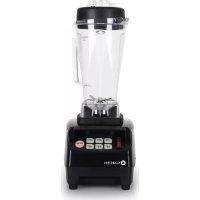
10012876 - Food Processor Klarstein - Free user manual and instructions
Find the device manual for free 10012876 Klarstein in PDF.


| Brand | Klarstein |
| Model | 10012876 |
| Product type | Food processor (blender/chopper) |
| Power supply | 220-240 V ~ 50/60 Hz |
| Power | 600 W (estimated) |
| Bowl capacity | 1.5 L (estimated) |
| Speeds | 3 (Low, Mid, High) + Pulse function |
| Timer | 30, 60, 90 seconds |
| Bowl material | Plastic |
| Blade material | Stainless steel |
| Included accessories | Blending bowl, silicone lid, pusher, 2-in-1 knife |
| Dimensions (W x D x H) | Approx. 25 x 20 x 30 cm |
| Weight | Approx. 2.5 kg |
| Care and cleaning | Clean with a damp cloth; do not immerse in water or in dishwasher |
| Safety | Built-in fuse; do not open or repair yourself |
| Spare parts and repairability | Repairs only by authorized workshop; replace fuse or plug according to instructions |
| General information | Intended use: chopping and blending food; do not use for other purposes |
Frequently Asked Questions - 10012876 Klarstein
User questions about 10012876 Klarstein
0 question about this device. Answer the ones you know or ask your own.
Ask a new question about this device
Download the instructions for your Food Processor in PDF format for free! Find your manual 10012876 - Klarstein and take your electronic device back in hand. On this page are published all the documents necessary for the use of your device. 10012876 by Klarstein.
USER MANUAL 10012876 Klarstein
- Ensure that the container is securely placed on the motorized base before using the blender.
- Hold the container before starting as the motor is powerful, also ensure that the clutch is in place.
- Do not place your fingers inside the jug at anytime, whether on or off the sharpness of the blade.
- Remove the jug from the base before pouring blended produce.
- Be sure not to touch the switch when the machine has started.
Operation
- Place the container on the motorized base securely
- Make sure that the "ON/OFF" switch indicate to "OFF" position
- Put the food in the container. Please inpouring some fluidity(such as water, milk juice...) if it is solid food.
- Cover the robber lid, then put the mixing rod or fi ll cap.
- Plug and hold the container, put the "ON/OFF" switch to "ON" position, then you can choose:
a. LOW: suitable for soft good, such as vegetable. Fruit...
b. MED: suitable for normal rigidity food, such as carrot, celery...
c. HIGH or PULSE: suitable for hard food, such as coffee bean, ice...
d. 30^60^90^ automatic timer control: user can choose them according to request.
- Completed blending, put switch to "OFF" position.
Safeguards
- Unplug from wall when blender is not in use.
- The cover can only be opened when the blade has completely stopped rotating.
- When cleaning, ensure that you unplug the appliance, the jug can be washed separately.
- Do not submerge the motorized blender base in water or place in the dishwasher.
- When in use, keep children away to prevent accidents.
- Do not put the metal matter in the container. Such as knife, fork, scoop...
Maintenance tips
- When cleaning or maintaining, unplug appliance and ensure main switch is turned to off position.
- Clean the blender body and the cover with a sponge or cloth
- Do not clean inside the jug by hand unless the blade is already removed.
- Clean the rotary shaft and the motor base with a dry rag.
- If required use a clean cloth with a mild-ph detergent to clean
Troubleshooting
Check if the current protector button is turned off, press it and then reset. If the blender still doesn't work. Check the following:
- Whether the appliance is plugged in
- If there is a power cut
- If none of the above applies, please do not attempt to fix the blender yourself and instead, ask specialized personnel for repair or approved supplier for replacement.
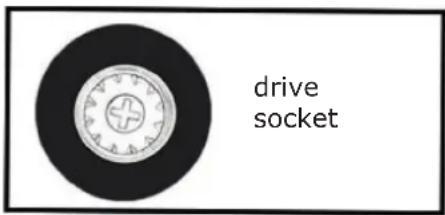
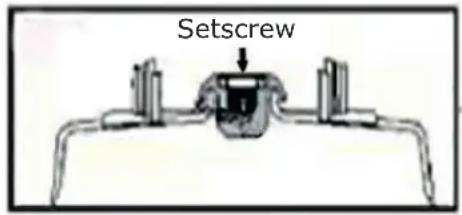
How to replace a new drive socket
Take off old drive socket by using screwdriver, then replace it by new socket.
Hints on Disposal
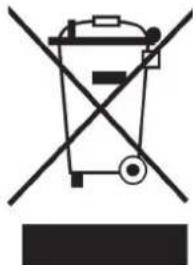
According to the European waste regulation 2002/96/EG this symbol on the product or on its packaging indicates that this product may not be treated as household waste. Instead it should be taken to the appropriate collection point for the recycling of electrical and electronic equipment. By ensuring this product is disposed of correctly, you will help prevent potential negative consequences for the environment and human health, which could otherwise be caused by inappropriate waste handling of this product. For more detailed information about recycling of this product, please contact your local council or your household waste disposal service.
Declaration of Conformity
Producer: Chal-Tec GmbH, Wallstraße 16, 10179 Berlin, Germany.


This product is conform to the following European Directives:
2014/30/EU (EMC)
2014/35/EU (LVD)
2011/65/EU (RoHS)