USER MANUAL 1479J2 TANITA
DIGITAL SCALE PROFESSIONAL-MINI MODEL 1479J / 1479J2

EN INSTRUCTIONS FOR USE
DE BEDIENUNGSHANDBUCH
FR NOTICE D'UTILISATION
ISTRUZIONI PER I'USO
ES INSTRUCCIONES DE USO
NL AANWIJZINGEN VOOR GEBRUK
PT MANUAL DE INSTRUÇões
RU NHCTPYKUNI NO 3KCNYATAUIN
ZH 使用說明
CE
EN
This device meets the EMC Directive 2004/108/EC and the RoHS Directive 2011/65/EU.
DE
This scale is a precision instrument and must be used under certain conditions to ensure accurate measurement. Please observe the following when using this scale.
- Never disassemble the unit.
- Use in a vibration-free location that is not exposed to direct sunlight.
- The scale will not measure accurately in an environment subject to large temperature and humidity changes. The unit takes approximately two hours to adjust to such changes.
- Keep water and chemicals off the scale. Wipe with a damp cloth from time to time.
- Do not use or store near heat sources (ovens, heaters, etc.).
- When not used for a long time, remove the batteries and store the unit in a dry, dust-free location.
- Check and replace batteries before sending the unit for repair. If repair is necessary, remove the batteries, repack the unit in the original carton and protect with packing materials before shipment.
- Do not leave objects on the weighing tray when the scale is not in use.
- To avoid measurement error, do not measure while using equipment that generates radio waves, such as mobile phones.

WARNING
To avoid electric shock, do not use the equipment near water.
EN
Specifications / Parts
| Model 1479J / 1479J2 |
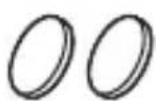
| Power supply CR2032 x 2 |
| Capacity / Graduation | g 200.00 / 0.01 |
| oz 7.050 / 0.001 |
| ozt 6.430 / 0.001 |
| dwt 128.60 / 0.01 |
| ct 1000.0 / 0.1 |
| grain 308.6.0 / 0.2 |
CR2032 x 2
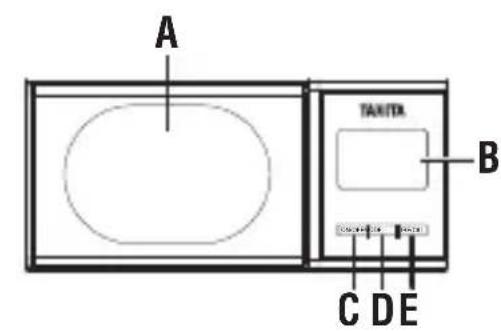
| A Weighing Tray |
| B LCD Display |
| C ON/OFF button |
| D MODE button |
| E TARE/CAL button |
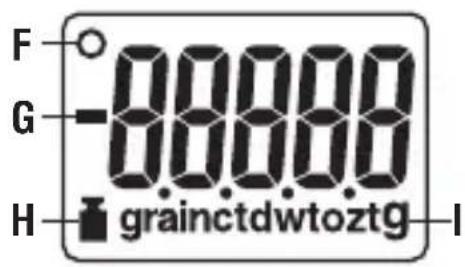
| F Stable mark |
| G Minus sign |
| H Calibration mark |
| I Weighing modes |
Instructions For Use
窗
- Weighing
Before measuring, we recommend you to carry out a calibration ( See Calibration.)
(1) Press the ON/OFF button.
(2) The display will flash, and when the display shows "0.00", "0.000" or "0.0" and Stable mark (O), the scale is ready for use.
(3) Place the object to be weighed on the tray.
(4) The object's weight will be displayed. ("EEEE": Over load. The object being weighed exceeds the maximum weight.)
- MODE
In order to change the units of measurement, press the MODE button. The units will change in the following order:
g oz ozt dwt ct grain
Tare Function
(1) While the scale is on, place the container to be tared on the weighing tray.
The display will indicate the weight of the container.
(2) Press the TARE/CAL and the display will indicate "0.00", "0.000" or "0.0".
(3) When an object to be weighed is placed in the container, only the weight of the object will be displayed.
- Auto Power Off
If weighing has been completed and the weigh on the scale has not changed for 2 minutes, the scale will automatically switch off, to save battery life.
The Auto-Power-Off time can be programmed at 0, 2, 5, 10, 20, 30 and
60 minutes according to preference.
(1) Press TARE/CAL button and ON/OFF button simultaneously when the unit is turned off. The unit will then show the current setting.
(2) Press MODE to increase the length and press TARE/CAL button to decrease.
(3) Press ON/OFF button to set.
- Battery Replacement
When batteries are running out, "Lo" is displayed and the power is automatically turned off.
Immediately replace with new batteries (all 2 batteries). Do not apply excessive force to the measuring section when replacing batteries.
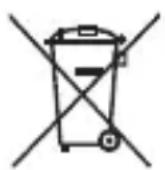
Notice:
These marks can be found on contaminant-containing Batteries:
Pb = Battery contains lead,
Cd = Battery contains cadmium,
Hg = Battery contains mercury.

Not allowed to mix batteries with consumer waste!
As a consumer you are legally bound to return used or discharged batteries. You can deposit your old batteries at public collection points in your town, or wherever the corresponding batteries are sold and specifically marked collecting boxes have been set up. In case of scrapping the apparatus, the batteries should be removed from it and deposited at collection points as well.
- Backlight (1479J2)
The backlight will be turned off automatically after 5 seconds of inactivity.
- Calibration
(1) Before calibrating you must have one 200g certifi ed weight.
(2) Tum on the scale and press theTARE/CAL button for 3 seconds.
(3) The display shows "CALib" and then will flash "200g".
Place the weight on the weighing tray. The scale will calibrate automatically.
(4) The following messages will appear one after another;
CALib End 200.00g
(5) Calibration is complete.
Calibration is not complete when showing "Err2". Make sure the weight is not over 200g.
Federal Communications Commission and Canadian ICES Notice
This equipment has been tested and found to comply with the limits for a Class B digital device, pursuant to Part 15 of the FCC Rules and Canadian ICES-003. These limits are designed to provide reasonable protection against harmful interference in a residential installation.
This equipment generates, uses and can radiate radio frequency energy and, if not installed and used In accordance with the instructions, may cause harmful interference to radio communications.
However, there is no guarantee that interference will not occur in a particular Installation. If this equipment does cause harmful interference to radio or television reception, which can be determined by turning the equipment off and on, the user is encouraged to try to correct the interference by one or more of the following measures:
Reorient or relocate the receiving antenna.
- Increase the separation between the equipment and receiver.
- Connect tile equipment into an outlet on a circuit different from that to which the receiver is connected.
- Consult the dealer or an experienced radio or television technician for help.
Modifications
The FCC requires the user to be notified that any changes or modifi cations made to this device that are not expressly approved by Tanita Corporation may void the user's authority to operate the equipment.
(5) Deijking is voltooid.
Pb Pb = BaTapeiKa coeepKnt CBnHeu
Cd CD = BaTapeiKa coIepKHT KaIMN
Hg Hg = BaTapeiKa coeepKnt pTuTb

HeIb3a cMeunBaTb 6aTapeiKn C pyrUmN 6bITOBbIMN OTXoJaM
Kak noTpe6ntelb, Bbl o63aHbI cIeIOBaTb npaBnAm BblpaCbBAHnB OTOxObl OTPa60TaHHbx n pa3pJKeHHbx 6batapeek. MoXHo BblpaCbBAbTb CTapBie 6batapekn B KOMMyHaJIbHbIe Mycopoc6OpHNKn B CBOem rOpoJe IIN CdaBaTb INx Ha NkTBi PPOJaKN COOBcTByUOuNX 6batapeek PnYcNoBN, YTO B 3Tnx MeCTax IMeOTcA CneuaJIbHbIe MapKIpOBAHHbIe KOHTeHepbl dIg 6batapeek. Ecln B OTxObl BblpaCbBAeCBAec BeCb npu6op, Heo6xoIMMo N3BVeKaTb IN3 HeTo 6batapekn IN BblpaCbBAbT bN B MeCTa CdaUn OTxOIOB, yKa3aHHbIe Bblwe.
-Подсветka (1479J2)
IodcBeTka BbIKHouaetcra ABToMaTHueckn uepe3 5 cekyHd 6e3deJCTBna.
- Kanin6poBka
Дя калибровки Heo6xodmo npimehaTb Tolyko ceptnphiKaunohHyI ngpIy Becom 200 rpaMM.
(1)Повернite дальше macштби отохмITE KhoIGNky TARE/CAL Ha 3 cekyнды.
(2)Ha niscnlee 3aropntcnaHadncb "CALib",a 3atem naHadncb 200g 3amiraeT.
(3) IomeCTnTe TectOByU rnpu n3 KOMPnEKTa Ha noDnOC BecOB. BecbI npoBeyT npoceDpy KaIN6pOBKn aBTOMaTnueckn.
(4)Ha nncnnee noceNoBaTeIbHo noBraTcneDuOne coo6eHna:
CALib END 200,00g
Tel: +31-20-560-2970
Fax: +31-20-560-2988
www.tanita.eu
TANITA India Private Limited
A-502, Mittal Commercia,
Off. M. V. Road (Andheri Kurla Road),
Marol, Andheri - East,
Mumbai 400 059
Tel: +91 22 3192 6107
Fax: +91 22 2859 9143
www.tanita.in
TANITA (Shanghai) Trading Co, Ltd.
Room 8005, 887 Huai Hai Zhong Lu, Shanghai
The People's Republic of China
Tel: +86-21-6474-6803
Fax: +86-21-6474-7901
www.tanita.com.cn
TANITA Corporation of America Inc.
2625 South Clearbrook Drive
Arlington Heights, IL 60005 USA.
Tel: +1-847-640-9241
Fax: +1-847-640-9261
www.tanita.com
TANITA Health Equipment H.K. Ltd.
Unit 301-303 3/F Wing On Plaza,
62 Mody Road, Tsimshatsui East,
Kowloon, Hong Kong
Tel: +852-2834-3917
Fax: +852-2838-8667
www.tanita.asia
Manufacturer
TANITA Corporation
1-14-2, Maeno-Cho, Itabashi-ku,
Tokyo, Japan 174-8630
Tel: +81(0)-3-3968-7048
Fax: +81(0)-3-3968-2661
www.tanita.co.jp
ISO 9001 Certified