
CMNR 6184XPUWIFI - Freezer CANDY - Free user manual and instructions
Find the device manual for free CMNR 6184XPUWIFI CANDY in PDF.



| Product type | Combined refrigerator-freezer |
| Wi-Fi connection | Yes, SmartFi+ technology via the simplyFi app |
| Cooling functions | Smart Eco mode, Fast Cooling, Fast Freezing, Vacation |
| Water dispenser | Integrated into the refrigerator door |
| Antibacterial system | UVA LED with titanium dioxide photocatalysis |
| Interior lighting | Replaceable LED |
| Power supply | 220-240 V, 50 Hz (standard estimation) |
| Climate class | SN, N, ST (from 10°C to 38°C) |
| Defrosting | Automatic (No Frost) |
| Door opening direction reversal | Possible, manipulation by a technician recommended |
| Refrigerant gas | R600a (isobutane) |
| Display | Vertical or round control panel (depending on version) with touch screen |
| Alarms | Door open, freezer overheating, sensor error |
| Memory after power outage | Keeps settings after a power failure |
| Adjustable feet | Yes, at the front |
| Cleaning | Interior: warm water and baking soda; exterior: mild cleaning product |
Frequently Asked Questions - CMNR 6184XPUWIFI CANDY
User questions about CMNR 6184XPUWIFI CANDY
0 question about this device. Answer the ones you know or ask your own.
Ask a new question about this device
Download the instructions for your Freezer in PDF format for free! Find your manual CMNR 6184XPUWIFI - CANDY and take your electronic device back in hand. On this page are published all the documents necessary for the use of your device. CMNR 6184XPUWIFI by CANDY.
USER MANUAL CMNR 6184XPUWIFI CANDY
SAFETY INFORMATION 29
COMBI REFRIGERATOR CANDY 36
Climate Class 36
TRANSPORTATION INSTRUCTIONS 36
INSTALLATION INSTRUCTIONS 37
STARTING TO USE 37
COMBI OPERATION 38
VERTICAL DISPLAY 38
ROUNDED DISPLAY 40
INTERNAL USER INTERFACE 41
TECHNICAL FEATURES 42
Freshness Control 42
ANTIBACTERIAL SYSTEM (if present) 42
WATER DISPENSER 42
Tips for keeping food perfect in the Fridge 43
Where to store your foods in the fridge 43
Storing Frozen Food 44
Energy Saving 45
Take Care 45
Defrosting 45
Cleaning and Care 45
Changing the Internal Light 46
Reversing the Door Swing 46
Troubleshooting 51
Thank you for purchasing this product.
Before using your refrigerator, please carefully read this instruction manual in order to maximize its performance. Store all documentation for subsequent use or for other owners. This product is intended solely for household use or similar applications such as:
- the kitchen area for personnel in shops, offices and other working environments
- on farms, by clientele of hotels, motels and other environments of a residential type
- at bed and breakfasts (B & B)
- for catering services and similar applications not for retail sale.
This appliance must be used only for purposes of storage of food, any other use is considered dangerous and the manufacturer will not be responsible for any omissions. Also, it is recommended that you take note of the warranty conditions. Please, to obtain the best possible performance and trouble free operation from your appliance it is very important to carefully read these instructions. Failure to observe these instructions may invalidate your right to free service during the guarantee period.
SAFETY INFORMATION
This guide contains many important safety information. Please, we suggest you keep these instructions in a safe place for easy reference and a good experience with the appliance.
The refrigerator contains a refrigerant gas (R600a: isobutane) and insulating gas (cyclopentane), with high compatibility with the environment, that are, however, flammable.
Caution: risk of fire
If the refrigerant circuit should be damaged:
- Avoid opening flames and sources of ignition.
Thoroughly ventilate the room in which the appliance is situated
WARNING!
- Care must be taken while cleaning/carrying the appliance to avoid touching the condenser metal wires at the back of the appliance, as you might injure your fingers and hands or damage your product.
- This appliance is not designed for stacking with any other appliance. Do not attempt to sit or stand on top of your appliance as it is not designed for such use. You could injure yourself or damage the appliance.
- Make sure that mains cable is not caught under the appliance during and after carrying/moving the appliance, to avoid the mains cable becoming cut or damaged.
- When positioning your appliance take care not to damage your flooring, pipes, wall coverings etc. Do not move the appliance by pulling by the lid or handle. Do not allow children to play with the appliance or tamper with the controls. Our company declines to accept any liability should the instructions not be followed.
- Do not install the appliance in humid, oily or dusty places, nor expose it to direct sunlight and to water.
- Do not install the appliance near heaters or flammable materials.
- If there is a power failure, do not open the lid.
Frozen food should not be affected if the failure lasts for less than 20 hours. If the failure is longer, then the food should be checked and eaten immediately or cooked and then refrozen.
- If you find that the lid of the chest freezer is difficult to open just after you have closed it, don't worry. This is due to the pressure difference which will equalize and allow the lid to be opened normally after a few minutes.
- Do not connect the appliance to the electricity supply until all packing and transit protectors have been removed.
- Leave to stand for at least 4 hours before switching on to allow compressor oil to settle if transported horizontally.
- This freezer must only be used for its intended purpose (i.e. storing and freezing of edible foodstuffs).
- Do not store medicine or research materials in the Wine Coolers. When the material that requires a strict control of storage temperatures is to be stored, it is possible that it will deteriorate or an uncontrolled reaction may occur that can cause risks.
- Before performing any operation, unplug the power cord from the power socket.
- On delivery, check to make sure that the product is not damaged and that all the parts and accessories
are in perfect condition.
- If in the refrigeration system a leak is noted, do not touch the wall outlet and do not use open flames. Open the window and let air into the room. Then call a service center to ask for repair.
- Do not use extension cords or adapters.
- Do not excessively pull or fold the power cord or touch the plug with wet hands.
- Do not damage the plug and/or the power cord; this could cause electrical shocks or fires.
- If the supply cord is damaged, it must be replaced by the manufacturer, its service agent or similarly qualified person in order to avoid a hazard.
- Do not place or store flammable and highly volatile materials such as ether, petrol, LPG, propane gas, aerosol spray cans, adhesives, pure alcohol, etc. These materials may cause an explosion.
- Do not use or store flammable sprays, such as spray paint, near the Wine Coolers. It could cause an explosion or fire.
- Do not place objects and/or containers filled with water on the top of the appliance.
- We do not recommend the use of extension leads and multi-way adapters.
- Do not dispose of the appliance on a fire. Take care not to damage the cooling circuit/pipes of the appliance in transportation and in use. In case of
damage, do not expose the appliance to fire, potential ignition source, and immediately ventilate the room where the appliance is situated.
- The refrigeration system positioned behind and inside the Wine Coolers contains refrigerant. Therefore, avoid damaging the tubes.
- Do not use electrical appliances inside the food storage compartments of the appliance, unless they are of the type recommended by the manufacturer.
- Do not damage the refrigerant circuit.
- Do not use mechanical devices or other means to accelerate the defrosting process, other than those recommended by the manufacturer.
- Do not use electrical appliances inside the food storage compartments, unless they are of the type recommended by the manufacturer.
- Do not touch internal cooling elements, especially with wet hands, to avoid cracks or injuries.
- Maintain the ventilation openings in the appliance enclosure or in the built-in structure, free of obstruction.
- Do not use pointed or sharp-edged objects such as knives or forks to remove the frost.
- Never use hairdryers, electrical heaters or other such electrical appliances for defrosting.
- Do not scrape with a knife or sharp object to
remove frost or ice that occurs. With these, the refrigerant circuit can be damaged, the spill from which can cause a fire or damage your eyes.
- Do not use mechanical devices or other equipment to hasten the defrosting process.
- Absolutely avoid the use of open flame or electrical equipment, such as heaters, steam cleaners, candles, oil lamps and the like in order to speed up the defrosting phase.
- Never use water to wash the compressor position, wipe it with a dry cloth thoroughly after cleaning to prevent rust. It is recommended to keep the plug clean, any excessive dust residues on the plug can be the cause of fire.
- The product is designed and built for domestic household use only.
- The guarantee will be void if the product is installed or used in commercial or non-residential domestic household premises.
- The product must be correctly installed, located and operated in accordance with the instructions contained in the User Instructions Booklet provided.
- The guarantee is applicable only to new products and is not transferable if the product is resold.
- Our company disclaims any liability for incidental or consequential damages.
- The guarantee does not in any way diminish your statutory or legal rights.
- Do not perform repairs on this Wine Cooler. All interventions must be performed solely by qualified personnel.
- If you are discarding an old product with a lock or latch fitted to the door, ensure that it is left in a safe condition to prevent the entrapment of children.
- This appliance can be used by children aged from 8 years and above and by persons with reduced physical, sensory or mental capabilities or with a lack of experience and knowledge, provided that they have been given adequate supervision or instruction concerning how to use the appliance in a safe way and understand the hazards involved.
- Children should not play with the appliance.
Cleaning and user maintenance should not be made by children without supervision.
- Locks: If your Fridge/Freezer is fitted with a lock, to prevent children being entrapped keep the key out of reach and not in the vicinity of the appliance. If disposing of an old Fridge/Freezer break off any old locks or latches as a safeguard.
COMBI REFRIGERATOR CANDY
Climate Class
The appliance is designed to operate at the limited range of ambient temperature, depending on climate zones. Do not use the appliance at the temperature out of the limit. Climate class of your appliance is indicated on the label with technical description inside the fridge compartment.
| Climate Class | Amb. T. (°C) | Amb. T. (°F) |
| SN | From 10 to 32 | From 50 to 90 |
| N | From 16 to 32 | From 61 to 90 |
| ST | From 16 to 38 | From 61 to 100 |
| T | From 16 to 43 | From 61 to 110 |
TRANSPORTATION INSTRUCTIONS
The appliance should be transported only in a vertical upright position. The packing as supplied must be intact during transportation. If during the course of transport the product has been transported horizontally, it must only be laid on its left hand side (when facing the door front) and it must not be operated for at least 4 hours to allow the system to settle after the appliance is brought back to upright position.
- Failure to comply with the above instructions could result in damage occurring to the appliance. The manufacturer will not be held responsible if these instructions are disregarded.
- The appliance must be protected against rain, moisture and other atmospheric influences.
INSTALLATION INSTRUCTIONS
- If possible avoid placing the appliance near cookers, radiators or in direct sunlight as this will cause the compressor to run for long periods. If installed next to a source of heat or refrigerator, maintain the following minimum side clearances:
From Cookers 4" (100 mm)
From Radiators 12" (300 mm)
From Fridges 4" (100 mm)
- Make sure that sufficient room, with an average temperature of between 16°C and 32°C, is provided around the appliance to ensure free air circulation. Ideally, a space of no less than 9 cm on the back and 2 cm on the sides.
- The appliance should be located on a smooth surface.
- It is forbidden to use the refrigerator outdoors.
- Protection from moisture. Do not locate the freezer in moist space to avoid the metal parts rusting. And do not spray water on the freezer, otherwise it will weaken the insulation and cause current leakage.
- Refer to "Cleaning and Care" section to prepare your appliance for use.
- If the freezer is installed in unheated areas, garages etc., in cold weather condensation may form on the outer surfaces. This is quite normal and is not a fault. Remove the condensation by wiping with a dry cloth.
- Never place the refrigerator in a wall recess or into fitted cabinets or furniture. When it is working, the grille at the back may become hot and the sides warm. Do not drape the refrigerator with any covering.
STARTING TO USE
Before you start to use the freezer, please check that:
- The interior is dry and air can circulate freely at the rear.
- Clean the interior as recommended under "TAKE CARE" section (electric parts of the refrigerator can only be wiped with a dry cloth).
- Do not switch on until 4 hours after moving the fridge/freezer. The coolant fluid needs time to settle. If the appliance is switched off at any time, wait 30 minutes before switching back on to allow the coolant fluid to settle.
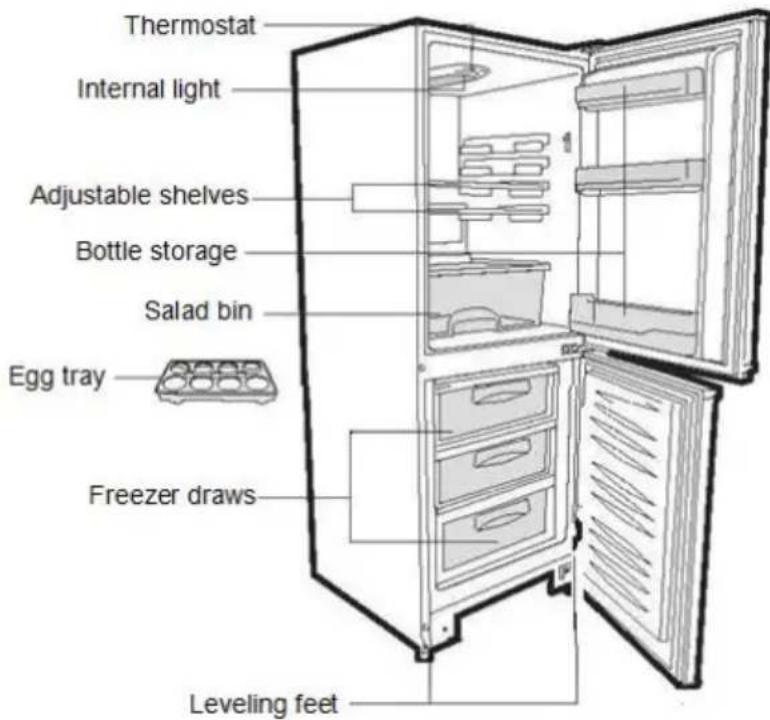
- Before connecting the refrigerator to the mains supply, position the thermostat control dial. The thermostat control dial is located inside the fridge compartment.
- Turn the thermostat knob to the "3" position and turn on the electricity. The compressor and the light inside the refrigerator will begin to work.
- Before storing foods in your refrigerator, turn the refrigerator on and wait for 24 hours to make sure it is working properly and to allow the fridge/freezer to cool to the correct temperature.
- Open the door 30 minutes later. If the temperature in the refrigerator has decreased noticeably, it shows that the refrigerator system works well. When the refrigerator operates for a period of time, the temperature controller will automatically set the temperature within limits.
COMBI OPERATION
Appliance connected to power at the first time: When the appliance is connected to power for the first time, the display will be lit for 2 seconds before going normal, and the appliance runs with intelligence function.
Display Control: When the refrigerator door is closed and there is no button operation for 3 minutes, the display light goes off.
When the display light is off, open the refrigerator door or click any button to light it up.
VERTICAL DISPLAY
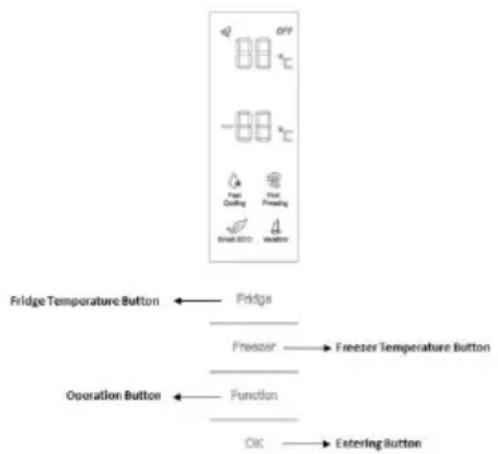
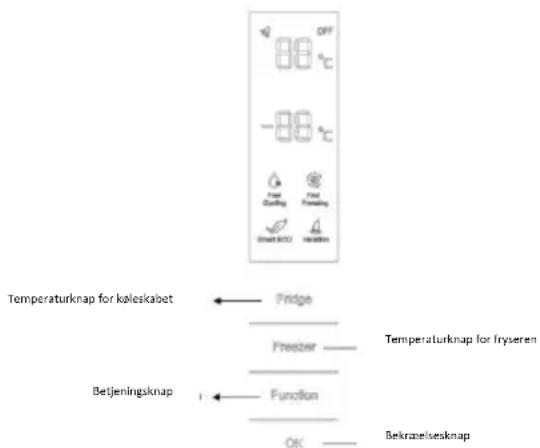
TEMPERATURE SETTING: Click the "Fridge" or "Freezer" button and when it flickers in the symbol, temperatures can be set. Each time the button is clicked, the temperature changes accordingly. Temperatures cannot be set under functions of fast cooling, fast freezing, Smart ECO, and vacation. Under temperature setting, if there is no button operation for 5 seconds, the button stops flickering and the set temperature comes into effect.
SMART ECO: Activate the Smart Eco button to set the temperatures of the fridge in max. energy efficiency conditions (+4°C for fridge temperature, -18°C for freezer temperature).
To enter Smart Eco: Click "option" until it flickers and then click "OK" to enter this function.
To deactivate Smart Eco: Click "option" until it goes to Smart ECO, click "OK" to quit this function and the light goes off.
FAST COOLING: Activate Fast Cooling mode to start an additional pulse for a fast cooling of the fridge compartment. The function is activated and confirmed by the switching on of the dedicated LED icon.
To enter Fast Cooling: Click "option" until it flickers in "Fast Cooling" and then click "OK" to enter this function.
To deactivate Fast Cooling: Click "option" until it goes to "fast cooling" and then click "OK" to deactivate this function.
FAST FREEZING: Activate Fast Freezing to rapidly freeze big quantities of food while keeping intact nutritional food properties. When the light in Fast Freezing goes off and the freezer temperature goes back to the value before fast freezing. When Fast Freezing time is up (26 hours), it deactivates automatically. When it goes to Vacation, Fast Freezing stops.
To enter Fast Freezing: Click "open" until it flickers in "Fast Freezing" and then click "OK" to enter
this function.
To deactivate Fast Freezing: Click "open" until it goes to "fast freezing" and then click "OK" to quit this function.
VACATION: In case of long stops, the Vacation function can be used. This function deactivates the fridge compartment, while leaving the freezer on. Ensure that there is no food inside the fridge compartment before using this function. The function is activated and confirmed by the switching on of the dedicated LED icon. The light in Vacation goes off and the refrigerator temperature goes back to the value before Vacation.
Vacation quits under functions of Smart ECO and Fast Cooling.
To enter Vacation: Click "open" until it flickers in "Fast Freezing" and then click "OK" to enter this function.
To deactivate Vacation: Click "open" until it goes to "Vacation" and then click "OK" to quit this function.
POWER OFF MEMORY: Refrigerator can automatically keep all the settings in case of power off.
When the unit is plugged in again, the refrigerator will run with the settings before power off.
POWER-ON DELAY: To prevent harm to the refrigerator in case of sudden power cut and power on, the unit does not start immediately if the power off time is less than 5 minutes.
FREEZER OVER-TEMPERATURE ALARM (only in case of power on): When the freezer temperature is higher than 10° C at the first time connected to power, the symbol light of the freezer chamber goes on and the number representing temperature flickers.
Press any button or wait for 5 seconds, flickering stops and it goes back to the temperature that was set.
REFRIGERATOR DOOR OPENING ALARM: When the refrigerator is open over 3 minutes, the buzzer will buzz. Close the door or press any button to stop the alarm, but for the latter, the alarm will go off again after 3 minutes.
SENSOR FAULT ALARM: When it shows "E0", "E1", "E2" or other abnormal symbols, it means sensor faults and the refrigerator needs repair.
ROUNDED DISPLAY
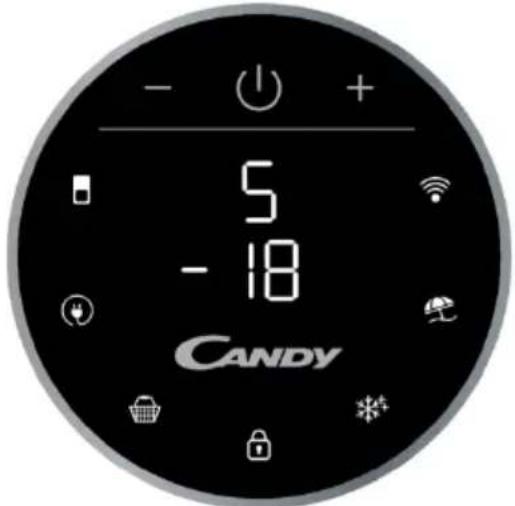
Rounded Display is a touch user interface. When the refrigerator is turned on, white LED lights will be enlightened. When the functions are pressed, the icon lights change from white to blue.
SETTING TEMPERATURE: Press MODE icon to change the temperature.
- Refrigerator Temperature: Press the MODE icon once, the refrigerator digit blinks, and manage the temperature of the refrigerator with "+" and "-" buttons.
Freezer Temperature: Press the MODE icon twice, the freezer digit blinks, and manage the temperature of the freezer with "+" and "-" buttons.
ECO MODE Icon: Press the Eco Mode icon to set the temperatures of the fridge in maximum energy efficiency conditions (+5°C for fridge temperature, -18°C for freezer temperature). The function is activated and confirmed when the icon LED changes from white to blue.
If you want to exit the ECO mode function, you need to press the Eco Mode icon again and the refrigerator temperature turns back to normal operation.
SUPER COOLING Icon: Press the Super Cooling icon to start an additional pulse for a fast cooling of the fridge compartment. The function is activated and confirmed when the icon LED changes from white to blue.
If you want to exit the Super Cooling function, you need to press the Super Cooling icon again and the refrigerator temperature turns back to normal operation.
LOCK Icon: Press the Lock icon to block the display user interface. If the lock function is selected, the icon (LED) should turn into blue. When the Lock function is turned on, the user cannot set any new functions. To turn off the Lock function, the user must perform a long press on the icon for 3 seconds to unlock the display.
SUPER FREEZING Icon: Press the Super Freezing icon to rapidly freeze large quantities of food while keeping intact nutritional food properties. The function is activated and confirmed when the icon LED changes from white to blue.
If you want to exit the Super Freezing function, you need to press the Super Freezing icon again and the freezer temperature turns back to normal operation.
HOLIDAY Icon: In case of long stops, the Holiday function can be used. This function deactivates the fridge compartment, while leaving the freezer on. Ensure that there is no food inside the fridge compartment before using this function. The function is activated and confirmed when the icon LED changes from white to blue.
If you want to exit the Holiday function, you will need to press the Holiday icon again, the light in Holiday goes off and the refrigerator temperature goes back to the value before Holiday.
Wi-Fi Icon: This appliance is equipped with SmartFi+ technology that allows you to control it remotely via App. Press the Wi-Fi icon for 3 seconds to activate the Wi-Fi function and the icon light changes from white to blue.
Machine Enrollment (on App): Download the SimplyFi App on your device. The Candy SimplyFi App is available for devices running both Android and iOS, both for tablets and for smartphones. Get all the details of the SmartFi+ functions by browsing the App in DEMO mode.
Open the App, create the user profile and enroll the appliance following the instructions on the device display or the "Quick Guide" attached on the machine. This operation is necessary just for the first installation. To finalize the enrollment, follow the instructions on the smartphone's screen.
Refrigerator usage from remote by App: When the enrollment is completed, the Wi-Fi LED will be switched on. From now on it will be possible to manage the product by using the buttons on the display or using the App: both of them will be aligned according to the last command given.
INTERNAL USER INTERFACE

SET Button: Press SET button for setting the temperature until you reach the level you want where level 1 is the warmest and level 4 is the coldest. Under normal operating conditions, we recommend using an intermediate setting (level 2).
Once the setting takes effect, it immediately enters the corresponding stall for operation control, and the stall indicator lights up for 3 seconds and then goes out. Factory default temperature is set to 2. Long press "SET" key for more than 3 seconds to enter the hardware self-check program. The hardware self-check operation is effective within 10 minutes, and the long button operation after 10 minutes is invalid.
Wi-Fi Button: This appliance is equipped with SmartFi+ technology that allows you to control it remotely via App. Press Wi-Fi icon for 3 seconds to activate Wi-Fi function and the icon light changes from white to blue.
Machine Enrollment (on App): Download the SimplyFi App on your device. The Candy SimplyFi App is available for devices running both Android and iOS, both for tablets and for smartphones. Get all the details of the SmartFi+ functions by browsing the App in DEMO mode.
Open the App, create the user profile and enroll the appliance following the instructions on the device display or the "Quick Guide" attached on the machine. This operation is necessary just for the first installation. To finalize the enrollment, follow the instructions on the smartphone's screen.
Refrigerator usage from remote by App: When the enrollment is completed, the Wi-Fi LED will be switched on. From now on it will be possible to manage the product by using the buttons on the display or using the App: both of them will be aligned according to the last command given.
FAST COOL Button: when "FAST COOL" button is pressed, rapid cooling function is activated, according to the 21°C to refrigeration control gear. Maximum running time is 3 hours, after this time temperature will be set to 1.
If the "SET" button is pressed in the process of speed cooling, the instant cooling function is immediately withdrawn and the default is entered into the next gear.
TECHNICAL FEATURES
FRESHNESS CONTROL
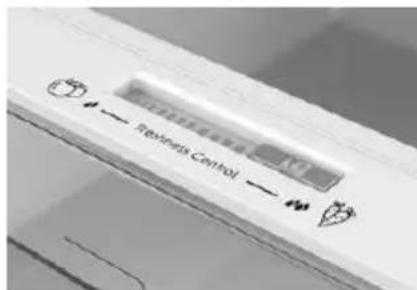
Thanks to freshness control, you can guarantee the right humidity level for vegetables and fruits in the crisper drawer (Fresh drawer). The humidity gets bigger as the rod goes from left to right.
ANTIBACTERIAL SYSTEM (if present)
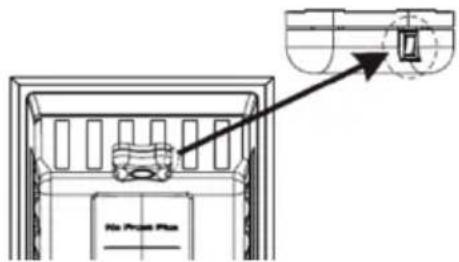
LED UVA Lights activate a Titanium Filter producing a "photocatalysis" reaction which will destroy bacteria within the refrigerator air. This reaction works when the refrigerator door is closed to avoid purified air leakage.
In Total No Frost products, it is inserted in sky box and it works every time the compressor works. Filter is permanent and therefore does not need changing.
The antibacterial system has to be turned off during the energy consumption test.
WATER DISPENSER
The water dispenser allows you to get chilled water without opening the fridge compartment door.
Before first use
Before using the water dispenser for the first time, remove and clean the water tank located inside the fridge compartment.
- Lift the water tank out of the fridge compartment.
- Open the water tank cover and then clean the water tank and cover in warm soapy water. Rinse thoroughly.
- After cleaning, attach the cover to the water tank and then replace the water tank back on the fridge door.
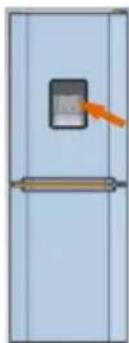
- Clean the dispenser pad outside the fridge door.
Filling the water tank with water
- Open the small cover.
- Fill the water tank with drinkable water up to the Max line.
- Close the small cover.
Dispensing
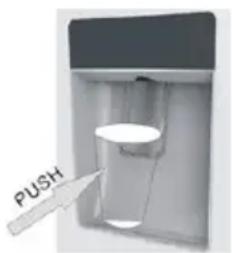
To dispense water, push the dispenser pad gently, using a glass or container. To stop the flow of water, pull your glass away from the dispenser pad.
Tips for keeping food perfect in the Fridge
Take extra care with meat and fish: cooked meats should always be stored on a shelf above raw meats to avoid bacterial transfer. Keep raw meats on a plate which is large enough to collect juices and cover it with cling film or foil.
Leave space around food: this allows cold air to circulate around the Fridge, ensuring all parts of the Fridge are kept cool.
Wrap up food! To prevent transfer of flavors and drying out, food should be separately packed or covered. Fruit and vegetables need not be wrapped.
Pre-cooked food should be cooled properly: allow pre-cooked food to cool down before placing in the Fridge. This will help to stop the internal temperature of the Fridge from rising.
Shut the door! To prevent cold air escaping, try to limit the number of times you open the door. When returning from shopping, sort foods to be kept in your Fridge before opening the door. Only open the door to put food in or take it out.
Where to store your foods in the fridge
Cool area: this is where to store foods which will keep longer if they are kept cool. Milk, eggs, yogurt, fruit juices, hard cheeses e.g. Cheddar. Opened jars and bottles of salad dressings, sauces and jams. Fats, e.g. Butter, margarine, low-fat spreads, cooking fats and lard.
Coldest area (0°C to 5°C): this is where foods which must be cold to keep them safe should be kept:
Raw and uncooked foods should always be wrapped. -Pre-cooked chilled foods, e.g. Ready meals, meat pies, soft cheeses. -Pre-cooked meats e.g. Ham, - Prepared salads (including pre-packed mixed green salads, rice, potato salad etc). Desserts, e.g. Fromage frais, home-prepared food and leftovers or cream cakes.
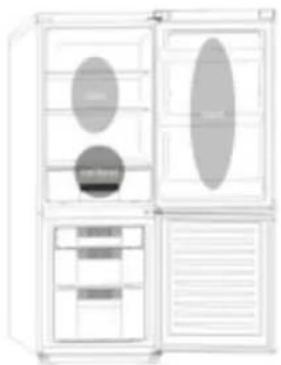
Crisper: this is the most humid part of the fridge. Vegetables, fruit, fresh salad items, unwashed whole lettuce, whole tomatoes, radishes, etc. can be stored here.
WE RECOMMEND THAT ALL PRODUCE KEPT IN THE SALAD BIN IS WRAPPED.
NOTES: Always wrap and store raw meat, poultry, and fish on the lowest shelf at the bottom of the fridge. This will stop them dripping onto or touching other foods. Do not store inflammable gases or liquids in the fridge.
Electrical operation: after 3 hours on the freezer, the temperature in the cabinet is above -12°C, the alarm light is lit, and the buzzer sounds.
Storing Frozen Food
| Clean and defrost your refrigerator regularly. | Freeze zzy drinks. |
| Prepare fresh food for freezing in small porons to ensure rapid freezing. | Consume ice-cream and water ices direct from freezer. It may cause “freezer burns” on lips. |
| Always choose high quality fresh food and be sure it is thoroughly clean before you freeze it. | Store poisonous or dangerous substances in the freezer. |
| Wrap all foods in aluminum foil or freezer quality plasc bags and make sure any air is excluded. | |
| Wrap frozen food when you buy it and put it into the freezer shortly. | |
| Keep food for as short a me as possible and adhere to “Best Before”, “Use By” dates. |
For more about storing, download the App and visit "Tips & Hints".
ENERGY SAVING
For better energy saving, we suggest:
- Installing the appliance away from heat sources, not exposed to direct sunlight, and in a well-ventilated room.
- Avoid putting hot food into the refrigerator to avoid increasing the internal temperature and therefore causing continuous functioning of the compressor.
- Do not excessively stuff foods so as to ensure proper air circulation.
- Defrost the appliance in case there is ice to facilitate the transfer of cold.
- In case of absence of electrical energy, it is advisable to keep the refrigerator door closed.
- Open or keep the doors of the appliance open as little as possible.
- Avoid adjusting the setting to temperatures too cold.
- Remove dust present on the rear of the appliance.
TAKE CARE
Defrosting
This appliance has automatic defrosting system, no need to defrost by hand.
Cleaning and Care
After defrosting you should clean the Fridge/Freezer internally with a weak solution of bicarbonate of soda. Then rinse with warm water using a damp sponge or cloth and wipe dry. Wash the baskets in warm soapy water and ensure they are completely dry before replacing in the Fridge/Freezer. Condensation will form on the back wall of the Fridge; however it will normally run down the back wall and into the drain hole behind the salad bin.
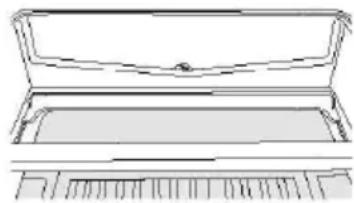
The drain hole will have a "cleaning spike" inserted into it. This ensures that small pieces of food cannot enter the drain. After you have cleaned the inside of your Fridge and removed any food residues from around the hole, use the "cleaning spike" to make sure that there are no blockages. Use standard furniture polish to clean the Fridge/Freezer exterior. Make sure that the doors are closed to prevent polish getting on the magnetic door seal or inside.
The grille of the condenser at the back of the Fridge/Freezer and the adjacent components can be vacuumed using a soft brush attachment.
Do not use harsh cleaners, scouring pads or solvents to clean any part of the Fridge/Freezer.
CHANGING THE INTERNAL LIGHT
- Before carrying out the LED replacement always disconnect the mains supply.
- Hold and lift up the LED light cover.
- Remove the old LED by unscrewing it in an anti-clockwise direction.
- Replace with a new LED light by screwing it in a clockwise direction making sure that it is secure in the light holder.
- Refit the light cover and re-connect your Fridge to the mains supply and switch on.
REVERSING THE DOOR SWING
Disassemble the Refrigerator Door
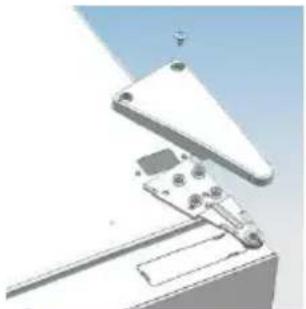
- a. Use a tool to remove the screw on the hinge cover, and then remove the cover. Insert the communication line into the hole on the cabinet top.
b. Use a tool to remove the 4 screws on the upper hinge cover and then remove the cover. Pry up the door bush and small end cap cover on the door.
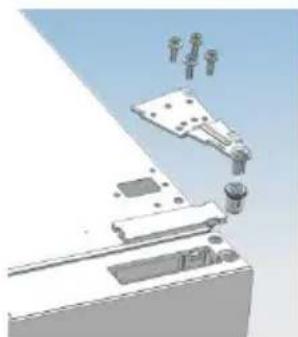
c. Insert the door bush and door communication line into the hole on the door and then put on the small end cap cover.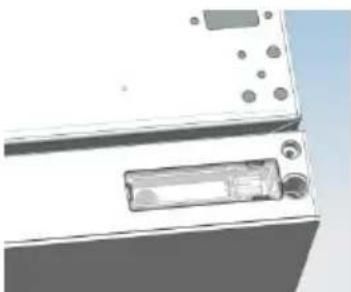
d. Use a tool to remove the 2 screws as shown in the below figure to remove the hole cover on the cabinet top and get the
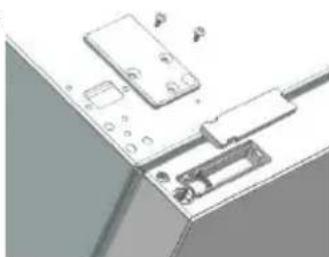
cabinet communication line out of the hole.
Pry up the small end cap cover on the door and get out the door bush and door communication line.
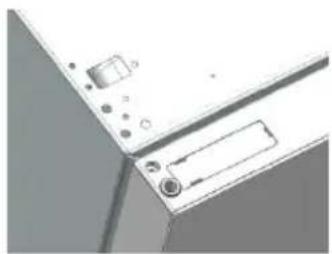
e. Insert the door bush into the round hole on the door and then put on the small end cap cover.
f. Move the refrigerator door upward over 500mm to remove the door.
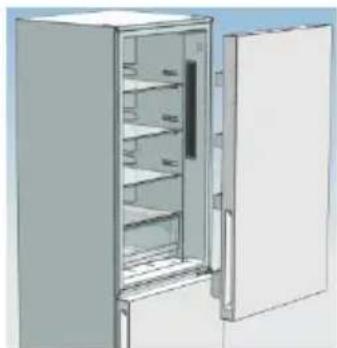
- a. Use a tool to remove the 3 screws on the middle hinge cover and then remove the middle hinge.
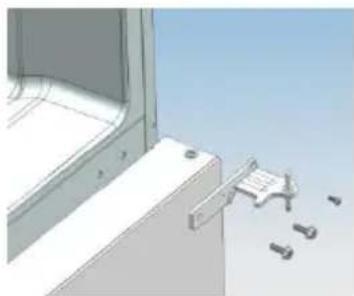
b. Move the freezer door upward over 500mm to remove the door.
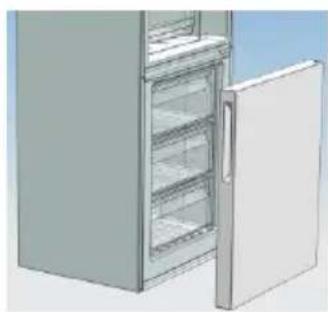
c. Remove the adjustable front feet under the lower hinge; use a tool to remove the 4 screws from the lower hinge and then disassemble the lower hinge. Door disassembly is finished.
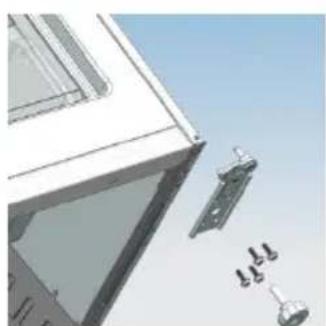
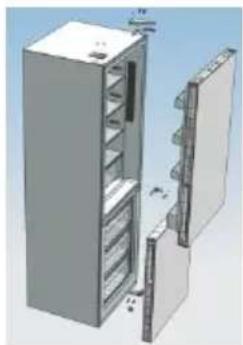
Assemble door, lower hinge accessories to the corresponding positions
- a. Use a tool to get the door bush out as shown in the below figure and assemble it to the corresponding position of the other side.
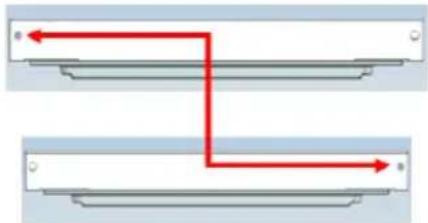
b. Use a tool to remove the screws of the stopper assembly as shown in the figure below, and then assemble them to the other side of the door.
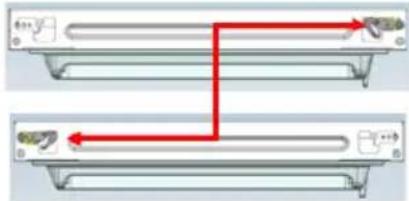
c. Use a tool to remove the axle and two stoppers on the lower hinge, and then assemble them to the position as shown in the figure below.
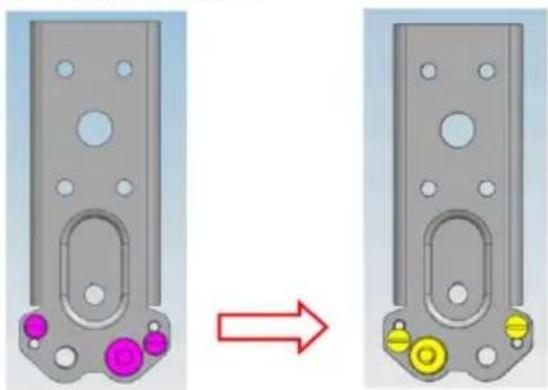
This situation applies to opening the door on the right side. This situation applies to the left side.
Assemble the refrigerator door and freezer door to the opposite side.
- a. Remove the adjustable front foot as shown below by hand, and then assemble the lower hinge to the other side of the cabinet and fix the screws by using a tool.
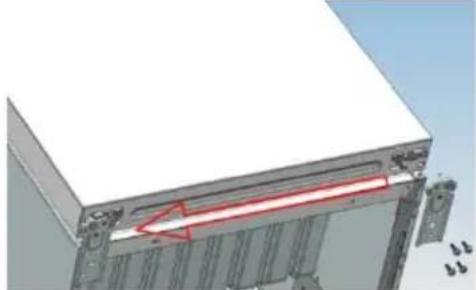
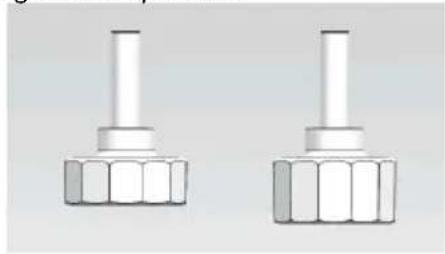
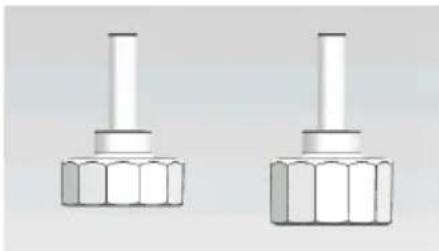
b. Assemble the shorter adjustable front foot to the lower hinge side and adjust the height of the foot to make the refrigerator stay level.
- Put on the freezer door and turn the middle hinge by 180 degrees, and then assemble it to the other side of the cabinet; use a tool to screw up the 3 screws to fix the middle hinge.
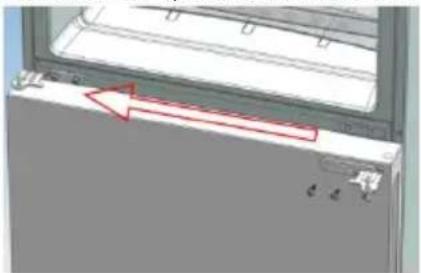
- Put on the refrigerator door and assemble the upper hinge to the other side of the cabinet; use a tool to screw up the 4 screws to fix the upper hinge.
After that, connect the door communication line and the cabinet communication line, and then put on the upper hinge cover and fix it using a screw.
- Assemble the hole cover to the other side of the cabinet and use a tool to screw up the hole cover.
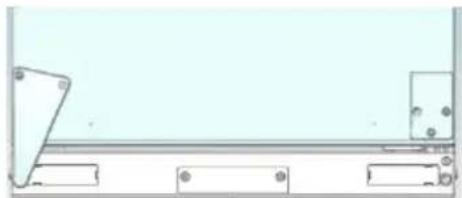
Door disassembly is finished here.
Figure of door opening from the right.
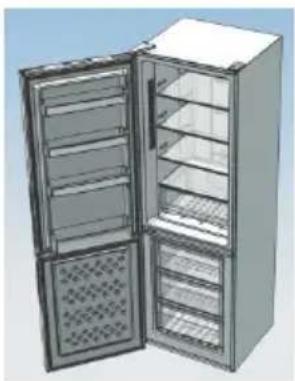
Figure of door opening from the left.
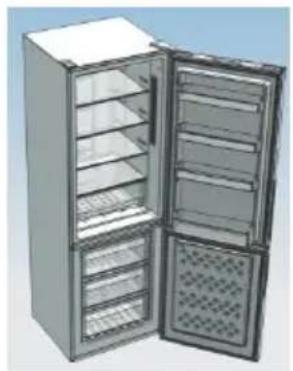

Double check that the door is aligned correctly and all the seals are closed on all sides. If necessary, re-adjust the levelling feet.
NOTE: If you want to have the door swing reversed, we recommend that you contact a qualified technician. You should only try to reverse the door yourself if you believe that you are qualified to do so. All parts removed must be saved to do the reinstallation of the door. You should rest the fridge freezer on something solid so that it will not slip during the door change process. Do not lay the fridge freezer flat as this may damage the coolant system. Ensure the fridge freezer is unplugged and empty. We recommend that 2 people handle the fridge freezer during assembly.
Troubleshooting
- If the appliance does not operate when switched on, check:
- Power cut: If the internal temperature of the fridge/freezer compartment is -18°C or less when the power returns, your food is safe. The food in your fridge/freezer will remain frozen for approximately 16 hours with the door closed. Do not open the fridge/freezer door more than necessary. The product is designed and built for domestic household use only.
- The plug is inserted properly in the socket and that the power supply is on. (To check the power supply to the socket, plug in another appliance).
- The fuse has blown, the circuit breaker has tripped, or the main distribution switch has been turned off.
- The temperature control has been set correctly. If the refrigerator is exceptionally cold, you may have accidentally adjusted the thermostat control dial to a higher position.
- If the refrigerator is exceptionally warm, the compressor may not be working. Turn the thermostat control dial to the maximum setting and wait a few minutes. If there is no humming noise, it is not working. Contact the local store where your purchase was made.
- If condensation appears outside of the refrigerator, this may be due to a change in the room temperature. Wipe off any residue of moisture. If the problem continues, contact the local store where your purchase was made. If the provided plug has been replaced, make sure the new plug is properly connected. If the appliance is still not operating after the above checks, please contact Customer Service.
Scrapping Old Appliances
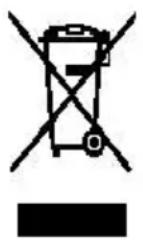
This appliance is marked according to the European directive 2012/19/EU on Waste Electrical and Electronic Equipment (WEEE).
WEEE contains both polluting substances (which can cause negative consequences for the environment) and basic components (which can be re-used). It is important to have WEEE subjected to specific treatments, in order to remove and dispose properly all pollutants, and recover and recycle all materials.
Individuals can play an important role in ensuring that WEEE does not become an environmental issue; it is essential to follow some basic rules:
WEEE should not be treated as household waste.
WEEE should be handed over to the relevant collection points managed by the municipality or by registered companies. In many countries, for large WEEE, home collection could be present.
In many countries, when you buy a new appliance, the old one may be returned to the retailer who has to collect it free of charge on a one-to-one basis, as long as the equipment is of equivalent type and has the same functions as the supplied equipment.
Conformity
By placing the CE mark on this product, we are confirming compliance with all relevant European safety, health and environmental requirements which are applicable in legislation for this product.
TABLE OF CONTENTS
SAFETY INFORMATION 54
COMBI CANDY 62
Climate class 62
TRANSPORT INSTRUCTIONS 62
INSTALLATION INSTRUCTIONS 63
START-UP 63
COMBINED OPERATION 64
VERTICAL DISPLAY UNIT 64
ROUND DISPLAY UNIT 66
INTERNAL USER INTERFACE 67
TECHNICAL CHARACTERISTICS 68
FRESHNESS CONTROL 68
The Holiday function continues under the Smart ECO and Fast Cooling functions.
VERTICAL DISPLAY
DISPOSAL OF OLD APPLIANCES
SAFETY INFORMATION
This manual contains important safety information.
TROUBLESHOOTING 456
Instructions for the user
Before using the refrigerator, read this manual carefully. It will help you use the appliance correctly and safely. Keep the manual for future reference or for future owners. This appliance is intended for household use or similar applications, such as:
- staff kitchen areas in shops, offices, and other working environments
- farmhouses, for guests in hotels, motels, and other residential-type environments, and in bed and breakfast establishments
- for catering and similar non-retail applications.
This appliance is intended for storing food. Any other use is considered dangerous and the manufacturer is not responsible for damage caused by misuse. We recommend that you familiarize yourself with the conditions of use. To ensure the best possible performance and safe operation, it is very important to read these instructions carefully. Failure to comply with these instructions may result in damage that is not covered by the free service during the warranty period.
SAFETY INFORMATION
This manual contains many important safety instructions. We recommend that you keep these instructions in a safe place for future reference, to help you use the appliance more easily and efficiently.
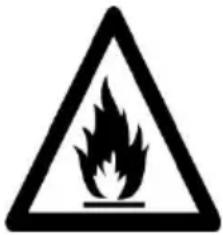
WARNING: FIRE HAZARD
Before operating the appliance, read the instructions.
- Remove the appliance from all packaging. Check for any visible damage.
WARNING!
Be careful when cleaning or moving the appliance and avoid touching the metal parts of the compressor at the rear of the appliance, as you could cut your fingers or damage your product. This appliance is not intended for storing any other devices. Do not stand or sit on the appliance, as it is not designed for such use. You could injure yourself or damage the appliance. Ensure that the power cord is not trapped under the appliance during installation or moving, to prevent damage to the power cord. When positioning the appliance, be careful not to damage the floor, walls, or coverings. Do not move the appliance by pulling the handle or the door. Do not allow children to play with the appliance or to touch the control panel. The manufacturer disclaims any liability if the instructions are not followed. Do not expose the appliance to rain, moisture, or direct sunlight.
Do not expose the appliance to rain, moisture, or direct sunlight.
Do not place the appliance near open flames or flammable materials. - If the power goes out, do not open the door. Frozen food should not be refrozen if the storage time has been exceeded by more than 20 hours. If the storage time is longer, the food should be checked, consumed, or refrozen. Do not be alarmed if the door of the horizontal freezer is difficult to open immediately after closing. This is due to the vacuum created, which will allow the door to be opened after a few minutes. Do not connect the appliance to the power supply until all packaging and transport materials have been removed. Leave it to stand for at least 4 hours before switching it on, so that the compressor oil can settle if it has been transported horizontally. This freezer is intended for domestic use only (i.e., storing and freezing food products). Do not store medicines or scientific research materials
in the freezer. When storing materials that require strict temperature control, it is possible that they may deteriorate or undergo uncontrolled reactions, which could pose risks.
- SUPPRIMER
- Disconnect the power cord from the outlet.
- Upon delivery, check that the product is not damaged and that all parts and accessories are in perfect condition.
- If refrigerant leaks into the cooling system, do not touch the walls and do not use open flames. Open a window and leave the room to air out. Then contact the service center to request a repair. Do not use flammable materials. Do not turn on the appliance forcefully or overheat the refrigerator, and do not touch the freezer with wet hands. Do not damage the freezer or the refrigerator; this could cause electric shock or fire. Do not place or store flammable materials such as ether, petrol, butane gas, propane, benzene, pure alcohol, etc. These materials may
Mounting the doors and the bottom panel in their respective places
- a). Using a screwdriver, remove the hinge pin as shown in the illustration below, and then mount it in its place on the opposite side.
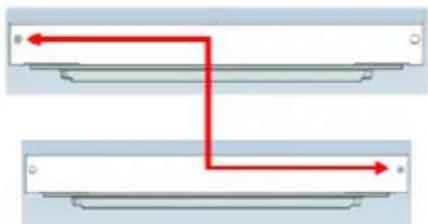
b). Using a screwdriver, unscrew the screws of the stopper as shown in the illustration below, and then screw them in on the opposite side.
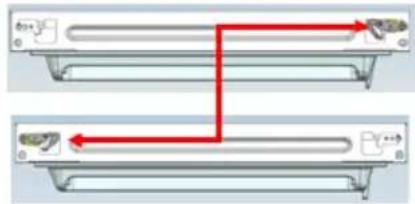
c). Using a screwdriver, remove the remaining two stoppers from the bottom panel, and then screw them in their places on the opposite side, as shown in the illustration below.
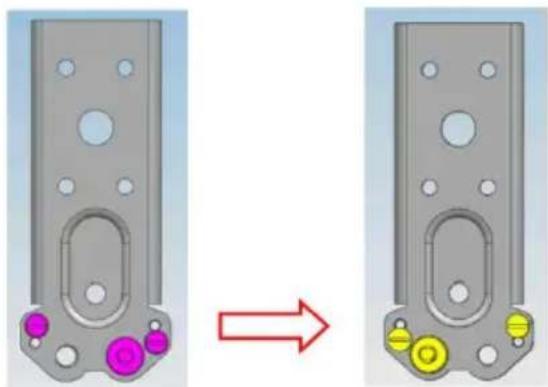
This illustration clearly shows the arrangement of the doors. This illustration clearly shows the arrangement of the doors.
Mounting the refrigerator and freezer doors on the opposite side
- a). With your hand, remove the front hinge pin as shown below, and then mount the bottom panel on the opposite side and tighten the screws with a screwdriver.
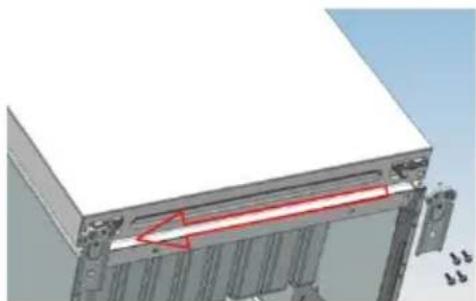
b). Mount the adjustable front hinge pin on the side of the bottom panel and adjust the height of the pin so that the refrigerator remains in a horizontal position.
- Place the freezer door and close the middle panel at 180 degrees, then mount it on the opposite side of the body. Use a screwdriver to tighten the 3 screws with which to secure the middle panel.
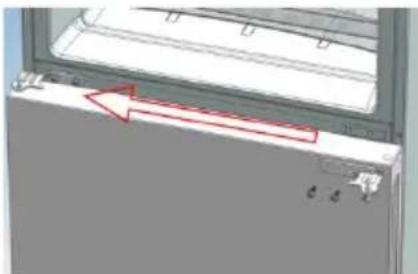
- Place the refrigerator door and mount the top panel on the opposite side of the body. Use a screwdriver to tighten the 4 screws with which to secure the top panel.
Then connect the communication cable of the door to the communication cable of the body, and then place the cover on the top panel and tighten it with a screwdriver.
- Mount the cover on the opening on the opposite side of the body and use a screwdriver to tighten it.
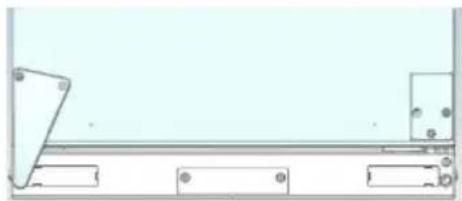
This completes the mounting of the doors.
This illustration shows the opening of the doors clearly.
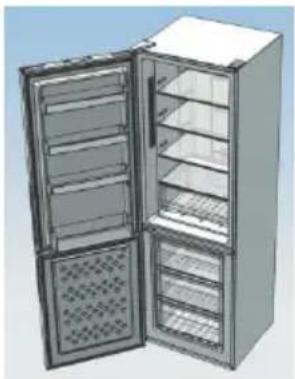
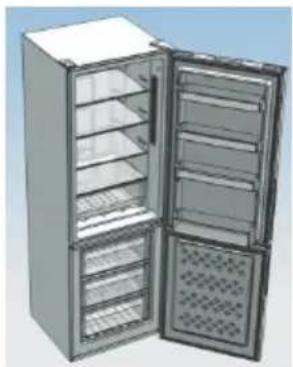
The appliance door may open from the freezer door.
Check carefully that the door is properly aligned and the door gasket is seated correctly. If necessary, adjust the door hinges.
WARNING: If you need to remove the refrigerator door, we recommend that you contact a qualified technician. Do not attempt to remove the door yourself unless you have the necessary skills. Any removed parts must be stored for reassembly of the door. The refrigerator must be supported on a stable surface so that it does not tip over while removing the door. Do not lay the refrigerator on its back, as this may damage the cooling system. Ensure that the refrigerator is unplugged and empty. We recommend that the removal and installation of the refrigerator door be performed by a qualified person.
TROUBLESHOOTING
If the appliance does not work when it is turned on, check the following: - Power supply: If the internal temperature of the refrigerator/freezer is -18°C or lower, when the power supply is restored, the food will be preserved. The food in the refrigerator/freezer will remain frozen for about 16 hours with the door closed. Do not open the refrigerator/freezer door more than necessary. - The product is designed and manufactured for domestic use only. - The plug is correctly inserted into the socket and the power supply is switched on. (To check the power supply, plug in another appliance). - The thermostat dial/switch is set to the correct position. The temperature control is set correctly. If the refrigerator is too cold, the thermostat may be set too high. Turn the thermostat to a lower setting. If the refrigerator is too warm, the compressor may not be running. Set the thermostat to the maximum setting and wait a few minutes. If there is no sound, it is not working. Contact the local dealer where the purchase was made. If the appliance is placed in a hot room, this may affect the internal temperature. Remove any remaining food. If the problem persists, contact the local dealer where the purchase was made. If the power cord is damaged, check that it is properly connected. If after performing the above checks the appliance still does not work, please contact the customer service department.
DISPOSAL OF OLD APPLIANCES
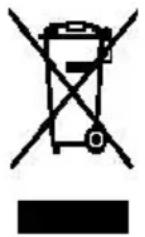
This appliance is marked in accordance with European Directive 2012/19/EC regarding waste electrical and electronic equipment (WEEE).
WEEE contains both polluting substances (which can have negative consequences for the environment) and basic components (which can be recycled). It is important that WEEE is subjected to specific treatment to correctly remove all pollutants and to recover all materials.
Individual households can play an important role in ensuring that WEEE is not a problem for the environment; it is important to follow some basic rules: WEEE should not be treated as household waste.
The product must be handed over at the appropriate collection points, managed by the municipality or registered companies. For large bulky items, there may be a possibility of home collection.
In many countries, when you purchase a new appliance, the old one can be returned to the retailer, who must take it back free of charge on a one-for-one basis, provided it is of equivalent type and has the same functions as the one provided.
Compliance
By placing the marking on this product, we confirm compliance with all relevant European safety, health, and environmental protection requirements applicable to this product.
SUMMARY
SAFETY INFORMATION 511
CANDY COMBI 518
Climate class 518
TRANSPORT INFORMATION 518
INSTALLATION INSTRUCTIONS 519
USING THE FREEZER 519
OPERATING THE COMBI FRIDGE-FREEZER 520
VERTICAL DISPLAY 520
CIRCULAR DISPLAY 522
INTERNAL USER INTERFACE 523
Climate class
The appliance is designed to operate in a limited range of ambient temperatures, depending on climate zones. Do not use the appliance at temperatures outside the set limits. The climate class of the appliance is indicated on the technical data plate inside the refrigerator compartment.
| Климатчески Клasc | Окрж.Т.(°C) | Окрж.Т.(°F) |
| SN | От 10 do 32 | От 50 do 90 |
| N | От 16 do 32 | От 61 do 90 |
| ST | От 16 do 38 | От 61 do 100 |
| T | От 16 do 43 | От 61 do 110 |
TRANSPORTATION INSTRUCTIONS
The appliance must be transported only in a vertical position.
The packaging in which the product was supplied must remain undamaged during transport. If during transport the appliance is in a horizontal position, it must only be on its left side (when facing the front panel), and it should not be operated for at least 4 hours to allow the system to settle before returning the product to a horizontal position.
- Failure to follow the above instructions may lead to damage to the appliance. The manufacturer is not responsible in case of failure to follow these instructions.
- The appliance must be protected from rain, moisture, and other atmospheric phenomena.
When setting the temperature, if no button is pressed within 5 seconds, the button stops flashing and the set temperature comes into effect.
SMART ECO: Activate the Smart Eco button to set the refrigerator temperature in maximum energy efficiency mode (+4°C for the refrigerator compartment temperature, -18°C for the freezer compartment temperature).
To enter Smart Eco: Press "Fridge" until the light starts flashing, then press "OK" to enter this function.
To exit Smart Eco: Press "Fridge" until the function switches to Smart ECO, press "OK" to exit this function, the backlight goes out.
FAST COOLING: Activate the fast cooling mode to start an additional pulse for fast cooling of the refrigerator compartment.
The function is activated and confirmed by pressing the corresponding button with a light indicator.
To enter fast cooling mode: Press "Fridge" until "Fast Cooling" starts flashing, then press "OK" to enter this function.
To exit fast cooling: Press "Fridge" until the system switches to "Fast Cooling" mode, then press "OK" to deactivate this function.
QUICK FREEZING: Activate the quick freezing mode to quickly freeze a large quantity of food while preserving its nutritional properties. When the quick freezing time ends, the freezer temperature returns to the value before quick freezing. When the quick freezing time increases (26 hours), it turns off automatically.
When switching to "Holiday" mode, the quick freezing function is disabled.
To enter the quick freezing mode: press "Mode" until "Fast Freezing" appears, then press "OK" to enter this function.
To disable quick freezing: press "Mode" until the system switches to "Fast freezing" mode, then press "OK" to exit this function.
HOLIDAY MODE: If you need to turn off the appliance for a long time, you can use the Holiday function. This function turns off the refrigerator compartment, leaving the freezer compartment on. Before using this function, make sure there are no food items in the refrigerator compartment. The function is activated and confirmed by pressing the corresponding button with a light.
The Holiday mode indicator light turns on, and the refrigerator temperature returns to the value before entering Holiday mode.
Holiday mode is turned off when the Smart ECO and Fast Cooling functions are activated.
To enter Holiday mode: press "Mode" until "Fast Freezing" starts flashing, then press "OK" to enter this function.
To exit Holiday mode: press "Mode" until the system switches to "Holiday" function, then press "OK" to exit this function.
SAVING SETTINGS WHEN POWER IS OFF: The refrigerator can automatically save all settings in case of power failure. When power is restored, the refrigerator will operate with the parameters that were used before the power failure.
POWER DELAY: To avoid damage to the refrigerator in case of sudden power failure and subsequent power-on, the device does not start immediately if the time without power is less than 5 minutes.
FREEZER COMPARTMENT TEMPERATURE ALARM (Only when power is on):
If the freezer temperature is above 10°C for the first time when connected to electricity, the freezer compartment symbol lights up, and the temperature indicator flashes.
Press any button for about 5 seconds, power will be cut off, and the system will return to the set temperature.
REFRIGERATOR DOOR OPEN ALARM: If the refrigerator door remains open for more than 3 minutes, an audible alarm sounds. Close the door or press any button to stop the alarm. In the latter case, the alarm will sound again.
The device will resume operation after a few minutes.
FAULT INDICATION: When "E0", "E1", "E2" or other abnormal operation symbols are displayed, it indicates a malfunction of the device. The refrigerator should be sent for repair.
CONTROL PANEL
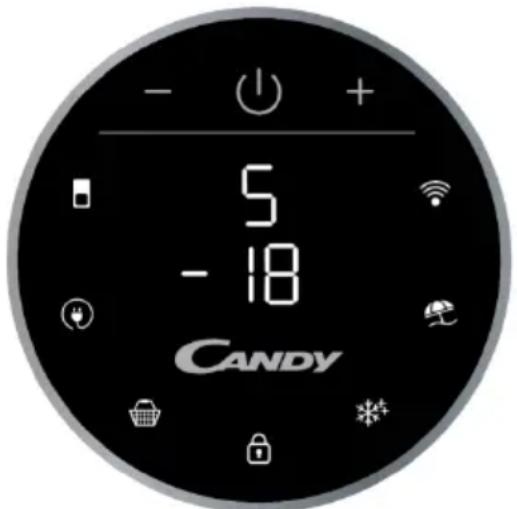
The control panel is the user interface. When the refrigerator is turned on, the indicator lights are white. When function buttons are pressed, the light of the button changes from white to blue.
TEMPERATURE SETTING: Press the MODE button to change the temperature.
- Refrigerator compartment temperature: Press the MODE button once, the refrigerator compartment indicator lights up, and its temperature can be adjusted with the "+" and "-" buttons.
- Freezer compartment temperature: Press the MODE button twice, the freezer compartment indicator lights up, and its temperature can be adjusted with the "+" and "-" buttons.
ECO MODE icon:
Press the Eco Mode icon to set the refrigerator compartment temperature to the most energy-efficient range (+5°C for the refrigerator compartment, -18°C for the freezer compartment). This function is activated and confirmed when the light on the icon changes from white to blue.
If you want to exit the ECO function, you should press the Eco Mode icon again, and the refrigerator temperature will return to normal operation.
SUPER COOLING icon:
Press the Super Cooling icon to activate an additional pulse for rapid cooling of the refrigerator compartment.
This function is activated and confirmed when the light on the icon changes from white to blue.
If you want to exit the Super Cooling function, you should press the Super Cooling icon again, and the refrigerator temperature will return to normal.
LOCK icon: Press the Lock icon to lock the user interface. If the lock function is selected, the icon (light) should be lit with blue light. When the lock function is enabled, the user cannot set any new functions. To disable the lock function, the user must press and hold the Lock icon for 3 seconds to unlock the interface.
Super Freezing button: Press the Super Freezing button to quickly freeze a large quantity of food while preserving their nutritional properties. This function is activated and confirmed when the button light changes from white to blue.
If you want to exit the Super Freezing function, you should press the Super Freezing button again, and the freezer compartment temperature will return to normal.
HOLIDAY: If necessary, you can use the Holiday function for a longer period. This function turns off the refrigerator compartment, leaving the freezer compartment on. Before using this function, make sure there are no food items in the refrigerator compartment. This function is activated and confirmed when the button light changes from white to blue.
If you want to exit the Holiday function, you need to press the Holiday button again; the Holiday indicator light will go out, and the refrigerator temperature will return to the value before the holiday.
Wrapping food: To avoid transfer of odors and drying out of food, you should wrap or cover food separately. Fruits and vegetables do not need to be wrapped.
Cooked dishes should be properly cooled: before placing a cooked dish in the refrigerator, let it cool down. This will help avoid an increase in temperature inside the refrigerator.
Close the door!: To avoid loss of cold air, try to open the refrigerator door less often. Before placing purchased products in the refrigerator, sort them. Open the door only to remove or place products.
Storage zones for food in the refrigerator
Cool zone: Where products will be stored longer if they are cool. Milk, yogurt, desserts, fruit juices, hard cheeses, as well as ketchup. Opened jars and bottles of sauces and jams. Fat products, for example, butter, margarine, low-fat spreads, cooking fats and lard.
Cold zone (from 0°C to +5°C): Where you should store products whose temperature should be low:
Raw, not fully cooked food must be stored in packaging.
-Ready-to-eat chilled foods, such as cooked dishes, meat products, soft cheeses.
-Raw meat products, for example, ham.
-Ready-made salads (including packaged green salads, rice and potato salads, etc.).
Desserts, for example, soft cheese, homemade cakes and leftovers of cakes with cream.
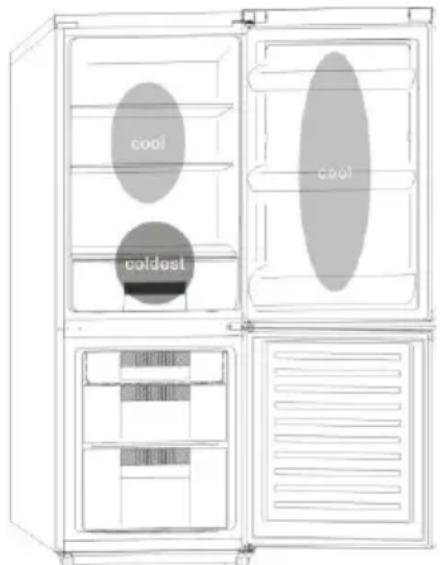
Container drawers: this is the humid zone of the refrigerator. Vegetables, fruits, fresh products for salad, etc. Here you can store unwashed salad leaves, whole tomatoes, radishes, etc.
IT IS RECOMMENDED TO STORE ALL SALAD PRODUCTS IN PACKAGING.
NOTE. Raw meat, poultry, and fish should be wrapped in wrapping and stored on the lowest shelf in the lower part of the refrigerator. This will prevent contact and dripping of juices onto other products. Do not place flammable liquids in the refrigerator.
If the temperature in the freezer compartment after 3 hours of operation is above -12°C, the warning indicator lights up and a buzzer sounds.
Storage of frozen products
Packaged products, previously frozen under industrial conditions, should be stored in accordance with the instructions of their manufacturers for frozen departments.
To achieve the best quality of products, attainable by the manufacturers of frozen products, supported by the food product retailer, remember the following:
- Place packages in the freezer as soon as possible after purchase.
- Do not exceed the storage period ("Use by...", "Best before") indicated on the packaging.


- SAFETY INFORMATION
- WARNING
- COMBI REFRIGERATOR CANDY
- CLIMATE CLASS
- TRANSPORTATION INSTRUCTIONS
- INSTALLATION INSTRUCTIONS
- STARTING TO USE
- COMBI OPERATION
- VERTICAL DISPLAY
- ROUNDED DISPLAY
- INTERNAL USER INTERFACE
- TECHNICAL FEATURES
- FRESHNESS CONTROL
- ANTIBACTERIAL SYSTEM (IF PRESENT)
- WATER DISPENSER
- BEFORE FIRST USE
- FILLING THE WATER TANK WITH WATER
- DISPENSING
- TIPS FOR KEEPING FOOD PERFECT IN THE FRIDGE
- WHERE TO STORE YOUR FOODS IN THE FRIDGE
- ENERGY SAVING
- TAKE CARE
- DEFROSTING
- CLEANING AND CARE
- CHANGING THE INTERNAL LIGHT
- REVERSING THE DOOR SWING
- DISASSEMBLE THE REFRIGERATOR DOOR
- ASSEMBLE DOOR, LOWER HINGE ACCESSORIES TO THE CORRESPONDING POSITIONS
- ASSEMBLE THE REFRIGERATOR DOOR AND FREEZER DOOR TO THE OPPOSITE SIDE
- TROUBLESHOOTING
- SCRAPPING OLD APPLIANCES
- CONFORMITY
- TABLE OF CONTENTS
- DISPOSAL OF OLD APPLIANCES
- WARNING: FIRE HAZARD
- MOUNTING THE DOORS AND THE BOTTOM PANEL IN THEIR RESPECTIVE PLACES
- MOUNTING THE REFRIGERATOR AND FREEZER DOORS ON THE OPPOSITE SIDE
- COMPLIANCE
- SUMMARY
- CONTROL PANEL
- ECO MODE ICON
- SUPER COOLING ICON
- STORAGE ZONES FOR FOOD IN THE REFRIGERATOR
- STORAGE OF FROZEN PRODUCTS
Brand : CANDY
Model : CMNR 6184XPUWIFI
Category : Freezer