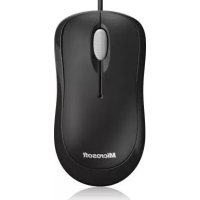
Ready Mouse - Mouse MICROSOFT - Free user manual and instructions
Find the device manual for free Ready Mouse MICROSOFT in PDF.



| Product type | Wireless optical mouse |
| Brand | Microsoft |
| Model | Ready Mouse |
| Connection technology | 27 MHz radio frequency (2 channels) |
| Power supply | 2 AA batteries (not included) |
| Estimated battery life | Several months depending on usage |
| Range | Approximately 2 meters |
| Optical resolution | 800 dpi (estimated) |
| Number of buttons | 3 (left, right, scroll wheel) |
| Scroll wheel | Yes |
| Compatibility | Windows, Mac |
| Dimensions (L x W x H) | Approximately 120 x 60 x 35 mm |
| Weight | Approximately 100 g (with batteries) |
| Care and cleaning | Clean with a dry cloth |
| Safety | Do not expose to moisture; keep out of reach of children |
| Spare parts and repairability | No repairable parts; do not open |
| General information | Complies with IEC 60825-1 and IEC 62471 standards; indoor use only |
Frequently Asked Questions - Ready Mouse MICROSOFT
User questions about Ready Mouse MICROSOFT
0 question about this device. Answer the ones you know or ask your own.
Ask a new question about this device
Download the instructions for your Mouse in PDF format for free! Find your manual Ready Mouse - MICROSOFT and take your electronic device back in hand. On this page are published all the documents necessary for the use of your device. Ready Mouse by MICROSOFT.
USER MANUAL Ready Mouse MICROSOFT
International Technical
Support Numbers
(partial list only) 96
Product Guide
This symbol identifies safety and health messages in the Product Guide and other product manuals.
Read this guide for important safety and health information that apply to the Microsoft device that you have purchased.
A Warning:
Failure to properly set up, use, and care for this product can increase the risk of serious injury or death, or damage to the device or devices. Read this guide and keep all printed guides for future reference. For replacement guides, go to www.microsoft.com/hardware or refer to the Microsoft Help and Support section for contact information.
Important Safety Information
Battery-Powered Devices
These precautions apply to all products that use rechargeable or disposable batteries. Improper use of batteries may result in battery fluid leakage, overheating, or explosion. Released battery fluid is corrosive and may be toxic. It can cause skin and eye burns, and is harmful if swallowed.
To reduce the risk of injury:
- Keep batteries out of reach of children.
- Do not heat, open, puncture, mutilate, or dispose of batteries in fire.
- Do not mix new and old batteries or batteries of different types (for example, carbon-zinc and alkaline batteries).
- Do not allow metal objects to touch the battery terminals on the device; they can become hot and cause burns.
- Remove the batteries if they are worn out or before storing your device for an extended period of time. Always remove old, weak, or worn-out batteries promptly and recycle or dispose of them in accordance with Local and National Disposal Regulations.
- If a battery leaks, remove all batteries, taking care to keep the leaked fluid from touching your skin or clothes. If fluid from the batter comes into contact with skin or clothes, flush skin with water immediately. Before inserting new batteries, thoroughly clean the batter compartment with a damp paper towel, or follow the battery manufacturer's recommendations for cleanup.
Disposable (non-rechargeable) batteries only:
- Caution Risk of explosion if battery is replaced by an incorrect type. Use and replace only with correct size and type (alkaline, zinc-carbon, or zinc-chloride) of batteries.
Headset Devices
Extended exposure to high volumes when using a headset may result in temporary or permanent hearing loss. To prevent damage to your headset, avoid sitting or stepping on the headset, its cable, or the cable connector.
A Warning:
The earphones contained within this product may attract dangerous objects like staples and paper clips. Take care to avoid harm that may occur from the retention of dangerous objects on the earphones.
Wireless Devices
Before boarding any aircraft or packing a wireless device in luggage that will be checked, remove the batteries from the wireless device or turn the wireless device off (if it has an on/off switch). Wireless devices can transmit radio frequency (RF) energy, much like a cellular telephone, whenever batteries are installed and the wireless device is turned on (if it has an on/off switch).
Game Controllers, Keyboards, and Mouse Devices
Health Warning
Use of game controllers, keyboards, mice, or other electronic input devices may be linked to serious injuries or disorders.
When using a computer, as with many activities, you may experience occasional discomfort in your hands, arms, shoulders, neck, or other parts of your body. However, if you experience symptoms such as persistent or recurring discomfort, pain, throbbing, aching, tingling, numbness, burning sensation, or stiffness, DO NOT IGNORE THESE WARNING SIGNS. PROMPTLY SEE A QUALIFIED HEALTH PROFESSIONAL, even if symptoms occur when you are not working at your computer. Symptoms like these can be associated with painful and sometimes permanently disabling injuries or disorders of the nerves, muscles, tendons, or other parts of the body. These musculoskeletal disorders (MSDs) include carpal tunnel syndrome, tendonitis, tenosynovitis, and other conditions.
While researchers are not yet able to answer many questions about MSDs, there is general agreement that many factors may be linked to their occurrence, including: overall health, stress and how one copes with it, medical and physical conditions, and how a person positions and uses his or her body during work and other activities (including use of a keyboard or mouse). The amount of time a person performs an activity may also be a factor.
Some guidelines that may help you work more comfortably with your computer and possibly reduce your risk of experiencing an MSD can be found in the "Healthy Computing Guide" installed with this device's software or in the "Healthy Gaming Guide" available at www.xbox.com. If this device did not come with software, you can access the "Healthy Computing Guide" at www.microsoft.com/hardware or (in the United States only) by calling (800) 360-7561 to request a CD at no charge. If you have questions about how your own lifestyle, activities, or medical, or physical condition may be related to MSDs, see a qualified health professional.
Photosensitive Seizures
A very small percentage of people may experience a seizure when exposed to certain visual images, including flashing lights or patterns that may appear in video games. Even people who have no history of seizures or epilepsy may have an undiagnosed condition that can cause these "photosensitive epileptic seizures" while watching video games.
These seizures may have a variety of symptoms, including light headedness, altered vision, eye or face twitching, jerking or shaking of arms or legs, disorientation, confusion, or momentary loss of awareness. Seizures may also cause loss of consciousness or convulsions that can lead to injury from falling down or striking nearby objects.
Immediately stop playing and consult a doctor if you experience any of these symptoms. Parents should watch for or ask their children about the above symptoms - children and teenagers are more likely than adults to experience these seizures. The risk of photosensitive epileptic seizures may be reduced by taking the following precautions:
Sit farther from the television screen.
Use a smaller television screen.
- Play in a well-lit room.
- Do not play when you are drowsy or fatigued.
If you or any of your relatives have a history of seizures or epilepsy, consult a doctor before playing.
All Devices
Do Not Attempt Repairs
Do not attempt to take apart, open, service, or modify the hardware device or power supply. Doing so could present the risk of electric shock or other hazard. Any evidence of any attempt to open and/or modify the device, including any peeling, puncturing, or removal of any of the labels, will void the Limited Warranty.
Choking Hazard
This device may contain small parts which may be a choking hazard to children under 3. Keep small parts away from children.
Usage and Cleaning
Use in accordance with these instructions:
- Do not use near any heat sources.
- Only use attachments/accessories specified by Microsoft.
Clean only with dry cloth. - Do not allow this product to become wet. To reduce the risk of fire or shock, do not expose this product to rain or other types of moisture.
Adhesive Mounting
Some devices use adhesive tape to mount components in your workspace. DO NOT mount on antiques, heirlooms, or other valuable or irreplaceable items. After mounting, removing the adhesive may damage the cosmetic coating and/or leave an adhesive residue.
Tablet Stands
To avoid damaging equipment placed on the tablet stand, do not overload or bump it, causing it to collapse or tip over.
Laser and LED Specific cations
Caution Use of controls or adjustments, or performance of procedures other than those specified herein may result in hazardous radiation exposure.
Laser Devices
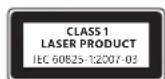
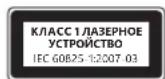
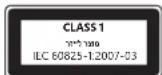
This device complies with International Standard IEC 60825-1:2007-03 for a Class 1 laser product. This device also complies with 21 CFR 1040.10 and 1040.11 except for deviations pursuant to Laser Notice No. 50, dated June 24, 2007.
Optical (LED) Mouse
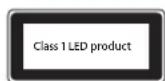
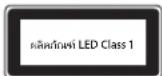
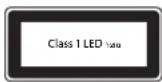
This product has been evaluated to comply with International Standard (IEC 60825-1:2001-08) and IEC 62471 (2006-07). This product uses LEDs that are considered Class 1 (IEC 60825-1:2001-08).
Regulatory Information
Not intended for use in machinery, medical or industrial applications.
Any changes or modifications not expressly approved by Microsoft could void the user's authority to operate this device.
This product is for use with NRTL Listed (UL, CSA, ETL, etc.), and/or IEC/EN 60950-1 compliant (CE marked) Information Technology equipment. No serviceable parts included. This device is rated as a commercial product for operation at +41^ (+5^) to +95^ (+35^) .
This Class B digital apparatus complies with, as applicable, Part 15 of the U.S. Federal Communications Commission (FCC) rules, Canadian ICES-003, RSS-Gen, RSS-210 and RSS-310. Operation is subject to the following two conditions: (1) this device may not cause interference, and (2) this device must accept any interference received, including interference that may cause undesired operation.
To comply with RF exposure requirements, the following operating configurations must be satisfied: the antenna has been installed by the manufacturer and no changes can be made. The wireless devices must not be co-located or operating in conjunction with any other antenna or transmitter. Except for headset and handheld devices, wireless devices must be at least 20cm between the antenna of the wireless device and all persons.
For 802.11a devices only
This product is restricted to indoor use only to reduce any potential for harmful interference with licensed operation in the 5.15 to 5.25 GHz frequency range.
Microsoft Corporation; One Microsoft Way; Redmond, WA 98052-6399; U.S.A. United States: (800) 426-9400 Canada: (800) 933-4750
Statement of Compliance with EU Directives
Hereby, Microsoft Corporation declares that this product is in compliance with the essential requirements and other relevant provisions of Directives, 2006/95/EC, 2004/108/EC and 1999/5/EC, as applicable.
Company: Microsoft Ireland Operations Ltd.
Address: The Atrium Building 3
Carmenhall Road, Sandyford Industrial Estate, DUBLIN 18
Country:
Ireland
Telephone number: +353 1295 3826
Fax number: +353 1706 4110
Complies with IDA Standards DB102868
Complies with IDA Standards DB100398

Category II Equipment
27 MHz Devices
RF output power: < 54dB V / m at 3m
Keyboard with two channels - RF frequencies: 27.095MHz (channel 1), 27.195MHz (channel 2)
Keyboard with a single channel - RF frequency: 27.195MHz or 27.095MHz
Mouse with two channels - RF frequencies: 27.045MHz (channel 1), 27.145MHz (channel 2)
Mouse with a single channel - RF frequency: 27.145MHz or 27.045MHz
This Category II radiocommunication device complies with Industry Canada Standard RSS-310.
Radio and TV Interference Regulations
The Microsoft hardware device(s) can radiate radio frequency (RF) energy. If not installed and used in strict accordance with the instructions given in the printed documentation and/or onscreen help files, the device may cause harmful interference with other radio-communications devices (for example AM/FM radios, televisions, baby monitors, cordless phones, etc.). There is, however, no guarantee that RF interference will not occur in a particular installation.
To determine if your hardware device is causing interference to other radio-communications devices, disconnect the device from your computer or remove the device's batteries (for a battery operated device). If the interference stops, it was probably caused by the device. If the interference continues after you disconnect the hardware device or remove the batteries, turn the computer off and then on again. If the interference stopped when the computer was off, check to see if one of the input/output (I/O) devices or one of the computer's internal accessory boards is causing the problem. Disconnect the I/O devices one at a time and see if the interference stops.
If this hardware device does cause interference, try the following measures to correct it:
- Relocate the antenna of the other radio-communications device (for example AM/FM Radios, televisions, baby monitors, cordless phones, etc) until the interference stops.
- Move the hardware device farther away from the radio or TV, or move it to one side or the other of the radio or TV.
- Plug the computer into a different power outlet so that the hardware device and radio or TV are on different circuits controlled by different circuit breakers or fuses.
If necessary, ask your computer dealer or an experienced radio-TV technician for more suggestions. For more information about interference issues, go to the FCC Web site at: http://www.fcc.gov/cgi/consumerfacts/interference.html. You can also call the FCC at 1-888-CALL FCC to request Interference and Telephone Interference fact sheets.
Disposal of Waste Batteries and Electrical & Electronic Equipment
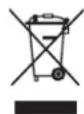
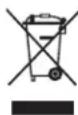
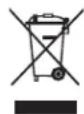
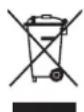
This symbol on the product or its batteries or its packaging means that this product and any batteries it contains must not be disposed of with your household waste. Instead, it is your responsibility to hand this over to an applicable collection point for the recycling of batteries and electrical and electronic equipment. This separate collection and recycling will help to conserve natural resources and prevent potential negative consequences for human health and the environment due to the possible presence of hazardous substances in batteries and electrical and electronic equipment, which could be caused by inappropriate disposal. For more information about where to drop off your batteries and electrical and electronic waste, please contact your local city/municipality office, your household waste disposal service, or the shop where you purchased this product. Contact weee@microsoft.com for additional information on WEEE and waste batteries.
Guiadoproduo
Piles jetables (non rechargeable) quintum :
Installation adhesive
Adresse: The Atrium Building 3
Carmenhall Road, Sandyford Industrial Estate, DUBLIN 18
Pays:
Irlande
Carmenhall Road, Sandyford Industrial Estate, DUBLINO 18
Paese: Irlanda
Carmenhall Road, Sandyford Industrial Estate, DUBLIN 18
Pais:
Irlanda
Número de téléphone: +353 1 295 3826
Numero de fax: +353 1706 4110

Piles jetables (non rechargeable) quintum :
Installation adhesive
Adres: The Atrium Building 3
Carmenhall Road, Sandyford Industrial Estate, DUBLIN 18
Land:
lerland
Telefoonnummer: +353 1295 3826
Faxnumber: +353 1706 4110

Verwerken van afgedankte batterijen en afgedankte elektrische en elektronische apparaten
Adresse: The Atrium Building 3
Carmenhall Road, Sandyford Industrial Estate, DUBLIN 18
Land: Irland
Telefon: +35312953826
Fax: +353 1 706 4110

Eaipia: Microsoft Ireland Operations Ltd.
Ateuovon: The Atrium Building 3
Carmenhall Road, Sandyford Industrial Estate, DUBLIN 18
Xwpa:lpavdelta
Aptooc TnEewpovou: +35312953826
AptOmuC Fax: +353 1706 4110

Anoppiyn axpnotw mataipiW Kc0w c kai nAektpikoK aiknAektpovkoEgONlaou
To ou ao auto enavw oto npoiov, otic mntatapiec tou n otouakeuaia onmaivei ot to npoiov auto, kai onoioeotne
mntatapiec nepiexei, dev npenei va atoppiinvtovta ie ta oikiaa anoppmuata. Avtieta, evai dikn aac euvunva napadwaote
to npoiov oe kaio io ediko onmeio auuoync yia tvv avakukwn twv mntapiwk wkaowc kai tou nkektpko kai nkektpvikou
Eoiiaou. Autn n Exwpiatn ovllayon kai avakukwan tho bonnoe stny eoikovomn qauikovtopw v ktnv anotpon
twv niabuv apnvntikw entttweuw yia tvv avpwiivnyeia kai to nepiackov, tic onoeic mnpoei va pokalaeen i kataaaln
anoppipn, loyw tc ntiavnc napovoiac enikivdvuvw ovuiw otic mntapiec, to nkektpki kai tov nkektpvikoc eoianlaio.
Tia nepioatepe c npnpopoeic oxetik a ta oneia ontuopeite va apnoete ra nkektpika kai nkektpvikaac onppiuata
kai tic mntatapie oac, etikovwnote me to deno oou mtopeite va apnoete ra nkektpika kai nkektpvikaac onppiuata
to onio ayopaaote to npoiov auto. Ia npooetec, nnpopopiec oxetik a te WEEK kyn tnpippsi nptapiwv, enikovwnote
te tnv nektpvikn dievthuvan weee@microsoft.com.

Manual do Produto
Carmenhall Road, Sandyford Industrial Estate, DUBLIN 18
Pais:
Irlanda
Sirket: Microsoft Ireland Operations Ltd.
Adres: The Atrium Building 3
Carmenhall Road, Sandyford Industrial Estate, DUBLIN 18
Ulke: Irlanda
Telefon numaras: +353 1295 3826
Adresse: The Atrium Building 3
Carmenhall Road, Sandyford Industrial Estate, DUBLIN 18
Land:
Irland
Telefonnummer: +353 1295 3826
Faxnumber: +353 1706 4110

Osoite: The Atrium Building 3
Carmenhall Road, Sandyford Industrial Estate, Dublin 18
Maa: Irlanti
Puhelinnumero: +353 1295 3826
Faksinumero: +353 1706 4110

Adress: The Atrium Building 3
Carmenhall Road, Sandyford Industrial Estate, DUBLIN 18
Land:
Irland
Telefonnummer: +353 1295 3826
Faxnumber: +353 1 706 4110

Microsoft Corporation; One Microsoft Way; Redmond, WA 98052-6399; U.S.A. United States: (800) 426-9400; Canada: (800) 933-4750
电话:(86) 21-6188-8888
传真:(86)21-34292977
技术支持电话
Microsoft Corporation, One Microsoft Way, Redmond, WA 98052-6399, U.S.A. (800) 426-9400 [T]
uuaaunauauuul u" uuu "auuunauuuuauuuuuuuuuuuuuuuuuuuuuuuuuuuuuuuuuuuuuuuuuuuuuuuuuuuuuuuuuuuuuuuuuuuuuuuuuuuuuuuuuuuuuuuuuuuuuuuuuuuuuuuuuuuuuuuuuuuuuuuuuuuuuuuuuuuuuuuuuuuuuuuuuuuuuuuuuuuuuuuuuuuuuuuuuuuuuuuUU
A
nuiuunnnnnnnnnnnnnnnnnnnnnnnnnnnnnnnnnnnnnnnnnnnnnnnnnnnnnnnnnnnnnnnnnnnnnnnnnnnnnnnnnnnnnnnnnnnnnnnnnnnnnnnnnnnnnnnnnnnnnnnnnnnnnnnnnnnnnnnnnnnnnnnnnnnnnnnnnnnnnnnnnnnnnnnnnnnnnnnnnn nn nannn nn nannn nn nannn nn nannn nn nannn nn nannn nn nannn nn nannn nn nannn nn nannn nn nannn nn nannn nn nannn nn nannn nn nannn nn nannn nn nannn nn nannn nn nannn nn nannn nn nannn nn nannn nn nannn nn nannn nn nannn nn nennn nn nannn nn nannn nn nannn nn nannn nn nannn nn nannn nn nannn nn nannn nn nannn nn nannn nn nannn nn nannn nn nannn nn nannn nn nannn nn nannn nn nannn nn nannn nn nannn nn nannn nn nannn nn nannn nn nannn nn nannn nn n ann
A
ounnniownnnae
"ouo 100000000000000000000000000000000000000000000000000000000000000000000000000
y
·山山山山山山山山山山山山山山山山山山山山山山山山山山山山山山山山山
·xunxunxunxunxunxunxunxunxunxunxunxunxunxunxunxunxunxunxunxunxunxunxunxunxunxunxunxunxunxunxunxunxunxunxunxunxunxunxunxunxunxunxunxunxunxunxunxunxunxunx
Wu"wuuuuuuuuuuuuuuuuuuuuuuuuuuuuuuuuuuuuuuuuuuuuuuuuuuuuuuuuuuuuuuuuuuuuuuuuuuuuuuuuuuuuuuuuuuuuuuuuuuuuuuuuuuuuuuuuuuuuuuuuuuuuuuuuuuuuuuuuuuuuuuuuuuuuuuuuuuuuuuuuuuuuUU
-
nnaaannnnnne nnnnnnnnnnnn nnnnnnnnn nnnnnnnnnnnnnnnnnnnnnnnnnnnnnnnnnnnnnnnnnnnnnnnnnnnnnnnnnnnnnnnnnnnnnnnnnnnnnnnnnnnnnnnnnn
- 1
WANNNNNTNNNNNNNNNNNNNNNNNNNNNNNNNNNNNNNNNNNNNNNNNNNNNNNNNNNNNNNNNNNNNNNNNNNNNNNNNNNNNNNNNNNNNNNNNNNNNNNNNNNNNNNNNNNNNNNNNNNNNNNNNNNNNNNNNNNNNNNNNNNNNNNNNNNNNNNNNNNNNNNNNNNNNNNNNNNNNNNNNNNNNNNNNNNNNNNNNNNNNNNN
yuaunnau
Wlloiunuununununununununununn n nnwnnnnnwwww noonnnnnnnnn
nwwnnnnnnnnnnnnnnnnnnnnnnnnnnnnnnnnnnnnnnnnnnnnnnnnnnnnnnnnnnnnnnnnnnnnnnnnnnnnnnnnnnnnnnnn
Nannnnn nnnn nn nnnn nnnn nnnn nnnn nnnn nnnn nnnn nnnn nnnn nnnn nnnn nnnn nnnn nnnn nnnn nnnn nnnn nnnn nnnn nnnn nnnn nnnn nnnn nnnn nnnn nnnn nnnn nnnn nnnn nnnn nnnn nnnn nnnn nnnn nn
muaaunannnnnnaaennnnn aannnnnnnnnnnnnnnnnnnnnnnnnnnnnnnnnnnnnnnnnnnnnnnnnnnnnnnnnnnnnnnnnnnnnnnnnnnnnnnnnnnnnnnnnnnnnnnnnnnnnnnnnnnnnnnnnnnnnnnnnnnnnnnn
Aeeppe eeppeeppeeppeeppeeppeeppeeppeeppeeppeeppeeppeeppeeppeeppeeppeeppeeppeeppeeppeeppeeppeeppeeppeeppeeppeeppeeppeeppeeppeeppeeppeeppeeppeeppeeppeeppeeppeeppeeppeeppe
A 费尔德瓦纳尼:
M
A Mahvatvapuoyu suyurkata janaNekarati
贝尼一-
sahitkejohooomkokmokranek
-贝兹阿·
- 贝尼卡的哥尼娜,阿美斯德勒夫
- 2015 年 12 月 31 日
·哈瓦阿克卡斯加阿卡如伊安普尔尼贝勒尼贝勒尼贝勒尼贝勒尼贝勒尼贝勒尼贝勒尼贝勒尼贝勒尼贝勒尼贝勒尼贝勒尼贝勒尼
- 1
- 电贝贝贝贝贝贝贝贝贝贝贝贝贝贝贝贝贝贝贝贝贝贝贝贝贝贝贝贝贝贝贝贝贝贝贝贝贝贝贝贝贝贝贝贝贝贝贝贝贝贝贝贝贝贝贝贝贝贝贝贝贝贝贝贝贝贝贝贝贝贝贝贝贝贝贝贝贝贝贝贝贝贝贝贝贝贝贝贝贝贝贝贝贝贝贝贝
Kefalun iJFJI JAFJ JAAH OYAH (RcAaKf KARnEyOgN h) Btiray:
-
2
Hahiehohoeet kai aayogang kare Tgamn y 0y 1kai kai aagthghik gao gao kane ne k parganmukkup kana ki munnekei kai shaoyia yra ssharayia kcp nse jia saokatni h. Aapne hohne s
巴哈克利斯
Kefi 1eAeRkAep 5 5 5 5 5 5 5 5 5 5 5 5 5 5 5 5 5 5 5 5 5 5 5 5 5 5 5 5 5 5 5 5 5 5 5 5 5 5 5 5 5 5 5 5 5 5 5 5 5 5 4
Adresa: The Atrium Building 3
Carmenhall Road, Sandyford Industrial Estate, DUBLIN 18
Država:
Irska
Telefonski broj: +353 1295 3826
Broj faksa: +353 1706 4110

Odlaganje opadnih baterija te elektricne i elektronike opreme
Ovaj simulb na proizvodu ili baterijama, odnosno pakiranju proizvoda znaci da proizvod i baterije koje sadrzi ne smijete odlagati u kućanski opdat. Umjesto toga dužni ste predat proizvod u odgovarajućem reciklaznom dvoristu u kojem se reciklaraju baterije i elektricka i elektronicka oprema. Zasebn o priukuplanje i reciklaranje pridonosi zašiti prirodnih resursa i sprječava moguce negativne posljedice po ljudsko zdravljé i okoliš zbog moguce prisutnosti opasinvi tvari u baterijama i elektrickoj, odnosno elektronickoj opremi, što要考虑 biti uzrokovano neprimjerenim odlaganjem. Dodatne informaciye o odlaganju baterija i elektrickog, odnosno elektronickog optada zatražite od lokainog gradskog/opcinskog ureda, servisi za odlaganje kućanskog optada ili u ducanu u kojem ste kupili proizvod. Dodatne informaciye o standardu WEEE i opradnim baterijama potrazite na adresi weee@microsoft.com.
Přiručka k produktu
Tento symbol v teto a dalsich priruckach identifikuje informace tykajici se bezpecnosti a zdrvi.
Adresa: The Atrium Building 3
Carmenhall Road, Sandyford Industrial Estate, DUBLIN 18
Zemé: Irsko
Telefonni cislo: +353 1295 3826
Fax: +353 1 706 4110

Cime: The Atrium Building 3
Carmenhall Road, Sandyford Industrial Estate, DUBLIN 18
Ország:
Ireland
(Írország)
Telefonszam: +353 1 295 3826
Faxszam: +353 1706 4110

Adres: The Atrium Building 3
Carmenhall Road, Sandyford Industrial Estate, DUBLIN 18
Państwo:
Irlandia
Nr Telefonu: +353 1 295 3826
Nr faksu: +353 1 706 4110

Company: Microsoft Ireland Operations Ltd.
Adresa: The Atrium Building 3
Carmenhall Road, Sandyford Industrial Estate, DUBLIN 18
Tará: Irlanda
Numar de telefon: +3531295 3826
Numar defax: +353 17064110

Eliminarea deseurilor de baterii si de echipamente electrice si electronice
ToIbkoIaIb6BaTapeek (HepeepaJxKaembIX)
BHMaHHe! Ecn 6aTapeo 3aMeHn6 6aTapee HEnpabInbHorO TnA, MoKet npOn30Tu B3pbIb. NcNoIb3yIte 6aTapeu ToIbKO npabInbHorO TnA n pa3Mepa (ueLoHbE, yIneunHKOBBe IIN cNHKoxOpnDhBe).
TapHHTypbI
IInTeBHOe nCIOB3OBaHHe HayuHKnOB npn BbOCOM yPOBHe rPOMKcTm MoKe T pNBeCTN K BPemEHHO HIN NOCTOHHo NOTepe Cnyxa. 106bl n36ekaT nobpejdeHra rapHHTpybl, He caTecb H He HactynaTe Ha He, ee Ka6eHn nn pa3bEmbl.
BecnpoBOHbIe yCtpoiCTBa
Ipea nocakov B cmolet n ynakobko yctpoCTBa B 6araX n3BleKeTe 6atae n3 6ecnpoBOHO rCPOCTBA nn BBKIOHTe er (npi HAIuHn BbIKIOUateJI). KaN COTOBBI TeLEFOH, 6ecnpoBOHOE yctpoCTBO MOXET CLYJKITb NcTOHNKOM paNOOACTOTHOrO (PCH) I3nyehn, ecn B HEM YCTaHOBHeB 6atae n yctpoCTBO BKIOUeHO (pni HAIuHn BBKIOUATEJI).
NrpObIe yCtpoIcTbA, KlaBnAtypbl Mblu
PpeynpeKdHne 06 onachoctn JIA 3doopoBba
NcnoB3OBaHne irpoBx yctPoIcTB, KlaBnAtypbl, Mblu nn Dpynx 3LeKtpoHHbx yCTpoIcTB BBOda HΦOpMaun MOKeT 6bItb CBr3aHO c cepbe3HbIMn TpaBMamn n 3a6OJIeBAHnMn.
Pnp npdoonjntbho npabote Ha komnbtope nHOrda Moryt Bo3NkaTb 6oJe3HeHbte OuyuHnB pykax, 3aIacTBx, nIeayx, wee nn dpyrnx qactrx TeJa. Ondako npn noBleHHn NOCTOBHHbIX nIIN NOBTOPOUHXc HEDOMORAHN, 6oJIy, NylbcauH, NOKaIBaHHn, nOteepy CYBCTNBtEhHOCTN, XKxEHnN ININ OueHeHnHE IIT HOPNPUYTE 3TN TPEBOXHBx CUMNTOMbl. HEMEDJEHNO OPBATNTECB K BPAUY, daJce ean 3TN cIMNTOMbl BO3NkaHOT He BO Bpem paobTo bA KombTopeom. NIOObHBe cIMNTOMbl MOYr 6b3aHbC 60e3HeHHm, aHnOg INPBOADzMM KINBAINHOCTNoBpeXdHeHnMn 3a 3oBeLAHHm HEPBHO CNTeMb, MBIu, cyOXKHN mIn dpytnx Taee TeJa. K TAKmKOCTHO-MbIweHbIM 3a6oLeBaHnM OTHOCrTa CINDPOM KaHAn 3aIpaCTb, TEHNINT, TEHDOCHOHT IN Dpytne.
Hecmptra hto yto KocTHo-MbIeuehIbe 3a60lebaHn noka eue HeIOCTaTOUHO n3yueHbI, cyuectbyeT O6uee MHeHne, yTo Ix BO3HKnHOBeHne onpeJeTcM HOrIMn fakTopamn, BkJIoua: o6uim COCTOHNm EdoopBn i CaMOUYBn m CTepeCAm n CnOCobAm n npoeDoJeHn, MeiunHckmN n fniueckmN pokaznnm a TAKKe NIOJKeHem, B KOTOpom YeNoBek pa60Taet N BblOnHnet dpyrne deICTBn (BKIOUaY noJIb3OBaHne KlaBnaTypoN mblbO). 3NaumMbIM fakTopom MoKet TaXe BbICTyNaB BpEm, B TeueHne KOTOporo YeNoBek BblONHret pa60ty.
HekotopbIe npabnla, KOtOpBle nomOryt caenatb pa6oTy Ha KOMNbHOtepe ydo6He n CHN3ntb pncK Bo3HNKHObeHnKOCTHO-MbIeHHbIX 3a60JIeBAHn, nIIOXeHbI b pyKOBdCTBe «PpInuINbl 6e3OnaCHO pa6oTbHa KOMNbHOtepe», NocTaBIAeMOM BmecTe c PpOrpaMMhIM o6ecneueHem dI aHHoro yCTPOiCTBa, nII IN B DOkUmeHente «PyKOBdCTBO NO 6e3OnaHcOHTnIrP», DocTyNHOM HA Be6-caiTe www.xbox.com. EcIn 3TO yCTPOiBcNo oCtABJraTcE 6e3 npOrpaMMHO o6ecneueHnA, MoXHO O3HaKOMNTbc r cyKOBdCTBOM «PpInuINbl 6e3OnaCHOH pa6oTbHa KOMNbHOtepe», nocTeB Be6-caTl WwWmrcfom.com/hardware nI (ToIbko IJIa CIIA) zak3a3ab 6eCIIaTHbK Komnakt-Dnck no TenephiHy (800) 360-7561. Ppi HAIChn BonPoCoB o TOM, kak 3doPobBE n FhiueceCK coTcOHRHe, onpeJeHHeNbIO NBCEHBeHbIe 3aHrTn i CTNIb KIn3H MOryT BInrTa HbO3HNKHObeHne KOCTHO-MbIeUeBHx 3a6OJIeBAHn, o6paTntEc k KBaIIHfNciUPOBAHHomBy Bpauy.
Cydoopoxhble n 3nnletnueckne npnnaKn B pe3yIbTaTe CBETOBORO BO3DeiCTBNA
Oueh MaIbI pnoeHT IIOe MoKeT NcIbIbTaBtpnctTybl npin BO3dienCTBnHEKOTopbIX BN3yAlbHbX n3o6paXehn, BkIOaY MRaHOune ORHN pncyHKN, IMeOUnceC BnuDeOnrpaX. DaXe y IIOeY, y KOTopbIX paHbSe He Na6IoudaIcBpncTybl nNn 3nnIeCNs, npn HEKOTopbIX YcIOBHX MOYr BO3NkaT TaKne EAnIeNTuCeCKne PnpnaKn CBtoCyBCTBntelBOcTN BO BPmPocMOTpa BnDEoNRp.
Takne npncTynbMoryt mMeMbpa3nHbce cmmTombb, BkHoua aerKoe roBokpyKeHne, n3MeHeHHoe 3peHne, noeprmbaHnBeK, MbluNlUca, pyK uN HOr, de3OpneHTauHIO, 3aMeuTaIbCTBO uN KpAeKoBpeMeHHyIO NOtePio BocnpnTNA. Tn npctTyblMOryT TaKxe BblBaTb NotepHO Co3HaHnN uN KOHybcN, KOToBpeMoryt npBecTu K TpaBme OT naDeHn Nn yDapa o KaKne-Jn60 ppeMetbl.
HemeJeHnO npekpatne irpy n 6pauy npu o6hApyeHHn KaKOro-ln6o n3 3TNxCmNTOMOB. PoInteN O6ra3aHbCneITb 3a Bo3MOXHOCTBIO pOraBHeHn Yka3aHHbIX Bblwe CmNTOMOB y CBONx DeTeN INHTepcOBAtCBs OUYueHnM, KOtOpBle OHN NCbTIbBAHOT npuIrpe:DeTn N noDpocTkN B60JIbWe CTeneHn, Yem B3PocBle, NOBepxeHb DaHHbIM pacCTpoiCTBaM. PnCK CBTooyBCTBnBbIX 3nnIeNTNUeCKNX PPnADKO MOKHO CH3NTB, Co6JHOa DcEduyUOUIne PpeoocTOPOKHOCTN.
Heo6xoJIMO CnTe b Ha 60JIbWe paccToHmOn OT TeIeKpaHa.
-Повьтесь ekpaHOM MeHBшero pa3Mepa.
- IrgpaTBe BXOPOoOCBeeHcHOM NOMEeHIN.
HeIrpaIteB COHHOM IIN yTOMJIeHHOM COCTOHN.
Ecn y Bac n nn y koro-n6o n3 Baunx poDCTBeHHNKOB OTMeaHnCb npncTybl nnnn encna, 6paTntecb K BpaY nepeHaJOM irpb.
Bce yctpoCTBa
He nbitaeTecb camoCTOATEJbHO peMOHTnPOBaT yCTpOCTBO
He pa36npaIte, He BckpbBaIte, He pemOHmtpuYte H MeODHcHpyTe yctpoCTBO nII 6LOK nITAHN. 3TN DeEChTB MOrYT npBecTN K npaKeHHIO 3JKeTpUeCKIM TOKOM I CTb NCTOCHOCTe. Pn HAJIHN CBNDETeLBCTB NOnBTKN OTKpbITN INI N3MeHNTb YcTPOCTBO, BKJIQUaHaHeceHne capanIH, npOKoIOB U ydaJIeHHe 3TNIKETOK, rapaHTIN HbIe O6raTeLbCTBA CHTAOTcR HeDeICTBtNBbIMN.
Onachoctb ydywb
3To yctpoiCTBO MOxET coepKATb MeIKNHe DeTALIN, KOtOpBle npeCTabJIaHOT onaHocTB dIaTee Do 3 ne. He donyckaTe nonadAHn 3TNX deTaleB pyknpe6hka.
3Kcnnnyataunn u nctka
NcnoIb3yIte yCTPOINCTBA B COOTBETCTBIM C daHHbIMN HHCTpyKUAMN:
He nCnoIb3yIte yCTpoIcTBOp PdOM CnCTOuHnKaMm TeTnla.
- IVcnoJb3yIe ToJIbKO npncnOco6JIeHna/AKCEccyApbl, OoO6peHHble K cncNoJIb3OBAHnHO KopnpaueM MaIKpocOΦT.
- PpOu3BOaNTe YNCTKy TOnbKO cyXoY TaKaHbIO.
He DOnyckaIte nonaHaHn Blan Ha yCTpoIcTB. YTo6bI yMeHbWntb pNCK Bo3ropaHn IIn yDapa ToKOM, He NoDBepraTe npOdyKT BO3dEINCTBnIO DOxJr nn Dpynx BnOB Blan.
KpenenneHa KneiKoO ochobe
Длкрпеленя KMноentOB HeKOTOpbix yctpoiCTBa ha paoboyem Mecte nCIOJIb3yETcKleIkaJIeHTa. HE CJIEDYET KpeNTb TaKne yctpoiCTBa Na ppeMeTax, He NOJIeXaUx BOCCTaHOBLeHIO IIN ppeCTaBIAJIOX aHTNHyIO, fAmILbHyIO N dpyryIO ueHHocTB. B npotNBHom Clyuae npn CHaTIIN KIeIKOro KpeIeHnO OHO MOKeT NOBpeITb KOCMeTHueCKoe NOKpbITNe NOBepXHOCTN IIN OCTaBtB Ha HeN CJIeDbI KIeIKoRO BeIeCTBa.
IpaTbKn dna nlaHwethbx NK
Yto6bIyCTpoCTBO He ynpanoC nOcTABKN He NOBpeDnIOcb, He ToJIkaTe ee H He KnaTe Ha Hee TAgKeJIbe IpeMeTbI.
XapakTeepntKn Ia3epoB u CBeToNDoB
BnmaHne! NcnoIb3OBaHne KaKx-ln6 cpeCTB ynpabHeHn HacTpoKn nn BbInoJIHeHne npOeDpy, He yKa3aHHbIX B daHHOM pyko0dCTBe, MOry T npBecTe K OnachOMy O6nyehHo.
Ja3epHbIe yctpoiCTBa
JaHHe yCTpoCTBO COOTBeTCTBye T MeKdyHApOdHomy CTaHdapTy IEC 60825-1:2007-03ДЯlaNa3epHBx yCTpoIcTB Klaacca 1.3To yCTpoIcTB TO TaKxe COOTBeTCTBye CTaHdaptam 21 CFR 1040.10 IN CFR 1040.11, KpOME NckJIIOueHIn, Yka3aHHbIX BByeDMJIeHN 50 O Na3epHOIN pOdykUIN OT 24 NIOHA 2007 rOda.
OnTnuecka (CBeToaNoDna)MbIb
DahHoe n3dEne 6bIIO npoteCTnPOBaHO n pni3HaHO COOTBeTCTBTOUIM MEXyHApOAnOMY CTaHApTy (IEC 60825-1:2001-08), a TaKxe IEC 62471 (2006-07). B daHHoN m3dEInn NcNoJb3ObaHb CBeToNDhBi E HnDnKaTOpbl, COOTBeTCTBHyOnne KlaCCy 1 (IEC 60825-1:2001-08).
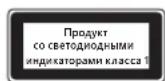
HΦopMaζη O COOTBETCTBn 3aKoHOdaTeJbHbIM Tpe6ObaHnA
He npedHa3NaeHOnIcNoJIb3OBaHnB INpOMbIuJIeHHbIX,MeNtUHckNX IIN pOn3BOdCTBeHHbIX cJIeJAX.
JIIO6bIe I3MeHEnHy yCTpOInCTBa, He OoO6peHHbIe RaBbIM 06pa3OM KopnpaueNe MaIKpocOΦT, MOrY T npBecTN K yTpate npaba H erO kcnnyatauio.
DAnHHb npOdyKT ppeHa3NaueH dIra nCnOJIb3OBAHnca C uΦpOBbIM o6OpyIOBaHnem, yKaaAHbIM Ia6opatOpneN RNTL (UL, CSA, ETL n T. d.) H/nn COOTBeTcBtUoM CTaHapTy IEC/EN 60950-1 (MapKnpoBa CA CE).
He coepxit deTanei, noIeXaunx pemonty. DaHHoe yCTPOCTBO MOKET kCNIyATnPOBaTbC B TEMpeaTyPOM dnaana3ohe 5-35 ^ C
ДлcoTBeTCTBn Tpe6oBaHnM RF OTHocnteIbHO paIIOuAcToTHOrO n3JyUeHn Heo6xOIMo co6IIOaTb CneIyIoUme npaBnla 3KcNlyaTaunn: anTeHHaYCTaHaBnBaIEcT pIOn3BOIDteMe; kaKe-Im6o ee n3MeHeHn 3aIpeueHe. BeCpOBoDhbe yCTpoiCTBa He doJIKNbI HaxOINbcr prAOM IIN pa6oTaTB COBMeCTHO cIIO6oI pyTOI aHTEHNO IIN nepeDaTuNKOM. AHTEHn BecPpOBoDHO rOyctPoIcTBa (KpOme rapHNTyp nHaJaONHHbIX yCTpoiCTB) DOJXHa paCpOJaRaTcBA ha pacCTOAHm He MeHee 20 cm OTeIOBeKa.
ToIbKO yCTpOcTB cTAndApTa 802.11a
AaHHe 3dEne pa3peaaeTc nCnOlb3OBaTb TOLbKO B NOMEueHN, YTO6bl CHN3NTb IIO6ble BO3MOXhBie BpeHbIe NOMEXN BO BpeMJIuHepoBaHHo pa60tB b dnaana3Ohe yactot ot 5,15 do 5,25 T.
Microsoft Corporation; One Microsoft Way; Redmond, WA 98052-6399; U.S.A. CUSA: KaHada (800) 426-9400; (800) 933-4750
Ytln3aun6atapeu, 3eKtpnueckoro n 3eKtpoHoro 06opydobAHNA
Haunue 3to 3nka Ha npdyke, nn Ha ero 3elemhax nataHry, nn Ha ero ynakobke yka3bIbaet, tTO daHHbI npdykT Iero
6atapen HnB3y YtINn3npoBaTB BmecTe C 6bITOBbIMN OTOdAMn. CneDyET DOCTABNT b npdyKT B COOTBeTcBHyOuN pyHK T pInemKn
npepeabotkn 6bape, 3eKtpnueckoro n 3eKtpoHnro 06OpDobAHn. Pa3deNbHbI c6Op npepeabotka nomoratoCoxpaHntb
npnpDhbIpecypcbi n peDoTbpATnbT NOteHuaNbHoe HeratNBHOe BnHnne Ha 3doPobBe IIOde N OKpyKaioUyO cpeNy.
K KOTOPOMy MoKeT npBecTN HeNpabINbHnay yTnIN3aLna, n3-3a BO3MOxHO rPncTyCTBn ANChbIX BeueCtB B 3JIeKTPnueCKOM
n 3JIeKTPoHOM o6OpydoBaan.ДЯ nOlyuyeHЯ dONoJInTeIbHbIX cBeDeHn O npYHK tax npneMa 6aTape, JJIeKTPnueCKTO
n 3JektpoHOrO o6OpyDobAHnI O6paTntecb B MeCThBle OprAhbl BlaCTn, cLyK6by C6opa 6bITOBx OTXoOB NIN B NYKT npNo6peTeHnI daHHOr npOdykTa. O6paTntecb no aDpccy weee@mrcrosoft.com IaI noJIyEHHaONIOJIHTeBHO INHΦopMaunn IO WEEE (AnpeKtNbA EC 6bOTXdax 3JektpuHeCKOrO n 3JektpoHOrO o6OpyDobAHnI yTuINImaCmN 3JeMeHToB nITaHnI.

Príručka k produktu
Microsoft Ireland Operations Ltd.
Adresa: The Atrium Building 3
Carmenhall Road, Sandyford Industrial Estate, DUBLIN 18
Krajina:
Irsko
Telefonne císlo:
+35312953826
Naslov: The Atrium Building 3
Carmenhall Road, Sandyford Industrial Estate, DUBLIN 18
Država:
Irska
Telefonska stevilka: +353 1295 3826
Stevilka faksa: +353 1706 4110

Odlaganje opadnih baterij ter elektricne in elektronske opreme
Uo6 yHnKHytn nookdxhenno 6bnadhaHHa nndabui Inaanwetib, He nepebahtaxyute Ta He wTOBxaTe ii, 06 BOHa He Bnala Ta He nepebephynac.
TexhiHixapaKTepeNtIKNa3epHnx i cBtIOdoIqHnx npncTpoIB
Ybar! BnKOpncTahHnElenmTeB KepyBaHHaNpNpCTocyBaHb a6o BnKoHaHHaN, He npeD6aueHNx y cboMy nociHky, MoKe np3BecTN do He6e3neHoro padiauiHoro onpOMiHHeHH.
Ja3ephi npictpoi
Lcienpncpii BIDIOBIAe mixnapoHOMy cTAnapTy IEC 60825-1:2007-03IaJIa3epnHex npncptoiB KIacy 1.Lcien pncpti TAKOX 3aIOBOJbHc BIMOram 21 CFR 1040.10 i 1040.11, 3a BInHrKOM BiXINHeB, BIKJaDeHNx y nobIDomLeHHI «Laser Notice» N950, daTOBaHOMy 24 cepBn 2007 p.
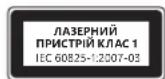
OntuHa (cbitioiDHa) Mw
UeBnBip6BIDIOBAE MIXHAPoDNm CTaHapTAM (IEC 60825-1:2001-08)i IEC 62471 (2006-07).Y Bnpo6i BnKOpNCTOByHOCTCBnCBITIOADN,BIDHeceHIdoKnacy1(IEC 60825-1:2001-08).
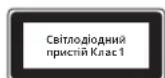
Hopmatubha iHΦopmaia
Bupi6 He npu3haueHn dIy BkOpncTaHn 3 MaunHnAmn i BepcTaTAM, B MeunHnx a6o npomcnobux cnCTeMax.
Byb-ki 3mHn nn moiikaiu, no He oTpmaJn Ooiui Horo cxbaenHn Kopnpauu MaKpocoT, MoKyTB npniBectn do npinnHeHH npab KOpntyBaa 3actocobbyatn ue npctpi.
LeBnBip6 MoKBe BnKOpncTObyBaTnca 3 OblaHaHnHm Dla iHOpMauiHx TexHoIor, 0o BiNobiAc cTaHapTAM, Bu3HaHIM NRTL (UL, CSA, ETL, i. H.), Ta/a6o IEC/EN 60950-1 (MapkyBaHH CE).
Pnctpi He MCTtB dTaeJe, 10o nptpebyto bocnyrobyBaHHa. Lcien pncpti BbaXaetbca cepHm Bnpo6om, knn moke npauhoatny diaana30hi temnepatyp biD +5^ do +35^
Дясуmicho3BUMORAMpaioactoTHOrOBINPOMiHOBaHHFCChe6xIDHO doTPMByBaTcA TAKHXeknnyatauichN KOHfipyauii: aHTeHaMa 6ytbCTAHOBJIeHa BnPO6HNIKOM i KODHI 3mIHHe OONyCKAOTbc. Be3npoBOIOI npicTpoi He MAOTb 6yttnpO3MIueHi 6JIn3bKO OINHODHO a60 npaIOBAtn CnIbHO 3 6ydb-koIO IHWOIO aHTeHOIO a60 nepeDaayem. 3a BHNATKOM raphitypn Ta npotatNBHX npictpoiB, 6e3npoBOIOI npicTpoi He6xIDHO po3TaowByBatn Ha BiCTani He MeHwe HIX 20 cm Bi d anHTEH 63npoBOOBOrO npicTpoi Ta npocTyHix IHOe.
Jnne dnnnpctpoB 802.11a
Cen npnctpi npn3naeHno nneBnKopncTahnn y npniueHH 3 MeTOO 3MeHueHH 6yNb-RAKx MOKINBnx WkiDnBnx nepekoq ni dac liueh3oBaHOI po60r B vactOTHomy diaana3OH 5,15-5,25 T.
Microsoft Corporation; One Microsoft Way; Redmond, WA 98052-6399; U.S.A. CIIJA: (800) 426-9400 Canada: (800) 933-4750
Ytniiaqir cnpaobohnx 6atapee, ekeTpnuHoro n ekeKpOHoro 06laHaHHA
Taka no3haoka Hn Bpu6i, 6aTapei nn ynaokoi 03hauac, 0e ne Bnp6 a6o 6aTapei do horo 3abopnoho ytni3ybaatn pao m iDomahim CmTTT. Hatomictb Bu Hecete BiNDobalhCTBa TpaHcnpotybanHHBpu6y Do BiNDOBHoro Mucia 3bnpaHH cmTTI
Jnnepep6kn 6aTapei, eEkeTpponHO Ta eEkeTpnuHO o6laHann. Take OKpeme 3bnpaHH i nepep6ka donomarac 3ebpiratn
Pnpouhi Pecypcn i 3ano6irn NotehuHIM HeraTmbHM Hasclkam I Jdoepo8n Jdoe j IOBDKII; He npauBbHa ytni3iauz
MOKe npz3BeCt DO MoKJNBO r OoWupenHH Nbe63neuHX PeOBNH, 0o Mic7bcr B 6aTapex, eEkeTPOHOMy J eEeTPNUHOMY
06laHaHHI.3aDoklaHIMM BIDOMCTMn pO MICu npHmOy CnpaobAHnx 6aTape, eektpnHoro Ta eektpnoHORo
06laHaHH 3BepTaTeCra DoMICeBOi McbKO/MyHUnnaJIbHOi adMinHcTaPauii, cLyXbN BuBe3EHn No6yTOBOro CMITRA 6o y Ma3HN, de 6yB
pnpduhnn ToBap.3BepHtbcra 3a aDpecoHO weee@microsoft.com dIra OtpmaHHdoaTKOBoi iHOpMaui Ioo WEEE (DInpeKTHBa EC npo
biXoOn eEeKTPnuHORo Ta eEeKTPoHHORo 6oaHaHH) iYtni3auiIeMeHTIB KINBHeHHA.
. 11111111111111111111111111111111
i 1
:
a 100000000000000000000000000000000000000000000000000000000000000
JUJIJIJIUGOUGOLOUGOLOU
aolo aoJUw Uloglo
aJbUy JsJy jgZJl
a a a a a a a a a a a a a a a a a a a a a a a a a a a a a a a a a a a a a a a
auiu auiu uaiuaaiu aaiu uioggul gaiu ayjg
b(lgz)s(y))0g 0o
(jjggljglljjgglgll)ylllallagssallggsalwolbsegyblllllj
JlJlaoggjuiwgl
jlll lcc aio oj
i j 1111111111111111111111111111111
4.4uLgglJlJUgoUcglqJolllJUUcglaclawUlc
ai ≤ ( L1 + L) b_i ≥ 1
aaii aai i g i kslll jglj lalbllg rj piaa qill aai yq gdd jla jg bgsj jg jg jg
sijie-sjgllll jy jy w- yw- ayw- yw/yyw
(1juii / juii / juii / iiaai gjo ciik |) lguiuugg ujiu
wglallgjglalllggljylp>ll jg>
a 1
.0011111111111111111111111111111 0000000000000000000000000000000
g 1 g 1 g 1 g 1 g 1 g 1 g 1 g 1 g 1 g 1 g 1 g 1 g 1 g 1 g 1 g 1 g 1 g 1 g 1 g 1 g 1 g 1 g 1 g 1 g 1 g 1 g 1 g 1 g 1 g 1 g 1 g 1 g 1 g 1 g
Ile lglal jg aagll galsll kglal 1gglwll no ydlal ll aylll no nllnol no nlll alg 100000000000000000000000000000000000000000000000000000000000000000000
blw 1sL jw wll pJU JU Uu
Jgll gll jglb lglal no llglall bga rgrj gsslll ylc glaag gdo aclll gai w no gag gll gll gll gll gll gll gll gll gll gll gll gll gll gll gll gll gll gll gll gll gll gll gll gll gll gll gll gll gll gll gll gll gll gll gll gll gll gll gll gll gll gll gll gll gll gll gll gll gll gll gell
c
a a a a a a a a a a a a a a a a a a a a a a a a a a a a a a a a a a a a a a a a a a a a a a a a
.
Laojewol jgjaliawwosaiw
Jsw oclao
Laa 13! g waleu Jw Wc 13!
aill llll lal lal aal 10 g 11g 11g 11g 11g 11g 11g 11g 11g
a_b = 1
jglzll
g j. 1 . 1 1 1 1 1 1 1 1 1 1 1 1 1 1 1 1 1 1 1 1 1 1 1 1 1 1 1 1 1 1 1 1
glll l 10
Jjlll yai go gaiyaiyai jilbglgaiiall li n no jalali lgl ayiyai yai aai bll ogai gl lylbll g iiaai ll g jlll g jlll g jlll g jlll g jlll g jlll g jlll g jlll g jlll g jlll g jlll g jlll g jlll g jlll g jlll g jlll g jlll g jlll g jlll g jlll g jlll g jlll g jlll g jlll g jlll g jll l g jlll g jlll g jlll g jlll g jlll g jlll g jlll g jlll g jlll g jlll g jlll g jlll g jlll g jlll g jlll g jlll g jlll g jlll g jlll g jlll g jlll g jlll g jlll g jlll g jll
M 10000000000000000000000000000000000000000000000000
aall aegyag yell llll hiai
2012 Microsoft Corporation
Microsoft CIE 4.0 agcagaaagajai Cieal Windows9 IntellMouse gIntellEye Microsoft jia
#
A
Microsoft 1nnn nn nnnn nn nnnn nn nnnn nn
n n n n n n n n n n n n n n n n n n n n n n n n n n n n n n n n n n n n n n n n n n n n n n n n n n n n n n n n n
NINO NIOI 2IUN yTID A
nibioDbyipnn npnn
n n nnnn nn nnnn nn nnnn nn nnnn nn nnnn nn nnnn nn nnnn nn nnnn nn nnnn nn nnnn nn nnnn nn nnnn nn nnnn nn nnnn nn nnnn nn nnnn nn nnnn nn nnnn nn nnnn nn nnnn nn nnnn nn nnnn nn nnnn nn nnnn nn nnnn nn nnnn
:nyn nn npn
.
.
nbn nnnn nn nnnn nnnn nnnn nnnn nnnn nnnn
·n
IN NNI IN NIN,NNN NIN NNNN NNNN NNNN NNNN NNNN
nniin niipn noopn npnn nn
IN yyn dy yana nbbionn on. ny in nydy ay yana nbbny bny npni nbbion by nn Nyn, nibit nbio DN
yipn nn ynn nnnnnnnnnnnnnnnnnnnnnnnnnnnnnnnnnnnnnnnnnnnnnnnnnnnnnnnnnnnnnnnnnnnnnnnnnnnnnnnnnnnnnnnnnnnnnnnnnnnnnnnnnnnnnnn
niblionny
:niyny-nnibio
yN-ON, pBx) jI aonl iJn bnnn nn nnnn nn nn nn nn nn nn nn nn nn nn nn nn nn nn nn nn nn nn nn nn nn nn nn nn nn nn nn nn nn nn nn nn nn nn nn nn nn nn nn nn nn nn nn nn nn nn nn nn nn nn nn nn nn nn nn nn nn nn nn nn nn nn nn nn nn nn nn nn nn nn nn nn nn nn nn nn nn nn
.
JINN JPNN
yinnn nnnn nn nnnn nn nnnn nn nnnn nn nnnn nn
bnn nn by n, bby bn by, by nnt in na
D'binN D'pan
(12/nybn and 10)IN nIN IN OINN IN pnnn nn bion nON,PTY yon oIN N INOy nBn an Bn) BYIN IN pnnn npninn nbion ny 22,100 (RF) TIN nIN nIN nIN Dpnn
(12) n 与 n
yipnni npninnipnnp
NIN NIN
i 1
n nn n nn n nn n nn n nn n nn n nn n nn n nn n nn n nn n nn n nn n nn n nn n nn n nn n nn n nn n nn n nn n nn n nn n nn n nn n nn n nn n nn n nn n nn n nn n nn n nn n nn n nn n nn n nn n nn n nn n nn n nn n nn n nn n nn n nn n nn n nn n nn n nn n nn n nn
n nn nnnnnnnnnnnnnnnnnnnnnnnnnnnnnnnnnnnnnnnnnnnnnnnnnnnnnnnnnnnnnnnnnnnnnnnnnnnnnnnnnnnnnnnnnnnnnnnnnnnnnnnnnnnnnnnnnnnnnnn
wnn nn nnnn nn nnnn nn nnnn nn nnnn nn nnnn nn nnnn nn nnnn nn nnnn nn nnnn nn nnnn nn nnnn nn nnnn nn nnnn nn nnnn nn nnnn nn nnnn nn nnnn nn nnnn nn nnnn nn nnnn nn nnnn nn nnnn nn nnnn nn nnnn nn nnnn nn nannn nn nnnn nn nnnn nn nnnn nn nnnn nn nnnn nn nnnn nn nnnn nn nnnn nn nnnn nn nnnn nn nnnn nn nnnn nn nnnn nn nnnn nn nnnn nn nnnn nn nnnn nn nnnn nn nnnn nn nnnn nn nnnn nn nnnn nn nnnn nn nnnn nn nennn nn nnnn nn nnnn nn nnnn nn nnnn nn nnnn nn nnnn nn nnnn nn nnnn nn nnnn nn nnnn nn nnnn nn nnnn nn nnnn nn nnnn nn nnnn nn nnnn nn nnnn nn nnnn nn nnnn nn nnnn nn nnnn nn
Nn Nnn 2y Dppnn
ynn yin nyn oioi in anann nn bni, ninn niin niin noyn ny npnn nni nnoo ninn npinn ninn npnn npnn npnn npnn npnn npnn npnn npnn npnn npnn npnn npnn npnn npnn npnn npnn npnn npnn npnn npnn npnn npnn npnn npnn npnn npnn npnn npnn npnn npnn npnn npnn npnn npnn npnn npnn npnn npnn npnn npnn npnn npnn npnn npnn npnn npnn npnn npnn npnn npnn npenn npnn npnn npnn npnn npnn npnn npnn npnn npnn npnn npnn npnn npnn npnn npnn npnn npnn npnn npnn npnn npnn npnn npnn npnn npnn npnn npnn npnn npnn npnn npnn npinn pinn
n nnnn nn nnnn nnnn nnnn nnnn nnnn nnnn nnnn nnnn nnnn nnnn nnnn nnnn nnnn nnnn nnnn nnnn nnnn nnnn nnnn nnnn nnnn nnnn nnnn nnnn nnnn nnnn nnnn nnnn nnnn nnnn nnnn nnnn nnnn nnnn nn
-
ynnn nnnn nn nnnn nn nnnn nn nnnn nn nnnn nn nnnn nn nnnn nn nnnn nn nnnn nn nnnn nn nnnn nn nnnn nn nnnn nn nnnn nn nnnn nn nnnn nn nnnn nn nnnn nn nnnn nn nnnn nn nnnn nn nnnn nn nnnn nn nnnn nn nnnn nn nnnn
-
nunon
- nui npnbo
.7NIN7nPNW
. IN DIOIN
pwnny 99n ynn n 99n IN Dispn nn nn nn nn n nn n nn
Dpnnn b
nynnnn
nni nnnn nnnn nn nnnn npnn nnnn npnn nnnn npnn nnnn npnn nnnn npnn nnnn npnn nnnn npnn nnnn npnn nnnn npnn nnnn npnn nnnn npnn nnnn npnn nnnn npnn nnnn npnn nnnn npnn nnnn npnn nnnn npnn nnnn npnn nnnn npnn nnnn npnn nnnn npann nnnn npann nannn npann nannn npann nannn npann nannn npann nannn npann nannn npann nannn npann nannn npann nannn npann nannn npann nannn npann nannn npann nannn npann nannn npann nannn npann nannn npann nannn npann nannn npann nannn npann nannn npann nennnp
n no
.0n np nnnn nn nnnn 1
W
jwnn nn nnnn
.
. Microsoft T-By I
. nnnn nnniy
n n n n n n n n n n n n n n n n n n n n n n n n n n n
np2tn nyxynn20n
DIN IN NIN NIN DNNN DIO, NIPN BY P2N NNTN NNN NNN NNN NNN NNN NNN NNN NNN NNN NNN NNN NNN NNN NNN NNN NNN NNN NNN NNN NNN NNN NNN NNN NNN NNN NNN NNN NNN NNN NNN NNN NNN NNN NNN NNN NNN NNN NNN NNN NNN NNN NNN NNN NNN NNN NNN NNN NNN NNN NNN N
Tablet- D
inno nnnn nn nnnn nn nnnn nn nn nn nn nn nn nn nn nn nn nn nn nn nn nn nn nn nn nn nn nn nn nn nn nn nn nn nn nn nn nn nn nn nn nn nn nn nn nn nn nn nn nn nn nn nn nn nn nn nn nn nn nn nn nn nn nn nn nn nn nn nn nn nn
LED-1
nnpnnn nnnn nn nnnnnnnnnnnnnnnnnnnnnnn
wupnn
-1 21 CFR 1040.10 du da dn n t pnn .1 iion wicn IEC 60825-1:2007-03 nni -iin npnn niy n nn 2007,24 nn ,Laser Notice No. 50 npiynn nn 1040.11
(LED) 10917
wnnnn n nn. (IEC 60825-1:2001-08) and IEC 62471 (2006-07) nn nn nn nn nn nn nn .Class 1 (IEC 60825-1:2001-08)-
nipn NwDyTID
1.000000 IN 000017,000000 000000 000000 000000 000000 000000
nnt pnn bynb wannn nn n 205 by Microsoft 1- by uinn
CE IDO DY) IEC/EN 60950-1 DIN TIN IN/(1,('D'UL,CSA,ETL nnd)NRTL NNDNNDNNDNNDNNDNNDNNDNNDNNDN
+35C ty +5°C bynnnnon nnyn non npnn nnnn nn nnnn nn
pnnn nnnn nn nnnn nnnn nnnn nnnn nnnn nnnn nnnn nnnn nnnn nnnn nnnn nnnn nnnn nnnn nnnn nnnn nnnn nnnn nnnn nnnn nnnn nnnn nnnn nnnn nnnn nnnn nnnn nnnn nnnn nnnn nnnn nnnn nnnn nnnn nn
802.11a npn ny
.5.25 GHz 5.15 nnnn nnynnnn nn nnnn nn nnnn nn nnnn nn (0800) 933-4750: (800) 9400-426: .Microsoft Corporation; One Microsoft Way; Redmond, WA 98052-6399; U.S.A.
n nnnn nn nnnn nn nnnn nn nnnn nn nnnn nn nnnn nn nnnn nn nnnn nn nnnn nn nnnn nn nnnn nn nnnn nn nnnn nn nnnn nn nnnn nn nnnn nn nnnn nn nnnn nn nnnn nn nnnn nn nnnn nn nnnn nn nnnn nn nnnn nn nnnn nn nnnn
n nn nnnn nnnn nnnn nnnn nnnn nnnn nnnn nnnn nnnn nnnn nnnn nnnn nnnn nnnn nnnn nnnn nnnn nnnn nnnn nnnn nnnn nnnn nnnn nnnn nnnn nnnn nnnn nnnn nnnn nnnn nnnn nnnn nnnn nnnn nn
n nnn nn nnn nnn nnn nnn nnn nnn nnn nnn nnn nnn nnn nnn nnn nnn nnn nnn nnn nnn nnn nnn nnn nnn nnn nnn nnn nnn nnn nnn nnn nnn nnn nnn nnn nnn nnn nnn nnn nnn nnn nnn nnn nnn nnn nnn nnn nnn nnn nnn nnn nnn nenn nnn nnn nnn nnn nnn nnn nnn nnn nnn nnn nnn nnn nnn nnn nnn nnn nann
nupbnynnnnno nno
International Technical Support Numbers (Partial List Only)
Argentina
Technical Support (Australian Callers Only): 13 20 58
Technical Support (International Callers): 517-6582-7733
+61238702200
Technical Support (Fax):
+61298702468
Austria
Microsoft Österreich Kundersupport
Telefonnummer:08000123345
Belgium and Luxembourg
02/503.31.13 (Belgium)
BC024353(Luxemburg)
Bolivia
Technical Support Phone: 86-21-96081318
Technical Support (Toll Free): 800-820-3800
Colombia
Personal Support+358 (09) 817 10 400 (IVR option 3-2)
Professional Support: +358 (09) 817 10 400 (option 4+2)
France
0825827829Numero indigo:0,15TTC/min
http://support.microsoft.com/contactus/?ws support
Germany
Technischer Support
master?ws=support#tab3
TrnAeepwG
8015003000(Maotunxpewn)
2111205500(Eovkaleirnokvnt
Hong Kong SAR
Technical Support Phone: (852) 23889600
Technical Support Phone (Macao SAR Toll Free): 0800-760
Fax: (852) 25675282
Italia
http://www.microsoft.com/Italy/info/contactaci.mspx
Telefon: +39 02 70.398.398
Japan
Technical Support Phone (Tel Free): 0120-54-2244
Korea
Customer Service Center (Tol):
1577-9700(Domestic),82-2-567-7881(International)
Latin American Countries
www.micrsofof.com/latam/contactenos
Mexico
Atencion a Clients (Toll:525267-2191
clients@msrmexico.com.mx
Tax (Toll): (52) (5) 267-2119
Netherlands
Technical Phone Support (Thuisgabruikers)
+31(0)205001500(option 2)
You can also visit our website
http://support.microsoft.com/contactus/for questions or
visit http://support.microsoft.com/OAS for technical online support information
New Zealand
Technical Support Phone: 0800-444-335
Norway
Personal Support +47 23 500 500 (option 2+2)
Professional Support: +47 23 500 777
Panamá
Moscow Local Number: 7/95 9167171
South Africa
Technical Support Phone: 0860225567 (inside South Africa)
(Shared call)
International Dialing: +27 11 990 5000
Fax Number: +2719905320
Email support: http://support.microsoft.com
Southeast Asia
Covering Indonesia, Malaysia, Singapore, and Thailand
-80064276738
Spain
PersonalSuppose:+4685599000
Professional Support: +46 8 751 09 80
Taiwan
Technical Support Phone: 886-2-2999-88-33
Technical Support (Toll Free): 0800-00-88-33
Turkey
Technical Support Phone (Toll): +90 212 33 68 999
(Tol) 4446787 (Inside Turkey only)
United Kingdom
Technical Support Phone: 0844 800 2400 (National Rate)
Uruguay
You can also visit our website
http://support.microsoft.com/contactus/ for questions or
visit http://support.microsoft.com/QAS for technical online
support information

- Product Guide
- Battery-Powered Devices
- To reduce the risk of injury:
- Disposable (non-rechargeable) batteries only:
- Headset Devices
- Wireless Devices
- Game Controllers, Keyboards, and Mouse Devices
- Health Warning
- Photosensitive Seizures
- All Devices
- Do Not Attempt Repairs
- Choking Hazard
- Usage and Cleaning
- Adhesive Mounting
- Tablet Stands
- Laser and LED Specific cations
- Laser Devices
- Optical (LED) Mouse
- Regulatory Information
- For 802.11a devices only
- Statement of Compliance with EU Directives
- Category II Equipment
- MHz Devices
- Radio and TV Interference Regulations
- Disposal of Waste Batteries and Electrical & Electronic Equipment
- Guiadoproduo
- Installation adhesive
- Piles jetables (non rechargeable) quintum :
- Verwerken van afgedankte batterijen en afgedankte elektrische en elektronische apparaten
- Anoppiyn axpnotw mataipiW Kc0w c kai nAektpikoK aiknAektpovkoEgONlaou
- Manual do Produto
- ounnniownnnae
- y
- yuaunnau
- 贝尼一-
- sahitkejohooomkokmokranek
- Kefalun iJFJI JAFJ JAAH OYAH (RcAaKf KARnEyOgN h) Btiray:
- 2
- 巴哈克利斯
- Odlaganje opadnih baterija te elektricne i elektronike opreme
- Přiručka k produktu
- Eliminarea deseurilor de baterii si de echipamente electrice si electronice
- BecnpoBOHbIe yCtpoiCTBa
- NrpObIe yCtpoIcTbA, KlaBnAtypbl Mblu
- PpeynpeKdHne 06 onachoctn JIA 3doopoBba
- Cydoopoxhble n 3nnletnueckne npnnaKn B pe3yIbTaTe CBETOBORO BO3DeiCTBNA
- Bce yctpoCTBa
- He nbitaeTecb camoCTOATEJbHO peMOHTnPOBaT yCTpOCTBO
- Onachoctb ydywb
- 3Kcnnnyataunn u nctka
- KpenenneHa KneiKoO ochobe
- IpaTbKn dna nlaHwethbx NK
- XapakTeepntKn Ia3epoB u CBeToNDoB
- Ja3epHbIe yctpoiCTBa
- OnTnuecka (CBeToaNoDna)MbIb
- HΦopMaζη O COOTBETCTBn 3aKoHOdaTeJbHbIM Tpe6ObaHnA
- ToIbKO yCTpOcTB cTAndApTa 802.11a
- Ytln3aun6atapeu, 3eKtpnueckoro n 3eKtpoHoro 06opydobAHNA
- Príručka k produktu
- Odlaganje opadnih baterij ter elektricne in elektronske opreme
- TexhiHixapaKTepeNtIKNa3epHnx i cBtIOdoIqHnx npncTpoIB
- Ja3ephi npictpoi
- OntuHa (cbitioiDHa) Mw
- Hopmatubha iHΦopmaia
- Jnne dnnnpctpoB 802.11a
- Ytniiaqir cnpaobohnx 6atapee, ekeTpnuHoro n ekeKpOHoro 06laHaHHA
- #
- International Technical Support Numbers (Partial List Only)
- Argentina
- Austria
- Bolivia
- Colombia
- France
- Germany
- Hong Kong SAR
- Italia
- Japan
- Korea
- Latin American Countries
- Mexico
- Netherlands
- New Zealand
- Norway
- Panamá
- South Africa
- Southeast Asia
- Spain
- Taiwan
- Turkey
- Uruguay
Brand : MICROSOFT
Model : Ready Mouse
Category : Mouse