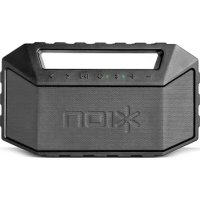
Plunge - Loudspeaker ION - Free user manual and instructions
Find the device manual for free Plunge ION in PDF.



| Product Type | Portable Bluetooth Speaker |
| Brand | ION |
| Model | Plunge |
| Dimensions (L x W x H) | 260 mm x 80 mm x 150 mm |
| Weight | 1.1 kg |
| Output Power | 13 W |
| Frequency Response | 100 Hz - 18 kHz |
| Waterproof Rating | IPX7 (submersible up to 1 meter for 30 minutes) |
| Bluetooth Profiles | A2DP, HFP, AVRCP |
| Bluetooth Range | Up to 30.4 m (100 feet) |
| Battery Life | Up to 20 hours |
| Charging Time | Approximately 4 hours |
| Charging Port | Micro USB (5V, 1A) |
| Auxiliary Input | 3.5 mm stereo jack |
| Box Contents | Plunge, micro USB cable, 3.5 mm cable, quick start guide, safety instructions |
| Main Functions | Bluetooth pairing, hands-free calling, playback control, volume, next/previous track, voice assistant, microphone, tripod mount point |
| Power Supply | Built-in rechargeable battery |
| Auto-off | After 10 minutes without Bluetooth connection or audio signal |
| Charging Indicator | Red LED while charging, green when charged, slow blinking for low battery |
| Care and Cleaning | Wipe with a soft, dry cloth. Do not use abrasive products. Ensure the waterproof caps are properly in place after use in water. |
| Spare Parts and Repairability | Contact ION customer service for spare parts or repairs |
| General Information | Read the safety instructions before use. Do not charge when the device is wet. |
Frequently Asked Questions - Plunge ION
User questions about Plunge ION
0 question about this device. Answer the ones you know or ask your own.
Ask a new question about this device
Download the instructions for your Loudspeaker in PDF format for free! Find your manual Plunge - ION and take your electronic device back in hand. On this page are published all the documents necessary for the use of your device. Plunge by ION.
USER MANUAL Plunge ION
- Make sure all items listed in the Box Contents are included in the box.
- READ THE SAFETY & WARRANTY MANUAL BEFORE USING THE PRODUCT.
- MAKE SURE THE BATTERY IS COMPLETELY CHARGED PRIOR TO FIRST USE FOR MAXIMUM BATTERY LIFE.
- Study the connection diagram.
Box Contents
Plunge
Micro-USB Charging Cable
3.5mm (1/8") to 3.5mm (1/8") cable
Quickstart Guide
Safety & Warranty Manual
Support
For the latest information about this product (system requirements, compatibility information, etc.) and product registration, visit ionaudio.com.
WARNING: Keep any non-water-resistant devices (phones, music players, etc.) in a dry place where they will not be affected by water and cause a risk of electric shock.
Quick Setup
Connection Diagram
Items not listed under the Box Contents are sold separately.
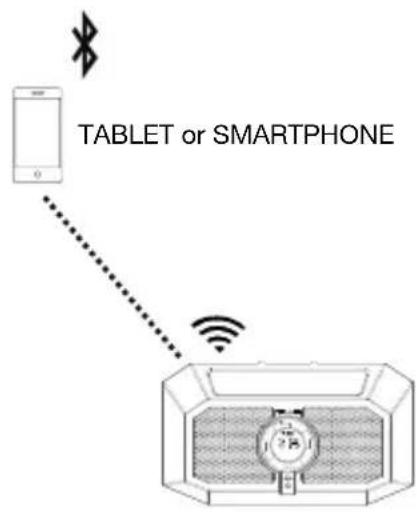
Playing Music
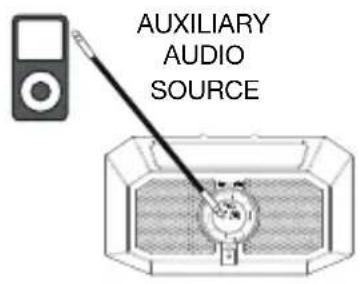
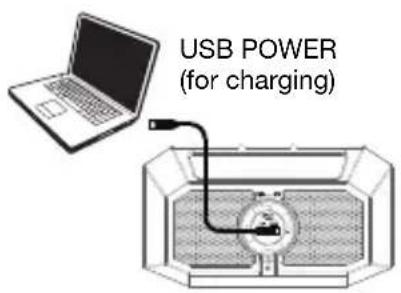
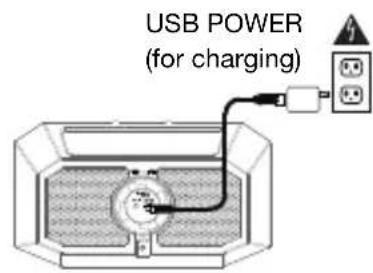
Charging
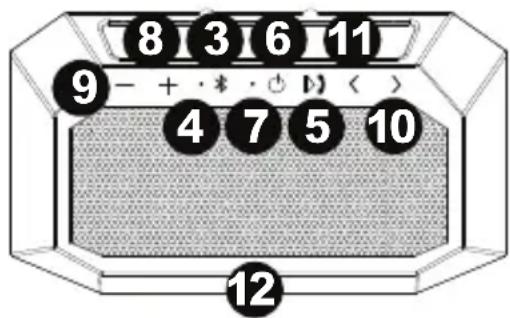
Features
- Auxiliary Input*: This stereo 3.5 mm (1/8") input can be used to connect a CD player, MP3 player, or other audio source.
- Micro USB Port*: Open the bottom cover to access the USB port. Use the included USB cable to connect this to a USB port on your computer or phone charger to recharge Plunge's battery.
Note: Make sure Plunge and connections are dry before charging. Never charge when wet.
- Bluetooth Button: Press and hold this button to disconnect a paired Bluetooth device.
-
Bluetooth LED: This blinks when Bluetooth pairing or illuminates solid when connected to a Bluetooth device.
-
Call Receive / Call End / Play /
Pause: Press to play or pause a track from a connected Bluetooth device. When Bluetooth-paired, press and release this button to answer a phone call. The phone's ringtone will be heard through Plunge's speaker until the call is answered. When the call has been disconnected, Plunge will resume playing music. To reject an incoming call, press and hold this button.
*IMPORTANT: Cover the Aux In and the Micro USB port with the cap in the locked position when using Plunge in water.

Open the air-tight cap before Plunge on a plane to prevent ker damage.
Note: If the speaker fills with water, the sound will be muffled until the water has drained from the speaker.

*ion
- Power On/Off Switch: Press and hold this button to turn Plunge on/off. While Plunge is connected to a power source, it does not need to be powered on to charge the battery.
Note: Plunge will power off after 10 minutes if there is no Bluetooth connection or no audio signal being received. - Charging Indicator: The LED will slowly blink when the battery needs charging. The LED is solid red when the battery is charging. When the power is on and the battery is fully charged, this LED will be solid green.
- Volume Up: Press this to increase the speaker volume on Plunge.
- Volume Down: Press this to decrease the speaker volume on Plunge.
Note: Press the Volume Up and Volume Down buttons at the same time to enable or disable voice prompts.
- Next Track: Press and release this button to skip to the next Bluetooth track. Press and hold this button for 2 seconds to enable your connected smartphone's voice assistant (e.g. Siri®, Google®, etc), and then speak into the microphone.
- Previous Track: Press and release this button once to go to the beginning of the track. Note: With some apps, pressing the Previous Track button or Next Track button may go to another playlist or music genre.
- Microphone: Talk into this after receiving a call.
- Tripod Mount (bottom panel): Attach a tripod to this 1/4 ” (6.35 mm) threaded mount.
Pairing or Disconnecting a Bluetooth Device
- Turn on your Bluetooth device.
- Power on Plunge and it will automatically go into pairing mode to search for Bluetooth devices. You will know you are in pairing mode when the Bluetooth icon is slowly flashing.
- Navigate to your Bluetooth device's setup screen, find "Plunge" and connect.
Note: If your Bluetooth device prompts for a pairing code, enter "0000".
- Press and release the Bluetooth button to disconnect a paired Bluetooth device.
- To connect to another Bluetooth device, repeat step 3.
Note: Maximum range will be achieved when using devices with Bluetooth 4.0.
Using the Phone
Note: You must power on and pair Plunge with your Bluetooth device before using it to listen to music or as a speakerphone.
Using the Phone:
When you have an incoming call, Plunge's speaker will play a ringtone.
- To answer the call, press Plunge's Call Receive button.
Note: If you get an incoming call during music playback, the music will pause until you end the call.
- Speak into the microphone and adjust the call volume using the Volume buttons.
- To end the call, press the Call End button.
- To reject an incoming call, press and hold the Call Receive button.
Troubleshooting
If the sound is distorted: Try lowering the volume control of your sound source. Also, try to reduce the overall volume of Plunge.
If there is too much bass: Try adjusting the tone or EQ control on your sound source to lower the bass level. This will allow you to play the music louder before clipping (distortion) occurs.
Technical Specifications
| Dimensions (Depth x Width x Height) | 10.2” x 3.1” x 5.9” 260 mm x 80 mm x 150 mm |
| Weight | 2 lbs; 0.9 kg |
| Output Power | 13 W |
| Frequency Response | 100 Hz – 18 KHz |
| Water Resistance Class | IPX 7 |
| Bluetooth Profile | A2DP, HFP, AVRCP |
| Bluetooth Range* | Up to 100' / 30.4 m |
| Aux Input | 3.5 mm (1/8") line-level |
| Battery Life** | Up to 20 hours (when fully charged) |
| Recharge Time | Up to 4 hours |
| Charge Port | USB; +5V, 1A |
Specifications are subject to change without notice.
- Bluetooth range is affected by walls, obstructions, and movement. For optimal performance, place the product in your room at line of sight, so it is unaffected by walls, furniture, etc.
** Battery life may vary based on temperature, age, and volume usage of product.
RSS Statement for Canadian models: This device complies with Industry Canada licence-exempt RSS standard(s). Operation is subject to the following two conditions: (1) this device may not cause interference, and (2) this device must accept any interference, including interference that may cause undesired operation of the device.
Trademarks and Licenses
ION Audio is a trademark of ION Audio, LLC, registered in the U.S. and other countries.
Google is a registered trademark of Google Inc.
Siri is a trademark of Apple Inc., registered in the U.S. and other countries.
The Bluetooth word mark and logos are owned by the Bluetooth SIG, Inc. and any use of such marks by ION Audio is under license.
All other product or company names are trademarks or registered trademarks of their respective owners.
Assistance technique
Kabel 3,5mm (1/8") - 3,5mm (1/8")
Snelstartgids
Brand : ION
Model : Plunge
Category : Loudspeaker