
Yoga Tab 2 Pro - Tablet LENOVO - Free user manual and instructions
Find the device manual for free Yoga Tab 2 Pro LENOVO in PDF.


| Product type | Multimedia tablet with built-in projector |
| Brand | Lenovo |
| Model | YOGA Tab 2 Pro (1380F / 1380L) |
| Operating system | Android |
| Processor | Intel® Atom™ Z3745 (4 cores, up to 1.86 GHz, 2 MB cache) |
| Memory | 2 GB RAM (estimated) |
| Storage | 32 GB (estimated) + microSD |
| Screen size | 13.3 inches |
| Screen resolution | 2560 x 1440 pixels (QHD) |
| Rear camera | 8 megapixels with autofocus |
| Front camera | 1.6 megapixel HD |
| Battery | 9600 mAh rechargeable lithium-ion |
| Wireless connectivity | Wi-Fi, Bluetooth, GPS, LTE (1380L model only) |
| Built-in projector | Yes, with manual focus |
| Speakers | Built-in subwoofer, Dolby Audio |
| Ports | Micro USB, 3.5 mm headphone jack |
| Expandable storage | microSD card (up to 64 GB, estimated) |
| SIM cards | Micro SIM (LTE model only) |
| Power supply | USB mains charger included |
| Care and cleaning | Clean with a soft, dry cloth. Do not use chemical products. |
| Safety | Do not expose to moisture, avoid shocks, do not look directly at the projector. |
| Spare parts and reparability | Contact Lenovo support for repairs. The battery is not user-replaceable. |
| Warranty | 1 to 2 years depending on country (see full notice) |
Frequently Asked Questions - Yoga Tab 2 Pro LENOVO
User questions about Yoga Tab 2 Pro LENOVO
0 question about this device. Answer the ones you know or ask your own.
Ask a new question about this device
Download the instructions for your Tablet in PDF format for free! Find your manual Yoga Tab 2 Pro - LENOVO and take your electronic device back in hand. On this page are published all the documents necessary for the use of your device. Yoga Tab 2 Pro by LENOVO.
USER MANUAL Yoga Tab 2 Pro LENOVO
Safety, Warranty & Quick Start Guide
YOGA Tablet 2 Pro-1380F
YOGA Tablet 2 Pro-1380L
English

Read this guide carefully before using your YOGA Tablet 2 Pro.
All information labeled with * in this guide refers only to the LTE model
(YOGA Tablet 2 Pro-1380L).
Electronic emission notices
European Union conformity
Radio and Telecommunications Terminal Equipment Directive
This product is in compliance with the essential requirements and other relevant provisions of the Radio and Telecommunications Terminal Equipment Directive, 1999/5/EC.
Learn more
To learn more information about your YOGA Tablet 2 Pro and obtain the latest manuals, go to: http://support.lenovo.com/.
Getting support
For support on network service and billing, contact your wireless network operator. For instructions on how to use your YOGA Tablet 2 Pro, go to: http://support.lenovo.com/.
Legal notices
Lenovo and the Lenovo logo are trademarks of Lenovo in the United States, other countries, or both.
Other company, product, or service names may be trademarks or service marks of others.
Manufactured under license from Dolby Laboratories.
Dolby and the double-D symbol are trademarks of Dolby Laboratories.
LIMITED AND RESTRICTED RIGHTS NOTICE: If data or software is delivered pursuant a General Services Administration "GSA" contract, use, reproduction, or disclosure is subject to restrictions set forth in Contract No. GS-35F-05925.
Technical specifications
| YOGA Tablet 2 Pro | |
| Model & version | Model: YOGA Tablet 2 Pro-1380F Version: WLAN |
| *Model: YOGA Tablet 2 Pro-1380L *Version: LTE | |
| System | Android |
| CPU | Intel® Atom™ Processor Z3745 (2M Cache, 4 cores, up to 1.86 GHz) |
| Camera | 8 megapixels AF (rear) + 1.6 megapixels HD (front) |
| Battery | 9600 mAh |
| Display | Size: 13.3 inches Resolution: 2560 x 1440 |
| Wireless communication | Bluetooth WLAN GPS *LTE, WCDMA, GSM |

- Your YOGA Tablet 2 Pro supports LTE Band 1, 2, 3, 4, 5, 7, 8, 19, and 20. But in some countries, LTE is not supported. To know if your YOGA Tablet 2 Pro works with LTE networks in your country, contact your carrier.
First glance
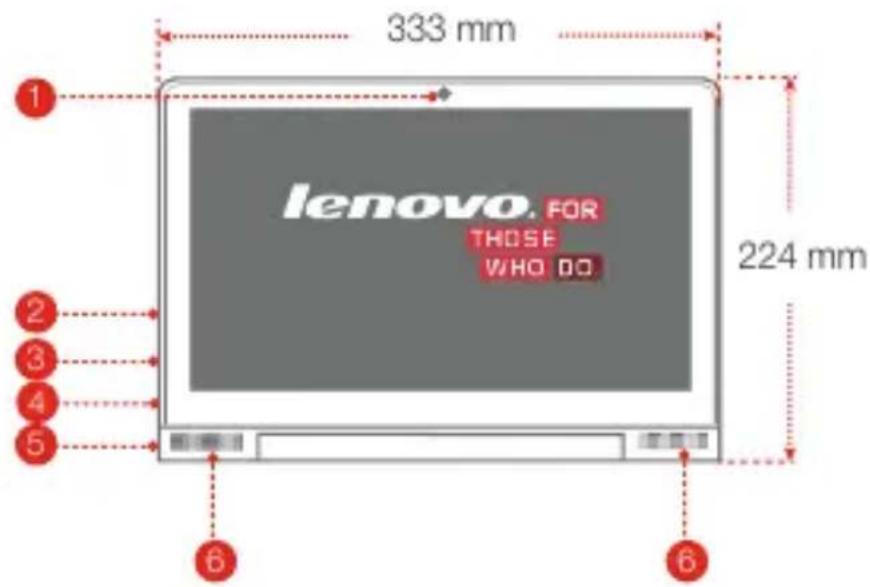
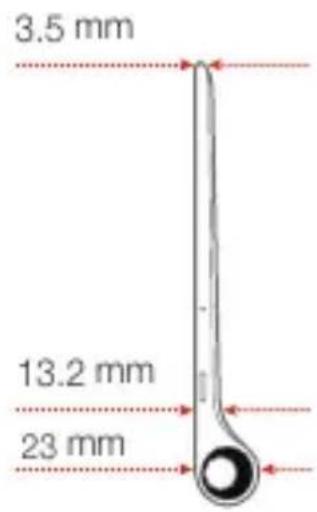
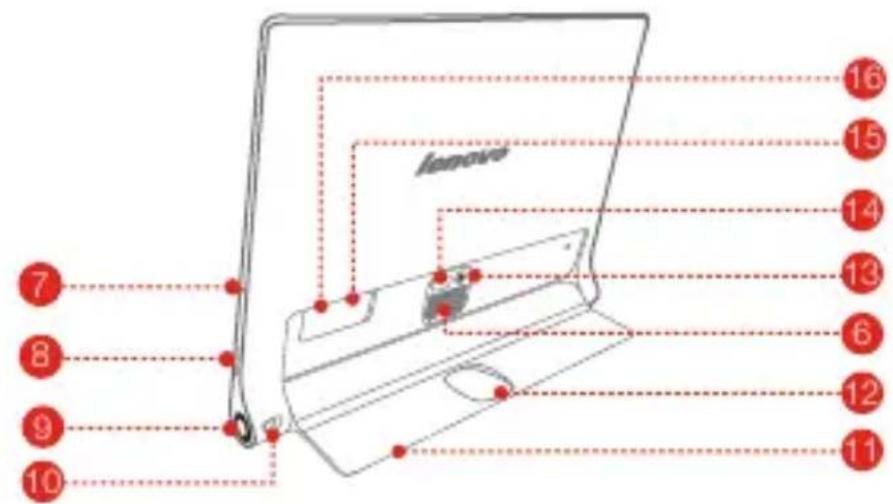
1 Front camera
2 Volume button
3 Micro USB
4 Earphone jack
5 On/Off button
6 Subwoofer
7 Microphone
Projection On/Off button
Projection lens
Projection focus slider
11 Kickstand
12 Hanging hole
13 Back camera
14 Kickstand push button
15 *Micro SIM card slot
16 microSD card slot
The WLAN model (YOGA Tablet 2 Pro-1380F) does not have a Micro SIM card slot.
Preparing your YOGA Tablet 2 Pro
You can use cellular services with the LTE model (YOGA Tablet 2 Pro-1380L) by inserting the Micro SIM card provided by your carrier. Install the Micro SIM card and the microSD card as shown.
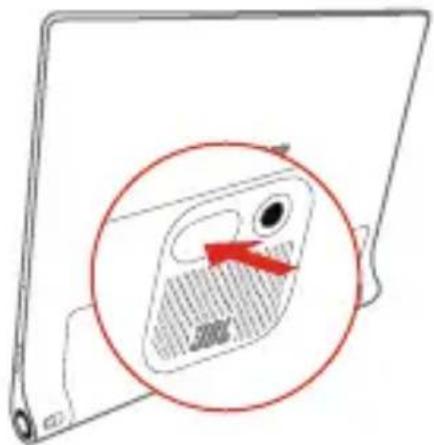
Step 1. Press the push button to open the kickstand.
Step 2. Open the card slot cover. Insert the Micro SIM card and microSD card and then install the card slot cover back.
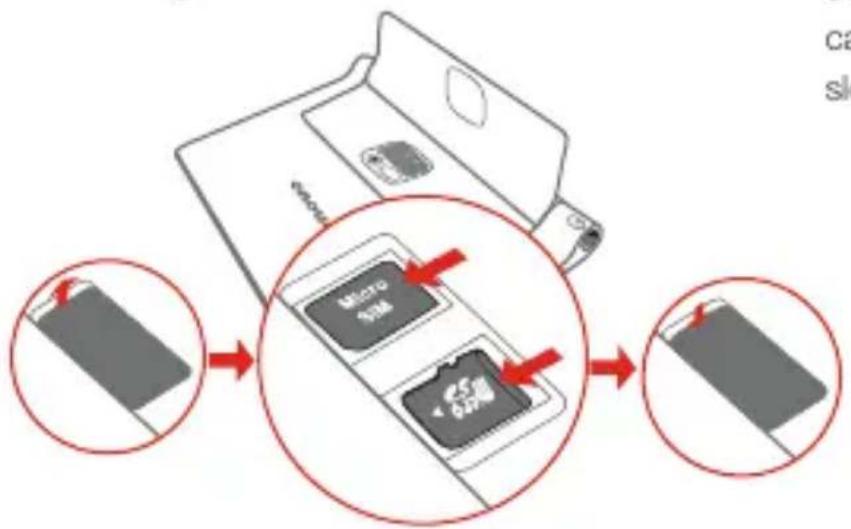
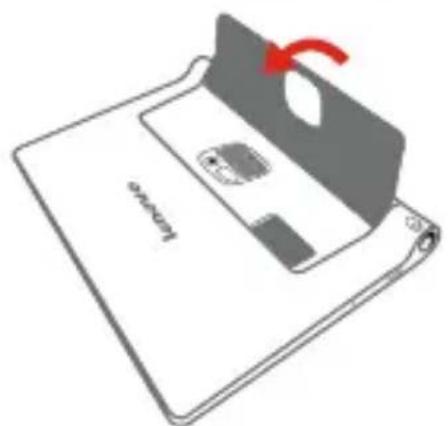
Step 3. Push back the Kickstand.
Only Micro SIM card works with your YOGA Tablet 2 Pro.
!!! DO not insert or remove the Micro SIM card while your YOGA Tablet 2 Pro is turned on. Doing so can permanently damage your Micro SIM card or YOGA Tablet 2 Pro.
Starting to use your YOGA Tablet 2 Pro
Before using your YOGA Tablet 2 Pro, you might need to charge the battery. Charge the battery as shown.
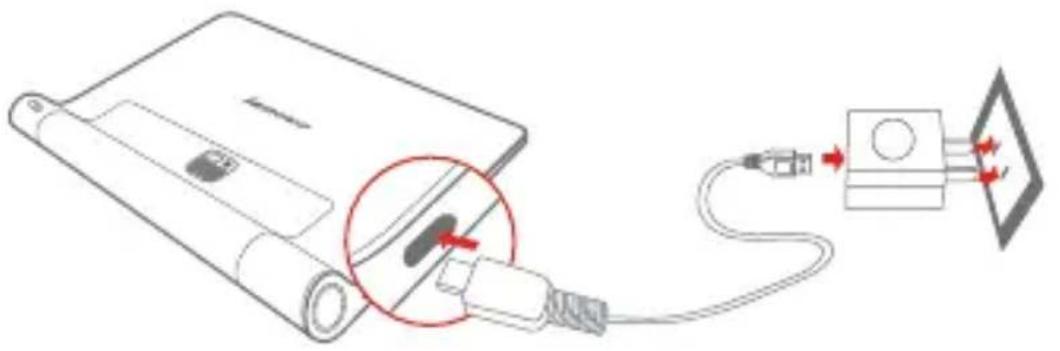
Connect your YOGA Tablet 2 Pro to a power outlet using the included cable and USB power adapter.

Low battery

Fully charged

Charging
Turning on/off
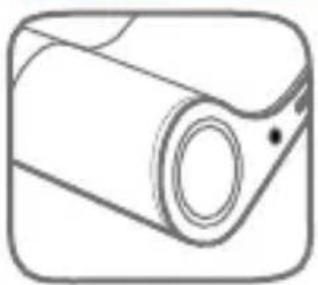
Turn on: Press and hold the On/Off button until the Lenovo logo is displayed.
Turn off: Press and hold the On/Off button for a few seconds, then tap Power off.
Taking screenshots
Press and hold the On/Off button and the Volume down button at the same time.
Using the projector
Use the projector feature as shown.
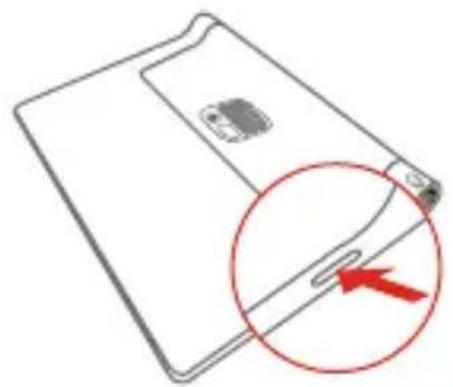
Step 1. Press and hold the Projection On/Off button to turn on or off.
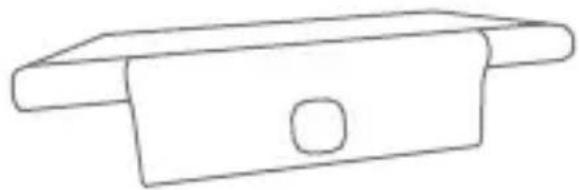
Step 2. Lay the tablet on its back with the kickstand out, and adjust the angle of the kickstand until it can stand on a table.
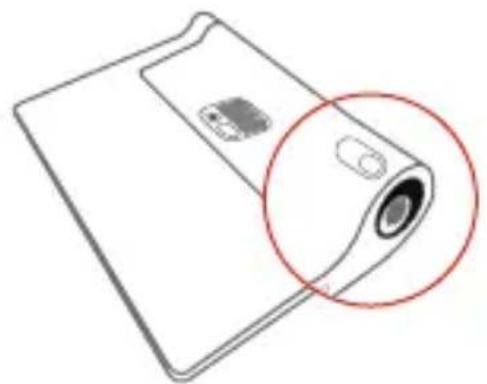
Step 3. Move the Projection focus slider left or right to adjust the projection focus.
Read before using your tablet
The following sections provide critical safety and regulatory information for Lenovo tablets and instructions on how to access electronic versions of the publications developed for your tablet.
Read first-Regulatory information
Device models equipped with wireless communications comply with the radio frequency and safety standards of any country or region in which it has been approved for wireless use. In addition, if your product contains a telecom modem, it complies with the requirements for connection to the telephone network in your country.
Be sure to read the Regulatory Notice for your country or region before using the wireless devices contained in your device. To obtain a PDF version of the Regulatory Notice, refer to the "Downloading publications" section below.
Downloading publications
Electronic versions of your publications are available from the http://support.lenovo.com. To download the publications for your device, go to: http://support.lenovo.com and follow the instructions on the screen.
Accessing your User Guide
Your User Guide contains detailed information about your device. To access your User Guide, use one of the following methods:
Go to: http://support.lenovo.com and follow the instructions on the screen.
Start your device, access the User Guide app.
Service and Support Information
The following information describes the technical support that is available for your product, during the warranty period or throughout the life of your product. Refer to the Lenovo Limited Warranty for a full explanation of Lenovo warranty terms. See "Lenovo Limited Warranty notice" later in this document for details on accessing the full warranty.
Online technical support
Online technical support is available during the lifetime of a product at http://www.lenovo.com/support.
Telephone technical support
You can get help and information from the Customer Support Center by telephone. Before contacting a Lenovo technical support representative, please have the following information available: model and serial number, the exact wording of any error message, and a description of the problem. Your technical support representative might want to walk you through the problem while you are at your device during the call.
Worldwide Lenovo Support telephone list
Important: Telephone numbers are subject to change without notice. The most up-to-date telephone list for the Customer Support Center is always available at http://www.lenovo.com/support/phone.
If the telephone number for your country or region is not listed, contact your Lenovo reseller or Lenovo marketing representative.
Important safety and handling information
Plastic bag notice
DANGER:
Plastic bags can be dangerous. Keep plastic bags away from babies and children to avoid danger of suffocation.
Built-in rechargeable battery notice
DANGER:
Do not attempt to replace the internal rechargeable lithium ion battery. Contact Lenovo Support for factory replacement.
Polyvinyl Chloride (PVC) cable and cord notice
WARNING: Handling the cord on this product or cords associated with accessories sold with this product will expose you to lead, a chemical known to the State of California to cause cancer, and birth defects or other reproductive harm. Wash hands after handling.
Prevent hearing damage
Your device has a headphone connector. Always use the headphone connector for headphones (also called a headset) or earphones.
CAUTION:
Excessive sound pressure from earphones and headphones can cause hearing loss. Adjustment of the equalizer to maximum increases the earphone and headphone output voltage and the sound pressure level. Therefore, to protect your hearing, adjust the equalizer to an appropriate level.
Excessive use of headphones or earphones for a long period of time at high volume can be dangerous if the output of the headphone or earphone connectors do not comply with specifications of EN 50332-2.
The headphone output connector of your device complies with EN 50332-2 Sub clause 7. This specification limits the device's maximum wide band true RMS output voltage to 150mV . To help protect against hearing loss, ensure that the headphones or earphones you use also comply with EN 50332-2 (Clause 7 limits) for a wide band characteristic voltage of 75mV . Using headphones that do not comply with EN 50332-2 can be dangerous due to excessive sound pressure levels.
If your device came with headphones or earphones in the package, as a set, the combination of the headphones or earphones and the device already complies with the specifications of EN 50332-1. If different headphones or earphones are used, ensure that they comply with EN 50332-1 (Clause 6.5 Limitation Values). Using headphones that do not comply with EN 50332-1 can be dangerous due to excessive sound pressure levels.
Sound pressure warning statement
For the device that is tested in accordance with EN 60950-1:
2006+A11:2009:+A1:2010+A12:2011, it is mandatory to perform audio tests for EN50332.
This device has been tested to comply with the Sound Pressure Level requirement laid down in the applicable EN 50332-1 and/or EN 50332-2 standards. Permanent hearing loss may occur if earphones or headphones are used at high volume for prolonged periods of time.
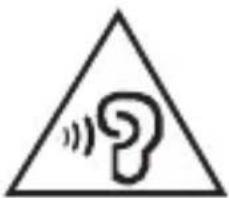
Warning statement:
To prevent possible hearing damage, do not listen at high volume levels for a long period of time.
Precautions for projector operation
The lens emits intensive light. Do not look directly into the lens, otherwise it may damage your eyes.
- Be careful when using the projector in the presence of children. Do not let children come within the irradiation range or look directly at the light beam or lens.
The projection lens, focus adjustment slider and surrounding areas may become hot during operation. For safety reasons, only use the projector in well-ventilated environments with ambient temperature below 33^ , to avoid the risk of scalding.
Warranty information
Lenovo Limited Warranty notice
This product is covered by the terms of the Lenovo Limited Warranty, version L505-0010-02 08/2011. Read the Lenovo Limited Warranty (LLW) at http://www.lenovo.com/warranty/lw_02. You can view the LLW in a number of languages from this Web site. If you cannot view the LLW from the Web site, contact your local Lenovo office or reseller to obtain a printed version of the LLW.
YOGA Tablet 2 Pro
Model & Version
| Model | Version |
| YOGA Tablet 2 Pro-1380F | WLAN |
| YOGA Tablet 2 Pro-1380L | LTE |
Warranty period and type of Warranty service
| Country or Region Purchase | Warranty Period | Type of Warranty Service |
| France, Germany, Italy, Austria, United Kingdom, Israel, Australia, New Zealand | parts and labor-1 year battery pack -1 year | 1,3 |
| Serbia, Costa Rica, Venezuela, Peru, Uruguay, Ecuador, Colombia, Chile, Argentina, Indonesia, Vietnam, India, Malaysia, Thailand, Philippines, Singapore, Hong Kong | parts and labor-1 year battery pack -1 year | 1,4 |
| Russia, Ukraine, Egypt, Lebanon, Morocco, South Africa, Tunisia, Mauritius, Mozambique, Saudi Arabia, United Arab Emirates, Jordan, Kenya, Nigeria, Uganda, Ghana, Oman, Tanzania, Namibia | parts and labor-1 year battery pack -1 year | 4 |
| Poland, Hungary, Romania, Bulgaria, Greece, Croatia, Slovenia, Slovakia, Cyprus, United States of America, Canada, Mexico, Japan | parts and labor-1 year battery pack -1 year | 1,5 |
| Panama | parts and labor-1 year battery pack -1 year | 2,4 |
| Taiwan, South Korea | parts and labor-1 year battery pack -1 year | 3,4 |
| Spain, Switzerland, Portugal, Netherlands, Belgium, Sweden, Denmark, Norway, Finland, Estonia, Latvia, Lithuania, Iceland | parts and labor-2 year battery pack -1 year | 1,3 |
| Czech Republic | parts and labor-2 year battery pack -1 year | 1,5 |
| Turkey | parts and labor-2 year battery pack -1 year | 3,4 |
- Excludes some components. 90-day limited warranty for power adapters, keyboards, plastics and hinges.
Types of Warranty Service
- Customer Replaceable Unit ("CRU") Service
- On-site Service
- Courier or Depot Service
- Customer Carry-In Service
- Mail-in Service
- Customer Two-Way Mail-in Service
- Product Exchange Service
For a full explanation of the types of warranty service, refer to the full warranty. See "Lenovo Limited Warranty notice" for details on accessing the full warranty.
Environmental, recycling, and disposal information
General recycling statement
Lenovo encourages owners of information technology (IT) equipment to responsibly recycle their equipment when it is no longer needed. Lenovo offers a variety of programs and services to assist equipment owners in recycling their IT products. For information on recycling Lenovo products, go to: http://www.lenovo.com/recycling.
Important WEEE information
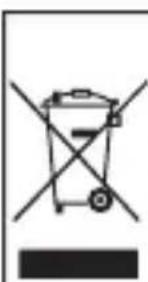
Electrical and electronic equipment marked with the symbol of a crossed-out wheeled bin may not be disposed as unsorted municipal waste. Waste of electrical and electronic equipment (WEEE) shall be treated separately using the collection framework available to customers for the return, recycling, and treatment of WEEE.
Country-specific information is available at: http://www.lenovo.com/recycling.
Recycling information for Japan
Recycling and disposal information for Japan is available at: http://www.lenovo.com/recycling/japan.
Additional recycling statements
Additional information about recycling device components and batteries is in your User Guide. See "Accessing your User Guide" for details.
Battery recycling marks
The battery recycling information of Taiwan

廢電池請回收
For better environmental protection, waste batteries should be collected separately for recycling or special disposal.
Battery recycling information for the United States and Canada

US & Canada Only
Battery recycling Information for the European Union
Restriction of Hazardous Substances Directive (RoHS)
Turkish
The Lenovo product meets the requirements of the Republic of Turkey Directive on the Restriction of the Use of Certain Hazardous Substances in Electrical and Electronic Equipment (EEE).
RoHS compliant as per E-Waste (Management & Handling) Rules, 2011.
European Union
Lenovo products sold in the European Union, on or after 3 January 2013 meet the requirements of Directive 2011/65/EU on the restriction of the use of certain hazardous substances in electrical and electronic equipment ("RoHS recast" or "RoHS 2").
For more information about Lenovo progress on RoHS, go to:
http://www.lenovo.com/socialresponsibility/us/en/RoHS_Communication.pdf
Notice for users in Mexico
EurAsia compliance mark
Français

Specifications techniques
For better environmental protection, waste batteries should be collected separately for recycling or special disposal.
Directive européenne RoHS (Restriction of Hazardous Substances)
Turquie
The Lenovo product meets the requirements of the Republic of Turkey Directive on the Restriction of the Use of Certain Hazardous Substances in Electrical and Electronic Equipment (EEE).
RoHS compliant as per E-Waste (Management & Handling) Rules, 2011.
Unioneuropeenne
Lenovo products sold in the European Union, on or after 3 January 2013 meet the requirements of Directive 2011/65/EU on the restriction of the use of certain hazardous substances in electrical and electronic equipment ("RoHS recast" or "RoHS 2").
For more information about Lenovo progress on RoHS, go to: http://www.lenovo.com/social_responsibility/us/en/RoHS_Communication.pdf
For better environmental protection, waste batteries should be collected separately for recycling or special disposal.
The Lenovo product meets the requirements of the Republic of Turkey Directive on the Restriction of the Use of Certain Hazardous Substances in Electrical and Electronic Equipment (EEE).
RoHS compliant as per E-Waste (Management & Handling) Rules, 2011.
Unión Europea
Lenovo products sold in the European Union, on or after 3 January 2013 meet the requirements of Directive 2011/65/EU on the restriction of the use of certain hazardous substances in electrical and electronic equipment ("RoHS recast" or "RoHS 2").
For more information about Lenovo progress on RoHS, go to: http://www.lenovo.com/social_responsibility/us/en/RoHS_Communication.pdf
AvisoparausuariosenMexico
First Edition (September 2014) © Copyright Lenovo 2014.
SSC9A6N2DF Printed in China