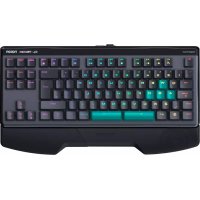
CL750OM - Keyboard Nacon - Free user manual and instructions
Find the device manual for free CL750OM Nacon in PDF.



| Product Type | Mechanical gaming keyboard |
| Number of keys | 89 keys |
| Switch type | Optical-mechanical "Blue" switches |
| Backlighting | Full color backlighting (RGB) |
| Chassis | Metal front chassis |
| Wrist rest | Detachable in 2 parts (magnetic attachment) |
| USB cable | Detachable, USB-C, approx. 1.8 m length |
| System compatibility | Windows 7/8/10 |
| Power supply | Via USB port |
| Software | Software downloadable at www.naongaming.com |
| Interchangeable switches | Yes (keycap and switch puller included) |
| Adjustable feet | Yes, with locking (green buttons) |
| Warranty | 2 years |
| Maintenance and cleaning | Soft, slightly damp cloth, no detergents |
| Usage precautions | Indoor use, avoid liquids and dust, do not disassemble |
Frequently Asked Questions - CL750OM Nacon
User questions about CL750OM Nacon
0 question about this device. Answer the ones you know or ask your own.
Ask a new question about this device
Download the instructions for your Keyboard in PDF format for free! Find your manual CL750OM - Nacon and take your electronic device back in hand. On this page are published all the documents necessary for the use of your device. CL750OM by Nacon.
USER MANUAL CL750OM Nacon
This product has been designed to enhance your video gaming experience. Please keep this instruction manual for future reference.
Guarantee
This product bearing the NACON trademark, is guaranteed by the manufacturer for a period of 2 years from the date of purchase, and will, during this period be replaced with the same or a similar model, at our option, free of charge, if there is a defect due to faulty material, or workmanship.
For any warranty request or claim, please keep your proof of purchase for the duration of the warranty. Without this document, we won't be able to process your request. The original packaging must be kept for all distance purchases (mail order & Internet).
This guarantee does not cover defects arising from accidental damage, misuse or wear and tear. This does not affect your statutory rights.
To access the declaration of conformity, please visit: www.naongaming.com/my-nacon/support/
Product specifications
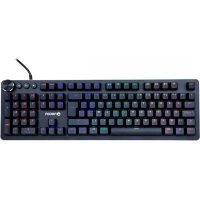
Gaming keyboard with 89 keys (Blue optic-mechanical switches)
Metal front casing
Full color backlight
Detachable & palm rest in 2 parts
Detachable USB cable (app. 1.8m)
Compatible with Windows® 7/8/10
Contents of the package
NACON CL-7500M gaming keyboard
Wrist rest (2 parts)
6x Brown switches
Key cap puller
Switch puller
Instruction booklet
I Wrist rest
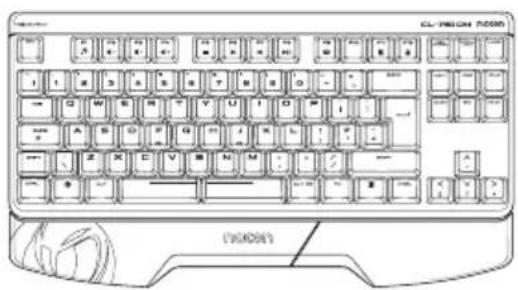
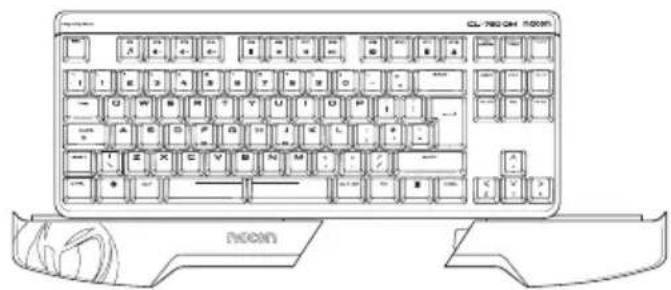
The Wrist rest is in 2 parts giving you flexibility to use part, or all of the rest, depending on your gaming style. Simply slide the Wrist rest on to the bottom edge of the keyboard.
Replacing the key switches
The mechanical switches can be removed and exchanged for other switches, like the Brown switches provided. The colour of a switch specifies the mechanical resistance/feeling when pressed.
To change the switches, use the provided Key cap puller to remove the key cap. Then use the provided Switch puller to remove the switch from the front plate. You can now insert another switch by just clipping it into the front plate - no tools are required. Make sure you insert the switch in the correct way and orientation: The opening, for the backlight to pass through, should be towards the top of the switch.
Feet lock
If you wish to change the angle of the keyboard you can extend the feet. To do this you press the Green buttons, on each side of the keyboard, and the feet will automatically fold out in to the correct position. To retract the feet press the Green button again and fold the feet back in to the keyboard casing.
NOTE : Please do not force the feet back without pushing the button. This can damage the internal mechanism.
USB cable
The cable provided is detachable and is designed to the removed for easier transportation. The keyboard connector uses a USB-C plug, which means that the plug can be inserted with either side facing up.
Software
To unlock the full potential of your NACON CL-7500M, please visit www.naongaming.com to download the latest software for this device.
Recycling
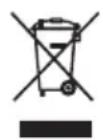
This product should not be disposed of in normal household rubbish. Please take it to a nominated collection point. Recycling is important and will help to protect our environment from
reduced landfill waste. EU and Turkey only.
Important Safeguards & Precautions
1/ This Unit is for indoor use only. Never expose to direct sunlight or wet weather conditions.
2/ Do not expose the unit to splashing, dripping, rain or moisture. Do not immerse in liquid.
3/ Do not expose to dust, high humidity, high temperatures or mechanical shock.
4/ Do not use if the equipment is damaged.
5/ Do not disassemble; there are no serviceable parts inside.
6/ For external cleaning, use a soft, clean, damp cloth only. Use of detergents may damage the finish and leak inside.
Ergonomics
Holding your hand in the same position for a longer period of time can lead to aching and pain. If this occurs repeatedly please consult your doctor.
As a precaution we recommend that you take a 15 minute break every hour.
Technical Helpline Information
Email: support@naongaming.com
Website: www.naongaming.com
Legal lines
Windows® 7/8/10 are a registered trademarks of Microsoft Corporation.
Repose-poignets (2 éléments)
6x switches "Brown"
Email: support.be@naongaming.com
Site Internet: www.naongaming.com
Adresse: Nacon Belgium s.a./n.v. Waterloo Office Park / Bâtiment H Drève Richelle 161 bte 15, 1410 Waterloo, Belgium
I Mentions légales
www.naongaming.com/de/
Rechtliches
Full colour backlight
Email: support.be@nacongaming.com
Waterloo Office Park / Batiment H
Drève Richelle 161 bte 15,
1410 Waterloo, Belgium
www.nacongaming.com
www.naongaming.com/my-nacon/support/
Email: support@naongaming.com
Website: www.naongaming.com
Legal lines
Windows® 7/8/10 são marca registadas da Microsoft Corporation.
Web: www.naongaming.com
1 Právní informace
www.naongaming.com/my-nacon/support/.
Vlastnosti vyrobku
Web: www.naongaming.com
Pravne informácie
Windows® 7/8/10 su registrovanymi ochrannymi značkami spolocnosti Microsoft.
Zahvaljujemo na kupnji proizvoda NACON™ CL-7500M.
Ovaj je proizvod namijenjen za unaprejenje vaseg igraceg iskustva. Zadržite ovaj prisučnik za buduću uporabu.
Jamstvo
Ovaj proizvod, koji sadrži zašitni znak NACON, nosi jamstvo proizvodača za razdoblje od 2 godine od datuma kupnje, i tijekom tog razdoblja zamjenuju se istim ili slicnim modelom, nasim sredstvima, besplatno, u slučaju kvara zbog pogreske u materijalu ili proizvodnji.
- Guarantee
- Product specifications
- Contents of the package
- I Wrist rest
- Replacing the key switches
- Feet lock
- USB cable
- Software
- Recycling
- Important Safeguards & Precautions
- Ergonomics
- Technical Helpline Information
- Legal lines
- I Mentions légales
- Rechtliches
- Vlastnosti vyrobku
- Zahvaljujemo na kupnji proizvoda NACON™ CL-7500M.
- Jamstvo
Brand : Nacon
Model : CL750OM
Category : Keyboard