RPSP1000 - Hi-Fi System PANASONIC - Free user manual and instructions
Find the device manual for free RPSP1000 PANASONIC in PDF.

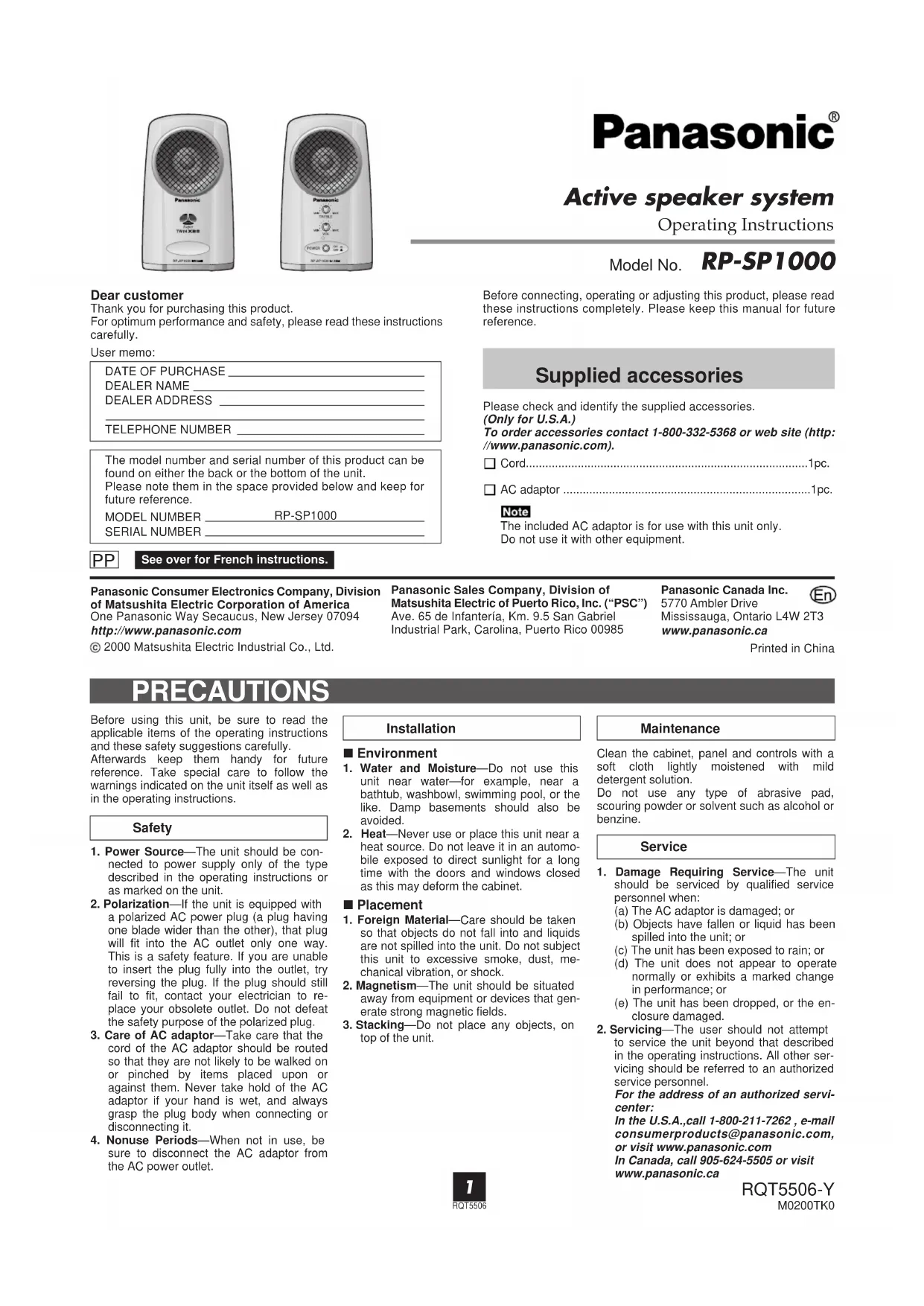

| Product Type | Active Speaker System |
| Brand | Panasonic |
| Model | RP-SP1000 |
| Dimensions (W x H x D) | 100 x 162 x 87 mm |
| Weight (left speaker) | 540 g |
| Weight (right speaker) | 600 g |
| Power | 12 V DC via AC adapter (3.5 W power consumption in standby) |
| Output Power | 10 W + 10 W (THD 10%, 1 kHz) |
| Input Impedance | 20 kΩ (1 kHz) |
| Input Jacks | 2 x 3.5 mm stereo mini-jack (LINE IN 1 and LINE IN 2) |
| Output Jack | 1 x OUTPUT SPEAKER (3.5 mm stereo plug) |
| Speaker Type | Bass reflex |
| Speaker Driver | 50 mm (2 in) |
| Controls | Volume (VOL), Treble (TREBLE), POWER switch |
| Indicator | Power indicator |
| Main Functions | Stereo playback, simultaneous mixing of both inputs, compatibility with various adapters |
| Care and Cleaning | Soft cloth slightly dampened with soapy water; do not use abrasive solvents |
| Safety | Do not expose to water or moisture; avoid heat, magnetic fields, stacking objects |
| Spare Parts and Repairability | Exclusive AC adapter; repairs by Panasonic authorized service center; 90-day warranty |
| General Information | Class B, NMB-003 Canada; customer service (905) 624-5505 |
Frequently Asked Questions - RPSP1000 PANASONIC
User questions about RPSP1000 PANASONIC
0 question about this device. Answer the ones you know or ask your own.
Ask a new question about this device
Download the instructions for your Hi-Fi System in PDF format for free! Find your manual RPSP1000 - PANASONIC and take your electronic device back in hand. On this page are published all the documents necessary for the use of your device. RPSP1000 by PANASONIC.
USER MANUAL RPSP1000 PANASONIC
Active speaker system
Operating Instructions
Model No. RP-SP1000
Dear customer
Thank you for purchasing this product.
For optimum performance and safety, please read these instructions carefully.
User memo:
DATE OF PURCHASE
DEALER NAME
DEALER ADDRESS
TELEPHONE NUMBER
The model number and serial number of this product can be found on either the back or the bottom of the unit.
Please note them in the space provided below and keep for future reference.
MODEL NUMBER RP-SP1000
SERIAL NUMBER
Before connecting, operating or adjusting this product, please read these instructions completely. Please keep this manual for future reference.
Supplied accessories
Please check and identify the supplied accessories.
(Only for U.S.A.)
To order accessories contact 1-800-332-5368 or web site (http://www.panasonic.com).
Cord.
□ AC adaptor
Note
The included AC adaptor is for use with this unit only.
Do not use it with other equipment.
PP
See over for French instructions.
Panasonic Consumer Electronics Company, Division of Matsushita Electric Corporation of America
One Panasonic Way Secaucus, New Jersey 07094
http://www.panasonic.com
© 2000 Matsushita Electric Industrial Co., Ltd.
Panasonic Sales Company, Division of Matsushita Electric of Puerto Rico, Inc. ("P
Ave. 65 de Infanteria, Km. 9.5 San Gabriel Industrial Park, Carolina, Puerto Rico 00985
Panasonic Canada Inc.
5770 Ambler Drive
Mississauga, Ontario L4W 2T3
www.panasonic.ca
Printed in China
PRECAUTIONS
Before using this unit, be sure to read the applicable items of the operating instructions and these safety suggestions carefully.
Afterwards keep them handy for future reference. Take special care to follow the warnings indicated on the unit itself as well as in the operating instructions.
Safety
- Power Source—The unit should be connected to power supply only of the type described in the operating instructions or as marked on the unit.
- Polarization—If the unit is equipped with a polarized AC power plug (a plug having one blade wider than the other), that plug will fit into the AC outlet only one way. This is a safety feature. If you are unable to insert the plug fully into the outlet, try reversing the plug. If the plug should still fail to fit, contact your electrician to replace your obsolete outlet. Do not defeat the safety purpose of the polarized plug.
- Care of AC adaptor—Take care that the cord of the AC adaptor should be routed so that they are not likely to be walked on or pinched by items placed upon or against them. Never take hold of the AC adaptor if your hand is wet, and always grasp the plug body when connecting or disconnecting it.
- Nonuse Periods—When not in use, be sure to disconnect the AC adaptor from the AC power outlet.
Installation
■ Environment
- Water and Moisture—Do not use this unit near water—for example, near a bathtub, washbowl, swimming pool, or the like. Damp basements should also be avoided.
- Heat—Never use or place this unit near a heat source. Do not leave it in an automobile exposed to direct sunlight for a long time with the doors and windows closed as this may deform the cabinet.
■ Placement
- Foreign Material-Care should be taken so that objects do not fall into and liquids are not spilled into the unit. Do not subject this unit to excessive smoke, dust, mechanical vibration, or shock.
- Magnetism—The unit should be situated away from equipment or devices that generate strong magnetic fields.
- Stacking—Do not place any objects, on top of the unit.
Maintenance
Clean the cabinet, panel and controls with a soft cloth lightly moistened with mild detergent solution.
Do not use any type of abrasive pad, scouring powder or solvent such as alcohol or benzine.
Service
- Damage Requiring Service—The unit should be serviced by qualified service personnel when:
(a) The AC adaptor is damaged; or
(b) Objects have fallen or liquid has been spilled into the unit; or
(c) The unit has been exposed to rain; or
(d) The unit does not appear to operate normally or exhibits a marked change in performance; or
(e) The unit has been dropped, or the enclosure damaged.
- Servicing—The user should not attempt to service the unit beyond that described in the operating instructions. All other servicing should be referred to an authorized service personnel.
For the address of an authorized servicemcenter:
In the U.S.A., call 1-800-211-7262, e-mail consumerproducts@panasonic.com, or visit www.panasonic.com
In Canada, call 905-624-5505 or visit www.panasonic.ca
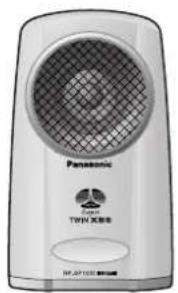
Left speaker
(Front) (Back)
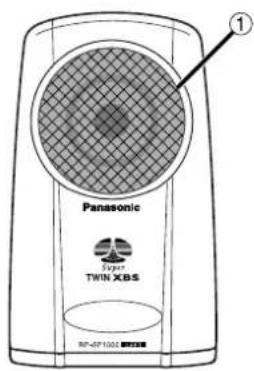
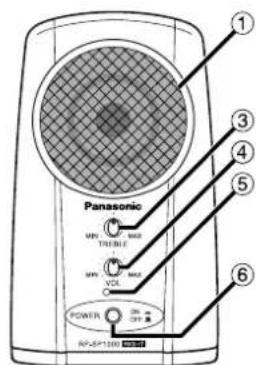
① Speaker
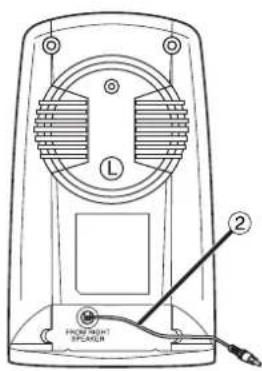
② Speaker cord
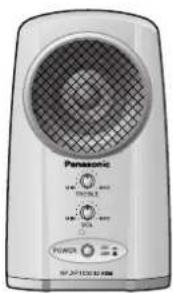
Right speaker
(Front) (Back)
③ Treble control (TREBLE)
④ Volume (VOL)
⑤ Power indicator
⑥ Power switch (POWER)
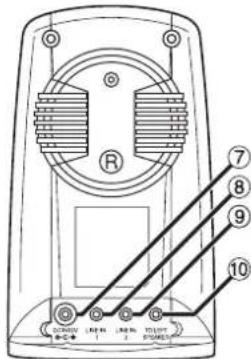
⑦ DC IN jack
⑧ Line-IN 1 (mini plug)
Line-IN 2 (mini plug)
Speaker output
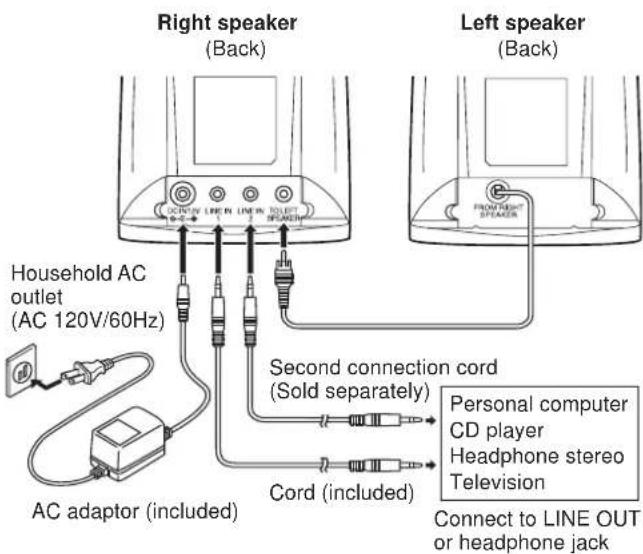
Connection
1 Before connection, turn off the power to all components.
2 Connect as shown
Note
Ensure cords are fully inserted to ensure correct operation.
Conserving power
The AC adaptor consumes 3.5 W when the unit is turned off with [POWER]. To save power when the unit is not to be used for a long time, unplug the AC adaptor from the household AC outlet.

Caution
Use the speakers only with the recommended system. Failure to do so may lead to damage to the amplifier and/or the speakers, and may result in the risk of fire. Consult a qualified service person if damage has occurred or if you experience a sudden change in performance.
To use LINE IN 1 and LINE IN 2 at the same time
Use the included cord and a second cord (not included).
The sound is mixed if you use LINE IN 1 and LINE IN 2 at the same time.
Note
If the output terminal on the other equipment is a 3.5mm (1/8 in.) stereo jack
LINE IN 1: Use the included cord (3.5 mm stereo plug - 3.5 mm stereo plug)
LINE IN 2: Purchase a second connection cord (3.5 mm stereo plug - 3.5 mm stereo plug) if you intend to use both at the same time.
If the output terminal on the other equipment is a 3.5mm (1/8 in.) monaural jack
Use a plug adaptor (not included) (3.5 mm stereo plug to 3.5 mm monaural plug)
If the output terminal on the other equipment is a 6.3mm (1/4 in.) stereo jack
Use a plug adaptor (not included) (3.5 mm stereo plug to 6.3 mm stereo plug)
If the output terminals on the other equipment are two pin jacks
Use a connection cable (not included) (two pin plugs - 3.5 mm stereo plug)
If irregular coloring occurs on your television
These speakers are designed to be used close to a television, but the picture may be affected with some televisions and set-up combinations.
If this occurs, turn the television off for about 30 minutes.
The television's demagnetizing function should correct the problem. If it persists, move the speakers further away from the television.
Do not attach these speakers to walls or ceilings.
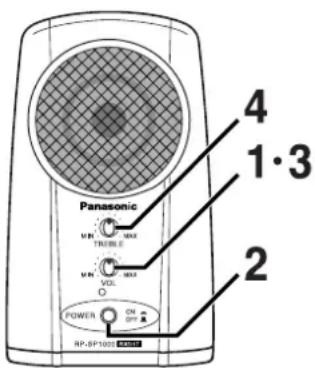
1 Turn [VOL] to "MIN".
2 Press [POWER] to turn the speakers on.
3 Turn on the equipment you have connected and adjust the volume with [VOL].
4 Adjust treble volume with [TREBLE].
Note
- To avoid product damage, do not expose this product to rain, water or other liquids.
- If a gritty noise is heard, wipe away the dirt on the plug.
- Before cleaning the speakers, press [POWER] to turn them off and disconnect the AC adaptor from the AC outlet.
THE FOLLOWING APPLIES ONLY IN THE U.S.A.
CAUTION:
This equipment has been tested and found to comply with the limits for a Class B digital device, pursuant to Part 15 of the FCC Rules.
These limits are designed to provide reasonable protection against harmful interference in a residential installation. This equipment generates, uses and can radiate radio frequency energy and, if not installed and used in accordance with the instructions, may cause harmful interference to radio communications. However, there is no guarantee that interference will not occur in a particular installation. If this equipment does cause harmful interference to radio or television reception, which can be determined by turning the equipment off and on, the user is encouraged to try to correct the interference by one or more of the following measures:
Reorient or relocate the receiving antenna.
- Increase the separation between the equipment and receiver.
- Connect the equipment into an outlet on a circuit different from that to which the receiver is connected.
- Consult the dealer or an experienced radio/TV technician for help.
Any unauthorized changes or modifications to this equipment would void the user's authority to operate this device.
This device complies with Part 15 of the FCC Rules. Operation is subject to the following two conditions: (1) This device may not cause harmful interference, and (2) this device must accept any interference received, including interference that may cause undesired operation.
Troubleshooting guide
Before requesting service for this unit, check the chart below for a possible cause of the problem you are experiencing. Some simple checks or a minor adjustment on your part may eliminate the problem and restore proper operation.
If you are in doubt about some of the check points, or if the remedies indicated in the chart do not solve the problem, refer to the directory of Authorized Service Centers (enclosed with this unit) to locate a convenient service center, or consult your dealer for instructions.
For detailed instructions, contact an authorized servicenter in the U.S.A. and Panasonic Canada Inc. Customer Care Centre in Canada.
In the U.S.A., call 1-800-211-7262, e-mail consumerproducts@panasonic.com, or visit www.panasonic.com In Canada, call 905-624-5505 or visit www.panasonic.ca
| Problems | Possible cause | Remedy |
| Volume is low.No sound. | [POWER] is switched off. | Press [POWER] to turn the speakers on. |
| [VOLUME] is set to "MIN". | Turn the volume up with [VOL]. | |
| The input signal level is low. | Raise the volume of the connected equipment. | |
| The cords are not con- nected fully. | Insert the cords fully. | |
| Sound is dis- torted. | The input signal is too high. | Lower the volume of the connected equipment. |
| Sound stops suddenly. | The protection circuitry has functioned due to high input level. | Reduce [VOL] to mini- mum, switch off the speakers, then switch them on again. |
Product service
Do not attempt to remove the cover(s) or repair the unit yourself. Refer servicing to qualified personnel only.
Product information
For product service, product information or assistance with product operation, refer to the servicenter directory.
Specifications
Power output 10W + 10W(10% T.H.D.,1kHz)
Input impedance 20kΩ (1kHz)
Input 3.5 mm (1/8 in.) stereo x 2
Speaker system Bass reflex type
Speaker unit 50mm (2i
Power requirement DC12 V
Dimensions (W x H x D) 100 x 162 x 87 mm
(3 15/16 x 6 3/8 x 3 7/16 in.)
Mass Left speaker: 540 g (19.05 oz.)
Right speaker: 600g (21.16 oz.)
Note
Specifications are subject to change without notice.
Mass and dimensions are approximate.
Panasonic Technics
AUDIO ACCESSORIES LIMITED WARRANTY
Panasonic Consumer Electronics Company or Panasonic Sales Company (collectively referred to as "the warrantor") will repair this product with new or refurbished parts, free of charge, in the U.S.A. or Puerto Rico from the date of original purchase in the event of a defect in materials or workmanship as follows:
For ninety (90) days—Headphones, Earphones, Microphones, Stereo Mini-Speaker Systems
For ten (10) days—Batteries—(When applicable)—New rechargeable batteries in exchange for defective rechargeable batteries. Non-rechargeable batteries are not warranted.
For assistance in obtaining service in the U.S.A. please contact:
Panasonic Services Company
Panasonic Plus Department
20421 84th Avenue South
Kent, WA 98032
Tel:1-800-833-9626
Fax: 1-800-237-9080
If service is needed, during the warranty period the purchaser will be required to furnish a purchase receipt or other proof of date of original purchase. This warranty is extended only to the original purchaser.
The purchaser will be responsible for shipping the unit to the above address.
For assistance in Puerto Rico contact, Panasonic Sales Company at the address or telephone number listed above.
This warranty only covers failures due to defects in materials and workmanship which occur during normal use and does not cover damages which occur in shipment, or failures which are caused by products
not supplied by the warrantor, or failures which result from accident, misuse, abuse, neglect, mishandling, faulty installation, misapplication, set-up adjustments, maladjustment of customer controls, improper operation or maintenance, improper antenna, inadequate signal reception or pickup, alteration, modification, power line surge, improper voltage supply, lightning damage, commercial use, such as; hotel, office, restaurant, or other business or rental use of the product, or serviced by anyone other than a Panasonic Services Company (PASC) Factory Servicenter, or damage that is attributable to acts of God.
LIMITS AND EXCLUSIONS
There are no express warranties except as listed above.
THE WARRANTYOR SHALL NOT BE LIABLE FOR INCIDENTAL OR CONSEQUENTIAL DAMAGES RESULTING FROM THE USE OF THIS PRODUCT, OR ARISING OUT OF ANY BREACH OF THIS WARRANTY, INCLUDING WITHOUT LIMITATION, DAMAGE TO TAPES, RECORDS OR DISCS. ALL EXPRESS AND IMPLIED WARRANTYIES, INCLUDING THE WARRANTYIES OF MERCHANTABILITY, AND FITNESS FOR A PARTICULAR PURPOSE, ARE LIMITED TO THE APPLICABLE WARRANTY PERIOD SET FORTH ABOVE. Some states do not allow the exclusion or limitation of incidental or consequential damages, or limitations on how long an implied warranty lasts, so the above exclusions or limitations may not apply to you.
This warranty gives you specific legal rights and you may also have other rights which vary from state to state.
If a problem with this product develops during or after the warranty period, you may contact your dealer or Servicenter. If the problem is not handled to your satisfaction, then write to the Consumer Satisfaction Center at the company address indicated above.
FOR CANADA
Panasonic Canada Inc. warrants this product to be free from defects in material and workmanship and agrees to repair or, at its option, replace the product for a period of 90 days from the date of original purchase.
This warranty does not apply to products purchased outside the boundaries of Canada or to any product which has been improperly installed, subjected to usage for which the product was not designed, misuse or abuse, shipping damage, or which has been altered or repaired in any way that affects the reliability or detracts from the performance, nor does it cover any product which is used commercially. Dry cell batteries are not covered by this warranty.
This warranty is extended to the original end user purchaser only. A purchase receipt or other proof of date of original purchase is required before warranty service is performed.
THIS EXPRESS, LIMITED WARRANTY IS IN LIEU OF ALL OTHER WARRANTYES, EXPRESS OR IMPLIED, EXCLUDING ANY IMPLIED WARRANTYES OF MERCHANTABILITY OR FITNESS FOR A PARTICULAR PURPOSE.
IN NO EVENT WILL PANASONIC CANADA INC. BE LIABLE FOR ANY SPECIAL, INDIRECT OR CONSEQUENTIAL DAMAGES.
In certain instances, some jurisdictions do not allow the exclusion or limitation of incidental or consequential damages, or the exclusion of implied warranties, so the above limitations and exclusions may not be applicable.
WARRANTY SERVICE
For product operation and information assistance,
please contact your Dealer or our Customer Care Centre
at: Telephone #: (905) 624-5505
Fax #: (905) 238-2360
Web: www.panasonic.ca
Richmond, British Columbia
Panasonic Canada Inc.
13131 Bathgate Place
Richmond, BC V6V 1Z3
Tel: (604) 278-4211
Fax: (604) 278-5627
Calgary, Alberta
Panasonic Canada Inc.
6835-8th St. N.E.
Calgary, AB T2E 7H7
Tel: (403) 295-3955
Fax: (403) 274-5493
Mississauga, Ontario
Panasonic Canada Inc.
5770 Ambler Dr.
Mississauga, ON L4W 2T3
Tel: (905) 624-8447
Fax: (905) 238-2418
Lachine, Quebec
Panasonic Canada Inc.
IF YOU SHIP THE PRODUCT TO A SERVICENTRE
Carefully pack and send prepaid, adequately insured and preferably in the original carton.
Include details of the defect claimed, and proof of date of original purchase.
Panasonic®
Panasonic Canada Inc.
5770 Ambler Drive, Mississauga, Ontario L4W 2T3
www.panasonic.ca
© 2000 Matsushita Electric Industrial Co., Ltd.

Imprimé en Chine
Panasonic Canada Inc.
13131 Bathgate Place
Richmond, BC V6V 1Z3
Tél.: (604) 278-4211
Téléç.: (604) 278-5627
Calgary, Alberta
Panasonic Canada Inc.
6835-8th St. N.E.
Calgary, AB T2E 7H7
Panasonic Canada Inc.
5770 Ambler Dr.
Mississauga, ON L4W 2T3
Tel.: (905) 624-8447
Téléç. : (905) 238-2418
Lachine, Quebec
Panasonic Canada Inc.
- ACTIVE SPEAKER SYSTEM
- DEAR CUSTOMER
- SUPPLIED ACCESSORIES
- NOTE
- PRECAUTIONS
- SAFETY
- INSTALLATION
- ENVIRONMENT
- PLACEMENT
- MAINTENANCE
- SERVICE
- LEFT SPEAKER
- RIGHT SPEAKER
- CONNECTION
- 1 BEFORE CONNECTION, TURN OFF THE POWER TO ALL COMPONENTS
- 2 CONNECT AS SHOWN
- CONSERVING POWER
- CAUTION
- TO USE LINE IN 1 AND LINE IN 2 AT THE SAME TIME
- IF THE OUTPUT TERMINAL ON THE OTHER EQUIPMENT IS A 3.5MM (1/8 IN.) STEREO JACK
- IF THE OUTPUT TERMINAL ON THE OTHER EQUIPMENT IS A 3.5MM (1/8 IN.) MONAURAL JACK
- IF THE OUTPUT TERMINAL ON THE OTHER EQUIPMENT IS A 6.3MM (1/4 IN.) STEREO JACK
- IF THE OUTPUT TERMINALS ON THE OTHER EQUIPMENT ARE TWO PIN JACKS
- IF IRREGULAR COLORING OCCURS ON YOUR TELEVISION
- IF THIS OCCURS, TURN THE TELEVISION OFF FOR ABOUT 30 MINUTES
- TROUBLESHOOTING GUIDE
- PRODUCT SERVICE
- PRODUCT INFORMATION
- SPECIFICATIONS
- PANASONIC TECHNICS
- AUDIO ACCESSORIES LIMITED WARRANTY
- PANASONIC SERVICES COMPANY
- LIMITS AND EXCLUSIONS
- FOR CANADA
- WARRANTY SERVICE
- RICHMOND, BRITISH COLUMBIA
- MISSISSAUGA, ONTARIO
- IF YOU SHIP THE PRODUCT TO A SERVICENTRE
- PANASONIC®
- CALGARY, ALBERTA
- LACHINE, QUEBEC
Brand : PANASONIC
Model : RPSP1000
Category : Hi-Fi System