
SBCSC463 - Headphones PHILIPS - Free user manual and instructions
Find the device manual for free SBCSC463 PHILIPS in PDF.



| Product type | Baby monitor |
| Brand | Philips |
| Model | SBC SC463 |
| Power supply | 2 mains adapters 230 V / 50 Hz, output 9 V DC 200 mA; optional batteries 4 × 1.5 V LR6 (AA) alkaline for each unit (not included) |
| Range | Up to 250 m outdoors (under good conditions) |
| Transmission frequencies | 40.695 – 40.675 MHz (model /00); 49.830 – 40.890 MHz (/05); 31.000 – 31.350 MHz (/16) |
| Number of channels | Selectable (depending on model) |
| Pilot tone | Yes, continuous communication link |
| Battery life | Up to 30 hours per unit |
| Operating temperature | 10 °C to 40 °C |
| Main features | Two-way listening, volume control, microphone sensitivity adjustment, link check (indicator), link loss alarm |
| Included components | Baby unit, parent unit, 2 mains adapters |
| Maintenance | Clean with a damp cloth |
Frequently Asked Questions - SBCSC463 PHILIPS
User questions about SBCSC463 PHILIPS
0 question about this device. Answer the ones you know or ask your own.
Ask a new question about this device
Download the instructions for your Headphones in PDF format for free! Find your manual SBCSC463 - PHILIPS and take your electronic device back in hand. On this page are published all the documents necessary for the use of your device. SBCSC463 by PHILIPS.
USER MANUAL SBCSC463 PHILIPS
Philips is dedicated to producing caring, reliable products that new moms and dads really need. Products whose reliability and operating quality bring reassurance. You can trust this Philips baby monitor to provide round-the-clock support by ensuring you can always hear your baby clearly, no matter where you are in the house.
Product illustration on inside flap:
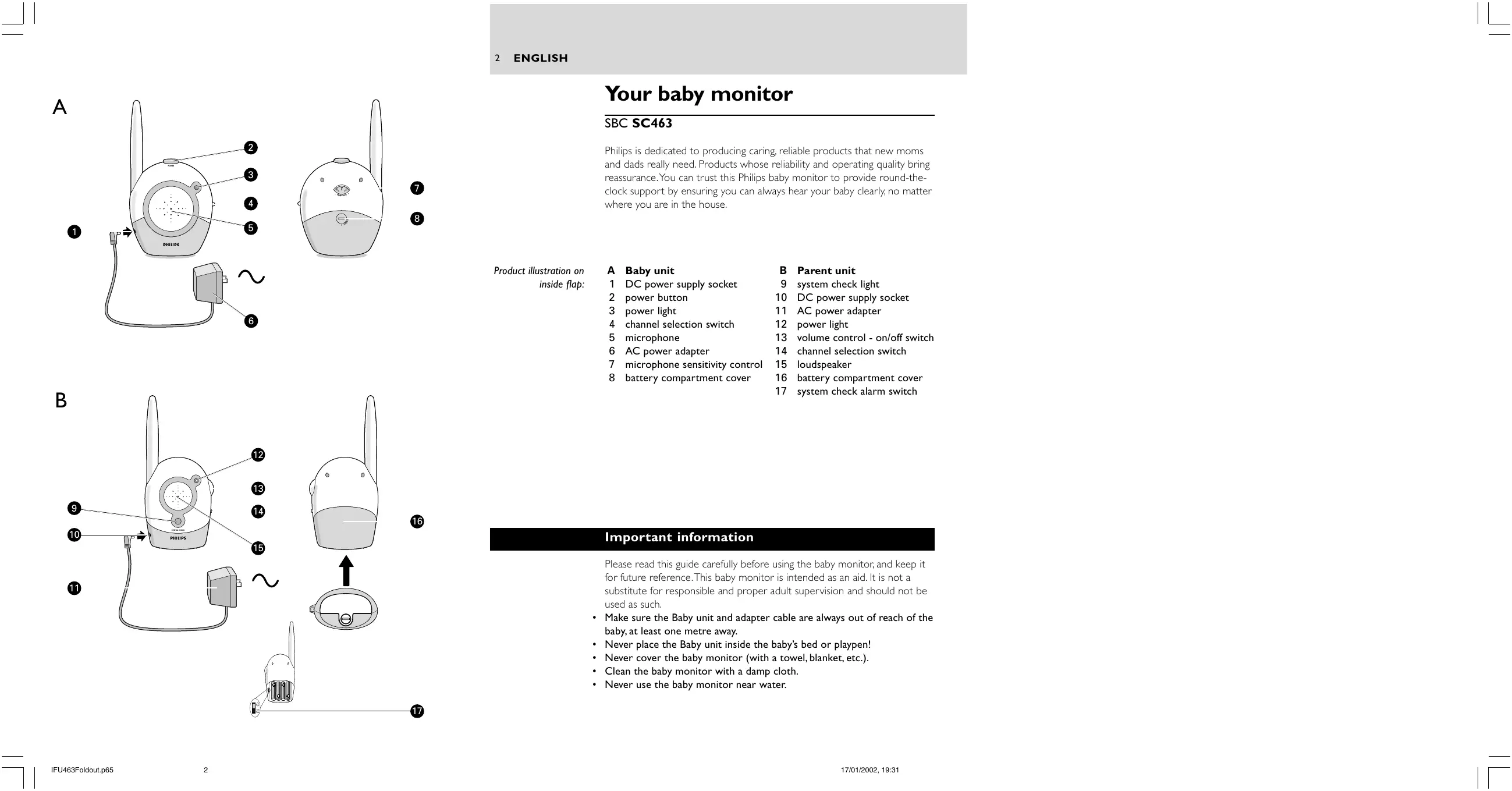
A Baby unit
1 DC power supply socket
2 power button
3 power light
4 channel selection switch
5 microphone
6 AC power adapter
7 microphone sensitivity control
8 battery compartment cover
B Parent unit
9 system check light
10 DC power supply socket
11 AC power adapter
12 power light
13 volume control - on/off switch
14 channel selection switch
15 loudspeaker
16 battery compartment cover
17 system check alarm switch
Important information
Please read this guide carefully before using the baby monitor, and keep it for future reference. This baby monitor is intended as an aid. It is not a substitute for responsible and proper adult supervision and should not be used as such.
- Make sure the Baby unit and adapter cable are always out of reach of the baby, at least one metre away.
- Never place the Baby unit inside the baby's bed or playpen!
- Never cover the baby monitor (with a towel, blanket, etc.).
- Clean the baby monitor with a damp cloth.
- Never use the baby monitor near water.
Your baby monitor
SBC SC463
Philips is dedicated to producing caring, reliable products that new moms and dads really need. Products whose reliability and operating quality bring reassurance. You can trust this Philips baby monitor to provide round-the-clock support by ensuring you can always hear your baby clearly, no matter where you are in the house.
Product illustration on inside flap:
A Baby unit
1 DC power supply socket
2 power button
3 power light
4 channel selection switch
5 microphone
6 AC power adapter
7 microphone sensitivity control
8 battery compartment cover
B Parent unit
9 system check light
10 DC power supply socket
11 AC power adapter
12 power light
13 volume control - on/off switch
14 channel selection switch
15 loudspeaker
16 battery compartment cover
17 system check alarm switch
Important information
Please read this guide carefully before using the baby monitor, and keep it for future reference. This baby monitor is intended as an aid. It is not a substitute for responsible and proper adult supervision and should not be used as such.
- Make sure the Baby unit and adapter cable are always out of reach of the baby, at least one metre away.
- Never place the Baby unit inside the baby's bed or playpen!
- Never cover the baby monitor (with a towel, blanket, etc.).
- Clean the baby monitor with a damp cloth.
- Never use the baby monitor near water.
Getting your baby monitor ready
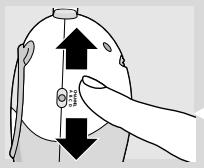
1 Position the Baby unit at least one metre away from your baby. Never place the baby unit inside the baby's bed or playpen.
2 Set channel selection switches to the same channel on both units.
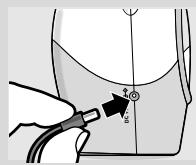
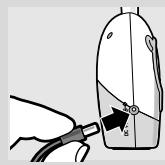
3 Connect the power adapter to Baby unit socket.
4 Plug the power adapter into mains supply.
5 Move away from the Baby unit with the Parent unit. If units are positioned too close to each other then a high-pitched noise can be heard.
6 Connect the second power adapter to the Parent unit's socket.
7 Plug the second power adapter into a mains supply.
Using your baby monitor
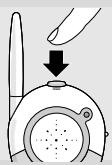
Listening to your baby
1 Push the power button on the Baby unit to turn it on.
The power light lights (green).
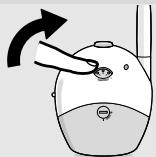
2 Adjust the microphone sensitivity of the Baby unit to a level you prefer (using your own voice as a sound reference).
The power light lights (yellow) when a sound is picked up.
3 Switch the Parent unit on and adjust the volume to level you prefer using the VOLUME ON/OFF control. The SYSTEM CHECK light lights continuously (green) when the Parent unit and Baby unit are in touch with each other.
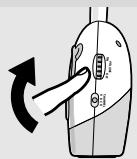
Features explanation
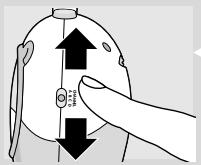
Avoiding interference
If there is interference or if sound reception is poor, switch both units to another channel.
Always make sure that the channel selection switches on both units are set to the same position.
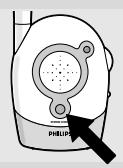
Checking that the units are in touch
Check that the SYSTEM CHECK light on the Parent unit lights continuously (green) to confirm that the connection between both units is reliable.
If the light flashes (red), move the Parent unit closer to the Baby unit. The light flashes if the units are out of range for more than 30 seconds or if there is interference.

Switching on the system check alarm
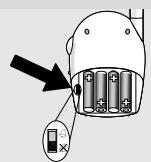
You can switch on the system check alarm on the Parent unit that beeps when the units are not in touch. The Parent unit is delivered with the system check alarm switched off.
1 Open the Parent unit's battery compartment cover.
2 Set the switch inside compartment to the ON position ( 🔊 ).
3 Close battery compartment cover.
The SYSTEM CHECK light can still flash even if the system check alarm is switched off.
Range 250m in open air
The baby monitor has an operating range of up to 250 metres in ideal open-air conditions. This means that the units can see each other with no obstacles in between. Walls, ceilings, large objects and even glass affect the operating range. The more obstacles there are in between, the shorter the operating range.
Using batteries
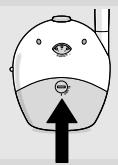
Operating the Baby unit cordlessly
1 Remove the battery compartment cover using a coin.
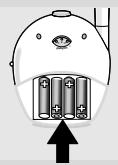
2 Insert four 1.5V, LR6 (AA) batteries noting the + and - configuration inside the battery compartment.
Batteries not included; we recommend non-chargeable Philips Alkaline batteries.
3 Put the cover back in place and secure using a coin.
If the power light flashes (red) install new batteries.
The unit operates for up to 30 hours on batteries.

Operating the Parent unit cordlessly
1 Remove the battery compartment cover using a coin.
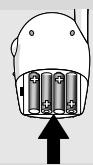
2 Insert four 1.5V, LR6 (AA) batteries noting the + and - configuration inside the battery compartment.
Batteries not included; we recommend non-chargeable Philips Alkaline batteries.
3 Put the cover back in place and secure using a coin.
If the power light flashes (red) install new batteries.
The unit operates for up to 30 hours on batteries.

Batteries
Dispose of used batteries in an environmentally friendly manner.
Do not mix old and new batteries, or different types of batteries.
Remove batteries if the baby monitor is not to be used for long periods.
| Problem solving | ||
| Problem | Possible cause | Solution |
| Power light does not light. | Parent unit:unit is not turned on. | Turn VOLUME ON/OFF control downwards. |
| Power adapter is not plugged in or batteries are exhausted. | Plug in power adapter or replace batteries. | |
| Baby unit:unit is not turned on. | Push power button. | |
| Power adapter is not plugged in or batteries are exhausted. | Plug in power adapter or replace batteries. | |
| High pitched noise. | Units are too close together. | Move parent unit away from baby unit. Turn VOLUME ON/OFF control on parent unit upwards. |
| No sound. | Volume on parent unit is set too low. | Turn VOLUME ON/OFF control downwards. |
| Power light flashing. | Batteries are low or empty. | Replace batteries or connect to mains power. |
| Interference or poor reception. | Mobile or cordless phones too close to the baby monitor. | Move phones away from the units. |
| Pick-up from another baby monitor. | Both systems are operating on the same frequency. | Switch channels. |
| System check light flashing (red) / System check alarm. | Units are out of range or there is interference from another FM source. | Move units closer together to restore the link. Remove the other FM source. |
| Technical specifications | ||
| Power supply: | Optional batteries 4 x 1.5V; AA alkaline for Parent unit (not included);Optional batteries 4 x 1.5V; AA alkaline for Baby unit (not included);AC power adapter 230V AC, 50 Hz (two included): - Output voltage 9V DC, 200mA.Only use the AC power adapter included or a type that complies with safety standard EN60950 and that has the following specification: input 230V AC, 50 Hz; output 9 Volt DC / 200mA. | |
| Operating range: | up to 250 metres in ideal conditions (walls, floors, etc. can limit this distance.) | |
| Operating temperature: | 10°C to 40°C | |
| Pilot tone: | Continuous communication link (hidden signal helps reduce interference and ensures a continuous link between both units so you only hear your baby's sounds). | |
| Transmission frequencies: | SBC SC463/00: from 40.695 to 40.675 MHzSBC SC463/05 (IRE, UK): from 49.830 to 40.890 MHzSBC SC463/16 (ES): from 31.000 to 31.350 MHz | |
Votre babyphone
SBC SC463
Product illustration on inside flap:
A Baby-unit
Product illustration on inside flap:
- A Baby unit
- B Parent unit
- Important information
- Your baby monitor
- SBC SC463
- Getting your baby monitor ready
- Using your baby monitor
- Listening to your baby
- Features explanation
- Avoiding interference
- Checking that the units are in touch
- Switching on the system check alarm
- Range 250m in open air
- Using batteries
- Operating the Baby unit cordlessly
- Operating the Parent unit cordlessly
- Batteries
- Votre babyphone
Brand : PHILIPS
Model : SBCSC463
Category : Headphones