
KXPRXA15EX - Cordless phone PANASONIC - Free user manual and instructions
Find the device manual for free KXPRXA15EX PANASONIC in PDF.
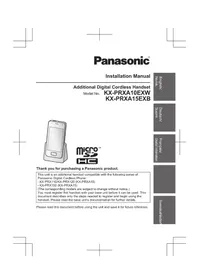



| Product type | Cordless phone (additional handset) |
| Brand | Panasonic |
| Model | KX-PRXA15EX |
| Dimensions (handset) | Approx. 140 x 45 x 25 mm |
| Weight (handset with battery) | Approx. 130 g |
| Power supply | AC adapter 230 V / 50 Hz (PNLV226CEK/PNLV230CE) and rechargeable battery |
| Battery type | Panasonic rechargeable battery (refer to base unit documentation) |
| Initial charging time | Approx. 5 hours |
| Display | Backlit monochrome LCD display |
| Compatibility | Panasonic KX-PRX110/120 (PRXA10) and KX-PRX150 (PRXA15) series base units |
| Main features | Calls via landline and mobile network (with SIM card), phonebook, hands-free speaker, microSD player, messaging |
| Care and cleaning | Clean with a soft, dry cloth. Do not use benzene, thinner, or abrasive powder. |
| Safety | Use only the supplied adapter, do not expose to moisture, keep out of reach of children, do not incinerate the battery. |
| Spare parts and repairability | Replacement battery and AC adapter available. Contact an authorized service center for repairs. |
| General information | Manufactured for the European market. Complies with R&TTE, WEEE, and DEEE directives. |
Frequently Asked Questions - KXPRXA15EX PANASONIC
User questions about KXPRXA15EX PANASONIC
0 question about this device. Answer the ones you know or ask your own.
Ask a new question about this device
Download the instructions for your Cordless phone in PDF format for free! Find your manual KXPRXA15EX - PANASONIC and take your electronic device back in hand. On this page are published all the documents necessary for the use of your device. KXPRXA15EX by PANASONIC.
USER MANUAL KXPRXA15EX PANASONIC
Additional Digital Cordless Handset
Model No.
KX-PRXA10EXW
KX-PRXA15EXB
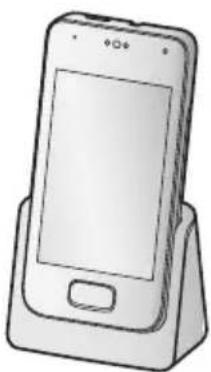


Thank you for purchasing a Panasonic product.
This unit is an additional handset compatible with the following series of Panasonic Digital Cordless Phone:
-KX-PRX110/KX-PRX120 (KX-PRXA10)
-KX-PRX150 (KX-PRXA15)
(The corresponding models are subject to change without notice.)
You must register this handset with your base unit before it can be used. This document describes only the steps needed to register and begin using the handset. Please read the base unit's documentation for further details.
Please read this document before using the unit and save it for future reference.
Norwegian
English
German
See information
Fanans
SvenskaNeder
Installation
Supplied accessories
| Accessory item/Part number Quantity | |
| Charger 1 | |
| AC adaptor/PNLV226CEK1/PNLV230CE*2 | 1 |
| Rechargeable battery*3 | 1 |
| Handset cover*4 | 1 |
1 KX-PRXA10 2 KX-PRXA15 3 Please read the base unit's documentation for replacement battery information. 4 The handset cover comes attached to the handset.
Note:
- Please read the base unit's documentation for additional/replacement accessories.
General information
- Please read "General information" of the base unit's documentation for information regarding R&TTE Directive.
- All references in this document to a SIM card apply to KX-PRXA15 only. The illustrations shown in this document are for reference only and may differ from the appearance of the actual product.
- The suffix is omitted from model numbers listed in this document.
Preparing the charger
KX-PRXA10
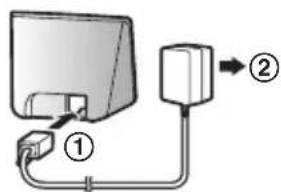
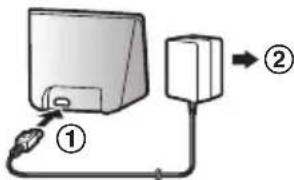
① Insert the AC adaptor plug to the unit until you hear a click. ② Connect the AC adaptor to the power outlet.
Installation
KX-PRXA15
① Insert the AC adaptor plug firmly into the charger. ② Connect the AC adaptor to the power outlet.
Note:
- Use only the supplied Panasonic AC adaptor PNLV226CEM/PNLV230CE 2 .
- The AC adaptor must remain connected at all times. (It is normal for the adaptor to feel warm during use.)
1 KX-PRXA10 2 KX-PRXA15
Preparing the handset
Inserting a SIM card, microSD card, and the battery
A SIM card (not supplied) allows the handset to connect to a mobile phone service. Consult your mobile phone service provider for more information.
A microSD card (not supplied) allows you to expand the handset's storage capabilities. The illustrations shown in this section depict the KX-PRXA15.
Important:
- Use only the supplied battery. For replacement, use only the Panasonic rechargeable battery noted in the base unit's documentation.
- When removing the battery, make sure you turn off the handset first.
- To avoid loss of data or malfunction, do not damage, carelessly handle, or short-circuit the gold-coloured contacts of the SIM card or microSD card.
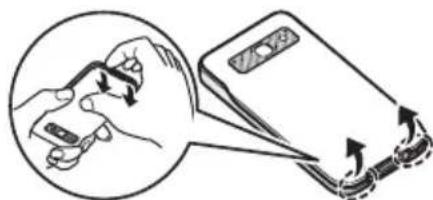
1 Remove the handset's cover.
Installation
2 KX-PRXA15 only:
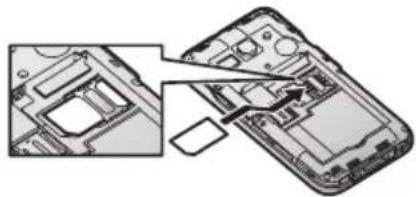
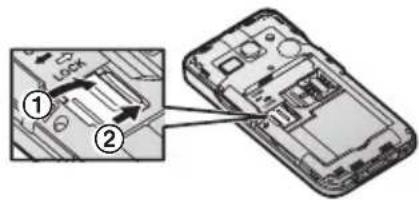
Position the SIM card with the gold-coloured contacts facing down, and then carefully slide the SIM card all the way into the SIM card slot.
3 Open the microSD card cover by sliding it toward the nearest side of the handset (1) and then lifting up (2).
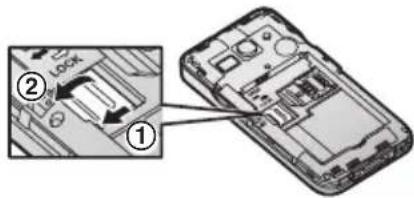
4 Insert the microSD card with the gold-coloured contacts facing down, close the microSD cover (1), and then gently slide the cover toward the opposite side of the handset (2).
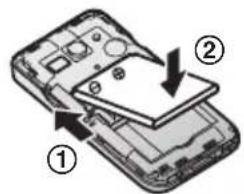
5 Insert the battery (1) and lower it into the handset (2).
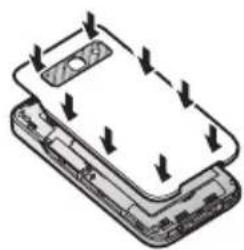
6 Attach the cover.
Note:
- If the battery is fully charged, but the operating time seems to be shorter, clean the charge contacts of the handset and charger with a dry cloth and charge again.
Charging the handset
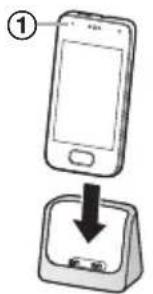
Charge the handset for about 5 hours before initial use. The charge indicator (1) lights while the handset is charging and turns off when the handset is fully charged.
Important:
- If the handset is placed into the charger while talking on the phone, the call is not disconnected.
or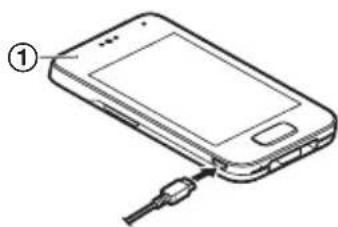
Place the handset into the charger. Connect the AC adaptor directly to the handset. (KX-PRXA15 only)
Turning on the handset
To turn the handset on, press and hold the power button on the top of the handset.
Setup wizard
The first time you turn on the handset, the setup wizard prompts you to configure initial settings such as the display language. Follow the on-screen instructions to configure the handset.
Registration dialogue
While using the setup wizard, a dialogue may be displayed prompting you to press the [●] on the base unit for 5 seconds. Follow the on-screen instructions to register the handset to the base unit. When registration is complete, continue to follow the setup wizard.
Registering the handset to the base unit
If the handset is not registered, the registration dialogue (page 5) is displayed. Follow the on-screen instructions to register the handset to the base unit. If you cancel this dialogue, you can display it again by tapping [Landline] in the home screen or app list, and then tapping [Landline settings] → [Initial settings].
Installation
For your safety
To prevent severe injury and loss of life/property, read this section carefully before using the product to ensure proper and safe operation of your product.
WARNING
Power connection
- Completely insert the AC adaptor/power plug into the power outlet. Failure to do so may cause electric shock and/or excessive heat resulting in a fire.
- Regularly remove any dust, etc. from the AC adaptor/power plug by pulling it from the power outlet, then wiping with a dry cloth. Accumulated dust may cause an insulation defect from moisture, etc. resulting in a fire.
- Unplug the product from power outlets if it emits smoke, an abnormal smell, or makes an unusual noise. These conditions can cause fire or electric shock. Confirm that smoke has stopped emitting and contact an authorised service centre.
Installation
- This product is not water-resistant. To prevent the risk of fire or electrical shock, do not expose the product to rain or any type of moisture.
- Do not place or use this product near automatically controlled devices such as automatic doors and fire alarms. Radio waves emitted from this product may cause such devices to malfunction resulting in an accident.
- Keep all accessories, including the SIM card and microSD card, out of the reach of children to prevent swallowing.
Operating safeguards
- The use of excessive sound volume through earphones, headphones, or headsets may cause hearing loss.
- To prevent possible hearing damage, do not listen at high volume levels for long periods.

CAUTION
Installation and location
- The AC adaptor is used as the main disconnect device. Ensure that the AC outlet is installed near the product and is easily accessible.
Battery
- Use only the specified battery or additional/replacement battery noted in the base unit's documentation for replacement battery information.
- Do not open or mutilate the battery. Released electrolyte from the battery is corrosive and may cause burns or injury to the eyes or skin. The electrolyte is toxic and may be harmful if swallowed.
- Exercise care when handling the battery. Do not allow conductive materials such as rings, bracelets, or keys to touch the battery, otherwise a short circuit may cause the battery and/or the conductive material to overheat and cause burns.
- Charge the battery in accordance with the instructions and limitations specified in this manual.
- Only use a compatible charger to charge the battery. Do not tamper with the charger. Failure to follow these instructions may cause the battery to swell or explode.
- Do not subject the battery to mechanical shock.
- Keep the battery out of the reach of children.
- Keep the battery clean and dry.
- Wipe the battery terminals with a clean dry cloth if they become dirty.
- Do not continuously charge the battery for a prolonged period of time.
- Remove the battery from the product if the product will not be used for a prolonged period of time.
Important safety instructions
When using your product, basic safety precautions should always be followed to reduce the risk of fire, electric shock, and injury to persons, including the following:
- Do not use this product near water for example, near a bathtub, washbowl, kitchen sink, or laundry tub, in a wet basement or near a swimming pool.
- Do not use the telephone to report a gas leak in the vicinity of the leak.
- Use only the power cord and batteries indicated in this manual. Do not dispose of batteries in a fire. They may explode. Check with local codes for possible special disposal instructions.
SAVE THESE INSTRUCTIONS
Other information
- Operating the product near electrical appliances may cause interference. Move away from the electrical appliances.
CAUTION: Risk of explosion if battery is replaced by an incorrect type. Dispose of used batteries according to the instructions.
Installation
Routine care
- Wipe the outer surface of the product with a soft moist cloth.
- Do not use benzine, thinner, or any abrasive powder.
Notice for downloading software or upgrading the operating system
- Product functions and operating procedures may change and certain applications may not function any longer if the product's operating system is upgraded.
- Confirm the safety and security of software before downloading or installing it on this product. Installing malware or viruses can cause malfunction and the disclosure of any private information stored in this product, or may cause excessive sound volume.
Notice for product disposal, transfer, or return
- This product can store your private/confidential information. To protect your privacy/confidentiality, we recommend that you erase information such as phonebook or caller list entries from the memory before you dispose of, transfer, or return the product.
Information for Users on Collection and Disposal of Old Equipment and used Batteries
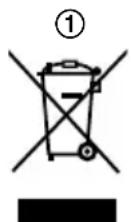
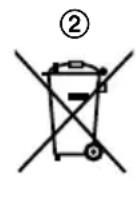
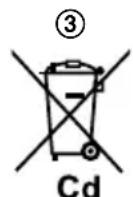
These symbols (①, ②, ③) on the products, packaging, and/or accompanying documents mean that used electrical and electronic products and batteries should not be mixed with general household waste.
For proper treatment, recovery and recycling of old products and used batteries, please take them to applicable collection points, in accordance with your national legislation and the Directives 2002/96/EC and 2006/66/EC.
By disposing of these products and batteries correctly, you will help to save valuable resources and prevent any potential negative effects on human health and the environment which could otherwise arise from inappropriate waste handling.
For more information about collection and recycling of old products and batteries, please contact your local municipality, your waste disposal service or the point of sale where you purchased the items.
Installation
Penalties may be applicable for incorrect disposal of this waste, in accordance with national legislation.
For business users in the European Union
If you wish to discard electrical and electronic equipment, please contact your dealer or supplier for further information.
Information on Disposal in other Countries outside the European Union
These symbols (①, ②, ③) are only valid in the European Union. If you wish to discard these items, please contact your local authorities or dealer and ask for the correct method of disposal.
Note for the battery symbol
This symbol (2) might be used in combination with a chemical symbol (3). In this case it complies with the requirement set by the Directive for the chemical involved.
Trademarks
- The Android™ robot is reproduced or modified from work created and shared by Google and used according to terms described in the Creative Commons 3.0 Attribution License.
- microSDHC Logo is a trademark of SD-3C, LLC.
- All other trademarks identified herein are the property of their respective owners.
End-user licence
This is an agreement between you and Panasonic System Networks Co., Ltd. ("Panasonic") with respect to the software installed in this product. Carefully read the terms of this agreement prior to using this product. Using this product indicates your acceptance of these terms.
Copyright:
The software is protected by copyright laws and international treaty provisions, and all other applicable laws. You are receiving only a limited licence to use the software and related documentation, and you shall obtain no title, ownership nor any other rights in or to the software and its related documentation, all of which title and rights shall remain with Panasonic or its licensor.
Licence:
You may: ① use the software solely for the purpose of recording images from this product compatible with the software, ② transfer your rights under this agreement on a permanent basis, provided that you transfer this agreement, all copies of the software, all related documentation and this product, and the recipient agrees to the terms of this agreement.
Restrictions:
Installation
You may not: ① reverse engineer, decompile or disassemble the software, except as expressly permitted by applicable law, ② use, copy, modify, alter, rent, lease or transfer the software, its related documentation, or any copies thereof, in whole or in part, except as expressly provided in this agreement, ③ export the software in contravention of any applicable U.S. or foreign export laws and regulations.
Open source software notice
Parts of this product use open source software supplied based on the relevant conditions of the Free Software Foundation's GPL and/or LGPL and other conditions. Please read all licence information and copyright notices related to the open source software used by this product. This information is available at the following web page:
www.panasonic.net/pcc/support/tel/sdict
At least three (3) years from delivery of this product, Panasonic System Networks Co., Ltd. will give to any third party who contacts us at the contact information provided below, for a charge of no more than the cost of physically distributing source code, a complete machine-readable copy of the corresponding source code and the copyright notices covered under the GPL and the LGPL. Please note that software licensed under the GPL and the LGPL is not under warranty. www.pgcc/support/tel/sdict
Disclaimer
Panasonic shall not be liable for loss of data or other incidental or consequential damages resulting from the use of this product. The use of downloaded content may be restricted or prohibited by the rights of third parties, including but not limited to restriction under applicable copyright laws. You are entirely responsible for additional content that you download to or forward from this product; Panasonic is not responsible for such content or its use. Panasonic does not warrant or guarantee the accuracy, integrity or quality of any additional content or any other third-party content. Under no circumstances will Panasonic be liable in any way for the improper use of additional content or other third-party content by this product or its operator. This document and any related documentation may refer to services and applications that are provided by third parties. The use of such services or programs may require separate registration with the third-party provider and may be subject to additional terms of use. For applications accessed on or through a third-party web site, please review the web site's terms of use and applicable privacy policy in advance.
Panasonic®
www.pcc/support/tel/sdct
Declaration of Conformity
Document No. PCTP-130118-01
(Issuer's name & address)
Panasonic System Networks Co., Ltd.
Hakata-ku, Fukuda, Japan
021564
(Object of the declaration)
(Product) : Premium Design Phone with Touchscreen
(Trade Name): Panasonic
AC Adaptor PNLV226E, PNLV226CE
Charger Unit - PNLG1049
Battery Unit - KX-PRA10
The object of the declaration described above is in conformity with the requirements of the following EU legislations and harmonized standards. For the RoHS Directive, this declaration of conformity is issued under the sole responsibility of the manufacturer:
(Council Directive): 1969/5/EC
(Council recommendation): 1988/519/EC
(Harmonized Standards): EN 60950-1:2006 +A11:2008 +A1:2010 +A12:2011. S G 2
EN301406V2.1.1, EN300328V1.8.1
EN300490-2V1.4.1, EN301489-1V1.9.2, EN301489-3V1.4.1
EN301489-5V1.3.1, EN301489-17V2.2.1
EN 503852002. EN 50360:2001 + A1:2012
(Council directive): 2009/125/EC
(Implementing Measure for EIP Directive): Commission Regulation (EC) No.273/2009
Commission Regulation (EC) No.1275/2008
(Harmonized Standards): EN 50503:2011
(Council directive): 2011/05/EU
(Harmonized Standards): EN 50581:2012
The last two digits of the year in which the CE marking was affixed the first time: 13.
Signed for and on behalf of:
B. kelnst
Printed Name: Makoto Katumoto
Title: Senior Technical Regulation Manager
Date of Issue: 20th July 2013
Authorised Representative in EU:
Panasonic Testing Centre
Panasonic Marketing Europa GmbH
Wineborgring 16, 22525 Homburg, Germany
(Signature) ∴ ① θ 1 . 设 x 2
(Printed name)
Date 26. July 2013
Useful Information
Panasonic
Panasonic System Networks Co., Ltd. 1-52, 4-chome, Minshima, Hakata-ku, Fukuoka 812-8531 Japan
Declaration of Conformity 021563 Document No. PGTP-130117-01
(Issuer's name & address) Panasonic System Networks Co., Ltd. Hakata-ku, Fukuoka, Japan
(Object of the declaration) (Product) Premium Design Phone with Touchscreen (Trade Name) Panasonic (Model Nr.) KX-PRX150 Base unit - KX-PRX120 Handset - KX-PRXA15 AC Adaptor PNLV226E, PNLV228CE, PNLV230E, PNLV230CE Charger Unit PNLC1048 Battery Unit KX-PRA10
The object of the declaration described above is in conformity with the requirements of the following EU legislations and harmonized standards. For the RoHS Directive, this declaration of conformity is issued under the sole responsibility of the manufacturer:
(Council Directive) : 1999/5/EC < 8> (Council recommendation): 1999/519/EC (Harmonized Standards) EN 6065-1:2006 +A11:2009 +A1:2010 +A12:2011. EN 301 40C V2.1.1, EN 300 32B V1.8.1. EN 300 440-2 V1.4.1, EN 301 511 V9.0.2, EN 301 008-1 V5.2.1 EN 301 006-2 V5.2.1, EN 301 409-1 V1.9.2, EN 301 489-3 V1.4.1 EN 301 489-3 V1.3, EN 301 489-7 V1.3, EN 301 489-17 V2.2.1 EN 301 48C-24 V1.6.1, EN 50385 2002, EN 60360-2001 +A1:2012 (Council directive) 2008/125/EC (Implementing Measure for ErP Directive): Commission Regulation (EC) No.278/2009 Commission Regulation (EC) No.1275/2008 (Harmonized Standards) EN50563:2011 (Council directive) 2011/85/EU (Harmonized Standards) EN50581:2012
The last two digits of the year in which the CE marking was affixed the first time: 13 Signed for and on behalf of: Printed Name: Makoto Kaburnoto Title: Senior Technical Regulator Date of Issue: 25th July 2013
Authorised Representative In EU: Panasonic Testing Centre Panasonic Marketing Europe GmbH Witsberging 15, 22525 Hamburg, Germany (Signature) : lo. du (Printed name) : Wolfram Kohl (Date) : 26 July 2013
Useful Information
Sales department/Vertrieb/Organisation Commerciale/Klantenservice/ Försäljning/Salgsavdeling/Maahantuonti/Departamento comercial/Τμήμα Πωλήσεων/Salgskontor/Departamento de Ventas/Ufficio Vendite/Satış bölümü
Danmark
Panasonic Denmark, filial af Panasonic Marketing Europe GmbH, Tyskland
Produktionsvej 26
DK-2600 Glostrup
http://www.panasonic.dk
Germany
Panafax: 210.9648.588
e-mail: info@intertech.gr
www.panasonic.gr
France
Panasonic Switzerland a branch of Panasonic Marketing Europe GmbH
Grundstrasse 12
6343 Rotkreuz
Support - Hotline
0900 809 809 (CHF 2.15/min. from
Panasonic Switzerland a branch of Panasonic Marketing Europe GmbH
Grundstrasse 12
6343 Rotkreuz
Support - Hotline
1-62, 4-chome, Minoshima, Hakata-ku, Fukuoka 812-8531, Japan
Manufacturer
Panasonic System Networks Zhuhai Co., Ltd.
3 Pin Xi 8 Lu, Nanping Keji Gongye Yuan, Zhuhai, Guangdong, China
© Panasonic System Networks Co., Ltd. 2013

PNQX6191ZA CC0713YK0 (E)


- THANK YOU FOR PURCHASING A PANASONIC PRODUCT
- INSTALLATION
- NOTE
- GENERAL INFORMATION
- PREPARING THE CHARGER
- KX-PRXA
- PREPARING THE HANDSET
- INSERTING A SIM CARD, MICROSD CARD, AND THE BATTERY
- IMPORTANT
- CHARGING THE HANDSET
- TURNING ON THE HANDSET
- SETUP WIZARD
- REGISTRATION DIALOGUE
- REGISTERING THE HANDSET TO THE BASE UNIT
- FOR YOUR SAFETY
- WARNING
- POWER CONNECTION
- OPERATING SAFEGUARDS
- CAUTION
- INSTALLATION AND LOCATION
- BATTERY
- IMPORTANT SAFETY INSTRUCTIONS
- SAVE THESE INSTRUCTIONS
- OTHER INFORMATION
- ROUTINE CARE
- NOTICE FOR DOWNLOADING SOFTWARE OR UPGRADING THE OPERATING SYSTEM
- NOTICE FOR PRODUCT DISPOSAL, TRANSFER, OR RETURN
- INFORMATION FOR USERS ON COLLECTION AND DISPOSAL OF OLD EQUIPMENT AND USED BATTERIES
- FOR BUSINESS USERS IN THE EUROPEAN UNION
- INFORMATION ON DISPOSAL IN OTHER COUNTRIES OUTSIDE THE EUROPEAN UNION
- NOTE FOR THE BATTERY SYMBOL
- TRADEMARKS
- END-USER LICENCE
- COPYRIGHT
- LICENCE
- RESTRICTIONS
- OPEN SOURCE SOFTWARE NOTICE
- DISCLAIMER
- PANASONIC®
- DECLARATION OF CONFORMITY
- USEFUL INFORMATION
- PANASONIC
- DECLARATION OF CONFORMITY 021563 DOCUMENT NO. PGTP
- DANMARK
- GERMANY
- FRANCE
Brand : PANASONIC
Model : KXPRXA15EX
Category : Cordless phone