
Predator Cestus 510 - Mouse ACER - Free user manual and instructions
Find the device manual for free Predator Cestus 510 ACER in PDF.




| Product type | Gaming mouse |
| Brand | Acer |
| Model | Predator Cestus 510 |
| Connector | USB (fixed cable) |
| Cable length | 1.8 m (1800 mm) |
| Sensor | Optical PMW810 |
| Max resolution (DPI) | 16,000 DPI |
| Preset DPI settings | 400 / 1600 / 3600 / 7200 / 16000 |
| Programmable buttons | 8 |
| Switches | Omron (50M or 20M) – 2 switches |
| Scroll wheel | Tiltable (vertical and horizontal scrolling) |
| Lighting | RGB (customizable via software) |
| Weight (with cable) | 153.5 ± 10 g |
| Removable additional weights | 2 × 5 g (included) |
| Dimensions (L × W × H) | 123.18 × 79.96 × 41.05 mm |
| Interchangeable side panels | Yes (narrow and wide included) |
| Interchangeable top cover | Yes (standard and high included) |
| System compatibility | Windows 10/8.1/8/7 |
| Configuration software | Predator Quartermaster (downloadable) |
| Operating temperature | -10 °C to 50 °C |
| Operating humidity | 10 % to 90 % (non-condensing) |
| Package contents | Mouse, 2 top covers, 2 side panels, 2 5g weights, case, stickers, guide |
Frequently Asked Questions - Predator Cestus 510 ACER
User questions about Predator Cestus 510 ACER
0 question about this device. Answer the ones you know or ask your own.
Ask a new question about this device
Download the instructions for your Mouse in PDF format for free! Find your manual Predator Cestus 510 - ACER and take your electronic device back in hand. On this page are published all the documents necessary for the use of your device. Predator Cestus 510 by ACER.
USER MANUAL Predator Cestus 510 ACER
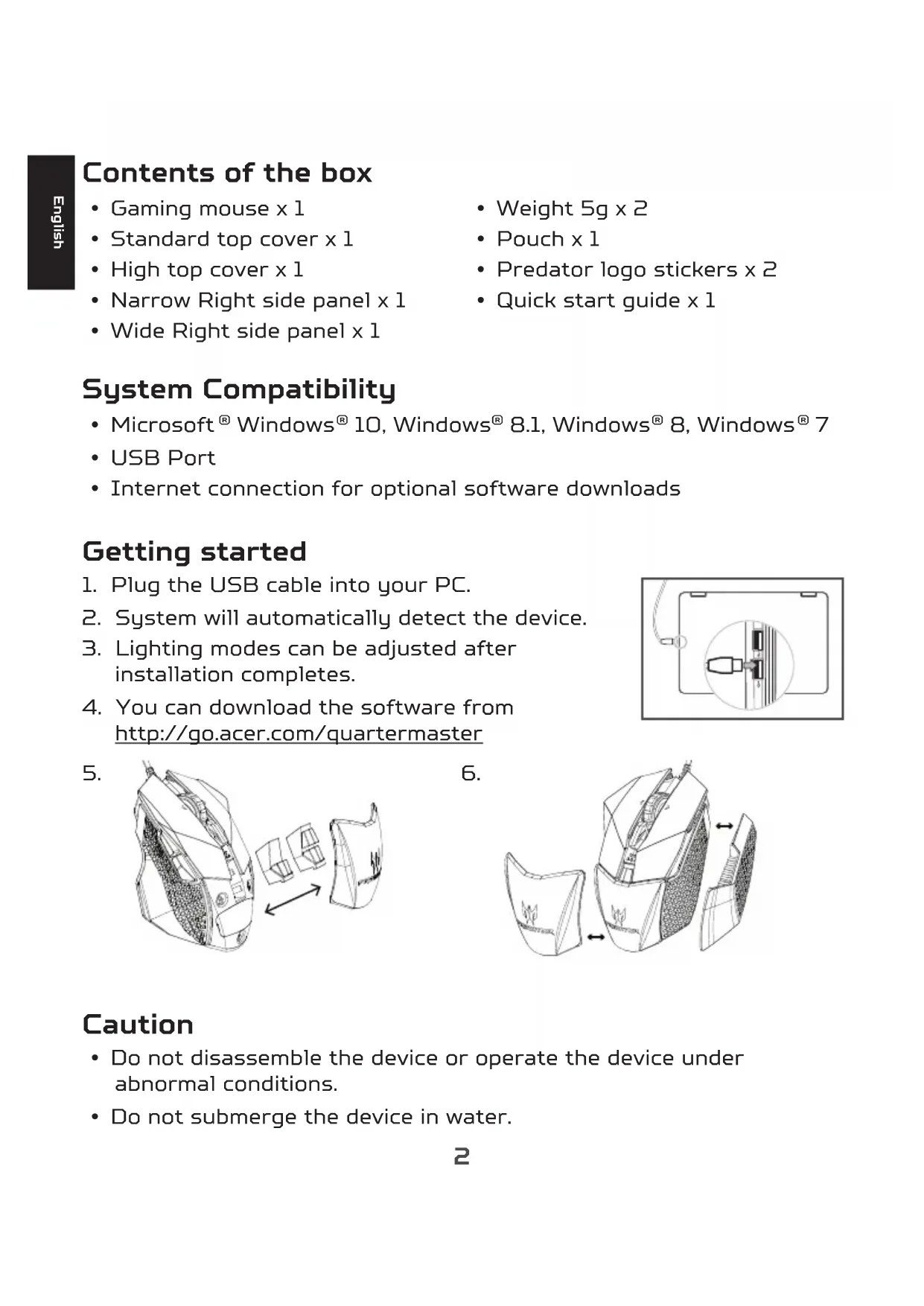
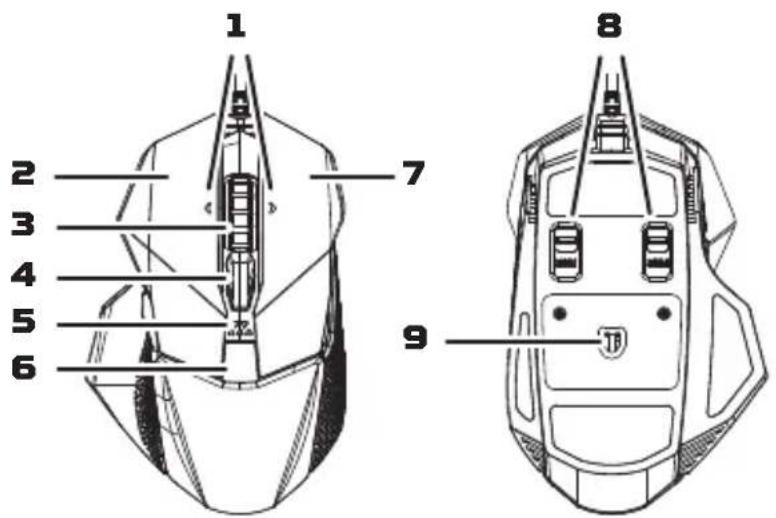
- Tilt Wheel 2. Left button 3. Scroll wheel
- DPI settings: 400/1600/3600/7200/16000
- DPI indicator
- Weight [5g + 5g]
- Right button
- Omron dual switches (50M + 20M)
- Optical sensor
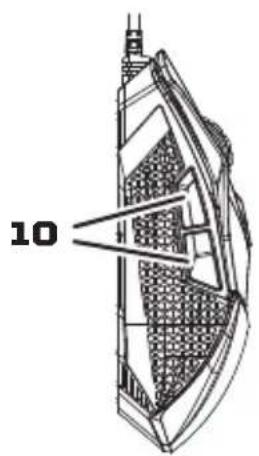
- Side buttons
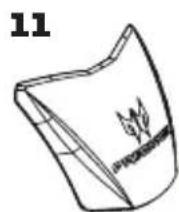
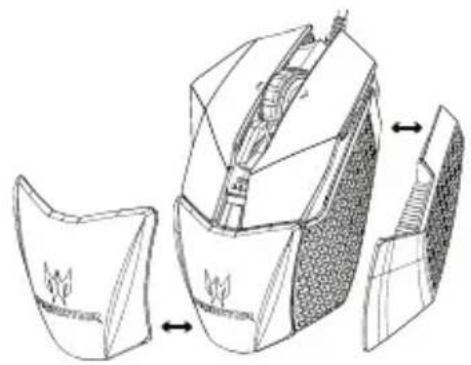
- Standard top cover
- High top cover
- Narrow right side panel
- Wide right side panel
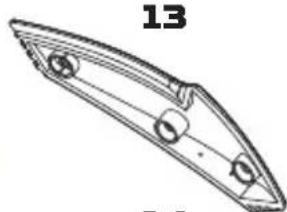
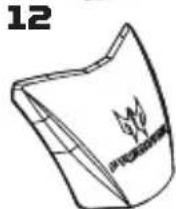
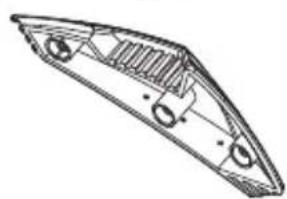
Contents of the box
Gaming mouse x 1 - Standard top cover x 1 - High top cover x 1 - Narrow right side panel x 1 - Wide right side panel x 1
Weight 5g x 2 - Pouch x 1 - Predator logo stickers x 2 - Quick start guide x 1
System Compatibility
- Microsoft® Windows® 10, Windows® 8.1, Windows® 8, Windows® 7 USB Port
- Internet connection for optional software downloads
Getting started
- Plug the USB cable into your PC.
- System will automatically detect the device.
- Lighting modes can be adjusted after installation completes.
- You can download the software from http://go.acer.com/quartermaster

5.
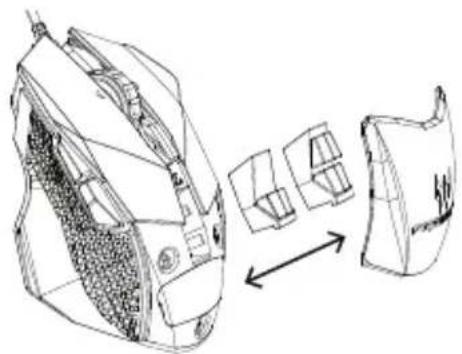
6.
Caution
- Do not disassemble the device or operate the device under abnormal conditions.
- Do not submerge the device in water.
- If the device RGB lights could not be lightened up, please re-plug in the USB.
- If the device could not be functional, or there was thermal abnormal situation, please re-plug in the USB.
- For more information regarding the PREDATOR accessories, please visit the PREDATOR website at www.acer.com/predator
- If you still encounter problems after going through the corrective measures, please contact your dealer or an authorized service center for assistance.
Environment
Temperature:
- Operating: -10 °C to 50 °C Non-operating: -20 °C to 60 °C
Humidity (non-condensing):
- Operating: 10% to 90%. Non-operating: 10% to 95%
Manufacturer address
Acer Inc.
8F, 88, Sec. 1, Xintai 5th Rd. Xizhi, New Taipei City 221, Taiwan

Europe - EU Declaration of Conformity
We declare under our sole responsibility that the product is in conformity with all the essential requirements and other provisions of the European Council Directive RoHS Directive [2011/65/EU], EMC Directive [2014/30/EU] and the Low Voltage Directive [2014/35/EU] issued by the Commission of the European Community.

This product must not be disposed of with your other household waste. Please dispose of it in compliance with local regulations or contact your local city office, your household waste disposal service, or the shop where you purchased the product.
This device complies with Part 15 of the FCC Rules. Operation is subject to the following two conditions: (1) This device may not cause harmful interference, and (2) this device must accept any interference received, including interference that may cause undesired operation.
This equipment has been tested and found to comply with the limits for a Class B digital device, pursuant to Part 15 of the FCC Rules. These limits are designed to provide reasonable protection against harmful interference in a residential installation. This equipment generates, uses and can radiate radio frequency energy and, if not installed and used in accordance with the instructions, may cause harmful interference to radio communications. However, there is no guarantee that interference will not occur in a particular installation. If this equipment does cause harmful interference to radio or television reception, which can be determined by turning the equipment off and on, the user is encouraged to try to correct the interference by one of the following measures:
- Reorient or relocate the receiving antenna.
- Increase the separation between the equipment and receiver.
- Connect the equipment into an outlet on a circuit different from that to which the receiver is connected.
- Consult the dealer or an experienced radio/TV technician for help.
FCC Caution: Any changes or modifications not expressly approved by the party responsible for compliance could void the user's authority to operate this equipment.
Notice: Canadian users
CAN ICES-3(B)/NMB-3(B)
Please visit www.acer.com/predator for warranty.
8F, 88, Sec. 1, Xintai 5th Rd., Xizhi, New Taipei City 221, Taiwan
8F, 88, Sec. 1, Xintai 5th Rd., Xizhi, New Taipei City 221, Taiwan

8F, 88, Sec. 1, Xintai 5th Rd., Xizhi, New Taipei City 221, Taiwan

8F, 88, Sec. 1, Xintai 5th Rd., Xizhi, New Taipei City 221, Taiwan

8F, 88, Sec. 1, Xintai 5th Rd., Xizhi, New Taipei City 221, Taiwan
CE
Europe - EU Declaration of Conformity
8F, 88, Sec. 1, Xintai 5th Rd., Xizhi, New Taipei City 221, Taiwan

Europe - EU Declaration of Conformity
We declare under our own responsibility that this product complies with the following standards in accordance with the provisions of the European Council's RoHS Directive [2011/65/EU], EMC Directive [2014/30/EU], and Low Voltage Directive [2014/35/EU] issued by the European Commission.

8F, 88, Sec. 1, Xintai 5th Rd., Xizhi, New Taipei City 221, Taiwan

8F, 88, Sec. 1, Xintai 5th Rd., Xizhi, New Taipei City 221, Taiwan

Europe - EU Declaration of Conformity
8F, 88, Sec. 1, Xintai 5th Rd., Xizhi, New Taipei City 221, Taiwan
The date of manufacture is indicated on the device label.
Specifications
- Humidity: 10% to 90%
- 10% to 95%
Acer Inc.
8F, 88, Sec. 1, Xintai 5th Rd., Xizhi, New Taipei City 221, Taiwan
www.acer.com/predator
#
8F, 88, Sec. 1, Xintai 5th Rd. Xizhi, New Taipei City 221, Taiwan
Specifications

Brand : ACER
Model : Predator Cestus 510
Category : Mouse