ACER Predator Cestus 500 - Mouse

Predator Cestus 500 - Mouse ACER - Free user manual and instructions

Find the device manual for free Predator Cestus 500 ACER in PDF.

📄 43 pages English EN Download 💬 AI Question 11 questions ⚙️ Specs
Notice ACER Predator Cestus 500 - page 3
Pick your language and provide your email: we'll send you a specifically translated version.
Product Type Gaming Mouse
Brand Acer
Model Predator Cestus 500
Connectivity Wired USB (braided cable 1.8 m)
Sensor Optical PMW730
Maximum Resolution 7200 DPI (DPI)
Number of Buttons 8 programmable
Switches Omron 50M or 20M (interchangeable)
Scroll Wheel Yes
Side Panels Interchangeable (wide and narrow included)
Backlighting RGB adjustable via software
Dimensions (L x W x H) 124.5 x 96.6 x 40 mm
Weight 135.7 g (±5 g)
Compatible Operating Systems Windows 10, 8.1, 8, 7
Customization Software Predator QuarterMaster (downloadable at go.acer.com/quartermaster)
Box Contents Mouse, wide panels x2, narrow panels x2, Predator logo stickers x2, case, quick start guide
Operating Temperature -10°C to 50°C
Operating Humidity 10% to 90% (non-condensing)
Certifications FCC, CE, RoHS
Warranty Visit www.acer.com/predator

Frequently Asked Questions - Predator Cestus 500 ACER

How to change the side panels of the mouse?
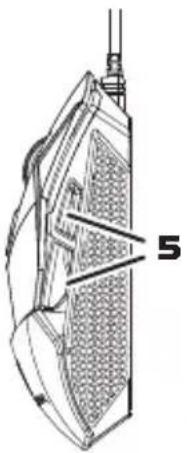
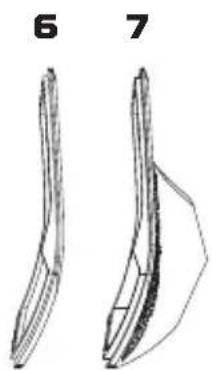
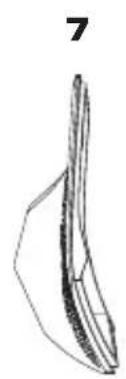
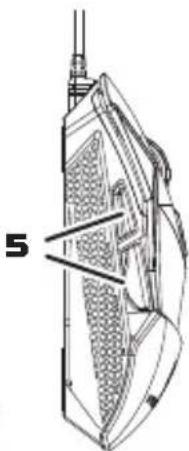
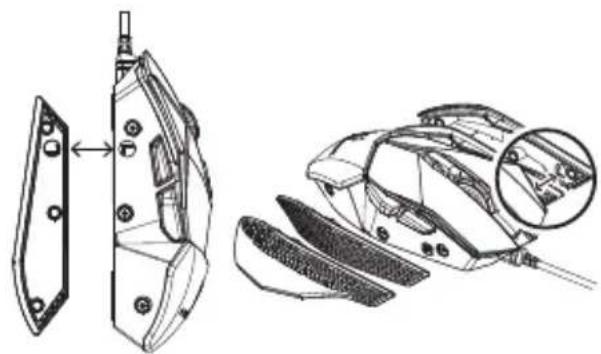
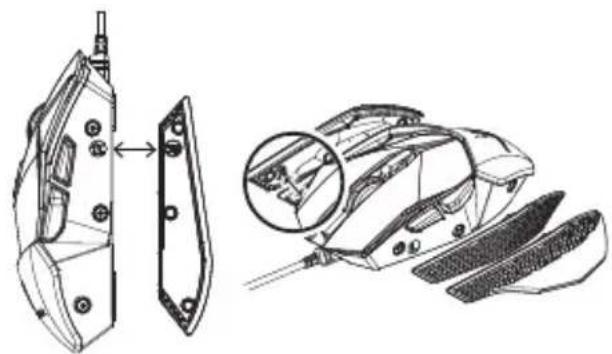
The mouse comes with two pairs of side panels: wide and narrow. To change them, carefully remove the current panels by unclipping them, then snap the new ones into place until they lock.
How to adjust the DPI of the mouse?
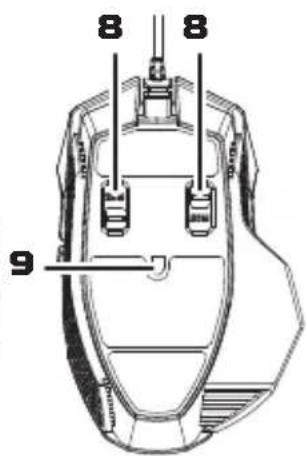
You can adjust the DPI using the Predator QuarterMaster software or via the dedicated button located under the scroll wheel.
Which software to use to customize buttons and lighting?
Use the Predator QuarterMaster software, downloadable from go.acer.com/quartermaster. It allows you to program buttons, adjust DPI, and configure RGB lighting.
How to change the Omron switches of the mouse?
The Omron switches (50M or 20M) are interchangeable. Open the mouse housing (note: this may void the warranty), remove the existing switches, and insert the new ones. Refer to online tutorials for more details.
What to do if the mouse does not turn on or the RGB lights do not work?
Unplug and replug the USB cable. If the problem persists, try another USB port or restart your computer. If the RGB lights remain off, check the settings in the QuarterMaster software.
Is the Predator Cestus 500 mouse compatible with macOS?
No, the mouse is designed for Windows 10, 8.1, 8, and 7. Advanced features (software, button programming) are not supported on macOS.
How to clean the mouse properly?
Unplug the mouse, then wipe it with a soft, slightly damp cloth. Do not use chemical or abrasive cleaners. Avoid getting moisture inside.
Where to download the Predator QuarterMaster software?
The software is available at go.acer.com/quartermaster. Make sure you have an internet connection to download.
What are the dimensions and weight of the mouse?
The dimensions are 124.5 x 96.6 x 40 mm and the weight is 135.7 g (±5 g).
What warranty covers the Predator Cestus 500 mouse?
The warranty is provided by Acer. For more information, visit www.acer.com/predator.

User questions about Predator Cestus 500 ACER

1 question about this device. Answer the ones you know or ask your own.

Ask a new question about this device

The email remains private: it is only used to notify you if someone responds to your question.

My ACER Predator Cestus 500 mouse clicks are not responding, how can I fix it?
Frequently Asked Questions - 04/05/2026
Response Notice-Facile

If the clicks on your Predator Cestus 500 are not responding, start by checking the USB connection. Unplug the USB cable from your PC and plug it back in firmly into a different USB port. A faulty connection is often the main cause. If you were using a USB hub, connect directly to the PC.

Next, clean the PMW730 optical sensor of your mouse. It may be obstructed by dust, which affects not only motion detection but also click responsiveness. Gently clean the area under the mouse with a soft, dry cloth. Also, ensure you are using an appropriate surface for the optical sensor.

A simple restart of your PC can resolve device detection issues. If the problem persists, restart and then download or update the Predator QuarterMaster software from http://go.acer.com/quartermaster. This software configures the 8 programmable buttons and sensitivity settings. It is possible that a setting in the software has disabled the clicks.

If none of these steps work, the issue is likely with the Omron switches (50M or 20M) which may wear out or become defective. Contact Acer Support via www.acer.com/predator for repair or replacement under warranty.

Respond (be the first)

Download the instructions for your Mouse in PDF format for free! Find your manual Predator Cestus 500 - ACER and take your electronic device back in hand. On this page are published all the documents necessary for the use of your device. Predator Cestus 500 by ACER.

USER MANUAL Predator Cestus 500 ACER

PREDATOR CESTUS 500 PMW730
ACER Predator Cestus 500 - PREDATOR CESTUS 500 PMW730 - 1

Quick Start Guide / Guide de démarriage rapide

Kurzanleitung / Guide de démarrage rapide

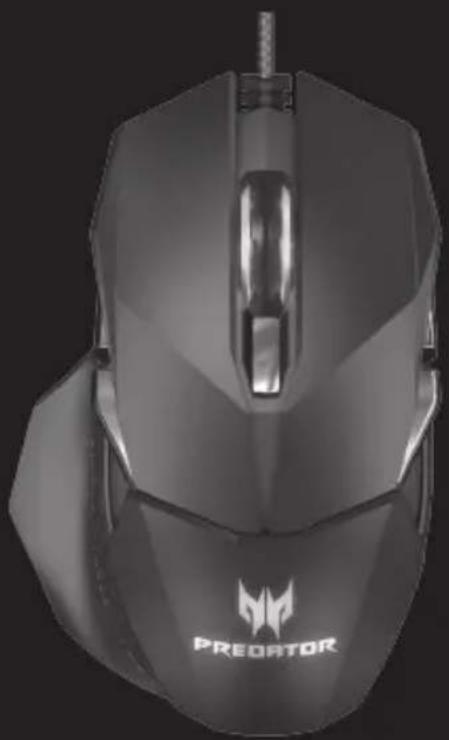
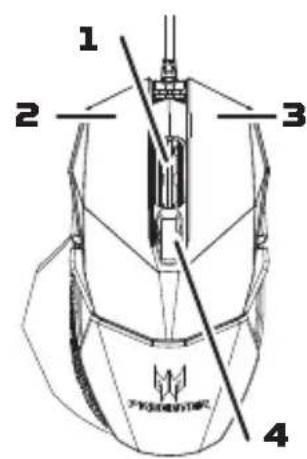
Gaming mouse x 1
- Wide side panels x 2
- Narrow side panels x 2
- Predator logo stickers x 2
- Pouch x 1
- Quick start guide x 1
ACER Predator Cestus 500 - PREDATOR CESTUS 500 PMW730 - 2

ACER Predator Cestus 500 - PREDATOR CESTUS 500 PMW730 - 3

ACER Predator Cestus 500 - PREDATOR CESTUS 500 PMW730 - 4

ACER Predator Cestus 500 - PREDATOR CESTUS 500 PMW730 - 5

ACER Predator Cestus 500 - PREDATOR CESTUS 500 PMW730 - 6

ACER Predator Cestus 500 - PREDATOR CESTUS 500 PMW730 - 7

ACER Predator Cestus 500 - PREDATOR CESTUS 500 PMW730 - 8

System Compatibility

  • Microsoft® Windows® 10, Windows® 8.1, Windows® 8, Windows® 7
  • USB Port
  • Internet connection for optional software downloads

Getting started

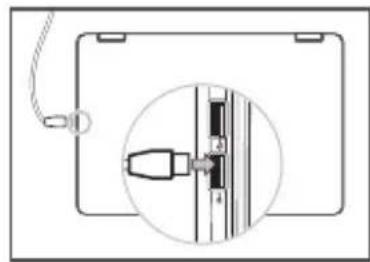
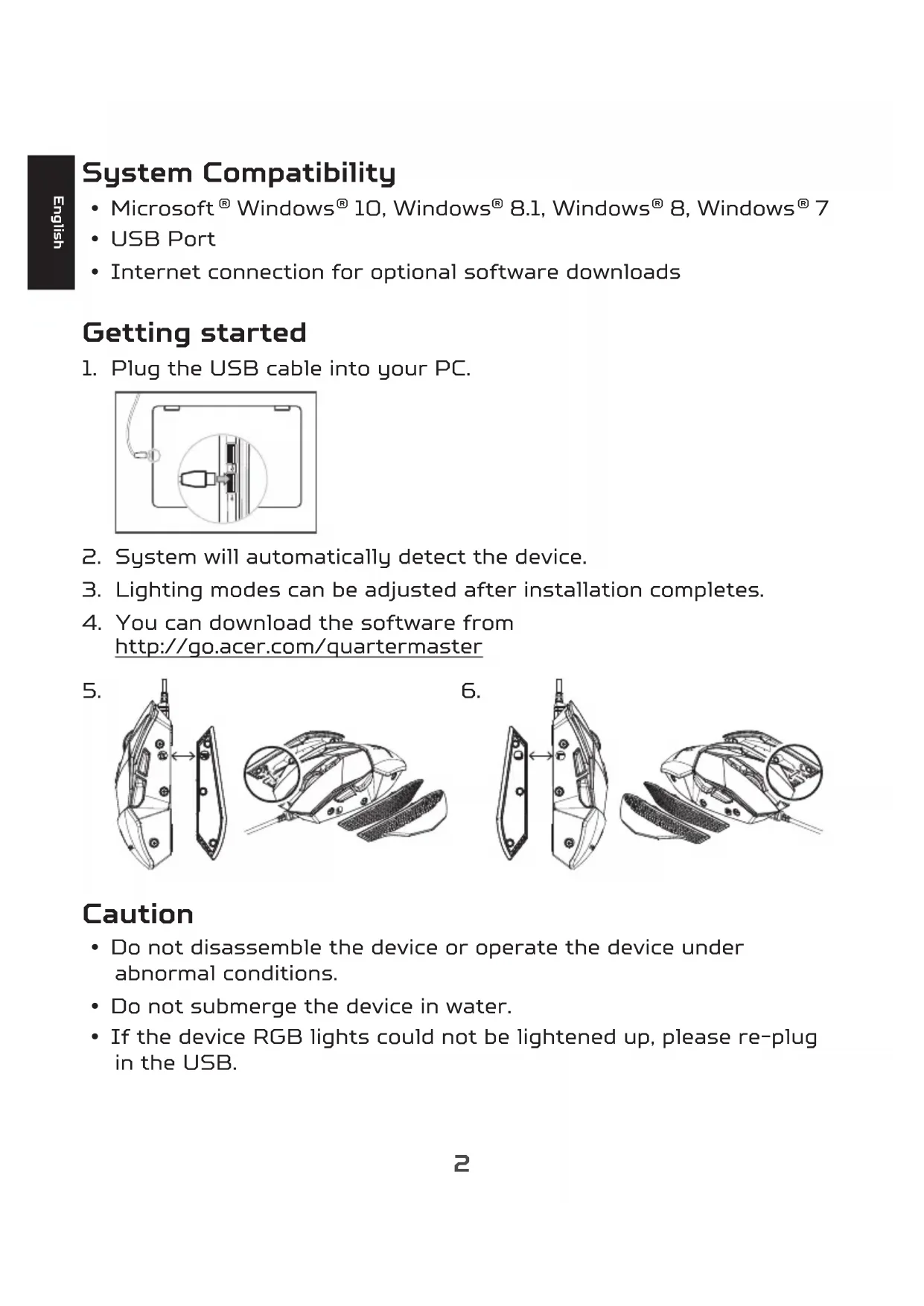
  1. Plug the USB cable into your PC.

ACER Predator Cestus 500 - Getting started - 1

  1. System will automatically detect the device.
  2. Lighting modes can be adjusted after installation completes.
  3. You can download the software from http://go.acer.com/quartermaster

5.
ACER Predator Cestus 500 - Getting started - 2

6.

ACER Predator Cestus 500 - Getting started - 3

Caution

  • Do not disassemble the device or operate the device under abnormal conditions.
  • Do not submerge the device in water.
  • If the device RGB lights could not be lightened up, please re-plug in the USB.

  • If the device could not be functional, or there was thermal abnormal situation, please re-plug in the USB.

  • If you still encounter problems after going through the corrective measures, please contact your dealer or an authorized service center for assistance.
  • For more information regarding the PREDATOR accessories, please visit the PREDATOR website at www.acer.com/predator

Environment

Temperature:

  • Operating: -10 °C to 50 °C
    Non-operating: -20 °C to 60 °C

Humidity (non-condensing):

  • Operating: 10% to 90% .
    Non-operating: 10% to 95%

Manufacturer address

Acer Inc.

8F, 88, Sec. 1, Xintai 5th Rd. Xizhi, New Taipei City 221, Taiwan

ACER Predator Cestus 500 - Manufacturer address - 1

Europe - EU Declaration of Conformity

We declare under our sole responsibility that the product is conformity with all the essential requirements and other provisions of the European Council Directive RoHS Directive [2011/65/EU], EMC Directive [2014/30/EU] and the Low Voltage Directive [2014/35/EU] issued by the Commission of the European Community.

ACER Predator Cestus 500 - Europe - EU Declaration of Conformity - 1

This product must not be disposed of with your other household waste or treat them in compliance with the local regulations or contact your local city office, your household waste disposal service or the shop where you purchased the product.

This device complies with Part 15 of the FCC Rules. Operation is subject to the following two conditions: [1] This device may not cause harmful interference, and [2] this device must accept any interference received, including interference that may cause undesired operation.

This equipment has been tested and found to comply with the limits for a Class B digital device, pursuant to Part 15 of the FCC Rules. These limits are designed to provide reasonable protection against harmful interference in a residential installation. This equipment generates, uses and can radiate radio frequency energy and, if not installed and used in accordance with the instructions, may cause harmful interference to radio communications. However, there is no guarantee that interference will not occur in a particular installation. If this equipment does cause harmful interference to radio or television reception, which can be determined by turning the equipment off and on, the user is encouraged to try to correct the interference by one of the following measures:

  • Reorient or relocate the receiving antenna.
  • Increase the separation between the equipment and receiver.
  • Connect the equipment into an outlet on a circuit different from that to which the receiver is connected.
  • Consult the dealer or an experienced radio/TV technician for help.

FCC Caution: Any changes or modifications not expressly approved by the party responsible for compliance could void the user's authority to operate this equipment.

Notice: Canadian users

CANICES-3[B]/NMB-3[B]

Please visit www.acer.com/predator for warranty.

8F, 88, Sec. 1, Xintai 5th Rd. Xizhi, New Taipei City 221, Taiwan

8F, 88, Sec. 1, Xintai 5th Rd. Xizhi, New Taipei City 221, Taiwan

ACER Predator Cestus 500 - Europe - EU Declaration of Conformity - 2

8F, 88, Sec. 1, Xintai 5th Rd. Xizhi, New Taipei City 221, Taiwan

ACER Predator Cestus 500 - Europe - EU Declaration of Conformity - 3

8F, 88, Sec. 1, Xintai 5th Rd. Xizhi, New Taipei City 221, Taiwan

ACER Predator Cestus 500 - Europe - EU Declaration of Conformity - 4

8F, 88, Sec. 1, Xintai 5th Rd. Xizhi, New Taipei City 221, Taiwan

ACER Predator Cestus 500 - Europe - EU Declaration of Conformity - 5

Europe - EU konformitetsdeklaration

8F, 88, Sec. 1, Xintai 5th Rd. Xizhi, New Taipei City 221, Taiwan

ACER Predator Cestus 500 - Europe - EU konformitetsdeklaration - 1

Europa - EU-samsvarserklæring

Vi erklærer under eget ansvar at dette produitet overholder følgende standarder i samsvar med bestemmelsene i Europa-rådets RoHS-direktiv [2011/65/EU], EMC-direktivet [2014/30/EU] og lavspenningsdirektivet [2014/35/EU] utstedt av EU-kommisjonen.

ACER Predator Cestus 500 - Europa - EU-samsvarserklæring - 1

Dette produit tæ maybe kastes sammen med annet husholdningsavfall, men behandles i samsvar med lokale bestemmelser. Kontakt kommunale instanser, renovasjonstjenesten eller butikken der du kjøpte produit.

Besk www.acer.com/predator for garantiinformasjon.

Tekniset tiedot

8F, 88, Sec. 1, Xintai 5th Rd. Xizhi, New Taipei City 221, Taiwan

ACER Predator Cestus 500 - Tekniset tiedot - 1

8F, 88, Sec. 1, Xintai 5th Rd. Xizhi, New Taipei City 221, Taiwan

ACER Predator Cestus 500 - Tekniset tiedot - 2

Europa - EU overensstemmelseserklaering

He pa36npaTe yCTpoiCTBO n He noJIb3yIeCb m npHHeOpMaJIbHbIX YcIOBnX.
He norpykaTe yCTPOBTO B BODY.
- Ecnn RGB-noicBcTka He 3aropaetc, To n3BneKeIte n ChOba BCTaBbTe uTekep B pa3bem USB.

Bcnyae Hepa60tocno6hoctn yctpoiCTBa nn npn BO3HKnHOBeHN HeHopMaJIbHOro HaPeBa n3BLeKInTe n CHOba BCTaBbTe wTeKeP B pa3beM USB
- Ecnn npo6nembl coxpaHrTc nocIe nonbITkn nx yCTpaHnTb, To o6paNTecb 3a NOMOuK npoDaBcy IIN B aBTOpN3OBaHHbI cepBnCHbI ueHTp.

PpeDynpexKdene

  • Pernoiueckn pa3MnHaIte naIbUpyK n3aJaCTbJ.
    -ДелайтперрьвьВ pa6ote.
    He HanpaIaTe npEaJIpeBja, depKIne 3aIaCTbpaCCla6JeHHbIMn.

ACER Predator Cestus 500 - PpeDynpexKdene - 1

YcIOBnJ 3KcIpyaTauN, XpaHeHn I TpaHCnOpTnpOBKn Tempepatya:

  • 3ксплуataць: -10 °C - 50 °C
    XpaHHeHn TpaHcnpTnpOBka: -20 ^ C -60 ^ C

BnaXHoCTb [6e3 06pa3OBaHnKoHdeHcata]:

  • 3ксплуataць: 10% - 90%
    XpaHeHne n TpaHCnOpTnpOBka: 10% - 95%

8F, 88, Sec. 1, Xintai 5th Rd. Xizhi, New Taipei City 221, Taiwan

ДаТа ИЗROTOВLEЕНЯ указаHA Ha зтКETke yctpoIcTBA.

YcnoBna yTnIIN3aun: He BbI6paCbIBaIte 3TO 3JeKtpoHHOe ycTpoNCTBO BMycop.CdaIte OTCnykNBwee ycTpoNCTBO Ha nepepa6OTky, YTO6bl CBeCTN K MmHmMy 3aqrp3HeHne OKpykaIOUe cpebl.

規格

8F, 88, Sec. 1, Xintai 5th Rd. Xizhi, New Taipei City 221, Taiwan

www.acer.com/predator

规格

Manual assistant
Powered by Anthropic
Waiting for your message
Product information

Brand : ACER

Model : Predator Cestus 500

Category : Mouse