Retro Classic - Keyboard Azio - Free user manual and instructions
Find the device manual for free Retro Classic Azio in PDF.


| Product type | Wired mechanical keyboard |
| Brand | Azio |
| Model | Retro Classic |
| Connectivity | Wired USB (Plug & Play) |
| Power supply | USB (5V / 500mA) |
| Backlighting | Yes, reactive and breathing modes |
| Shortcut keys | Secondary via FN key |
| Compatible systems | Windows, macOS, Linux |
| Dimensions (approx.) | 445 x 138 x 30 mm |
| Weight (approx.) | 1.2 kg |
| Material | Plastic case, retro keycaps |
| Package contents | Keyboard, USB cable, quick start guide |
| Customer service | support@aziocorp.com / Facebook |
Frequently Asked Questions - Retro Classic Azio
User questions about Retro Classic Azio
0 question about this device. Answer the ones you know or ask your own.
Ask a new question about this device
Download the instructions for your Keyboard in PDF format for free! Find your manual Retro Classic - Azio and take your electronic device back in hand. On this page are published all the documents necessary for the use of your device. Retro Classic by Azio.
USER MANUAL Retro Classic Azio
Typewriter Backlit Mechanical Keyboard
A blast from the past. A nostalgic classic reborn with modern innovations. A timeless design fit for composing literary masterpieces. Introducing the AZIO RETRO CLASSIC, a typewriter inspired mechanical keyboard.
The AZIO RETRO CLASSIC is a mechanical keyboard with unique features such as curvilinear zinc alloy frame, premium curated surface, hand-crafted round keycaps, full backlight, pillar style feet, and classic fonts. Incorporated with clicky mechanical keys, this keyboard gives off satisfying tactile feedback reminiscent of classic typewriters. All details are carefully crafted to provide a one of a kind user experience you will love.
THANK YOU FOR PURCHASING
AZIO RETRO CLASSIC BACKLIT MECHANICAL KEYBOARD
& WELCOME TO THE AZIO FAMILY!
01
PRODUCT BASICS
Package Contents
- AZIO RETRO CLASSIC Keyboard
- User Guide
Warranty Card
System Requirements
Available USB port
- IBM-compatible PC
- Windows XP, Vista, 7, 8, 10
Specifications
- Model: MK-RETRO-L-xx-xx
- Interface: USB
- Mechanical Switch: Tactile & Clicky
- N-Key Rollover: Full NKRO via USB
- Backlight: Yes
- Cord Length: 6 ft. Braided
- Hotkeys: Web Browser, File Explorer, E-Mail, Media Player, Back Track, Next Track, Play/Pause, Stop, Volume -, Volume +, Mute, Calculator, Win Lock
- OS Support: Windows 10, 8, 7, Vista, XP
Dimensions (LxWxH): 147x455x40mm / 5.80x17.91x 1.58 inches
Weight: 3.5 lbs / 1588 g
LED Indicator Abbreviations
N: Number Lock
C: Caps Lock
S: Scroll Lock
W:WindowsKeyLock
02
SETUP & SUPPORT
Setting Up
Plug & Play: Simply connect the keyboard to an available USB port and the keyboard will automatically install all necessary drivers.
Using hotkeys: To utilize the secondary hotkey functions of some keys, hold down the FN key and press the hotkey of your choice.
Support/Service
We want you to love your AZIO RETRO CLASSIC as much as we do. If you have any questions or issues with your keyboard, please do not hesitate to contact us.
Alternatively, please visit us at www.aziocorp.com where you can find frequently asked questions, troubleshooting tips, and a look at our other products.
Here's How To Reach Us
By phone: 866.468.1198
By email: support@aziocorp.com
On FB: www.facebook.com/aziocorp

03
PRODUCT FEATURES
A Classic Reborn
The Retro Classic is a typewriter inspired mechanical keyboard that combines retro aesthetics with state-of-the-art technology.
Premium Illuminated Mechanical Keys
Experience the perfect blend of tactile feel and click. Full LED backlight improves visibility in dimly lit environment and creates a glamorous ambience.
Designed to Inspire
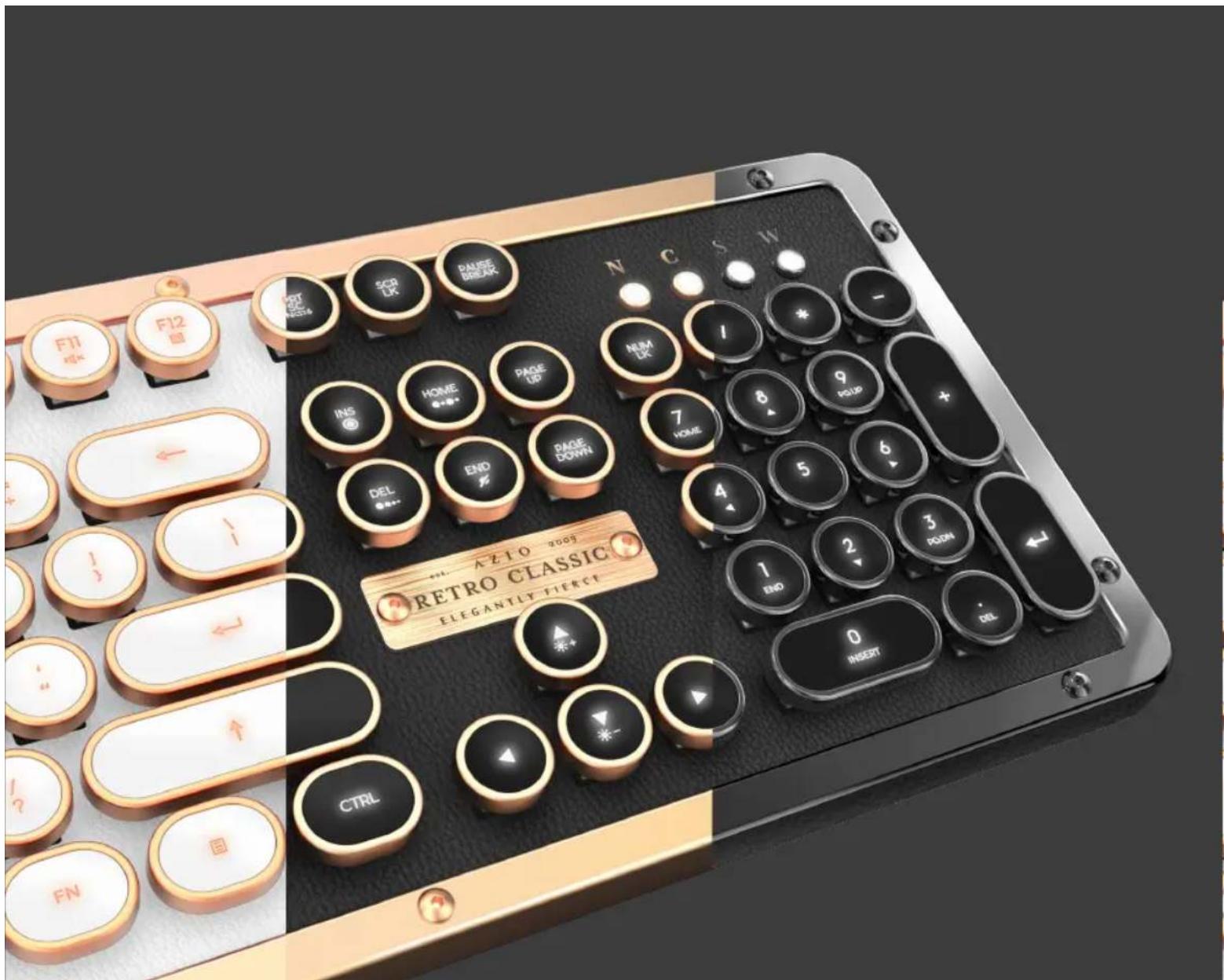
Durability is reinforced through a sturdy zinc alloy frame and fixated with high-caliber industrial bolts. The keyboard is then accented with a satin brushed logo plaque to deliver our signature finishing touch.
Extravagant & Sophisticated
A new level of luxury is achieved through utilizing premium genuine leather surface. Also available with real marble.
Adjustable Pillar Feet
Achieve optimal wrist position by adjusting the height of the pillar style feet.
04
DEVICE LAYOUT
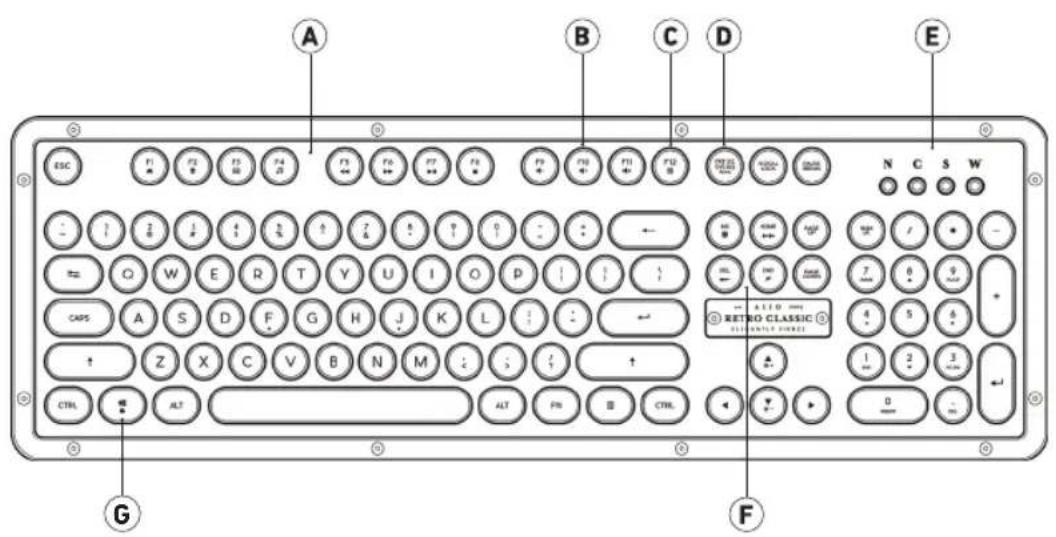
Productivity Hotkeys
B Multimedia Hotkeys
Calculator
D 6KRO/NKRO Toggle
Status Indicator LEDs
F Backlight Modes
Win Start Lock
05
BACKLIGHT CONTROL
| Backlight On [Press FN + INS] Turn the backlight on. | |
| Reactive Mode [Press FN + HOME] Lights up upon actuation and stays lit momentarily for a trailing effect. | |
| Breathing Mode [Press FN + DEL] Rhythmically fade in and out creating a calm and tranquil backlighting effect. | |
| Backlight Off [Press FN + END] Turn the backlight off. | |
| Increase Brightness [Press FN + Up] Increase the LED backlight brightness. | |
| Decrease Brightness [Press FN + Down] Decrease the LED backlight brightness. |
06
HOTKEY INDEX
| Web Browser | File Explorer | |
| Media Player | ||
| Back Track | Next Track | |
| Play/Pause | Stop | |
| Volume - | + Volume + | |
| Mute | Calculator | |
07
WARRANTY
Azio Corporation warrants only to the original purchaser of this product, when purchased from an Azio authorized reseller or distributor, that this product will be free from defects in material and workmanship under normal use and service for the length of the warranty period after purchase.
Azio reserves the right, before having any obligation under this warranty, to inspect the damaged Azio product. Initial shipping costs of sending the Azio product to the Azio service center in Los Angeles, California, for inspection shall be borne solely by the purchaser. In order to keep this warranty in effect, the product must not have been mishandled or misused in any way.
This warranty does not cover any damage due to accidents, misuse, abuse or negligence. Please retain the dated sales receipt as evidence of the original purchaser & date of purchase. You will need it for any warranty services. In order to claim under this warranty, purchaser must contact Azio and obtain an RMA # which is to be used within 15 days of issuance and must present acceptable proof of original ownership (such as original receipt) for the product.
Azio, at its option, shall repair or replace the defective unit covered by this warranty. This warranty is non-transferable and does not apply to any purchaser who bought the product from a reseller or distributor not authorized by Azio, including but not limited to purchases from internet auction sites. This warranty does not affect any other legal rights you may have by operation of the law. Contact Azio through email, chat, or through one of the technical support numbers listed for warranty service procedures.
Epostaile: support@aziocorp.com
FB üzerinden: www.facebook.com/aziocorp
RUSSIAN
PykoBODCTBO no 6bIcTpmy3anycky
KOMJIEKT NOCTABKN
Kannataa AZIO RETRO CLASSIC
HCTpyku na haany pa6to
YCTAHOBKA
CTaHapnt Plug & Play: Pncto 10KnKnHtue KnaHbTuTy K CboOuHOMy nopty USB, IN OHA AutomatneKcY cTahOBIT BCE HbOxOHNMIIe npAeBpE.
Vcnnb30aBHe ropnX knaBn:YtobbocnoB3OBaTbca TOpHbIM
yHKUMMH KHeOpTbR TOpMHKJIaHbM, yJepKHaIe HKaIaTO KlaBbWy FN HAXMHTC Hc60XdHMg TOpHbKl KaHbM.
I0JIb3OBATEJIbCKN PEXKIM 3ADHEI NOCDBETKN
- Up: yucnueHnnc npKocTn NOCDBcTKN
2.BHH3:YMeHbWHTB RPOKCTB NOCDBETKN
3.INS:NouccekaKnueha
4.END:NoCBeKaBiknOueHa
5.HOME:PeaIpyuOu npexn mocBcTeKn
6.DEL:PeKMMnDCBETKNpNdsXAHNN
I0DDEPKA/O6CJYKUBAHNE
MxTnM,4oBb AZIO RETRO CLASSIC nohpabnac BAM TAK ke, kakn Hm. Ecn y Bac 03hNkHyt Bnpocu nn npobembl c knabntpyo, cmeno caaahmae h C HAM. Bt KaKc MeOKe ToocetTu Hau cal Ww. azicorp. com, rne Hndeta Heacto 3aDaaBBe Bnpocu nn npckacn No nncky HeCnpabHOcte, a TaKke CMOKeTe yHnEe bpyne Hau n npOyKtBu.
3neKtpoHHa noTa: support@aziocorp.com
FB: www.facebook.com/aziocorp
KOREAN
印志于国
AZIO RETRO CLASSIC
电
制訂范例
洛拉上安洛雷::电能电电电USBFtoE用电电电电电电电电电电电电电电电电电电电电电电电电电电电电电电电电电电电电电电电电电电电电电电电电电电电电电电电电电电电电电电电电电电电电电电电电电电电电电电电电电电电
Thank you again for choosing AZIO products. We will be even more thrilled if you would kindly share your AZIO experiences.
Here are some humble suggestions on ways to share:

Share through an online review

Share with friends

Share with us on aziocorp.com
Facebook /AzioCorp
Twitter /AzioCorp
ELEGANTLY FIERCE
www.aziocorp.com