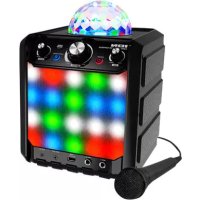
Party Rocker Express - Karaoke system ION - Free user manual and instructions
Find the device manual for free Party Rocker Express ION in PDF.



| Product type | Portable karaoke system |
| Brand | ION |
| Model | Party Rocker Express |
| Power | 8 C batteries (not included) or included AC adapter |
| Microphone inputs | 2 6.35mm inputs |
| Auxiliary input | 1 3.5mm stereo input |
| Auxiliary output | 1 output for stereo system or external speaker |
| USB port | Charge a smartphone or tablet |
| Bluetooth | Version 4.0, maximum range with compatible devices |
| Lighting | Rotating light dome with 7 patterns reacting to music |
| Controls | Master volume, microphone volume, echo effect |
| Speaker | Built-in speaker grille |
| Box contents | Power adapter, quick start guide, safety instructions and warranty |
| Safety | Do not expose to water, do not look directly at dome light, do not sit on dome |
| Maintenance | Clean with a dry cloth, avoid humidity |
| Support | ionaudio.com/support |
Frequently Asked Questions - Party Rocker Express ION
User questions about Party Rocker Express ION
0 question about this device. Answer the ones you know or ask your own.
Ask a new question about this device
Download the instructions for your Karaoke system in PDF format for free! Find your manual Party Rocker Express - ION and take your electronic device back in hand. On this page are published all the documents necessary for the use of your device. Party Rocker Express by ION.
USER MANUAL Party Rocker Express ION
Party Rocker Express
Quickstart Guide English (3-6)
Snelstartgids Netherlands (23-26)
Appendix English (27)
Quickstart Guide (English)
Introduction
Box Contents
Party Rocker Express
Microphone with Cable
Power Adapter
1/8" (3.5 mm) Audio Cable
Quickstart Guide
Safety & Warranty Manual
Support
For the latest information about this product (documentation, technical specifications, system requirements, compatibility information, etc.) and product registration, visit ionaudio.com.
For additional product support, visit ionaudio.com/support.
WARNING: DO NOT splash or immerse in water or other liquids. Not for use in rain. Use only in dry locations.
WARNING: DO NOT look directly into the dome light. Do not sit, stand, or apply pressure on the dome light.
Setup
Items not listed under Introduction > Box Contents are sold separately.
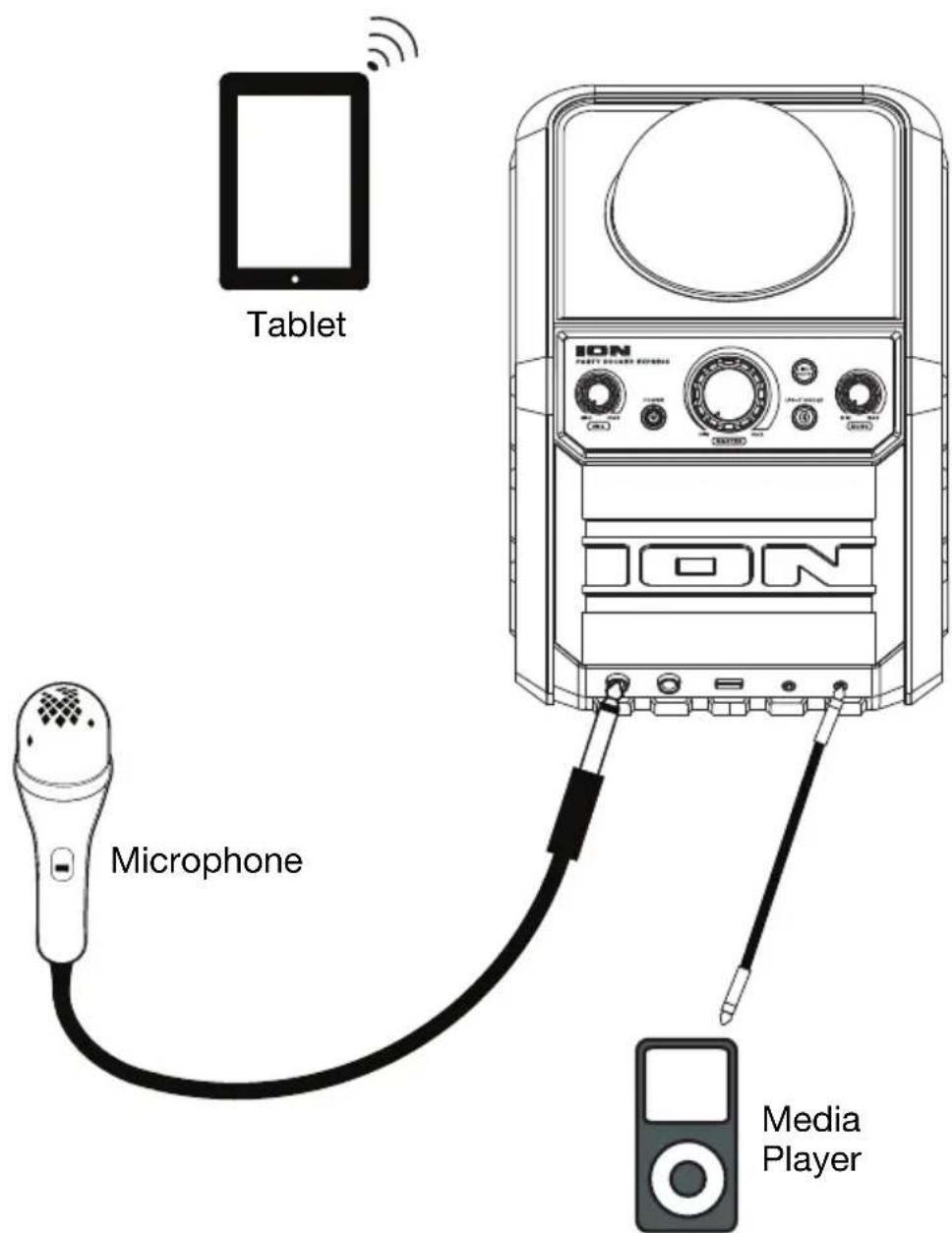
- For optimal performance, place Party Rocker Express in the center of the room so it is unobstructed by walls, furniture, etc.
- Turn down the Master Volume on the Party Rocker Express.
- Turn on Party Rocker Express.
- Connect your music player with an audio cable or Bluetooth (see Connecting with a Bluetooth Device for more details on this).
- Adjust the volume on your music player and on Party Rocker Express as needed.
- Press the Light Mode button on Party Rocker Express.
- Turn off Party Rocker Express when not in use.
Features
-
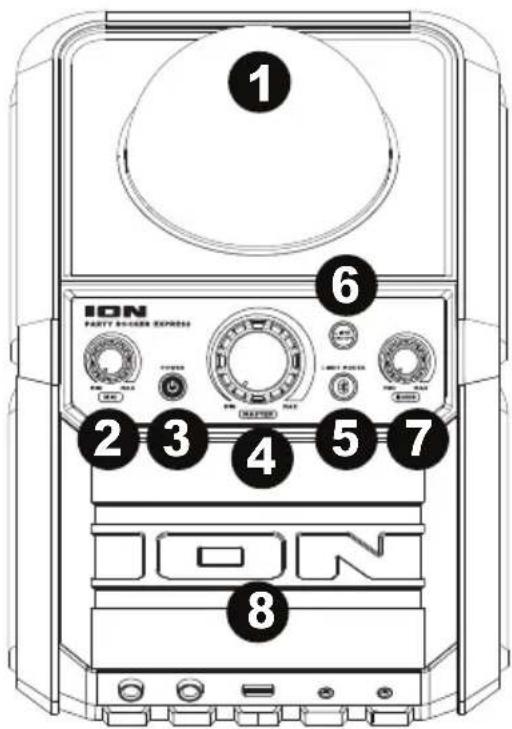
Dome*: The lights in the dome can spin and react to the music playing (depending on the Light Mode that is selected).
-
Microphone Volume Control: Adjust this knob to control the volume for microphone inputs 1 and 2.
-
Power ON/OFF: Press this button for one second to turn Party Rocker Express on or off.
-
Master Volume Control: This adjusts the speaker's main mix volume, which includes the microphone inputs, auxiliary input, and the audio of a paired Bluetooth device.
5. Bluetooth/Light Mode Button: Bluetooth Functions
- When the unit is first powered on, it will automatically enter Pairing mode.
- The Paired LED will be lit when a device is paired to Party Rocker Express. This LED will not be lit when Party Rocker Express is first powered on (unless it was previously paired with a device).
- Press and hold the Bluetooth button for 3 seconds to disconnect a paired Bluetooth device.
Light Mode Functions
- When the lights are activated, press and release this button to cycle to the next light mode.
- Play through all individual pattern loops or select from one of the 7 individual pattern loops.
-
The lights follow a mode-selected pattern and will react to the music playback.
-
Lights: Press and release this button to turn the dome and grille party lights on and off.
- Echo: Now you can sound like a rock star in a huge arena! Adjust this knob to control the amount of echo applied to the mic inputs, making your voice reverberate and sound spacious.
- Speaker Grille: The audio playback is heard through here. Also, the illuminated party lights are seen here.
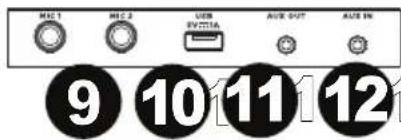
- Microphone Inputs: Connect 1/4" (6.35 mm) microphones to these inputs.
- USB: Connect a smartphone or tablet here to charge.
- Auxiliary Output: Connect this output to a home stereo or an ION Block Rocker to increase the overall volume.
- Auxiliary Input: This stereo 1/8" input can be used to connect a smartphone, MP3 player, or other audio sources.
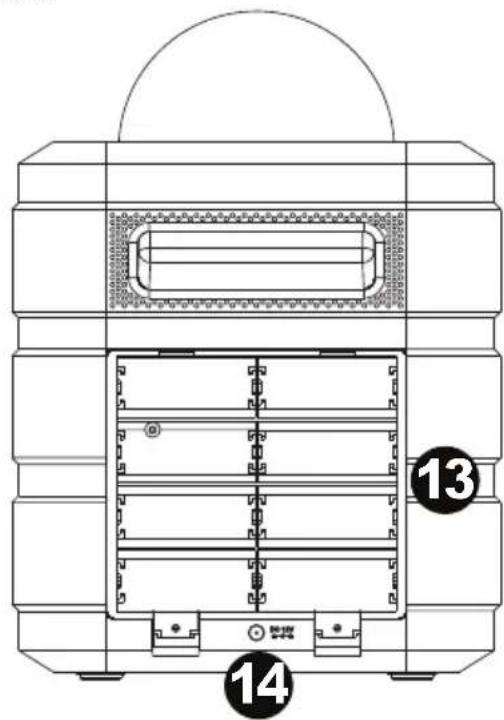
- Battery Compartment: If powering with batteries, install 8 "C" size batteries here.
- Power Input: If powering with the power adapter, connect the included power adapter here.
*WARNING: Do not look directly into the dome light. Do not sit, stand, or apply pressure on the dome light.
Operation
Connecting with a Bluetooth Device
- Turn on Party Rocker Express using the power button.
- Navigate to your Bluetooth device's setup screen, find "Party Rocker Express" and connect.
Note: If your Bluetooth device prompts for a pairing code, enter '0000'.
Note: The next time you approach Party Rocker Express with your Bluetooth device, it will automatically re-connect. - If your Bluetooth device is not able to connect to Party Rocker Express, press and hold the Bluetooth button on Party Rocker Express for 3 seconds to break previous Bluetooth connections and reset the Bluetooth module.
Note: Maximum range will be achieved when using devices with Bluetooth 4.0. - Start music playback from your Bluetooth device.
- To connect to another Bluetooth device, press and hold the Bluetooth button for 3 seconds. Repeat Step 2.
- To disconnect a connected Bluetooth device, press and hold the Bluetooth button for 3 seconds.
Note: If you experience trouble connecting or playing music, update your device's OS.
Troubleshooting
If the sound is distorted: Try lowering the volume control of your sound source or musical instrument. Also, try to reduce the overall volume of Party Rocker Express.
If there is too much bass: Try adjusting the tone or EQ control on your sound source to lower the bass level. This will allow you to play the music louder before clipping (distortion) occurs.
If there is a high-pitched whistling noise when using microphones: This is probably feedback. Point the microphone away from the speaker.
If you can't hear the microphone over the music volume: Turn down the music volume from your source.
Party Rocker Express
Micrófono y cable
Party Rocker Express
Microphone et cable
Party Rocker Express
Microfono e cavo
Party Rocker Express
Mikrofon und Kabel
Netzteil
Party Rocker Express
Microfoon en kabel
Stroomadapter
Snelstartgids
Technical Specifications
| Drivers | Low-Frequency: 4.0" / 102 mm woofer High-Frequency: 1.6" / 41 mm tweeter |
| Output Power | 40 W (Peak) |
| Bluetooth Specifications | Profile: A2DP Range: Up to 30 feet / 10 meters |
| Microphone Type | Dynamic microphone (included) |
| USB Charging Port | +5 V, 1 A |
| Power | Via 8 "C" batteries or power adapter (12 VDC, 2 A, center-positive) |
| Dimensions (width x depth x height) | 8.54" x 8.46" x 11.42" / 217 x 215 x 290 mm |
| Weight | 5.3 lbs / 2.4 kg (without mic and power adapter) |
Specifications are subject to change without notice. Bluetooth and wireless reception and range are affected by walls, obstructions, and movement. For optimal performance, place the product in the center of the room so it is unobstructed by walls, furniture, etc. Battery life may vary based on temperature, age, and usage of product.
Trademarks & Licenses
ION Audio is a trademark of ION Audio, LLC, registered in the U.S. and other countries. The Bluetooth word mark and logos are owned by the Bluetooth SIG, Inc. and any use of such marks by ION Audio is under license. All other product names, company names, trademarks, or trade names are those of their respective owners.
ionaudio.com
Brand : ION
Model : Party Rocker Express
Category : Karaoke system