
ES2113 - Epilator PANASONIC - Free user manual and instructions
Find the device manual for free ES2113 PANASONIC in PDF.
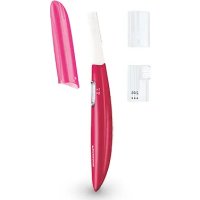


| Product Type | Battery-powered facial trimmer for peach fuzz and eyebrows |
| Brand | Panasonic |
| Model | ES2113 |
| Power Supply | 1 AAA alkaline battery (LR03) sold separately |
| Weight | 32 g (including battery) |
| Sound Level | 62 dB(A) reference 1pW |
| Main Functions | Trims peach fuzz, trims eyebrows with adjustable comb (2 lengths), use on face and neck |
| Blades Included | Blade for peach fuzz, blade for eyebrows |
| Eyebrow Comb | 2 positions: long (6-8 mm) and short (2-4 mm) |
| Included Accessories | Cap, cleaning brush, soft case |
| Care and Cleaning | Clean with the provided brush, do not clean with water or alcohol, wipe with a dry cloth |
| Safety | Keep out of reach of children, do not use on sensitive or acne-prone skin, do not disassemble, check blade condition before each use |
| Replacement Parts and Repairability | Replaceable blades, removable comb; no user-serviceable parts |
| Recommended Use | Only on face and neck, bare skin (without soap, cream, or lotion) |
Frequently Asked Questions - ES2113 PANASONIC
User questions about ES2113 PANASONIC
0 question about this device. Answer the ones you know or ask your own.
Ask a new question about this device
Download the instructions for your Epilator in PDF format for free! Find your manual ES2113 - PANASONIC and take your electronic device back in hand. On this page are published all the documents necessary for the use of your device. ES2113 by PANASONIC.
USER MANUAL ES2113 PANASONIC
Panasonic
Facial Trimmer
Operating Instructions
Model No. ES2113
Panasonic Electric Works Wanbao (Guangzhou) Co., Ltd. http://panasonic.net
No.2 EN, GR, FR, IT, NE, SP, DN, PO, NR, SW, FN, Tu, Po, Cz, Hu, Ru, Russi, Uk (RKM) Printed in China
Before operating this unit, please read these instructions completely.
2
3
INDEX
ENGLISH Page 5
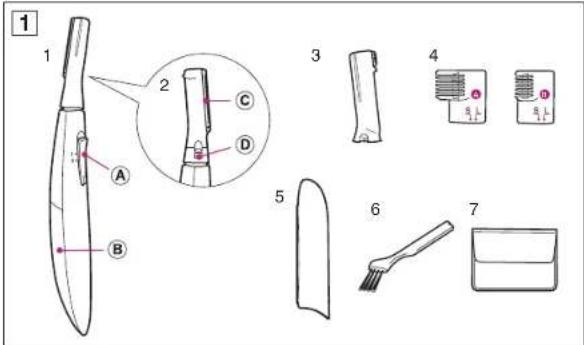
- Main Unit Switch ○B Battery cover
- Blade on Rear Side ○c Downy hair blade ○D Blade release button
- Eyebrow blade
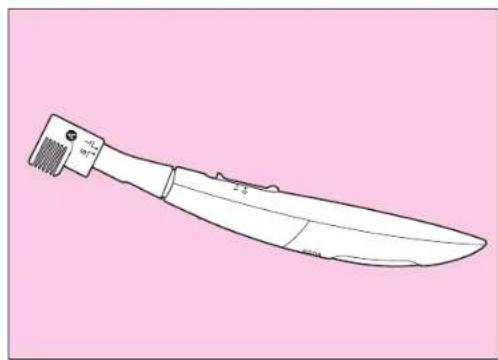
- Eyebrow comb
- Cap
- Cleaning brush
- Soft carrying case
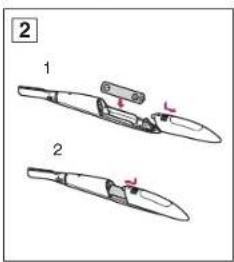
Inserting the battery (Fig. 2)
(Battery sold separately.)
Be sure to remove the battery cover only after the switch is off.
- Insert one AAA (LR03) alkaline battery. Note: Insert the battery in the correct polarity.
- Attach the battery cover.
Attaching and removing
the blade (Figs. 3 and 4)
(Attach the downy hair blade or eyebrow blade according to the area to be trimmed.)
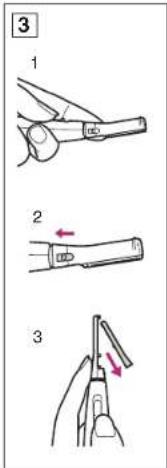
■ Removing the blade (Fig. 3)
- Support the head of the trimmer with your finger so that it does not swing excessively.
- Slide the blade release button in the direction of the arrow.
- Remove the blade in the direction of the arrow.
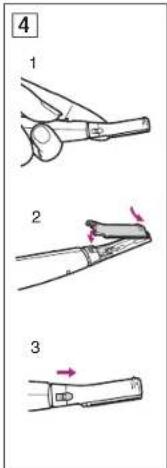
■ Attaching the blade (Fig. 4)
- Support the head of the trimmer with your finger so that it does not swing excessively.
- Attach by inserting the projection at the tip of the facial trimmer into the hole of the blade.
- Slide the blade release button in the direction of the arrow.
Trimming downy hair
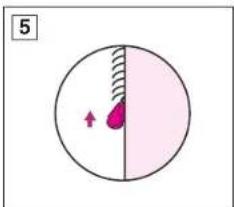
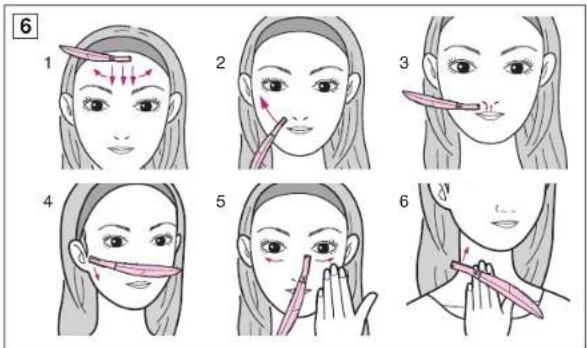
(Use the downy hair blade) ■ Holding the blade to the skin (Fig. 5) - Lay the blade against the skin. - Slowly move the blade against the flow of the hair. ■ How to trim (Fig. 6) Slowly move the facial trimmer in the direction of the arrow for the areas to be trimmed. 1. Above the eyebrows Move from the hairline to the center of the forehead. Then back to the hairline. 2. Cheek Move outward from the center of the face. 3. Upper lip Stretch your upper lip and move up and down. 4. Sideburns Decide on the length of the sideburns and trim downward. 5. Below the eyes Hold the skin with your fingers and move outward from the center. 6. Nape Hold the skin with your fingers and move upward.
Trimming your eyebrows (Use the eyebrow blade)
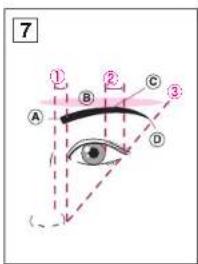
■ Basic eyebrow shape (Fig. 7)
① The eyebrow base (A) is within the lines extending from the inner side and outer side of the nose. ② The eyebrow crest (©) is above the eyebrow arch (®) within the lines extending from the outer edge of the eye and the iris. ③ The eyebrow tip (①) is within the line extending from and connecting the outer side of the nose and the outer edge of the eye. ■ Using the facial trimmer on
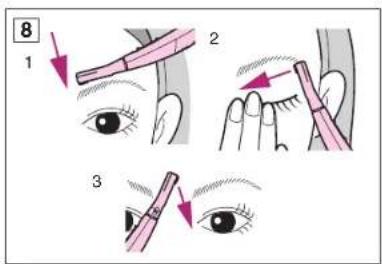
the eyebrows (Fig. 8) Slowly move the facial trimmer in the direction of the arrow along the hair sticking out of the outline.
- Above the eyebrow Stop at about 2-3 mm on the side of the eyebrow.
- Below the eyebrow Trim while holding the eyelid and stretching the skin.
- The brow Trim while changing your grip.
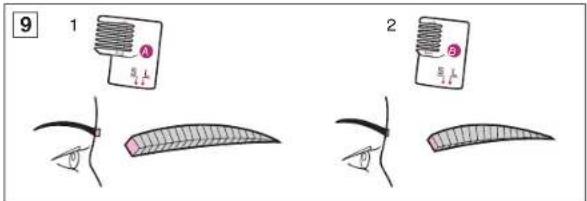
Eyebrow comb (Fig. 9)
- Eyebrow comb A Trimming length: 6-8 mm Finished image: Overall long eyebrow (even length) For a natural eyebrow
- Eyebrow comb B Trimming length: 2-4 mm Finished image: Overall short eyebrow (even length) Eyebrow becomes easier to draw.
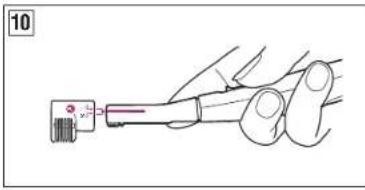
Attaching the comb (Fig. 10)
Support the head of the trimmer with your finger so that it does not swing excessively. Select the trimming length and align the L (long) or S (short) mark with the groove in the eyebrow comb. Insert the eyebrow comb onto the eyebrow blade until it clicks in.
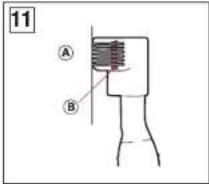
How to use (Fig. 11)
- Use the eyebrow comb by holding it close to your skin (A). The blade is at the position of the line (B).
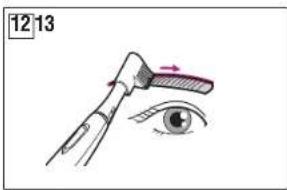
- Align the comb with your eyebrow and move from the end to the beginning of the eyebrow. (Fig. 12)
- Repeat until the eyebrow is trimmed to a desired length.
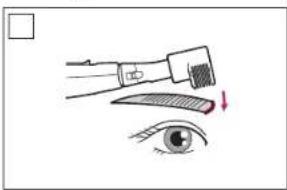
- Depending on individuals, the hair at the eyebrow base may be pointing upward. In this case, it is recommended the comb be moved against the flow of the hair, in the direction from the forehead to the nose. (Fig. 13)
Cleaning
(Be sure to turn off the switch)
- Remove the blade.
- Clean with brush.
- Wipe off any trimmed hair with a dry cloth.
- After cleaning, attach the blade to its original position.
Caution
- Keep out of reach of children.
- Do not clean the product in water. • The following people should not use the product.
- People with sensitive skin
- People with allergies
- In areas where there are pimples or acne.
- Do not use other than on the face or neckline.
- Do not modify, disassemble or repair.
- Since the blade is precision machine, handle it carefully.
- Check that the blade is not damaged before using the product.
- Only use on bare skin. Using the product when soap, cream or lotions have been applied may lead to malfunctions.
- When the trimmer begins losing power, replace the battery. The battery may leak if not replaced promptly when it reaches the end of its life span.
- Do not clean the product with alcohol, benzine, etc. Wipe with a dry cloth or a cloth which has been moistened with a dilute soap solution.
- Only use AAA (LR03) alkaline battery. Since other battery is not as powerful, the time for which the product can be used is dramatically reduced.
Specifications
Power supply: Battery
Battery size: 1 AAA (LR03) alkaline battery (Sold separately)
Weight: 32 g (including battery)
Airborne Acoustical Noise: 62 (dB(A) re 1pW)
- Blade on the back
© Flat trimmer blade
Wanbao Base Shiguang Road, Panyu District, Guangzhou, Guangdong, 511495 CHINA


Brand : PANASONIC
Model : ES2113
Category : Epilator