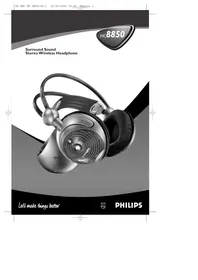
SBCHC8850 - Bluetooth speaker PHILIPS - Free user manual and instructions
Find the device manual for free SBCHC8850 PHILIPS in PDF.


| Product type | Wireless FM high-fidelity audio system (transmitter + headphones) |
| Brand | Philips |
| Model | SBCHC8850 |
| Carrier frequency | Channel 1: 863.5 MHz / Channel 2: 864.0 MHz / Channel 3: 864.5 MHz (depending on version) |
| Transmission range | Up to 100 meters, omnidirectional (360°) |
| Modulation | Frequency (FM) |
| RF output power | < 10 mW |
| Frequency response (headphones) | 10 – 22,000 Hz |
| Signal-to-noise ratio | > 60 dB |
| Distortion | < 0.5% THD |
| Channel separation | > 30 dB |
| Transmitter power supply | 12 V / 200 mA DC (power adapter included, model SBC CS030/00) |
| Headphone power supply | 2 NiMH rechargeable batteries R03/AAA (550 mAh) – automatic charging on transmitter |
| Battery life (after full charge) | Approximately 16 hours (charging time) |
| Key features | Wireless transmission, SRS™ surround, auto tuning, mute function, automatic charging, LED indicators |
| Connectivity | 3.5 mm stereo audio input and line input (RCA) – use only one at a time |
| Kit contents | FM transmitter SBC HC8852, FM headphones SBC HC8855, 12 V/200 mA adapter, 2 NiMH R03/AAA batteries, 2 m audio cable (3.5 mm to 2 RCA), 3.5 mm to 6.3 mm adapter |
| Maintenance and cleaning | Clean with a slightly damp cloth (no alcohol, thinner, or ammonia) |
| Safety | Do not open, avoid moisture, excessive heat, and direct sunlight |
| Batteries and recycling | Follow local regulations for disposal of used batteries and equipment |
Frequently Asked Questions - SBCHC8850 PHILIPS
User questions about SBCHC8850 PHILIPS
0 question about this device. Answer the ones you know or ask your own.
Ask a new question about this device
Download the instructions for your Bluetooth speaker in PDF format for free! Find your manual SBCHC8850 - PHILIPS and take your electronic device back in hand. On this page are published all the documents necessary for the use of your device. SBCHC8850 by PHILIPS.
USER MANUAL SBCHC8850 PHILIPS
Stereo Wireless Headphone

Let's make things better.

PHILIPS
Figure 1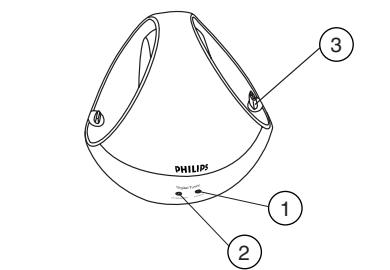
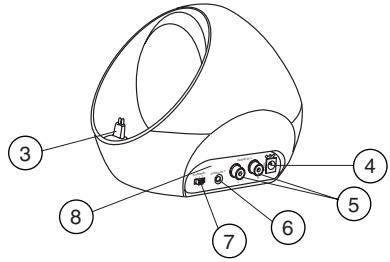
Figure 2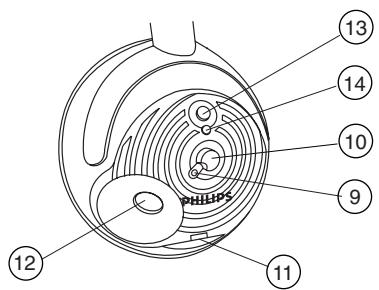
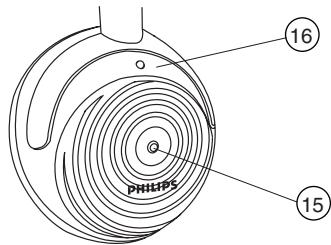
Figure 3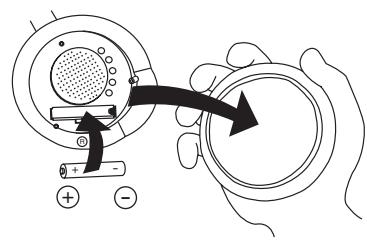
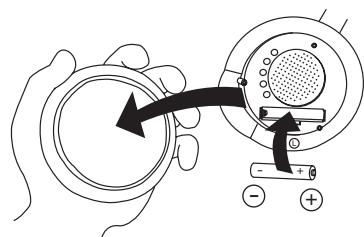
Figure 4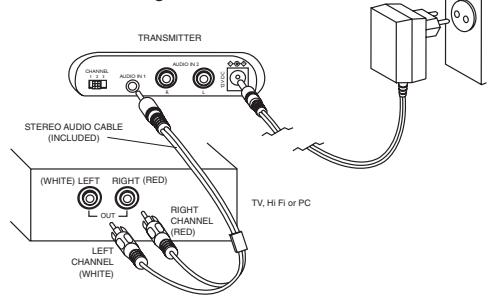
Figure 5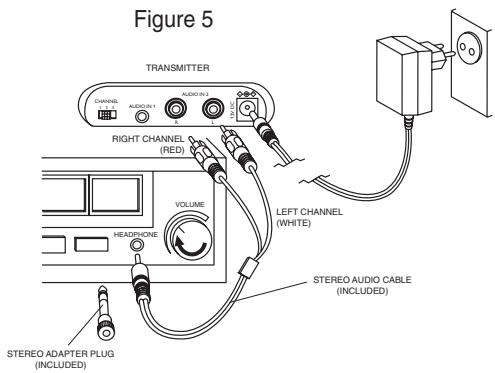
Index
| English | English | 4 | Svenska | 68 | Svenska |
| Français | Français | 12 | Norge | 76 | Norge |
| Español | Espanol | 20 | Suomi | 84 | Suomi |
| Deutsch | Deutsch | 28 | Russkien | 92 | Russkien |
| Nederlands | Nederlands | 36 | Polski | 100 | Polski |
| Italiano | Italiano | 44 | Magyar | 108 | Magyar |
| Portugues | Português | 52 | Türkçe | 116 | Türkçe |
| Dansk | Dansk | 60 | Еλληνικá | 124 | Еλληνικá |
Introduction
General information
Congratulations!
You have just bought the most sophisticated FM wireless stereo sound system. This system uses the latest FM wireless technology, which gives you complete freedom of movement while enjoying your favorite music and movies. No more inconvenience from cables or headphone wires! To ensure you get the best performance from your FM wireless stereo sound system, please read this manual carefully.
IMPORTANT
Read these instructions. All the safety and operating instructions should be read before using the wireless headphone system.
Check if the voltage indicated on the type plate of the adapter corresponds to the local mains voltage before connecting to the mains power supply.
Remove the batteries from the headphone's battery compartment and disconnect the adapter from the mains if the system is not in use for a long period.
Prevent fire or shock hazard: do not expose this equipment to humidity, rain, sand or excessive heat caused by heating equipment or direct sunlight.
Radio equipment for wireless audio applications is not protected against disturbance from other radio services.
IMPORTANT
Before using the FM headphone for the first time, please ensure that the batteries are fully charged for about 16 hours. This will guarantee a longer operating lifetime of the batteries.
Benefits of Philips latest RF/FM wireless technology
Wireless transmission
The FM transmitter transmits the stereo audio signal from your audio or video source to your FM headphone without wires.
Wide transmission range
Your FM headphone can receive signals up to 100 meters away.
High-frequency radio system
The FM headphone set uses a high radio frequency as the signal carrier, ensuring a very clear, sharp reception.
Mute function
Reduces the noise disturbance when the sound signal is too low or not available.
Surround Sound
The FM headphone features SRS
headphone™ to enjoy full surround experience without disturbing others.
Automatic power on/off indicator
The FM transmitter automatically switches on and starts transmitting when audio signals are detected at the audio input (red LED). When no audio signals are detected the FM transmitter automatically switches off after a few minutes.
Automatic tuning
The FM headphone automatically tunes to the right transmission frequency if you push the tuning button.
General information
Controls
Automatic rechargeable system
The FM transmitter automatically recharges the headphone's built-in rechargeable R03/AAA NiMH batteries. Just position the headphone on the transmitter and contact. The green LED lights up during charging.
Easy transmission
The FM headphone is able to receive signals from the transmitter, even through barriers such as doors, walls and windows.
Multiple headphones with one transmitter
An additional number of headphones and/or wireless speakers can be used with a single transmitter if they:
- operate in the 864 MHz band
- can detect a 19 kHz pilot tone
Please consult the appliance's electrical specification sheets for confirmation on compatibility.
Kit contents
This FM headphone system consists of the following accessories:
1 × SBC HC8852 FM transmitter, 1 × SBC HC8855 FM headphone, 1 × SBC CS030/00 12 Volt / 200 mA AC/DC adapter (for UK: SBC CS030/05 12 Volt / 200 mA AC/DC adapter), 2 × rechargeable batteries R03/AAA (NiMH), 550 mAh, 1 × 3.5 mm stereo plug to 2 × RCA audio cable (2 m), 1 × 3.5 mm plug to 6.3 mm stereo adapter plug
Transmitter (figure 1)
1 Power indicator - lights up when audio signals are detected at the audio input. 2 Recharging indicator - lights up when headphone is replaced on the FM transmitter. Completely flat batteries will be fully charged after about 16 hours. 3 Recharging contact - make sure you align your headphone to this contact for recharging. 4 DC power - connect to the 12 Volt/200 mA AC/DC adapter. 5 Line audio input - alternative connection to an audio source. 6 3.5 mm stereo headphone audio input - connects your FM transmitter to an audio source.
IMPORTANT
Use only 1 of the audio inputs:
3.5 mm stereo headphone audio input OR the line audio input!
Using both audio inputs at the same time may damage your FM wireless system or your audio source!
7 Channel switch - select one of 3 channels for best reception. We advise you to select channel 1 as a first option. 8 Controls plate
Controls
Installation
Headphone (figure 2)
9 Power indication - lights up when in use. When batteries are low, the power indicator flashes, and you should recharge the headphone for about 16 hours before the next use. 10 Power On/Off - push the button to switch the headphone on/off. 11 Recharging contacts - align headphone to the transmitter, green recharging LED on the transmitter's front must switch on, indicating that the headphone is being recharged. 12 Volume - adjust volume to your desired listening level. 13 SRTM On/Off - push the button to switch the SRTM surround sound mode on/off. 14 SRSTM indication - lights up when the SRSTM surround sound mode is activated. 15 Tuning - press and hold the button for about 1 second. The headphone automatically tunes to the right transmission frequency and the tuning indicator will light up. If not, repeat this step. 16 Tuning indicator - lights up when receiving optimal transmission.
Transmitter power supply
IMPORTANT
Use only Philips SBC CS030/00 12 Volt/200 mA AC/DC adapter. (For UK, use only Philips SBC CS030/05)
1 Make sure the adapter's rated voltage corresponds to the mains socket voltage. 2 Connect the DC connector of the AC/DC adapter to the 12 Volt DC power input connector located at the rear of the transmitter. 3 Connect the 12 Volt/200 mA AC/DC adapter to the mains socket. Always disconnect the AC/DC adapter if the transmitter is not to be used for a long period of time.
Headphone power supply
IMPORTANT
Use only rechargeable R03/AAA NiMH batteries (preferably Philips).
Do not use NiCd batteries or alkaline batteries as these may damage your FM wireless system!
1 Check if the power button of the FM headphone is in the on position. 2 When the red power indicator on the FM headphone starts flashing, it indicates that the batteries are running low. 3 To recharge the headphone's built-in rechargeable R03/AAA NiMH batteries, position the headphone on the transmitter and contact.
Environmental Information
All redundant packing material has been omitted. We have done our best to make the packaging easily separable into two materials: cardboard and polyethylene
Your unit consists of materials which can be recycled if disassembled by a specialized company. Please observe the local regulations regarding the disposal of packing materials, exhausted batteries and old equipment.
Installation
Audio Connections
Notes:
Completely flat batteries need approximately 16 hours to recharge.
The FM headphone will switch off automatically during recharging.
Always remove the batteries if the headphone is not to be used for a long period of time.
Batteries contain chemical substances, so they should be disposed of properly.
Headphone battery replacement (figure 3)
IMPORTANT
Use only rechargeable R03/AAA NiMH batteries (preferably Philips).
Do not use NiCd batteries or alkaline batteries as these may damage your FM wireless system!
1 Remove the earcushions. 2 Take out the batteries and dispose of them properly. 3 Insert new batteries. Only use R03/AAA NiMH batteries (preferably Philips). 4 Make sure the batteries are correctly inserted as indicated by the engraved symbols in the battery compartment. 5 Put the earcushions back on the earshells.
IMPORTANT
Before using the FM headphone for the first time, please ensure that the batteries are fully charged for about 16 hours. This will guarantee a longer operating lifetime of the batteries.
Audio Connections
IMPORTANT
Use only 1 of the audio inputs:
3.5 mm stereo headphone audio input OR the line audio input!
Using both audio inputs at the same time may damage your FM wireless system or your audio source!
Option 1 (figure 4)
Connecting the FM transmitter to a line output of an audio source, e.g. REC OUT, LINE OUT.
1 Connect the 3.5mm stereo plug of the stereo audio cable to the FM transmitter's 3.5mm headphone input. 2 Connect the 2 RCA plugs of the stereo audio cable to a line output (REC OUT or LINE OUT) of an audio source, e.g. TV, HiFi or PC:
- Check if the red RCA plug (right channel) is connected to the right channel (red) of the audio source.
- Check if the white RCA plug (left channel) is connected to the left channel (white) of the audio source.
3 Switch on your audio source. The red power indication LED of the transmitter lights up if receiving an audio signal. 4 In case the line output of the audio source has an adjustable output level, adjust the line output level of the audio source to the highest acceptable undistorted level. 5 Switch on the headphone. You may hear a hissing sound through the headphone if the headphone is not yet properly tuned to the transmitter. 6 To tune, press and hold the tuning control button for about 1 second. Repeat if necessary until the red tuning indication lights up.
Audio Connections
Basic operation
7 Adjust the volume to the desired level with the headphone volume control.
Option 2 (figure 5)
Connecting the FM transmitter to a headphone output of an audio source
IMPORTANT
Use only 1 of the audio inputs:
3.5 mm stereo headphone audio input OR the line audio input!
Using both audio inputs at the same time may damage your FM wireless system or your audio source!
1 Connect the 2 RCA plugs of the stereo audio cable to the FM transmitter's audio input 2:
- Check if the red RCA plug (right channel) is connected to the right channel (red) of the FM transmitter's audio input 2.
- Check if the white RCA plug (left channel) is connected to the left channel (white) of the FM transmitter's audio input 2.
2 Connect the 3.5mm stereo plug of the stereo audio cable to the headphone output of an audio source, such as TV, HiFi or PC. - In case your audio source has a 6.3mm headphone output, use the supplied 3.5mm to 6.3 mm stereo adapter plug. 3 Switch on your audio source and carefully increase the volume of the audio source. The red power indication LED of the transmitter lights up if receiving an audio signal. 4 Switch on the headphone. You may hear a hissing sound through the headphone if the headphone is not yet properly tuned to the transmitter.
5 To tune, press and hold the tuning control button for about 1 second. Repeat if necessary until the red tuning indication lights up. 6 Adjust the volume to the desired level with the headphone volume control.
Basic operation
When the FM transmitter is connected to a: - line output of an audio source, such as REC OUT or LINE OUT or - headphone output of an audio source.
1 Switch on your audio source and carefully increase the volume of the audio source. The red power indication LED of the transmitter lights up if receiving an audio signal. 2 Switch on the headphone. You may hear a hissing sound through the headphone if the headphone is not yet properly tuned to the transmitter. 3 To tune, press and hold the tuning control button for about 1 second. Repeat if necessary until the red tuning indication lights up. 4 Adjust the volume to the desired level with the headphone volume control. 5 Push the SRSTM on/off button to switch the SRSTM surround sound mode on or off.
Troubleshooting
If a fault occurs, first check the points listed below before taking the set for repair.
If you are unable to remedy a problem by following these hints, consult your dealer or service centre.
WARNING: Under no circumstances should you try to repair the set yourself, as this would invalidate the warranty.
| Problem | Remedy |
| No sound | - Check if the AC/DC adapter is fully inserted into the AC outlet and that its DC connector is properly inserted into the 12 Volt DC input connector located at the rear of the transmitter.- Check if the headphone's on/off switch is in the on position.- Headphone batteries running low. Position the headphone on the transmitter and contact. (See Headphone power supply)- Check if the audio source is switched on and tuned to a channel with audio.- Volume not adjusted. Adjust the volume on the audio source/ headphone to a higher level.- Adjust the headphone's tuning frequency. Press and hold the tuning control button for about 1 second.- Make use of the HC8852 transmitter. Some transmitters already built into other equipment may not be compatible with the HC8855 headphone because of the advanced technologies used in the HC8855 headphone. |
| Distorted sound | - Adjust the headphone's tuning frequency. Press and hold the tuning control button for about 1 second. Repeat if necessary until the red tuning indication lights up.- Adjust the transmitter's frequency. Select any of the 3 channels of the transmitter. Next adjust the headphone's frequency by pressing and holding the tuning button for about 1 second.- Headphone batteries running low. Position the headphone on the transmitter and contact. (See Headphone power supply) |
Troubleshooting
Distorted sound
- Check the volume on audio source/headphone is not set at too high a level. Reduce the volume.
- Distance from the transmitter is too large. Move closer to the transmitter.
- Interference from fluorescent lamps/other radio sources. Move transmitter or headphone elsewhere/change the transmitter's channel.
- Make use of the HC8852 transmitter. Some transmitters already built into other equipment may not be compatible with the HC8855 headphone because of the advanced technologies used in the HC8855 headphone.
- The SRSTM surround sound mode works best on normal stereo signals. Make sure that the surround modes on the audio source are switched off when listening to the HC8855 headphone.
Maintenance
- If the headphone will not be used for a long time, please remove the batteries to prevent leakage and corrosion.
- Only replace the batteries with R03/AAA NiMH batteries (preferably Philips).
- Do not leave the headphone near heat sources. Do not expose to direct sunlight, excessive dust, moisture, rain or any kind of mechanical shock.
- Do not use alcohol, thinner or petroleum-based substances to clean the headphone or transmitter. Use a slightly dampened chamois cloth to clean the housing.
- Do not use cleaning agents containing alcohol, spirits, ammonia or abrasives as these may harm the housing.
Hearing Safety! Continuous use at a high volume may permanently damage your hearing.
Specifications*
Regulations
| System: | Radio Frequency (RF) | |
| Carrier Frequency: (Transmitter HC8852) | SBC HC 8850/00 & /05 | SBC HC 8850/16 |
| Channel 1: 863.5 MHz | Channel 1: 863.5 MHz | |
| Channel 2: 864.0 MHz | Channel 2: 863.7 MHz | |
| Channel 3: 864.5 MHz | Channel 3: 863.9 MHz | |
| Carrier Frequency: (Headphone HC8855) | 863.2 to 864.7 MHz (Auto tuning) | |
| Modulation: | Frequency Modulation (FM) | |
| Radiated Output Power: | <10m Watt | |
| Effective Transmission Range: | up to100 meters, omni directional (360°) | |
| Input level: | 500 mVrms (1 kHz sine wave) | |
| Power supply – transmitter: | 12Volt / 200 mA DC, centre positive | |
| Power supply – headphone: | 2 × R03 (AAA) batteries (NiMH) | |
| Frequency range (Headphone): | 10 – 22,000 Hz | |
| Signal/Noise ratio: | > 60 dB (1 kHz sine wave ,A-weighted) | |
| Distortion: | < 0.5% THD | |
| Channel separation: | > 30 dB | |
*) All specifications are subject to change without prior notice.
European Regulations
This product has been designed, tested and manufactured according to the European R&TTE Directive 1999/5/EC.
Following this Directive, this product can be brought into service in the following states:
R&TTE Directive 1999/5/EC
| SBC HC 8850/00 | |||||||
| B | ✓ | DK | ✓ | E | X | GR | X |
| IRL | X | I | X | L | ✓ | NL | ✓ |
| P | ✓ | SU | ✓ | S | ✓ | UK | X |
| D | ✓ | CH | ✓ | ||||
| This product complies with class 3 requirements as set down in EN 301 489-9 | |||||||
| SBC HC 8850/05 | |||||||
| B | X | DK | X | E | X | GR | X |
| IRL | ✓ | I | X | L | X | NL | X |
| P | X | SU | X | S | X | UK | ✓ |
| D | X | CH | X | ||||
| This product complies with class 3 requirements as set down in EN 301 489-9 | |||||||
| SBC HC 8850/16 | |||||||
| B | ✓ | DK | ✓ | E | ✓ | GR | X |
| IRL | X | I | X | L | ✓ | NL | ✓ |
| P | ✓ | SU | ✓ | S | ✓ | UK | X |
| D | ✓ | CH | ✓ | ||||
| This product complies with class 3 requirements as set down in EN 301 489-9 | |||||||
Introduction
| SBC HC 8850/00 | |||||||
| B | ✓ | DK | ✓ | E | X | GR | F |
| IRL | X | I | X | L | ✓ | NL | ✓ |
| P | ✓ | SU | ✓ | S | ✓ | UK | X |
| D | ✓ | CH | ✓ | ||||
| This product complies with class 3 requirements as set down in EN 301 489-9 | |||||||
| SBC HC 8850/05 | |||||||
| B X | DK X | E X | GR X | F X | |||
| IRL √ | I X | L X | NL X | A X | |||
| P X | SU X | S X | UK √ | N X | |||
| D X | CH X | ||||||
| This product complies with class 3 requirements as set down in EN 301 489-9 | |||||||
| SBC HC 8850/16 | |||||||
| B | ✓ | DK | ✓ | E | ✓ | GR | X |
| IRL | X | I | X | L | ✓ | NL | ✓ |
| P | ✓ | SU | ✓ | S | ✓ | UK | X |
| D | ✓ | CH | ✓ | ||||
| This product complies with class 3 requirements as set down in EN 301 489-9 | |||||||
Introduction
General Information
Congratulations!
| SBC HC 8850/00 | |||||||
| B | ✓ | DK | ✓ | E | X | GR | F |
| IRL | X | I | X | L | ✓ | NL | ✓ |
| P | ✓ | SU | ✓ | S | ✓ | UK | X |
| D | ✓ | CH | ✓ | ||||
| This product complies with class 3 requirements as set down in EN 301 489-9 | |||||||
| SBC HC 8850/05 | |||||||
| B X | DK X | E X | GR X | F X | |||
| IRL √ | I X | L X | NL X | A X | |||
| P X | SU X | S X | UK √ | N X | |||
| D X | CH X | ||||||
| This product complies with class 3 requirements as set down in EN 301 489-9 | |||||||
| SBC HC 8850/16 | |||||||
| B | ✓ | DK | ✓ | E | ✓ | GR | F |
| IRL | X | I | X | L | ✓ | NL | ✓ |
| P | ✓ | SU | ✓ | S | ✓ | UK | X |
| D | ✓ | CH | ✓ | ||||
| This product complies with class 3 requirements as set down in EN 301 489-9 | |||||||
Introduction
| SBC HC 8850/00 | |||||||
| B | ✓ | DK | ✓ | E | X | GR | F |
| IRL | X | I | X | L | ✓ | NL | ✓ |
| P | ✓ | SU | ✓ | S | ✓ | UK | X |
| D | ✓ | CH | ✓ | ||||
| This product complies with class 3 requirements as set down in EN 301 489-9 | |||||||
| SBC HC 8850/05 | |||||||
| B X | DK X | E X | GR X | F X | |||
| IRL ✓ | I X | L X | NL X | A X | |||
| P X | SU X | S X | UK ✓ | N X | |||
| D X | CH X | ||||||
| This product complies with class 3 requirements as set down in EN 301 489-9 | |||||||
| SBC HC 8850/16 | |||||||
| B | ✓ | DK | ✓ | E | ✓ | GR | X |
| IRL | X | I | X | L | ✓ | NL | ✓ |
| P | ✓ | SU | ✓ | S | ✓ | UK | X |
| D | ✓ | CH | ✓ | ||||
| This product complies with class 3 requirements as set down in EN 301 489-9 | |||||||
Introduction
Congratulations!
| SBC HC 8850/00 | |||||||
| B | ✓ | DK | ✓ | E | X | GR | X |
| IRL | X | I | X | L | ✓ | NL | ✓ |
| P | ✓ | SU | ✓ | S | ✓ | UK | X |
| D | ✓ | CH | ✓ | ||||
| This product complies with class 3 requirements as set down in EN 301 489-9 | |||||||
| SBC HC 8850/05 | |||||||
| B X | DK X | E X | GR X | F X | |||
| IRL √ | I X | L X | NL X | A X | |||
| P X | SU X | S X | UK √ | N X | |||
| D X | CH X | ||||||
| This product complies with class 3 requirements as set down in EN 301 489-9 | |||||||
| SBC HC 8850/16 | |||||||
| B | ✓ | DK | ✓ | E | ✓ | GR | F |
| IRL | X | I | X | L | ✓ | NL | ✓ |
| P | ✓ | SU | ✓ | S | ✓ | UK | X |
| D | ✓ | CH | ✓ | ||||
| This product complies with class 3 requirements as set down in EN 301 489-9 | |||||||
Introduction
| SBC HC 8850/00 | |||||||
| B | ✓ | DK | ✓ | E | X | GR | X |
| IRL | X | I | X | L | ✓ | NL | ✓ |
| P | ✓ | SU | ✓ | S | ✓ | UK | X |
| D | ✓ | CH | ✓ | ||||
| This product complies with class 3 requirements as set down in EN 301 489-9 | |||||||
| SBC HC 8850/05 | |||||||
| B | X | DK | X | E | X | GR | X |
| IRL | ✓ | I | X | L | X | NL | X |
| P | X | SU | X | S | X | UK | ✓ |
| D | X | CH | X | ||||
| This product complies with class 3 requirements as set down in EN 301 489-9 | |||||||
| SBC HC 8850/16 | |||||||
| B | ✓ | DK | ✓ | E | ✓ | GR | F |
| IRL | X | I | X | L | ✓ | NL | ✓ |
| P | ✓ | SU | ✓ | S | ✓ | UK | X |
| D | ✓ | CH | ✓ | ||||
| This product complies with class 3 requirements as set down in EN 301 489-9 | |||||||
Introduction
General information
Congratulations!
| SBC HC 8850/00 | |||||||
| B | ✓ | DK | ✓ | E | X | GR | X |
| IRL | X | I | X | L | ✓ | NL | ✓ |
| P | ✓ | SU | ✓ | S | ✓ | UK | X |
| D | ✓ | CH | ✓ | ||||
| This product complies with class 3 requirements as set down in EN 301 489-9 | |||||||
| SBC HC 8850/05 | |||||||
| B | X | DK | X | E | X | GR | X |
| IRL | ✓ | I | X | L | X | NL | X |
| P | X | SU | X | S | X | UK | ✓ |
| D | X | CH | X | ||||
| This product complies with class 3 requirements as set down in EN 301 489-9 | |||||||
| SBC HC 8850/16 | |||||||
| B | ✓ | DK | ✓ | E | ✓ | GR | X |
| IRL | X | I | X | L | ✓ | NL | ✓ |
| P | ✓ | SU | ✓ | S | ✓ | UK | X |
| D | ✓ | CH | ✓ | ||||
| This product complies with class 3 requirements as set down in EN 301 489-9 | |||||||
Introduction
General information
Congratulations!
Transmitter (figure 1)
| SBC HC 8850/00 | |||||||
| B | ✓ | DK | ✓ | E | X | GR | F |
| IRL | X | I | X | L | ✓ | NL | ✓ |
| P | ✓ | SU | ✓ | S | ✓ | UK | X |
| D | ✓ | CH | ✓ | ||||
| This product complies with class 3 requirements as set down in EN 301 489-9 | |||||||
| SBC HC 8850/05 | |||||||
| B | X | DK | X | E | X | GR | F |
| IRL | ✓ | I | X | L | X | NL | A |
| P | X | SU | X | S | X | UK | ✓ |
| D | X | CH | X | ||||
| This product complies with class 3 requirements as set down in EN 301 489-9 | |||||||
| SBC HC 8850/16 | |||||||
| B | ✓ | DK | ✓ | E | ✓ | GR | X |
| IRL | X | I | X | L | ✓ | NL | ✓ |
| P | ✓ | SU | ✓ | S | ✓ | UK | X |
| D | ✓ | CH | ✓ | ||||
| This product complies with class 3 requirements as set down in EN 301 489-9 | |||||||



- INDEX
- INTRODUCTION
- GENERAL INFORMATION
- CONGRATULATIONS
- IMPORTANT
- BENEFITS OF PHILIPS LATEST RF/FM WIRELESS TECHNOLOGY
- WIRELESS TRANSMISSION
- WIDE TRANSMISSION RANGE
- HIGH-FREQUENCY RADIO SYSTEM
- MUTE FUNCTION
- SURROUND SOUND
- AUTOMATIC POWER ON/OFF INDICATOR
- AUTOMATIC TUNING
- CONTROLS
- AUTOMATIC RECHARGEABLE SYSTEM
- EASY TRANSMISSION
- MULTIPLE HEADPHONES WITH ONE TRANSMITTER
- KIT CONTENTS
- TRANSMITTER (FIGURE 1)
- INSTALLATION
- HEADPHONE (FIGURE 2)
- TRANSMITTER POWER SUPPLY
- HEADPHONE POWER SUPPLY
- ENVIRONMENTAL INFORMATION
- AUDIO CONNECTIONS
- HEADPHONE BATTERY REPLACEMENT (FIGURE 3)
- OPTION 1 (FIGURE 4)
- BASIC OPERATION
- OPTION 2 (FIGURE 5)
- TROUBLESHOOTING
- DISTORTED SOUND
- MAINTENANCE
- SPECIFICATIONS
- REGULATIONS
Brand : PHILIPS
Model : SBCHC8850
Category : Bluetooth speaker