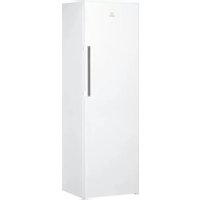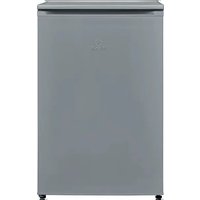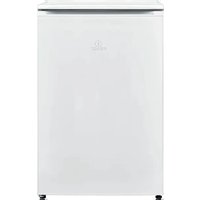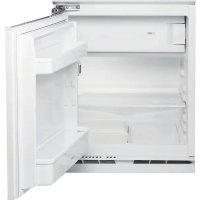
INBUF011 - Freezer INDESIT - Free user manual and instructions
Find the device manual for free INBUF011 INDESIT in PDF.


| Technical specifications | INDESIT INBUF011 freezer, 100-liter capacity, energy class A+, dimensions: 85 x 55 x 58 cm. |
|---|---|
| Usage | Static cold operation, adjustable temperature between -18C and -24C, ideal for long-term food preservation. |
| Maintenance and repair | Manual defrost recommended, regular cleaning of door seals, temperature level checks. |
| Safety | Door locking system, protection against electrical overloads, compliant with current safety standards. |
| General information | Weight: 35 kg, 2-year warranty, noise level: 42 dB, white color. |
Frequently Asked Questions - INBUF011 INDESIT
User questions about INBUF011 INDESIT
0 question about this device. Answer the ones you know or ask your own.
Ask a new question about this device
Download the instructions for your Freezer in PDF format for free! Find your manual INBUF011 - INDESIT and take your electronic device back in hand. On this page are published all the documents necessary for the use of your device. INBUF011 by INDESIT.
USER MANUAL INBUF011 INDESIT
Wait at least two hours, after the installation, before connecting the appliance to the power supply. Connect the appliance to the power supply it starts the operation automatically. The ideal storage temperatures for the food are preset in the factory.
After turning the appliance on, you must wait for 4-6 hours for the correct storage temperature to be reached for a normally filled appliance. Position the antibacterial anti-odour filter in the fan as demonstrated in the filter packaging (if available). If the audible signal sounds, it means that the temperature alarm has intervened: press the button to switch off the acoustic alarms.
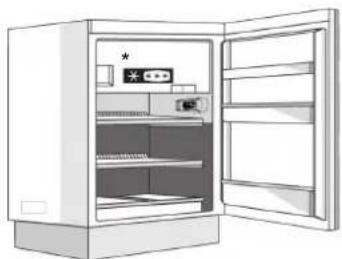
CONTROL PANEL
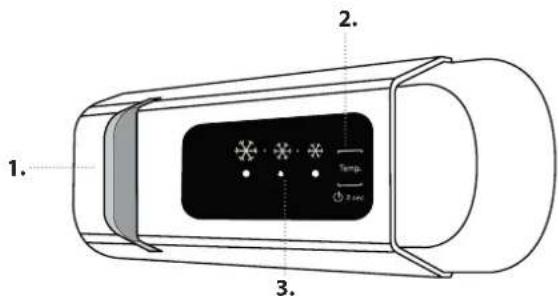
- LED Light
- On/Stand-by
- Freezer and refrigerator compartment temperature button

ON/STAND-BY
Press the button for 3 seconds to turn the appliance off. In Stand-by mode the light in the refrigerator compartment does not turn on. Press the button again briefly to reactivate the appliance.
Note: this does not disconnect the appliance from the power supply.
FREEZER AND REFRIGERATOR COMPARTMENT TEMPERATURE
The three LED indicators indicate the refrigerator compartment set temperature. It is possible to set a different temperature of the appliance with the button.
Recommended setting: MEDIUM
The following adjustments are possible:
LEDs lit Set temperature
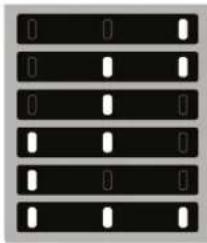
High (less cold)
Medium-high
Medium
Medium-low
Low (colder)
Fast cool

To avoid food waste, please refer to the recommended setting and storage times found in the online user manual.
HOW TO STORE FRESH FOOD AND BEVERAGES
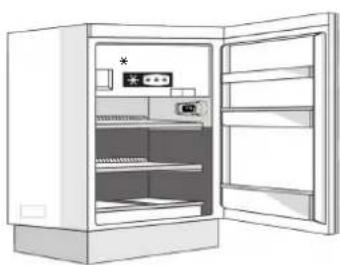
Legend

TEMPERATE ZONE Suggested for storage of tropical fruit, cans, drink, eggs, sauces, pickles, butter, jam
COOL ZONE Suggested for storage of cheese, milk, daily food, delicatessen, yoghurt
COOLEST AREA Suggested for storage of cold cuts, desserts, meat and fish
- Available only on certain models
REFRIGERATOR COMPARTMENT
Light system (depending on model)
| This product contains a light source of energy efficiency class G | This product contains 4 lateral light sources of energy efficiency class F |
| This product contains a light source of energy efficiency class G | This product contains 4 lateral light sources of energy efficiency class F and a top light source of energy class G |
| This product contains a top light source of energy efficiency class G |
FREEZER COMPARTMENT
Freezing fresh food
- It is advisable to set the temperature colder or turn on the Fast Freeze/ Fast Cool* at least four hours before removing the food from the freezer compartment, to prolong the preservation of the food during the defrosting phase.
- To defrost, unplug the appliance and remove the drawers. Leave the door open to allow the frost to melt. To prevent the water from escaping during the defrost, it is advised that you place an absorbent cloth on the bottom of the freezer compartment and wring it out regularly.
- Clean the inside of the freezer compartment and dry it carefully.
GENERAL INFORMATION
The drawers, baskets and shelves should be kept in their current position unless otherwise specified in this quick guide. The light system inside the refrigerator compartment uses LED lights, allowing for better lighting than with traditional light bulbs, as well as for very low energy consumption.
- Turn the appliance back on and put the food back inside. To remove the frost on the STOP FROST* accessory, follow the CLEANING.
Ice cubes*
Fill 2/3 of the ice tray with water and put it back in the freezer compartment. Do not, under any circumstances, use sharp or pointed objects to remove the ice.
The quantity of fresh food that can be frozen in a specific time period is indicated on the rating plate.
Load limits are determined by baskets, flaps, drawers, shelves etc. Make sure that these components can still close easily after loading.
Doors and lids of the refrigeration appliance should be removed before disposal in the landfill, to avoid children or animals getting trapped inside.
- Available only on certain models
What to do if... Possible reasons Solutions
| The control panel is switched off, the appliance does not work. | There may be an appliance power supply problem. | Check that: · there is not a power outage; · the plug is properly inserted in the socket and any bipolar power switch is in the correct position (this enables the power supply to the appliance); · the household electrical system protection devices are efficient; · the power cable is not damaged. |
| The appliance could be in On/stand by mode. | Turn the appliance on by briefly pressing the ① button (see On/Stand-by function). | |
| The inside light does not work. | The light may need to be replace. Malfunction of a technical component. | Disconnect the appliance from the power supply and contact the Technical Assistance Service if you need a replacement. |
| The inside light flashes. Door alarm active. It is activated when the refrigerator compartment door remains open for a prolonged period of time. | To stop the alarm, close the refrigerator door. On reopening the door, check the light works. | |
| The temperature inside the compartments is not low enough. | There could be various causes (see "Solutions"). | Check that: · the door closes properly; · the appliance is not installed near a heat source; · the set temperature is adequate; · the circulation of air through the vents at the bottom of the appliance is not obstructed (see installation section). |
| There is water on the bottom of the refrigerator compartment. | The defrost water drain is blocked. | Clean the defrosting water drain (see section "Cleaning and Maintenance"). |
| Excessive amount of frost in the freezer compartment. | The door to the freezer compartment is not closed properly. | Check that there is nothing preventing the door from closing properly. · Defrost the freezer compartment. · Make sure the appliance has been correctly installed. |
| The front edge of the appliance that the door gaskets seal against is hot. | This is not a defect. It prevents condensation from forming. | No solution is necessary. |
| One or more green symbols are flashing continuously and it is not possible to change the temperature set. | Malfunction alarm. The alarm indicates a fault in a technical component. | Contact Technical Assistance Service. |
| The temperature of the refrigerator compartment is too cold. | · The set temperature is too cold. · A large amount of fresh food may have been placed in the freezer compartment. | · Try to set a less cold temperature. · If fresh food has been placed in the freezer compartment, wait until it has fully frozen. · Turn off the fan (if present) following the procedure described in the paragraph "FAN". |
Available only on certain models
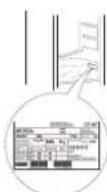
Note: If the chiller declaration is present in the rating plate (see image below), the declaration applies only to standard EN 62552:2013 valid until February 28th, 2021.
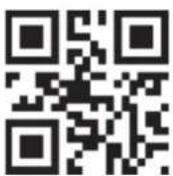
Policies, standard documentation, ordering of spare parts and additional product information can be found by:
- Visiting our website docs.indesit.eu and parts-selfservice.whirlpool.com
Using QR Code
- Alternatively, contact our After-sales Service (See phone number in the warranty booklet). When
contacting our After-sales Service, please state the codes provided on your product's identification plate.
The model information can be retrieved using the QR-Code indicated on the energy label. The label also includes the model identifier that can be used to consult the https://eprel.ec.europa.eu database portal.
1ÈRE UTILISATION
a a a a a a a a a a a a a a a a a a a a a a a a a
jll piai jai jai
1
a jlll g aabla
alilal alibaii
y
suii iibii
aulll aabsl gagall plalgl jllg jn jj 5g
j
a
Ae Cj jaoa a
| ### | ### | ### |
| ### | ### | ### |
| ### | ### | ### |
| ### | ### | ### |
...Laoie Jauil Laiiiaal
aalalalalalalalalalalalalalalalalalalalalalal
https://eprel.ec.europa.eu