208066 - Scale Louis Tellier - Free user manual and instructions
Find the device manual for free 208066 Louis Tellier in PDF.


| Product type | Precision scale |
| Brand | Louis Tellier |
| Model | 208066 |
| Maximum capacity | 6 kg / 12 kg / 30 kg / 50 kg |
| Minimum capacity | 10 g / 20 g / 40 g / 100 g |
| Accuracy | 0.5 g / 1 g / 2 g / 5 g |
| Units of measurement | kg / Oz |
| Dimensions (L x W x H) | 320 x 300 x 110 mm |
| Platform dimensions | 300 x 240 mm |
| Display dimensions | 124 x 36 mm |
| Backlit display | Yes |
| Power supply | 4 R14 batteries (size C) or DC 6 V - 100 mA adapter (not included) |
| Battery life | Approximately 80 hours in continuous use |
| Automatic shut-off | Yes, after 6 minutes of inactivity |
| Protection rating | IP53 |
| Operating conditions | Temperature from 5 °C to 35 °C, humidity < 70 % |
| Storage conditions | Temperature from -10 °C to 60 °C, humidity < 85 % |
| Weight | 3.1 kg |
| Certifications | EN 61326-1/2013, EN 61000-6-1/2019, EN 61000-6-3/2021 |
| Main functions | Weighing, manual/automatic tare, weight alarm, calibration |
| Maintenance and cleaning | Soft cloth slightly dampened with mild detergent |
| Low battery indication | Display shows "Lo" |
| Commercial use | Prohibited (not compliant for commercial transaction) |
Frequently Asked Questions - 208066 Louis Tellier
User questions about 208066 Louis Tellier
0 question about this device. Answer the ones you know or ask your own.
Ask a new question about this device
Download the instructions for your Scale in PDF format for free! Find your manual 208066 - Louis Tellier and take your electronic device back in hand. On this page are published all the documents necessary for the use of your device. 208066 by Louis Tellier.
USER MANUAL 208066 Louis Tellier
USER MANUAL NOTICE D'UTILISATION
ELECTRONIC SCALE BALANCE ELECTRONIQUE
N3671
N3672
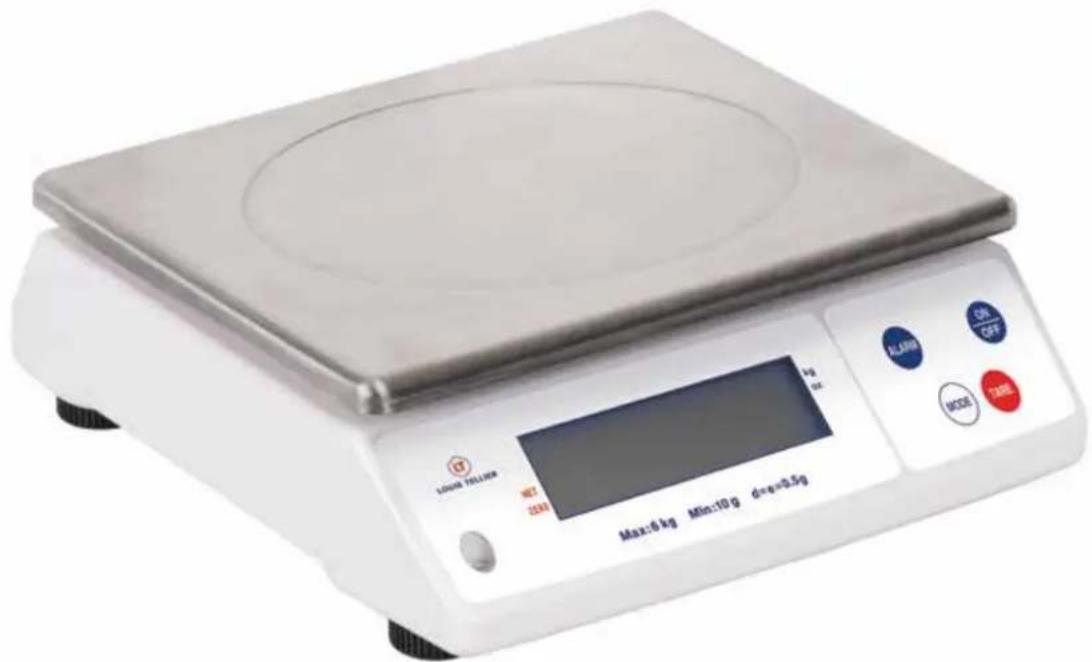
telecharger la notice

| weighing - maximum capacity 6 kg | 12 kg 30 kg 50 kg | |||
| weighing - minimum capacity 10 g | 20 g 40 g 100 g | |||
| accuracy 0,5 g 1 g 2 g 5 g | ||||
| weighing unit | kg / Oz | |||
| dimensions (L x l x h) | 320 x 300 x 110 mm | |||
| platform size | 300 x 240 mm | |||
| LCD size | 124 x 36 mm | |||
| backlight display | YES | |||
| power source | 4 x R14 C - size battery or adaptateur type DC 6V-100mA (not supplied) | |||
| battery life | approximately 80 hours continuously | |||
| shut off | automatic or manual | |||
| protection class | IP53 | |||
| conditions of use | temperature from 5°C to 35°C - humidity < 70% | |||
| storage conditions | temperature from -10°C to 60°C - humidity < 85% | |||
| weight | 3,1 kg | |||
| certification | EN 61326-1/2013 EN 61000-6-1/2019 EN 61000-6-3/2021 | |||
KEY RECOMMENDATIONS
PLEASE READ THE INSTRUCTIONS FOR USE BEFORE ANY USE TO OBTAIN CORRECT OPERATION AND WORK SAFELY
INSTRUCTIONS FOR USE TO BE KEPT FOR REFERENCE AT ANY TIME
DO NOT LEAVE THE SCALE WITHIN THE REACH OF CHILDREN USE THE SCALE ON A FLAT, STABLE AND UNOBSTRUCTED SURFACE DO NOT IMMERSE THE SCALE IN WATER OR ANY OTHER LIQUID
DO NOT PLACE ANYTHING ON THE SCALE WHEN NOT IN USE TO PREVENT DAMAGE PERMANENTLY THE WEIGHT SENSOR
AVOID SHOCKS
DO NOT WORK IN A PROLONGED WAY AT EXTREME TEMPERATURES
DUST, DIRT, MOISTURE, VIBRATION, DRAFTS AND PROXIVITY TO OTHERS ELECTRONIC EQUIPMENT CAN ALL HAVE A NEGATIVE EFFECT ON RELIABILITY AND ACCURACY OF THE SCALES
WASH WITH A LIGHTLY IMPREGNATED SOFT CLOTH WITH A NEUTRAL DETERGENT
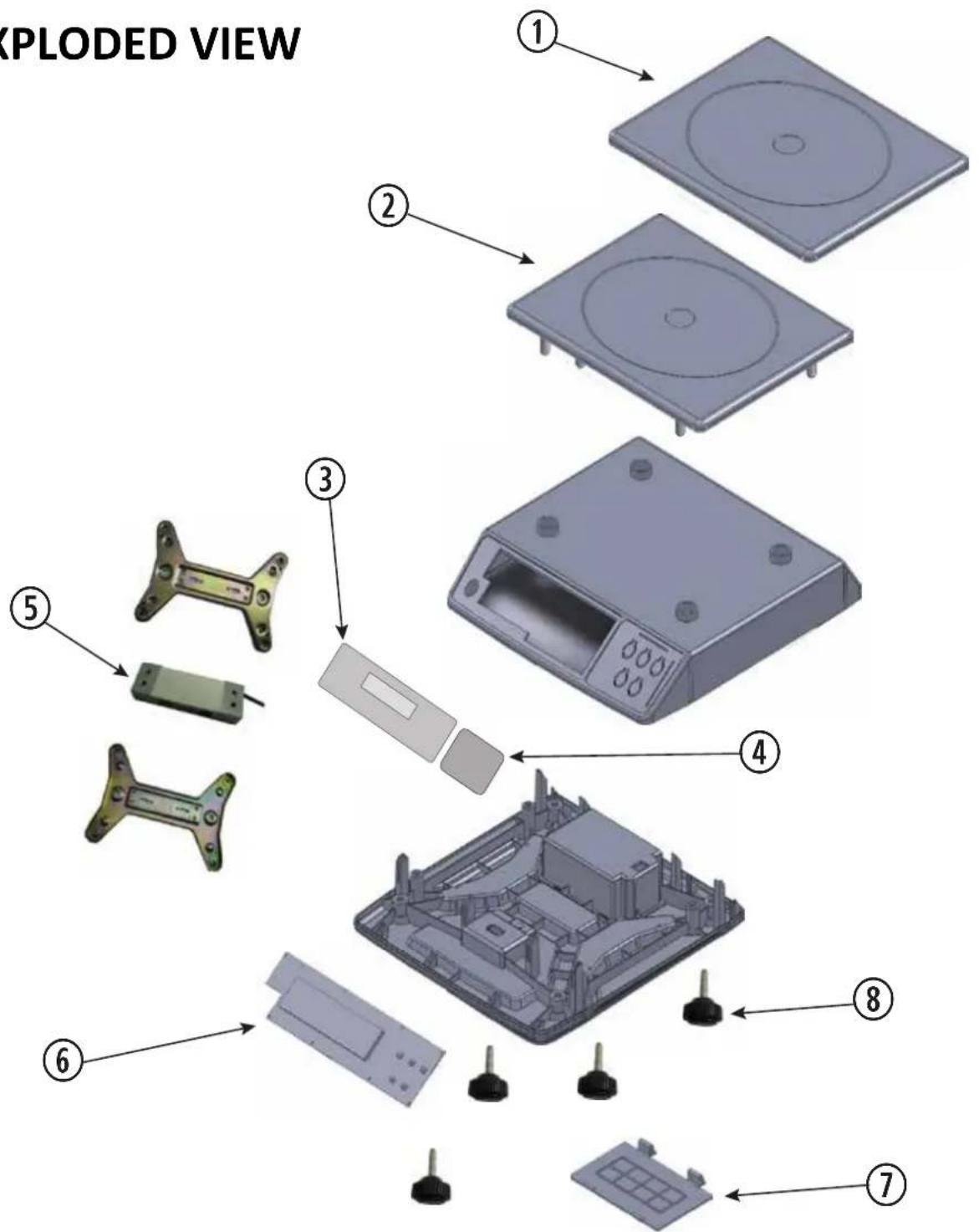
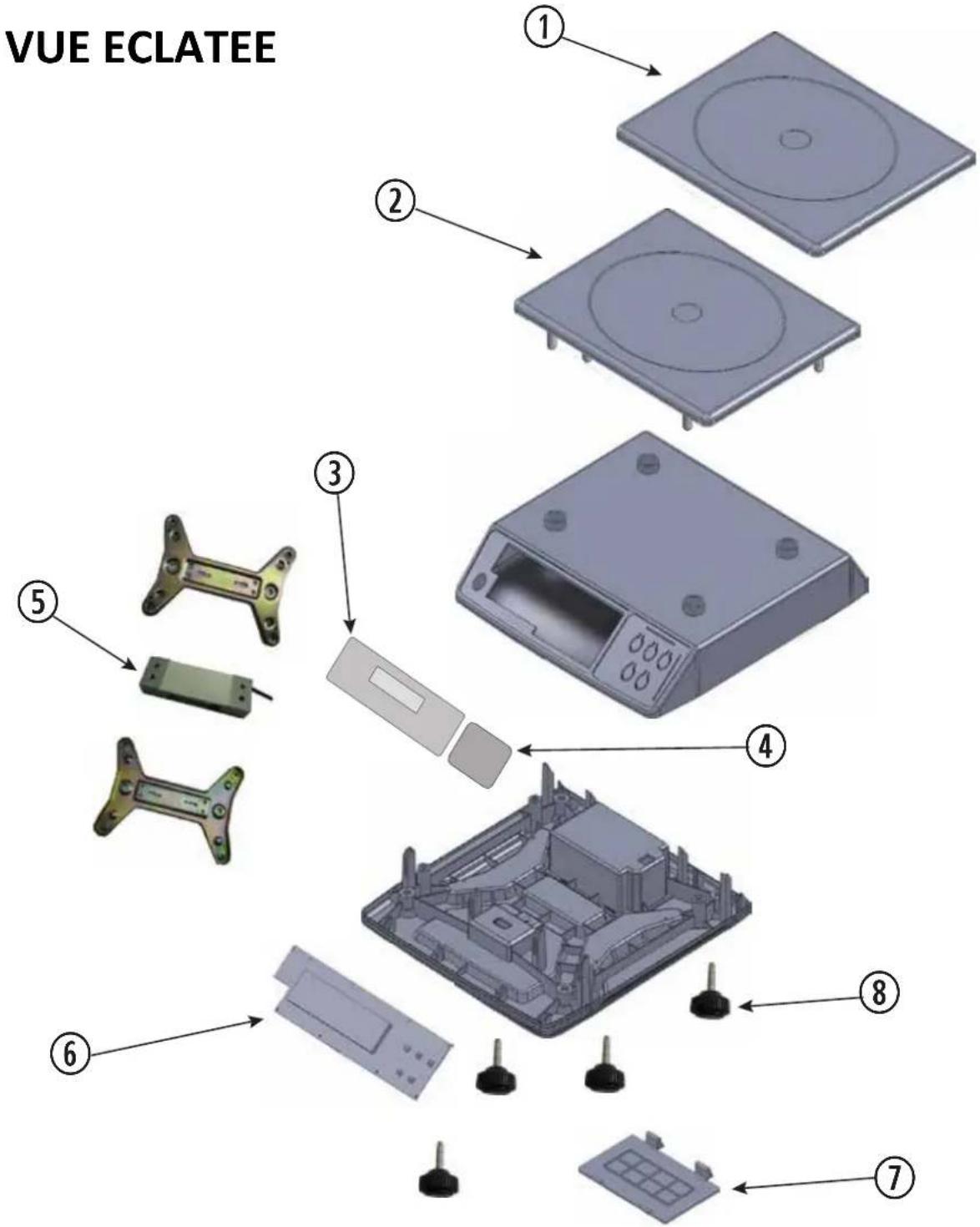
EXPLODED VIEW
| No. | DESCRIPTION | REFERENCE PIECE | |||
| N3670 (6 kg) N3671 (12 kg) N3672 (30 kg) | N3673 (50 kg) | ||||
| 1 | STAINLESS STEEL UPPER TRAY | N3670-PLTX | |||
| 2 | PLASTIC TRAY | N3670-P | |||
| 3 | FRONT PANEL | N3670-PP | N3671-PP | N3672-PP | N3673-PP |
| 4 | KEYBOARD | N3671-PK | |||
| 5 | LOAD CELL | N3670-CAP | N3673-CAPN | N3672-CAPN | 3671-CAP |
| 6 | PCB CARD + LCD SCREEN | N3670-PCB | N3671-PCB | N3672-PCB N | 3673-PCB |
| 7 | BATTERY COVER | N3670-CP | |||
| 8 | set of 4 FOOT | N3670-PI4 | |||
| not shown | POWER ADAPTOR | N3670-A / N3670-A-UK (UK plug) | |||
ASSEMBLY
Insert the 4 batteries in their recess under the device.
Place the scale on a flat and stable surface.
Adjust the feet of the scale so that the bubble on the left is centered.
Install the plate on the scale (the feet of the plate must be inserted in the recesses provided for that purpose).
The scale is ready for use
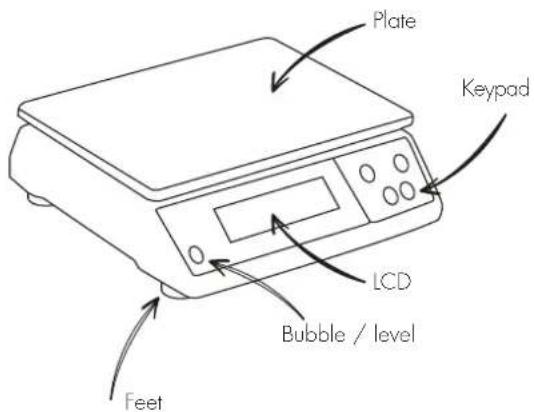
SCREEN-PANELCONTROL
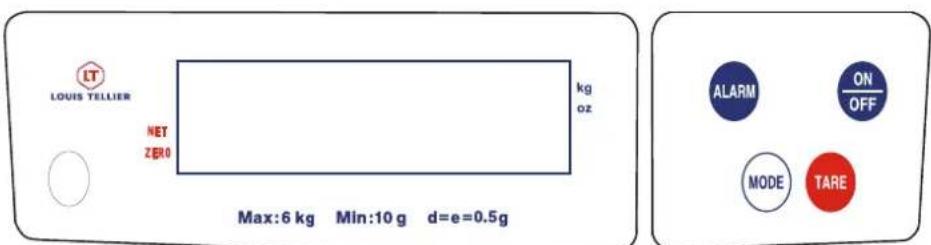

on/off button

Select button unit of measure/ kg or Oz

To deduct a weight from the weighing (container for example)

To activate the weight alarm function
NOT AUTHORISED FOR COMMERCIAL USE
USE
Turn on the scale by pressing the

When 0.0000 or 0 . 0.0 appears on the screen, the cursor flashes facing the unit of measures kg or Oz according and a circle is positioned on the face screen to "ZERO"
The scale is ready for use.
CAUTION : when turning on the scale, unit of measure displays on the screen is the last used. The unit of measurement can be changed at any time by pressing
WEIGHING
Press the MODE button to select the desired unit of measure (kg/Oz).
The cursor «▶» blinks and appears in front of the selected unit of measure.
Place the item(s) to be weighed on the plate.
The screen displays the weight in the selected unit.
CAUTION: If the screen displays "---", there is an overload. The maximum weight is exceeded. Immediately remove the item from the scale.
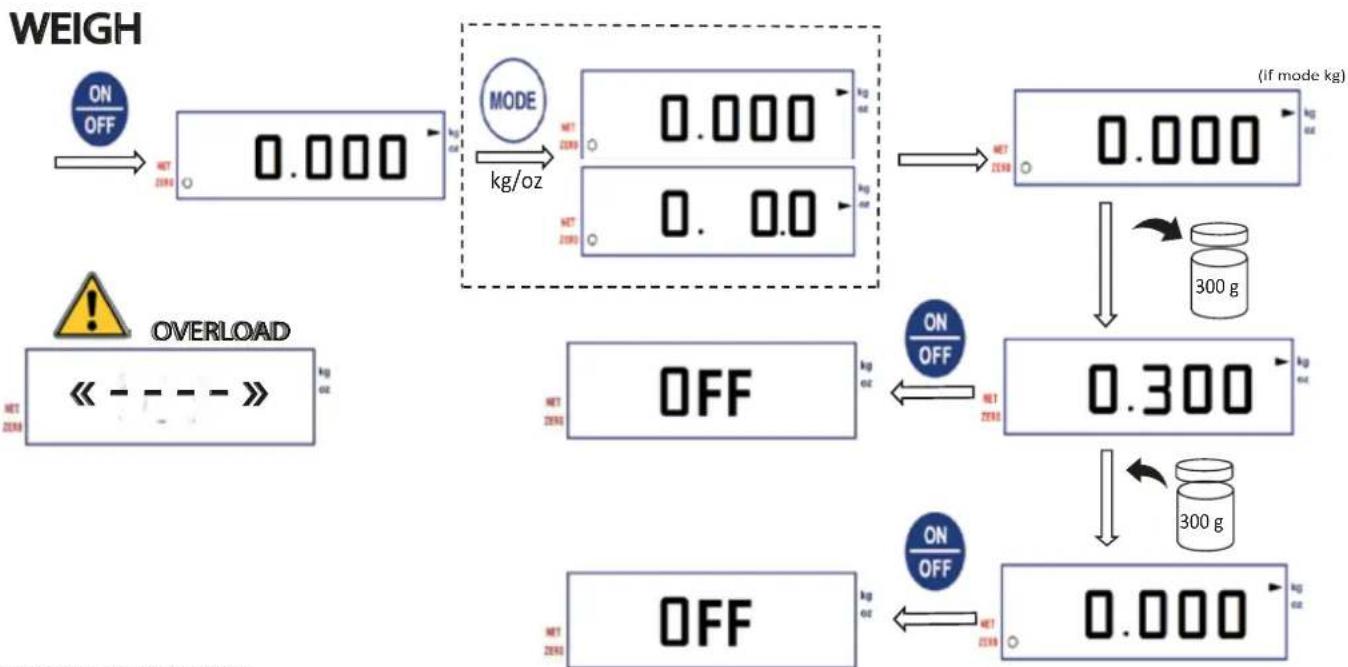
download sheet «weigh»
TARE
Tare enables the weight of a vessel or container to be subtracted during weighing.
Once the tare has been made, fill the container with the items to be weighed. The screen then displays the exact weight of the items.
The tare can be done automatically or manually.
Automatically :
Place the empty container on the plate THEN turn on the scale by pressing

The screen displays 0.0000 or 0 . 0.0 according unit of measurement.
The tare is performed
Manually:
Turn on the scale by pressing ON Place the empty container on the tray, the weight of the container is displayed. Press the button TARE the screen displays 0.0000 or 0.0.0 according the unit of measurement. The tare is performed.
Note: the weighing unit can be selected before or after taring in manual mode, after taring in automatic mode; the unit of measure can be changed at any time by pressing
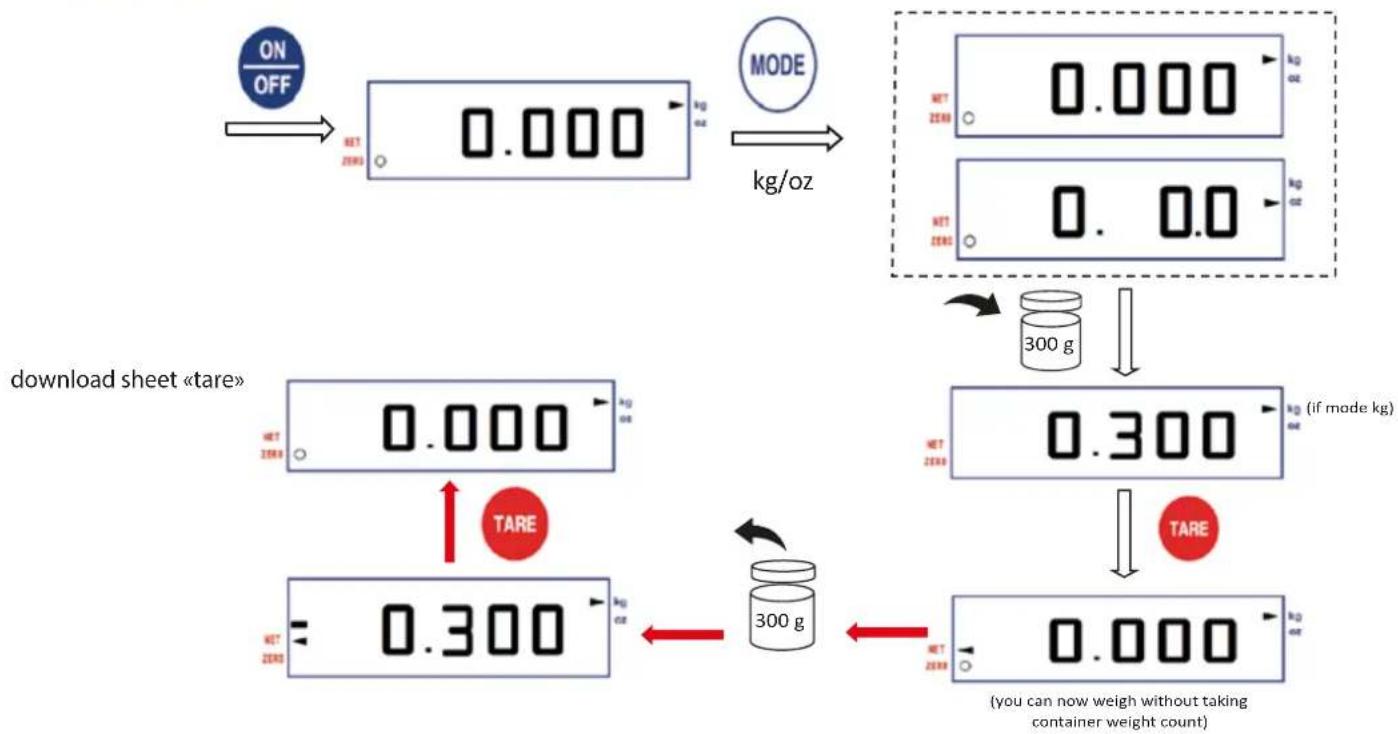
TARE MANUALLY
ATTENTION: We advise you, to avoid any error, to cancel the tare at the end of weighing. 2 options ( ① ou ② for manually mode / ② for automatically mode):
1 Remove the container. Its weight is displayed on the screen (the - sign appears on the left). Press on TARE to cancel the tare. The screen displays 0.000 .(see procedure above, follow the
② Turn off the scale by pressing ON. The tare value is not stored.
ADVICE: When the scale shows an empty negative weight, check that the tare has been cancelled before weighing another item.
The tare is not stored when the balance is turned off.
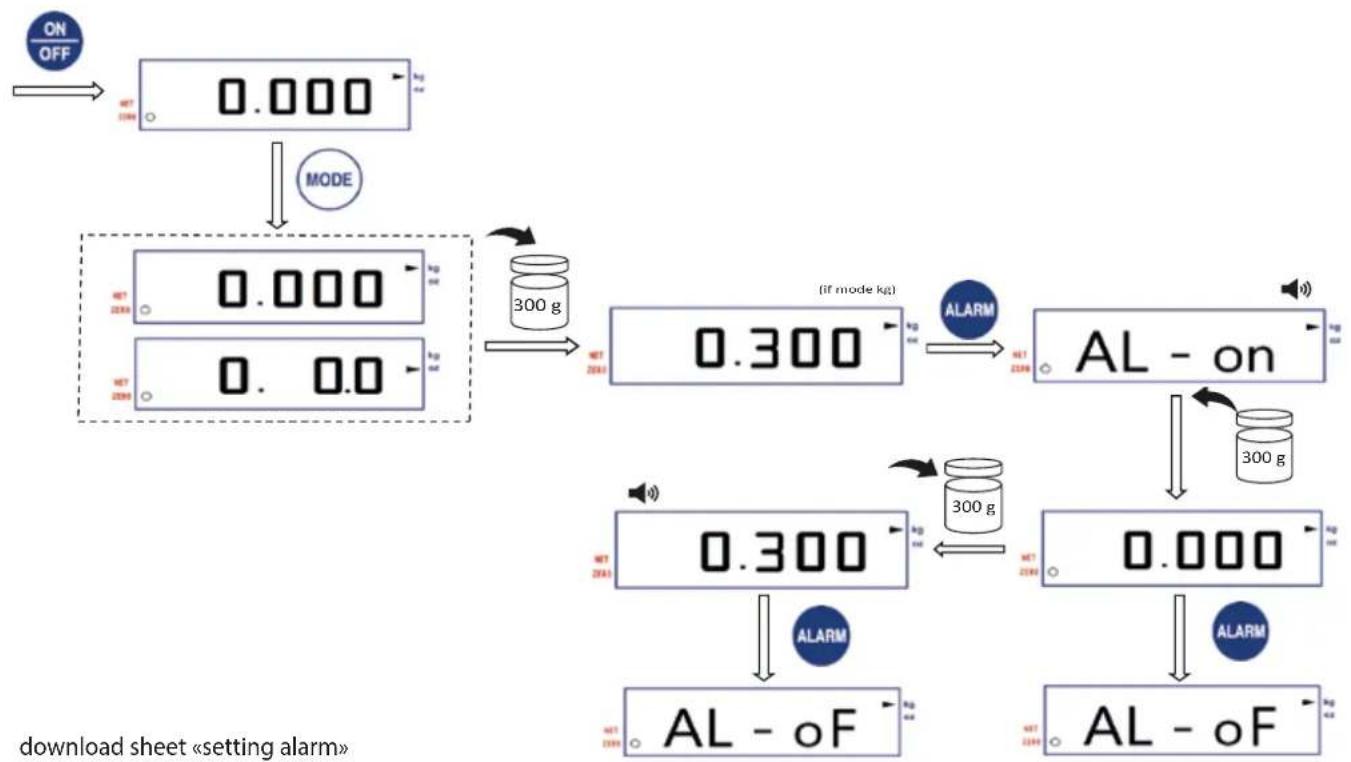
SETTING THE ALARM
The alarm function allows the scale to store a set weight. When this weight is reached, one beep sounds
Turn on the scale. Select the desired unit of measurement with the MODE button
Place the reference weight on the plate.
Press the ALARM button. The screen displays "AL - on" then beeps are sounded
Remove the weight from the scale. The reference weight is stored.
Place new items on the scale :
If the weight approaches (80%) the maximum value of the stored reference weight, spaced beep series sounds.
If the weight reaches or exceeds the maximum value of the stored reference weight, short beep series sounds.
To disable this function, press the ALARM button. The screen displays "AL - of" indicating the end of storage of the reference weight.
SETTING ALARM
CALIBRATION
Regular calibration is required to ensure reliability and accuracy weighing.
1-Balance off,press and hold TARE button
2- Wait for the screen to display a value
3- Press the button TARE again, the screen displays "2Ero" and then again a value
4- Depending on the displayed value (eg 5000), put the same value (ie 5kg/5000g ) on the plate
5- Press TARE, after 2 seconds the screen displays «CAL» then «PASS»
6- Remove the weight deposited on the plate and turn off the scale
7-Calibration is performed
CALIBRATION
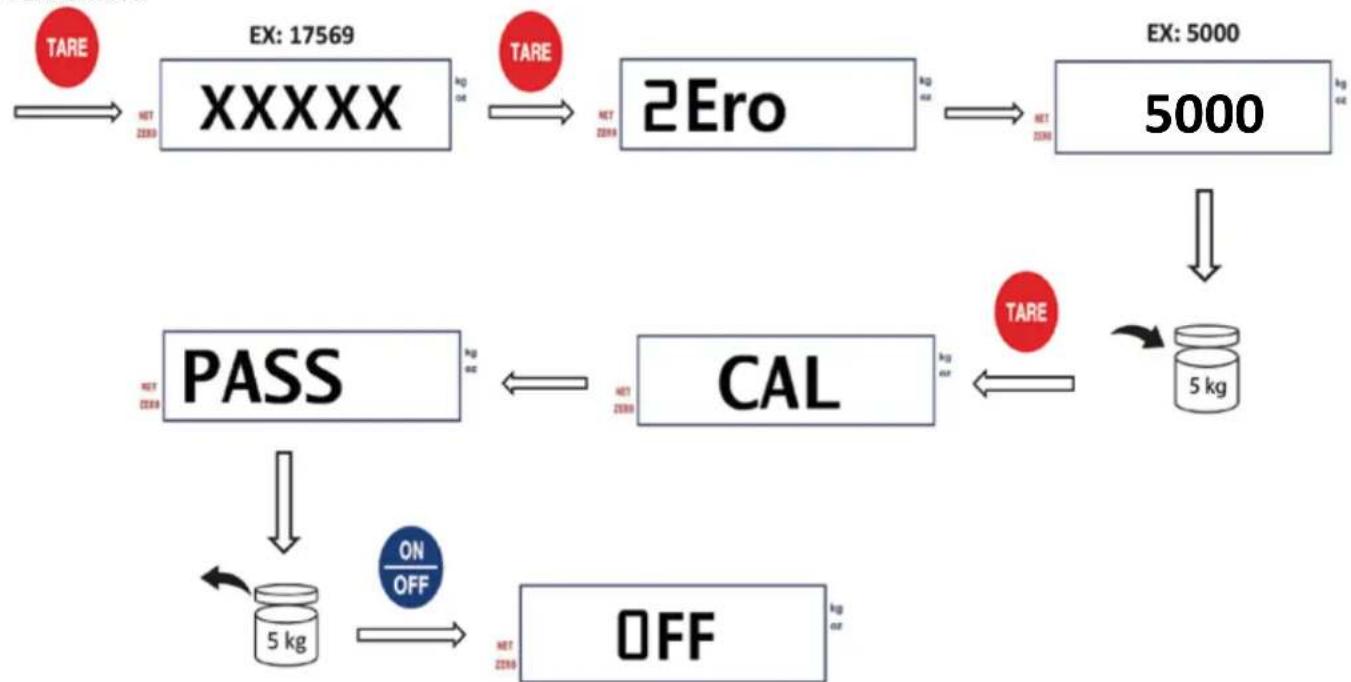
Press & hold
download sheet «calibration»
BATTERY LIFE
When the battery level is too low, the screen displays « Lo ». They must be changed.
If not used, the balance will automatically turn off after 6 minutes regardless of the energy used (batteries or main power)
CLEANING
Clean with a soft cloth lightly impregnated with a neutral detergent.
CONVENIENT
The different QR Codes in this manual allow you to download each individual card linked to a function (weighing, calibration...) for display possible at the workplace.
CHARACTERISTIQUES TECHNIQUES
RECOMMANDATIONS IMPORTANTES
MERCI DE LIRE LE MODE D'EMPLOI AVANT Toute UTILISATION POUR OBTENIR UN FONCTIONNEMENT CORRECT ET TRAVAILIER EN Toute SECURITE
MODE D'EMPLOI A CONSERVER AFIN DE S'Y REPORTER A TOUT MOMENT
NE PAS LAISSER LA BALANCE A LA PORTEE DES ENFANTS
UTILISER LA BALANCE SUR UNE SURFACE PLANE, STABLE ET DEGAGEE
NE PAS IMMERGER LA BALANCE DANS L'EAU OU TOUT AUTRE LIQUIDE
NE RIEN POSER SUR LA BALANCE QUAND ELLE N'EST PAS EN SERVICE POUR EVITER D'ENDOMMAGER DURABLEMENT LE CAPTEUR DE POIDS
EVITER LES CHOCS
NE PAS TRAVAILIER DE MANIÈRE PROLONGEE A DES TEMPERATURES EXTREMES
LA POUSSIÈRE, LA SALETE, L'HUMIDITE, LES VIBRATIONS, LES COURANTS D'AIR ET LA PROXIMATE D'AUTRES ÉQUIPEMENTS ÉLECTRONIQUES PEUVENT TOUS AVOIR UN EFFET NÉGATIF SUR LA FIABILITÉ ET LA PRECISION DE LA BALANCE
LAYER AVEC UN CHIFFON Doux LEGEREMENT IMPREGNE AVEC UN DETERGENT NEUTRE
| No. ARTICLE | DESCRIPTION | REFERENCE PIECE | |||
| N3670 | N3671 | N3672 | N3673 | ||
| 1 | PLATEAU INOX | N3670-PLTX | |||
| 2 | PLATEAU PLASTIQUE | N3670-P | |||
| 3 | PANNEAU FRONTAL | N3670-PP | N3671-PP | N3672-PP | N3673-PP |
| 4 | PANNEAU DE CONTROLE | N3671-PK | |||
| 5 | CAPTEUR DE POIDS | N3670-CAP | N3672-CAP | N36713GARP | |
| 6 | CARTE ELECTRONIQUE + ECRAN LCD | N3670-PCB | N3671-PCB | N3672-PCB | N3673-PCB |
| 7 | COUVERCLE COMPARTIMENT PILES | N3670-CP | |||
| 8 | PIED - lot de 4 | N3670-PI4 | |||
| non représenté | ADAPTATEUR SECTEUR | N3670-A / N3670-A-UK (prise UK) | |||
INSTALLATION
- USER MANUAL NOTICE D'UTILISATION
- ELECTRONIC SCALE BALANCE ELECTRONIQUE
- KEY RECOMMENDATIONS
- ASSEMBLY
- SCREEN-PANELCONTROL
- NOT AUTHORISED FOR COMMERCIAL USE
- USE
- WEIGHING
- TARE
- Automatically :
- Manually:
- SETTING THE ALARM
- SETTING ALARM
- CALIBRATION
- Regular calibration is required to ensure reliability and accuracy weighing.
- BATTERY LIFE
- If not used, the balance will automatically turn off after 6 minutes regardless of the energy used (batteries or main power)
- CLEANING
- CONVENIENT
- CHARACTERISTIQUES TECHNIQUES
- RECOMMANDATIONS IMPORTANTES
- INSTALLATION
Brand : Louis Tellier
Model : 208066
Category : Scale