RDH130K - Humidifier Royal Sovereign - Free user manual and instructions
Find the device manual for free RDH130K Royal Sovereign in PDF.


| Product Type | Dehumidifier |
| Brand | Royal Sovereign |
| Model | RDH130K |
| Dehumidification Capacity | 30 pints/day (14.2 L/day) |
| Dimensions (W × D × H) | 358 × 266 × 506 mm |
| Net Weight | 13.5 kg |
| Power Supply | 115 V ~ 60 Hz |
| Power Consumption | 420 W / 4.2 A |
| Refrigerant | R134A |
| Tank Capacity | 4 L |
| Airflow (max/min) | 260 / 220 m³/h |
| Noise Level (max/min) | 52 / 50 dB |
| Humidity Control Range | 35% to 85% RH |
| Main Features | 24h timer, auto-defrost, automatic restart, continuous operation, two fan speeds, filter indicator, full tank indicator |
| Maintenance and Cleaning | Clean filter every 2 weeks; clean tank every few weeks; clean exterior with mild detergent |
| Safety | Automatic shut-off when tank is full or mispositioned; frost protection |
| Spare Parts and Repairability | Air filter (standard ref.), water tank, drain hose (inner diam. ≥ 5/16 in) |
| Warranty | 1 year (parts and labor) |
| Operating Temperature | 5 °C to 35 °C |
| Certification | Energy Star |
Frequently Asked Questions - RDH130K Royal Sovereign
User questions about RDH130K Royal Sovereign
0 question about this device. Answer the ones you know or ask your own.
Ask a new question about this device
Download the instructions for your Humidifier in PDF format for free! Find your manual RDH130K - Royal Sovereign and take your electronic device back in hand. On this page are published all the documents necessary for the use of your device. RDH130K by Royal Sovereign.
USER MANUAL RDH130K Royal Sovereign
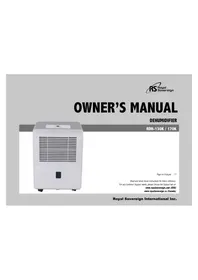
natural_image
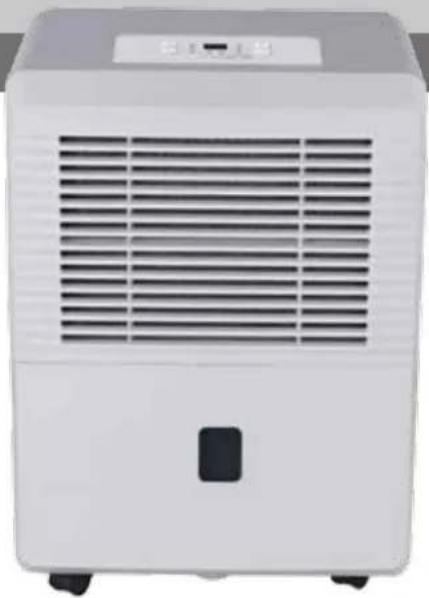
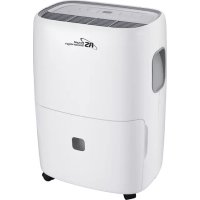
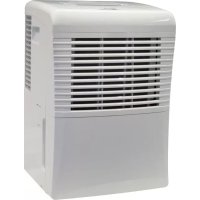
White portable air purifier with ventilation grille and control panel (no visible text or symbols)Page en Français 17
Read and retain these instructions for future reference.
For any Customer Support needs, please choose the Support tab on
www.royalsovereign.com (USA)
www.royalsovereign.ca (Canada)
Royal Sovereign International Inc.
DEHUMIDIFIER
Model RDH-130K / RDH-170K
INTRODUCTION
Thank you for choosing Royal Sovereign to provide you and your family with premium "Air Comfort" solutions for your home, apartment, or office. This Dehumidifier can be set-up in just minutes and if properly maintained, will give you many years of trouble free operation. This manual will provide you with valuable information necessary for the proper care and maintenance for your new appliances. Please take a few moments and read the instructions thoroughly.
Why Dehumidify?
Moisture in the air can lead to mold and mildew leaving a room smelling musty.
Dehumidifiers remove the moisture in the air making it better quality to breathe and protect the furnishings in a room from being damaged.
CONTENTS
Page
Safety Precautions 4
Operation 6
Parts 9
Operation 11
Care And Maintenance 13
Troubleshooting Tips 14
Specification 15
Warranty 16
Contact information 16
To prevent injury to the user or other people and property damage, the following instructions must be followed. Incorrect operation due to ignoring of instructions may cause harm or damage.
• The seriousness is classified by the following indications.
| WARNING | This symbol indicates the possibility of death or serious injury. |
| CAUTION | This symbol indicates the possibility of injury or damage to property. |
- Meanings of symbols used in this manual are as shown below.
| Never do this. | |
| Always do this. |
WARNING
| Do not exceed the rating of the power outlet or connection device.Otherwise, it may cause electric shock or fire due to excess heat generation. | Do not operate or stop the unit by switching on or off the power.It may cause electric shock or fire due to heat generation. | Do not damage or use an unspecified power cord.It may cause electric shock or fire. |
| Do not modify power cord length or share the outlet with other appliancesIt may cause electric shock or fire due to heat generation. | Do not insert or pull out plug with wet hands.It may cause electric shock. | Do not place the unit near a heat source.Plastic parts may melt and cause a fire. |
| Disconnect the power if strange sounds, smell, or smoke comes from it.It may cause fire and electric shock. | You should never try to take apart or repair the unit by yourself.It may cause failure of machine or electric shock. | Before cleaning, turn off the power and unplug the unit.It may cause electrical shock or injury. |
| Do not use the machine near flammable gas or combustibles, such as gasoline, benzene, thinner, etc.It may cause an explosion or fire. | Do not drink or use the water drained from the unit.It contains contaminants and could make you sick. | Do not take the water bucket out during operation.It may cause bucket full protect of the unit and cause electric shock. |

CAUTION
| Do not use the unit in small spaces.Lack of ventilation can cause overheating and fire. | Do not put in places where water may splash onto the unit.Water may enter the unit and degrade the insulation. It may cause an electric shock or fire. | Place the unit on a level, sturdy section of the floor.If the unit falls over, it may cause water to spill and damage belongings, or cause electrical shock or fire. |
| Do not cover the intake or exhaust openings with cloths or towels.A lack of air flow can lead to overheating and fire. | Care should be taken when using the unit in a room with the following persons:Infants, children, elderly people, and people not sensitive to humidity. | Do not use in areas where chemicals are handled.This will cause the unit deterioration due to chemicals and solvents dissolved in the air. |
| Never insert your finger or other foreign objects into grills or openings. Take special care to warn children of these dangers.It may cause electric shock or failure of appliance. | Do not place heavy object on the power cord and take care so that the cord is not compressed.There is danger of fire or electric shock. | Do not climb up on or sit on the unit.You may be injured if you fall or if the unit falls over. |
| Always insert the filters securely. Clean filter once every two weeks.Operation without filters may cause failure. | If water enters the unit, turn the unit off and disconnect the power , contact a qualified service technician.It may cause failure of appliance or accident. | Do not place flower vases or other water container on top of the unit.Water may spill inside the unit, causing insulation failure and electrical shock or fire. |
Electrical Information
- A nameplate is located at the back of the unit and contains electrical and technical data.
- Be sure the unit is properly grounded. To minimize shock and fire hazards, proper grounding is important.
The power cord is equipped with a three-prong grounding plug for protection against shock hazards. - Your unit must be used in a properly grounded wall receptacle. If the wall receptacle you intend to use is not adequately grounded or protected by a time delay fuse or circuit breaker, have a qualified electrician install the proper receptacle.
- Ensure the receptacle is accessible after the unit installation.
- Do not use extension cords or an adapter plugs with this unit. However, if it is necessary to use an extension cord, use an approved Dehumidifier extension cord only (available at most local hardware stores).
• To avoid the possibility of personal injury, always disconnect the power supply to the unit, before installing and/or servicing.
Operation
Control Panel
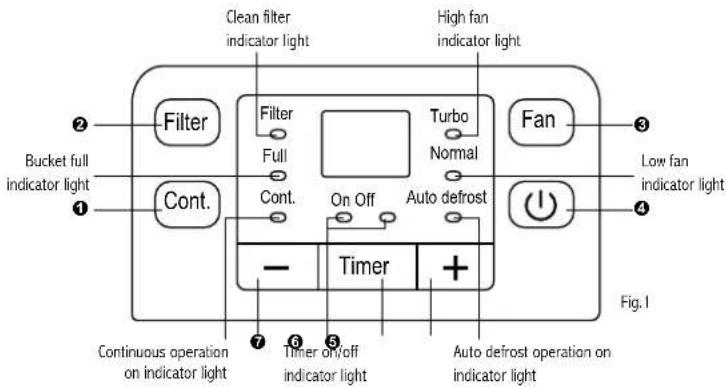
NOTE: The control panel of the unit purchased may be slightly different as there are slight variations depending on the model.
6
Control Panel
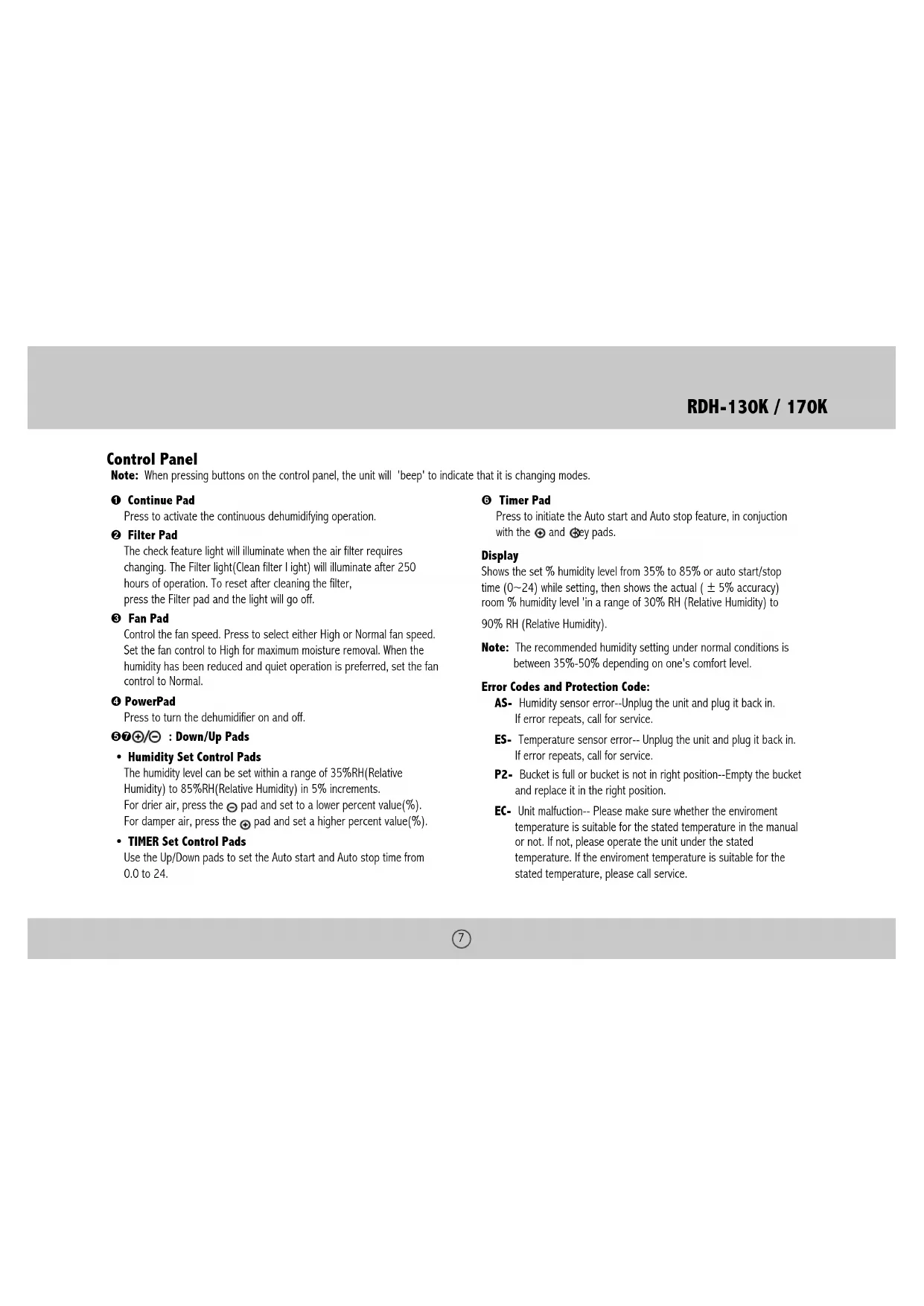
Note: When pressing buttons on the control panel, the unit will 'beep' to indicate that it is changing modes.
① Continue Pad
Press to activate the continuous dehumidifying operation.
② Filter Pad
The check feature light will illuminate when the air filter requires changing. The Filter light(Clean filter light) will illuminate after 250 hours of operation. To reset after cleaning the filter, press the Filter pad and the light will go off.
③ Fan Pad
Control the fan speed. Press to select either High or Normal fan speed. Set the fan control to High for maximum moisture removal. When the humidity has been reduced and quiet operation is preferred, set the fan control to Normal.
④ PowerPad
Press to turn the dehumidifier on and off.
⑤⑦⊕/⊖ : Down/Up Pads
• Humidity Set Control Pads
The humidity level can be set within a range of 35%RH(Relative Humidity) to 85%RH(Relative Humidity) in 5% increments. For drier air, press the ⊙ pad and set to a lower percent value(%). For damper air, press the ⊕ pad and set a higher percent value(%).
• TIMER Set Control Pads
Use the Up/Down pads to set the Auto start and Auto stop time from 0.0 to 24.
⑥ Timer Pad
Press to initiate the Auto start and Auto stop feature, in conjunction with the ⊕ and Ⓧ key pads.
Display
Shows the set % humidity level from 35% to 85% or auto start/stop time (0\~24) while setting, then shows the actual (± 5% accuracy) room % humidity level 'in a range of 30% RH (Relative Humidity) to 90% RH (Relative Humidity).
Note: The recommended humidity setting under normal conditions is between 35%-50% depending on one's comfort level.
Error Codes and Protection Code:
AS- Humidity sensor error--Unplug the unit and plug it back in. If error repeats, call for service.
ES- Temperature sensor error-- Unplug the unit and plug it back in. If error repeats, call for service.
P2- Bucket is full or bucket is not in right position--Empty the bucket and replace it in the right position.
EC- Unit malfunction-- Please make sure whether the environment temperature is suitable for the stated temperature in the manual or not. If not, please operate the unit under the stated temperature. If the environment temperature is suitable for the stated temperature, please call service.
Other Features
Bucket Full Light
Glows when the bucket is ready to be emptied, or when the bucket is removed or not replaced in the proper position.
Auto Shut Off
The shuts off after 30 seconds when the bucket is full, or when the bucket is removed or not replaced in the proper position.
When the setting humidity is reached, the unit will be shut off automatically. For some models, the fan motor will continue operating.
Auto Defrost
When frost builds up on the evaporator coils, the compressor will cycle off and the fan will continue to run until the frost disappears.
Wait 3 Minutes Before Resuming Operation
After the unit has stopped, it can not be restart operation in the first 3 minutes. This feature is designed to protect the unit from possible damage.
Operation will automatically start after 3 minutes.
Check Filter Feature
The system starts to count the time once the fan motor operates. The check filter feature can be only activated when the accumulated operation time achieves 250 hours or more. The Reset light(Clean filter indicator light) flashes at one time per second, after finishing clean the air filter, press the Filter pad and the Reset light(Clean filter indicator light) goes off.
Auto-Restart
If the unit breaks off unexpectedly due to the power cut, it will restart with the previous function setting automatically when the power resumes.
Setting The Timer
- When the unit is on, first press the Timer button, the Timer Off indicator light illuminates. It indicates the Auto Stop program is initiated. Press it a second time to turn on the indicator light indicating that the auto feature has been set.
- When the unit is off, first press the Timer button, the TIMER ON indicator light illuminates. It indicates the Auto Start program is initiated. Press it a second time to turn OFF the indicator light indicating that the auto feature has been set.
- Press or hold the UP or DOWN pad to change the Auto time by 0.5 hour increments, up to 10 hours, then at 1 hour increments up to 24 hours. The control will count down the time remaining until start.
- The selected time will register in 5 seconds and the system will automatically revert back to display the previous humidity setting.
- When the Auto start & Auto stop times are set, within the same program sequence, TIMER ON OFF indicator lights illuminate identifying both ON and OFF times are now programmed.
- Turning the unit ON or OFF at any time or adjusting the timer setting to 0.0 will cancel the Auto Start/Stop function.
- When LED display window displays the code of P2, the Auto Start/Stop function will also be cancelled.
PARTS
Front
- Control panel
- Air intake grille
- Air outlet grille
- Air filter (behind the grille)
- Water bucket
- Handle (both sides)
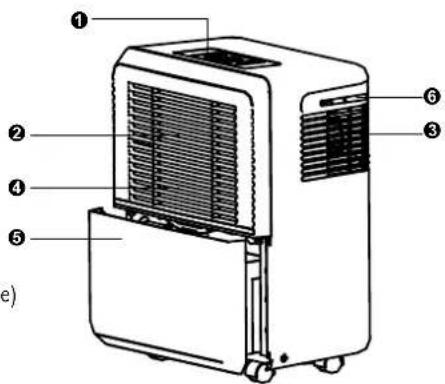
Fig.2
Rear
- Drain hose outlet
- Caster
- Power Cord and plug
- Band (Used only when storing the unit.)
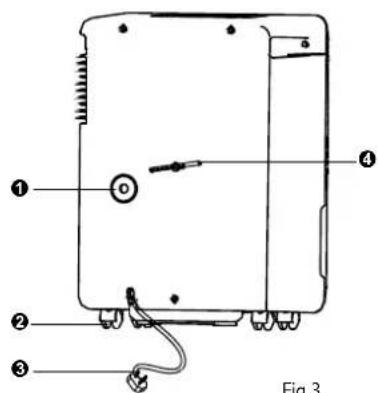
Fig.3
NOTE: The control panel of the unit purchased may be slightly different as there are slight variations depending on model.
Accessories:
Drain hose(1pc)
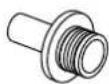
adaptor A(1pc) screw(2pc)


General Use
A dehumidifier operating in a basement will have little or no effect in drying an adjacent enclosed storage area, such as a closet, unless there is adequate circulation of air in and out of the area.
- Do not use outdoors.
- This dehumidifier is intended for indoor residential applications only. This dehumidifier should not be used for commercial or industrial applications.
- Place the dehumidifier on a smooth, level floor strong enough to support the unit with a full bucket of water.
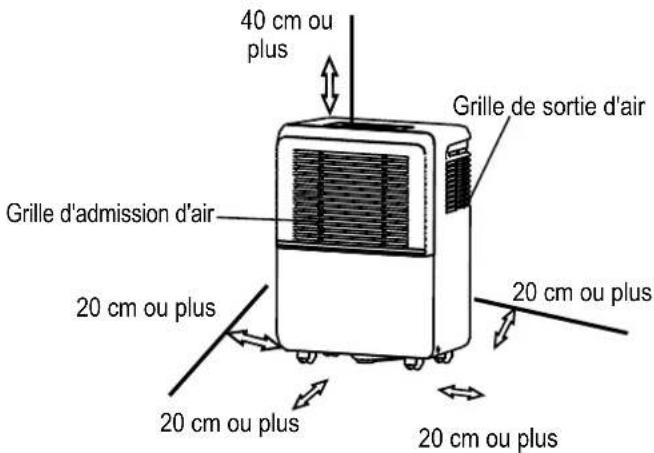
- Allow at least 20cm of air space on all sides of the unit for good air circulation.
- Place the unit in an area where the temperature will not fall below 5^ (41°F). The coils can become covered with frost at temperatures below 5^ (41°F), which may reduce performance.
- Place the unit away from the clothes dryer, heater or radiator.
- Use the unit to prevent moisture damage anywhere books or valuables are stored.
- Use the dehumidifier in a basement to help prevent moisture damage.
- The dehumidifier must be operated in an enclosed area to be most effective.
- Close all doors, windows and other outside openings to the room.
Casters (At four points on the bottom of unit)
- Casters can move freely.
- Do not force casters to move over carpet, nor move the unit with water in the bucket. (The unit may tip over and spill water.)
- When first using the dehumidifier, operate the unit continuously 24 hours.
- This unit is designed to operate with a working environment between 50C/410F and 350C/950F.
- If the unit has been switched off and needs to be switched on again quickly, allow approximately three minutes for the correct operation to resume.
- Do not connect the dehumidifier to a multiple socket outlet, which is also being used for other electrical appliances.
Select a suitable location, making sure you have easy access to an electrical outlet. - Plug the unit into a electrical socket-outlet with earth connection.
- Make sure the Water bucket is correctly fitted otherwise the unit will not operate properly.
NOTE: When the water in the bucket reaches to a certain level, please be careful to move the machine to avoid it falling down.
OPERATION
Removing the collected water
There are two ways to remove collected water.
1. Usethebucket
- When the unit is off, if the bucket is full, the unit will beep 8 times and the Full indicator light will flash, the digital display shows P2.
- When the unit is on, if the bucket is full, the compressor turns off and the fan turns off after 30 seconds for drying the water of the condenser, then the unit will beep 8 times and the Full indicator light will flash, the digital display shows P2.
- Slowly pull out the bucket. Grip the left and right handles securely, and carefully pull out straight so water does not spill. Do not put the tank on the floor because the bottom of the bucket is uneven. Otherwise the bucket will fall and cause the water to spill.
- Throw away the water and replace the bucket. The bucket must be in place and securely seated for the dehumidifier to operate.
- The machine will re-start when the bucket is restored in its correct position.
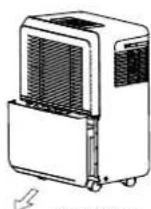
Fig.5 Fig.6
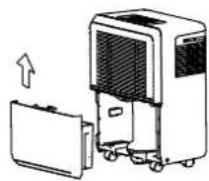
1. Pull out the bucket a little.
- Hold both sides of the bucket with even strength, and pull it out from the unit.
- Pour the water out.
NOTES:
- When you remove the bucket, do not touch any parts inside of the unit. Doing so may damage the product.
- Be sure to push the bucket gently all the way into the unit. Banging the bucket against anything or failing to push it in securely may cause the unit not to operate.
- When you remove the bucket, if there is some water in the unit you must dry it.
2.Continuousdraining
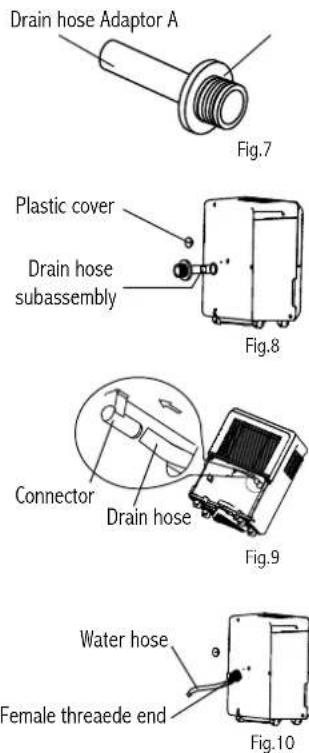
Water can be automatically emptied into a floor drain by attaching the unit with a water hose (Id≥5/16, not included) with a female threaded end (ID:M=1, not included).
• Install the drain hose onto the adaptor A (See Fig.7, placed in the bucket).
- Remove the plastic cover from the back drain outlet of the unit and set aside and remove bucket, then insert the drain hose through the drain outlet of the unit and securely press it into the connector on the front of the unit. (See.Fig.9)
- Tighten the adaptor A and the unit by using two screws (placed in the bucket).
- Install the female threaded end of the water hose into the adaptor A.(See.Fig.10), then lead the water hose to the floor drain or a suitable drainage facility.
- Make sure the hose is secure so there are no leaks.
- Direct the hose toward the drain, making sure that there are no kinks that will stop the water flowing.
- Place the end of the hose into the drain and make sure the end of the hose is level or down to let the water flow smoothly. Do never let it up.
- Place the bucket back in the unit and make sure that it is located correctly.
- Select the desired humidity setting and fan speed on the unit for continuous draining to start.
NOTE: When the continuous drain feature is not being used, remove the drain hose from the outlet.
CARE AND MAINTENANCE
Care and cleaning of the dehumidifier
Turn the dehumidifier off and remove the plug from the wall outlet before cleaning.
1. Clean the Grille and Case
- Use water and a mild detergent. Do not use bleach or abrasives.
- Do not splash water directly onto the main unit. Doing so may cause an electrical shock, cause the insulation to deteriorate, or cause the unit to rust.
- The air intake and outlet grilles get soiled easily, so use a vacuum attachment or brush to clean.
2. Clean the bucket
Every few weeks, clean the bucket to prevent growth of mold, mildew and bacteria. Partially fill the bucket with clean water and add a little mild detergent. Swish it around in the bucket, empty and rinse.
NOTE: Do not use a dishwasher to clean the bucket. After clean, the bucket must be in place and securely seated for the dehumidifier to operate.
3. Clean the air filter
- Remove the filter every two weeks based on normal operating conditions.
- Remove the filter from the top of the unit (See.Fig.11a), or to remove the filter, remove Bucket then pull filter downwards (See.Fig.11b).
- Wash the filter with clean water then dry.
- Re-install the filter,replace Bucket.
CAUTION:
DO NOT operate the dehumidifier without a filter because dirt and lint will clog it and reduce performance.
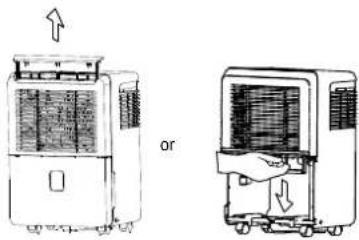
Fig.11bFig.11a
4. When not using the unit for long time periods
• After turning off the unit, wait one day before emptying the bucket.
- Clean the main unit, water bucket and air filter.
• Cover the unit with a plastic bag.
- Store the unit upright in a dry, well-ventilated place.
- Wrap the cord and bundle it with the band(Fig.12).
• Cover the unit with a plastic bag. - Store the unit upright in a dry, well-ventilated place.
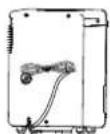
Fig.12
TROUBLESHOOTING TIPS
Before calling for service, review the chart below first yourself.
| Problem What to check | ||
| Unit does not start | Make sure the dehumidifier s plug is pushed completely into the outlet.Check the house fuse/circuit breaker box.Dehumidifier has reached its preset level or bucket is full.Water bucket is not in the proper position. | |
| Dehumidifier does not dry the air as it should | Did not allow enough time to remove the moisture.Make sure there are no curtains, blinds or furniture blocking the front or back of the dehumidifier.The humidity control may not be set low enough.Check that all doors, windows and other openings are securely closed.Room temperature is too low, below 5OC(41OF).There is a kerosene heater or something giving off water vapor in the room. | |
| The unit makes a loud noise when operating | The air filter is clogged.The unit is tilted instead of upright as it should be.The floor surface is not level. | |
| Frost appears on the coils • This is normal. The dehumidifier has Auto defrost feature. | ||
| Water on floor | Hose to connector or hose connection may be loose.Intend to use the bucket to collect water, but the back drain plug is removed. | |
| ES, AS,P2and EC appear in the display | These are error codes and protection code. See theCONTROL PADS ON THE DEHUMIDIFIERsection. | |
SPECIFICATIONS
| Model RDH-130K RDH-150K RDH-170K | |||||
| Performance | Energy star YES YES YES | ||||
| Capacity (Pints/Day) 30 50 70 | |||||
| Electrical | Power input 115V~, 60Hz | 115V~, 60Hz 115V~, 60Hz | |||
| Amps 4.2 5.5 6.9 | |||||
| Watts 420 570 765 | |||||
| Dimension | Unit Dimension (W × D × H) | 14.09 × 10.47 × 19.92 in358 × 266 × 506 mm | 15.59 × 14.02 × 23.74 in396 × 356 × 603 mm | 15.59 × 14.02 × 23.74 in396 × 356 × 603 mm | |
| Packing Dimension (W × D × H) | 15.9 × 12.7 × 21.4 in405 × 323 × 543 mm | 17.8 × 16.4 × 25.8 in453 × 416 × 655 mm | 17.8 × 16.4 × 25.8 in453 × 415 × 655 mm | ||
| Net / Gross Weight | 29.76 / 33.07 lbs (13.5 / 15 kg) | 37.48 / 41.89 lbs (17/19 kg) | 43 / 46.3 lbs (19.5/21kg) | ||
| Function | Refrigeration | R134A | R410A | R410A | |
| Air Flow | M3/H(CFM) | 260/220 | 370/330 | 370/330 | |
| Noise(Rating) | dB | 52/50 | 56/53 | 54/52 | |
| Features | Controls Electric | Electric | Electric | ||
| Tank volume(L) | 4 | 8 | 8 | ||
| Humidity sensor | YES YES YES | ||||
| Auto Restart Function | YES YES YES | ||||
| Filter Check | YES(250h) | YES(250h) | YES(250h) | ||
| 24 Hour On/Off Timer | 24 24 24 | ||||
| Easy-removable Filter | YES YES YES | ||||
| Digital Display on Unit | YES YES YES | ||||
| Filter Type | NORMAL | NORMAL | NORMAL | ||
| Variable Fan Speeds | 2 | 2 | 2 | ||

FULL ONE YEAR WARRANTY
Royal Sovereign warrants each Dehumidifier to be free from defects in material and workmanship. Our obligation under this warranty is limited to the repair or replacement, free of charge, when delivered to an authorized Royal Sovereign service center, of any defective part(s) thereof, other than parts damaged in transit. This warranty is in effect to the original purchaser, for a period of one year from the date of purchase and is not transferable. This warranty shall apply only if the dehumidifier is used on Alternating Current (AC) circuit, in accordance with the factory provided instructions which accompany it.
EXCLUSIONS
This warranty excludes and does not cover defects, malfunctions or failures of your Royal Sovereign Dehumidifiers, caused by repairs by unauthorized persons or service centers, mishandling, improper installation, modification or unreasonable use including incorrect voltage, acts of God, or failure to provide reasonable and necessary maintenance. This warranty is in lieu of any and all expressed warranties. In no event shall Royal Sovereign be liable for consequential or incidental damages. This limitation would not apply if you live in a location that does not permit the exclusion of limitation of incidental or consequential damages. This warranty gives you specific legal rights and you may also have other rights which vary from state to state.
ROYAL SOVEREIGN INTERNATIONAL, INC.
2 Volvo Drive Rockleigh, NJ 07647 USA
TEL: +1) 800-397-1025 FAX: +1) 201-750-1022
www.royalsovereign.com
RS CANADA INC.
5610 Timberlea Blvd, Mississauga Ontario L4W 4M6 CANADA
TEL: +1) 905-461-1095 FAX: +1) 905-461-1096
TF: +1) 866 961-6673
www.royalsovereign.ca
GUIDE DE L'UTILISATEUR
DÉSHUMIDIFICATEUR
RDH-130K / 170K
natural_image
White portable air purifier with ventilation grille and control panel (no visible text or symbols)Page en Français 17
www.royalsovereign.ca (Canada)
Royal Sovereign International Inc.
DEHUMIDIFIER
Model RDH-130K / RDH-170K
INTRODUCTION
Fig.2
Arrière
Fig.3
Fig.11bFig.11a
www.royalsovereign.com
RS CANADA INC.
5610, boul. Timberlea, Mississauga (Ontario) L4W 4M6 CANADA
TÉL.: 1-905-461-1095 TÉLÉC.: 1-905-461-1096
SF:1-866-961-6673
www.royalsovereign.ca
- DEHUMIDIFIER
- INTRODUCTION
- Why Dehumidify?
- CONTENTS
- CAUTION
- Electrical Information
- Operation
- Control Panel
- ① Continue Pad
- ② Filter Pad
- ③ Fan Pad
- ④ PowerPad
- ⑤⑦⊕/⊖ : Down/Up Pads
- • Humidity Set Control Pads
- • TIMER Set Control Pads
- ⑥ Timer Pad
- Display
- Error Codes and Protection Code:
- Other Features
- Bucket Full Light
- Auto Shut Off
- Auto Defrost
- Wait 3 Minutes Before Resuming Operation
- Check Filter Feature
- Auto-Restart
- Setting The Timer
- PARTS
- Front
- Rear
- Accessories:
- General Use
- Casters (At four points on the bottom of unit)
- Removing the collected water
- There are two ways to remove collected water.
- Usethebucket
- NOTES:
- 2.Continuousdraining
- CARE AND MAINTENANCE
- Care and cleaning of the dehumidifier
- Clean the Grille and Case
- Clean the bucket
- Clean the air filter
- CAUTION:
- When not using the unit for long time periods
- TROUBLESHOOTING TIPS
- FULL ONE YEAR WARRANTY
- EXCLUSIONS
- GUIDE DE L'UTILISATEUR
- Arrière
Brand : Royal Sovereign
Model : RDH130K
Category : Humidifier