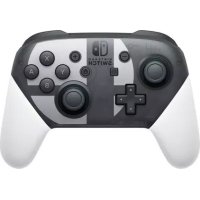
Pro Controller Super Smash Ultimate (Switch) - Controller NINTENDO - Free user manual and instructions
Find the device manual for free Pro Controller Super Smash Ultimate (Switch) NINTENDO in PDF.



| Product Type | Wireless Controller |
| Brand | Nintendo |
| Model | Pro Controller Super Smash Ultimate |
| Compatibility | Nintendo Switch |
| Dimensions | Approximately 106 x 152 x 63 mm (L x W x H) |
| Weight | Approximately 246 g |
| Power Source | Built-in rechargeable lithium-ion battery |
| Battery Life | Approximately 40 hours |
| Charging Time | Approximately 6 hours |
| Connection | Bluetooth wireless, wired via USB-C cable |
| Main Functions | Analog sticks, A/B/X/Y/+, -, L/R/ZL/ZR buttons, sticks, D-pad, motion sensors, NFC for amiibo |
| Maintenance and Cleaning | Wipe with a soft, dry cloth. Do not use thinner, benzene, or alcohol. |
| Safety | Read health and safety information. Do not expose to fire, water, etc. Use only with HAC-002 power adapter for charging. |
| Spare Parts and Repairability | Battery not user-replaceable. Contact Nintendo for repair. |
| General Information | Do not dispose of with household waste. Recycle in accordance with regulations. |
Frequently Asked Questions - Pro Controller Super Smash Ultimate (Switch) NINTENDO
User questions about Pro Controller Super Smash Ultimate (Switch) NINTENDO
0 question about this device. Answer the ones you know or ask your own.
Ask a new question about this device
Download the instructions for your Controller in PDF format for free! Find your manual Pro Controller Super Smash Ultimate (Switch) - NINTENDO and take your electronic device back in hand. On this page are published all the documents necessary for the use of your device. Pro Controller Super Smash Ultimate (Switch) by NINTENDO.
USER MANUAL Pro Controller Super Smash Ultimate (Switch) NINTENDO
For more information about Nintendo Switch, please visit the Nintendo Support website.
Technical Specifications
Support information Support only
Tukitiedot
Kundestotteinformation
44
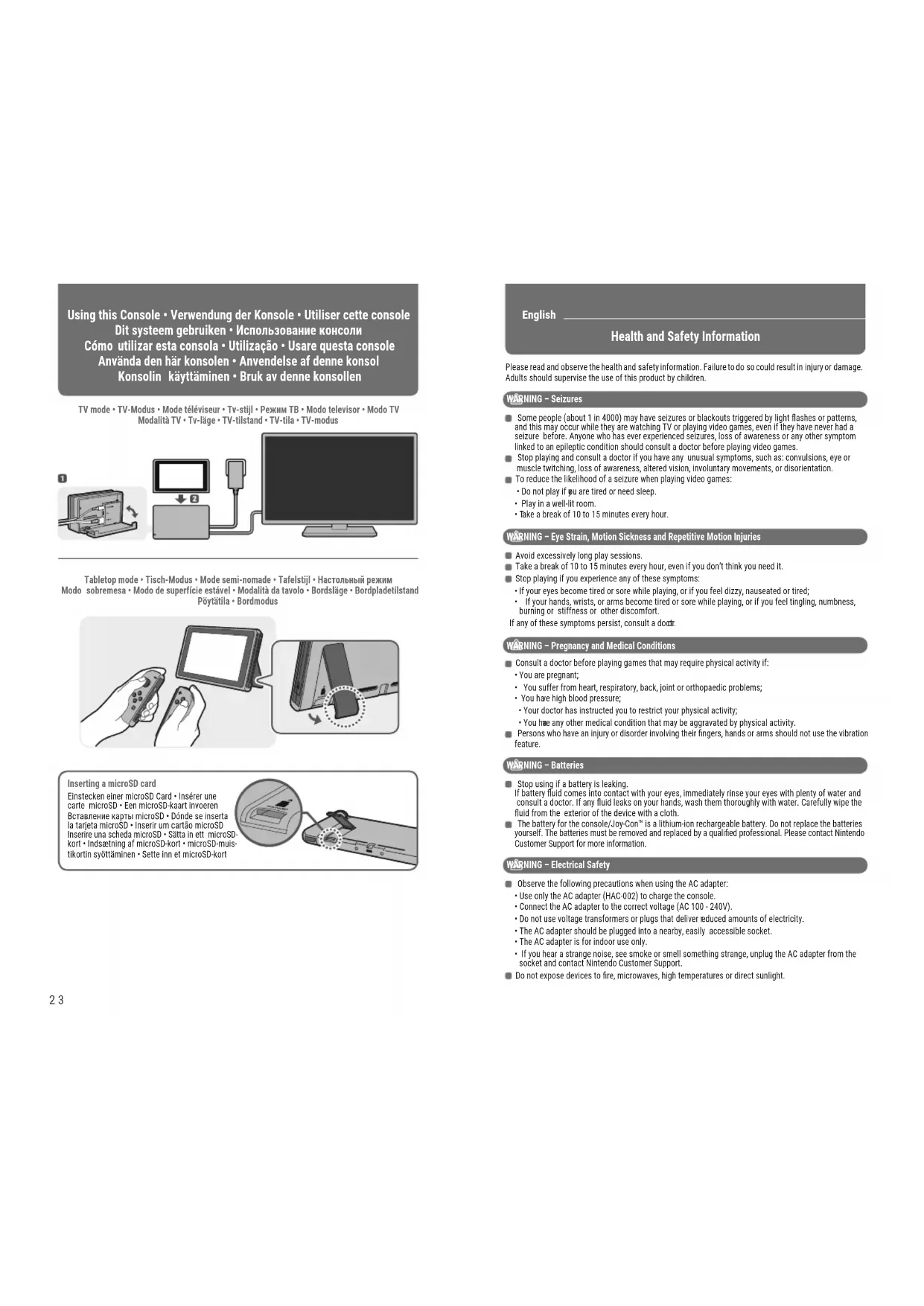
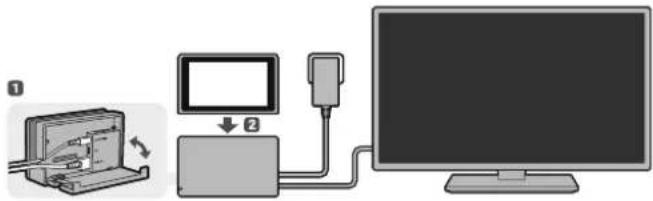
Using this Console • Verwendung der Konsole • Utiliser cette console Dit systeem gebruiken • Использование консоли Cómo utilizar esta consola • Utilização • Usare questa console Använda den här konsolen • Anvendelse af denne konsol Konsolin käyttäminen • Bruk av denne konsollen
TV mode • TV-Modus • Mode téléviseur • Tv-stijl • Режим ТВ • Modo televisor • Modo TV Modalità TV • Tv-läge • TV-tilstand • TV-tila • TV-modus
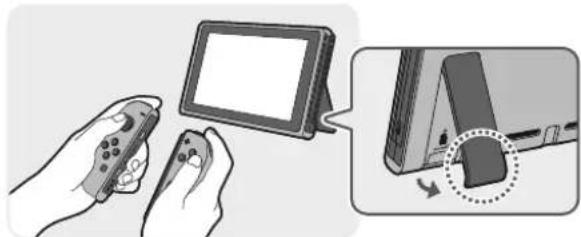
Tabletop mode • Tisch-Modus • Mode semi-nomade • Tafelstijl • Настольный режим Modo sobremesa • Modo de superfície estável • Modalità da tavolo • Bordsläge • Bordpladetilstand Pöytätila • Bordmodus
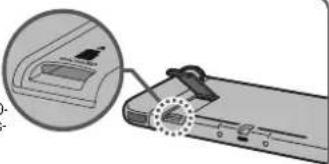
Inserting a microSD card
Einstecken einer microSD Card • Insérer une carte microSD • Een microSD-kaart invoeren Вставление карты microSD • Dónde se inserta la tarjeta microSD • Inserir um cartão microSD Inserire una scheda microSD • Sätta in ett microSD-kort • Indsætning af microSD-kort • microSD-muls-tikortin syöttäminen • Sette inn et microSD-kort
English
Health and Safety Information
Please read and observe the health and safety information. Failure to do so could result in injury or damage. Adults should supervise the use of this product by children.
WARNING - Seizures
Some people (about 1 in 4000) may have seizures or blackouts triggered by light flashes or patterns, and this may occur while they are watching TV or playing video games, even if they have never had a seizure before. Anyone who has ever experienced seizures, loss of awareness or any other symptom linked to an epileptic condition should consult a doctor before playing video games.
- Stop playing and consult a doctor if you have any unusual symptoms, such as: convulsions, eye or muscle twitching, loss of awareness, altered vision, involuntary movements, or disorientation.
■ To reduce the likelihood of a seizure when playing video games:
- Do not play if pu are tired or need sleep.
- Play in a well-lit room.
• Take a break of 10 to 15 minutes every hour.
WARNING – Eye Strain, Motion Sickness and Repetitive Motion Injuries
- Avoid excessively long play sessions.
Take a break of 10 to 15 minutes every hour, even if you don't think you need it.
■ Stop playing if you experience any of these symptoms:
- If your eyes become tired or sore while playing, or if you feel dizzy, nauseated or tired;
- If your hands, wrists, or arms become tired or sore while playing, or if you feel tingling, numbness, burning or stiffness or other discomfort.
If any of these symptoms persist, consult a doctor.
WARNING – Pregnancy and Medical Conditions
- Consult a doctor before playing games that may require physical activity if:
- You are pregnant;
- You suffer from heart, respiratory, back, joint or orthopaedic problems;
• You have high blood pressure;
- Your doctor has instructed you to restrict your physical activity;
- You have any other medical condition that may be aggravated by physical activity.
Persons who have an injury or disorder involving their fingers, hands or arms should not use the vibration feature.
WARNING - Batteries
■ Stop using if a battery is leaking.
If battery fluid comes into contact with your eyes, immediately rinse your eyes with plenty of water and consult a doctor. If any fluid leaks on your hands, wash them thoroughly with water. Carefully wipe the fluid from the exterior of the device with a cloth.
The battery for the console/Joy-Con™ is a lithium-ion rechargeable battery. Do not replace the batteries yourself. The batteries must be removed and replaced by a qualified professional. Please contact Nintendo Customer Support for more information.
WARNING - Electrical Safety
- Observe the following precautions when using the AC adapter:
- Use only the AC adapter (HAC-002) to charge the console.
- Connect the AC adapter to the correct voltage (AC 100 - 240V).
- Do not use voltage transformers or plugs that deliver reduced amounts of electricity.
• The AC adapter should be plugged into a nearby, easily accessible socket.
• The AC adapter is for indoor use only.
- If you hear a strange noise, see smoke or smell something strange, unplug the AC adapter from the socket and contact Nintendo Customer Support.
- Do not expose devices to fire, microwaves, high temperatures or direct sunlight.
Do not let devices come into contact with liquid and do not use them with wet or oily hands. If liquid gets inside, stop using and contact Nintendo Customer Support.
- Do not expose devices to excessive force.
Do not pull on cables and do not twist them too tightly.
- Do not touch device connectors with your fingers or metal objects.
- Do not touch the AC adapter or connected devices while charging during a thunderstorm.
■ Use only compatible accessories that have been approved for use in your country.
- Do not disassemble or try to repair devices.
If devices are damaged, stop using them and contact Nintendo Customer Support. Do not touch damaged areas. Avoid contact with any leaking fluid.
WARNING - General
- Keep this console, its accessories and packaging materials away from young children and pets. Small parts such as game cards, microSD cards and packaging items may be accidentally ingested. The cables can coil around the neck.
Do not use this console within 25 centimetres (10 inches) of a cardiac pacemaker while using wireless communication. If you have a pacemaker or other implanted medical device, first consult a doctor.
■ Wireless communication may not be allowed in certain places such as aeroplanes or hospitals. Please follow respective regulations.
Do not look directly into the IR Motion Camera, which is located on the right Joy-Con controller. This can lead to impaired vision and other problems. - Do not use excessive volume for headphones.
This may damage your hearing. Keep the volume at a level at which you can hear your surroundings. Consult a doctor if you experience symptoms such as buzzing in your ears.
- Stop playing if you are holding the console or the controllers while charging and they become too hot, as this may lead to skin burns.
CAREFUL USAGE
Do not place the console in humid areas or areas where the temperature can suddenly change. If condensation forms, turn the power off and wait until the water droplets have evaporated.
- Do not use in dusty or smoky areas.
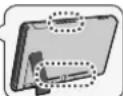
Do not cover the console's air intakes or vents while playing to avoid overheating
If devices become dirty, wipe them with a soft, dry cloth.
Avoid using thinner, benzene or alcohol.
- Be aware of your surroundings while playing.
■ Make sure to charge the built-in batteries at least once every six months.
If the batteries are not used for an extended period of time, it may become impossible to charge them.
Please make sure you read the Health and Safety Information page on the Nintendo Switch console once it has been set up. You can access this information from SUPPORT in (System Settings) on the HOME Menu.
IMPORTANT INFORMATION FOR PARENTS Parental Controls
Nintendo Switch offers a variety of exciting features. However, as a parent, you might want to restrict certain things which you deem unsuitable for children. We have prepared special steps to enable you to make Nintendo Switch safe for your family.
Nintendo Switch Parental Controls are available on the console itself and can also be controlled by an app on your smart device. During the initial setup of your console, you can select how you would like to set Parental Controls. Follow the on-screen instructions to finish setting Parental Controls. On the console itself, you can use a PIN to set and change your desired Parental Controls settings. Your PIN can also be used to temporarily disable Parental Controls if you should wish to do so. You can also change your settings at any time – even when you are away from home – using the dedicated app.
Purchase Restrictions in Nintendo eShop
In order to restrict Nintendo eShop purchases, you must associate your child's Nintendo Account with your Nintendo Account. Access your Nintendo Account on a smart device or PC to create an account for your child or associate an existing account with yours and set restrictions as you deem appropriate in the Nintendo Account settings.
https://accounts.nintendo.com
Using the Joy-Con Controllers
Charge and pair controllers before using them for the first time. You can charge and pair controllers by attaching them directly to the console or using the Joy-Con charging grip (HAC-012) (sold separately). To charge the controllers fully when they are attached to the console, ensure that the console is charging at the same time.
When playing with a Joy-Con detached from the console, make sure to use a Joy-Con strap accessory. To attach a Joy-Con strap accessory, match the + or - Button on the controller with the same symbol on the accessory. Slide the Joy-Con strap accessory onto the controller and lock it using the slide lock. Then, put on and tighten the wrist strap. Hold the controller securely and do not let go of it. Allow adequate room around you during gameplay. When you are done playing, release the slide lock before detaching the accessory from the Joy-Con. When attaching a Joy-Con to the console or attaching a Joy-Con strap accessory make sure that you orientate the Joy-Con correctly and slide it into place until you hear a clicking sound.
Activating and Deactivating Wireless Internet Connection
To activate wireless internet connection, go to INTERNET in ⚙️ (System Settings) on the HOME Menu and proceed to set up a connection.
To deactivate wireless internet connection in handheld or tabletop mode, hold down the HOME Button to enter Quick Settings, then set Flight Mode to On. Alternatively, in handheld or tabletop mode, start ⚙️ (System Settings) from the HOME Menu, then set Flight Mode to On.
Disposal of this Product
Do not dispose of this product or built-in batteries in household waste. For details see http://docs.nintendo-europe.com
Warranty Information
To find out how to receive warranty information, see support.nintendo.com
Deutsch
https://accounts.nintendo.com
https://accounts.nintendo.com
Utiliser les manettes Joy-Con
WAARSCHUWING - Epilepsie
WAARSCHUWING - Batterijen
https://accounts.nintendo.com
https://accounts.nintendo.com
The Ground Truth image displays a single, solid horizontal line, which is a stylistic or background element (like a ruled paper line or separator), not a placeholder for text. According to Rule 2, such stylistic/background lines must be ignored by the OCR result. The OCR content provided is "", which consists of no characters. This correctly represents the absence of any textual content in the GT and correctly matches the visual line as a stylistic element. Therefore, the OCR output should have been empty or omitted this sequence entirely.
https://accounts.nintendo.com
https://accounts.nintendo.com
Utilizar os comandos Joy-Con
https://accounts.nintendo.com
Usare i controller Joy-Con
VIKTIG INFORMATION FÖR FÖRÄLDRAR
Innehållsfiltrering
https://accounts.nintendo.com
https://accounts.nintendo.com
Anvendelse af Joy-Con-controllere
https://accounts.nintendo.com
https://accounts.nintendo.com
Automatic power-down (sleep mode) could help save energy by reducing the amount of time the Nintendo Switch console remains on, but not in use. See http://docs.nintendo-europe.com for further information about sleep mode and the console's power consumption.
Nintendo Customer Support (South Africa) [180416/RSA]
Nintendo Customer Support support@nintendo.co.za
www.nintendo.co.za
The iStore Building, No.1 Sandton Drive
Sandton, 2146
South Africa
(+27) 011 390 7002
(Calls are charged at the local rate to the caller.)
Nintendo Service (Deutschland) [280416/GER-NOE]
Nintendo Service info@nintendo.de
www.nintendo.de
Postfach 730312
60505 Frankfurt
Deutschland
(+49) 069 66105 900
Nintendo Service (Österreich) [280416/GER-AT]
Nintendo Service info@nintendo.at
www.nintendo.at
Postfach 730312
60505 Frankfurt
Deutschland
(+43) 01 25300070
Nintendo Service (Schweiz) [280416/GER-CH]
Nintendo Service info@nintendo.ch
www.nintendo.ch
Nintendo Schweiz
Täfernstr. 1 (Gate 1)
5405 Dättwil
Schweiz
(+41) 056 2031420
Nintendo Service (Belgien/Luxemburg) [280416/GER-NBE]
Nintendo Service
DECLARATION OF CONFORMITY / DÉCLARATION DE CONFORMITÉ
Hereby, Nintendo declares that the radio equipment type (Nintendo Switch/Joy-Con) is in compliance with Directive 2014/53/EU. The full text of the EU declaration of conformity is available at the following internet address: http://docs.nintendo-europe.com
© 2017 Nintendo Co., Ltd.
Trademarks are property of their respective owners. Nintendo Switch and Joy-Con are trademarks of Nintendo.
- HEALTH AND SAFETY INFORMATION
- WARNING - SEIZURES
- WARNING – EYE STRAIN, MOTION SICKNESS AND REPETITIVE MOTION INJURIES
- WARNING – PREGNANCY AND MEDICAL CONDITIONS
- WARNING - BATTERIES
- WARNING - ELECTRICAL SAFETY
- WARNING - GENERAL
- CAREFUL USAGE
- IMPORTANT INFORMATION FOR PARENTS PARENTAL CONTROLS
- PURCHASE RESTRICTIONS IN NINTENDO ESHOP
- USING THE JOY-CON CONTROLLERS
- ACTIVATING AND DEACTIVATING WIRELESS INTERNET CONNECTION
- DISPOSAL OF THIS PRODUCT
- WARRANTY INFORMATION
- DEUTSCH
- UTILISER LES MANETTES JOY-CON
- WAARSCHUWING - EPILEPSIE
- WAARSCHUWING - BATTERIJEN
- UTILIZAR OS COMANDOS JOY-CON
- USARE I CONTROLLER JOY-CON
- VIKTIG INFORMATION FÖR FÖRÄLDRAR
- INNEHÅLLSFILTRERING
- ANVENDELSE AF JOY-CON-CONTROLLERE
- DECLARATION OF CONFORMITY / DÉCLARATION DE CONFORMITÉ
Brand : NINTENDO
Model : Pro Controller Super Smash Ultimate (Switch)
Category : Controller