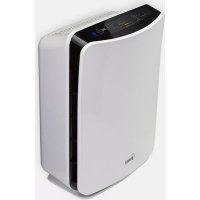
P150 - Air purifier Winix - Free user manual and instructions
Find the device manual for free P150 Winix in PDF.



| Product type | Air purifier |
| Brand | Winix |
| Model | P150 (WACP150) |
| Dimensions (L × W × H) | 210 × 470 × 350 mm |
| Weight | 6 kg |
| Power supply | 220 V AC / 50 Hz |
| Power consumption | 4 W (Low) to 40 W (Turbo) |
| Purification capacity (AHAM) | 15 m² (recommended), 33 m² (max) |
| Fan speeds | 4 (Quiet, Med, High, Turbo) |
| Filter type | Carbon pre-filter + True HEPA filter |
| Technologies | PlasmaWave™, Air quality sensor, Light sensor |
| Display | Digital (air quality and speed indicators) |
| Noise level | Silent operation (not specified in dB) |
| Certifications | AHAM, ECARF, Energy Star, UL |
| Maintenance | Carbon pre-filter: replace every 3 months; True HEPA filter: replace when indicator lights up (about 1 year) |
| Warranty | 2 years (parts and labor) |
| Country of manufacture | Korea |
| Spare parts available | Filters (pre-filter and True HEPA) |
| Safety | Do not block air inlets/outlets, do not use without filter, do not clean with flammable liquids |
Frequently Asked Questions - P150 Winix
User questions about P150 Winix
0 question about this device. Answer the ones you know or ask your own.
Ask a new question about this device
Download the instructions for your Air purifier in PDF format for free! Find your manual P150 - Winix and take your electronic device back in hand. On this page are published all the documents necessary for the use of your device. P150 by Winix.
USER MANUAL P150 Winix
WINIX USA 120 Prairie lake Road, Unit E East Dundee, Illinois 60118
www.winixinc.com E-Mail: info@winixinc.com
Tel: +1.847.551.9900
WINIX Europe Hoogoorddreef 74, 1101BG, Amsterdam
www.winixeu.com Tel.: +31 (0)20-3632107
FresHome
PlasmaWave™
True HEPA Air Cleaner
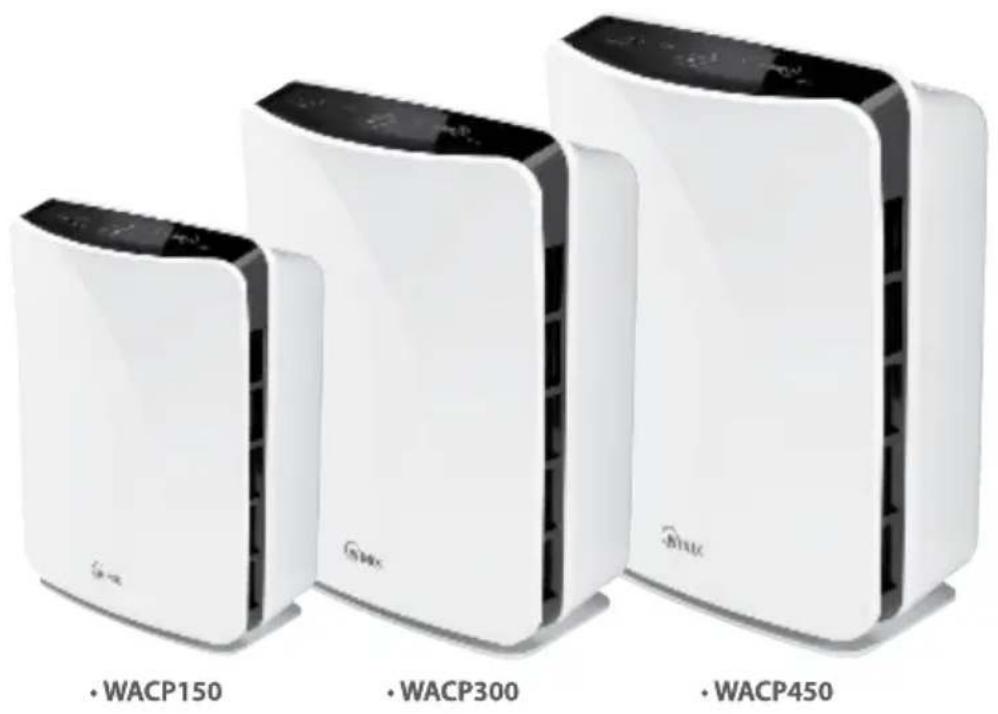
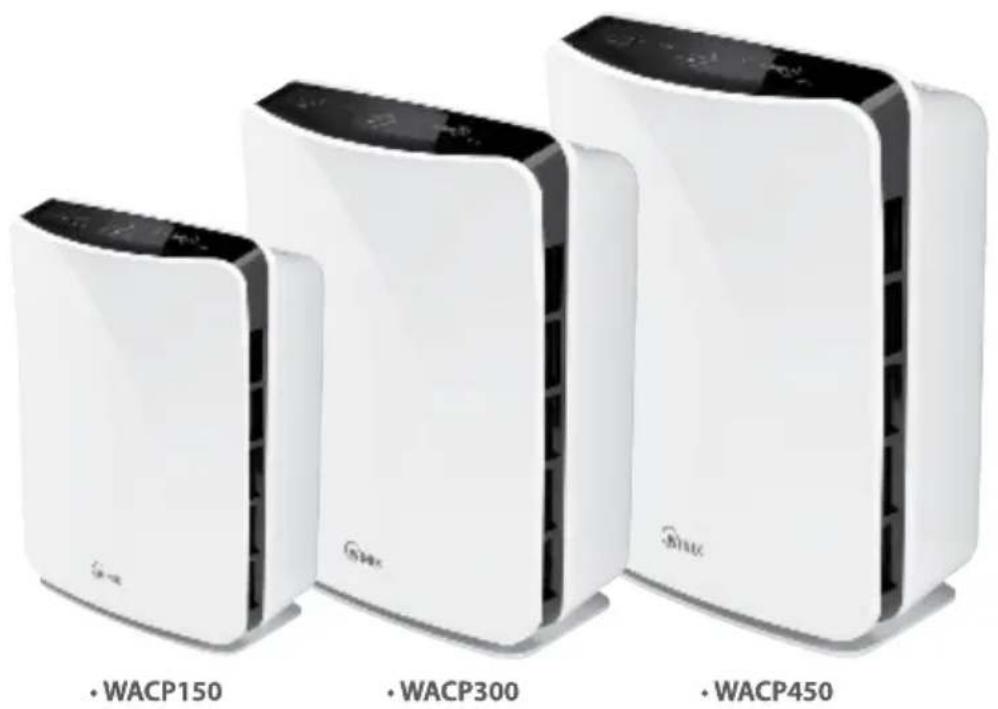
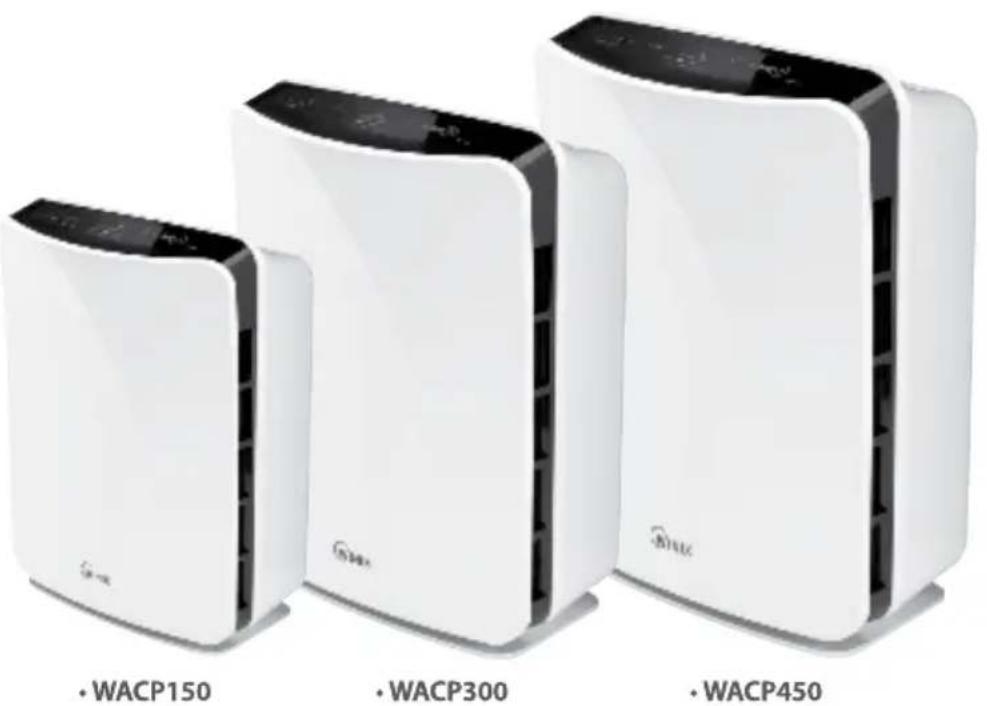
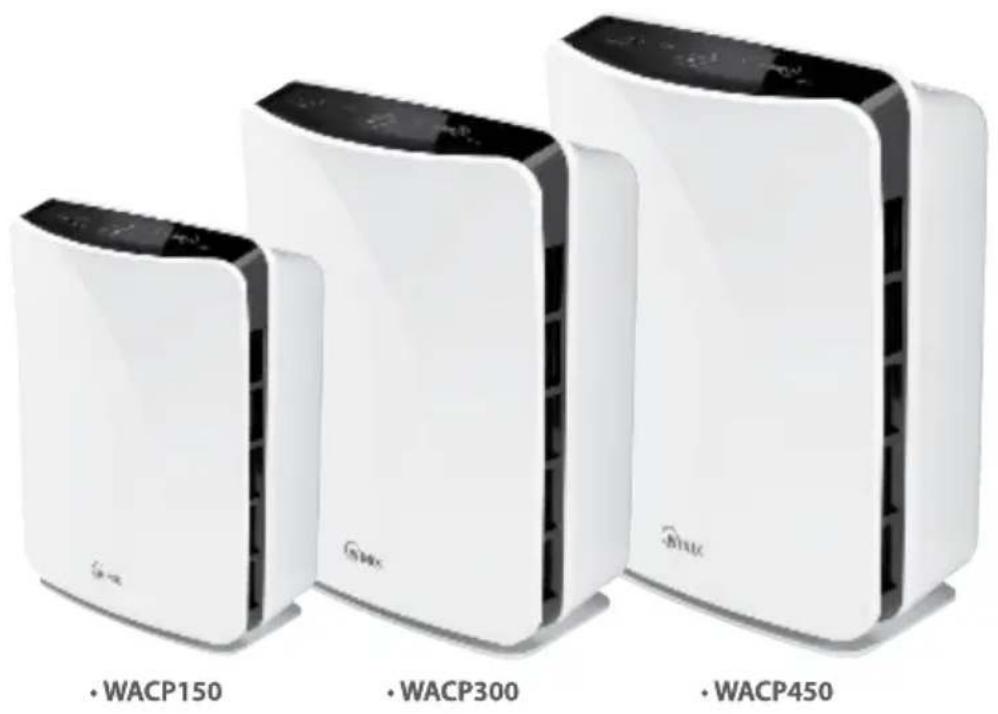
Model : WACP150, WACP300, WACP450
CAUTION:
Read and follow all safety rules and instructions before operating this equipment
Read and follow all safety rules and instructions before operating this equipment. Please keep this manual for future reference.
TABLE OF CONTENTS
Warranty 2
Package Contents 2
Instructions 3
Safety Instructions 7
Product Specifications 8
Air Cleaner Features 9
Air Cleaner Set-Up 10
Control Panel 11
Operations 11
Filter Replacement 12
Remote Control 14
Troubleshooting 15
LIMITED PRODUCT WARRANTY
WINIX FRESHOME™ AIR CLEANERS LIMITED WARRANTY
Limited Warranty: Winix warrants the parts of the machine to be free of defects in material and workmanship and provides service and support for two (2) years from the date of purchase by the original consumer for model WACP150, WACP300 and WACP450.
If any part is found to be defective during the warranty period, your sole and exclusive remedy will be repair or replacement, at Winix's option and expense, of the defective part.
This warranty does not apply in cases of abuse, mishandling, failure to comply with product usage standards, operation using an improper power supply (other than listed on the label), or unauthorized repair.
Winix reserves the right to charge the consumers for any additional costs incurred by Winix to provide parts or services outside of the country where the air purifier is initially sold by an authorized reseller. This warranty does not include the air cleaner's replaceable filters, this is an expendable part that can wear out from normal use before one the warranty expires.
ANY IMPLIED WARRANTY, INCLUDING THAT OF MERCHANTABILITY OR FITNESS FOR A PARTICULAR PURPOSE, IS HEREBY LIMITED IN DURATION TO THE APPROPRIATE WARRANTY PERIOD SET FORTH ABOVE.
In no event shall Winix be liable for any consequential or incidental damages attributable to this product.
This warranty gives you specific legal rights. The duration, terms, and conditions of this warranty are valid worldwide, except where different limitations, restrictions, or conditions may be required by local law.
For more details or to obtain service under this warranty, please contact your dealer.
PACKAGE CONTENTS
Models WACP300 AND WACP450
• Winix Air Purifier (Qty.1)
• Carbon Pre-Filters (Qty.4)
• True HEPA Filter (Qty.1)
- Use & Care Guide (Qty.1)
- Remote control (Qty.1)
• 3V Lithium Battery (CR2025 installed in remote)
Models WACP150
- Winix Air Purifier (Qty.1)
• Carbon Pre-Filters (Qty.4)
• True HEPA Filter (Qty.1) - Use & Care Guide (Qty.1)
INSTRUCTIONS
WARNING: SAFETY INSTRUCTIONS
| WARNING / NOTICE DIRECTION | |
 Follow these instructions to avoid any risk of personal injury, property damage, electrical shocks or fire hazards. Follow these instructions to avoid any risk of personal injury, property damage, electrical shocks or fire hazards. |  PROHIBITED PROHIBITED |
 DO NOT DISASSEMBLE DO NOT DISASSEMBLE | |
 Failure to follow the safety instructions can lead to personal injury or property damage. Failure to follow the safety instructions can lead to personal injury or property damage. |  Must Follow Must Follow |
 Ground connection protecting from electrical shock Ground connection protecting from electrical shock | |

Warning

Power Cord
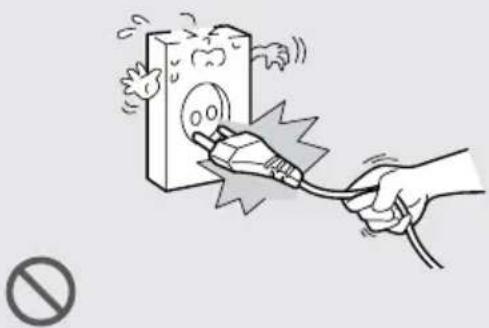
DON'T unplug the unit by pulling on its power cord.
natural_image
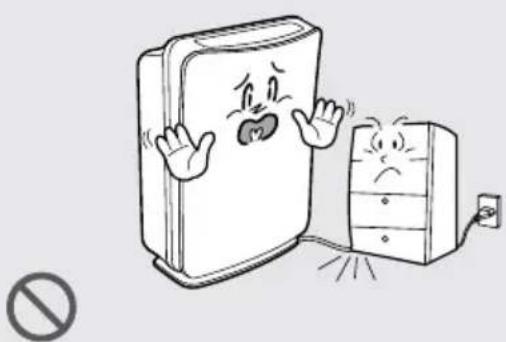
Illustration of a hand using a plug to test a plug with a warning symbol (no text or labels)DON'T bend or place heavy object on the power cord.
natural_image
Cartoon illustration of a refrigerator and a refrigerator with expressive faces, no text or symbols presentDON'T touch the plug with wet hands.
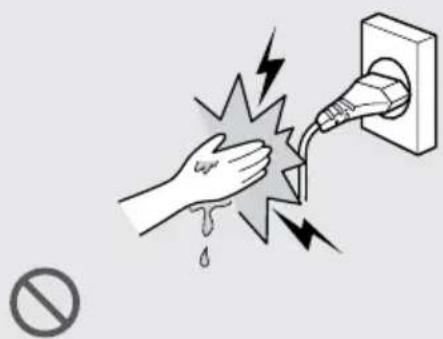
DON'T replace or modify the power cord. If the power cord/plug is damaged, it must be replaced by the manufacturer or a qualified technician.

natural_image
Cartoon illustration of a book character with a hand holding a pencil and a magnifying glass, no text or symbols present.
Warning

Power
DO connect the power cord to only proper power outlet with a ground connection.
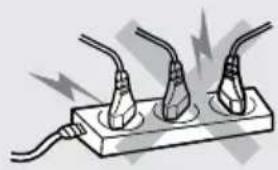
natural_image
Illustration of three cables connected to a plug with three outlets, showing electrical connections (no text or symbols)
DO unplug air cleaner when not in use to save energy consumption.
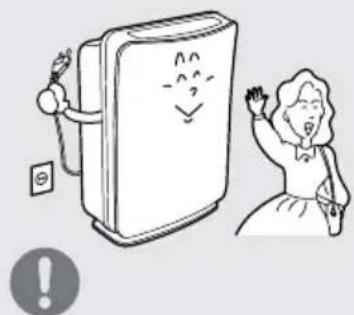
natural_image
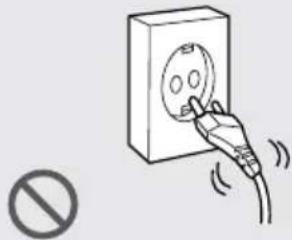
Illustration of a smiling refrigerator with a person cheering and a warning symbol (no text or symbols present)DON'T plug power cord into loose or damaged electrical outlet. (Can lead to overheating or electrical shock.)
natural_image
Illustration of a hand inserting a plug into an electrical socket, with no text or symbols present.
Warning

Operation
DON'T attempt to repair, alter or disassemble the air cleaner.


natural_image
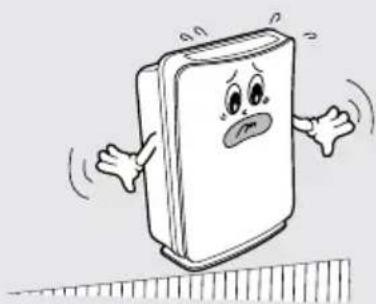
Cartoon illustration of a smiling book character with arms and legs, no text or symbols presentDON'T operate air cleaner on an uneven surface.

natural_image
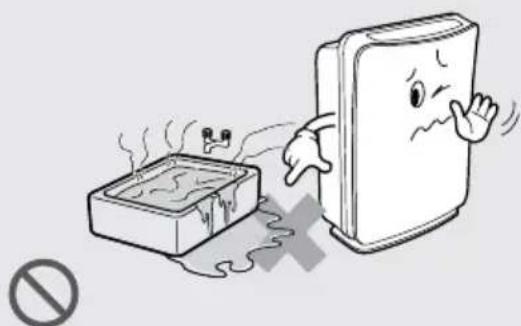
Cartoon illustration of a smiling book character standing on a ruler, no text or symbols presentDON'T operate the air cleaner if standing water is present.
natural_image
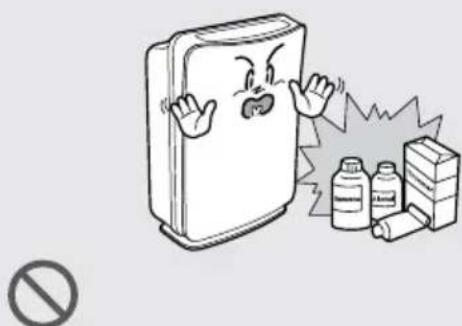
Cartoon illustration of a smoking machine emitting smoke next to a cigarette pack, with no text or symbols present.DON'T operate air cleaner near flammable materials.
natural_image
Cartoon illustration of a refrigerator with angry expression and a warning symbol (no text present)
Note

Power
DON'T disconnect the power cord during operation.
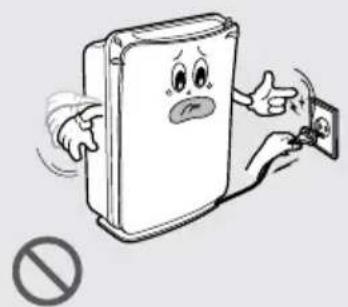
natural_image
Cartoon illustration of a book character with a sad face and pointing at a smartphone, no text or symbols present.DON'T unplug the power cord before air cleaner has cooled down.
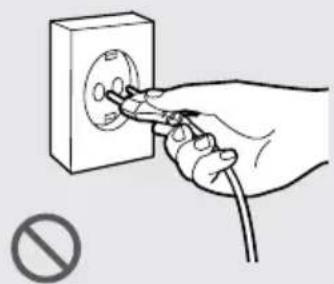
natural_image
Hand using a power socket to switch an electrical outlet (no text or symbols visible)DO unplug the unit and contact your service dealer if any irregular noise or smoke occurs.
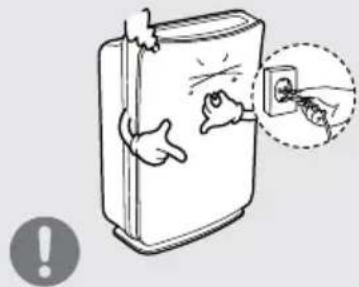

Note

Operation
DON'T insert ANYTHING into the air inlet or outlet.

natural_image
Cartoon illustration of a child running toward a smiling refrigerator with a stick (no text or symbols)
DON'T place hands or any body parts near the air outlet during operation.

natural_image
Cartoon illustration of a hand holding a book with a sad face and open arms (no text or symbols)
DON'T place the air cleaner near heater.
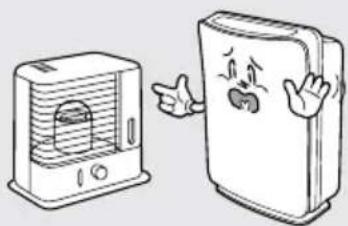
natural_image
Illustration of a portable air conditioner and a closed refrigerator with cartoon facial expressions (no text or symbols)
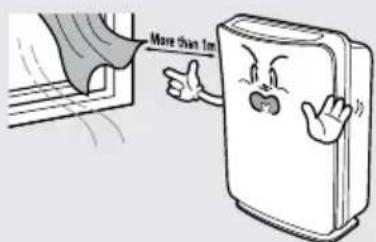
DON'T place the air cleaner near curtains or other materials that can block the vents of the unit.


Note

Operation
DON'T strike or drop the air cleaner.

natural_image
Cartoon illustration of a smiling can with stars and a 'no' symbol below (no text or symbols on the can)DON'T fill the air cleaner with hot water.
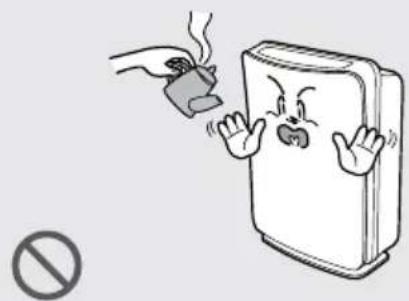
natural_image
Illustration of a hand holding a small object emitting smoke next to a smiling book with angry expression (no text or symbols)DON'T use flammable material (such as benzene or alcohol) to clean the air cleaner.
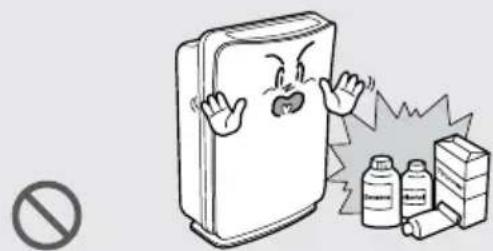
natural_image
Cartoon illustration of a refrigerator with angry expression and a warning symbol (no text present)DON'T place clothes and towels on top of air cleaner while operating.

natural_image
Cartoon illustration of a book character with arms and facial expression, no text or symbols presentDON'T allow children to play on or near the air cleaner.
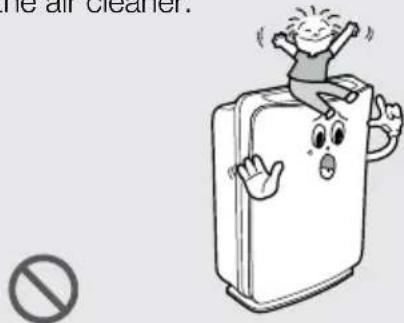
DON'T spray flammable liquids or gases into the unit.
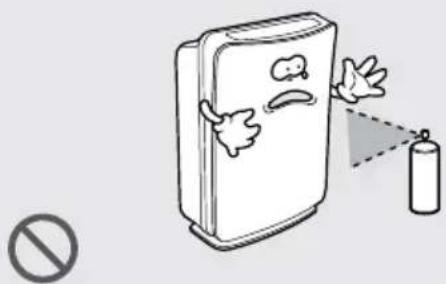
natural_image
Illustration of a refrigerator with flying birds and a spray bottle emitting a droplet, accompanied by a prohibition symbol (no text or labels)DON'T install the unit under direct light.

natural_image
Illustration of a smiling refrigerator with a hand waving, next to a window with a sun and a 'no' symbol (no text or numbers present)DON'T spray liquids directly into air cleaner during cleaning.
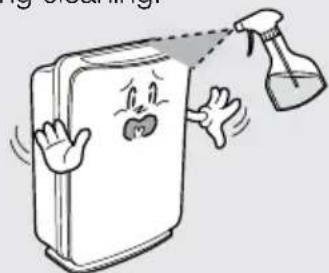
natural_image
Cartoon illustration of a book with a smiling face and a spray bottle spraying water (no text or symbols)SAFETY INSTRUCTIONS
Thank you for purchasing a Winix air cleaner. Please read this manual carefully before using. This product is for household use only.
IMPORTANT CAUTIONS FOR USING YOUR AIR CLEANER
WARNING: Follow the instructions in this manual to reduce the risk of electric shock, short circuit, and/or fire:
- Do not repair or modify the unit unless specifically recommended in this manual. All other repairs should be completed by a qualified technician.
- Do not force the plug into an electrical outlet. Do not alter the plug in any way.
- Do not use if the power cord or plug is damaged or the connection to the wall outlet is loose.
- Use AC 220 V AC / 50Hz only.
- Do not damage, break, forcefully bend, pull, twist, bundle, coat, pinch, or place heavy objects on the power cord.
- Periodically remove dust from the power plug. This will reduce the risk of shock due to humidity build up.
- If the power plug is damaged, it must be replaced by the manufacturer or a qualified technician
- Remove the power plug from the outlet before cleaning the unit. When removing the power plug, grasp by holding the plug itself, never hold by the cord.
- Remove the power plug from the outlet when not in use.
- Do not handle the power plug with wet hands.
-
Do not operate the unit when using indoor smoke-generating insecticides.
-
Do not clean unit with benzene or paint thinner. Do not spray insecticides on the unit.
- Do not use the unit where it is humid or where the unit may become wet, such as in a bathroom.
- Do not insert fingers or foreign objects into the air intake or outlet.
- Do not use the unit near flammable gases. Do not use near cigarettes, incense, or other spark-creating items.
- Unit will not remove carbon monoxide emitted from heating appliances or other sources.
IMPORTANT PRECAUTIONS FOR USING YOUR AIR CLEANER
- Do not block the intake or outlet vents.
- Do not use near hot objects, such as a stove.
- Do not use where the unit may come into contact with steam.
- Do not use the unit on its side.
- Keep away from products that generate oily residue, such as a deep fryer.
- Do not use detergent to clean the unit.
- Do not operate without a filter.
- Do not wash and reuse the True HEPA Filter or the Carbon Pre-Filter.
- Hold the handle on the back of the unit to transport.
- Do not hold by the front panel.
PRODUCT SPECIFICATIONS
| Model WACP150 WACP300 WACP450 | |||
| AHAM recommended room capacity | 15 m^2 30 m^2 45 m^2 | ||
| Maximum room capacity 33 m^2 66 m^2 96 m^2 | |||
| Power Supply 220 V AC/50 Hz | 220 V AC/50 Hz 220 V AC/50 Hz | ||
| Power Rate | Low 4W, Turbo 40W | Low 4W, Turbo 60W | Low 11W, Turbo 110W |
| Fan Speeds | 4 Speeds | 4 Speeds | 4 Speeds |
| Display | Digital | Digital | Digital |
| Control Type | Auto / Manual | Auto / Manual | Auto / Manual |
| Remote Control | No | Yes | Yes |
| Air Quality Sensor | Yes | Yes | Yes |
| Light Sensor | Yes | Yes | Yes |
| AHAM Certified | Yes | Yes | Yes |
| UL Listed | Yes | Yes | Yes |
| ECARF Certified | Yes | Yes | Yes |
| Energy Star Qualified | Yes | Yes | Yes |
| Check Filter Indicator | Yes | Yes | Yes |
| Cleaning System | |||
| - Carbon Pre-Filter | Yes | Yes | Yes |
| - True HEPA Filter | Yes | Yes | Yes |
| - PlasmaWaveTM | Yes | Yes | Yes |
| CADR | Smoke /Dust /Pollen | Smoke /Dust / Pollen | Smoke / Dust / Pollen |
| 98 / 98 / 103 | 197 / 197 / 214 | 291 / 298 / 343 | |
| Unit Size(mm, L×W×H) | 210 × 470 × 350 | 220 × 550 × 415 | 260 × 650 × 440 |
| Unit Weight (kg) | 6 kg | 7 kg | 8 kg |
Warning: Change or modifications to this unit not expressly approved by the party responsible for compliance could void the user's authority to operate the equipment.
NOTE: This equipment has been tested and found to comply with the limits for a Class B digital device, pursuant to Part 15 of the FCC Rules. These limits are designed to provide reasonable protection against harmful interference in a residential installation. This equipment generates, uses and can radiate radio frequency energy and, if not installed and used in accordance with the instructions, amy cause harmful interference to radio communications. However, there is no guarantee that interference will not occur in a particular installation. If this equipment does cause harmful interference to radio or television reception, which can be determined by turning the equipment off and on, the user is encouraged to try to correct the interference by one or more of the following measures:
- Reorient or relocate the receiving antenna.
- Increase the separation between the equipment and receiver.
- Connect the equipment into an outlet on a circuit different from that to which the receiver is connected.
- Consult the dealer or on experienced radio/TV technician for help.
AIR CLEANER FEATURES

CAUTION: Fully assemble air filter before using (See Air Cleaner Set-Up on following page).
Note: Features vary according to model.
- Quiet Operation
This Winix air cleaner has a four-speed fan with quiet operation that is ideal for night time use.
• Air Quality Sensor
This Winix air cleaner has an AIR QUALITY sensor that detects the presence of various pollutants in the air. The unit automatically increases fan speed to clean more air volume and remove the impurities quickly.
- Light Sensor
The built-in light sensor detects when the room is dark and automatically dims the lights of the control panel and lowers the fan speed for quiet and energy-efficient operation. Once the room is dim, and not allow the fan to increase speed despite what the AIR QUALITY sensor detects.
• Multi-Stage Cleaning
The air passes through multiple stages of cleaning before returning to the room.
- PlasmaWave™ Technology
PlasmaWave™ breaks apart airborne pollutants at the molecular level.
• Carbon Pre-Filter
The Carbon Pre-Filter collects large particles, such as dust, pet hair, and lint. It absorbs odor causing gases, such as those caused by cigarette smoke, organic decay, and cooking, effectively reduce the development of bacteria and fungi. For best performance, replace every three months.
- True HEPA Filter
Captures 99.99% of particles and impurities as small as 0.3 microns, including smoke, dust, pollen, and other allergens. Replace when the CHECK FILTER indicator light turns on.

Advanced PlasmaWave™ Technology
PlasmaWave™ breaks apart airborne pollutants at the molecular level.
In a fraction of a second, PlasmaWave™ combines with naturally occurring water molecules in the air (H₂O) to create billions of Hydroxyl Radical molecules (OH).
OH is an unstable molecule that seek equilibrium by stealing hydrogen atoms from adjacent molecules containing hydrogen (the pollutants), thereby reforming them into harmless molecules of water, carbon dioxide, and other acceptable molecules.
The result is a measurable reduction of pollutants after the air passes through the Plasma Generator (PlasmaWave™).
By reforming molecules, PlasmaWave™ technology can reduce odors, as well as VOCs (chemicalvapors). It is also effective at reducing airborne.
The PlasmaWave ^™ technology is harmless and the OH molecule only lives for a nanosecond while it reforms surrounding molecules. Most importantly-unlike old style ion technology-PlasmaWave ^™ dose not produce high levels of ozone as a by-product.
When combined with a fan-and-filter air cleaning system, PlasmaWave™ offers an effective and efficient way of cleaning the air of unwanted pollutants including dust, smoke, and pollen, as well as VOCs, allergens, and odors.
AIR CLEANER SET-UP
Set-Up Procedure
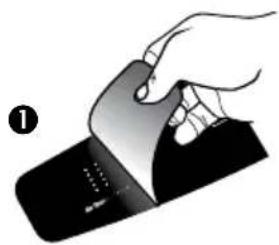
- Remove protective film from the control panel.
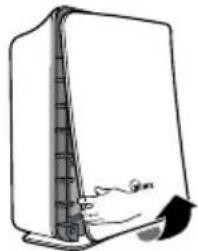
- Remove the front panel by pulling gently on the lower portion of the panel. Do not force, the panel should remove easily.
- Remove the plastic frame from the unit.
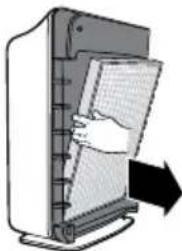
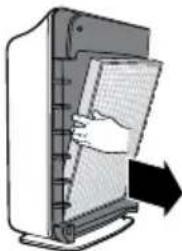
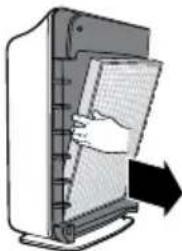
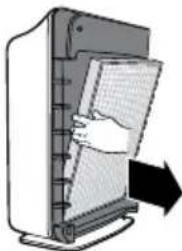
- Remove the True HEPA Filter and remove the plastic wrapper from the filter.
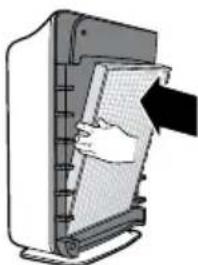
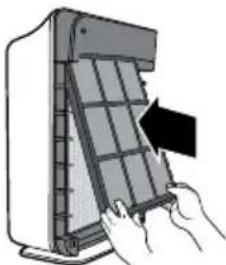
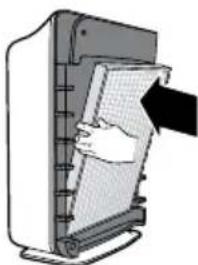
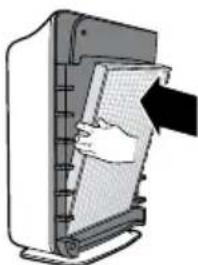
- Install the True HEPA Filter with the arrow showing "air flow" pointing in toward the back of the air cleaner; the white tabs at the top and bottom of the HEPA filter will point out to the front of the unit.
- Open the resealable plastic bag containing the Carbon Pre-Filters and remove one filter. Reseal the plastic bag to maintain the freshness of the remaining filter.
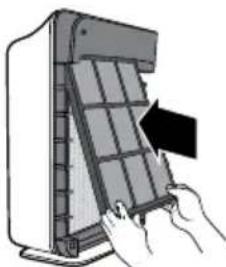
- Install the Carbon Pre-Filter onto the plastic frame by pushing against all "hook and loop" squares on the back of the frame. (Diag. 7A)
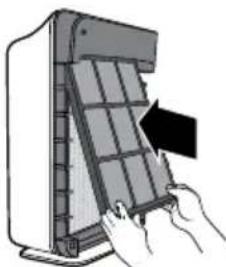
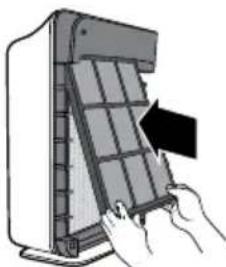
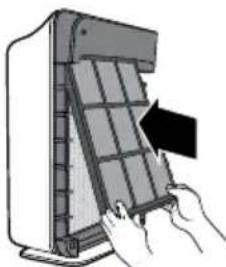
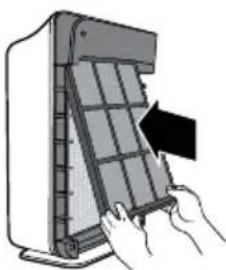
- Install the plastic frame by inserting tabs up into the air cleaner and gently pushing in at the bottom tab until the frame fits into place snuggly.
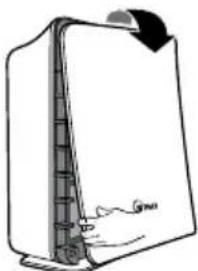
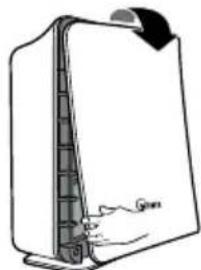
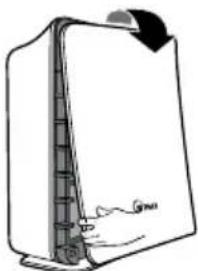
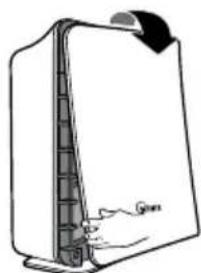
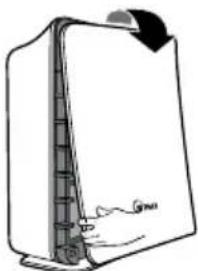
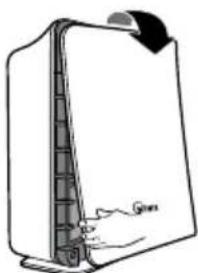
- Replace the front panel by hooking the panel on the top of the unit. Swing the panel in by pushing gently on each side of the unit and then lock it into place.
- Plug the power cord into a wall outlet.
- Press and hold the POWER button until a short "beep" sounds.
- The air cleaner will take 3\~4 minutes to calibrate the AIR QUALITY sensor. During this time the sensor lights will flash on and off. Once the sensor has calibrated, the lights will begin in AUTO mode.
- Remove tab from remote control (WACP300 / WACP450 only.)
Note: For best results and to maximize air flow:
- Place unit at least 2 feet away from the wall.
- Place the unit away from drafty areas, as the sensors may not react accurately.
- Do not place near curtains, furniture, or other items that might inhibit air flow.
- Place the unit on a stable surface.
natural_image
Illustration of a hand holding a card with a partially visible card (no text or symbols)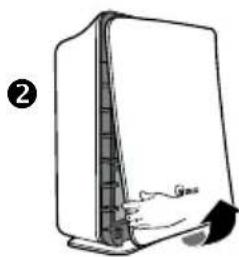
natural_image
Simple line drawing of a rectangular device with a handle and arrow, no text or symbols present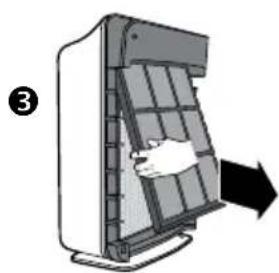
natural_image
Diagram of a device with a hand inserting a component into a grid-like structure, indicated by an arrow (no text or symbols present)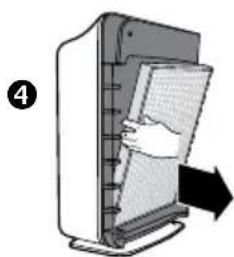
natural_image
Illustration of a computer monitor with a hand inserting a paper into it, showing no text or symbols.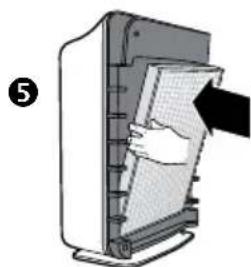
natural_image
Illustration of a hand inserting a card into a device (no text or symbols visible)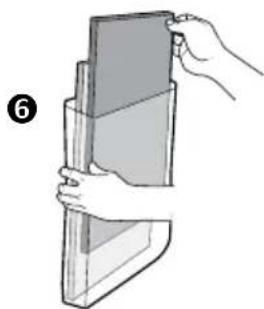
natural_image
Illustration of a hand holding a rectangular object, no text or symbols present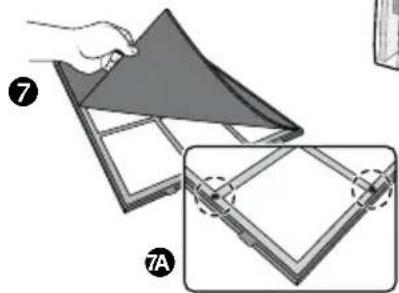
natural_image
Illustration of a folding panel with labeled parts (7 and 7A), showing structural details without any text or symbols.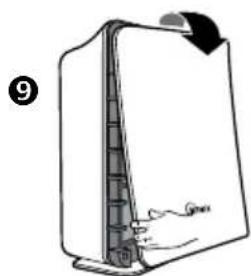
natural_image
Diagram of a refrigerator with a handle and arrow indicating rotation (no text or symbols)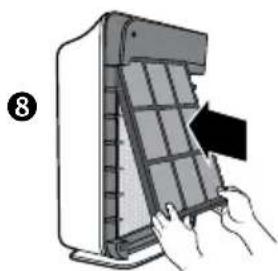
natural_image
Illustration of hands installing or adjusting a grid panel inside a device (no text or symbols visible)CONTROL PANEL
A. AIR QUALITY SENSOR: Automatically monitors the air quality level and adjusts fan speed accordingly in Auto.
B. AUTO: Changes the mode setting to AUTO.
C. RESET: Resets the CHECK FILTER indicator light.
D. CHECK FILTER: Signals when to replace filters.
E. PlasmaWave™: Shows that PlasmaWave™ Technology is active.
F. AIR QUALITY: Green, yellow, and red lights indicate the quality of the air.
G. Turbo / High / Med / Quiet: Shows current fan speed setting.
H. SPEED: adjusts fan speed to QUIET, MED, HIGH or TURBO.
I. Ⓞ: Turns the unit On and Off.
J. LIGHT SENSOR: dims the control panel lights and sets the fan speed to QUIET when the room is dark.

OPERATIONS
AUTOMATIC OPERATION: The unit is set to automatic operation when it is first turned on. The air purifier will automatically sense the amount of impurities in the air, and adjust the fan speed to keep your air purified.
MANUAL OPERATION: After you turn on the unit, you can switch to manual operation by using the SPEED button. To go back to the automatic operation press AUTO.
QUIET, MED OR HIGH: These levels are recommended for standard daytime use. HIGH will activate automatically when sensors detect poor air quality in AUTOMATIC OPERATIONS. Use the SPEED button to select the required level.
TURBO: This is the highest fan speed. It can be activated manually for maximum air purification by pushing the SPEED button several times.
PlasmaWave™: Push the Auto button for 3 seconds to turn on or off.
FILTER REPLACEMENT
Filter Replacement
• There are two separate filters: True HEPA Filter and Carbon Pre-Filter.
- The CHECK FILTER indicator will signal when to replace the True HEPA Filter. The replacement period will vary depending on the hours of usage, air quality, and location of the unit. However, in most cases of normal use the filter will need to be replaced annually.
- Change the True HEPA Filter when the CHECK FILTER indicator is on.
- For best performance, change the Carbon Pre-Filter every three months. This filter should be disposed of when changed.
CAUTION: Turn off the air clearer and unplug the electrical cord before performing any maintenance.
Carbon Pre-Filter Replacement
- Turn off the air cleaner and unplug the electrical cord.
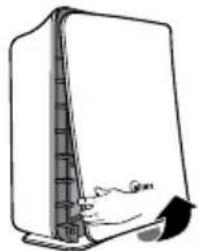
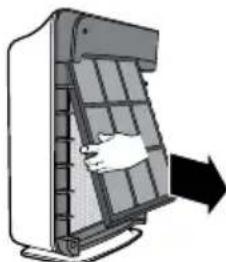
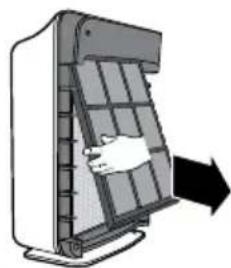
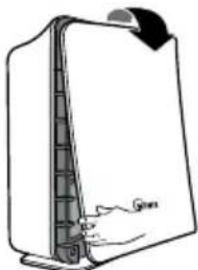
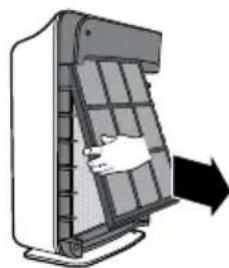
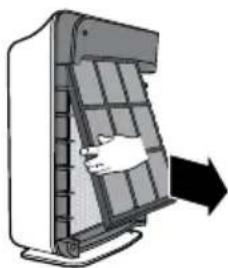
- Remove the front panel by pulling gently from the lower portion of the panel. Do not force, the panel should remove easily.
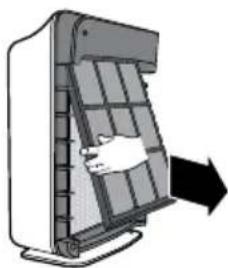
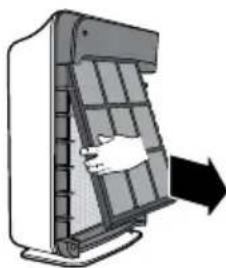
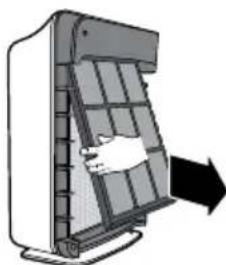
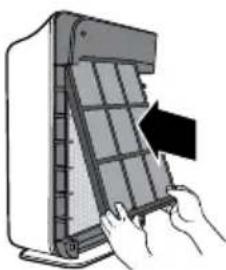
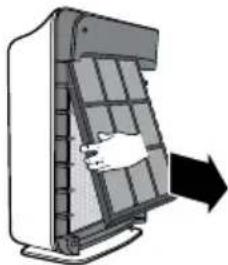
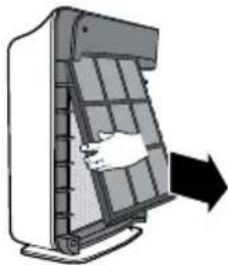
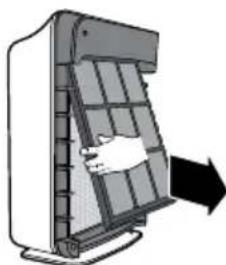
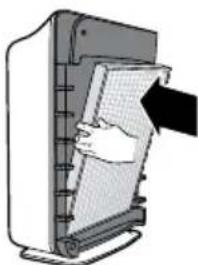
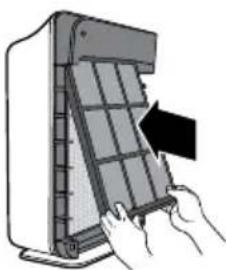
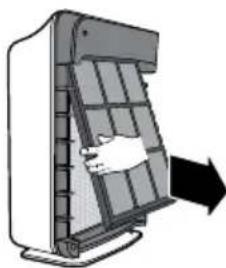
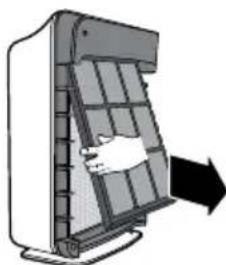
- Remove the Carbon Pre-Filter and plastic frame by gently pulling out from the bottom and down from the top.
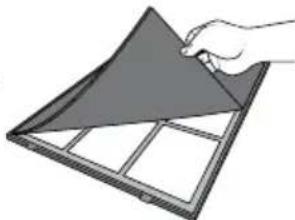
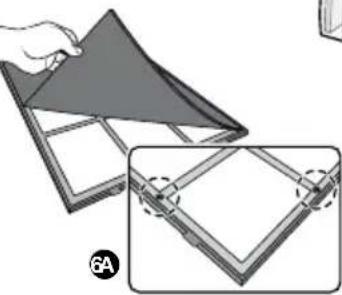
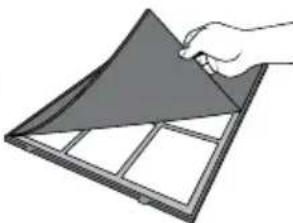
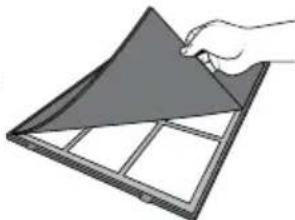
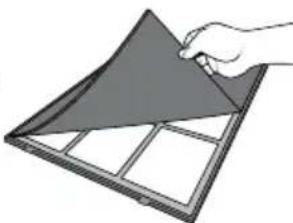
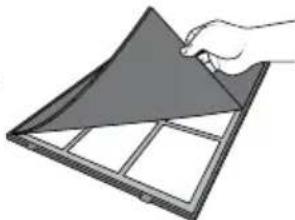
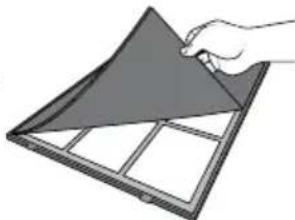
- Remove the Carbon Pre-Filter from the plastic frame and dispose of it.
- Remove a replacement Carbon Pre-Filter from the resealable plastic bag and reseal to maintain the freshness of the remaining filter.
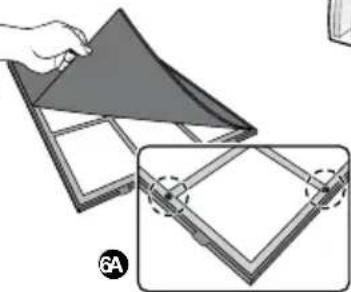
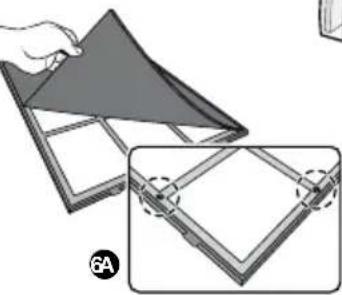
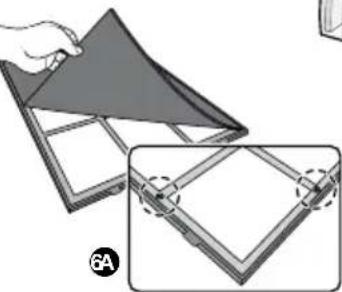
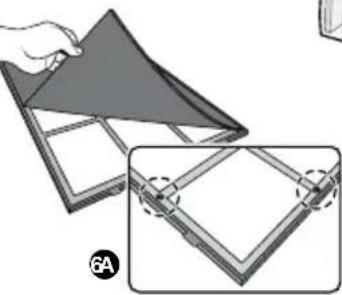
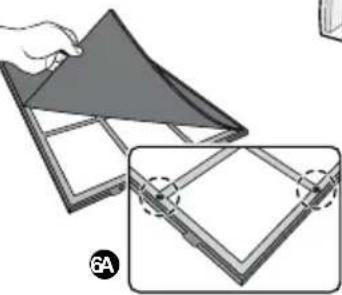
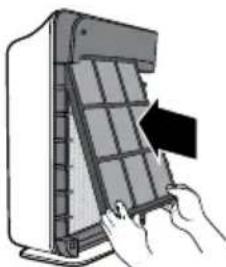
- Install the Carbon Pre-Filter onto the plastic frame by pushing against six "hook and loop" squares on the back of the frame. (DIAG. 6A)
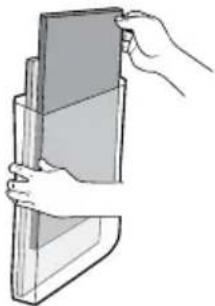
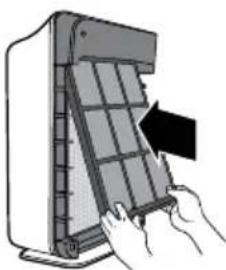
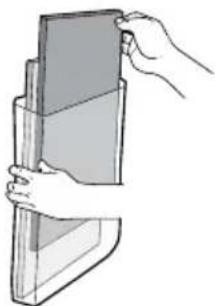
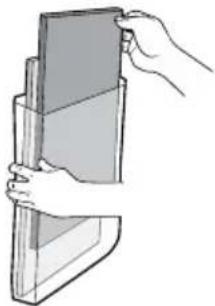
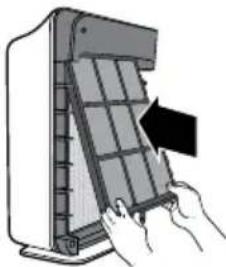
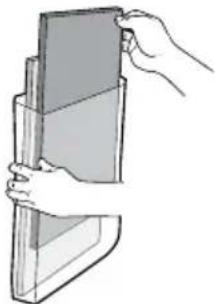
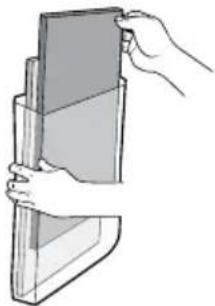
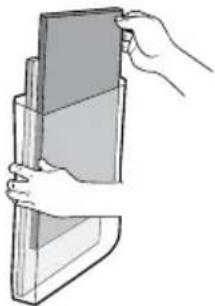
- Install the plastic frame by inserting tabs up into the air cleaner and gently pushing in at the bottom tab until the frame fits into place snuggly.
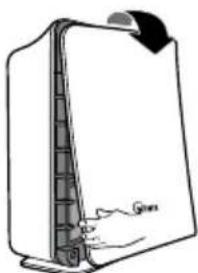
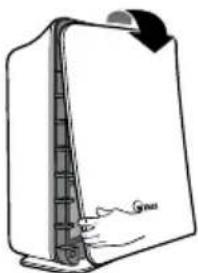
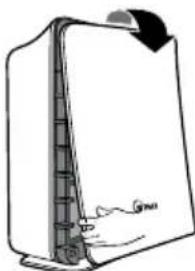
- Replace the front panel by hooking the panel on the top of the unit. Swing the panel in by pushing gently on each side of the unit and then lock it into place.
- Plug in air cleaner and press POWER button until short "beep" sounds.
CAUTION: Do not wash and reuse the True HEPA Filter or the Carbon Pre-Filter as they will not work effectively.
2
natural_image
Simple line drawing of a computer monitor with a scroll wheel and base mount (no text or symbols)3
natural_image
Diagram of a hand inserting a grid into a device panel, with an arrow indicating direction (no text or symbols present)4
natural_image
Illustration of a hand holding a triangular panel with grid lines, no text or symbols present5
natural_image
Illustration of a hand holding a stack of books or documents (no text or symbols visible)6
natural_image
Illustration of a folding sheet with a hand holding the top panel, showing two views (top and side), no text or symbols present.8
natural_image
Illustration of hands installing or adjusting a grid panel on a device (no text or symbols visible)9
natural_image
Line drawing of a refrigerator with a handle and lid, no text or symbols presentCAUTION: Turn off the air clearer and unplug the electrical cord before performing any maintenance.
True HEPA Filter Replacement
- Turn off the air cleaner and unplug the electrical cord.
- Remove the front panel by pulling gently from the lower portion of the panel. Do not force, the panel should remove easily.
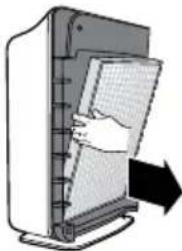
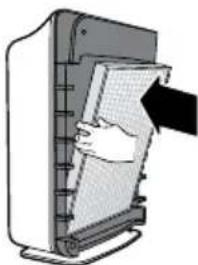
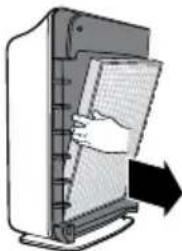
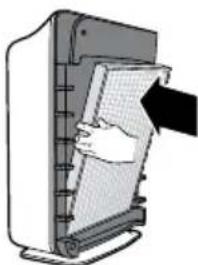
- Remove the Carbon Pre-Filter and plastic frame by gently pulling out from the bottom and down from the top.
- Remove the True HEPA Filter and dispose of it.
- Remove the plastic wrap from the new True HEPA Filter and insert it with the arrow showing "air flow" pointing in toward the back of the top and bottom of the True HEPA Filter will point out to the front of the unit.
- Reinstall the plastic frame and Carbon Pre-Filter by inserting tabs up into the air cleaner and gently pushing in at the bottom tab until the frame fits into place snuggly.
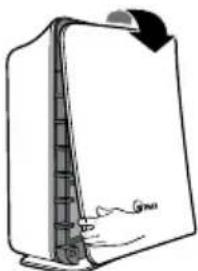
- Replace the front panel by hooking the panel on the top of the unit. Swing the panel in by pushing gently on each side of the unit and then lock it into place.
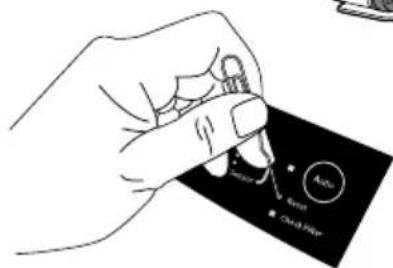
- Plug in air cleaner and press POWER button until short "beep" sounds.
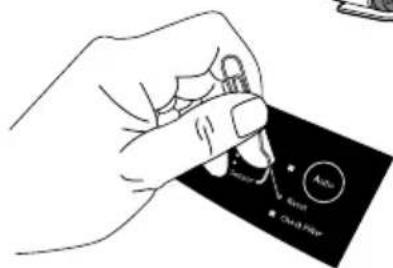
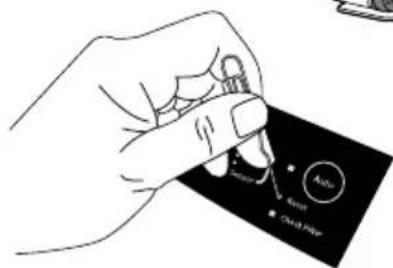
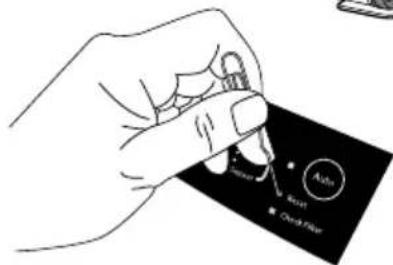
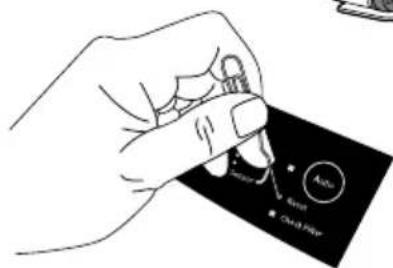
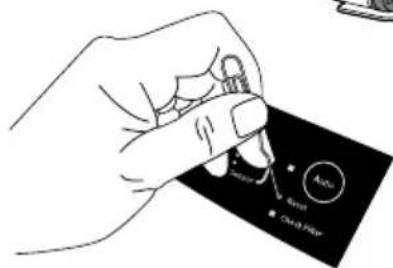
- Press the RESET FILTER button by gently inserting a paperclip into the RESET FILTER hole on the control panel. The light will flash 5 times before a "beep" sounds to indicate the filter has been reset. See figure C on page 8 or Diag. 9 to the right.
The air cleaner will take 3-4 minutes to calibrate the AIR QUALITY sensor. During this time the sensor lights will flash on and off. Once the sensor has calibrated, the lights will stop flashing and the unit will begin in AUTO mode.
2
natural_image
Simple line drawing of a computer monitor with a scroll wheel and base, no text or symbols present3
natural_image
Diagram of a door handle opening a panel, with an arrow indicating direction (no text or symbols present)4
natural_image
Illustration of a hand inserting a grid into a device (no text or symbols visible)5
natural_image
Illustration of a hand inserting a card into a computer monitor (no text or symbols visible)8
natural_image
Illustration of hands inserting a grid into a device panel (no text or symbols visible)9
natural_image
Diagram of a door handle with a hand pointing to the side panel (no text or symbols)9
REMOTE CONTROL
BATTERY REPLACEMENT
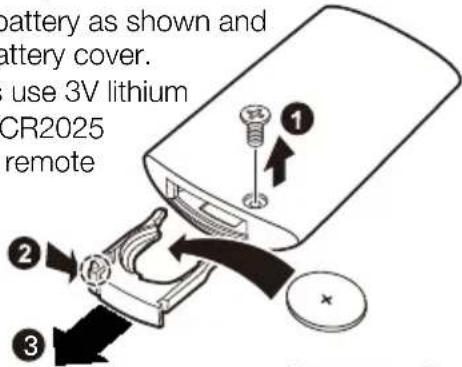
- Remove the screw from the backside of the remote.
- Squeeze tabs of battery cover and at the same time pull cover out of remote.
- Insert battery as shown and close battery cover.
- Always use 3V lithium battery CR2025 into the remote control.
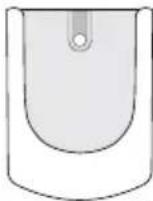
CRADLE: The remote control has a separate wall-mountable storage cradle that can be conveniently attached to any wall using a screw.
BATTERY USE
• Always use 3V lithium battery CR2025 into the remote control.
- Incorrect battery usage may cause battery fluid leakage and/or damage.
- When not using remote control for an extended period, remove the battery.
- Avoid dropping or damaging the remote control.
PROPER OPERATING CONDITIONS
- Operate the remote control facing the air cleaner.
- Operate within 20 feet of the air cleaner.
IMPROPER OPERATING CONDITIONS
- Any location where there is inverter lighting equipment or electronic spontaneous lighting equipment.
- When objects or furniture are located between the remote and the air cleaner.
- When air cleaner unit is located in direct sunlight, as sunlight may interfere with the infrared sensor.
- In areas where fluorescent lighting is flickering due to worn-out bulbs.
- Keep remote control away from direct sunlight or heaters.
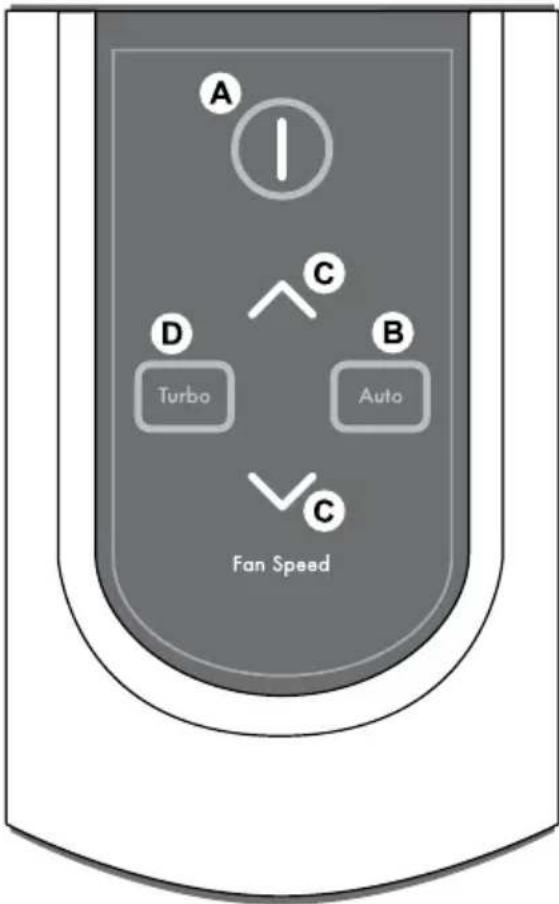
A. POWER: Use the power button to turn the power on and off. A short "beep" will sound when the unit turns on or off.
B. AUTO: Use the Auto button to engage the unit into Auto mode.
C. FAN SPEED: By pressing up or down, the unit will change fan speeds and enter into manual mode.
D. TURBO: Use this button to switch from automatic operation and begin the maximum amount of room air cleaning and air movement and will remain in Turbo speed until changed into Auto or Manual mode.
TROUBLESHOOTING
Before You call
Solutions to Common Problems
Before you call for service, review the list below. This list covers problems that are not the result of defective materials or workmanship.
| OCCURRENCE POSSIBLE CAUSE / SOLUTION | |
| The remote control dose not work. | Make sure the remote control battery is inserted correctly.dose not work.Replace a worn-out battery.Make sure that the remote control has a clear line of sight to the air cleaner. |
| The unit has stopped removing odors effectively, or seems to be emitting an odor. | Make sure the AIR QUALITY sensor is not blocked or clogged.Move the unit closer to the offending odors.Replace the filters as they may have reached their capacity to absorb pollutants. You may need to replace filters more frequently. |
| The AIR QUALITY LEVEL indicator is orange or red, but the air seems clean. | Clear the AIR QUALITY sensor with a vacuum cleaner as it may be blocked or clogged. |
| Unit interferes with radio or television reception. | Because this unit radiates radio frequency energy, try one or more of the following suggestions:Reorient or relocate the receiving antenna.Increase the distance between the equipment and the air cleaner.Connect the air cleaner to an outlet on a circuit different from that to which the equipment is connected.Consult an experienced television/radio technician. |
| The CHECK FILTER indicator remains lit after replacing the True HEPA Filter. | Press the RESET FILTER button by gently inserting a paper-clip into the RESET FILTER button hole. Hold for 3-5 seconds until a “beep” sounds to indicate the unit has been reset. |
| The unit does not remove smoke and odors in the air. | Make sure the sensor is not blocked or clogged.- The filters may need replacement |
| The unit seems to produce odors. | Move the unit closer to the offending odors.- Replace the filter- Replace the HEPA filter |
| The air quality light is green, but there is still dust/odor in the air. | Replace the filters as needed. |
| The air quality light is yellow or red, but the air seems clean. | Clear the sensor with a vacuum cleaner, as it may be blocked or clogged.- Sometimes a compressed can of air may unclog the dust in the sensor. |
| Unit makes a ticking sound. | This is caused by the PlasmaWaveTM. technology, it may come and go depending on the environment, but as long as the PlasmaWaveTM light is on, the function is working. |
| Unit interferes with radio or television reception. | Because this unit radiates radio frequency energy, we suggest you try one or more of the following:- For better reception, adjust the television/radio antenna.- Move the unit away from the affected television/radio.- Plug the unit power cord into an outlet different from the television/radio power cord. |
| The FILTER REPLACEMENT indicator remains lit after replacing the True HEPA and/or Carbon Filter. | Press the reset filter button by gently inserting a paperclip end into the RESET FILTER opening,. Hold for 3-5 seconds until you hear a “beep” and light turns off. |
| The Remote Control Does Not Work | Make sure the battery is installed properly.Make sure the battery may not need replacing due to being worn out.Make sure the remote has a clear line of sight to the air cleaner. |
| There is still some dust you can see in the air or on my furniture | The unit will capture most dust and particles, however with opening doors, windows, central HVAC etc... there may still be some level of dust that you can see. |
| There is nothing holding the filters in place | The filters are meant to rest inside the unit. Once the unit is turned on, the force of air pulled through the machine will create a tight seal of the filters. |
| I can hear revving of the fan motor | This is normal, especially at night when all environmental sounds are quiet, you may hear the motor running in repetition. |
| The unit is running on high all the time. | Clear the sensor with a vacuum cleaner, as it may be blocked or clogged.- Sometimes a compressed can of air may unclog the dust in the sensor. |
| Can I wash my filter? | NO - the filters that come with the unit will fall apart and be ruined if water is run through them. |
| Can I vacuum my filter? | NO - vacuuming will only spread the dust back into the air. If you think the filter is too dirty, it may be time to replace. |
| There is an odor coming from the unit and I just opened it. | The unit has been concealed in a tightly wrapped package of currogated cardboard and plastic. Because this has a fan and pulls air through it, it may give off some “new” odors.Depending on sensitivity, this should wear off in several days or perhaps a week depending on how much it is used. |
| I am not sure what filter to buy? | Go to www.winixinc.com to see which filter options are available for your unit by reviewing the reference chart. |
| Will this clean a bigger area than what it is rated for? | CADR ratings are provided from a controlled testing environment, if that environment changes, it can affect the performance.However if you have a slightly larger room than what the CADR rating is, it will still help improve the air, but may take a bit longer to do so. |
| Where should I place the unit? | At least 2 feet away from the wall to allow proper circulation around the unit. If there are doors or narrow hallways it may reduce the airflow to the air cleaner, but will eventually circulate near the machine. |
| Can I turn off the sleep mode? | No, however you can manually push what fan speed you prefer which will stay at that speed until you change it. |
Winix Luftreiniger
Made in Korea
Kontakt
WINIX USA 120 Prairie Lake Road, Unit E East Dundee, Illinois 60118
www.winixinc.com E-Mail: info@winixinc.com
Tel.: +1.847.551.9900
WINIX Europe Hoogoordreef 74, 1101BG, Amsterdam, Niederlande
www.winixeu.com Tel.: +31.020.3632107
Model : WACP150, WACP300, WACP450
ACHTUNG:
natural_image
Illustration of a hand using a power plug to test electrical shock (no text or symbols present)natural_image
Cartoon illustration of a refrigerator and a computer monitor, both showing expressive faces (no text or symbols)natural_image
Illustration of a hand holding a plug with lightning bolts and a power outlet, no text or symbols presentnatural_image
Cartoon illustration of a distressed refrigerator with hands holding a tool near an electrical outlet (no text or symbols)
Warnung
Stromversorgung
natural_image
Illustration of three cables connected to a power outlet with lightning bolts indicating electrical hazard (no text or symbols)
natural_image
Illustration of a smiling refrigerator with a surprised face and a person waving, accompanied by a warning symbol (no text or symbols present)natural_image
Hand inserting a plug into an electrical outlet (no text or symbols visible)
Warnung
Betrieb
natural_image
Cartoon illustration of a smiling book character with arms and legs, no text or symbols presentnatural_image
Cartoon illustration of a book character with arms and legs, standing beside a ruler (no text or symbols)natural_image
Cartoon illustration of a steaming room next to a book with a sad face, no text or symbols presentnatural_image
Cartoon illustration of a refrigerator with angry expression and falling bottles and boxes (no text or symbols)
Hinweis

Stromversorgung
natural_image
Cartoon illustration of a book character with a sad face and thumbs-up gesture, holding a smartphone (no text or symbols)natural_image
Hand inserting a socket into an electrical outlet, no text or symbols visiblenatural_image
Illustration of a book with a hand touching its pages, showing an electrical socket inserted (no text or symbols present)
Hinweis

Betrieb
natural_image
Cartoon illustration of a child running toward a smiling refrigerator with a stick (no text or symbols)
natural_image
Cartoon illustration of a hand holding a closed book with a sad face, arms outstretched (no text or symbols)
natural_image
Illustration of a portable air conditioner and a closed refrigerator with cartoon facial expressions (no text or symbols)


Hinweis

Betrieb
natural_image
Cartoon illustration of a smiling book character running away from behind, with stars and a prohibition symbol below (no text or symbols on the book or background)natural_image
Illustration of a hand holding a small object emitting smoke next to a smiling book with angry expression (no text or symbols)natural_image
Cartoon illustration of a refrigerator with angry expression and a warning symbol (no text or labels)natural_image
Cartoon illustration of a book character with arms and facial expression, no text or symbols presentnatural_image
Cartoon illustration of a child standing on a door while holding an open refrigerator, with a no-smoking symbol below (no text or symbols on the main image)natural_image
Illustration of a refrigerator with exhaust smoke and spray bottle, no text or symbols presentnatural_image
Cartoon illustration of a smiling refrigerator with a hand waving, next to a window with a sun and a 'no' symbol (no text or numbers present)natural_image
Cartoon illustration of a book character with arms and legs, reacting to a spray bottle (no text or symbols)
natural_image
Hand holding a card with a metallic clip, no visible text or symbols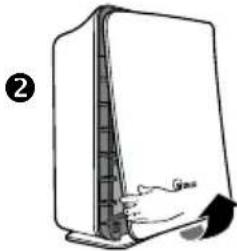
natural_image
Line drawing of a server or rack device with a handle and spout, no text or symbols present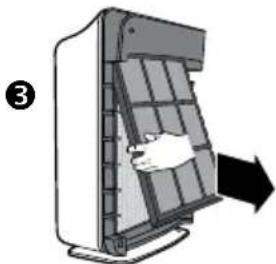
natural_image
Diagram of a device with a hand inserting a grid into a panel, showing an arrow indicating direction (no text or symbols present)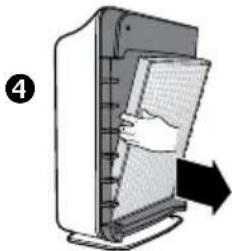
natural_image
Illustration of a computer monitor with a hand inserting a paper into it, showing a right-pointing arrow (no text or symbols)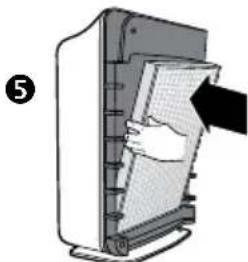
natural_image
Illustration of a hand inserting a paper into a printer holder (no text or symbols visible)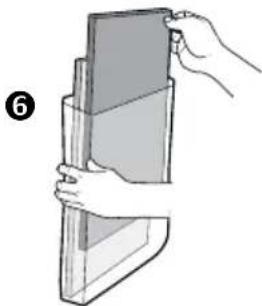
natural_image
Illustration of a hand holding a rectangular object, no text or symbols present
natural_image
Illustration of a folding panel with labeled parts (7 and 7A), showing structural details without any text or symbols.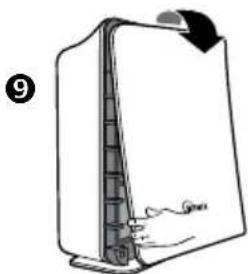
natural_image
Diagram of a mechanical device with a handle and arrow indicating rotation (no text or symbols)
natural_image
Illustration of hands installing or adjusting a grid device into a device casing (no text or symbols visible)BEDIENFELD
BETRIEBSMODI
natural_image
Line drawing of a computer monitor with scroll wheel and base mount (no text or symbols)3
natural_image
Diagram of a door handle opening a window with a hand inserting a tray (no text or symbols)4
natural_image
Illustration of a hand holding a triangular object over a grid-patterned panel (no text or symbols)5
natural_image
Illustration of hands holding a stack of books or documents (no text or symbols visible)6
natural_image
Illustration of a folding sheet with a hand holding the top panel, showing a close-up view of the sheet (no text or symbols present)8
natural_image
Illustration of hands installing or adjusting a grid panel on a device (no text or symbols visible)9
natural_image
Diagram of a door handle with a curved arrow indicating rotation (no text or symbols)natural_image
Simple line drawing of a computer monitor with a scroll wheel and base, no text or symbols present3
natural_image
Diagram of a device with a hand pressing down on a panel, showing airflow direction (no text or symbols)4
natural_image
Illustration of a hand inserting a card into a computer monitor (no text or symbols visible)5
natural_image
Illustration of a hand inserting a card into a computer monitor (no text or symbols visible)8
natural_image
Illustration of hands inserting a grid into a device panel (no text or symbols visible)9
natural_image
Diagram of a door handle with a hand pointing to the side panel (no text or symbols)9
FERNBEDIENUNG
ERSETZEN DER BATTERIEN
WINIX USA 120 Prairie lake Road, Unit E East Dundee, Illinois 60118
www.winixinc.com email:info@winixinc.com
Tel: +1.847.551.9900
WINIX Europe Hoogoorddreef 74, 1101BG, Amsterdam
www.winixeurope.eu Tel.: +31 (0)20-3632107
AVERTISSEMENT :
GARANTIE LIMITÉE DU PRODUIT
GARANTIE LIMITÉE DES PURIFICATEURS D'AIR WINIX FRESHOME™
natural_image
Illustration of a hand using a plug to test electrical shock hazard, with no text or symbols present.natural_image
Cartoon illustration of a refrigerator with a surprised expression and a distressed refrigerator, both showing expressive gestures (no text or symbols)natural_image
Cartoon illustration of a book character with a frowning expression and a hand holding a pencil, next to a prohibition symbol (no text or labels)
Attention

Alimentation
natural_image
Illustration of three cables connected to a plug with three outlets, showing electrical connections (no text or symbols)
natural_image
Illustration of a person reacting to the front view of a smiling, anthropomorphic book (no text or symbols present)
natural_image
Illustration of a hand inserting a plug into an electrical outlet, with no text or symbols present.
Attention

Fonctionnement
natural_image
Cartoon illustration of a smiling refrigerator with arms and legs, no text or symbols presentnatural_image
Cartoon illustration of a smiling book character standing on a ruler, with no text or symbols present.natural_image
Cartoon illustration of a toilet emitting smoke next to a book with a warning symbol (no text or labels)natural_image
Cartoon illustration of a refrigerator with angry expression and a warning symbol (no text or labels)
Note

Alimentation
natural_image
Cartoon illustration of a smiling book character giving a thumbs-up, with a prohibition symbol below (no text or labels)natural_image
Hand using a power socket to switch an electrical outlet (no text or symbols visible)
Note

Fonctionnement
natural_image
Cartoon illustration of a child running toward a large refrigerator with a frowning face (no text or symbols)
natural_image
Cartoon illustration of a hand holding a book with a sad face and open arms (no text or symbols)
natural_image
Illustration of a portable air conditioner and a closed refrigerator with cartoon facial expressions (no text or symbols)


Note

Fonctionnement
natural_image
Cartoon illustration of a smiling can with stars and a 'no' symbol below (no text or symbols on the can)natural_image
Illustration of a hand holding a small object and a book with angry expression, standing beside a prohibition symbol (no text or labels)natural_image
Cartoon illustration of a smiling refrigerator with hands and a warning symbol (no text or labels)natural_image
Cartoon illustration of a book character with arms and facial expression, no text or symbols presentnatural_image
Illustration of a smiling refrigerator with a hand waving, next to a window showing a sun and a 'no' symbol (no text or labels)natural_image
Cartoon illustration of a book character with arms and legs, spraying water from a bottle (no text or symbols)CONSIGNES DE SÉCURITÉ
natural_image
Illustration of a hand holding a card with a stylus, no text or symbols present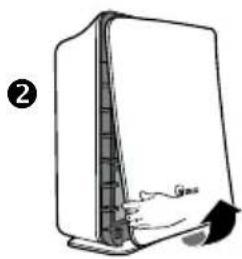
natural_image
Diagram of a device with a handle and arrow indicating movement (no text or symbols)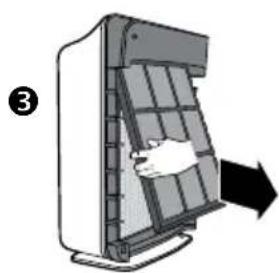
natural_image
Diagram of a device with a hand inserting a component into a grid-like structure, showing an arrow indicating direction (no text or symbols present)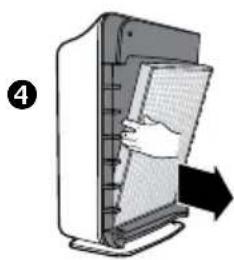
natural_image
Illustration of a hand inserting a grid into a computer tower, with an arrow indicating direction (no text or symbols)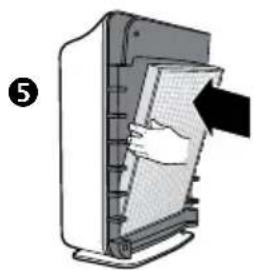
natural_image
Illustration of a hand inserting a card into a computer monitor (no text or symbols visible)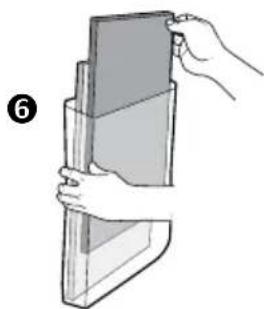
natural_image
Illustration of a hand holding a rectangular object, no text or symbols present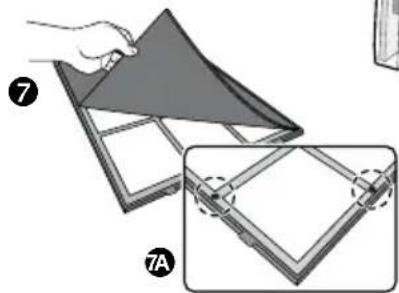
natural_image
Illustration of a folding panel with labeled parts (7 and 7A), showing structural details without any text or symbols.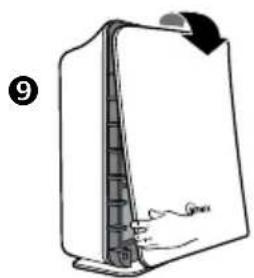
natural_image
Diagram of a device with a curved arrow indicating rotation or movement, showing internal structure (no text or symbols)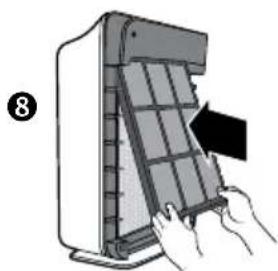
natural_image
Illustration of hands installing or adjusting a grid panel inside a device (no text or symbols visible)PANNEAU DE CONTRÔLE
FONCTIONNEMENTS
natural_image
Simple line drawing of a computer monitor with a scroll wheel and cable (no text or symbols)3
natural_image
Diagram of a door handle opening a window with a hand inserting a black arrow (no text or symbols)4
natural_image
Illustration of a hand holding a triangular object over a grid-patterned panel (no text or symbols)5
natural_image
Illustration of a hand holding a stack of books or documents (no text or symbols visible)6
natural_image
Illustration of a folding sheet with a hand holding the top panel, showing structural details (no text or symbols)8
natural_image
Illustration of hands installing or adjusting a grid panel on a device (no text or symbols visible)9
natural_image
Line drawing of a refrigerator with a handle and lid, no text or symbols presentnatural_image
Simple line drawing of a computer monitor with a scroll wheel and base, no text or symbols present3
natural_image
Diagram of a door handle opening a window with a hand inserting a black arrow (no text or symbols)4
natural_image
Illustration of a hand inserting a grid into a device (no text or symbols visible)5
natural_image
Illustration of a hand inserting a document into a machine (no text or symbols visible)8
natural_image
Illustration of hands installing or adjusting a grid panel on a device (no text or symbols visible)9
natural_image
Diagram of a mechanical device with a curved arrow indicating rotation, showing internal structure and no text or symbols.9
TÉLÉCOMMANDE
REEMPLACER LA PILE
CONDITIONS DE FONCTIONNEMENT APPROPRIÉES
WINIX USA 120 Prairie lake Road, Unit E East Dundee, Illinois 60118
www.winixinc.com E-Mail: info@winixinc.com
Tel: +1.847.551.9900
WINIX Europe Hoogoorddreef 74, 1101BG, Amsterdam
www.winixeu.com Tel.: +31 (0)20-3632107
Model : WACP150, WACP300, WACP450
LET OP:
BEPERKTE PRODUCTGARANTIE
BEPERKTE GARANTIE VOOR WINIX FRESHOME™-LUCHTREINIGERS
Model WACP300 EN WACP450
WAARSCHUWING: VEILIGHEIDSVOORSCHRIFTEN
natural_image
Illustration of a hand using a power plug to test electrical shock (no text or symbols present)natural_image
Cartoon illustration of a refrigerator with a surprised expression and a distressed refrigerator, both showing expressive gestures (no text or symbols)natural_image
Illustration of hands using a plug to plug electrical socket with lightning bolts (no text or symbols)
natural_image
Cartoon illustration of a smiling refrigerator with hands holding a tool near an electrical outlet (no text or symbols)

Waarschuwing
natural_image
Illustration of three cables connected to a power outlet with lightning bolts indicating electrical hazard (no text or symbols)
Stroom
natural_image
Illustration of a person reacting to a large book with a smiling face, next to a small electrical outlet (no text or symbols)natural_image
Illustration of a hand inserting a plug into an electrical outlet, with no text or symbols present.
Waarschuwing
natural_image
Cartoon illustration of a smiling book character with arms and legs, showing facial expression (no text or symbols)
natural_image
Cartoon illustration of a smiling book character standing beside a ruler (no text or symbols)
Gebruik
natural_image
Illustration of a book character emitting smoke next to a cigarette pack, with no text or symbols present.natural_image
Cartoon illustration of a refrigerator with angry expression and falling medicine bottles (no text or symbols)

Opmerking

Stroom
natural_image
Cartoon illustration of a sad book character holding a smartphone, with no text or symbols present.natural_image
Hand inserting a socket into an electrical outlet (no text or symbols visible)
Opmerking

Gebruik
natural_image
Cartoon illustration of a child running toward a large refrigerator with a star-shaped object nearby (no text or symbols)
natural_image
Cartoon illustration of a hand holding a closed book with a sad face and surprised expression (no text or symbols)
natural_image
Illustration of a portable air conditioner and a closed refrigerator with facial expressions (no text or symbols)


Opmerking

Gebruik
U mag de luchtreiniger NOOIT ergens tegenaan stoten of laten vallen.

natural_image
Cartoon illustration of a smiling book with stars and motion lines, no text or symbols presentnatural_image
Illustration of a hand holding a cup and a steaming cup next to a smiling refrigerator with arms open, accompanied by a no-smoking symbol (no text or labels)natural_image
Cartoon illustration of a refrigerator with angry expression and a warning symbol (no text or labels)natural_image
Cartoon illustration of a book character with arms and facial expression, waving (no text or symbols)natural_image
Cartoon illustration of a child standing on a door while holding an open suitcase, with no text or symbols present.natural_image
Illustration of a book with a sad face and open mouth, showing a sun and a window, with no text or symbols present.natural_image
Cartoon illustration of a book character with arms and legs, emitting vapor from a spray bottle (no text or symbols)natural_image
Hand holding a card with a metallic clip, no visible text or symbols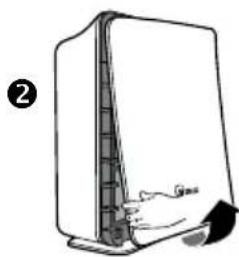
natural_image
Simple line drawing of a server or rack device with a handle and arrow, no text or symbols present.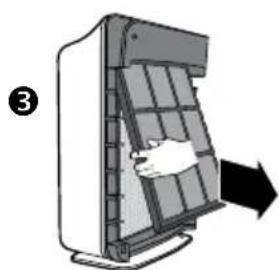
natural_image
Diagram of a device with a hand inserting a grid into a panel, showing an arrow indicating direction (no text or symbols present)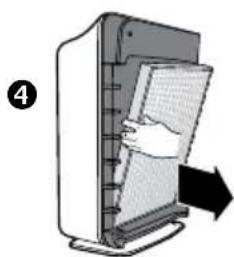
natural_image
Illustration of a computer monitor with a hand inserting a paper into it, showing no text or symbols.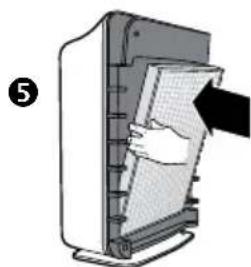
natural_image
Illustration of a hand inserting a card into a device (no text or symbols visible)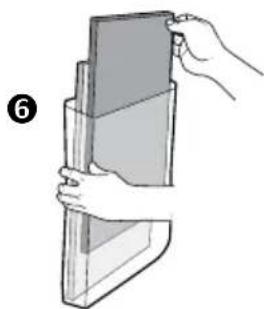
natural_image
Illustration of a hand holding a rectangular object, no text or symbols present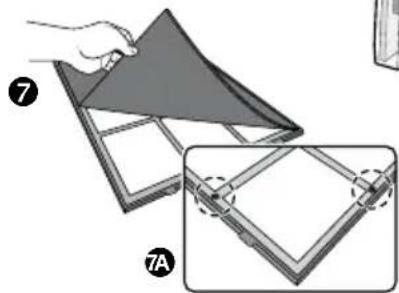
natural_image
Illustration of a folding panel with labeled parts (7 and 7A), showing structural details without any text or symbols.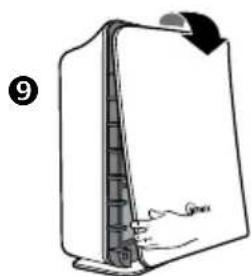
natural_image
Diagram of a device with a handle and arrow indicating rotation (no text or symbols)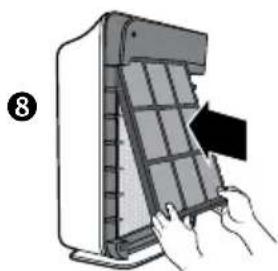
natural_image
Illustration of hands installing or adjusting a grid panel inside a device (no text or symbols visible)BEDIENINGSPANEEEL
WERKINGSSTANDEN
natural_image
Simple line drawing of a computer monitor with a scroll wheel and a hand pointing to it (no text or symbols)3
natural_image
Diagram of a door handle opening a panel, with an arrow indicating direction (no text or symbols present)4
natural_image
Illustration of a hand holding a folded paper or sheet with a dark triangular cover (no text or symbols)5
natural_image
Illustration of a hand holding a rectangular object, possibly a folded paper or container (no text or symbols visible)6
natural_image
Illustration of a folding paper with a triangular cover and a magnified inset showing the same fold (no text or symbols)9
natural_image
Diagram of a device with a handle and arrow indicating rotation (no text or symbols)8

natural_image
Illustration of hands installing or adjusting a grid panel on a device (no text or symbols visible)natural_image
Simple line drawing of a computer monitor with a scroll wheel (no text or symbols)3
natural_image
Diagram of a device with a hand pressing down on a panel, showing airflow direction (no text or symbols)4
natural_image
Illustration of a hand inserting a card into a computer monitor (no text or symbols visible)5
natural_image
Illustration of a hand inserting a card into a computer monitor (no text or symbols visible)8
natural_image
Illustration of hands inserting a grid into a device panel (no text or symbols visible)9
natural_image
Diagram of a mechanical device with a handle and arrow indicating rotation (no text or symbols)9
AFSTANDSBEDIENING
DE BATTERIJ VERVANGEN
True HEPA Air Cleaner
Model : WACP150, WACP300, WACP450
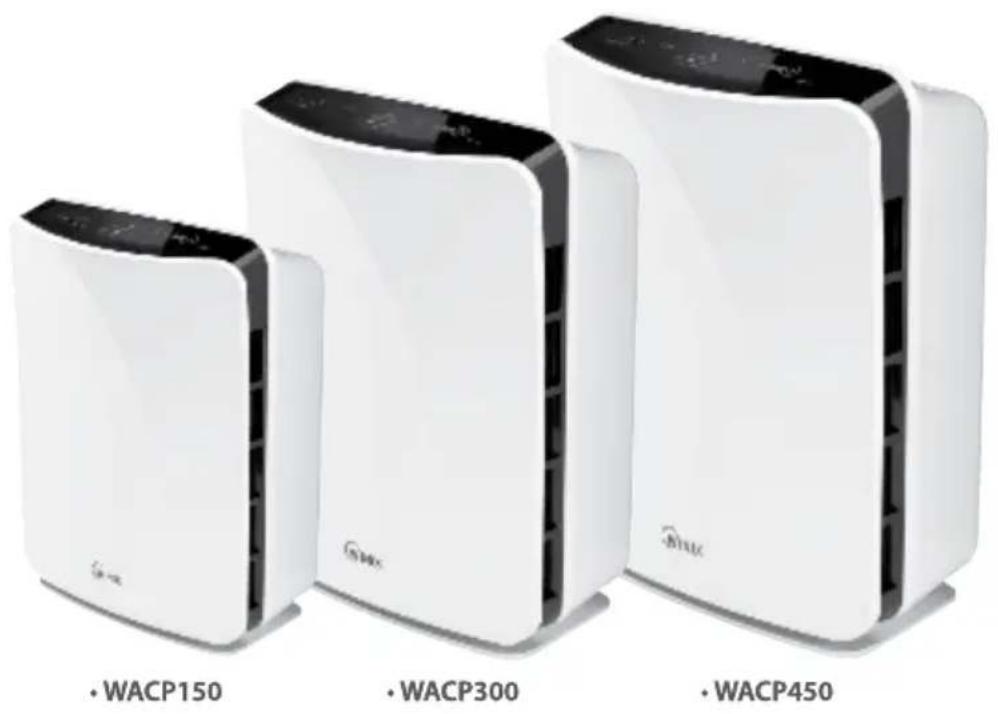
CAUTION:
Read and follow all safety rules and instructions before operating this equipment
Read and follow all safety rules and instructions before operating this equipment. Please keep this manual for future reference.
ÍNDICE
Garantía 2
natural_image
Illustration of a hand using a plug to test electrical shock from a battery (no text or symbols)natural_image
Cartoon illustration of a refrigerator with a frowning face and a distressed refrigerator, no text or symbols presentnatural_image
Cartoon illustration of a book character with a phone and hand holding a pencil, no text or symbols present
Advertencia
natural_image
Illustration of three cables connected to a power outlet with lightning bolts indicating electrical hazard (no text or symbols)
natural_image
Illustration of a person reacting to a large book with a smiling face, next to an electrical outlet (no text or symbols)natural_image
Illustration of a hand inserting a plug into an electrical outlet, with no text or symbols present.
Advertencia
Funcionamiento
natural_image
Cartoon illustration of a smiling refrigerator with arms and legs, no text or symbols presentnatural_image
Cartoon illustration of a smiling book character standing on a ruler, with no text or symbols present.natural_image
Cartoon illustration of a toilet emitting smoke next to a book with a warning symbol (no text or labels)natural_image
Cartoon illustration of a distressed refrigerator with angry expression, accompanied by smaller bottles and stacked boxes (no text or symbols)
Atención
natural_image
Cartoon illustration of a smiling book character giving a thumbs-up, with a prohibition symbol below (no text or labels)natural_image
Hand inserting a socket into an electrical outlet, no text or symbols visiblenatural_image
Cartoon illustration of a boy running beside a smiling refrigerator (no text or symbols)
natural_image
Cartoon illustration of a hand holding a closed book with a sad face and waving hands (no text or symbols)
natural_image
Illustration of a portable air conditioner and a closed refrigerator with cartoon facial expressions (no text or symbols)


Atención

Funcionamiento
natural_image
Cartoon illustration of a smiling can with stars and a 'no' symbol below (no text or symbols on the can)natural_image
Illustration of a hand holding a small object emitting smoke from a steaming cup next to a smiling refrigerator, with no text or symbols present.natural_image
Cartoon illustration of a distressed refrigerator with arms and bottles, no text or symbols presentnatural_image
Cartoon illustration of a book character with arms and facial expression, no text or symbols presentnatural_image
Cartoon illustration of a child standing on top of a closed book with arms and surprised expression (no text or symbols)natural_image
Illustration of a refrigerator with a spray bottle emitting vapor, showing no text or symbolsnatural_image
Cartoon illustration of a smiling book with a hand waving, next to a window with a sun (no text or symbols)natural_image
Cartoon illustration of a book with a smiling face and a spray bottle spraying from its pages (no text or symbols)natural_image
Illustration of a hand holding a card with a stylus, no text or symbols present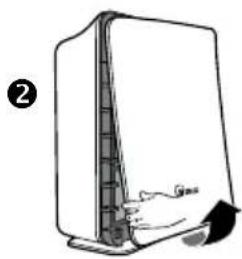
natural_image
Diagram of a device with a handle and arrow indicating movement (no text or symbols)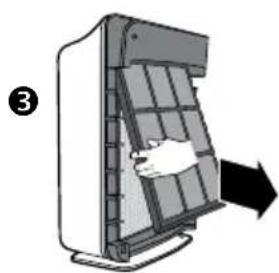
natural_image
Diagram of a device with a hand inserting a component into a grid-like structure, showing an arrow indicating direction (no text or symbols present)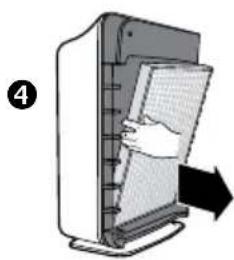
natural_image
Illustration of a computer tower with a hand inserting a grid into the screen (no text or symbols)
natural_image
Illustration of a hand inserting a card into a computer monitor (no text or symbols visible)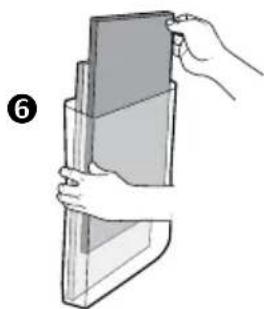
natural_image
Illustration of a hand holding a rectangular object, no text or symbols present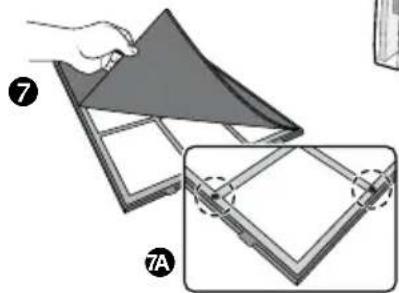
natural_image
Illustration of a folding panel with labeled parts (7 and 7A), showing structural details without any text or symbols.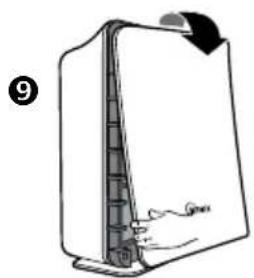
natural_image
Diagram of a device with a curved arrow indicating rotation or movement, showing internal structure (no text or symbols)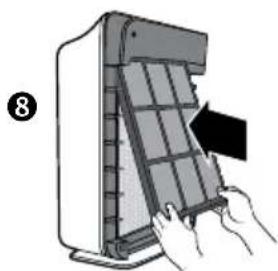
natural_image
Illustration of hands installing or adjusting a grid panel inside a device (no text or symbols visible)PANEL DE CONTROL
natural_image
Simple line drawing of a computer monitor with a scroll wheel (no text or symbols)3
natural_image
Diagram of a door handle clamped into a grid-patterned panel, with an arrow indicating compression or disassembly (no text or symbols present)4
natural_image
Illustration of a hand holding a folded paper or sheet with a grid pattern (no text or symbols)5
natural_image
Illustration of a hand holding a stack of rectangular objects (no text or symbols visible)6
natural_image
Illustration of a folding sheet with a hand holding the top panel, showing a close-up view of the sheet (no text or symbols present)8
natural_image
Illustration of hands installing or adjusting a grid panel on a device (no text or symbols visible)9

natural_image
Line drawing of a refrigerator with a hand pointing to the side panel (no text or symbols)natural_image
Simple line drawing of a computer monitor with a scroll wheel and base, no text or symbols present3
natural_image
Diagram of a door handle opening a panel, with an arrow indicating direction (no text or symbols)4
natural_image
Illustration of a hand inserting a grid into a device (no text or symbols visible)5
natural_image
Illustration of a hand inserting a card into a computer monitor (no text or symbols visible)8
natural_image
Illustration of hands inserting a grid into a device panel (no text or symbols visible)9
natural_image
Diagram of a door handle with a hand pointing to the side panel (no text or symbols)9
MANDO A DISTANCIA
WINIX USA 120 Prairie lake Road. Unit E East Dundee, Illinois 60118
www.winixinc.com E-Mail: info@winixinc.com
Tel: +1.847.551.9900
WINIX Europa Hoogoordreef 74, 1101BG, Amsterdam
www.winixeu.com Tel.: +31 (0)20-3632107
FresHome
PlasmaWave™
True HEPA Air Cleaner
Model : WACP150, WACP300, WACP450
CAUTION:
Read and follow all safety rules and instructions before operating this equipment
Read and follow all safety rules and instructions before operating this equipment. Please keep this manual for future reference.
SOMMARIO
Garanzia 2
Modelli WACP300 E WACP450
natural_image
Illustration of a hand using a plug to test a plug with a circular head, no text or symbols presentnatural_image
Cartoon illustration of a refrigerator and a refrigerator with expressive faces, no text or symbols presentnatural_image
Cartoon illustration of a book character with a hand holding a pencil and a small electrical switch, no text or symbols present.
Avvertenza

Alimentazione
natural_image
Illustration of three cables connected to a plug with three connectors, showing electrical connections without any text or symbols.
natural_image
Illustration of a smiling book with a heart symbol next to an electric shock wave, and a person waving (no text or symbols present)natural_image
Illustration of a hand inserting a plug into an electrical socket, with no text or symbols present.
Avvertenza

Funzionamento
natural_image
Cartoon illustration of a smiling refrigerator with arms and legs, no text or symbols presentnatural_image
Cartoon illustration of a book character with arms and facial features, standing on a ruler (no text or symbols)natural_image
Cartoon illustration of a toilet emitting smoke next to a book with a warning symbol (no text or labels)natural_image
Cartoon illustration of a refrigerator with angry expression and a warning symbol (no text or labels)
Nota

Alimentazione
natural_image
Cartoon illustration of a book character with a sad face and pointing at a small electronic device, no text or symbols present.natural_image
Hand using a power plug to switch an electrical outlet (no text or symbols visible)
Nota

Funzionamento
natural_image
Cartoon illustration of a child running toward a smiling refrigerator with a stick (no text or symbols)
natural_image
Cartoon illustration of a hand holding a closed book with a sad face and surprised expression (no text or symbols)
natural_image
Illustration of a portable air conditioner and a closed refrigerator with facial expressions (no text or symbols)


Nota

Funzionamento
natural_image
Cartoon illustration of a smiling can with stars and a prohibition symbol (no text or labels)natural_image
Illustration of a hand holding a small object emitting smoke next to a smiling refrigerator with a bandaged face (no text or symbols)natural_image
Cartoon illustration of a refrigerator with angry expression and a warning symbol (no text or labels)natural_image
Cartoon illustration of a book character with arms and facial expression, no text or symbols presentnatural_image
Cartoon illustration of a child jumping on top of a refrigerator with surprised expression (no text or symbols)natural_image
Illustration of a refrigerator with birds flying around it and a spray bottle nearby (no text or symbols)natural_image
Cartoon illustration of a smiling refrigerator with a hand waving, next to a window showing a sun (no text or symbols)natural_image
Cartoon illustration of a book character with a spray bottle spraying from its pages (no text or symbols)natural_image
Hand holding a card with a metallic clip, no visible text or symbols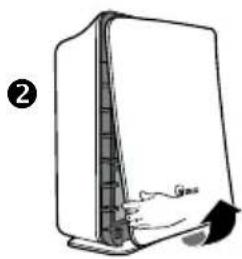
natural_image
Diagram of a device with a handle and arrow indicating movement (no text or symbols)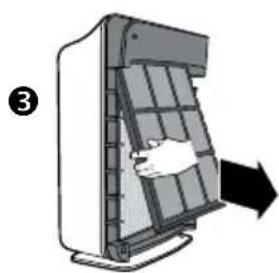
natural_image
Diagram of a device with a hand inserting a component into a grid-like structure, indicated by an arrow (no text or symbols present)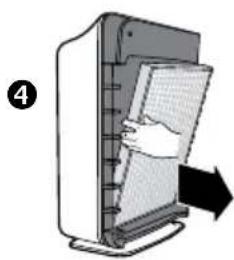
natural_image
Illustration of a computer tower with a hand inserting a grid into the screen (no text or symbols)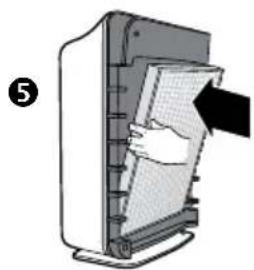
natural_image
Illustration of a hand inserting a card into a computer monitor (no text or symbols visible)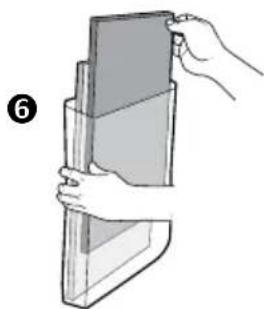
natural_image
Illustration of a hand holding a rectangular object, no text or symbols present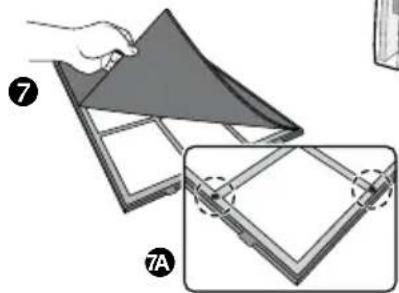
natural_image
Illustration of a folding panel with labeled parts (7 and 7A), showing structural details without any text or symbols.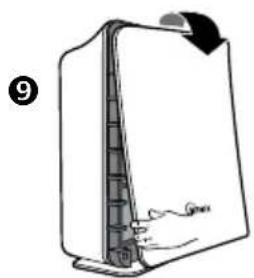
natural_image
Diagram of a device with a curved arrow indicating rotation or movement, showing internal structure (no text or symbols)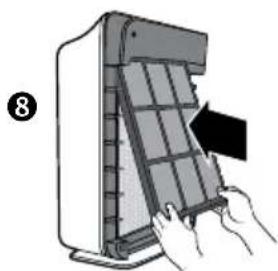
natural_image
Illustration of hands installing or adjusting a grid panel inside a device (no text or symbols visible)PANNELLO DI CONTROLLO
FUNZIONAMENTO
natural_image
Simple line drawing of a computer monitor with a scroll wheel and base mount (no text or symbols)3
natural_image
Diagram of a hand inserting a grid into a device, with an arrow indicating direction (no text or symbols present)4
natural_image
Illustration of a hand holding a folded paper or sheet with a triangular cover (no text or symbols)5
natural_image
Illustration of a hand holding a stack of books or documents (no text or symbols visible)6
natural_image
Illustration of a folding sheet with a hand holding the top panel, showing a close-up view of the sheet (no text or symbols)8
natural_image
Illustration of a hand inserting a grid into a device panel (no text or symbols visible)9
natural_image
Line drawing of a refrigerator with a handle and lid, no text or symbols presentnatural_image
Simple line drawing of a computer monitor with a scroll wheel (no text or symbols)3
natural_image
Diagram of a device with a hand pressing down on a panel, showing airflow direction (no text or symbols)4
natural_image
Illustration of a hand inserting a card into a computer monitor (no text or symbols visible)5
natural_image
Illustration of a hand inserting a card into a computer monitor (no text or symbols visible)8
natural_image
Illustration of hands inserting a grid into a device panel (no text or symbols visible)9
natural_image
Diagram of a door handle with a hand pointing to the side panel (no text or symbols)9
TELECOMANDO

- FresHome
- PlasmaWave™
- True HEPA Air Cleaner
- CAUTION:
- TABLE OF CONTENTS
- LIMITED PRODUCT WARRANTY
- WINIX FRESHOME™ AIR CLEANERS LIMITED WARRANTY
- PACKAGE CONTENTS
- Models WACP300 AND WACP450
- Models WACP150
- INSTRUCTIONS
- Warning
- Power Cord
- Power
- Operation
- Note
- SAFETY INSTRUCTIONS
- IMPORTANT CAUTIONS FOR USING YOUR AIR CLEANER
- IMPORTANT PRECAUTIONS FOR USING YOUR AIR CLEANER
- PRODUCT SPECIFICATIONS
- AIR CLEANER FEATURES
- - Quiet Operation
- • Air Quality Sensor
- - Light Sensor
- • Multi-Stage Cleaning
- - PlasmaWave™ Technology
- • Carbon Pre-Filter
- - True HEPA Filter
- Advanced PlasmaWave™ Technology
- AIR CLEANER SET-UP
- Set-Up Procedure
- CONTROL PANEL
- OPERATIONS
- FILTER REPLACEMENT
- Carbon Pre-Filter Replacement
- True HEPA Filter Replacement
- REMOTE CONTROL
- BATTERY REPLACEMENT
- BATTERY USE
- PROPER OPERATING CONDITIONS
- IMPROPER OPERATING CONDITIONS
- TROUBLESHOOTING
- Before You call
- Solutions to Common Problems
- Winix Luftreiniger
- Kontakt
- ACHTUNG:
- Warnung
- Stromversorgung
- Betrieb
- Hinweis
- BEDIENFELD
- BETRIEBSMODI
- FERNBEDIENUNG
- ERSETZEN DER BATTERIEN
- AVERTISSEMENT :
- GARANTIE LIMITÉE DU PRODUIT
- Attention
- Alimentation
- Fonctionnement
- CONSIGNES DE SÉCURITÉ
- PANNEAU DE CONTRÔLE
- FONCTIONNEMENTS
- TÉLÉCOMMANDE
- REEMPLACER LA PILE
- CONDITIONS DE FONCTIONNEMENT APPROPRIÉES
- LET OP:
- BEPERKTE PRODUCTGARANTIE
- BEPERKTE GARANTIE VOOR WINIX FRESHOME™-LUCHTREINIGERS
- Model WACP300 EN WACP450
- WAARSCHUWING: VEILIGHEIDSVOORSCHRIFTEN
- Waarschuwing
- Stroom
- Gebruik
- Opmerking
- BEDIENINGSPANEEEL
- WERKINGSSTANDEN
- AFSTANDSBEDIENING
- DE BATTERIJ VERVANGEN
- ÍNDICE
- Advertencia
- Funcionamiento
- Atención
- PANEL DE CONTROL
- MANDO A DISTANCIA
- SOMMARIO
- Modelli WACP300 E WACP450
- Avvertenza
- Alimentazione
- Funzionamento
- Nota
- PANNELLO DI CONTROLLO
- TELECOMANDO
Brand : Winix
Model : P150
Category : Air purifier