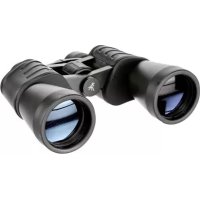
Hunter 16x50 - Binoculars BRESSER - Free user manual and instructions
Find the device manual for free Hunter 16x50 BRESSER in PDF.



| Product type | Binoculars |
| Brand | Bresser |
| Model | Hunter 16x50 |
| Magnification | 16x |
| Objective lens diameter | 50 mm |
| Weight (estimated) | Approx. 950 g |
| Dimensions (estimated) | 220 mm x 180 mm x 60 mm |
| Focusing | Center wheel and diopter adjustment on right eyepiece |
| Diopter adjustment | Yes, via diopter ring |
| Interpupillary distance adjustment | By folding at the central hinge |
| Eyecup type | Twist-up or rubber depending on model |
| Use with glasses | Yes, foldable eyecups |
| Tripod thread | Yes, standard DIN thread |
| Recommended tripod adapter | Art. no. 19-16000 or 19-16500 |
| Interpupillary distance | Adjustable by rotating around the central hinge |
| Lens cleaning | Microfiber cloth, optionally glasses cleaning liquid |
| Storage | In the provided pouch, protected from dust and moisture |
| Maximum temperature | 60 °C |
| Warranty | 2 years, extension possible via registration at www.bresser.de/warranty_terms |
| After-sales service | Parc d'activités de Nicopolis, 260 rue des Romarins, 83170 Brignoles, France |
| Safety | Do not look at the sun. Keep out of reach of children. Avoid exposing lenses to sunlight. |
Frequently Asked Questions - Hunter 16x50 BRESSER
User questions about Hunter 16x50 BRESSER
0 question about this device. Answer the ones you know or ask your own.
Ask a new question about this device
Download the instructions for your Binoculars in PDF format for free! Find your manual Hunter 16x50 - BRESSER and take your electronic device back in hand. On this page are published all the documents necessary for the use of your device. Hunter 16x50 by BRESSER.
USER MANUAL Hunter 16x50 BRESSER
This instruction manual was created for various models in our series of binoculars. Pages 2-7 present the relevant features in pictures. Depending on the model you have purchased, this chapter of the manual covers the binoculars in full or in part. As a result, please pay attention to the letters (P, R or C) to make sure that a chapter applies to your model.
Please read this manual carefully and completely before using the binoculars.
Your
BRESSER Team
P = Porro prism model · R = Roof prism model · C = Compact model
General Safety Informations!
RISK of physical injury!
Never look through this device directly at or near the sun. There is a risk of BLINDING YOURSELF!
Children should only use this device under supervision. Keep packaging materials (plastic bags, rubber bands, etc.) away from children. There is a risk of SUFFOCATION.
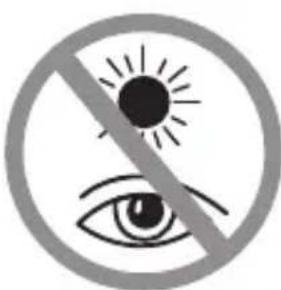
Fire/Burning RISK!
Never subject the device - especially the lenses - to direct sunlight. Light ray concentration can cause fires and/or burns.
RISK of material damage!
Never take the device apart. Please consult your dealer if there are any defects. The dealer will contact our service centre and send the device in for repair if needed.
Do not subject the device to temperatures exceeding 60^
BINOCULARS
List of Parts
1 Centre axle
a Twist-up eyecups or
2b Rubber eyecups
Diopetre adjustment
Body of the binoculars
5 Lens tube
Central focussing wheel
Eyepiece
8 Objective lens
Threaded tripod connection
10 Image circle with correctly set eye distance
Eyepieces for spectacle wearers
Depending on the model, your binoculars are equipped with either twist-up eyecups (2a) or rubber eyecups (2b). Since there is a larger distance between the binocular eyepiece and the pupil for those wearing glasses, both eyecup varieties can be adjusted individually.
Twist-up Eyecups (2a)
Screw in the twist-up eyecups (2a) to use the
binoculars while wearing glasses. If you are not wearing glasses, unscrew the eyecups to achieve the required distance from the pupils. OR
Rubber Eyecups (2b)
To use the binoculars while wearing glasses, turn the rubber eyecups (2b) towards the sides and down. If you are not wearing glasses, leave the eyecups in the upright position to achieve the required distance from the pupils.
Adjusting the eyepiece distance P R C
The distance between the eyes differs between individuals. To achieve perfect interaction between your eyes and the eyepieces of your binoculars set the angle at the centre of the binoculars (1) so that you see a circular image (10). Note this setting for later use.
Adjusting the focus
Look through your binoculars with your right eye closed. Now adjust the image for your left eye using the centre wheel (6) until it is sharp and
clear. Close your left eye and adjust the image for your right eye using the dioptre ring (3) until it too is sharp and clear.
Mounting the binoculars on a tripod P R
Your binoculars have a threaded tripod connection (9) built in. The required tripod adapter is available as an optional accessory (Art. No. 19-16000 or 19-16500). With this accessory, you are able to mount your binoculars on a tripod with a DIN mounting thread (e.g. Art. No. 49-22100).
TIPS on cleaning
Lenses (eyepieces and/or object lenses) should be cleaned with a soft, lint-free cloth (e.g. microfibre) only. Do not use excessive pressure - this may scratch the lens.
Dampen the cleaning cloth with a spectacle cleaning fluid and use it on very dirty lenses.
Protect the device against dirt and dust. Leave it to dry properly after use at room temperature. Then put the dust caps on and store the device in the case provided.
Chere cliente, cher client,
Kataaoyoc EApntnauwv
Kevtpikoc aEvovac KIAIiwv
a IepioTpEoEvα KαλuμαTaα oΦθαλuωv
b Eλασικα καλύματα oφθαλμων
3 PuθμiδiπTρας
4 KIAIOW
5 AvTIkeIeVIKoS oKoS
6 Kevtpiko koupi (puOmuon Eukpiviaoc)
7 PpoooO00Aiooc 0aKoc
8 AvTIKεIμεVIKóS φαKóS
Onn yia Tn ouvdoen Tpiioa
Kukao, 0e oot a putheta eyn axoataon maio
PpooofoaIoi aKoi yia aTOua nou oopouv yuaia PRC
Avaoya eTo EKoTcE moVTeLo To TnAeokoiOac Eivai EeonlaioEv oite μe TepotpeoEvKaUmuata OoAaMwv (2a) eTE μe EAAOTiKaAulmuata OoAaMwv (2b). Etniyn 0ouc fopouv yuaia u npxikat Kavov aeyalutepn anoTaon eTu
Ppooofoaou Tou TnAeokoniou KAI TNC KOpnc Tou aioou, o Dou Turoi KaUmuAtwv MaTov Mnpouv vpuOIOuV Exomega
IepiOtpEfoEvKALuMuAto ofoaamov (2a)
Tia vKaIOATEe mE yuaia OTO TnAeokotio,
Biodote Ta IepiOtpEfoEvKALumuata
ofoaamow (2a).Avdeltaopateyuaia,
EeibowTe ta KALumuatao ofoaamw, wotv a
eITeuytheta i n aiaitouevn anoTaoon Tns kOpnc
twv ofoaamw.
DaHHoe pyKOBOCTBO NO 3KcNpyataun OTHOCITc K pa3NJUHbIM MoJeM HaWei cepHn 6HOKnei. Ha cTpaHuax 2-7 OHN npedctabIeHbC ONHCaHem COOTBETCTBYUx yHKuN. IaBbI daHHoro pyKOBOCTBa-B 3aBNCMOCTN OT COOTBETCTBYUx eM MoEJI - NONHOCTbIO INN YACTNUHO OTHOCTCAK COOTBETCTBYUx eM MoEJI B CBA3N C 3TNM CM. 6yKBbl (P, R INN C), YTObI y3HaTb, OTHOCTCAI rIraBa K BaWei MoEJI.
Ipeed nepBbIM nCnOJIb3OBaHHem 6HNOKJI NOLHO BHNMaTeJbHO npOHTaIte daHHe pyKOBOdCTBO!
Baw KONJIeKTHB BRESSER
P=MOeJIc npn3MoJ Noppo·R=MOeJIc daxnpn3MOJ·C=KOMNaKTbIe MOeJI
O6uhe npedynpeKdHnA!
ONACHOCTb TpaBMpoBaHra!
Hn B Koem cnyuae He cmoptne uepe3 3OT npnoop npmao Ha coHnue nnn B HanpaBHeHH coHua. Onachoctb NOTEPN 3PEHNA!
IeTn DOJIHKHbI HcNoJIb3OBaTb npI6Op TOJIbKO NOd npNCMOTpOM B3pOcJIbIX. NCKJIIOHTe DoCTyn DeTeN K yNaKOBouHbIM MaTePnaJAM (NpAactNKOBbIe naKeTbI, pe3INHOBbIe IeHTbI n.T.D.)! ONACHOCTb YdUJbI!

ONACHOCTb NOKAPA!
He np6op - B oO6eHHoCTn IIN3bl - NOI npAmbIMN cOnHeHbIMN lyuAMN! N3-3a foKycnpOBcONHeHbIX LyueM MoKeT Bo3HKnHyTb Noxap!
ONACHOCTb npnHHeHH MaTePnaJbHoro yuepe6a!
He pa3bpaTe np6op! B clyuae HencnpaBHOCTn o6paauTEc b K dInepy. OH cBxKETc C cepBnC HbIM ceHTpOM n MoKeT nepeCtAe np6Op dIy BblONHeHn peMOHTa.
He donyckaia Te harpebaHna npnbopa do BbICOKo TemnepaTpybl!
BNIHOKNI
IpeueHb KOMnoHeHTOB
1 LcHTpaJIbHaI Oc b6HOKJIA
a HABINHnBaIOuIeCn OkyIpybI
b Pe3nHOBbie OkyIpaI
3 MexaHn3M dnoONTpnueCKo HABOdkn
Kopnyc 6nHOKJIA
5 Ty6yc 6bEeKTHBa
6 LcHTpaIbHbI npHBOD (yCTaHOBka Ha pe3KoCTb)
Okyjap
8 尼H3a 06bekTnBa
9 Pe3b6a dny yctaHOBKn Ha 7TaTnB
10 OTo6paKaIouaIgKpyKHOCTb npn npaBnIbHo HAcTpoEHOn rna3Hoi 6a3e
Okynap dny noIb3OBaTeNeB Ouch P R C
B 3aBnCmOCTn OT MoDenn 6HOKlb OCHaaetcra INoo HABINHuaHOuMnscr OkyIpaMn (2a), INoo pe3nHObIMn OkyIpaMn (2b).Tak KaK y noJIb30Ba -TeNe B OuchpacctOarHne MeJdy OkyIpaMn 6HOKnI 3paUkamn yBeJIuHeO, oBa HABINHuaIOuXxCsR OKyIpaMOrT peryInpOBaTbcra NO OTdJIbHOCTn.
HaBnHcyBaIOuIneCryKoynpbl (2a)
EcIn Bbl CMOTpHte uepe3 6HHOKlb B Ouykax, BKpyTnte HABINHcHBaIOUeCeOkyIpaB (2a). EcIn Bbl He HocHTe OUYK, BbIKpyTnte HaBNHcNBAIOUeCeOkyIpaB dIra ObecneueHn Heo6xoDMIMO pacCToHn Ido 3paKOB.
NIN
Pe3nHOBbIe OKyIaRbI (2b)
EcIn BbI cMOtpnte uepe3 6HOKJIb B OUKKax, OTBepHnTe pe3HHOBblte OKyIpaBI (2b) c6Oky BHN3. EcIn Bbl He Hocnte OUYKN, OCTaBbTe OKyIpaBI BBePTHKaIbHOM NIOJKeHNN DnA oBeCneueHnHEo6xOdMOro paCCTOraHn DO 3paUkOB.
HactpoJaTla3HO6a3blPRC
PacctoHne MeJdy rna3amn ABJREcHnDnBnDaIbHbIM dIa KaKDoRo YeNoBeka. DIn oBeCneueHn IDeaIbHOrO cOrlaocBaHnra Tna3 COKyIpaMn 6HHOKn erO HeoXoHMo cOrHyTbOTHOCTeBHo CEHTpAlbHOH OCN (1) TaKIM o6pa3OM, UTO6bl Chepe3 Hero 6bla BnHa OTo6paKaHOUaA OKpyKHOCTb (10). 3anOMHHe HAcTpOrydI NcNOb3OBaHnRA B 6dyuem.
YcTaHOBka Ha pe3KoCTb PR C
IocmOTpnte uepe3 6HOKnb n 3aKpoTe npabBn rna3. Otperynpyte n3o6paKeHne dny IeBoro rna3a c NOMOuTo ueHTpaNbHorO npBODa (6). 3aKpoTe neBn rna3 n otperynpyte pe3KoCTb n3o6paKeHnA dny npABoro rna3a C NOMOuBIO dnONTPnHoro Koblua (3).
yCTAHOBKa 6HHOKJI HA WtATnB P R
Ha 6nHOKJIe HmEeTcpe3b6a dIy yCTaHOBKn Ha 5tATNB (9). Heo6xOIMbI dIy 3TOr oIaNTep 5tATNBA NOCTABnRETC B KauEcTBe OIuIN ((NO no KaTALORY 19-16000 nII 19-16500). C erO noMoUbIO MOXHO YCTaHAbINBaTb 6nHOKJIb Ha 5tATNB C npICoEdHHTeJIbHo pe3b6oB DIN (HaNP., NO no KaTALORY 49-22100).
YKA3AHnNo qncTKe
HcnoIb3yIte dna qnCTKn IINH3 (OKyIpaI n/IIIO bEKTNBI) TOIbKO MArKyO caΦeTKy H3 HEKHaHO MaTePnAa (HaNPmEp, MInKpOBOJOKHO). He HaXMaIte Ha caΦeTKy CInuKOM CInbHO, YTO6bl NCKIHOHTB BepoARTHOCTb O6pa3OBaHHa apaHH Ha IINH3ax.
Дя удаленя 6олee сиьньix 3aря3нeн CMочnte yистяшую calфety B JxndKoCTn Дя ChSTkn OчКOB n npOTpIte LInH3bl C He6OJIbshm YcnilneM.
3aunuane npnbop ot nbinn n Bnarn! Nocne HcnoIb30BaHnra - B OCOeHHOCTn npn BbICOKoBnJHOCTN BO3dyxa - NOpeKHTe npnbop HeKOtOpoe Bpemn pni KOMHaTHOH TemnepaType, UTObI DaTb NCnapntbcra OCTaToHOBnare. HaDeHbTe Pblne3aunTHbIe KOJIpaKn I NOMeCTNTe npnbop BCymky, BXODAUYIO B KOMPJIeKT NoCTabKn.
DE Garantie & Service
GB Warranty & Service
The regular guarantee period is 2 years and begins on the day of purchase. To benefit from an extended voluntary guarantee period as stated on the gift box, registration on our website is required.
You can consult the full guarantee terms as well as information on extending the qua
rantee period and details of our services at www.bresser.de/warranty_terms.

- General Safety Informations!
- RISK of physical injury!
- Fire/Burning RISK!
- RISK of material damage!
- BINOCULARS
- List of Parts
- Eyepieces for spectacle wearers
- Twist-up Eyecups (2a)
- Rubber Eyecups (2b)
- Adjusting the eyepiece distance P R C
- Adjusting the focus
- Mounting the binoculars on a tripod P R
- TIPS on cleaning
- Chere cliente, cher client,
- Kataaoyoc EApntnauwv
- PpooofoaIoi aKoi yia aTOua nou oopouv yuaia PRC
- O6uhe npedynpeKdHnA!
- ONACHOCTb TpaBMpoBaHra!
- ONACHOCTb NOKAPA!
- ONACHOCTb npnHHeHH MaTePnaJbHoro yuepe6a!
- BNIHOKNI
- IpeueHb KOMnoHeHTOB
- Okynap dny noIb3OBaTeNeB Ouch P R C
- HaBnHcyBaIOuIneCryKoynpbl (2a)
- NIN
- Pe3nHOBbIe OKyIaRbI (2b)
- HactpoJaTla3HO6a3blPRC
- YcTaHOBka Ha pe3KoCTb PR C
- yCTAHOBKa 6HHOKJI HA WtATnB P R
- YKA3AHnNo qncTKe
- DE Garantie & Service
- GB Warranty & Service
Brand : BRESSER
Model : Hunter 16x50
Category : Binoculars