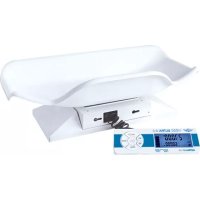
Ultrababy U2 - Scale MyWeigh - Free user manual and instructions
Find the device manual for free Ultrababy U2 MyWeigh in PDF.


| Product Type | Baby Scale |
| Brand | MyWeigh |
| Model | Ultrababy U2 |
| Maximum Capacity | 60 lb (27.215 kg) |
| Accuracy (0-2 lb / 0-1 kg) | 2 g / 0.1 oz |
| Accuracy (2-60 lb / 1-27.215 kg) | 5 g / 0.2 oz |
| Dimensions | 533 mm x 272 mm x 89 mm |
| Net Weight | 1.95 kg |
| Gross Weight | 2.60 kg |
| Power Supply | 6 AA alkaline batteries or AC adapter 5V-9V/100mA or USB adapter 5V/100mA |
| Display | Large dual-read LCD, detachable panel on flexible cable |
| Main Functions | Weighing, HOLD (pause), SEND (PC send), TARE (tare), unit conversion, adjustable auto-off, calibration |
| Measurement Units | g, kg, lb, oz, lb/oz |
| Connectivity | USB for PC connection (free Windows software) |
| Baby Tray | Removable tray with widened base secured by locking tab |
| Operating Temperature | Optimum 15-30°C (62-90°F) |
| Maintenance | Wipe with a soft dry cloth. Do not use abrasive products. |
| Safety | Use only the recommended adapter. Avoid moisture and overloading. Do not shake or drop. |
Frequently Asked Questions - Ultrababy U2 MyWeigh
User questions about Ultrababy U2 MyWeigh
0 question about this device. Answer the ones you know or ask your own.
Ask a new question about this device
Download the instructions for your Scale in PDF format for free! Find your manual Ultrababy U2 - MyWeigh and take your electronic device back in hand. On this page are published all the documents necessary for the use of your device. Ultrababy U2 by MyWeigh.
USER MANUAL Ultrababy U2 MyWeigh
The scale should always be used in an environment that is free from excessive air currents, corrosives, vibration, and temperature or humidity extremes. These factors will affect accuracy and performance. Please check www.myweigh.com for the latest version of this manual, in case of possible revisions.
All safety messages are identified by the words "WARNING" and "CAUTION". These words mean the following:

WARNING
Important information to alert you to a situation that might cause serious injury and damage to your property if instructions are not followed.

CAUTION
Important information that tells how to prevent damage to the equipment.
When using the scale, the following safety precautions should always be followed.

WARNING
Use only the correct AC/USB adaptor with the scale. Other adaptors may cause permanent electrical damage.

CAUTION
Avoid placing the scale in direct sunlight, this may cause discoloration or malfunction.
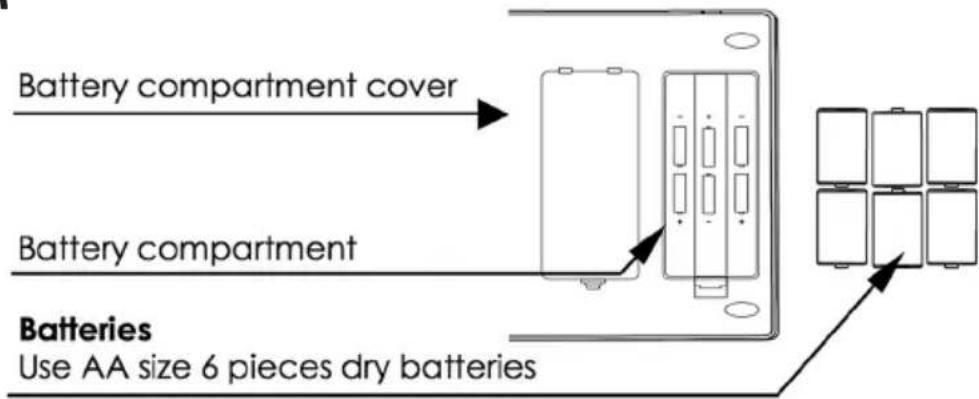
Replace all batteries at the same time - Do not replace only a portion of the 6 batteries as this may cause a malfunction.
If the scale is not to be used for a long period of time, remove all batteries from the battery compartment to avoid leakage, which may cause damage to this scale.
Avoid overloading the scale, as this may cause permanent damage and void your warranty - please do not EVER exceed the maximum capacity of the scale.
Keep the scale away from water - this scale is not water resistant. Shock, injury and electrical damage can occur if used in a wet location!
Matter charged with static electricity could affect accuracy. Discharge all static electricity. For example, one method is to use Static-Guard spray, and spray it on both sides of the weighing platform.
PARTS DESCRIPTION
- KEYS
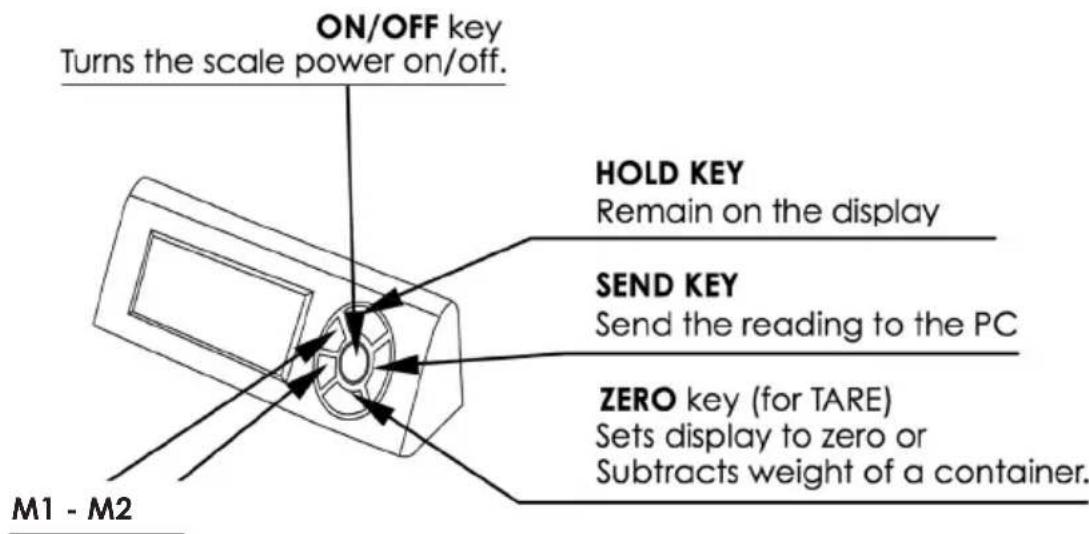
- BACK

BOTTOM
DISPLAY
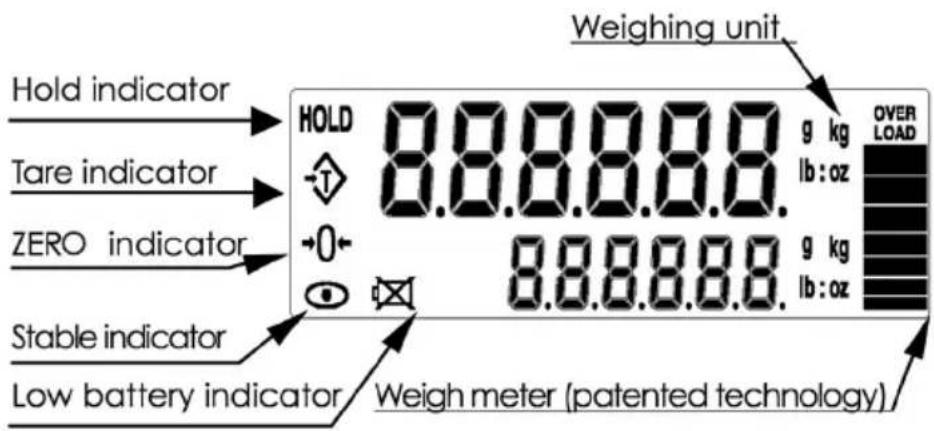
HOLD FUNCTION
Once the HOLD key is pressed, the weight will remain on the display even if the item has been removed from the scale so the weight can easily be read.
1) Place the item on the scale platform.
2) Wait for the stable weights to be displayed.
3) Press the HOLD key. The "HOLD" indicator will turn-on.
4) Remove the item from the scale platform. The item's weight reading will remain on the display. You can now also convert this to other measures (ie to Pounds or Kilograms) by pressing the M1 or M2 key.
5) Quit the hold function: After an item is weighed and the hold function is enabled you may want to cancel the hold function. Press the HOLD key again to cancel the "HOLD" indicator and return the scale to normal weighing mode.
Before weighing
If the scale is excessively cold or hot, allow the scale to warm up to normal room temperature for at least 1 hour prior to use.
Error messages
" Battery is at low voltage. "OVER LOAD" The weight is above the capacity.
Weighing procedures
1) Press O to turn on the scale. The scale will go through a quick warm up procedure, then be ready for use.
2) M1 M2 unit selection. There are two displayed weighing modes that can be displayed. Press and release the M1 key once to change the upper displayed weight unit. Press and release M2 key to change the bottom displayed weight unit. You can select g (grams), kg (kilograms), lb/oz(pounds/ounces), lb (pounds) or oz.
3) Start weighing
If you do not use a container for weighing
Verify the reading is "0". If not, press TARE to display "0". Place the items to be weighed on the platform. When the reading becomes stable, the stable weighing is displayed.
If you use a container for weighing
Place an empty container on the platform. Wait for the stability indicator to be displayed or the weight to stabilize and press TARE. Place the objects to be weighed in the container. When the reading becomes stable, the stable weight is displayed.
AUTO-OFF CONTROL
Press and hold both HOLD and ① to turn on the scale, then release both keys (do not wait for the scale to count down), the display will show "00000", then it will show "OFF 0" (disabled) or "OFF 1" (automatic turn off after about 2 minutes) or "OFF 2" (automatic turn off after about 5 minutes), select the auto turn off time by press SEND. Now confirm your selection by pressing TARE. The scale will return to active weighing.
When to calibrate
Calibration is almost never required
Calibration may be desired when the scale is first set up for use, if the scale is inaccurate, or if the scale is moved to a different altitude or gravitation. This is necessary because the weight of a mass in one location is not necessarily the same in another location. Also, with time and use, mechanical deviations can occur.
How to calibrate
1) Turn the scale OFF and place it on a flat, very stable surface.
2) Press and hold both M1 and ① to turn on the scale and then release the keys, wait for the display to show "CL. xx" (xx number is the required calibration weight), you can press the M1 key to choose the calibration unit between "Lb" and "kg".
3) press the HOLD key to change the value of ten digit, and press the TARE key to change the value of units digit, and then press the M2 key to confirm the calibration weight. The display will show "CAL", if the required weight is too small or overrun the range, it will show "Err", press the TARE key and then the display will show "CL.xx" twinkling.
4) Place the calibration weight(s) needed on the center of the tray, then wait 3 seconds, then press TARE.
5) The display will show "PASS". Calibration is complete. After a few seconds, the scale will return to normal weighing mode. Remove the weight from the tray and turn the scale Off.
If calibration is repeatedly incorrect
1) Replace the batteries.
2) Try a more stable surface or a vibration and interference free location.
3) Be sure there is no static electricity on the scale (use an anti-static spray to remove static electricity).
WARNING
The baby specific tray and the wider base MUST BOTH be securely attached to the scale when weighing a baby. Failing to do so might cause serious injury. Never use the baby specific tray without the wider base.
BASE REMOVAL AND INSTALLATION
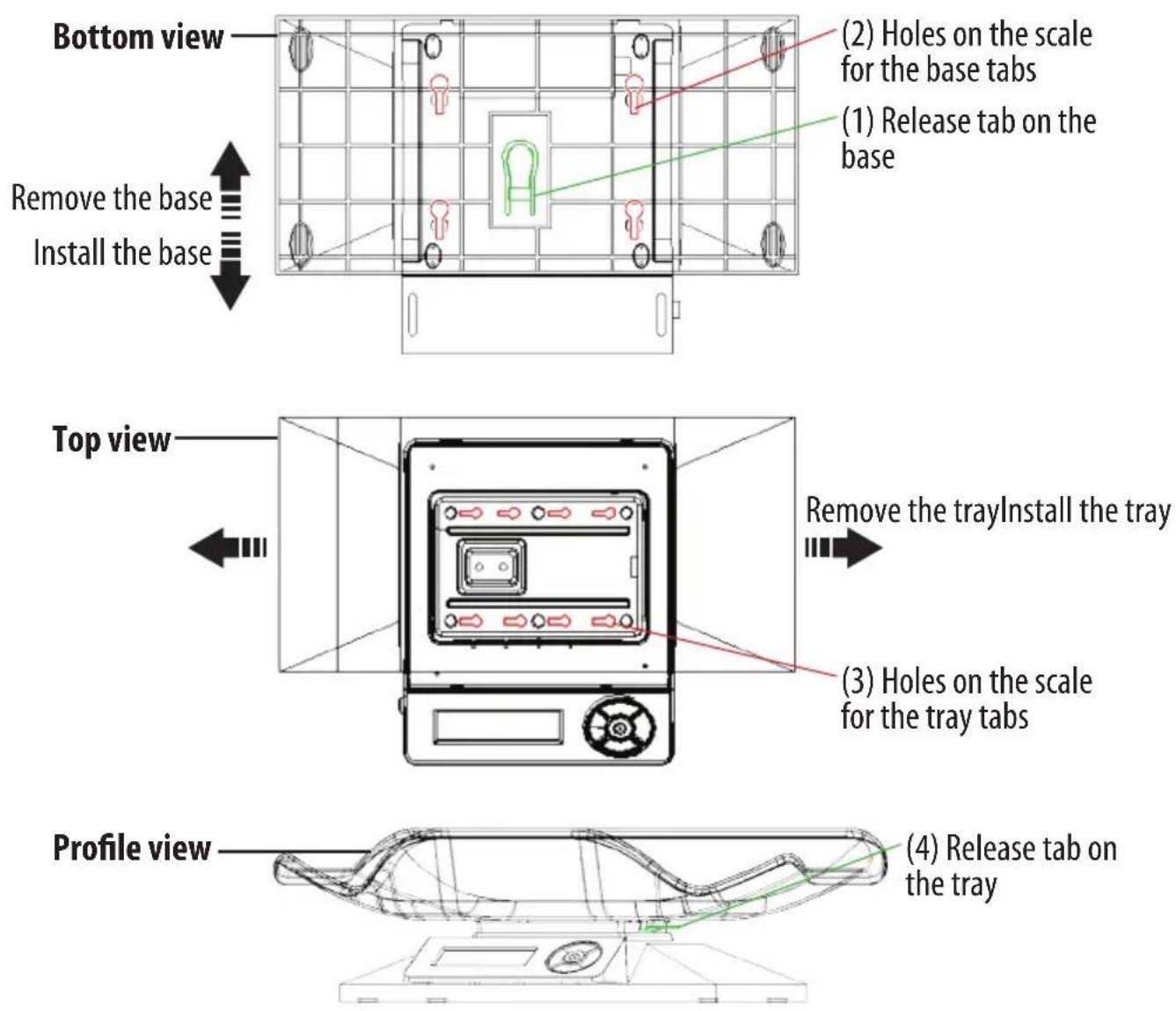
Remove the base by pulling its release tab (1) and sliding it towards the back of the scale. Install the base by introducing the four base tabs into the four holes at the bottom of the scale (2) and sliding the base forward. The base release tab (1) will click in to lock the scale onto the base.
TRAY REMOVAL AND INSTALLATION (valid for both types of tray)
Remove the tray by pulling its release tab (4) up and sliding the tray to the right, then up. Install the tray by introducing the eight tray tabs into the eight holes on the scale (3) and sliding the tray to the left. The tray release tab (4) will click in to lock the tray onto the scale.
WARNING
Cell-Phones, Cordless-Phones, certain fluorescent lights and some radio-frequency devices can cause temporary interference and cause the scale to temporarily not work properly. Please do not use any electronic device near the U2. Just like in an Airplane, do not use your cell-phone near the scale when it is in use. While there is NO risk of permanent damage to the scale, interference can cause an incorrect calibration or incorrect weight readings.
1) If the scale does not perform accurately, please recalibrate the scale as outlined in the manual.
2) If the Display ever becomes locked on "----", this indicates that the scale was shocked, dropped or otherwise damaged and the delicate weighing sensors have been damaged. You can try recalibrating the scale (If the sensor has not been hurt too badly it may work again after recalibration). Otherwise you will have to follow the warranty instructions that came with your scale.
3) If the display is faint or the scale won't power on, this often indicates low batteries or a bad power supply. If new batteries or changing power supplies does not fix this error the scale will have to be sent to us for replacement under our warranty program.
4) If the display shows UNST, this means the scale is not stable. Please try operating the scale on a more stable surface and be sure nothing is on the tray or stuck under the tray when you turn it on. If this situation persists, it may be an indication of fatal load cell damage.
Although the Ultrababy U2 is designed to be extremely durable, it's important that you never overload or drop/shock the scale. If you ship the scale be certain to pack it extremely well to prevent shipping damage. Scales are delicate instruments and unlike Cellular phones, scales have delicate sensors that determine how much an item weighs. If you drop or shock your scale, these sensors "feel" the shock and are sometimes destroyed. This happens with all digital scales. We design our scales to be as resistant to shock or drops as possible, however there is no way for us to protect 100% against load cell or sensor damage. A well-treated scale will provide years of reliable and accurate weighing. However an abused scale will only work until it's sensors are damaged. For more information or more troubleshooting please visit www.myweigh.com
The U2 can be connected to most Windows® based computers using our free software (activation VX.X.exe). You can download the latest version of this software at www.myweigh.com/ultrasoftware
If you close the activation window, communication will stop.
FEATURES
- Auto shut off (optional)
- Auto zero tracking
- AC/USB Power (optional)
- Removable display box on flex-cord
- g /lb:oz /kg/lb/oz conversion
- Extremely large 2-mode LCD
- Hold function
Large weighing tray with multiple attachments - Weighmeter technology
ULTRABABY U-2
| 0-2lb/0-1kg 2-60lb/1-27.215kg | DivisionCapacity | 2g/0.1oz 5g/0.2oz | |
| Tray dimension | 533mm x 272mm x 89mm | ||
| Net/gross weight | 1.95kg / 2.60kg | ||
| Operating temperature | Optimum 15-30°C (62-90°F) | ||
| Power Source | 6 x AA alkaline batteries or DC Adapter 5V-9V/100mA or USB Adapter 5V/100mA | ||






ULTRABABY U-2
MBSC ULTRA U-2 - 0-1kg x 2g 1-27.215kg x 5g
BEDIENUNGSANLEITUNG
www.myweigh.com/ultrasoftware