43M116 - Wristwatch Caravelle - Free user manual and instructions
Find the device manual for free 43M116 Caravelle in PDF.


| Product Type | Wristwatch |
| Brand | Caravelle |
| Model | 43M116 |
| Movement | Quartz |
| Power Source | 1.5V battery (type SR626SW) |
| Battery Life | Approximately 1 year |
| Display | Analog (hands) |
| Functions | Hours, minutes, seconds, date, day (bilingual) |
| Rotating Outer Bezel | Yes (depending on model) |
| Water Resistance | Water resistant (not recommended for swimming) |
| Case Material | Stainless steel |
| Crystal | Mineral |
| Strap | Leather or metal (depending on model) |
| Case Dimensions | Approximately 40 mm diameter |
| Case Thickness | Approximately 10 mm |
| Weight | Approximately 80 g |
| Warranty | Limited (see manual) |
| Care Instructions | Avoid magnetic fields, shocks; replace battery at an authorized watchmaker |
| Repairability | Hand over to a Bulova authorized watchmaker |
Frequently Asked Questions - 43M116 Caravelle
User questions about 43M116 Caravelle
0 question about this device. Answer the ones you know or ask your own.
Ask a new question about this device
Download the instructions for your Wristwatch in PDF format for free! Find your manual 43M116 - Caravelle and take your electronic device back in hand. On this page are published all the documents necessary for the use of your device. 43M116 by Caravelle.
USER MANUAL 43M116 Caravelle
SETTING NON-DATE MODELS
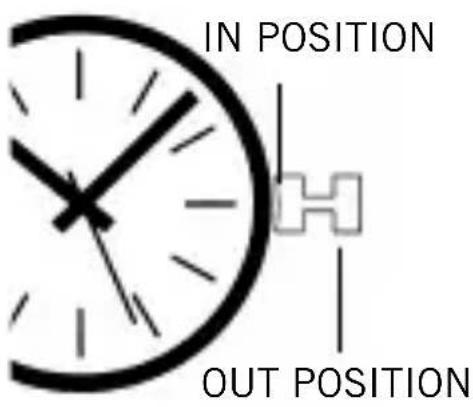
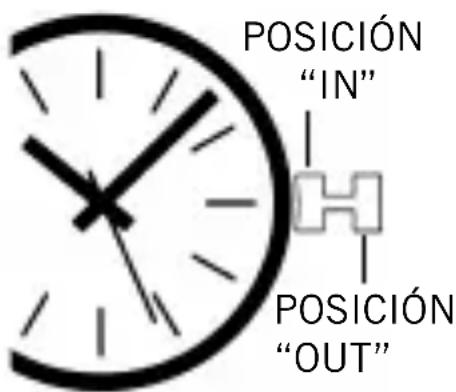
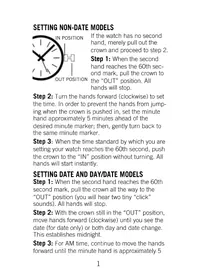
If the watch has no second hand, merely pull out the crown and proceed to step 2.
Step 1: When the second hand reaches the 60th second mark, pull the crown to the “OUT” position. All hands will stop.
Step 2: Turn the hands forward (clockwise) to set the time. In order to prevent the hands from jumping when the crown is pushed in, set the minute hand approximately 5 minutes ahead of the desired minute marker; then, gently turn back to the same minute marker.
Step 3: When the time standard by which you are setting your watch reaches the 60th second, push the crown to the “IN” position without turning. All hands will start instantly.
SETTING DATE AND DAY/DATE MODELS
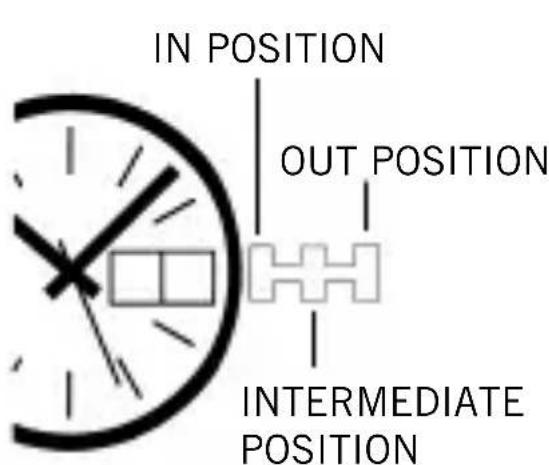
Step 1: When the second hand reaches the 60th second mark, pull the crown all the way to the “OUT” position (you will hear two tiny “click” sounds). All hands will stop.
Step 2: With the crown still in the “OUT” position, move hands forward (clockwise) until you see the date (for date only) or both day and date change. This establishes midnight.
Step 3: For AM time, continue to move the hands forward until the minute hand is approximately 5
minutes ahead of the desired minute marker; then, gently turn back to the same minute marker. For PM time, follow the same procedure, but first advance the hands past 12 o'clock.
Note: The date will advance automatically at midnight, provided that AM and PM have been established (steps 2 and 3). The watch calendar is programmed for a 31-day cycle. Therefore, on the first day of any month following a month with less than 31 days, the date must be advanced manually (see Step 5).
Step 4: When the time standard by which you are setting your watch reaches the 60th second, push the crown all the way to the “IN” position without turning. All hands will start instantly.
Step 5: Pull the crown to the “INTERMEDIATE” position (one “click”). Your watch will continue to tell time. Slowly turn crown one way until correct date appears. Then, for day/date models, slowly turn crown the other way until correct day appears.
Note: The day is printed in two successive positions on the day indicator: in English and in Spanish on U.S. models; in English and in French, depending on the models. It is possible to make use of either position. The display will automatically
remain in the language chosen.
In some models, the calendar cannot be changed manually between 9:00pm and 6:00am. However, the mechanism will not be damaged if the crown is turned accidentally during this period of time.
Step 6: Push the crown to the “IN” position. Your watch is now operating normally.
HOW TO USE THE ELAPSED TIME INDICATOR
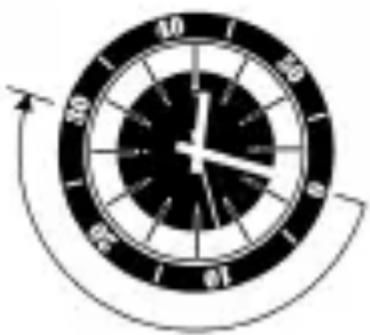
If your watch is equipped with a rotatable outer dial with one-minute graduations, this can be used in various ways to check elapsed time. For example if a diver has a 30-minute air supply, he can set the outer ring so that the triangle is in line with the minute hand when he submerges.
The minute hand will then indicate on the outer ring the length of time that the diver has been under water.
SCREW-DOWN CROWN
If your watch includes a screw-down crown, you have additional assurance that it will remain water-tight. To make the crown operational, it must be turned toward you until the threads are disengaged. Then, instructions for setting must be followed. To reseal the crown, press in until threads engage. Turn away from you until tight.
ABOUT THE POWER CELL
Your new Quartz Watch has a fresh power cell designed to provide maximum reliability for approximately a year under normal use. If the cell is not replaced before it is exhausted, the watch will simply stop. The mechanism should not be harmed in any manner. However, when the power cell becomes exhausted, it should be removed at your earliest convenience to diminish the possibility of leakage. Never store your watch with an exhausted power cell in it.
The watch should be brought to an authorized Bulova dealer for replacement of the power cell and recycling since the exhausted cell contains mercury(Hg). For best performance, the proper power cell should be used.
ABOUT THE BATTERY LIFE INDICATOR
Some models are equipped with a battery life indicator. This is a novel device that will alert you to the need to replace the battery before the watch actually stops. At least a week prior to exhaustion of the battery, the second hand will jump a few seconds at a time. Timekeeping will not be affected.
Note: When the crown is in the “OUT” position, the motor and hands stop. Only the quartz crystal continues to vibrate, using very little power. If the watch is to be stored for a length of time, it is recommended that the crown be left in the “OUT” position to prolong battery life. This does not apply to models with two hands only.
DEEP WATER LIMITED WARRANTY
Supplementary and subject to all the provisions and duration of the basic Bulova watch limited warranty, deep sea watches are further warranted not to leak when submerged in water to the depth shown on the dial, provided crystal and crown remain intact and the case has been unopened.
In order to assure the preservation of your watch's water resistance, particularly in those instances where the element of safety is involved, have it checked occasionally by a competent watch technician and serviced or repaired, if necessary. In addition, the wearer should avoid manipulation of the crown when submerged.
WATER RESISTANCE
Watch modelsmarked only “Water Resistant on the case back, without additional depth markings on the dial, are not to be used for swimming.
For swimming, models that have the additional marking of “50m,” “100m” or “200m” on the dial are recommended.
CÓMO AJUSTAR A LOS MODELOS SIN FECHA
natural_image
Analog clock face showing 12 o'clock with hour and minute hands, no text or symbols present.IF SERVICE IS REQUIRED: Bulova timepieces have been engineered to provide years of use with minimal need for service. In the unlikely event that service is needed, first have the battery tested to be sure it still has sufficient power. If this does not correct the problem, send a statement outlining the specific nature of the problem along with the timepiece in a durable, protective wrapping, postage prepaid and with a \$10.00 shipping/handling fee.
IMPORTANT REMINDERS FOR SERVICE
- Do not show the name “Bulova” as part of the address
- Use registered mail or insured mail.
- Carefully wrap the timepiece in protective wrapping. Do not send in original box.
POST-WARRANTY SERVICE: Bulova's staff of watch-makers is expert at repairing and restoring Bulova timepieces. For repairs outside of warranty, a \$10.00 charge will be assessed to cover cost of evaluation, postage and handling if repair authorization is refused. Post-warranty repairs should be mailed to the appropriate address.
For additional information please visit our Web Site at www.bulova.com
EN EL CASO QUE SE REQUIERA SERVICIO: Los
- SETTING NON-DATE MODELS
- SETTING DATE AND DAY/DATE MODELS
- HOW TO USE THE ELAPSED TIME INDICATOR
- SCREW-DOWN CROWN
- ABOUT THE POWER CELL
- ABOUT THE BATTERY LIFE INDICATOR
- DEEP WATER LIMITED WARRANTY
- WATER RESISTANCE
- CÓMO AJUSTAR A LOS MODELOS SIN FECHA
- IMPORTANT REMINDERS FOR SERVICE
- EN EL CASO QUE SE REQUIERA SERVICIO: Los
Brand : Caravelle
Model : 43M116
Category : Wristwatch