Comfortshave 99237 - Shaver TREBS - Free user manual and instructions
Find the device manual for free Comfortshave 99237 TREBS in PDF.



| Product type | Rechargeable electric shaver |
| Brand | Trebs |
| Model | Comfortshave 99237 |
| Power supply | USB charger, 5 V DC, 2 W |
| Battery type | Built-in rechargeable battery |
| Battery life | Not specified, full charge recommended before first use |
| Charging temperature | 5 - 35 °C |
| Main functions | Dry shaving, foil and rotary blades, cordless operation |
| Included items | Shaver, protective case, USB charger, cleaning brush |
| Replaceable parts | Outer foil, inner blades |
| Maintenance | Regular cleaning with the provided brush; do not clean with water |
| Safety | Disconnect before cleaning; do not use with wet hands; do not charge below 5 °C |
| Customer service | Trebs: 0900-TREBSbv (0900-873 27 28), €0.30/min |
Frequently Asked Questions - Comfortshave 99237 TREBS
User questions about Comfortshave 99237 TREBS
0 question about this device. Answer the ones you know or ask your own.
Ask a new question about this device
Download the instructions for your Shaver in PDF format for free! Find your manual Comfortshave 99237 - TREBS and take your electronic device back in hand. On this page are published all the documents necessary for the use of your device. Comfortshave 99237 by TREBS.
USER MANUAL Comfortshave 99237 TREBS
Please read all the instrc ons carefully before start using the shaver.
Items contained in this package : shaver, charging adapter, cleaning brush, oper ng instruc ons.
Before each use, always clean your face thoroughly. This will give a be er shaving performance and is more hygiene while causing less contamina on to the shaver.
- Before rst using the shaver or when it has not been used for a long me, please make sure the shaver is charged properly before use.
- Use only the charging adapter that is provided by the manufacturer.
- Never clean the shaver with water that can cause damages to the appliance.
- Do not unplug the charging adapter with wet hands to minimize risks of electric shock.
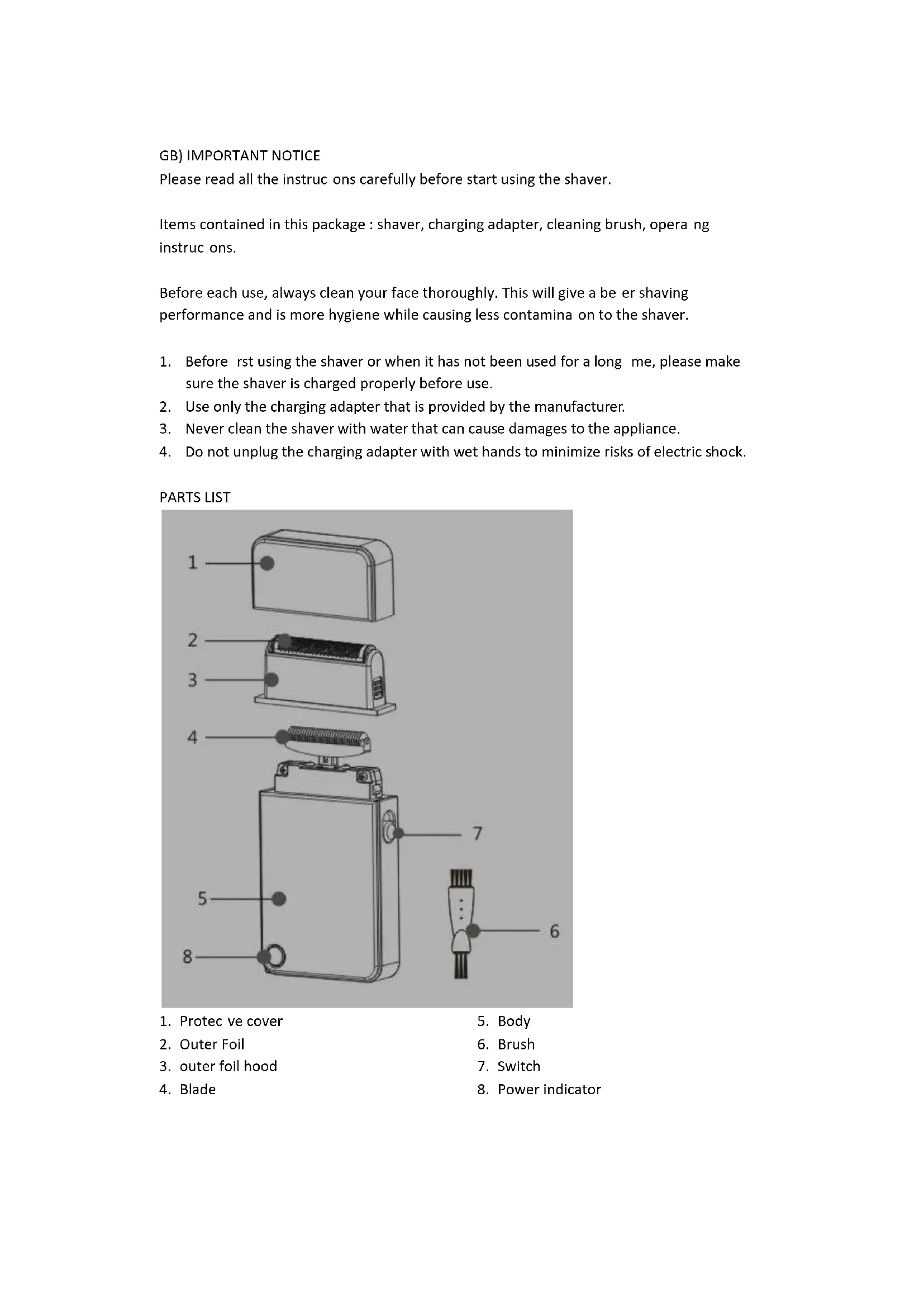
PARTS LIST

-
Protec ve cover
-
Body
-
Outer Foil
-
Brush
-
outer foil hood
-
Switch
-
Blade
-
Power indicator
HOW TO RECHARGE
-
To promote the shelf life of the shaver, it is highly recommended to recharge your appliance only a er the ba ery is completely exhausted. Otherwise you must discharge the appliance before your charge it. To discharge, turn the shaver on un I its ba ery has run down.
-
Please check the power supply before recharging the shaver. The standard voltage is DC5V 2W.
-
The shaver should not be recharged under temperature of 5 - 35^
-
For safety purpose, please make sure both the shaver and its power socket are completely dry before recharging.
-
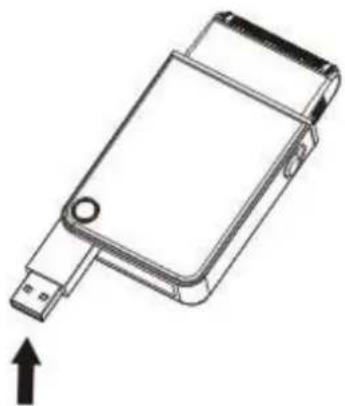
Turn the On/O switch o and securely a ach the charging adapter into the socket. Conned to power outlet. The indicator light will turn on when it is being recharged. Take note that the shaver should be placed upright when charging to avoid unwanted damages.
HOW TO USE
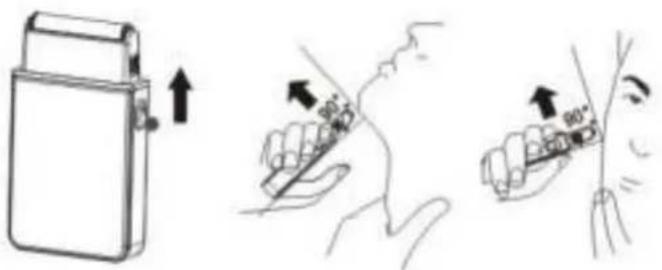
- Remove the cover and push the On/O switch upward to turn on the shaver.
- Stretch your skin with free hand and hold the shaver at a right angle to the skin. Gently shave over the desired area.
- When shaving, be sure not to apply too much pressure to avoid injuries to your skin. You may require a li le me to get used to the new shaving method of our product.
- A er you have nished shaving, turn o the shaver and replace the cover.
HOW TO REPLACE THE OUTER FOIL AND INNER BLADES
- Turn the ON/O switch o before replacing the outer foil.
- Detach the outer foil hood. Hold on the foil with ngers at", "point[indicated as(1)(2) in the diagram] and pull out. Repeat the same on opposite side to completely release the foil.
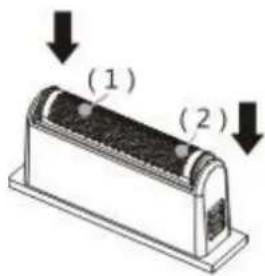
- To insert a new outer foil, slightly bend the foil inward and place down un it is parallel.
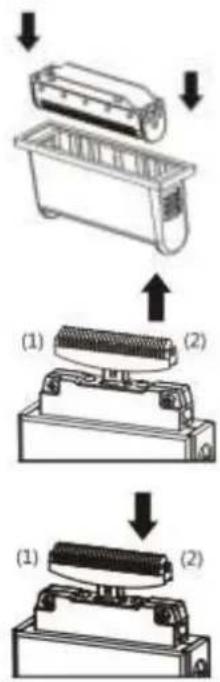
- Hold rmly at both ends (1)(2) of the inner blades and pull upward to detach the blades.
- Hold both ends of the new inner blades and press downward until it snaps into the shaver.
MAINTENANCE AND CLEANING
- Regular clearing will keep the shaver in good condi on and maintain its cu ng performance.
- Unplug and turn the On/Off switch o . Remove the cover and detach the outer foil hood.
- Carefully clean the outer foil, inner blades and shaver body with a cleaning brush.
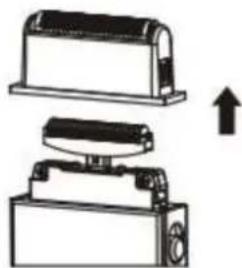
Cau on! NEVER clean the shaver with water.
SIMPLE CHECKING METHOD:
You should immediately stop using the shaver if it is malfunctioning. Before sending out for repairs, you can do a simple checking based on the following checking table:
| Type of malfunction on | Part to examine | Handling method |
| Blunt blade, weak rota on, shorter shelf life | Check if there are too much of beard residues accumulated inside the inner blades | Clean regularly by using a clearing brush or spray with blade cleaner |
| No indicator light unable recharge | Check if the On/O switch is turned o | Turn o the On/O switch and then try to recharge |
Service
If you have any further questions about the product a er reading this manual, please contact the Trebs customer service: Phone: 0900-TREBSbv (0900-873 27 28), € 0.30 per minute.
CE