32L3733 - Television TOSHIBA - Free user manual and instructions
Find the device manual for free 32L3733 TOSHIBA in PDF.



| Product type | LED LCD TV |
| Screen size | 32 inches (81 cm) |
| Resolution | 1366 x 768 pixels (HD) |
| Dimensions (without stand) | 73.2 x 43.0 x 8.5 cm (approx.) |
| Weight (without stand) | 4.5 kg (approx.) |
| Power supply | 220-240 V AC, 50 Hz |
| Connectivity | 2x HDMI, 1x USB, 1x LAN (RJ45), built-in Wi-Fi 2.4/5 GHz, Bluetooth (for virtual remote) |
| Audio | Dolby Audio™ (Dolby Digital Plus™), stereo speakers |
| Smart functions | Internet browser, HbbTV, Internet portal, Smart Center (control via app) |
| Recording | PVR (USB recording) |
| Program guide | Built-in EPG |
| Remote control | Remote control with programmable buttons (My Button 1 and 2) |
| Safety | Child lock, auto power off, surge protection |
| Maintenance | Clean with a soft, dry cloth. Do not use abrasive or liquid products. |
| Repairability | Spare parts available from authorized service. Repairs by qualified personnel only. |
Frequently Asked Questions - 32L3733 TOSHIBA
User questions about 32L3733 TOSHIBA
0 question about this device. Answer the ones you know or ask your own.
Ask a new question about this device
Download the instructions for your Television in PDF format for free! Find your manual 32L3733 - TOSHIBA and take your electronic device back in hand. On this page are published all the documents necessary for the use of your device. 32L3733 by TOSHIBA.
USER MANUAL 32L3733 TOSHIBA
Markings on the Product....2
Connections......4
TV Control & Operation....4
First Time Installation....4
Network Connection....4
Remote Control (TV - DVD)....5
Accessories Included....6
Feature Overview....6
Licenses 6
Wireless LAN Transmitter Specifications**......7
Safety Information

CAUTION
RISK OF ELECTRIC SHOCK DO NOT OPEN
CAUTION: TO REDUCE THE RISK OF ELECTRIC SHOCK DO NOT REMOVE COVER (OR BACK). NO USER-SERVICEABLE PARTS INSIDE. REFER SERVICING TO QUALIFIED SERVICE PERSONNEL.
In extreme weather (storms, lightning) and long inactivity periods (going on holiday) disconnect the TV set from the mains.
The mains plug is used to disconnect TV set from the mains and therefore it must remain readily operable. If the TV set is not disconnected electrically from the mains, the device will still draw power for all situations even if the TV is in standby mode or switched off.
Note: Follow the on screen instructions for operating the related features.
IMPORTANT - Please read these instructions fully before installing or operating
WARNING: This device is intended to be used by persons (including children) who are capable / experienced of operating such a device unsupervised, unless they have been given supervision or instruction concerning the use of the device by a person responsible for their safety.
- Use this TV set at an altitude of less than 2000 meters above the sea level, in dry locations and in regions with moderate or tropical climates.
- The TV set is intended for household and similar general use but may also be used in public places.
- For ventilation purposes, leave at least 5cm of free space around the TV.
- The ventilation should not be impeded by covering or blocking the ventilation openings with items, such as newspapers, table-cloths, curtains, etc.
- The power cord plug should be easily accessible. Do not place the TV, furniture, etc. on the power cord. A damaged power cord/plug can cause fire or give you an electric shock. Handle the power cord by the plug, do not unplug the TV by pulling the power cord. Never touch the power cord/plug with wet hands as this could cause a short circuit or electric shock. Never make a knot in the power cord or tie it with other cords. When damaged it must be replaced, this should only be done by qualified personnel.
- Do not expose the TV to dripping or splashing of liquids and do not place objects filled with liquids, such as vases, cups, etc. on or over the TV (e.g., on shelves above the unit).
- Do not expose the TV to direct sunlight or do not place open flames such as lit candles on the top of or near the TV.

- Do not place any heat sources such as electric heaters, radiators, etc. near the TV set.
- Do not place the TV on the floor and inclined surfaces.
- To avoid danger of suffocation, keep plastic bags out of the reach of the babies, children and domestic animals.
- Carefully attach the stand to the TV. If the stand is provided with screws, tighten the screws firmly to prevent the TV from tilting. Do not over-tighten the screws and mount the stand rubbers properly.
- Do not dispose of the batteries in fire or with hazardous or flammable materials.
Warning: Batteries must not be exposed to excessive heat such as sunshine, fire or the like.
WARNING - excessive sound pressure from earphones or headphones can cause hearing loss.
ABOVE ALL - NEVER let anyone, especially children, push or hit the screen, push anything into holes, slots or any other openings in the case.
| Caution | Serious injury or death risk |
| Risk of electric shock | Dangerous voltage risk |
| Maintenance | Important maintenance component |
Markings on the Product
The following symbols are used on the product as a marker for restrictions and precautions and safety instructions. Each explanation shall be considered where the product bears related marking only. Note such information for security reasons.

Class II Equipment: This appliance is designed in such a way that it does not require a safety connection to electrical earth.

Class II Equipment With Functional Earthing: This appliance is designed in such a way that it does not require a safety connection to electrical earth, the earth section is used for functional purposes.

Protective Earth Connection: The marked terminal is intended for connection of the protective earthing conductor associated with pply wiring.

Hazardous Live Terminal: The marked terminal(s) is/are hazardous live under normal operating conditions.

Caution, See Operating Instructions: The marked area(s) contain(s) user replaceable coin or button cell batteries.

Class 1 Laser Product: This product contains Class 1 laser source that is safe under reasonably foreseeable conditions of operation.
WARNING
Do not ingest the battery, Chemical Burn Hazard This product or the accessories supplied with the product may contain a coin/button cell battery. If the coin/button cell battery is swallowed, it can cause severe internal burns in just 2 hours and can lead to death.
Keep new and used batteries away from children. If the battery compartment does not close securely, stop using the product and keep it away from children.
If you think batteries might have been swallowed or placed inside any part of the body, seek immediate medical attention.

Never place a television set in unstable or inclined locations. A television set may fall, causing serious personal injury or death. Many injuries, particularly to children, can be avoided by taking simple precautions such as;
- Using cabinets or stands recommended by the manufacturer of the television set.
- Only using furniture that can safely support the television set.
- Ensuring the television set is not overhanging the edge of the supporting furniture.
- Not placing the television set on tall furniture (for example, cupboards or bookcases) without anchoring both the furniture and the television set to a suitable support.
- Not standing the television set on cloth or other materials placed between the television and supporting furniture.
• Educating children about the dangers of climbing on furniture to reach the television set or its controls. If your existing television set is being retained and relocated, the same considerations as above should be applied.
Apparatus connected to the protective earthing of the building installation through the MAINS connection or through other apparatus with a connection to protective earthing – and to a television distribution system using coaxial cable, may in some circumstances create a fire hazard. Connection to a television distribution system has therefore to be provided through a device providing electrical isolation below a certain frequency range (galvanic isolator, see EN 60728-11)
Using the special functions to change the size of the displayed image (i.e. changing the height/width ratio) for the purposes of public display or commercial gain may infringe on copyright laws.
The LCD display panels are manufactured using an extremely high level of precision technology; however, sometimes some parts of the screen may be missing picture elements or have luminous spots. This is not a sign of a malfunction.
The set should be operated only from a 220-240 V AC 50 Hz outlet. Ensure that the television is not standing on the mains lead. Do not cut off the mains plug from this equipment, this incorporates a special Radio Interference Filter, the removal of which will impair its performance. It should only be replaced by a correctly rated and approved type. IF IN DOUBT PLEASE CONSULT A COMPETENT ELECTRICIAN.
WALL MOUNTING WARNINGS
- Read the instructions before mounting your TV on the wall.
- Thewall mount kit is optional. You can obtain from your local dealer, if not supplied with your TV.
- Do not install the TV on a ceiling or on an inclined wall.
- Use the specified wall mounting screws and other accessories.
- Tighten the wall mounting screws firmly to prevent the TV from fall. Do not over-tighten the screws.
Specification is subject to change without notice.
Connections
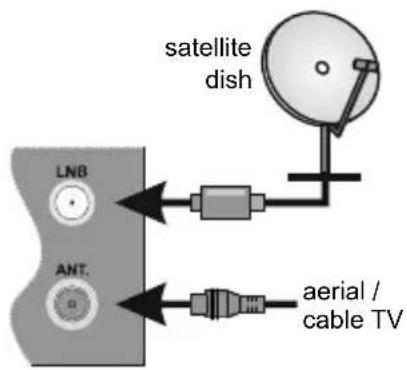
Antenna
Connect the antenna cable/s to your TV.
Power
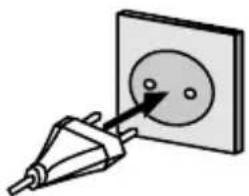
After unpacking, allow the TV set to reach the ambient room temperature before you connect the set to the mains. Plug the power cable to the mains socket outlet.
natural_image
Simple line drawing of a plug inserted into a socket (no text or symbols)The TV set is designed to operate on a 220-240V AC, 50 Hz supply.
External Devices
Use the proper cable to connect two units together.
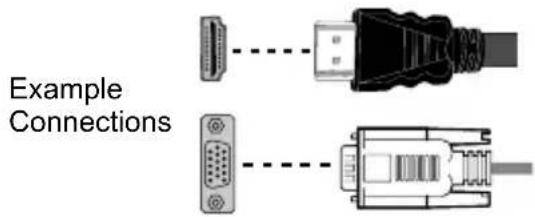
To select the desired input source, press the Source button on the remote control. Or press the switch in consecutively until the Sources list is displayed.

PLEASE ENSURE BOTH UNITS ARE SWITCHED OFF BEFORE CONNECTING
TV Control & Operation
natural_image
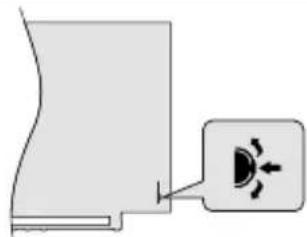
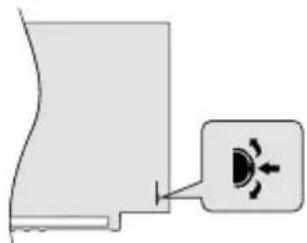
Simple diagram showing a device with a speaker icon and directional arrows, no text or symbols present.The control switch allows you to control basic functions of your TV. Press the centre of the control switch in or the Standby button on the remote to turn the TV on from standby mode.
First Time Installation
When turned on for the first time, Welcome Screen will be displayed. Select your language and press OK. Follow the on screen instructions to set your TV and install channels. The installation wizard will guide you through the setup process. You can perform First Time Installation anytime using the related option in the Installation menu.
Network Connection
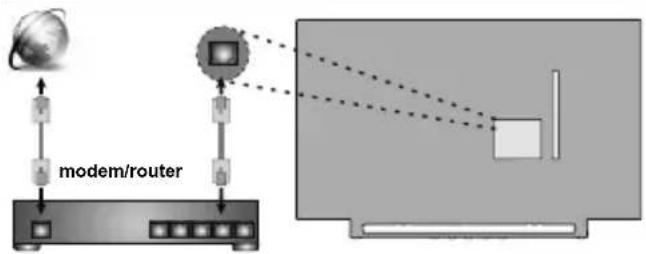
You can set up your TV so that it can access the Internet through your local area network (LAN) using a wired or wireless connection.
Wired
flowchart
graph TD
    A["modem/router"] --> B["Satellite"]
    B --> C["Monitor"]
    C --> D["Screen"]
    style A fill:#f9f,stroke:#333
    style B fill:#ccf,stroke:#333
    style C fill:#cfc,stroke:#333
    style D fill:#fcc,stroke:#333
Wireless
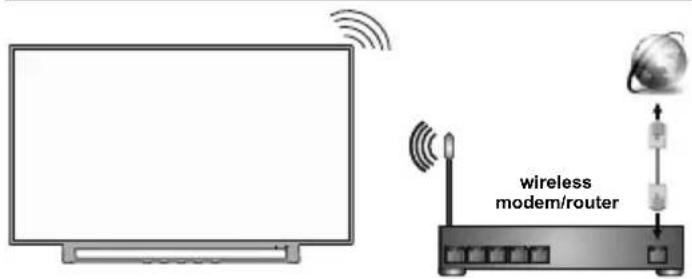
Note: The figures are for representation only
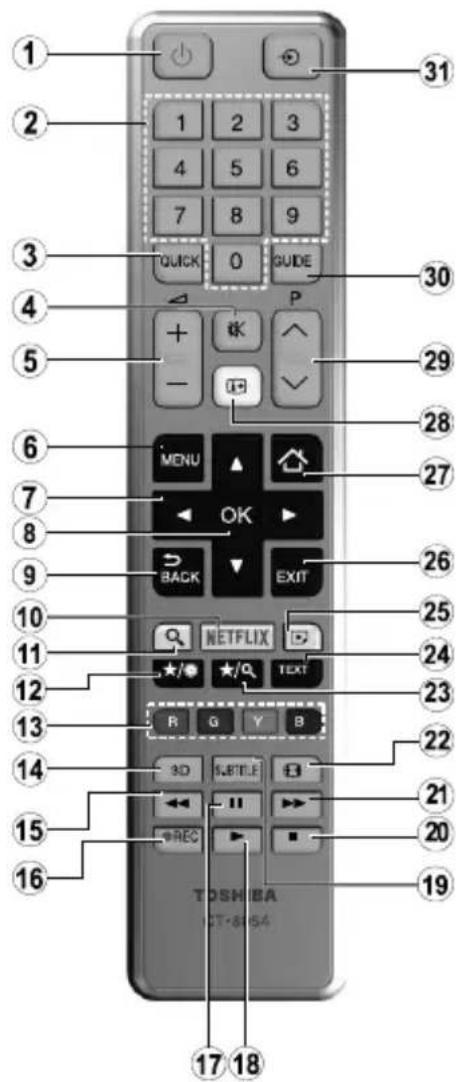
- Standby: Switches On / Off the TV Standby
- Numeric buttons: Switches the channel, enters a number or a letter in the text box on the screen. Numeric buttons
- Quick Menu: Displays a list of menus for quick access
- Mute: Completely turns off the volume of the TV Mute
- Volume +/- Volume +/-
- Menu: Displays TV menu TV Menu
- Directional buttons: Helps navigate menus, content etc. and displays the subpages in TXT mode when pressed Right or Left Navigation buttons
- OK: Confirms user selections, holds the page (in TXT mode), views channel list (DTV mode) OK / Select
- Back/Return: Returns to previous screen, opens index page (in TXT mode)
- Netflix: Launches the Netflix application, if this feature is supported by your TV
- Search: Opens the search page in the browser
- My button 1 (*) Display time / DVD menu
- Coloured Buttons: Follow the on-screen instructions for coloured button functions Red button - Zoom Green button - Repeat Yellow button - Root Blue button - Title
- Favourites: Displays favourite lists menu / Switches between favourite lists
- Rapid reverse: Moves frames backwards in media such as
movies Rapid reverse
-
Record: Records programmes
-
Pause: Pauses the media being played, starts timeshift recording Pause
-
Play: Starts to play selected media Play
-
Subtitles: Turns subtitles on and off (where available) Subtitles
-
Stop: Stops the media being played Stop
-
Rapid advance: Moves frames forward in media such as movies Rapid advance
-
Screen: Changes the aspect ratio of the screen Screen
-
My button 2 (*) Search mode
-
Text: Displays teletext (where available), press again to superimpose the teletext over a normal broadcast picture (mix)
-
Media browser: Opens the media browsing screen Angle
-
Exit: Closes and exits from displayed menus or returns to previous screen Exit
-
Internet: Opens the portal page, where you can reach many web based applications
-
Info: Displays information about on-screen content, shows hidden information (reveal - in TXT mode) Info / Time
-
Programme +/-
-
EPG (Electronic programme guide): Displays the electronic programme guide
-
Source: Shows all available broadcast and content sources Source
Note: The references in Bold are for models with and in DVD operation.
(\*) MY BUTTON 1 & MY BUTTON 2:
These buttons may have default functions depending on the model. However you can set a special function to these buttons by pressing on them for five seconds when on a desired source or channel. A confirmation message will be displayed on the screen. Now the selected MY BUTTON is associated with the selected function. Note that if you perform First Time Installation, MY BUTTON 1&2 will return to their default function.
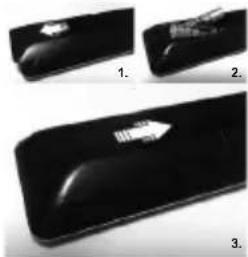
Inserting the Batteries into the Remote
Remove the back cover to reveal the battery compartment. Insert two size AAA batteries. Make sure the (+) and (-) signs match (observe correct polarity). Do not mix old and new batteries. Replace only with same or equivalent type. Place the cover back on.
natural_image
Three black electronic devices with a white arrow pointing to one (no text or symbols visible)Accessories Included
- Remote Control
- Batteries: 2 x AAA
- Quick Start Guide
- Product Fiche
- Side AV Connection Cable**
(**) Limited Models Only
Feature Overview
Media Browser
Browse the media content stored on USB devices that are connected to your TV
Common Interface
Decode encrypted digital TV channels with a Conditional Access Module(CAM) and a card provided by a digital TV service operator
Personal Video Recorder (PVR)
Record your favourite TV programmes
Electronic Programme Guide (EPG)
Display the scheduled digital TV programmes
CEC
Control basic functions of the connected HDMI-CEC compatible audio/video devices with the remote control of the TV
Audio Video Sharing
Access your media files stored on media server devices, such as PC's or handheld devices, that are connected to your home network
HbbTV
Access to HbbTV services (services are dependant on broadcast)
Internet Portal
Access to the portal for internet content and services (services are dependant on country)
Open Browser
Browse the internet from the comfort of your sofa
Wireless Display
Wirelessly stream video and sound content and use your TV as a second screen for your compatible PC or handheld device
Smart Center
Use the Smart Center application installed on your mobile device to launch your portal applications, control your TV, share media files and stream TV programmes
Virtual Remote
Control your TV via a wireless handheld device
Audio Link and Smart Remote
Connect audio devices or remote controllers wirelessly to your TV.
Some features may not be available dependant on your TV model, please check the product fiche for your product specifications
For more detailed information on installation, function and control refer to the full manual on our the website at http://www.toshiba-tv.com
Licenses
The terms HDMI and High-Definition Multimedia Interface, and the HDMI Logo are trademarks or registered trademarks of HDMI Licensing Administrator, Inc. in the United States and other countries.

Manufactured under license from Dolby Laboratories. Dolby Audio and the double-D symbol are trademarks of Dolby Laboratories.
Dolby Audio™ (supporting Dolby Digital Plus™)
DOLBY AUDIO
YouTube and the YouTube logo are trademarks of Google Inc.
For DTS patents, see http://patents.dts.com. Manufactured under license from DTS Licensing Limited. DTS, the Symbol, & DTS and the Symbol together are registered trademarks, and DTS TruSurround is a trademark of DTS, Inc. © DTS, Inc. All Rights Reserved.

For DTS patents, see http://patents.dts.com. Manufactured under license from DTS Licensing Limited. DTS, the Symbol, & DTS and the Symbol together are registered trademarks, and DTS 2.0+Digital Out is a trademark of DTS, Inc.© DTS, Inc. All Rights Reserved.

For DTS patents, see http://patents.dts.com. Manufactured under license from DTS Licensing Limited. DTS, DTS-HD, the Symbol, & DTS or DTS-HD and the Symbol together are registered trademarks of DTS, Inc.® DTS, Inc. All Rights Reserved.

DVB is a registered trademark of the DVB Project.
[1] EIA/CEA-861-D compliance covers the transmission of uncompressed digital video with high-bandwidth digital content protection, which is being standardized for reception of high-definition video signals. Because this is an evolving technology, it is possible that some devices may not operate properly with the television.
(**)This product incorporates copyright protection technology that is protected by U.S. patents and other intellectual property rights. Use of this copyright protection technology must be authorized by Rovi Corporation, and is intended for home and other limited viewing uses only unless otherwise authorized by Rovi Corporation. Reverse engineering and disassembly are prohibited.
(\*\*) Limited Models Only
This product contains technology subject to certain intellectual property rights of Microsoft. Use or distribution of this technology outside of this product is prohibited without the appropriate license(s) from Microsoft.
Content owners use Microsoft PlayReady™ content access technology to protect their intellectual property, including copyrighted content. This device uses PlayReady technology to access PlayReady-protected content and/or WMDRM-protected content. If the device fails to properly enforce restrictions on content usage, content owners may require Microsoft to revoke the device's ability to consume PlayReady-protected content. Revocation should not affect unprotected content or content protected by other content access technologies. Content owners may require you to upgrade PlayReady to access their content. If you decline an upgrade, you will not be able to access content that requires the upgrade.
Wireless LAN Transmitter Specifications**
| Frequency Ranges | Max Output Power |
| 2400 - 2483,5 MHz (CH1-CH13) < 100 | mW |
| 5150 - 5250 MHz (CH36 - CH48) < 200 | mW |
| 5250 - 5350 MHz (CH52 - CH64) < 200 | mW |
| 5470 - 5725 MHz (CH100 - CH140) < 200 | mW |
Country Restrictions
This device is intended for home and office use in all EU countries (and other countries following the relevant EU directive) without any limitation except for the countries mentioned below.
| Country Restriction | |
| Bulgaria | General authorization required for outdoor use and public service |
| France In-door | use only for 2454-2483.5 MHz |
| Italy | If used outside of own premises, general authorization is required |
| Greece | In-door use only for 5470 MHz to 5725 MHz band |
| Country Restriction | |
| Luxembourg | General authorization required for network and service supply(not for spectrum) |
| Norway | Radio transmission is prohibited for the geographical area within a radius of 20 km from the centre of Ny-Ålesund |
| Russian Federation | In-door use only |
The requirements for any country may change at any time. It's recommended that user checks with local authorities for the current status of their national regulations for both 2.4 GHz and 5 GHz wireless LAN's.
(**) Limited Models Only
Find out all you need to know about the latest, trend-setting TV technology on our website.
www.toshiba-tv.com
You can review your TV user manual online or download as you like
Disposal...
The following information is only for EU-member states:
Disposal of products
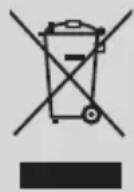
The crossed out wheeled dust bin symbol indicates that products must be collected and disposed of separately from household waste. Integrated batteries and accumulators can be disposed of with the product. They will be separated at the recycling centres.
The black bar indicates that the product was placed on the market after August 13, 2005.
By participating in separate collection of products and batteries, you will help to assure the proper disposal of products and batteries and thus help to prevent potential negative consequences for the environment and human health.
For more detailed information about the collection and recycling programmes available in your country, please contact your local city office or the shop where you purchased the product.
Disposal of batteries and/or accumulators
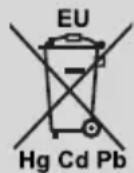
The crossed out wheeled dust bin symbol indicates that batteries and/or accumulators must be collected and disposed of separately from household waste.
If the battery or accumulator contains more than the specified values of lead (Pb), mercury (Hg), and/or cadmium (Cd) defined in the European Battery Directive, then the chemical symbols for lead (Pb), mercury (Hg) and/or cadmium (Cd) will appear below the crossed out wheeled dust bin symbol.
By participating in separate collection of batteries, you will help to assure the proper disposal of products and batteries and thus help to prevent potential negative consequences for the environment and human health. For more detailed information about the collection and recycling programmes available in your country, please contact your local city office or the shop where you purchased the product.
REACH information
The European Union (EU) chemical regulation, REACH (Registration, Evaluation, Authorization and Restriction of Chemicals), entered into force on 1 June 2007, with phased deadlines to 2018.
Toshiba will meet all REACH requirements and is committed to provide our customers with information about the presence in our articles of substances included on the candidate list according to REACH regulation.
Please consult the following website www.toshiba-tv.com for information about the presence in our articles of substances included on the candidate list according to REACH in a concentration above 0.1 % weight by weight.
EU Conformity Statement

This product is carrying the CE-Mark in accordance with the related European Directives.
Responsible for CE-Marking is Vestel UK, Langley, Berkshire, SL3 6EZ.
This product is labeled with the CE Mark in accordance with the related European Directives, notably RoHS Directive 2011/65/EU. Furthermore the product complies with the Ecodesign Directive 2005/32/EC (EuP) and 2009/125/EC (ErP) and its related implementing measures.
This equipment corresponds to requirements of the Technical Regulation on limitation of usage of certain dangerous substances in electrical and electronic equipment.
Inhaltsverzeichnis
natural_image
Simple line drawing of a plug inserted into a socket (no text or symbols)natural_image
Simple diagram showing a device with a speaker icon and a magnified view of its speaker (no text or symbols present)natural_image
Three black rectangular objects with white arrows pointing to surface features, labeled 1, 2, and 3 (no text or symbols on objects)natural_image
Simple line drawing of a plug inserted into a socket (no text or symbols)natural_image
Simple diagram showing a device with a magnified view of a circular component (no text or symbols)natural_image
Three black objects with white arrows indicating features, labeled 1, 2, and 3 (no text or symbols on objects)Accessoires inclus
Restrictions relatives aux pays
natural_image
Diagram showing two types of connectors: a USB port connected to a black connector and a white connector (no text or labels)natural_image
Diagram of a plug inserted into a socket with a circular component, no text or symbols presentnatural_image
Simple diagram showing a device with a speaker icon and a label pointing to it (no text or symbols present)natural_image
Three black rectangular objects with arrow-like marks, labeled 1, 2, and 3 (no text or symbols on objects)Accessori inclusi
TV-bediening & Operation....41
natural_image
Simple line drawing of a plug inserted into a square socket (no text or symbols)TV-bediening & Operation
natural_image
Pure diagram of a device with a label and directional arrow, no text or symbols presentnatural_image
Three black rectangular objects with white arrows pointing to surface, labeled 1, 2, and 3 (no text or symbols on objects)Accessoires inbegrepen
- Afstandsbediening
- Batterijen: 2 x AAA
- Aan de slag
- Productfiche
• Zijde AV verbindingskabel**
(**) Enkel beperkte modellen
Functie overzicht
Mediabrowser
natural_image
Diagram showing two types of connectors: a USB connector and a D-sub connector, both connected by dashed lines (no text or labels present)natural_image
Simple line drawing of a plug inserted into a socket with a circular socket (no text or symbols)natural_image
Simple diagram showing a speaker icon with sound waves, no text or symbols presentnatural_image
Three black rectangular objects with white arrows indicating features, labeled 1, 2, and 3 (no text or symbols on objects)Załączone akcesoria
natural_image
Simple line drawing of a plug inserted into a socket (no text or symbols)natural_image
Pure diagram of a mechanical component with an inset showing a circular component and directional arrows (no text or symbols)natural_image
Three black rectangular objects with white arrows pointing to surface, labeled 1, 2, and 3 (no text or symbols on objects)natural_image
Simple line drawing of a plug inserted into a socket with two dots, no text or symbols presentnatural_image
Simple diagram showing a curved surface with a magnified inset of a circular object (no text or symbols)natural_image
Three black rectangular objects with white arrow markings, no visible text or symbolsnatural_image
Simple line drawing of a plug inserted into a square socket (no text or symbols)natural_image
Diagram showing two types of connectors: a USB port connector and a U2D card connector, both connected by dashed lines (no text or labels present)natural_image
Simple diagram showing a device with a speaker icon and a magnified view of the speaker (no text or symbols)natural_image
Three black rectangular objects with white arrows pointing to surface features, labeled 1, 2, and 3 (no text or symbols on objects)Включени аксесоари
Изхвърляне...
Klasa 1 Laserski proizvod:
natural_image
Simple line drawing of a plug inserted into a socket (no text or symbols)Televizor je dizajniran je za rad na napajanju od 220-240 V AC, 50 Hz.
Kontrola i rad televizora
natural_image
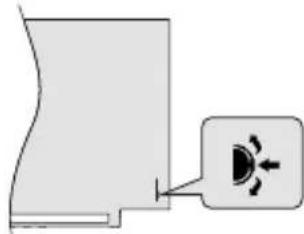
Simple diagram showing a device with a highlighted component and a small icon (no text or symbols)Kontrolni prekidač vam omogućuje kontrolu osnovnih funkcija televizora. Pritisnite središnji dio kontrolnog prekidača ili tipku Stanje mirovanja na daljinskom upravljaču za uključivanje televizora iz stanja mirovanja.
Prva instalacija
Kada se uključi po prvi put, pokazuje se ekran dobrodošlice. Odaberite svoj jezik i pritisnite OK. Pratite uputstva na ekranu da biste podesili svoj televizor i instalirali kanale. Čarobnjak za instalaciju će vas voditi kroz proces podešavanja. Možete obaviti Prvu instalaciju bilo kada koristeći povezanu opciju u izborniku Instalacija.
Mrežna veza
- Pripravnost: Uključivanje/isključivanje televizora Pripravnost
- Numerički taster: Prebacuje kanal, unosi broj ili slovo u okvir za tekst na ekranu. Numeričke tipke
- Brzi meni: Prikazuje listu menija brzog pristupa
- Utišaj: Potpuno utišava zvuk televizora Utišavanje zvuka
- Glasnoća +/- Glasnoća +/-
- Izbornik: Prikazuje izbornik televizora Izbornik televizora
- Navigacijske tipke: Pomaže kod navigacije kroz meni, sadržaj itd. i prikazuje podstranice u teletekstu kada se pritisne desni ili lijevi taster Navigacijske tipke
- OK: Potvrđuje izbor korisnika, zadržava stranicu (u režimu teleteksta), prikazuje listu kanala (DTV režim) OK / Izbor
- Povratak/Nazad: Vraća na prethodni ekran, otvara indeksnu stranicu (u režimu teleteksta)
- Netflix: Pokreće Netflix aplikaciju ako vaš televizor podržava ovu funkciju
- Pretraživanje: Otvara stranicu za pretraživanje u pregledaču
- Moj taster 1 (*) Prikaz vremena / DVD izbornik
- Tasteri u boji: Slijedite upute na ekranu za funkcije tipki u boji Crvena tipka - zumiranje Zelena tipka - ponavljanje Žuta tipka - osnovni direktorij Plava tipka - titl
- Omiljeni: Prikazuje meni sa spiskovima omiljenih / Prebacuje sa jednog spiska omiljenih na drugi
-
Brzo unazad: Pomjera okvire natrag u medijima kao što su filmovi Brzo kretanje unatrag
-
Snimanje: Snima programe
-
Pauza: Pauzira reprodukovani medij, počinje snimanje sa vremenskim pomakom Pauza
-
Reprodukcija: Pokreće reprodukciju izabranog medija Reprodukcija
-
Titlovi: Uključuje ili isključuje titlove (gdje su dostupni) Titlovi
-
Zaustavljanje: Zaustavlja medij koji se reproducira Zaustavljanje
-
Brzo kretanje naprijed: Pomjera okvire naprijed u medijima kao što su filmovi Brzo kretanje naprijed
-
Ekran: Mijenja proporciju ekrana Ekran
-
Moji taster 2 (*) Režim pretrage
-
Tekst: Prikazuje teletekst (gdje je dostupan), ponovo pritisnite da postavite teletekst preko normalne televizijske slike (miks)
-
Pretraživanje medija: Otvara ekran pregledača medija Ugao
-
Izlaz: Zatvara i izlazi iz prikazanih menija ili se vraća na prethodni ekran Izlaz
-
Internet: Otvara stranicu portala, odakle možete doći do mnogih internet aplikacija
-
Informacije: Prikazuje informaciju u vezi sa sadržajem na ekranu, prikazuje skrivene informacije (prikazivanje - u režimu teleteksta) Informacije / Vrijeme
-
Program +/-
-
Elektronski programski vodič (EPV): Prikazuje elektronski vodič programa
-
Izvor: Prikazuje sve dostupne signale i izvore sadržaja Izvor
Napomena: Reference ispisane podebljanim slovima su modeli sa DVD funkcijom.
(\*) MOJ TASTER 1 I MOJ TASTER 2:
Ovi tasteri mogu imati podrazumevane funkcije ovisno o modelu. Ipak, možete postaviti specijalnu funkciju za ove tastere tako što ćete ih pritisnuti i zadržati na pet sekundi kada se nalazite na željenom izvoru ili kanalu. Na ekranu će se prikazati poruka potvrde. Sada je izabran MOJ TASTER povezan sa tom funkcijom. Imajte na umu da ukoliko uradite prvu instalaciju, MOJ TASTER 1 i 2 vratit će se na prvobitnu funkciju.
natural_image
Three black objects with white arrows pointing to surface, labeled 1, 2, and 3 (no text or symbols on objects)Uključeni dodaci
- Daljinski upravljač
- Baterije: 2 X AAA
- Kratko uputstvo za pokretanje
• Dokumentacija proizvoda - Kabel za povezivanje bočne AV veze**
(**) Samo ograničeni režimi
Pregled funkcija
Pretraživanje medija
Pretražite multimedijalni sadržaj sačuvan na USB uređajima koji su povezani na vaš televizor
Zajednički interfejs
Dekodirajte šifrirane digitalne televizijske kanale pomoću uvjetnog pristupnog modula (CÂM) i kartice koju je obezbjedio servisni operater digitalne televizije
Lični video rekorder (PVR)
Snimite omiljene TV programe
Elektronički programski vodič (EPV)
Prikažite zakazane digitalne TV programe
CEC
Kontrolirajte osnovne funkcije povezanih HDMI uređaja koji su kompatibilni sa CEC pomoću daljinskog upravljača vašeg televizora
Odlaganje...
Sljedeće informacije odnose se samo na države članice Evropske Unije:
Odlaganje proizvoda
Simbol sa precrtanom kantom za smeće označava da proizvodi moraju da se sakupe i odlože odvojeno od kućnog otpada. Integrirane baterije i akumulatori mogu da se odlože sa proizvodom. Oni će biti odvojeni u centrima za reciklažu.
natural_image
Simple line drawing of a plug inserted into a socket (no text or symbols)natural_image
Diagram showing two types of connected USB connectors: one with a port, the other with a cable (no text or labels)natural_image
Simple diagram showing a curved line and a speaker icon with directional arrows (no text or labels)natural_image
Three black rectangular objects with white markings, possibly electronic components or surfaces, shown from different angles (no text or symbols visible)Audio Link a Smart Remote
natural_image
Simple line drawing of a plug inserted into a socket (no text or symbols)natural_image
Simple diagram showing a device with a speaker icon and a magnified view of the speaker (no text or symbols)natural_image
Three black electronic devices with visible internal components and labels (no readable text or symbols)Videotallennin (PVR)
natural_image
Diagram showing two types of connectors: a USB connector and a D-sub connector, both connected by dashed lines (no text or labels present)natural_image
Simple line drawing of a plug inserted into a socket (no text or symbols)natural_image
Simple diagram showing a curved line and a magnified inset with a speaker icon (no text or labels)natural_image
Three black rectangular objects with white markings, possibly electronic components or devices, arranged side by side (no visible text or symbols)PVR (Personal Video Recorder)
Ta opp TV-programmene du liker best
Elektronisk programguide (EPG)
Vis planlagte, digitale TV-programmer
CEC
Open Browser (Åpen nettleser)
VED BEHOV FOR SERVICERING SKAL
SERVICETEKNIKERE. KONTAKTES.
natural_image
Simple line drawing of a plug inserted into a socket (no text or symbols)Dette TV-apparat er designet til at fungere med 220-240V, 50 Hz stikkontakt.
Eksterne enheder
natural_image
Diagram showing three types of connectors: a USB connector, a black USB cable, and an orange USB connector (no text or labels present)natural_image
Simple diagram showing a curved line and a speaker icon with directional arrows (no text or labels)(\*) MIN KNAP 1 & MIN KNAP 2:
natural_image
Three black objects with white arrows pointing to surface, labeled 1, 2, and 3 (no text or symbols on objects)Personal Video Recorder (PVR)
Optag dine foretrukne TV-programmer
Elektronisk programguide (EPG)
Vise planlagte digitale TV-programmer