EWF1495RC - Washing machine ELECTROLUX - Free user manual and instructions
Find the device manual for free EWF1495RC ELECTROLUX in PDF.


Frequently Asked Questions - EWF1495RC ELECTROLUX
User questions about EWF1495RC ELECTROLUX
0 question about this device. Answer the ones you know or ask your own.
Ask a new question about this device
Download the instructions for your Washing machine in PDF format for free! Find your manual EWF1495RC - ELECTROLUX and take your electronic device back in hand. On this page are published all the documents necessary for the use of your device. EWF1495RC by ELECTROLUX.
USER MANUAL EWF1495RC ELECTROLUX
EN Washing Machine User Manual 2
WE'RE THINKING OF YOU
Thank you for purchasing an Electrolux appliance. You've chosen a product that brings with it decades of professional experience and innovation. Ingenious and stylish, it has been designed with you in mind. So whenever you use it, you can be safe in the knowledge that you'll get great results every time.
Welcome to Electrolux.
Visit our website for:

Get usage advice, brochures, trouble shooter, service information:
www.electrolux.com/webselfservice

Register your product for better service:
www.registerelectrolux.com

Buy Accessories, Consumables and Original spare parts for your appliance:
www.electrolux.com/shop
CUSTOMER CARE AND SERVICE
Always use original spare parts.
When contacting our Authorised Service Centre, ensure that you have the following data available: Model, PNC, Serial Number.
The information can be found on the rating plate.
⚠ Warning / Caution-Safety information
i General information and tips
Environmental information
Subject to change without notice.
1. ⚠SAFETY INFORMATION
Before the installation and use of the appliance, carefully read the supplied instructions. The manufacturer is not responsible for any injuries or damages that are the result of incorrect installation or usage. Always keep the instructions in a safe and accessible location for future reference.
1.1 Children and vulnerable people safety
- This appliance can be used by children aged from 8 years and above and persons with reduced physical, sensory or mental capabilities or lack of experience and knowledge if they have been given supervision or instruction concerning the use of the appliance in a safe way and understand the hazards involved.
- Do not let children play with the appliance.
• Children aged 3 years and under must be kept away from this appliance when it is in operation at all times. - Keep all packaging away from children and dispose of it appropriately.
- Keep detergents away from children.
- Keep children and pets away from the appliance when the door is open.
- Children shall not carry out cleaning and user maintenance of the appliance without supervision.
1.2 General Safety
- Do not change the specification of this appliance.
- Do not exceed the maximum load of 9 kg (refer to the "Programme chart" chapter).
- The operating water pressure at the water entry point from the outlet connection must be between 0.5 bar (0.05 MPa) and 8 bar (0.8 MPa).
- The ventilation opening in the base must not be covered by a carpet, mat, or any floor covering.
- The appliance must be connected to the water mains using the new supplied hose sets, or other new hose sets supplied by the Authorised Service Centre.
- Old hose sets must not be reused.
- If the mains power supply cable is damaged, it must be replaced by the manufacturer, its Authorised Service Centre or similarly qualified persons to avoid an electrical hazard.
- Before any maintenance operation, deactivate the appliance and disconnect the mains plug from the socket.
- Do not use high pressure water sprays and/or steam to clean the appliance.
- Clean the appliance with a moist cloth. Use only neutral detergents. Do not use abrasive products, abrasive cleaning pads, solvents or metal objects.
2. SAFETY INSTRUCTIONS
2.1 Installation
- Remove all the packaging and the transit bolts.
- Keep the transit bolts in a safe place. If the appliance is to be moved in future they must be reattached to lock the drum to prevent internal damage.
• Always take care when moving the appliance as it is heavy. Always use safety gloves and enclosed footwear. - Do not install or use a damaged appliance.
- Follow the installation instruction supplied with the appliance.
- Do not install or use the appliance where the temperature can be less than 0^ or where it is exposed to the weather.
- The floor area where the appliance is to be installed must be flat, stable, heat resistant and clean.
- Make sure that there is air circulation between the appliance and the floor.
- Do not install the appliance directly over the floor drain.
-
Adjust the feet to have the necessary space between the appliance and the flooring.
-
Do not install the appliance where the appliance door cannot be fully opened.
- Do not put a container to collect possible water leakage under the appliance. Contact the Authorised Service Centre to ensure which accessories can be used.
2.2 Electrical connection
• The appliance must be earthed.
• Always use a correctly installed shockproof socket.
- Make sure that the parameters on the rating plate are compatible with the electrical ratings of the mains power supply.
- Do not use multi-plug adapters and extension cables.
- Make sure not to cause damage to the mains plug and to the mains cable. Should the mains cable need to be replaced, this must be carried out by our Authorised Service Centre.
- Connect the mains plug to the mains socket only at the end of the installation. Make sure that there is
access to the mains plug after the installation.
- Do not touch the mains cable or the mains plug with wet hands.
- Do not pull the mains cable to disconnect the appliance. Always pull the mains plug.
• This appliance complies with the E.E.C. Directives.
2.3 Water connection
- Do not cause damage to the water hoses.
- Before connection to new pipes, pipes not used for a long time, where repair work has been carried out or new devices fitted (water meters, etc.), let the water flow until it is clean and clear.
- Ensure that there are no visible water leaks during and after the first use of the appliance.
- Do not use an extension hose if the inlet hose is too short. Contact the service centre for the replacement of the inlet hose.
- You can extend the drain hose to maximum 400 cm. Contact the service centre for the other drain hose and the extension.
2.4 Use

WARNING!
Risk of injury, electrical shock, fire, burns or damage to the appliance.
- This appliance is for household use only.
- Follow the safety instructions on the detergent packaging.
- Do not put flammable products or items that are wet with flammable products in, near or on the appliance.
- Make sure that all metal objects are removed from the laundry.
- Do not wash fabrics which are heavily soiled with oil, grease or other greasy substances. It can damage rubber parts of the washing machine. Prewash such fabrics by hand before loading them into the washing machine.
- Do not touch the glass door while a programme is in operation. The glass can get hot.
2.5 Service
• To repair the appliance contact an Authorised Service Centre.
- Use original spare parts only.
2.6 Disposal

WARNING!
Risk of injury or suffocation.
- Disconnect the appliance from the mains electrical and water supplies.
- Cut off the mains electrical cable close to the appliance and dispose of it.
- Remove the door catch to prevent children or pets from becoming trapped in the drum.
- Dispose of the appliance in accordance with local requirements for the disposal of Waste Electrical and Electronic Equipment (WEEE).
3. PRODUCT DESCRIPTION
3.1 Appliance overview
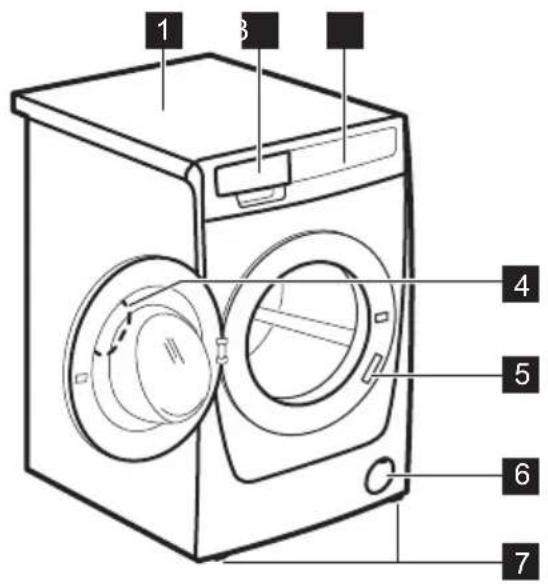
text_image
1 3 4 5 6 71 Worktop
2 Detergent dispenser
3 Control panel
4 Door handle
5 Rating plate
6 Drain pump filter
7 Feet for levelling the appliance
3.2 Fixing plate kit (4055171146)
Available from your authorised dealer.
If you install the appliance on a plinth, secure the appliance in the fixing plates.
Read carefully the instructions supplied with the accessory.
4. CONTROL PANEL
4.1 Control panel description
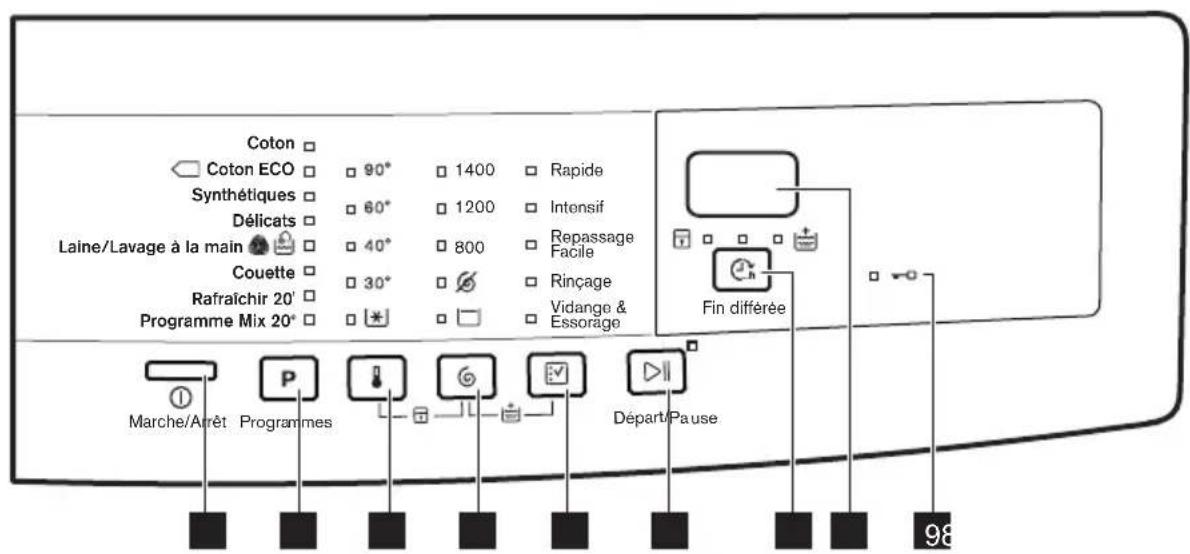
• : the programme duration
• : the "finish in" time
• : the alarm codes
- Err: the message of error
• : the programme is completed.
B. The child lock indicator:
- The indicator comes on when you activate this device.
C. The extra rinse indicator:
- The indicator comes on when you activate this option.
| Programme Temperature range | Maximum loadMaximum spin speed | Programme description(Type of load and soil level) |
| Coton90 °C - Cold | 9 kg1400 rpm | White cotton and coloured cotton. Normal soil and light soil. |
| ECO^1) 60 °C - 40 °C | 9 kg1400 rpm | White cotton and fast-coloured cotton. Normal soil. The energy consumption decreases and the time of the washing programme is extended. |
| Synthétiques60 °C - Cold | 3 kg1200 rpm | Synthetic items or mixed fabric items. Normal soil. |
| Délicats40 °C - Cold | 3 kg1200 rpm | Delicate fabrics such as acrylics, viscose and mixed fabrics requiring gentler washing. Normal soil. |
| Laine/Lavage à la main 40 °C - Cold | 1,5 kg1200 rpm | Machine washable wool, hand washable wool and other fabrics with «hand washing» care symbol ^2) . |
| Couette60 °C - Cold | 3 kg800 rpm | Special programme for one synthetic blanket, duvet, bedspread and so on. |
| Rafraîchir 20'40 °C - 30 °C | 1 kg1200 rpm | A very short cycle for cotton and synthetic items with light soil level or worn only once. |
| Programme Mix 20°20 °C | 2 kg1200 rpm | Special programme for cotton, synthetic and mixed fabrics with light soil. Set this programme to decrease the energy consumption. Make sure that the detergent is for low temperature in order to have good washing results3). |
1) Standard programmes for the Energy Label consumption values. According to regulation 1061/2010, these programmes are respectively the «Standard 60°C cotton programme» and the «Standard 40°C cotton programme». They are the most efficient programmes in terms of combined energy and water consumption for washing normally soiled cotton laundry.

The water temperature of the washing phase may differ from the temperature declared for the selected programme.
2) During this cycle the drum rotates slowly to ensure a gentle wash. It can seem that the drum doesn't rotate or doesn't rotate properly, but this is normal for this programme.
3) No temperature indicator is on.
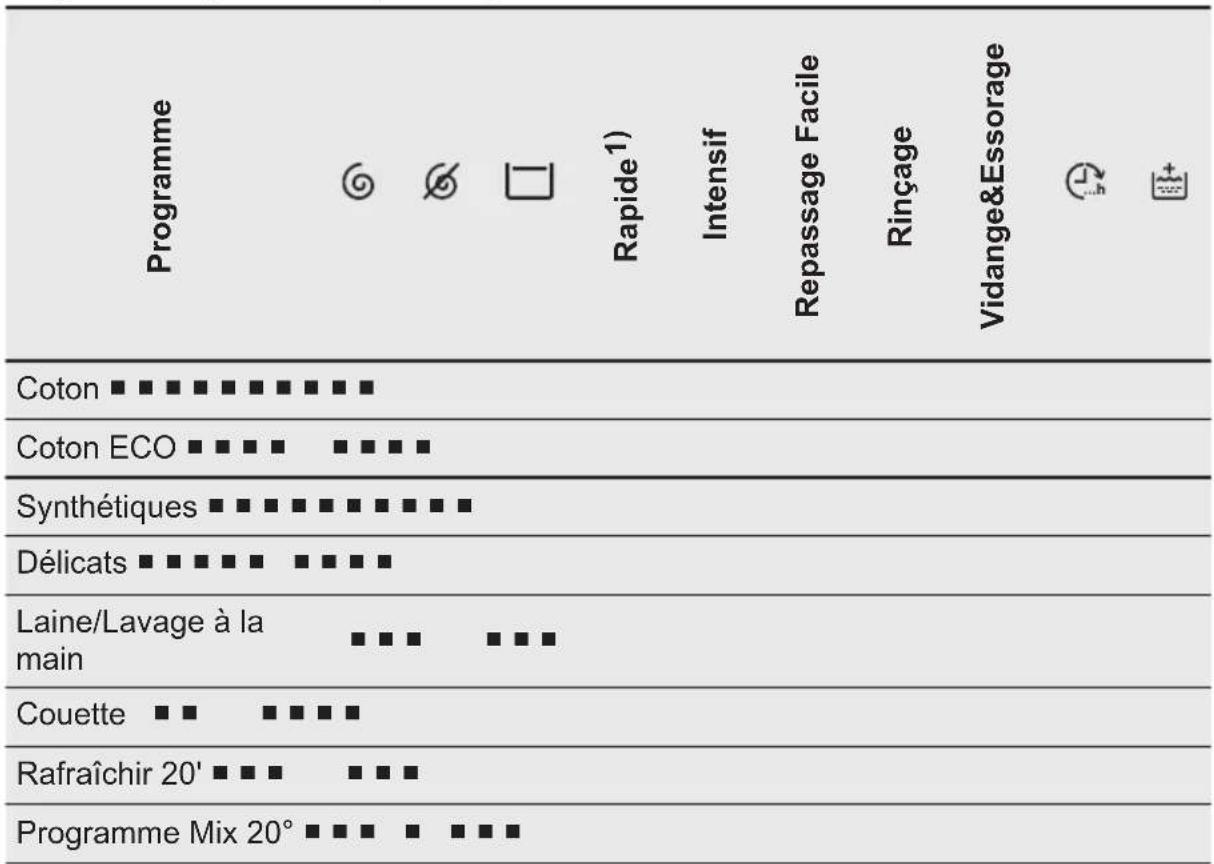
Programme options compatibility
other
| Item | Description | |---|---| | Rapide1) | | | Intensif | | | Repassage Facile | | | Rinçage | | | Vidange&Essorage | | | | | | | | | | | | | | | | | | | | | | | | | | | | | | | | | | | | | | | | | | | | | | | | | | | | | | I Coton ■ ■ ■ ■ ■ ■ ■ ■ ■ ■ ■ ■ ■ ■ ■ ■ ■ ■ ■ ■ ■ ■ ■ ■ ■ ■ ■ ■ ■ ■ ■ ■ ■ ■ ■ ■ ■ ■ ■ ■ ■ ■ ■ ■ ■ ■ ■ ■ ■ ■ ■ ■ ■ ■ ■ ■ ■ ■ ■ ■ ■ ■ ■ ■ ■ ■ ■ ■ ■ ■ ■ ■ ■ ■ ■ ■ ■ ■ ■ ■ ■ ■ ■ ■ ■ ■ ■ ■ ■ ■ ■ ■ ■ ■ ■ ■ ■ ■ ■ ■ □ □ □ □ □ □ □ □ □ □ □ □ □ □ □ □ □ □ □ □ □ □ □ □ □ □ □ □ □ □ □ □ □ □ □ □ □ □ □ □ □ □ □ □ □ □ □ □ □ □ ▢ ▢ ▢ ▢ ▢ ▢ ▢ ▢ ▢ ▢ ▢ ▢ ▢ ▢ ▢ ▢ ▢ ▢ ▢ ▢ ▢ ▢ ▢ ▢ ▢ ▢ ▢ ▢ ▢ ▢ ▢ ▢ ▢ ▢ ▢ ▢ ▢ ▢ ▢ ▢ ▢ ▢ ▢ ▢ ▢ ▢ ▢ ▢ ▢ ▢ ▩ Coton ECO ■ ■ ■ ■■■■■■■■■■■■■■■■■■■■■■■■■■■■■■■■■■■■■■■■■■■■■■■■■■■■■■■■□□□□□□□□□□□□□□□□□□□□□□□□□□□□□□□□□□□□□□□□□□□□□□□□□□□□□□□□□□□□□□□□□□□□□□□□□□□□□□□□□□□□□□□□□□□□□□□□□□□□○○○○○○○○○○○○○○○○○○○○○○○○○○○○○○○○○○○○○○○○○○○○○○○○○○○○○○○○○○○○○○○○○○○○○○○○○○○○○○○○○○○○○○○○○○○○○○○○○○○○△ Laine/Lavage à la main ■■■■■■■■■■■■■■■■■■■■■■■■■■■■ Couette ■■ ■■■■ Rafraîchir 20' ■ ■ ■ ■■■ Programme Mix 20° ■■■ ■ ■■1) When you set this option, we recommend that you decrease the quantity of the laundry. It is possible to keep the full load but the washing results can be unsatisfactory. Recommended load: cotton: 4,5 kg, synthetics and delicates: 2,5 kg.
5.1 Woolmark Apparel Care - Blue

text_image
WOOL HAND WASH SAFE APPAREL CAREThe wool wash cycle of this machine has been approved by The Woolmark
Company for the washing of wool garments labelled as «hand wash» provided that the garments are washed according to the instructions issued by the manufacturer of this washing machine. Follow the garment care label for drying and other laundry instructions. M1512
In UK, Eire, Hong Kong and India the Woolmark symbol is a certification trademark.
6. CONSUMPTION VALUES
i
Stated values are obtained in laboratory conditions with relevant standards. Different causes can change the data: the quantity and type of laundry and ambient temperature. Water pressure, the supply voltage and the temperature of inlet water may also affect the washing programme duration.
i Technical specifications may be changed without prior notice to improve the quality of product.
At the start of the programme, the display shows the programme duration for the maximum load capacity. During the washing phase the programme duration is automatically calculated and can be greatly reduced if the laundry load is lower than the maximum load capacity (e.g. Cotton 60^ , maximum load capacity 9kg , the programme duration exceeds 2 hours; actual load 1kg , the programme duration will be less than 1 hour). When the appliance is calculating the real programme duration a dot flashes in the display.
| Programmes Load (kg) | Energy consumption (kWh) | Water consumption (litre) | Approximate programme duration (minutes) | Remaining moisture (%)1) |
| Coton 60°C 9 1,58 84 240 52 | ||||
| Coton 40°C 9 1,30 82 210 52 | ||||
| Synthétiques 40°C 3 0,74 61 140 35 | ||||
| Délicats 40°C 3 0,54 62 95 35 | ||||
| Laine/Lavage à la main 30°C2) | 1,5 0,42 62 75 30 | |||
| Standard cotton programmes | ||||
| Standard 60°C cotton | 9 0,95 53 248 52 | |||
| Standard 60°C cotton | 4,5 0,64 43 209 52 | |||
| Standard 40°C cotton | 4,5 0,61 44 205 52 | |||
| 1) At the end of spin phase.2) Not available for some models. | ||||
| Off Mode (W) Left On Mode (W) | ||||
| 0.30 0.30 | ||||
| The information given in the chart above is compliant with the EU Commission regulation 1015/2010 implementing directive 2009/125/EC | ||||
7. OPTIONS
7.1 Temperature
With this option you can change the default temperature.
Indicator Ⓞ = cold water.
The indicator of the set temperature comes on.
7.2 Spin ©
With this option you can change the default spin speed.
The indicator of the set speed comes on.
Additional spin options:
No Spin
-
Set this option to deactivate all spin phases. Only the drain phase is available.
• The related indicator comes on. -
Set this option for very delicate fabrics.
- The rinses phase uses more water for some washing programmes.
- Set this option to prevent the laundry creases.
• The related indicator comes on.
• There is a water in the drum when the programme is completed. - The drum turns regularly to prevent the laundry creases.
• The door stays locked. You must drain the water to unlock the door.
Rinse Hold

To drain the water refer to 'At the end of the programme'.
7.3 Rapide
With this option you can decrease the programme duration.
Use this option for items with light soil or items to refresh.
The related indicator comes on.
7.4 Intensif
With this option you can wash very soiled laundry.
The washing cycle lasts longer with this option.
The related indicator comes on.
7.5 Repassage Facile
The appliance carefully washes and spins the laundry to prevent the creases.
The appliance decreases the spin speed, uses more water and adapts the programme duration to the type of laundry.
The related indicator comes on.
7.6 Rinçage
With this option you can perform only a last rinse of a selected washing programme.
If you set also the Extra Rinse function (the appliance adds two or more rinses.
8. SETTINGS
8.1 Permanent Extra Rinse
With this option you can permanently have an extra rinse when you set a new programme.
- To activate/deactivate this option touch the buttons 📋 and 📊 at the same time until the indicator 🖱 comes on/goes off.
The related indicator comes on.
7.7 Vidange&Essorage
With this option you can perform the spin and drain cycle.
The spin phase is suitable to the washing programme you set.

If you set also the No Spin option, the appliance only drains.
7.8 Fin différée
With this option you can set the number of hours in which you would like your washing programme to be completed.
You can set from minimum 3 hours to maximum 20 hours.
The display shows the number of hours and the indicator above the button is on.
7.9 Extra Rinse
With this option you can add some rinses to a washing programme.
Use this option for persons allergic to detergents and in areas where the water is soft.
The related indicator comes on. ^1)
8.2 Child Lock
With this option you can prevent that the children play with the control panel.
- To activate/deactivate this option touch the buttons 🔊 and 📋 at the same time until the indicator 🔑 comes on/goes off.
Activate this option after you touch the button ▷. the buttons are locked (except for the button ⏻).

This option stays active even when you switch off the appliance.
8.3 Acoustic signals
The acoustic signals operate when:
• The programme is completed.
• The appliance has a malfunction.
9. BEFORE FIRST USE
- Connect the mains plug to the mains socket.
- Open the water tap.
- Put a small quantity of detergent in the compartment for washing phase.
- Set and start a programme for cotton at the highest temperature without laundry.
10. DAILY USE

WARNING!
Refer to Safety chapters.
10.1 Loading the laundry
- Open the appliance door
- Shake the items before you put them in the appliance.
- Put the laundry in the drum, one item at a time.
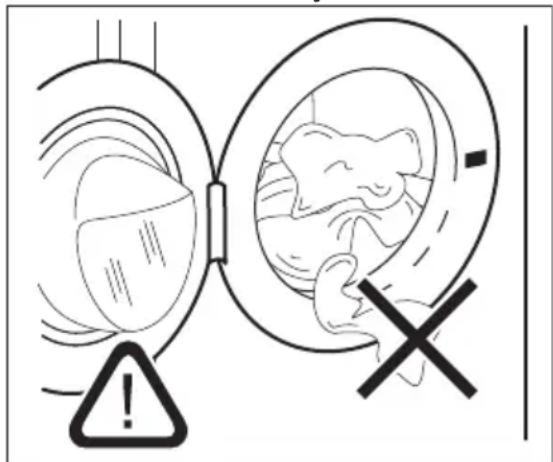
Make sure not to put too much laundry in the drum.
4. Close the door firmly.
text_image
Medical warning diagram showing a catheter with an explosion symbol and a cross indicating a specific condition.To deactivate/activate the acoustic signals, touch the buttons P and a the same time for 4 seconds.

If you deactivate the acoustic signals, they continue operate when the appliance has a malfunction.
This removes all possible dirt from the drum and the tub.

Make sure that no laundry gets caught between the seal and the door to avoid risk of water leakage and damage to the laundry.

Washing heavily oiled, greasy stains could cause damage rubber parts of the washing machine.
10.2 Using detergent and additives
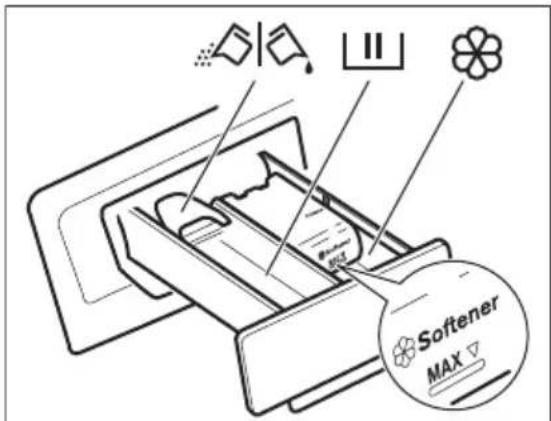
- Measure out the detergent and the fabric conditioner.
- Put the detergent and the fabric conditioner into the compartments.
- Carefully close the detergent drawer
text_image
Softener MAX10.3 Detergent compartments

Detergent compartment for washing phase.
If you use liquid detergent, put it immediately before you start the programme.

Compartment for liquid additives (fabric conditioner, starch).

CAUTION!
Do not exceed the MAX level.

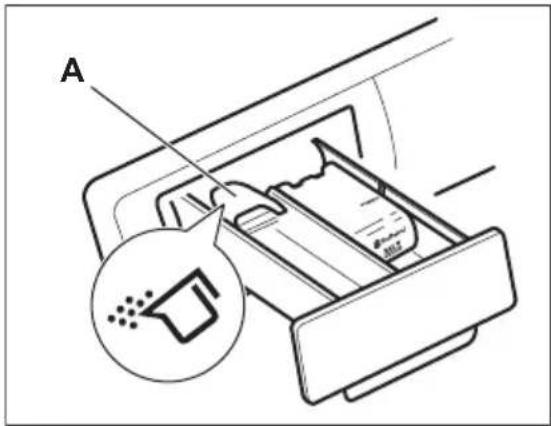
Flap for powder or liquid detergent.
10.4 Liquid or powder detergent
text_image
A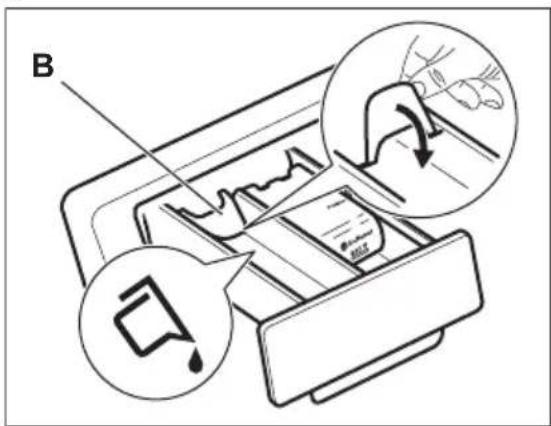
text_image
B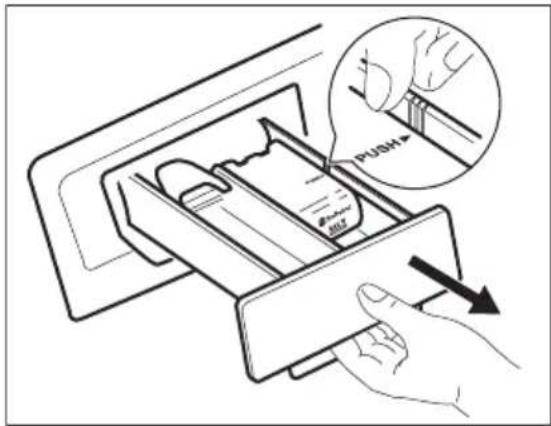
text_image
PUSH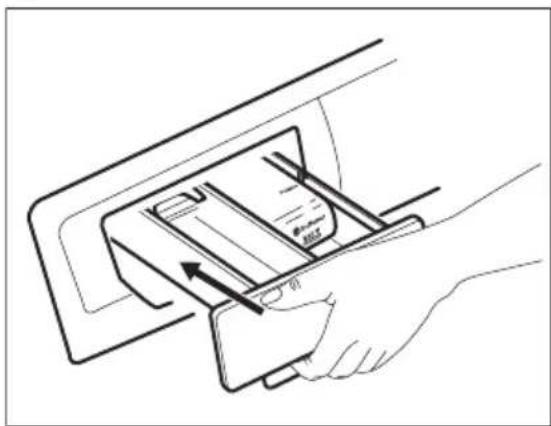
natural_image
Line drawing of a hand inserting a card into a device (no text or symbols)- Position A for powder detergent (factory setting).
- Position B for liquid detergent.

When you use the liquid detergent:
- Do not use gelatinous or thick liquid detergents.
- Do not put more liquid then the maximum level.
- Do not set the delay start (or Finish in option).
10.5 Activating the appliance
Press and hold for a couple of seconds the Marche/Arrêt button to activate or deactivate the appliance.
A tune sounds when the appliance is activated.
The display shows the word On.
10.6 Setting a programme
- Touch the programme button set the programme:

- The indicator of the button flashes.

• The display shows the programme duration.
- If necessary, change the temperature and the spin speed or add available options. When you activate an option, the indicator of the set option comes on.

If you set something incorrect, the display shows the message Err
10.7 Starting a programme without the Fin différée option
Touch the button ▷.||
• The indicator of the button stops to flash and stays on.
- The programme starts, the door locks, the indicator is on.
- The drain pump can operate for a short time at the beginning of the washing cycle.

After approximately 15 minutes from the start of the programme:
• The appliance adjusts automatically the programme duration agree with the laundry load.
- The display shows the new value.
10.8 Starting a programme with the Fin différée option
- Touch the button again and again to choose the number of hours in which you want the washing cycle to be finished.
The display shows the number of hours you set (e.g. 3) and the indicator above the button is on to show that his option is active.
- Touch the button Départ/Pause :
• The door is locked.
• The appliance starts the countdown.
- When the countdown is completed, the programme starts automatically.

You can cancel or change the set of the Fin différée option before you touch the button Départ/Pause. After touching the button Départ/Pause you can only cancel the Fin différée option.
b. Touch the button until the indicator above this button goes off. Touch the button Départ/Pause again to start the programme immediately.
10.9 Interrupting a programme and changing the options
You can change only some options before they operate.
- Touch ▷||
The indicator of this button flashes.
-
Change the options. If you change any option the Fin différée option (if set) will be disabled.
-
Touch ▷|| again.
The programme continues.
10.10 Cancelling a programme
-
Press the button for some seconds to cancel the programme and to deactivate the appliance.
-
Press the same button again to activate the appliance. Now, you can set a new washing programme.
i
Before starting the new programme the appliance could drain the water. In this case, make sure that the detergent is still in the detergent compartment, if not fill the detergent again.
10.11 Opening the door
While a programme (or the ) operates, the appliance door is locked. The indicator is on.
!
CAUTION!
If the temperature and level of the water in the drum are too high, you cannot open the door.
To open the door during the first minutes of the cycle (or when the operates):
- Touch the button to pause the appliance.
- Wait until the indicator goes off.
- You can open the door.
- Close the door and touch the button ▷∥ again. The programme (or the ⏻) continues.
10.12 At the end of the programme
• The appliance stops automatically.
- The acoustic signal operates (if it is activated).
- In the display comes on.
- The indicator of the button goes off.
• The door lock indicator goes off.
- You can open the door.
- Remove the laundry from the appliance. Make sure that the drum is empty.
- Press the button Ⓘ for some seconds to deactivate the appliance.
- Close the water tap.
- Keep the door and the detergent drawer ajar, to prevent the mildew and odours.
The washing programme is completed, but there is water in the drum:
- The drum turns regularly to prevent the creases in the laundry.
- The indicator flashes to remind you to drain the water.
- The door lock indicator is on. The indicator of button ▷ flashes. The door stays locked.
- You must drain the water to open the door.
Draining the water:
-
To drain the water.
-
Touch the button ▷∥. The appliance drains the water and spins with the maximum spin speed for selected washing programme.
• Alternatively, touch the button to change the spin speed and
6
then touch the button. The appliance drains the water and spins. If you set the appliance only drains.
- When the programme is completed and the door lock indicator goes off, you can open the door.
- Press the button for some seconds to deactivate the appliance.

The appliance drains and spins automatically after approximately 18 hours (except for Wool programme).
10.13 AUTO-OFF option
The AUTO-OFF stand-by option automatically deactivates the appliance
11. HINTS AND TIPS
11.1 The laundry load
- Divide the laundry in: white, coloured, synthetics, delicates and wool.
- Obey the washing instructions that are on the laundry care labels.
- Do not wash white and coloured items together.
- Some coloured items can discolour with the first wash. We recommend that you wash them separately for the first times.
- Button up pillowcases, close zippers, hooks and poppers. Tie up belts.
- Empty the pockets and unfold the items.
- Turn multilayered fabrics, wool and items with painted illustrations inside out.
- Remove hard stains with a special detergent.
- Wash and pre-treat heavy soil stains before putting items in drum
- Be careful with the curtains. Remove the hooks and put the curtains in a washing bag or pillowcase.
- Do not wash laundry without hems or with cuts. Use a washing bag to wash small and/or delicate items (e.g. underwired bras, belts, tights, etc.).
to decrease the energy consumption. All the indicators and the display go off when :
- You do not use the appliance for 5 minutes before you touch ▷∥
Press the button ⓣ to activate the appliance again.
• After 5 minutes from the end of the washing programme.
Press the button Ⓐ to activate the appliance again.
The display shows the end of the last set programme.
Touch the button P if you want to set a new cycle.
- A very small load can cause balance problems with the spin phase. If this occurs, adjust manually the items in the tub and start the spin phase again.
11.2 Stubborn stains
For some stains, water and detergent is not sufficient.
We recommend that you pre-treat these stains before you put the items in the appliance.
Special stain removers are available. Use the special stain remover that is applicable to the type of stain and fabric.
11.3 Detergents and additives
- Only use detergents and additives specially made for washing machines:
– powder detergents for all types of fabric, -
powder detergents for delicate fabrics (40 °C max) and woollens,
– liquid detergents, preferably for low temperature wash programmes (60 °C max) for all types of fabric, or special for woollens only. -
Do not mix different types of detergents.
- To help the environment, do not use more than the correct quantity of detergent.
- Obey the instructions that you find on the on packaging of these products.
- Use the correct products for the type and colour of the fabric, the programme temperature and the level of soil.
- If your appliance does not have the detergent dispenser with the flap device, add the liquid detergents with a dosing ball (supplied by the detergent's manufacturer).
11.4 Ecological hints
• Always start a washing programme with the maximum load of laundry allowed.
- If necessary, use a stain remover when you set a programme with a low temperature.
- To use the correct quantity of detergent, check the water hardness of your domestic system. Refer to "Water hardness".
11.5 Water hardness
If the water hardness in your area is high or moderate, we recommend that you use a water softener for washing machines. In areas where the water hardness is soft it is not necessary to use a water softener.
To know the water hardness in your area, contact your local water authority.
Use the correct quantity of the water softener. Obey the instructions that you find on the packaging of the product.
12. CARE AND CLEANING

WARNING!
Refer to Safety chapters.
12.1 External cleaning
Clean the appliance with soap and warm water only. Fully dry all the surfaces.

CAUTION!
Do not use alcohol, solvents or chemical products.
12.2 Descaling
If the water hardness in your area is high or moderate, we recommend that you use a water descaling product for washing machines.
Regularly examine the drum to prevent limescale and rust particles.
To remove rust particles use only special products for washing machines. Do this separately from the laundry wash.

Always obey the instructions that you find on the packaging of the product.
12.3 Maintenance wash
With the low temperature programmes it is possible that some detergent stays in the drum. Perform a maintenance wash regularly. To do this:
- Remove all laundry from the drum.
- Select the cotton programme with the highest temperature with a small quantity of detergent.
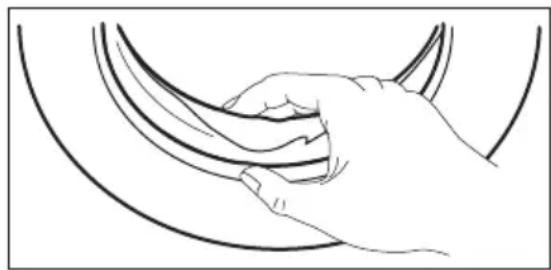
12.4 Door seal
natural_image
Line drawing of a hand gripping a curved object (no text or symbols)Regularly examine the seal and remove all objects from the inner part.
12.5 Cleaning the detergent dispenser
1.2.
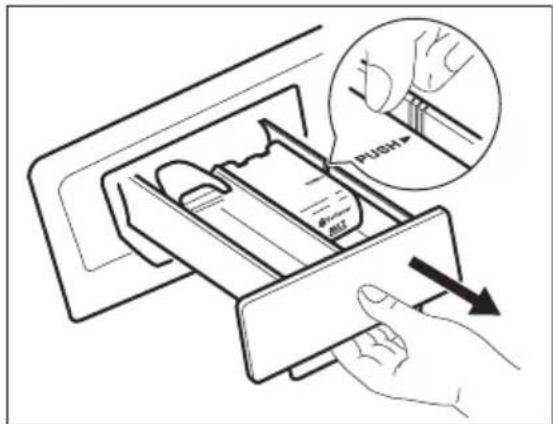
text_image
push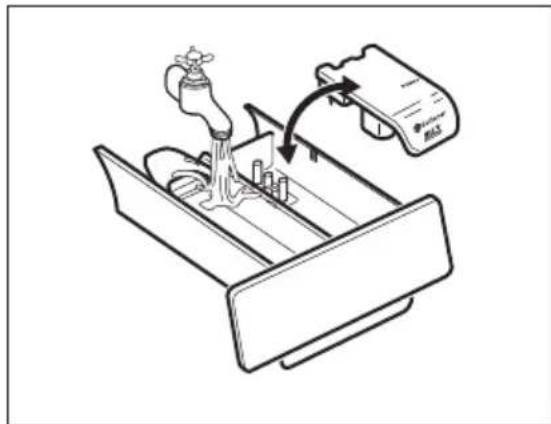
text_image
Diagram showing a hand operating a water tap into a drain, with a label indicating 'Water Tap' and 'RAS'.3.4.
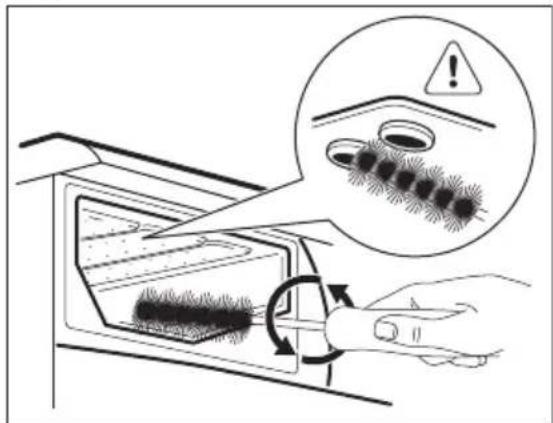
text_image
Diagram illustrating a hair follicle application process with warning and magnified view of the process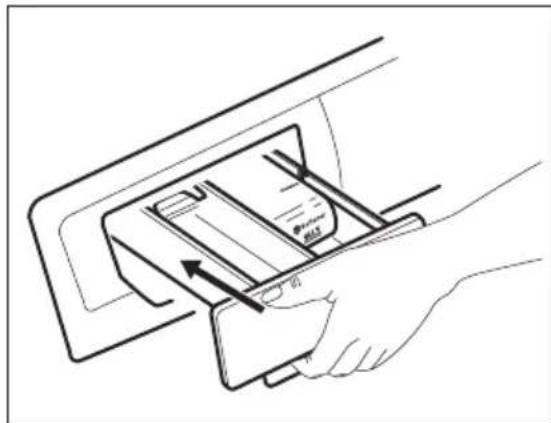
natural_image
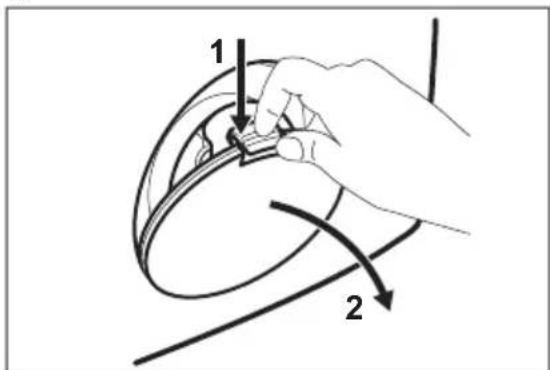
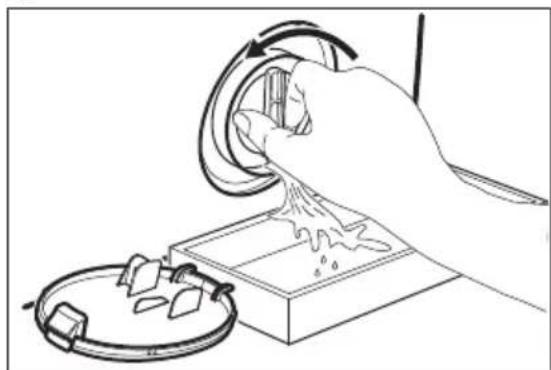
Line drawing of a hand inserting a card into a device (no text or symbols)12.6 Cleaning the drain filter
i
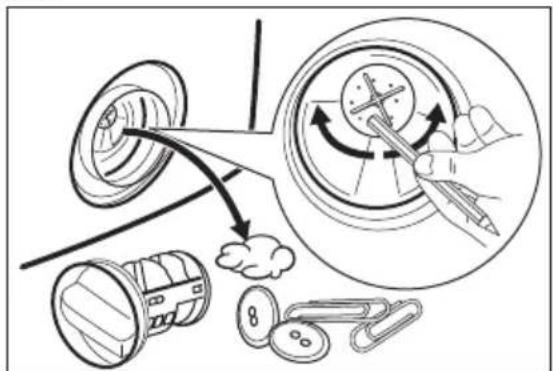
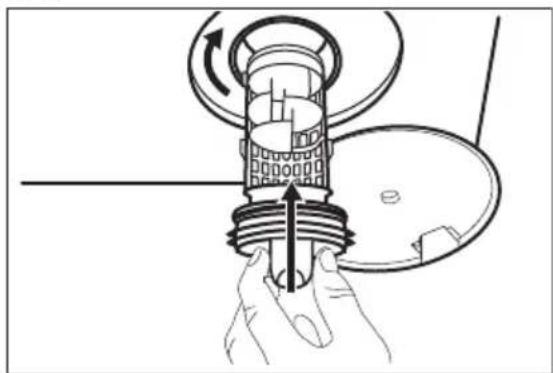
Do not clean the drain filter if the water in the appliance is hot.
i
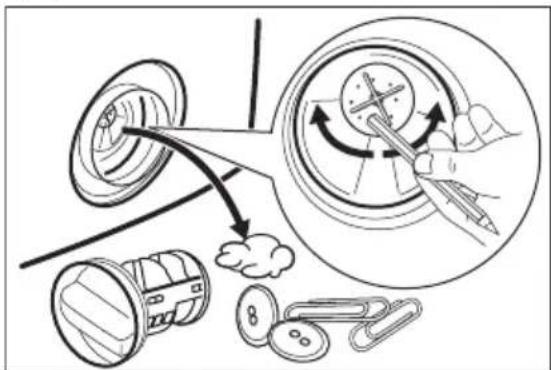
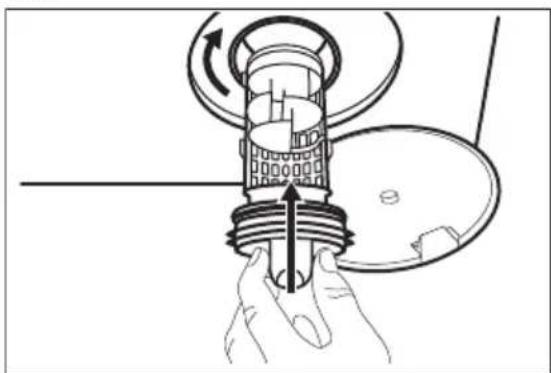
Regularly check the drain pump filter and make sure that it is clean.
i
Repeat the steps 2 and 3 until the water stops flowing out.
1.
text_image
1 22.
natural_image
Illustration of a hand pouring liquid into a container with a circular arrow indicating rotation (no text or symbols)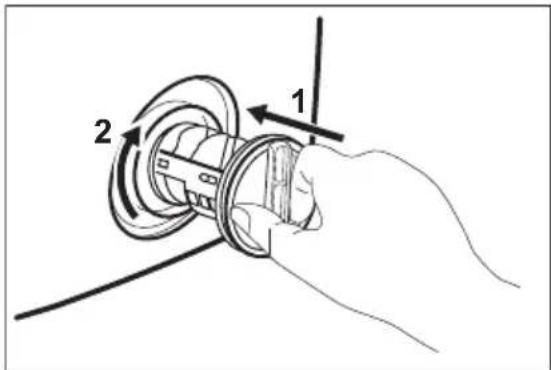
text_image
Diagram showing a hand holding a circular mechanical component with labeled parts 1 and 2, indicating rotation or assembly.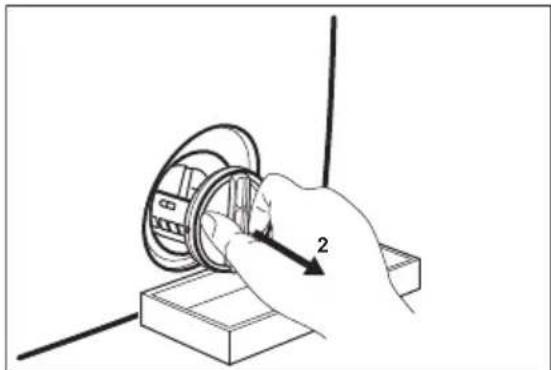
natural_image
Hand holding a mechanical component with a numbered arrow indicating assembly (no text or symbols present)5.6.
text_image
Diagram illustrating a mechanical or electrical process with labeled components and directional arrows, including a magnified circular view showing tool interaction.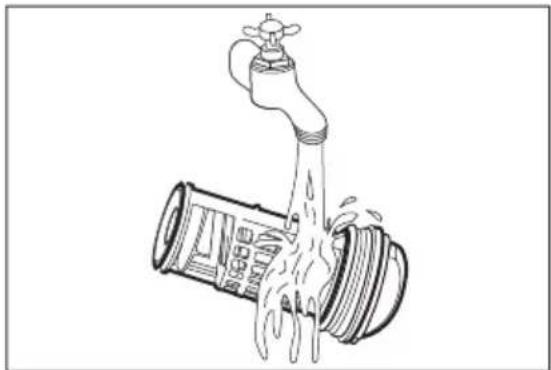
natural_image
Illustration of a faucet pouring liquid into a pipe (no text or symbols)7.8.
natural_image
Diagram of a hand holding a mechanical component with rotating arrows, no text or symbols present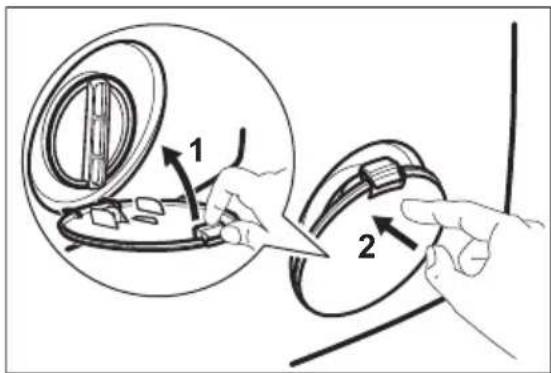
text_image
Diagram illustrating a mechanical assembly process with labeled parts and directional arrows indicating movement or force.
Always keep a rag nearby to dry up any water spillage.

Make sure that the impeller of the pump can rotate. If it does not rotate, contact the Authorised Service Centre. Make sure also that you tighten the filter correctly to prevent leakages.
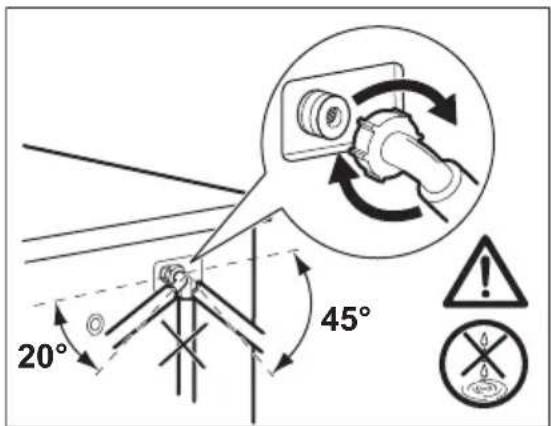
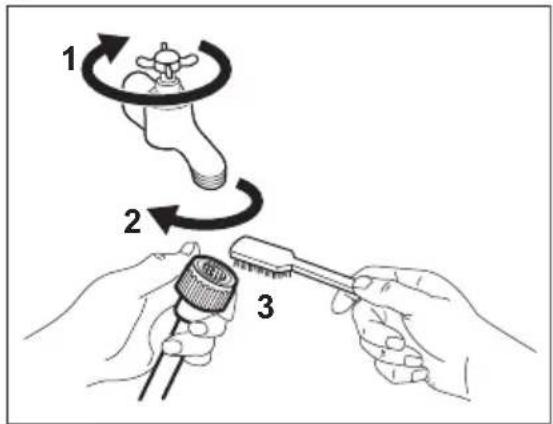
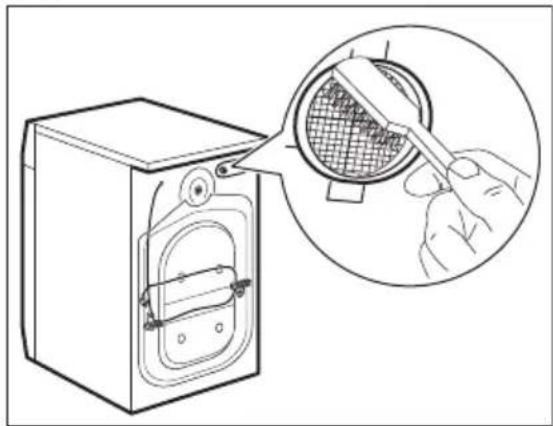
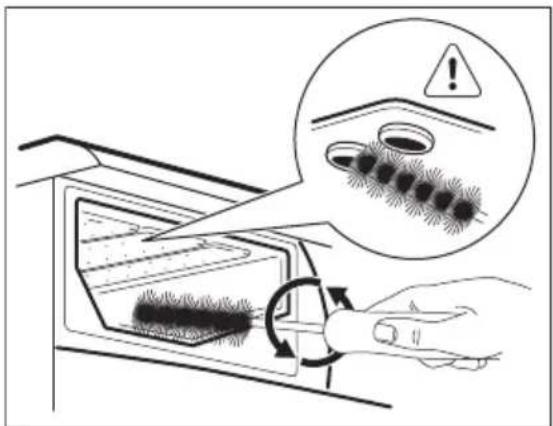
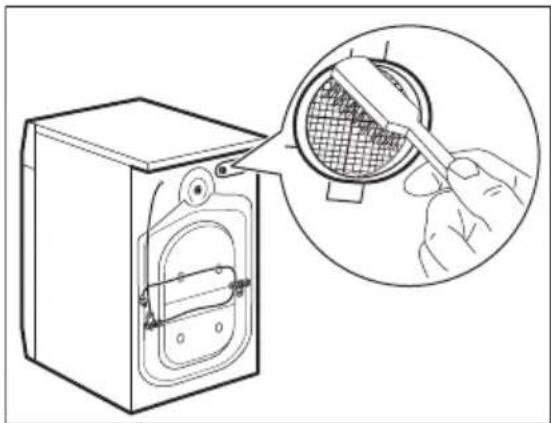
12.7 Cleaning the inlet hose and the valve filter
text_image
1 2 3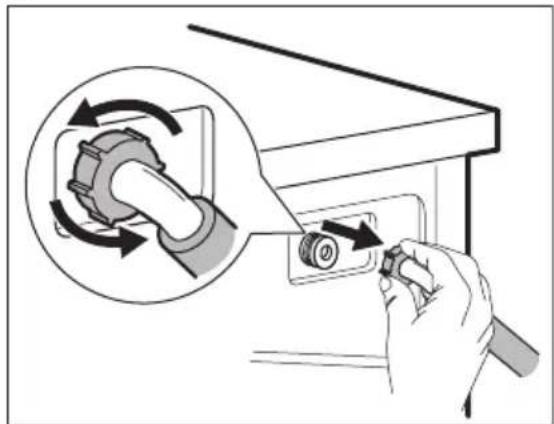
natural_image
Illustration of a hand using a tool to adjust a mechanical component, showing rotational arrows and a magnified view (no text or symbols)3.4.
natural_image
Line drawing of a washing machine with a magnified inset showing a hand using a tool to clean or inspect the interior (no text or symbols present)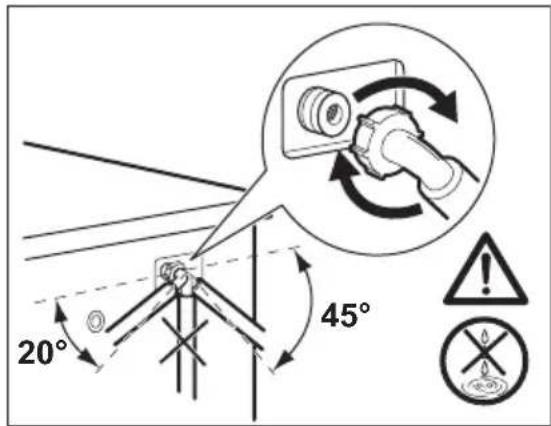
text_image
20° 45°12.8 Emergency drain
Because of a malfunction, the appliance cannot drain the water.
If this occurs, do steps (1) through (8) of 'Cleaning the drain filter'. If necessary, clean the pump.
When you drain the water with the emergency drain procedure, you must activate the drain system again:
-
Put 2 litres of water in the main wash compartment of the detergent dispenser.
-
Start the programme to drain the water.
12.9 Frost precautions
If the appliance is installed in an area where the temperature can be less than
0^ C , remove the remaining water from the inlet hose and the drain pump.
-
Disconnect the mains plug from the mains socket.
-
Close the water tap.
-
Put the two ends of the inlet hose in a container and let the water flow out of the hose.
-
Empty the drain pump. Refer to the emergency drain procedure.
-
When the drain pump is empty, install the inlet hose again.

WARNING!
Make sure that the temperature is higher than 0 °C before you use the appliance again.
The manufacturer is not responsible for damages caused by low temperatures.
13. TROUBLESHOOTING

WARNING!
Refer to Safety chapters.
13.1 Introduction
The appliance does not start or it stops during operation.
First try to find a solution to the problem (refer to the table). If the problem persists, contact the Authorised Service Centre.
With some problems, the acoustic signals operate and the display shows an alarm code:
- E10 - The appliance does not fill with water properly. Start the appliance again by pressing appliance again by pressing Départ/Pause button. After 10 seconds the door will be unlocked.
- The appliance does not drain the water.
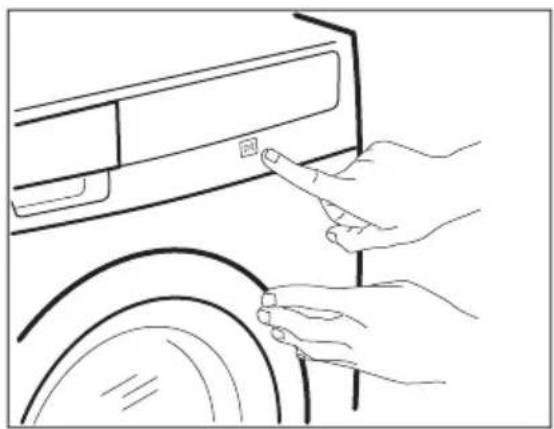
- The appliance door is open or not closed correctly. Please check the door!

If the appliance is overloaded, remove some items from the drum and/or keep pressed the door and push the Départ/Pause button at the same time until the indicator stops flashing (see the picture below).
natural_image
Line drawing of hands pointing at a button on a car front panel (no text or symbols)- -EHO
- The mains supply is unstable. Wait until the mains supply is stable.
- No communication between electronic elements of the appliance. Switch off and switch on again. The programme was not finished properly or the appliance stopped too early. If the alarm code appears again, contact the Authorised Service Centre.

WARNING!
Deactivate the appliance before you do the checks.
13.2 Possible failures
| Problem Possible solution | |
| The programme does not start. | Make sure that the mains plug is connected to the mains socket.Make sure that the appliance door is closed.Make sure that there is not a damaged fuse in the fuse box.Make sure that the Start/Pause has been pressed.If the delay start is set, cancel the setting or wait for the end of countdown.Deactivate the Child Lock function if it is on. |
| The appliance does not fill with water properly. | Make sure that the water tap is open.Make sure that the pressure of the water supply is not too low. For this information, contact your local water authority.Make sure that the water tap is not clogged.Make sure that the filter of the inlet hose and the filter of the valve are not clogged. Refer to “Care and cleaning”.Make sure that the inlet hose has no kinks or bends.Make sure that the connection of the water inlet hose is correct.Make sure that the connections of the water inlet hoses are correct. |
| The appliance does not fill with water and drain immediately. | Make sure that the drain hose is in the correct position.The hose may be too low. Refer to 'Installation instruction'. |
| The appliance does not drain the water. | Make sure that the sink spigot is not clogged.Make sure that the drain hose has no kinks or bends.Make sure that the connection of the drain hose is correct.Set the drain option if you set a programme without drain phase.Set the drain option if you set an option which ends with water in the drum.Make sure that the drain filter is not clogged. Clean the filter, if necessary. Refer to 'Care and cleaning'.If problem remains please contact the Authorised Service Centre. |
| The spin phase does not operate or the washing cycle lasts longer than usually. | Set the spin option.Set the drain option if you set an option which ends with water in the drum.Make sure that the drain filter is not clogged. Clean the filter, if necessary. Refer to 'Care and cleaning'.Adjust manually the items in the tub and start the spin phase again. This problem may be caused by balance problems. |
| There is water on the floor. | Make sure that the couplings of the water hoses are tight and there is not water leakages.Make sure that the water inlet hose and the drain hose have no damages.Make sure you use the correct detergent and the correct quantity of it. |
| You cannot open the appliance door. | Make sure that the washing programme is finished.Set the drain or the spin option if there is water in the drum.Do the emergency drain procedure. See "Frost precautions" (in "Care and Cleaning" chapter). |
| The appliance makes an unusual noise. | Make sure the levelling of the appliance is correct. Refer to 'Installation instruction'.Make sure that the packaging and/or the transit bolts are removed. Refer to 'Installation instruction'.Add more laundry in the drum. The load may be too small. |
| The cycle is shorter than the time displayed. | The appliance calculates a new time according to the laundry load. See the 'Consumption Values' chapter. |
| The cycle is longer than the time displayed. | An unbalanced laundry load increases the duration time. This is a normal behaviour of the appliance. |
| The washing results are not satisfactory. | Increase the detergent quantity or use a different detergent.Use special products to remove the stubborn stains before you wash the laundry.Make sure that you set the correct temperature.Decrease the laundry load. |
| You cannot set an option. | Make sure that you press only the wanted touch button(s). |
After the check, activate the appliance. The programme continues from the point of interruption.
If the problem occurs again, contact the Authorised Service Centre.
If the display shows other alarm codes. Deactivate and activate the appliance. If the problem continues, contact the Authorised Service Centre.
13.3 Service
We recommend the use of original spare parts.
When contacting the Authorised Service Centre, make sure that these data are
available. You can find the information on the rating plate: model, PNC and Serial Number. (Mod., Prod. No., Ser. No.)
1) Connect the water inlet hose to a water tap with a 3/4" thread.
14. TECHNICAL DATA
| Dimension Width/ Height/ Depth/ Total depth | 600 mm/ 850 mm/ 600 mm/ 660 mm |
| Electrical connection Voltage | 230 V |
| Overall power | 2200 W |
| Fuse | 10 A |
| Frequency | 50 Hz |
| Level of protection against ingress of solid particles and moisture ensured by the protective cover, except where the low voltage equipment has no protection against moisture | IPX4 |
| Water supply pressure Minimum | 0,5 bar (0,05 MPa) |
| Maximum | 8 bar (0,8 MPa) |
| Water supply 1) | Cold water |
| Maximum Load Cotton 9 kg | |
| Energy Efficiency Class A+++ -20% | |
| Spin Speed Maximum 1400 rpm |
15. ENVIRONMENTAL CONCERNS
Recycle materials with the symbol Put the packaging in relevant containers to recycle it. Help protect the environment and human health by recycling waste of electrical and electronic appliances. Do not dispose of
appliances marked with the symbol ⚙️ with the household waste. Return the product to your local recycling facility or contact your municipal office.
TABLE DES MATIÈRES
- INFORMATIONS DE SÉCURITÉ....26
- CONSIGNES DE SÉCURITÉ....27
- DESCRIPTION DE L'APPAREIL....29
- BANDEAU DE COMMANDE....30
- TABLEAU DES PROGRAMMES....31
- VALEURS DE CONSOMMATION....33
- OPTIONS....35
- RÉGLAGES....36
- AVANT LA PREMIÈRE UTILISATION.... 36
- UTILISATION QUOTIDIENNE....36
- CONSEILS....41
- ENTRETIEN ET NETTOYAGE....42
- EN CAS D'ANOMALIE DE FONCTIONNEMENT....46
- CARACTÉRISTIQUES TECHNIQUES......49
NOUS PENSONS À VOUS
text_image
WOOL HAND WASH SAFE APPAREL CARE®text_image
Medical warning diagram showing a catheter and an eye with a warning symbol and cross mark
text_image
Softener MAX10.3 Compartiments à lessive

natural_image
Line drawing of a hand inserting a card into a device (no text or symbols)natural_image
Line drawing of a hand gripping a curved object (no text or symbols)natural_image
Line drawing of a mechanical device with a faucet and lever, showing a rotating component (no text or symbols)3.4.
text_image
Diagram illustrating a hand using a device to remove a textured material, with an inset showing a warning symbol and a magnified view of the process.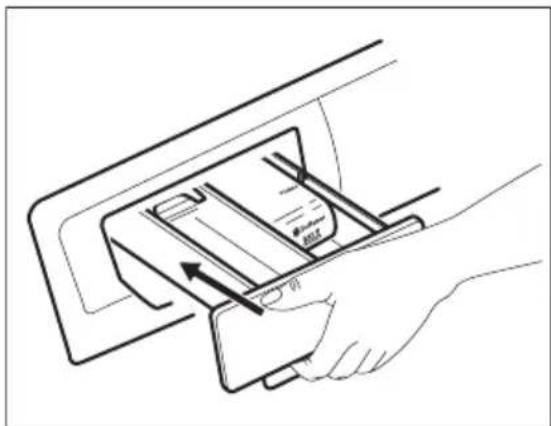
natural_image
Line drawing of a hand inserting a card into a device (no text or symbols)natural_image
Illustration of a hand pouring liquid into a container with a rotating arrow (no text or symbols)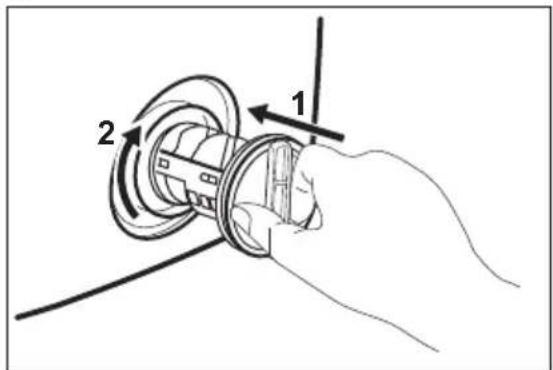
text_image
Diagram showing a hand holding a mechanical component with labeled parts 1 and 2, indicating rotation or assembly.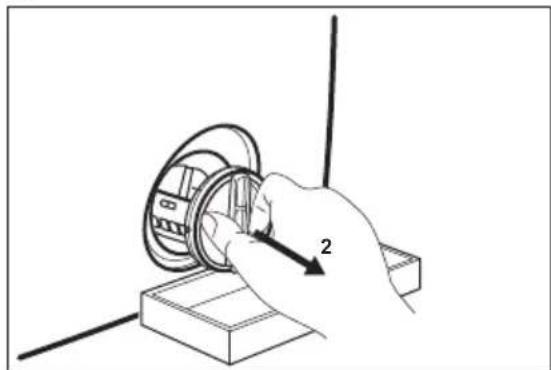
natural_image
Hand inserting a component into a circular housing, no text or symbols visible5.6.
text_image
Diagram illustrating a mechanical or electrical process with labeled components and directional arrows, including a magnified circular view showing tool interaction.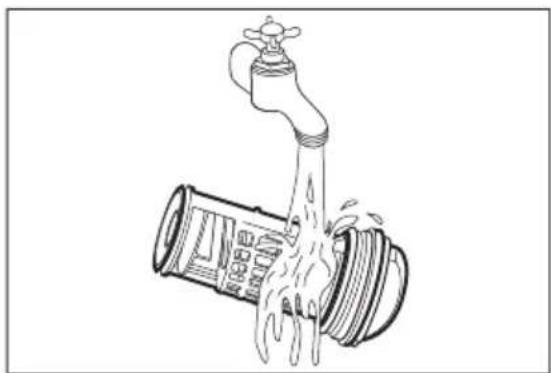
natural_image
Line drawing of a faucet with water spilling out (no text or symbols)7.8.
natural_image
Diagram of a mechanical device with hands holding a component, showing internal components and motion arrows (no text or symbols)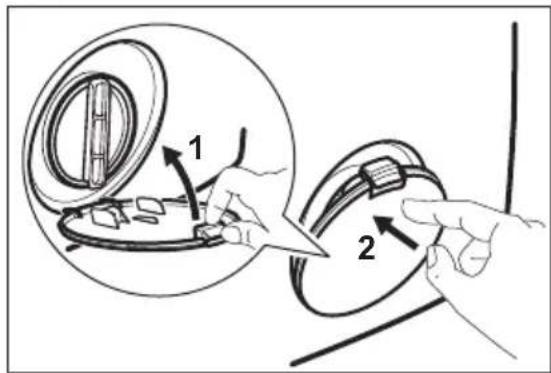
text_image
Diagram illustrating a mechanical assembly or cleaning process with labeled parts and directional arrows indicating steps 1 and 2.
natural_image
Illustration of a hand using a tool to adjust a mechanical component, showing rotational arrows and a magnified view (no text or symbols)3.4.
natural_image
Line drawing of a washing machine with a magnified inset showing a hand using a tool to filter or clean the interior (no text or symbols present)