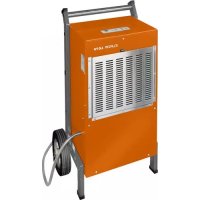
LO70 - Dehumidifier Eurom - Free user manual and instructions
Find the device manual for free LO70 Eurom in PDF.


| Product type | Dehumidifier |
| Brand | Eurom |
| Model | LO70 |
| Dehumidification capacity | 70 L/day (at 30°C, 80% RH) |
| Supply voltage | 220-240 V ~ 50 Hz |
| Power consumption | 1360 W |
| Rated current | 6,35 A |
| Dimensions (L x D x H) | 54 x 37 x 92 cm |
| Net weight | 44 kg |
| Operating temperature range | 5°C to 32°C |
| Adjustable humidity range | 30% to 90% RH |
| Display | Digital humidity |
| Water drainage | Continuous via included flexible hose |
| Air filter | Washable and reusable |
| Auto defrost | Yes |
| Memory function | Yes (saves settings during power outage) |
| Operating hours counter | Built-in (displayed in 10-minute increments) |
| Stackable | No |
| Filter cleaning | Monthly (more often in dusty environment) |
| Included accessories | Drain hose, user manual |
Frequently Asked Questions - LO70 Eurom
User questions about LO70 Eurom
0 question about this device. Answer the ones you know or ask your own.
Ask a new question about this device
Download the instructions for your Dehumidifier in PDF format for free! Find your manual LO70 - Eurom and take your electronic device back in hand. On this page are published all the documents necessary for the use of your device. LO70 by Eurom.
USER MANUAL LO70 Eurom
OPBOUW VAN HET APPARAAT
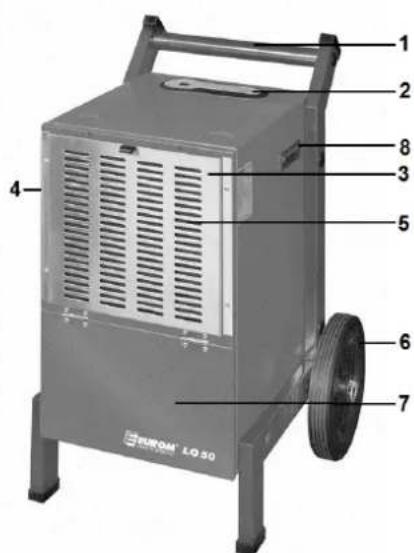
LO50
Thank you very much for you choice for a EUROM dehumidifier. You made a good choice! We hope that it will work to your full satisfaction.
To get the best out of your dehumidifier it is important to read this instruction book carefully and completely before use and to understand it. Pay particular attention to the safety instructions: they are listed to protect you and your environment!
Keep the instruction booklet for future reference.
IMPORTANT SAFETY INSTRUCTIONS
- Please make sure the power supply is 220 240V / 50Hz before operation.
- Please do not plug or unplug to startup or shut off the unit, but use the On/Off-button.
- Please do not cut off the power by pulling the wire, but take the plug in your hand..
- Please be careful when moving the unit, do not mangle the wire.
- Please do not put finger, stick or other object into the grid.
- Please prohibit child to climb, stand or sit on the unit, or to touch it.
- Please unplug the unit before cleaning or maintenance.
- Please do not use unit in strait, too small space.
- If possible, do not use an extension cord, as this poses the risk of overheating and fire. If the use of an extension cord is unavoidable, then make sure it is an undamaged, approved extension cord with a minimum diameter of 3 × 2.5 ~mm^2 and a minimum permissible power of 2000 Watt/10Amp. To prevent overheating, always fully extend the cord!
- Do not use any relay, timer, dimmer or adapter. Otherwise, it might result in fire, radiation, orelectric shock.
- Do not use the unit in sunshine, wind or rain; it is only to use indoors).
- Do not use in places where chemicals or similar can be stored. Volatile substances can damage the unit and cause leakage.
- Keep clean the plug and plug it into the socket properly. If the plug is not properly plugged in, the result may be a shock or fire. Never touch device or plug with wet hands!
- To prolong the life of the filter, pack it in a plastic bag when the device is not used for a longer time.
- Do not place the equipment nearby a stove or heater; otherwise the weak parts may melt down and fire mau be the result.
- When problems arise (p.e. a strange smell) switch the unit off immediately and unplug it from the wall outlet. Otherwise, a fire, an electric shock or malfunction may result.
- Do not damage the electric cable and replace it never yourself. Do not place heavy objects on the cable and don't lead it around sharp corners. Keep it away from heat sources. Don't use a damaged electrical cable any more!
- When the unit is used continuously, arrange a suitable drain. At a temperature around or below freezing the device does not allow continuous work.
- Make sure that the machine is always in a stable and perfectly horizontal position. Otherwise, water may enter into the unit and get through to essential elements, with fire, shock, etc. to possible result.
- Do not use the unit near water or in spaces such as bathrooms and laundryrooms. If the device is too damp, fire or electric shock mau occur.
-
When you don't use the unit for an extended period of time, disconnect the plug from the socket.
-
Repairs to the appliance, cord and plug must only be carried out by qualified technicians.
THE DEHUMIDIFIER
EUROM dehumidifiers are designed to reduce the air humidity in a room and, as a result, raise levels of comfort and improve the conditions for the storage of goods.
The dehumidifier combines a compact and practical design with top quality and simple controls. This makes it ideal for use in industrial, scientific and medical environments such as (underground) storage spaces, rooms that house technological equipment, archives and so on for the purposes of protecting computers, medicines, books etc. against moisture, erosion and mildew.
DESIGN OF THE DEVICE
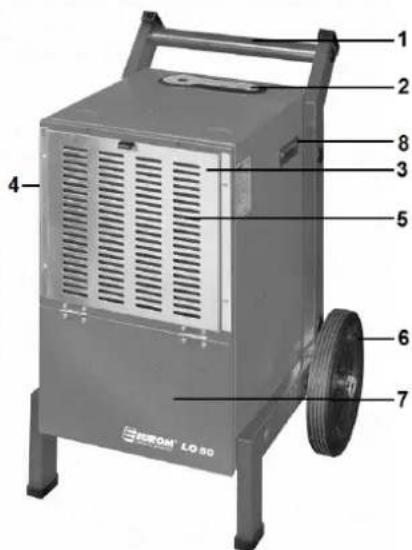
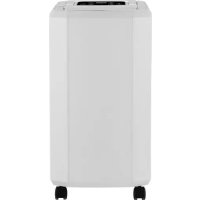
LO50
- Push bar
- Control panel
- Filter grille
- Air outlet (side)
- Air inlet
6.Wheel - Access to water reservoir
- Handle
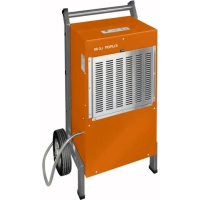
LO70, LO70P en LO120:
- Push bar
- Control panel
- Filter grille
- Air outlet (side)
- Air inlet
- Water outlet
7.Wheel
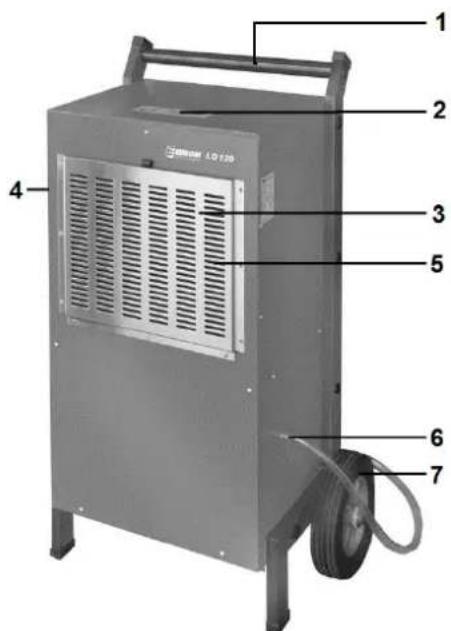
The device is equipped with a water drainage pipe to which a 12 (LO50) / 34 (LO70&LO120) hose is attached (via a hose-clamp). Place the end of the hose in a well, drain or other waste water outlet. Ensure that the hose runs downwards along its length and is not bent or buckled.
The LO70P is fitted with an in-built drainage pump. When the collected water has reached pump level, the pump comes on automatically and pumps the water away, up to max. 4.7m high.
CONTROL PANEL
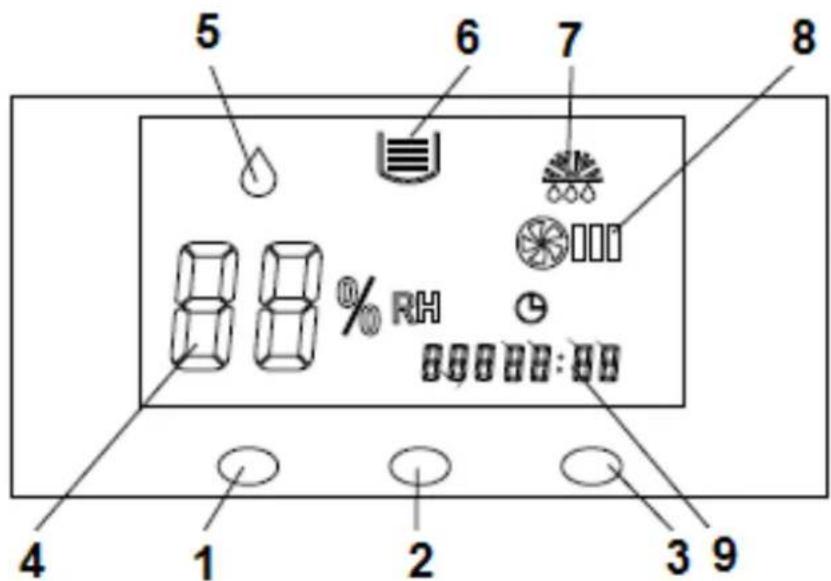
- ON/OFF button
- 'Humidity up' button
- 'Humidity down' button
- Humidity display
- 'ON' light
- LO50: Watertank full
LO70P: Defective pump
LO70 & LO120: --
- Defrosting light
- Fan
- Hour meter
You switch the device on and off with the ON/OFF button.
Every time you press the buttons 'humidity up or 'humidity down, you set the desired air humidity level 1 % higher or lower. If you depress the button for longer than 1.5 seconds, the set humidity will increase/decrease at a rate of 5 points per second.
The devices have a 'ventilator' signal light that comes on when the internal ventilator is working. This always works while the device is operating, unless it is defrosting. The LO70P also has a 'defective pump' signal light. The device will stop operating. Consult your service point if this light comes on.
All devices also have an hour counter that counts the total number of hours your device has been operating (in units of 10 minutes).
STARTING AND OPERATING
Check that the socket, to which you are connecting the dehumidifier, provides the voltage as indicated on the specification plate: 220/240V-50Hz.
L070 and LO120: Check that the drainage hose is correctly connected and is able to drain properly into the appropriate waste outlet. The drainage hose on the LO70P may also be positioned on an upwards incline (max. 4.7m).
Insert the plug into the socket; the device will beep.
Press the ON/OFF button. The ON light will come on and the display will show the factory setting for humidity: 60% .
After three seconds, the display will show the actual air humidity; this will remain on the display while the device is on.
Press on the 'humidity up or 'humidity down button in order to set the desired level. If the set humidity is over 3% lower than the actual humidity level, the device will start to work and continue until the actual level is 3% lower than the set level. The device will then switch off.
If the air humidity is set to less than 30% , the device will continuously dehumidify. The display will show "CO".
Press the ON/OFF button again in order to switch the device off. The device will come to a halt and all of the lights will go out.
Note:
- If the set humidity is higher than the actual humidity, the device will not come on.
- If you are dehumidifying, the fan motor and the compressor will run for at least three minutes before the compressor starts. The compressor may not be restarted within three minutes of switching the device off. It is, therefore, possible that the motor will not immediately respond to being turned off or on!
- When the temperature is low, keep an eye on whether the device needs to defrost. When defrosting, the relevant light will come on and the fan will run but the compressor will automatically switch off.
- The devices have an automatic memory that automatically stores the settings and also saves if the power supply fails or is interrupted. Once the power supply has been restored, the device will start to work according to the previously entered settings.
The display will show a humidity level of 30% to 90% . - Remove the plug from the socket if you do not plan to use the device for an extended period.
- Only LO50: If the water reservoir is full, the light will come on and the compressor and fan will automatically shut down. You will also hear a beep. If you do not drain the reservoir, the beep will be repeated every 5 minutes. Only once the reservoir has been emptied can the device be used again.
- Only LO50: You can install a continuous drain by removing the reservoir, taking the rubber bung out of the base of the reservoir and connecting a hose to this outlet. Then replace the reservoir and run the hose from the device (downwards) to a suitable drainage point.
USE
- In order to avoid damaging the compressor, never place the dehumidifier on a slope of over 45^ .
The device works between 5^ and 32^ . - When being used, the compressor will emit heat which can increase the ambient temperature by between 1 and 3^ . This is perfectly normal.
- If the indoor temperature is lower than 10^ and air humidity is pretty low, you will not need to use the device.
- Ensure that there is at least 10cm of free space between the air inlet and the outlet opening and any solid objects, e.g. a wall.
- Try to ensure that the room is as well sealed as possible in order to improve the dehumidification result.
CLEANING
Too much dust on the filter will impact upon the device's ability to dehumidify. Clean the filter regularly (at least once a month); if the device is placed in a dusty environment, you should clean it weekly or even daily. To do so, open the front panel and take the filter out.
Remove the loose dust by carefully knocking the filter. Then vacuum the filter gently or wash it in lukewarm water with a little, mild soap. Leave to dry thoroughly before repositioning in the device (follow the above instructions in reverse order). Never use the dehumidifier without a filter! If also the element (2) is dirty, you can clean it carefully with a brush, see fig. The dehumidifier's housing and the water reservoir of the LO50 can be
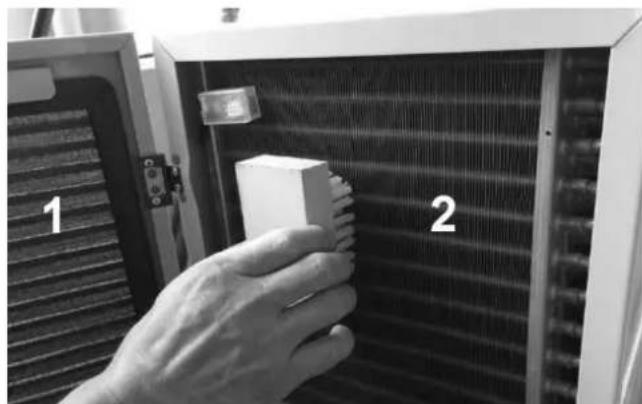
cleaned with a damp cloth and a mild cleaning agent. Never use corrosive or abrasive products as these could damage the finish.
Always remove the plug from the socket before carrying out any cleaning work!
TECHNICAL SPECIFICATIONS
| Model | LO50 | LO70 | LO70P | LO120 |
| Article number | 37.241.0 | 37.238.0 | 37.239.7 | 37.244.1 |
| Connected power | 220-240 V / 50 Hz | |||
| Dehumidification l/day | 50 | 70 | 70 | 120 |
| Output capacity W | 900 | 1360 | 1360 | 1650 |
| Power usage Amp. | 4,2 | 6,35 | 6,35 | 7,7 |
| Stackable | + (max. 2) | - | - | - |
| Dimensions cm | 41x43x59 | 54x37x92 | 54x37x92 | 66x43x109 |
| Weight kg | 35 | 44 | 44,5 | 57 |
ERROR MESSAGES
The following error messages could appear on the display:
E1: Problem in the humidity sensor
E2: Problem with the sensor for defrosting pipes
PROBLEMS AND SOLUTIONS
The device does not work
Device is switched off - switch it on
Power failure - wait until power is restored
- Plug not (correctly) inserted into socket - resolve
- Melted fuse - replace the fuse
- LO50: water reservoir full - drain it
The device is not dehumidifying very effectively
- Filter blocked by dirt - clean filter
- Obstacle in air inlet or outlet - remove blockage
- Door or window open - close the door or window and shade the sun
Coolant leakage - contact a service department
Water leak
Device tips over - place on a stable and horizontal surface
- Drain is blocked - remove blockage
Peculiar sounds
Device is not stable - place it on a stable and horizontal surface
- Filter is blocked - clean filter
- When you switch the device on or off, the circulation of the coolant can make a certain amount of noise; this is perfectly normal.
- The air that is emitted from the air outlet may well be warm; this is perfectly normal.
- If you cannot resolve the issue with the above instructions, please contact your supplier or a recognised repair company. Never open the device yourself!
CE - DECLARATION
Euromac bv., Genemuiden-NL hereby declares that the EUROM dehumidifiers LO50 - LO70(P) - LO120 meet the LVD guideline 2006/95/EC and the EMC guideline 2004/108/EC and comply with the following norms:
EN 55014-1:2006 +A1:2009+A2:2011
EN 55014-2:1997)+A1:2001+A2:2008(LO70, LO70P&LO120) EN 55014-2:1997/AC :1997 (LO50)
EN 61000-3-2:2006+A1:2009+A2:2009
EN 61000-3-3:2008 (LO70, LO70P&LO120) EN 61000-3-3:1995/A2 :2005 (LO50)
EN 60335-2-40:2003+A11:2004+A12:2005+A1:2006 (LO70, LO70P&LO120)
EN 60335-2-40:2003/A13:2012 (LO50)
EN 60335-1:2012
EN 62233:2008
Genemuiden, 28-10-2014,
W.J. Bakker, alg.dir.
FR
REMERCIEMENTS
- OPBOUW VAN HET APPARAAT
- LO50
- IMPORTANT SAFETY INSTRUCTIONS
- THE DEHUMIDIFIER
- DESIGN OF THE DEVICE
- LO70, LO70P en LO120:
- CONTROL PANEL
- STARTING AND OPERATING
- Note:
- USE
- CLEANING
- TECHNICAL SPECIFICATIONS
- ERROR MESSAGES
- PROBLEMS AND SOLUTIONS
- The device does not work
- The device is not dehumidifying very effectively
- Water leak
- Peculiar sounds
- CE - DECLARATION
- FR
- REMERCIEMENTS
Brand : Eurom
Model : LO70
Category : Dehumidifier